cisco-ai-defense/mcp-scanner
GitHub: cisco-ai-defense/mcp-scanner
一款专为 MCP 协议设计的安全扫描工具,通过多引擎联合检测识别恶意工具、提示词注入等 AI 应用安全威胁。
Stars: 962 | Forks: 116
# MCP 扫描器
[](https://opensource.org/licenses/Apache-2.0)
[](https://www.python.org/downloads/)
[](https://pypi.org/project/cisco-ai-mcp-scanner/)
[](https://discord.com/invite/nKWtDcXxtx)
[](https://www.cisco.com/site/us/en/products/security/ai-defense/index.html)
[](https://learn-cloudsecurity.cisco.com/ai-security-framework)
一个用于扫描 MCP (Model Context Protocol) 服务器和工具以发现潜在安全问题的 Python 工具。MCP Scanner 结合了 Cisco AI Defense inspect API、YARA 规则和 LLM-as-a-judge 来检测恶意的 MCP 工具。
## 概述
MCP Scanner 为扫描 MCP 服务器和工具的安全问题提供了一个全面的解决方案。它利用三个强大的扫描引擎(Yara, LLM-as-judge, Cisco AI Defense),既可以联合使用,也可以独立运行。
该 SDK 旨在易于使用,同时提供强大的扫描功能、灵活的身份验证选项和自定义能力。
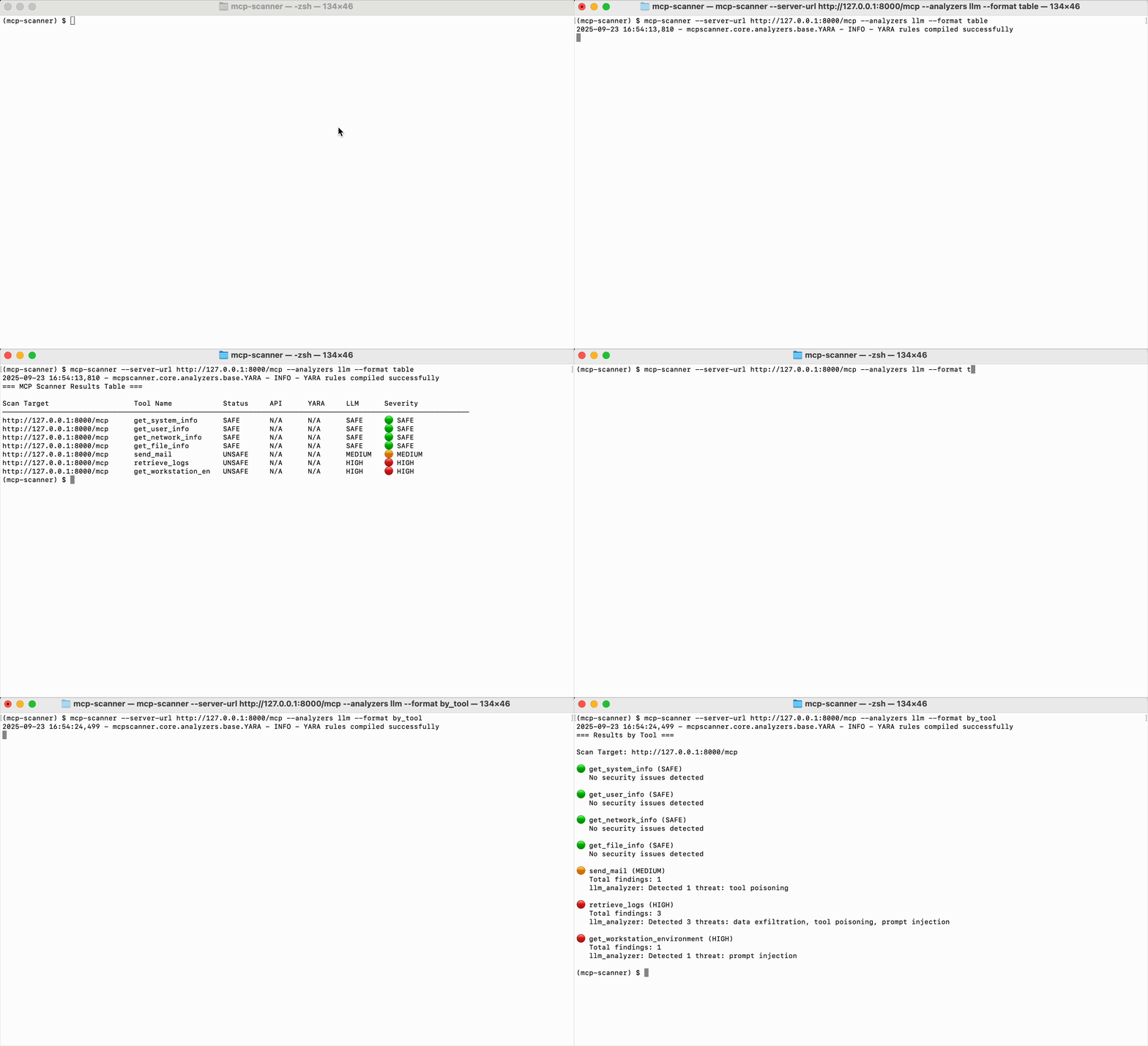
## 功能
- **多种模式:** 作为独立的 CLI 工具或 REST API 服务器运行扫描器
- **多引擎安全分析**:根据需要,可同时使用三个扫描引擎或独立使用。
- **就绪性扫描**:用于生产就绪性问题(超时、重试、错误处理)的零依赖静态分析。
- **全面扫描**:扫描 MCP 工具、提示词、资源和服务器指令以发现安全问题
- **行为代码扫描**:扫描 MCP 服务器的源代码以发现威胁。
- **静态/离线扫描**:无需实时服务器连接即可扫描预生成的 JSON 文件 - 非常适合 CI/CD 流程和物理隔离环境
- **显式身份验证控制**:通过显式的 Auth 参数对身份验证进行细粒度控制。
- **OAuth 支持**:全面支持 SSE 和 streamable HTTP 连接的 OAuth 身份验证。
- **自定义端点**:配置 API 端点以支持任何 Cisco AI Defense 环境。
- **MCP Server 集成**:直接连接到 MCP 服务器,通过灵活的身份验证扫描工具、提示词和资源。
- **可自定义 YARA 规则**:添加您自己的 YARA 规则以检测特定模式。
- **全面报告**:提供有关检测到的安全问题的详细报告。
## 安装
### 前置条件
- Python 3.11+
- uv (Python 包管理器)
- 有效的 Cisco AI Defense API Key(可选)
- LLM Provider API Key(可选)
### 作为 CLI 工具安装
```
uv tool install --python 3.13 cisco-ai-mcp-scanner
```
或者,您可以从源码安装:
```
uv tool install --python 3.13 --from git+https://github.com/cisco-ai-defense/mcp-scanner cisco-ai-mcp-scanner
```
### 安装用于本地开发
```
git clone https://github.com/cisco-ai-defense/mcp-scanner
cd mcp-scanner
uv sync --python 3.13
```
### 作为依赖项安装到其他项目中
使用 uv 将 MCP Scanner 添加为依赖项。从您的项目根目录开始(如果需要,请使用 uv 初始化):
```
uv init --python 3.13 #if not already done
uv add cisco-ai-mcp-scanner
# 然后激活虚拟环境:
## macOS 和 Linux: source .venv/bin/activate
## Windows CMD: .vemv\Scripts\activate
## Windows PWSH: .venv\Scripts\Activate.ps1
uv sync
```
模块名为 `mcpscanner`。通过以下方式导入此模块:
```
# import everything (不推荐)
import mcpscanner
# selective imports (推荐)。例如:
from mcpscanner import Config, Scanner
from mcpscanner.core.models import AnalyzerEnum
```
## 快速开始
### 环境设置
#### 核心 API 配置
```
Cisco AI Defense API (only required for API analyzer)
export MCP_SCANNER_API_KEY="your_cisco_api_key"
export MCP_SCANNER_ENDPOINT="https://us.api.inspect.aidefense.security.cisco.com/api/v1"
# 对于其他 endpoints,请访问 https://developer.cisco.com/docs/ai-defense/getting-started/#base-url
```
#### LLM 配置(用于 LLM 分析器和代码行为分析器)
**已测试的 LLM:** OpenAI GPT-4o 和 GPT-4.1 | AWS Bedrock Claude 4.5 Sonnet
```
# 带 AWS credentials (profile) 的 AWS Bedrock Claude
export AWS_PROFILE="your-profile"
export AWS_REGION="us-east-1"
export MCP_SCANNER_LLM_MODEL="bedrock/anthropic.claude-sonnet-4-5-20250929-v2:0" # Any AWS Bedrock supported model
# 带 API key (Bearer token) 的 AWS Bedrock Claude
export MCP_SCANNER_LLM_API_KEY="bedrock-api-key-..." # Generated via Amazon Bedrock -> API Keys
export AWS_REGION="us-east-1"
export MCP_SCANNER_LLM_MODEL="bedrock/us.anthropic.claude-sonnet-4-5-20250929-v2:0" # Any AWS Bedrock supported model
# LLM Provider API Key (LLM analyzer 必需)
export MCP_SCANNER_LLM_API_KEY="your_llm_api_key" # OpenAI
# LLM Model Configuration (可选 - 已提供默认值)
export MCP_SCANNER_LLM_MODEL="gpt-5.2" # Any LiteLLM-supported model
export MCP_SCANNER_LLM_BASE_URL="https://api.openai.com/v1" # Custom LLM endpoint
export MCP_SCANNER_LLM_API_VERSION="2025-04-01-preview" # API version (if required)
# 对于 Azure OpenAI (示例)
export MCP_SCANNER_LLM_BASE_URL="https://your-resource.openai.azure.com/"
export MCP_SCANNER_LLM_API_VERSION="2025-04-01-preview"
export MCP_SCANNER_LLM_MODEL="azure/gpt-5.2"
# 对于 Extended Thinking Models (更长超时)
export MCP_SCANNER_LLM_TIMEOUT=300
```
注意:如果您使用的是来自 Azure Foundry 的模型,请设置 MCP_SCANNER_LLM_BASE_URL 和 MCP_SCANNER_LLM_MODEL 环境变量,因为 Microsoft 已弃用对 MCP_SCANNER_LLM_API_VERSION 的需求。
#### 使用本地 LLM(无需 API Key)
如果您使用的是本地 LLM 端点,例如 Ollama、vLLM 或 LocalAI,
`MCP_SCANNER_LLM_API_KEY` 变量仍然是必需的,但可以设置为任意值。
示例:
```
export MCP_SCANNER_LLM_API_KEY=test
export MCP_SCANNER_LLM_ENDPOINT=http://localhost:11434
```
### 快速开始示例
开始使用的最快方法是使用 `mcp-scanner` CLI 命令。全局标志(如 `--analyzers`、`--format` 等)必须放在子命令之前。
#### CLI 用法
```
# 扫描此机器上 well-known client configs
mcp-scanner --scan-known-configs --analyzers yara --format summary
# Stdio server (使用 uvx mcp-server-fetch 示例)
mcp-scanner --stdio-command uvx --stdio-arg=--from --stdio-arg=mcp-server-fetch --stdio-arg=mcp-server-fetch --analyzers yara --format summary
# Remote server (deepwiki 示例)
mcp-scanner --server-url https://mcp.deepwki.com/mcp --analyzers yara --format summary
# 作为 REST API 的 MCP Scanner
mcp-scanner-api --host 0.0.0.0 --port 8080
```
#### SDK 用法
```
import asyncio
from mcpscanner import Config, Scanner
from mcpscanner.core.models import AnalyzerEnum
async def main():
# Create configuration with your API keys
config = Config(
api_key="your_cisco_api_key",
llm_provider_api_key="your_llm_api_key"
)
# Create scanner
scanner = Scanner(config)
# Scan all tools on a remote server
tool_results = await scanner.scan_remote_server_tools(
"https://mcp.deepwki.com/mcp",
analyzers=[AnalyzerEnum.API, AnalyzerEnum.YARA, AnalyzerEnum.LLM]
)
# Print tool results
for result in tool_results:
print(f"Tool: {result.tool_name}, Safe: {result.is_safe}")
# Scan all prompts on a server
prompt_results = await scanner.scan_remote_server_prompts(
"http://127.0.0.1:8000/mcp",
analyzers=[AnalyzerEnum.LLM]
)
# Print prompt results
for result in prompt_results:
print(f"Prompt: {result.prompt_name}, Safe: {result.is_safe}")
# Scan all resources on a server
resource_results = await scanner.scan_remote_server_resources(
"http://127.0.0.1:8000/mcp",
analyzers=[AnalyzerEnum.LLM],
allowed_mime_types=["text/plain", "text/html"]
)
# Print resource results
for result in resource_results:
print(f"Resource: {result.resource_name}, Safe: {result.is_safe}, Status: {result.status}")
# 运行 scanner
asyncio.run(main())
```
#### 子命令概述
- **remote**:扫描远程 MCP 服务器(SSE 或 streamable HTTP)。支持 `--server-url`,可选 `--bearer-token`、`--header`。
- **stdio**:启动并扫描 stdio MCP 服务器。需要 `--stdio-command`;接受 `--stdio-args`、`--stdio-env`,可选 `--stdio-tool`。
- **config**:扫描特定 MCP 配置文件中的服务器。需要 `--config-path`;可选 `--bearer-token`。
- **known-configs**:扫描此机器上已知客户端配置位置中的服务器;可选 `--bearer-token`。
- **prompts**:扫描 MCP 服务器上的提示词。需要 `--server-url`;可选 `--prompt-name`、`--bearer-token`、`--header`。
- **resources**:扫描 MCP 服务器上的资源。需要 `--server-url`;可选 `--resource-uri`、`--mime-types`、`--bearer-token`、`--header`。
- **instructions**:扫描 InitializeResult 中的服务器指令。需要 `--server-url`;可选 `--bearer-token`。
- **supplychain**:扫描 MCP 服务器源代码以进行行为分析。需要“MCP Server 源代码路径或 MCP Server 源文件”。
- **static**:离线扫描预生成的 MCP JSON 文件(CI/CD 模式)。支持 `--tools`、`--prompts`、`--resources`,可选 `--mime-types`。
注意:当未使用子命令时,顶级标志(例如 `--server-url`、`--stdio-*`、`--config-path`、`--scan-known-configs`)仍受支持,但建议使用子命令。
#### 更多示例
#### 扫描已知的 MCP 配置路径(Windsurf, Cursor, Claude, VS Code)
```
# 对定义在 well-known config locations 的所有 servers 进行仅 YARA 扫描
mcp-scanner --scan-known-configs --analyzers yara --format summary
# 详细输出
mcp-scanner --scan-known-configs --analyzers yara --detailed
```
#### 扫描特定的 MCP 配置文件
```
# 如果您的 shell 需要,请自行展开 ~
mcp-scanner --config-path "$HOME/.codeium/windsurf/mcp_config.json" \
--analyzers yara --format by_tool
```
#### 扫描 stdio MCP 服务器
```
# 使用重复的 --stdio-arg 以确保可靠参数传递
mcp-scanner --analyzers yara --format summary \
stdio --stdio-command uvx \
--stdio-arg=--from --stdio-arg=mcp-server-fetch --stdio-arg=mcp-server-fetch
# 或者 list-form (确保它不与后续 flags 冲突)
mcp-scanner --analyzers yara --detailed \
stdio --stdio-command uvx \
--stdio-args --from mcp-server-fetch mcp-server-fetch
# 仅扫描 stdio server 上的特定 tool
mcp-scanner --analyzers yara --format summary \
stdio --stdio-command uvx \
--stdio-arg=--from --stdio-arg=mcp-server-fetch --stdio-arg=mcp-server-fetch \
--stdio-tool fetch
```
#### 对远程服务器使用 Bearer token(非 OAuth)
```
# 带 Bearer token 的直接 remote server
mcp-scanner --analyzers yara --format summary \
remote --server-url https://your-mcp-server/sse --bearer-token "$TOKEN"
# 将从 configs 中发现的所有 remote servers 应用于 Bearer token
mcp-scanner --analyzers yara --detailed known-configs --bearer-token "$TOKEN"
mcp-scanner --analyzers yara --format by_tool \
config --config-path "$HOME/.codeium/windsurf/mcp_config.json" --bearer-token "$TOKEN"
```
#### 使用自定义 HTTP headers(例如 MCP Gateway dual-token auth)
```
# 单个自定义 header
mcp-scanner --analyzers yara remote --server-url https://your-mcp-server/mcp \
--header "X-API-Key: your-api-key"
# 多个自定义 headers (MCP Gateway dual-token authentication)
mcp-scanner --analyzers yara remote --server-url https://gateway.example.com/mcp \
--header "Authorization: Bearer ingress-token" \
--header "X-Egress-Auth: Bearer egress-token"
```
#### 扫描提示词
```
# 扫描 MCP server 上的所有 prompts
mcp-scanner --analyzers llm prompts --server-url http://127.0.0.1:8000/mcp
# 扫描所有 prompts (带详细输出)
mcp-scanner --analyzers llm --detailed prompts --server-url http://127.0.0.1:8000/mcp
# 扫描所有 prompts (table 格式)
mcp-scanner --analyzers llm --format table prompts --server-url http://127.0.0.1:8000/mcp
# 按名称扫描特定 prompt
mcp-scanner --analyzers llm prompts --server-url http://127.0.0.1:8000/mcp --prompt-name "greet_user"
# 获取原始 JSON 输出
mcp-scanner --analyzers llm --raw prompts --server-url http://127.0.0.1:8000/mcp
```
#### 扫描资源
```
# 扫描 MCP server 上的所有 resources
mcp-scanner --analyzers llm resources --server-url http://127.0.0.1:8000/mcp
# 扫描所有 resources (带详细输出)
mcp-scanner --analyzers llm --detailed resources --server-url http://127.0.0.1:8000/mcp
# 扫描所有 resources (table 格式)
mcp-scanner --analyzers llm --format table resources --server-url http://127.0.0.1:8000/mcp
# 按 URI 扫描特定 resource
mcp-scanner --analyzers llm resources --server-url http://127.0.0.1:8000/mcp \
--resource-uri "file://test/document.txt"
# 带自定义 MIME type 过滤的扫描
mcp-scanner --analyzers llm resources --server-url http://127.0.0.1:8000/mcp \
--mime-types "text/plain,text/html,application/json"
```
#### 扫描服务器指令
服务器指令在 MCP `InitializeResult` 中提供使用指南、安全说明和配置详细信息。扫描指令有助于检测提示词注入、工具投毒和误导性指引。
```
# 扫描 server instructions (默认为 API, YARA, 和 LLM analyzers)
mcp-scanner instructions --server-url http://127.0.0.1:8000/mcp
# 带详细输出的扫描
mcp-scanner --detailed instructions --server-url http://127.0.0.1:8000/mcp
# 带特定 analyzers 的扫描 (推荐 LLM 用于语义分析)
mcp-scanner --analyzers llm instructions --server-url http://127.0.0.1:8000/mcp
# 获取原始 JSON 输出
mcp-scanner --raw instructions --server-url http://127.0.0.1:8000/mcp
# 带身份验证
mcp-scanner instructions --server-url https://your-server.com/mcp --bearer-token "$TOKEN"
```
#### 行为代码扫描
行为分析器对 MCP 服务器源代码执行高级静态分析,以检测文档字符串声明与实际实现之间的行为不匹配。它结合了 LLM 驱动的一致性检查和跨文件数据流跟踪。
```
# 扫描单个 Python 文件
mcp-scanner behavioral /path/to/mcp_server.py
# 扫描目录
mcp-scanner behavioral /path/to/mcp_servers/
# 带特定输出格式
mcp-scanner behavioral /path/to/mcp_server.py --format by_severity
# 带所有 findings 的详细分析
mcp-scanner behavioral /path/to/mcp_server.py --format detailed
# 保存结果到文件
mcp-scanner behavioral /path/to/mcp_server.py --output results.json --format raw
```
有关完整的技术细节,请参阅 [行为扫描文档](https://github.com/cisco-ai-defense/mcp-scanner/tree/main/docs/behavioral-scanning.md)。
#### 扫描静态/离线文件(CI/CD 模式)
`static` 子命令允许您扫描预生成的 JSON 文件,而无需连接到实时的 MCP 服务器。这非常适合 CI/CD 流程、物理隔离环境或可重现的安全检查。
```
# 扫描来自静态 JSON 文件的 tools
mcp-scanner --analyzers yara static --tools /path/to/tools-list.json
# 带多个 analyzers 的扫描
mcp-scanner --analyzers yara,llm static --tools /path/to/tools-list.json
# 扫描来自静态 JSON 文件的 prompts
mcp-scanner --analyzers llm static --prompts /path/to/prompts-list.json
# 扫描来自静态 JSON 文件的 resources
mcp-scanner --analyzers llm static --resources /path/to/resources-list.json
# 一次扫描所有三种类型 (带详细输出)
mcp-scanner \
--analyzers yara,llm,api \
--format detailed \
static \
--tools /path/to/tools-list.json \
--prompts /path/to/prompts-list.json \
--resources /path/to/resources-list.json
# CI/CD 示例:仅 YARA 扫描 (无需 API keys)
mcp-scanner --analyzers yara --format summary static --tools output/tools.json
```
**预期的 JSON 格式:**
```
{
"tools": [
{
"name": "tool_name",
"description": "Tool description",
"inputSchema": { "type": "object", "properties": {} }
}
]
}
```
有关更多详细信息,请参阅 [静态扫描文档](docs/static-scanning.md) 和 [examples/static_scanning_example.py](examples/static_scanning_example.py)。
#### 就绪性扫描
就绪性分析器使用 20 条启发式规则检查 MCP 工具的生产就绪性问题。它不需要 API 密钥,并专注于运营可靠性:超时、重试、错误处理等。
```
# 仅 Readiness 扫描 (无需 API keys)
mcp-scanner --analyzers readiness --server-url http://localhost:8000/mcp
# 组合安全 + Readiness 扫描
mcp-scanner --analyzers yara,readiness --server-url http://localhost:8000/mcp
# 详细 Readiness 输出
mcp-scanner --analyzers readiness --detailed --server-url http://localhost:8000/mcp
```
有关完整的技术细节,请参阅 [就绪性扫描文档](https://github.com/cisco-ai-defense/mcp-scanner/tree/main/docs/readiness-scanning.md)。
### API 服务器用法
API 服务器为 MCP 扫描器功能提供了一个 REST 接口,允许您将安全扫描集成到 Web 应用程序、CI/CD 流程或其他服务中。它通过 HTTP 端点公开了与 CLI 工具相同的扫描功能。
```
# 启动 API server (从 .env 文件加载配置)
mcp-scanner-api --port 8000
# 或者带自定义 host 和 port
mcp-scanner-api --host 0.0.0.0 --port 8080
# 启用带 auto-reload 的开发模式
mcp-scanner-api --reload
```
运行后,API 服务器提供以下端点:
- **`/scan-tool`** - 扫描 MCP 服务器上的特定工具
- **`/scan-all-tools`** - 扫描 MCP 服务器上的所有工具
- **`/scan-prompt`** - 扫描 MCP 服务器上的特定提示词
- **`/scan-all-prompts`** - 扫描 MCP 服务器上的所有提示词
- **`/scan-resource`** - 扫描 MCP 服务器上的特定资源
- **`/scan-all-resources`** - 扫描 MCP 服务器上的所有资源
- **`/scan-instructions`** - 扫描 InitializeResult 中的服务器指令
- **`/health`** - 健康检查端点
文档可在 [docs/api-reference.md](https://github.com/cisco-ai-defense/mcp-scanner/tree/main/docs/api-reference.md) 中找到,或者在服务器运行时通过 `http://localhost:8000/docs` 查看交互式文档。
## 输出格式
扫描器支持多种输出格式:
- **`summary`**:包含关键发现的简要概述
- **`detailed`**:包含完整结果分类的综合分析
- **`table`**:整洁的表格格式
- **`by_severity`**:按严重程度分组的结果
- **`raw`**:原始 JSON 输出
### 输出示例
#### 详细格式
```
mcp-scanner --server-url http://127.0.0.1:8001/sse --format detailed
```
```
=== MCP Scanner Detailed Results ===
Scan Target: http://127.0.0.1:8001/sse
Tool: execute_system_command
Status: completed
Safe: No
Analyzer Results:
• api_analyzer:
- Severity: HIGH
- Threat Summary: Detected 1 threat: security violation
- Threat Names: SECURITY VIOLATION
- Total Findings: 1
• yara_analyzer:
- Severity: HIGH
- Threat Summary: Detected 2 threats: system access, command injection
- Threat Names: SECURITY VIOLATION, SUSPICIOUS CODE EXECUTION
- Total Findings: 2
• llm_analyzer:
- Severity: HIGH
- Threat Summary: Detected 2 threats: prompt injection, tool poisoning
- Threat Names: PROMPT INJECTION, SUSPICIOUS CODE EXECUTION
- Total Findings: 2
```
#### 表格格式
```
mcp-scanner --server-url http://127.0.0.1:8002/sse --format table
```
```
=== MCP Scanner Results Table ===
Scan Target: http://127.0.0.1:8002/sse
Scan Target Tool Name Status API YARA LLM Severity
-----------------------------------------------------------------------------------------
http://127.0.0.1:8002/sse exec_secrets UNSAFE HIGH HIGH HIGH HIGH
http://127.0.0.1:8002/sse safe_command SAFE SAFE SAFE SAFE SAFE
```
## 文档
有关详细的文档,请参阅 [docs/](https://github.com/cisco-ai-defense/mcp-scanner/tree/main/docs) 目录:
- **[架构](https://github.com/cisco-ai-defense/mcp-scanner/tree/main/docs/architecture.md)** - 系统架构和组件
- **[行为扫描](https://github.com/cisco-ai-defense/mcp-scanner/tree/main/docs/behavioral-scanning.md)** - 具有 LLM 驱动一致性检查的高级静态分析
- **[LLM Providers](https://github.com/cisco-ai-defense/mcp-scanner/tree/main/docs/llm-providers.md)** - 所有 Provider 的 LLM 配置
- **[MCP 威胁分类](https://github.com/cisco-ai-defense/mcp-scanner/tree/main/docs/mcp-threats-taxonomy.md)** - 完整的 AITech 威胁分类
- **[身份验证](https://github.com/cisco-ai-defense/mcp-scanner/tree/main/docs/authentication.md)** - OAuth 和安全配置
- **[编程用法](https://github.com/cisco-ai-defense/mcp-scanner/tree/main/docs/programmatic-usage.md)** - 编程用法示例和高级用法
- **[静态扫描](https://github.com/cisco-ai-defense/mcp-scanner/tree/main/docs/static-scanning.md)** - 离线/CI-CD 扫描模式
- **[API 参考](https://github.com/cisco-ai-defense/mcp-scanner/tree/main/docs/api-reference.md)** - 完整的 REST API 文档
- **[输出格式](https://github.com/cisco-ai-defense/mcp-scanner/tree/main/docs/output-formats.md)** - 详细的输出格式选项
## 联系 Cisco 获取 AI Defense 订阅
https://www.cisco.com/site/us/en/products/security/ai-defense/index.html
## 许可证
在 `Apache 2.0` 许可证下分发。有关更多信息,请参阅 [LICENSE](https://github.com/cisco-ai-defense/mcp-scanner/tree/main/LICENSE)。
项目链接:[https://github.com/cisco-ai-defense/mcp-scanner](https://github.com/cisco-ai-defense/mcp-scanner)
标签:AI安全, Chat Copilot, CISA项目, Cisco, CLI, MCP, Model Context Protocol, Python, REST API, URL发现, WiFi技术, YARA, 云安全监控, 云资产可视化, 人工智能, 大模型, 威胁情报, 安全合规, 安全检测, 开发者工具, 无后门, 用户模式Hook绕过, 网络代理, 网络安全, 逆向工具, 隐私保护, 静态分析