charlesvestal/schwung
GitHub: charlesvestal/schwung
一个非官方扩展框架,通过并行 Shadow UI 为 Ableton Move 硬件添加自定义合成器、效果器和工具模块。
Stars: 371 | Forks: 48
# Schwung(原名 Move Everything)
[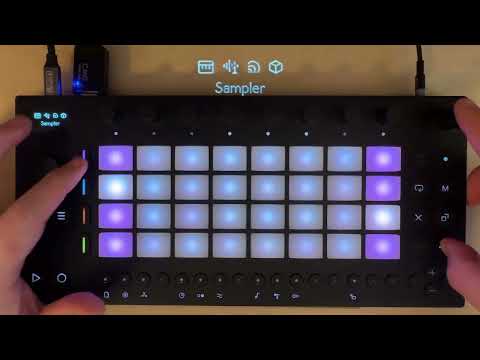](https://www.youtube.com/watch?v=AQ-5RZlg6gw)
一个非官方框架,用于在 Ableton Move 上运行自定义乐器、效果器和控制器。
Schwung 添加了一个与 Move 原生系统并行运行的 Shadow UI,使得额外的 Synth、FX 和其他工具能够在常规 UI 旁边运行。
## 许可证
MIT - 请参阅 [LICENSE](LICENSE) 和 [THIRD_PARTY_LICENSES](THIRD_PARTY_LICENSES)
如果没有 [Move Anything](https://github.com/bobbydigitales/move-anything) 项目的工作成果,Schwung 将无法实现,该项目提供了访问 Move 硬件和系统功能的基础技术。感谢 @talktogreg、@impbox、@deets,特别是 @bobbyd 的这些贡献。
## 重要声明
本项目绝未被 Ableton 批准、认可或支持。
本项目会修改您 Ableton Move 上的软件。在安装之前,请备份重要的 Set 和采样,并熟悉 DFU 恢复模式(在 [Centercode](https://ableton.centercode.com/project/article/item.html?cap=ecd3942a1fe3405eb27a806608401a0b&arttypeid=%7Be70be312-f44a-418b-bb74-ed1030e3a49a%7D&artid=%7BC0A2D9E2-D52F-4DEB-8BEE-356B65C8942E%7D) 上),以防您需要恢复设备。安装后 Move 仍可正常工作;Schwung 与其并行运行。
这是名副其实的“Hack(修改/破解)”。它并不稳定,也不适合作为日常主力工具,但它很有趣,而且超级好玩。请知悉风险,并尽情享受!
另外:这些代码很大程度上是由 AI 编程助手编写的,并在人类监督下完成。如果这让你感到不安或你不认同这种方法,完全没问题!感谢你的关注。
## 安装
### 桌面安装程序(推荐)
下载适合您平台的 [Schwung 安装程序](https://github.com/charlesvestal/schwung-installer/releases/latest)(macOS、Windows、Linux)。它通过图形界面处理 SSH 设置、模块选择和升级。桌面安装程序也支持屏幕阅读器访问。
### 命令行
**前置条件:**
- Move 已连接 WiFi
- 一台位于同一网络的电脑
- **Mac/Linux:** 终端
- **Windows:** [Git Bash](https://git-scm.com/downloads)(随 Git for Windows 附带)
**安装:**
```
curl -L https://raw.githubusercontent.com/charlesvestal/schwung/main/scripts/install.sh | sh
```
**仅屏幕阅读器(无障碍安装):**
```
curl -sL https://raw.githubusercontent.com/charlesvestal/schwung/main/scripts/install.sh | sh -s -- --enable-screen-reader --disable-shadow-ui
```
_注意:使用 `-sL`(静默模式)以减少输出,适合屏幕阅读器。_
安装程序将:
1. **指导您完成 SSH 设置**(如果需要)(生成密钥,展示如何将其添加到 Move)
2. **下载并安装** Schwung 框架
3. **提供模块安装选项**(合成器、效果器)来自模块商店
4. **复制资源** 以供需要的模块使用(ROM、SoundFonts 等)
**安装选项:**
```
# 默认启用屏幕阅读器 (TTS 公告)
./scripts/install.sh local --enable-screen-reader
# 仅安装屏幕阅读器,不带 UI 功能
./scripts/install.sh --enable-screen-reader --disable-shadow-ui
# 跳过模块安装提示
./scripts/install.sh --skip-modules
```
要管理您 Move 上的文件,您也可以使用 [Cyberduck](https://cyberduck.io)(通过 SFTP 连接到 `move.local`,选择您的 SSH 私钥)。
有关故障排除和手动设置,请参阅 [MANUAL.md](MANUAL.md)。
## 卸载
```
curl -L https://raw.githubusercontent.com/charlesvestal/schwung/main/scripts/uninstall.sh | sh
```
默认情况下,卸载前会将非活动的 Set Pages 备份导出到 `/data/UserData/UserLibrary/Schwung Backups/Set Pages/`,然后再移除 Schwung。
若要永久删除 Schwung 数据而不导出备份:
```
curl -L https://raw.githubusercontent.com/charlesvestal/schwung/main/scripts/uninstall.sh | sh -s -- --purge-data
```
## 模式
- **Shadow UI**:与 Move 原生系统并行运行自定义信号链,以便您可以叠加额外的合成器和效果器。使用 Shift+Vol+Track(以及 +Menu)访问这些信号链插槽。
- **Overtake 模块**:暂时接管 Move UI 的全屏模块(例如 MIDI 控制器应用)。使用 Shift+Vol+Jog 点击访问 Overtake 模块。
- **量化采样器**:Shift+Sample 打开一个采样器,录制到 `Samples/Schwung/Resampler/YYYY-MM-DD/`。选择重采样(包括 Schwung 合成器)或 Move Input,设置时长(以小节为单位),录制会在音符事件或按下播放时开始。
- **跳回录制**:Shift+Capture 将最后 30 秒的音频写入 `Samples/Schwung/Skipback/YYYY-MM-DD/`。
- **屏幕阅读器**:用于无障碍访问的可选 TTS 语音播报。通过 Shadow UI 设置切换,或在禁用 Shadow UI 时使用 Shift+Menu。
在 **全局设置 > 显示 > 叠加旋钮 (Global Settings > Display > Overlay Knobs)** 中,您可以将旋钮叠加触发方式更改为 `+Shift`(默认)、`+Jog Touch` 或 `Off`。如果 `Shift+Knob` 干扰原生 Move 操作(如精细控制),请使用 `+Jog Touch` 或 `Off`。
使用详情、快捷键和工作流程记录在 [MANUAL.md](MANUAL.md) 中。
## 原生采样器桥接
在 **Master FX > 设置** 中,`Resample Src` 控制是否将 Schwung 音频馈送到原生 Move 采样工作流中:
- `Off`:禁用(默认)
- `Replace`:用 Schwung 主输出替换原生采样器输入
`Mix` 仅作为遗留配置值保留,并被视为 `Replace`。
为了获得此功能最可靠的原生采样行为:
- 将 `Resample Src` 设置为 **Replace**
- 在 Move 的采样器中,将采样源设置为 **Line In**
- 将监听设置为 **Off**
如果监听开启(或源/路由配置不同),可能会发生音频反馈。
## 文档
- [MANUAL.md](MANUAL.md) - 用户指南和快捷键
- [BUILDING.md](BUILDING.md) - 构建说明
- [docs/ARCHITECTURE.md](docs/ARCHITECTURE.md) - 系统和 Shadow UI 架构
- [docs/MODULES.md](docs/MODULES.md) - 模块开发、Shadow UI 集成、Overtake 模块
- [docs/API.md](docs/API.md) - JavaScript 模块 API
- [src/modules/chain/README.md](src/modules/chain/README.md) - 信号链模块说明
## 可用模块
模块可通过模块商店或桌面安装程序安装。完整详情请参阅 [module-catalog.json](module-catalog.json)。
### 音源
| 模块 | 描述 | 作者 |
|--------|-------------|--------|
| [Dexed](https://github.com/charlesvestal/schwung-dx7) | 6 算子 FM 合成器 (Dexed/MSFA),支持 .syx 音色 | Dexed/MSFA 由 google/asb2m10 开发 (移植: charlesvestal) |
| [SF2 Synth](https://github.com/charlesvestal/schwung-sf2) | 使用 FluidLite 的 SoundFont (.sf2) 合成器 | FluidLite 由 Robin Lobel 开发 (移植: charlesvestal) |
| [SFZ Player](https://github.com/charlesvestal/schwung-sfz) | 使用 sfizz 引擎的 SFZ 和 DecentSampler (.dspreset) 采样播放器 | sfizz 由 sfztools 开发 (移植: charlesvestal) |
| [Mini-JV](https://github.com/charlesvestal/schwung-jv880) | 基于 ROM 的 PCM 波表合成器模拟器 | nukeykt/giulioz (移植: charlesvestal) |
| [OB-Xd](https://github.com/charlesvestal/schwung-obxd) | 基于 Oberheim OB-X 的虚拟模拟合成器 | reales (移植: charlesvestal) |
| [Braids](https://github.com/charlesvestal/schwung-braids) | 具有 47 种合成算法的宏振荡器 (Mutable Instruments) | Emilie Gillet (移植: charlesvestal) |
| [Hera](https://github.com/charlesvestal/schwung-hera) | 具有 BBD 合唱效果的 Juno-60 模拟合成器 | jpcima (移植: charlesvestal) |
| [Surge XT](https://github.com/charlesvestal/schwung-surge) | 混合合成器 - 波表、FM、减法及物理建模,拥有 600+ 预设 | Surge Synth Team (移植: charlesvestal) |
| [RaffoSynth](https://github.com/charlesvestal/schwung-moog) | 具有 4 个振荡器和 Moog 梯形滤波器的单音合成器 | Nicolas Roulet, Julian Palladino (移植: charlesvestal) |
| [Webstream](https://github.com/charlesvestal/schwung-webstream) | 网络音频搜索和流媒体生成器,捆绑 yt-dlp + ffmpeg 运行时 | charlesvestal |
| [Radio Garden](https://github.com/charlesvestal/schwung-radiogarden) | 通过 Radio Garden 浏览并流式传输全球 200 个城市的直播电台 | charlesvestal |
| [AirPlay](https://github.com/charlesvestal/schwung-airplay) | AirPlay 音频接收器 - 从 iPhone、iPad 或 Mac 流式传输到 Move 的信号链 | charlesvestal |
| [Chiptune](https://github.com/charlesvestal/schwung-chiptune) | NES 2A03 和 Game Boy DMG 芯片音乐合成器,含 32 个预设 | blargg (移植: charlesvestal) |
| [Osirus](https://github.com/charlesvestal/schwung-virus) | 通过 Gearmulator JIT 引擎实现的 Access Virus DSP56300 模拟器 | dsp56300/gearmulator (移植: charlesvestal) |
| [Granny](https://github.com/handcraftedcc/move-everything-granny) | 具有扫描控制和文件浏览器的颗粒采样乐器 | handcraftedcc |
| [MrHyde](https://github.com/handcraftedcc/move-everything-mrhyde) | 灵感来自 MicroFreak 的宏振荡器,基于 Mutable Instruments Plaits | handcraftedcc |
| [MrDrums](https://github.com/handcraftedcc/move-everything-mrdrums) | 16 垫采样鼓模块,具有每垫控制和动态垫编辑功能 | handcraftedcc |
| [REX Player](https://github.com/charlesvestal/schwung-rex) | Propellerhead ReCycle (.rx2/.rex) 切片播放器,带有 DWOP 无损解码器 | charlesvestal |
| [HUSH ONE](https://github.com/charlesvestal/schwung-hush1) | 模拟 Roland SH-101 的单音减法合成器 | charlesvestal |
| [NuSaw](https://github.com/charlesvestal/schwung-nusaw) | 失谐复音多锯齿波合成器,带谐振滤波器、双包络、合唱和延迟 | charlesvestal |
| [Plaits](https://github.com/j3threejay/move-anything-plaits) | 具有 24 种合成引擎的宏振荡器 (Mutable Instruments Plaits) | Emilie Gillet (移植: charlesvestal) |
| [Sample Slicer](https://github.com/j3threejay/move-anything-slicer) | 具有瞬态检测功能的采样切片器,支持 32 垫复音播放 | Justin Joe |
| [Weird Dreams](https://github.com/fillioning/weird-dreams-move) | 8 复音模拟鼓机 — 64 个套鼓,41 个音色预设,动态垫选音色编辑,主总线 FX | fillioning (DSP: dfilaretti) |
### 音频 FX
| 模块 | 描述 | 作者 |
|--------|-------------|--------|
| [CloudSeed](https://github.com/charlesvestal/schwung-cloudseed) | Ghost Note Audio 开发的算法混响 | Ghost Note Audio (移植: charlesvestal) |
| [TAPESCAM](https://github.com/charlesvestal/schwung-tapescam) | 磁带饱和和退化效果 | Charles Vestal |
| [PSX Verb](https://github.com/charlesvestal/schwung-psxverb) | PlayStation 1 SPU 混响模拟 | Charles Vestal |
| [TapeDelay](https://github.com/charlesvestal/schwung-space-delay) | 带有颤动和音调塑形的磁带延迟 | Charles Vestal |
| [Junologue Chorus](https://github.com/charlesvestal/schwung-junologue-chorus) | Junologue 合唱 - Juno-60 合唱模拟(I、I+II、II 模式) | Peter Allwin (移植: charlesvestal) |
| [NAM](https://github.com/charlesvestal/schwung-nam) | Neural Amp Modeler - 神经网络吉他放大器/效果模拟 | NeuralAudio 由 Mike Oliphant 开发 (移植: charlesvestal) |
| [Ducker](https://github.com/charlesvestal/schwung-ducker) | MIDI 触发的侧链闪避器 - 无需音频侧链的经典泵浦效果 | charlesvestal |
| [CLAP FX](https://github.com/charlesvestal/schwung-clap) | CLAP 音频效果插件宿主 | charlesvestal |
| [Gate](https://github.com/charlesvestal/schwung-gate) | 噪声门和向下扩展器 | charlesvestal |
| [Key Detect](https://github.com/charlesvestal/schwung-keydetect) | 检测通过它的音频的调性 | charlesvestal |
| [Vocoder](https://github.com/charlesvestal/schwung-vocoder) | 声码器 - 使用麦克风/线路输入作为调制器来塑造合成器载波 | charlesvestal |
| [Usefulity](https://github.com/charlesvestal/schwung-usefulity) | 立体声实用工具 - 声道选择、宽度、低音单声道、增益、声像、相位、静音、DC 滤波器 | charlesvestal |
| [Boris Granular](https://github.com/fillioning/move-anything-boris) | 实时颗粒音频效果,支持实时输入捕获和 MIDI 同步 | Alessandro Gaiba (移植: fillioning) |
| [Super Boom](https://github.com/fillioning/super-boom-move) | 灵感来自 OTO Boum 的主总线破坏器,具有 8 频段滤波器组、10 种前置放大模型、声码器模式和磁带级 | fillioning |
| [Verglashttps://github.com/fillioning/move-everything-verglas) | Mutable Instruments Clouds 颗粒处理器 — 颗粒、拉伸、循环器和频谱模式,带输出滤波器和限制器 | Emilie Gillet (移植: fillioning) |
| [Dragonfly Hall](https://github.com/wolfrenegade1976/move-anything-dragonfly-hall) | Dragonfly Hall 混响 — 华丽的 Hall 混响,具有 25 个预设和完整的参数控制 | bradcoomber |
| [Punch-In FX](https://github.com/fillioning/MovePunchFX) | PO-33 风格的 Punch-in 效果,带压力控制 — 左侧 4x4 垫网格上有 16 种效果 | fillioning |
| [Structor](https://github.com/fillioning/move-everything-structor) | 具象音乐声音解构/重构器 — 8 种算法模式,具有每颗粒 DJ 滤波、随机化和音序器 | fillioning |
### MIDI FX
| 模块 | 描述 | 作者 |
|--------|-------------|--------|
| [Super Arp](https://github.com/handcraftedcc/move-everything-superarp) | 高级 MIDI 琶音器,具有进行模式、节奏预设和种子修饰符 | handcraftedcc |
| [Eucalypso](https://github.com/handcraftedcc/move-everything-eucalypso) | 确定 4 通道欧几里得 MIDI 音序器,具有保持/音阶音符寄存器、重触发模式和种子调制 | handcraftedcc |
### Overtake
| 模块 | 描述 | 作者 |
|--------|-------------|--------|
| [M8 LPP Emulator](https://github.com/charlesvestal/schwung-m8) | 用于 Dirtywave M8 的 Novation Launchpad Pro 模拟 | bobbydigitales (移植: charlesvestal) |
| [SID Control](https://github.com/charlesvestal/schwung-sidcontrol) | SIDaster III 合成器的 MIDI 控制器 | charlesvestal |
| [Custom MIDI Control](https://github.com/chaolue/move-anything-control) | 自定义 MIDI 控制器,具有 16 个可配置的垫/旋钮/按钮库 | chaolue |
| [Performance FX](https://github.com/charlesvestal/schwung-performance-fx) | 32 种 Punch-in 音频 FX,具有压力控制、锁定和速度同步 | charlesvestal |
### 工具
| 模块 | 描述 | 作者 |
|--------|-------------|--------|
| [AutoSample](https://github.com/charlesvestal/schwung-autosample) | 自动对外部 MIDI 设备进行采样以创建多重采样的 SFZ 乐器 | charlesvestal |
| [Wave Edit](https://github.com/charlesvestal/schwung-waveform-editor) | 在 Move 上修剪、增益调整和编辑音频文件 | charlesvestal |
| [Time Stretch](https://github.com/charlesvestal/schwung-stretch) | 使用 Bungee 进行实时音频时间拉伸 | charlesvestal |
| [Stems](https://github.com/charlesvestal/schwung-stems) | 将音频分轨为:鼓、人声、伴奏(0.5 倍实时) | charlesvestal |
| [DJ Deck](https://github.com/djhardrich/move-anything-dj) | CDJ/唱机风格的 4 轨分轨播放器,带有 Bungee 时间拉伸/变调 | DJ Hard Rich |
| [Tuner](https://github.com/CatsAreCool710/Move-Everything-Tuner) | 半音阶和乐器调音器,带步进指南反馈 | Jeremiah Ticket |
## 相关仓库
**安装程序:**
- [move-everything-installer](https://github.com/charlesvestal/schwung-installer) - 跨平台桌面安装程序
## 社区
- Discord: [https://discord.gg/Zn33eRvTyK](https://discord.gg/GHWaZCC9bQ)
- 贡献者: @talktogreg, @impbox, @deets, @bobbyd, @chaolue, @charlesvestal
## AI 辅助免责声明
本模块是 Schwung 的一部分,并在 AI 辅助下开发,包括 Claude、Codex 和其他 AI 助手。
所有架构、实现和发布决策均由人类维护者审查。
AI 辅助的内容可能仍包含错误,因此请在生产使用前验证功能、安全性和许可证兼容性。
标签:Ableton, CSV导出, Cutter, DFU模式, Move, Shadow UI, SSH, 内存分配, 合成器, 客户端加密, 嵌入式开发, 开源, 插件框架, 数据可视化, 桌面安装程序, 模块化, 电子音乐, 硬件修改, 自定义控制器, 非官方, 音乐制作, 音乐工具, 音效