Sucharithaa14/Phishing-Website-Detection-using-LightGBM-and-SVM-algorithms
GitHub: Sucharithaa14/Phishing-Website-Detection-using-LightGBM-and-SVM-algorithms
一个集成LightGBM和SVM的钓鱼网站检测Web应用,提供实时URL分类和模型训练功能。
Stars: 1 | Forks: 0
# 钓鱼检测




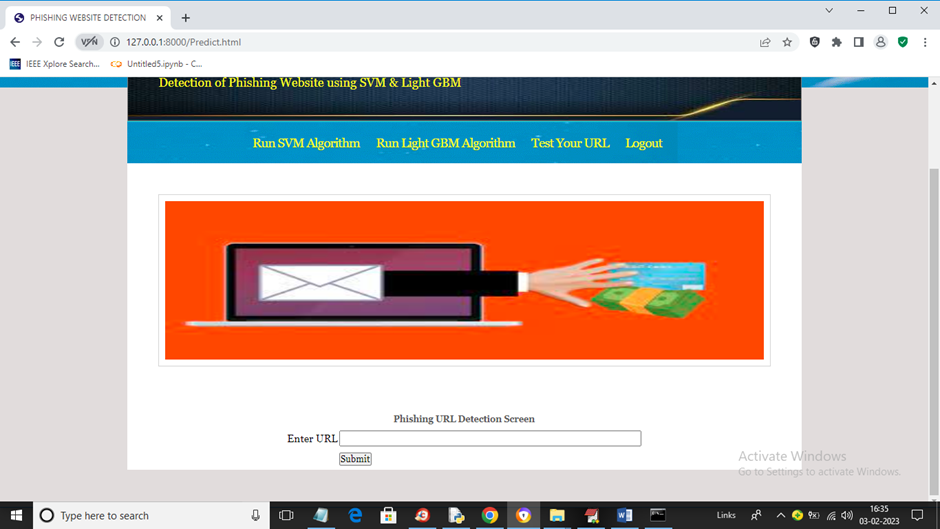
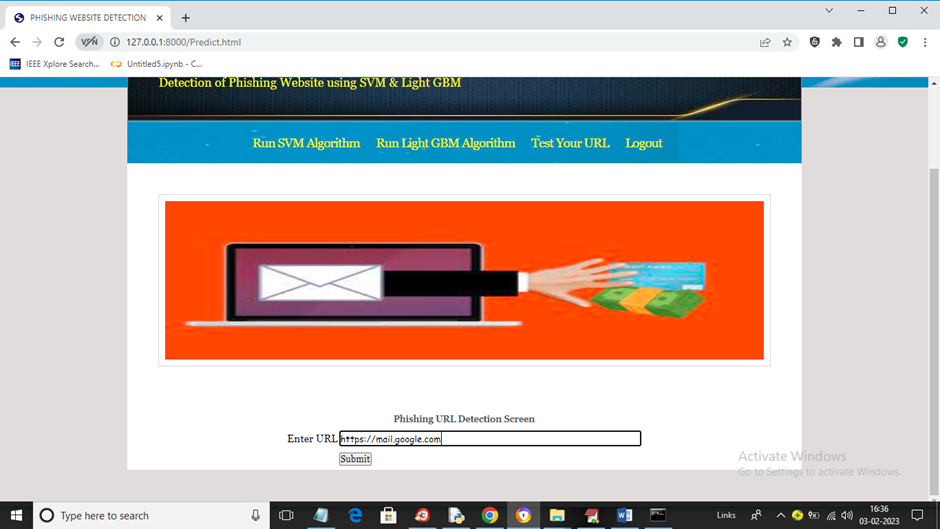
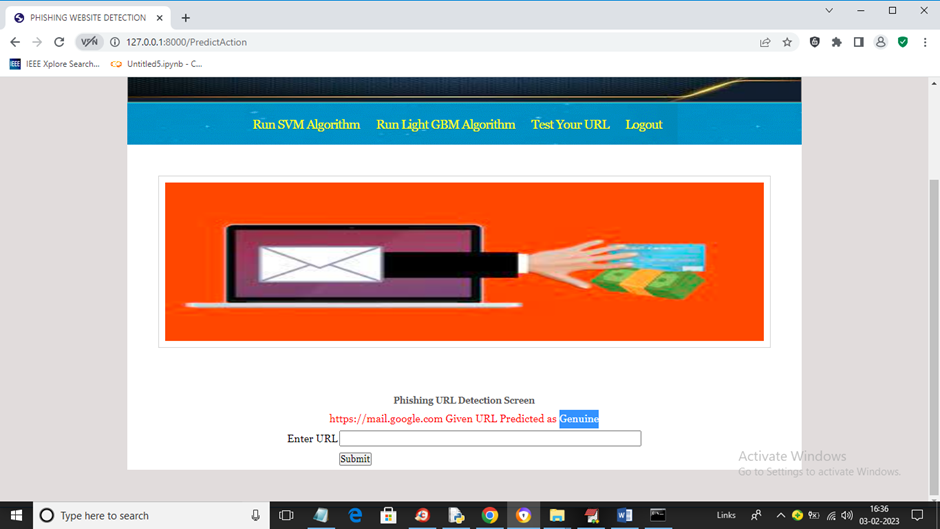
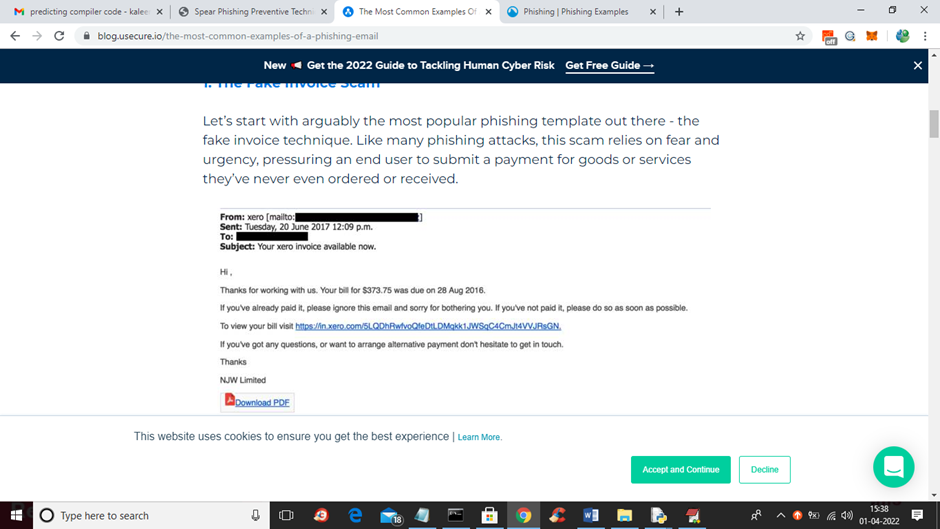
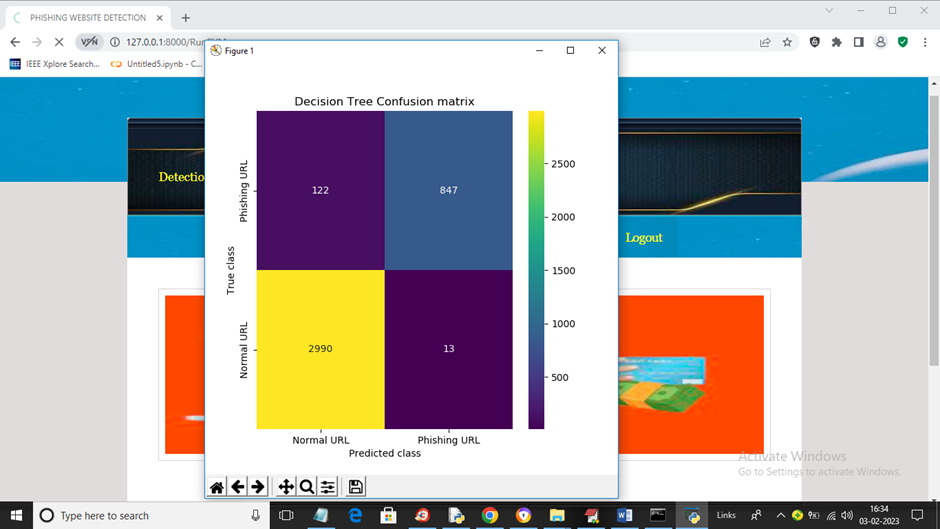
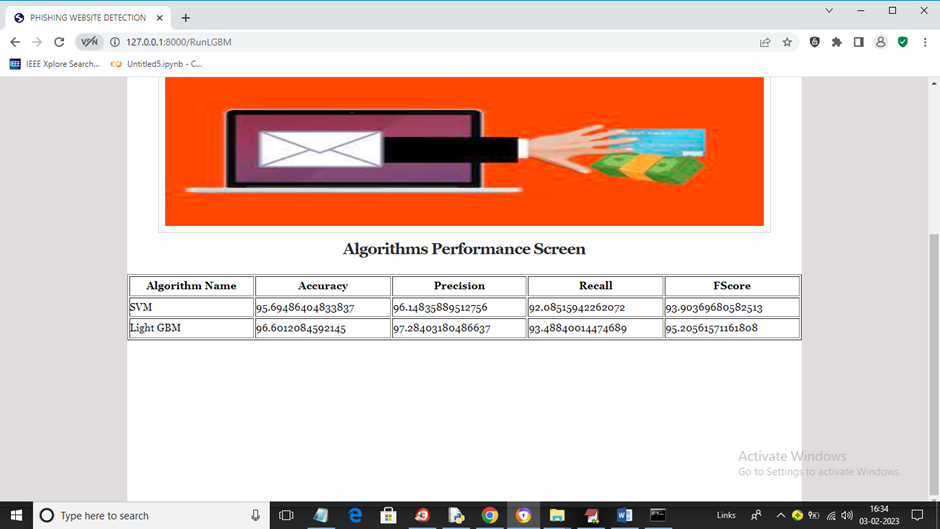
项目输出
 📌 概述
钓鱼检测是一个基于 Django 的 Web 应用程序,旨在使用机器学习来检测和分析钓鱼尝试。
它提供了一个 Web 界面,用户可以在其中测试 URL 是否来自经过训练的钓鱼检测模型。
📂 项目结构
PhishingDetection/
│
├── PhishingDetection/ # 主项目文件夹
│ ├── settings.py # Django 配置
│ ├── wsgi.py # WSGI 入口点
│ ├── urls.py # URL 路由
│
├── PhishingDetectionApp/ # 核心应用逻辑
│ ├── models/ # 机器学习模型(保存在此处)
│ ├── templates/ # HTML 模板
│ ├── static/ # CSS/JS/图片
│ ├── data/ # 数据集存储
│
├── db.sqlite3 # SQLite 数据库(默认)
├── run.bat # 用于启动服务器的 Windows 脚本
├── train\_model.py # 模型训练脚本
⚙️ 系统要求
- Python 3.7+
- Django 2.1.7
- scikit-learn
- pandas
- numpy
安装依赖项:
```
pip install -r requirements.txt
```
如果 `requirements.txt` 文件缺失,请手动安装:
bash
pip install django==2.1.7 scikit-learn pandas numpy
🚀 安装说明
1. 克隆仓库:
git clone https://github.com/Sucharithaa14/Phishing-Website-Detection-using-LightGBM-and-SVM-algorithms.git
cd PhishingDetection
2. 创建并激活虚拟环境:
python -m venv venv
venv\Scripts\activate # 在 Windows 上
source venv/bin/activate # 在 Linux/Mac 上
3. 安装依赖项(见上文)。
▶️ 运行应用程序
1. 使用批处理脚本(Windows)
提供的 `run.bat` 文件包含:
bat
python manage.py runserver
双击 `run.bat` 或在 **命令提示符** 中运行:
bash
run.bat
2. 直接使用 Django 命令
```
python manage.py runserver
```
服务器将在以下地址启动:
```
http://127.0.0.1:8000/
```
📊 数据集使用
* 将您的钓鱼数据集(推荐 CSV 格式)放入 `PhishingDetectionApp/data/` 文件夹中。
* 数据集应包含已标记的 URL(例如 `url`、`label`),其中:
* `label = 1` → 钓鱼
* `label = 0` → 合法
示例:
```
url,label
http://example.com,0
http://malicious-site.com,1
```
🧠 模型训练
您可以使用提供的 `train_model.py` 来训练钓鱼检测模型。
脚本:`train_model.py`
```
import pandas as pd
import pickle
from sklearn.ensemble import RandomForestClassifier
from sklearn.model_selection import train_test_split
from sklearn.feature_extraction.text import CountVectorizer
from sklearn.metrics import accuracy_score
import os
# 加载数据集
DATA_PATH = "PhishingDetectionApp/data/phishing.csv"
MODEL_PATH = "PhishingDetectionApp/models/phishing_model.pkl"
print("[INFO] Loading dataset...")
data = pd.read_csv(DATA_PATH)
# 提取特征和标签
urls = data['url']
labels = data['label']
# 使用 Bag-of-Words 将 URL 转换为特征
print("[INFO] Extracting features...")
vectorizer = CountVectorizer()
X = vectorizer.fit_transform(urls)
y = labels
# 拆分数据
X_train, X_test, y_train, y_test = train_test_split(X, y, test_size=0.2, random_state=42)
# 训练模型
print("[INFO] Training model...")
model = RandomForestClassifier(n_estimators=100, random_state=42)
model.fit(X_train, y_train)
# 评估模型
y_pred = model.predict(X_test)
print(f"[INFO] Accuracy: {accuracy_score(y_test, y_pred):.2f}")
# 保存模型 + vectorizer
os.makedirs(os.path.dirname(MODEL_PATH), exist_ok=True)
pickle.dump((model, vectorizer), open(MODEL_PATH, "wb"))
print(f"[INFO] Model saved at {MODEL_PATH}")
```
运行训练
```
python train_model.py
```
这将:
1. 从 `PhishingDetectionApp/data/phishing.csv` 加载数据集
2. 训练一个 RandomForest 模型
3. 将训练好的模型和向量器保存为 `PhishingDetectionApp/models/phishing_model.pkl`
🔍 在 Django 中使用模型
`views.py` 中的示例:
```
import pickle
import os
MODEL_PATH = os.path.join("PhishingDetectionApp", "models", "phishing_model.pkl")
model, vectorizer = pickle.load(open(MODEL_PATH, "rb"))
def check_url(request):
url = request.POST.get("url")
features = vectorizer.transform([url])
prediction = model.predict(features)[0]
result = "Phishing" if prediction == 1 else "Legitimate"
return render(request, "result.html", {"url": url, "result": result})
```
🌍 部署
该项目包含 `wsgi.py`,用于与 WSGI 兼容的服务器(如 **Gunicorn**、**uWSGI** 或 **Apache mod\_wsgi**)进行部署。
📜 许可证

本项目仅用于**教育和研究目的**。
```
---
✨ Now your GitHub repo will look **clean and professional** with badges at the top.
Do you also want me to **generate the `requirements.txt` file** for you right now, so you can just commit it along with the README?
```
📌 概述
钓鱼检测是一个基于 Django 的 Web 应用程序,旨在使用机器学习来检测和分析钓鱼尝试。
它提供了一个 Web 界面,用户可以在其中测试 URL 是否来自经过训练的钓鱼检测模型。
📂 项目结构
PhishingDetection/
│
├── PhishingDetection/ # 主项目文件夹
│ ├── settings.py # Django 配置
│ ├── wsgi.py # WSGI 入口点
│ ├── urls.py # URL 路由
│
├── PhishingDetectionApp/ # 核心应用逻辑
│ ├── models/ # 机器学习模型(保存在此处)
│ ├── templates/ # HTML 模板
│ ├── static/ # CSS/JS/图片
│ ├── data/ # 数据集存储
│
├── db.sqlite3 # SQLite 数据库(默认)
├── run.bat # 用于启动服务器的 Windows 脚本
├── train\_model.py # 模型训练脚本
⚙️ 系统要求
- Python 3.7+
- Django 2.1.7
- scikit-learn
- pandas
- numpy
安装依赖项:
```
pip install -r requirements.txt
```
如果 `requirements.txt` 文件缺失,请手动安装:
bash
pip install django==2.1.7 scikit-learn pandas numpy
🚀 安装说明
1. 克隆仓库:
git clone https://github.com/Sucharithaa14/Phishing-Website-Detection-using-LightGBM-and-SVM-algorithms.git
cd PhishingDetection
2. 创建并激活虚拟环境:
python -m venv venv
venv\Scripts\activate # 在 Windows 上
source venv/bin/activate # 在 Linux/Mac 上
3. 安装依赖项(见上文)。
▶️ 运行应用程序
1. 使用批处理脚本(Windows)
提供的 `run.bat` 文件包含:
bat
python manage.py runserver
双击 `run.bat` 或在 **命令提示符** 中运行:
bash
run.bat
2. 直接使用 Django 命令
```
python manage.py runserver
```
服务器将在以下地址启动:
```
http://127.0.0.1:8000/
```
📊 数据集使用
* 将您的钓鱼数据集(推荐 CSV 格式)放入 `PhishingDetectionApp/data/` 文件夹中。
* 数据集应包含已标记的 URL(例如 `url`、`label`),其中:
* `label = 1` → 钓鱼
* `label = 0` → 合法
示例:
```
url,label
http://example.com,0
http://malicious-site.com,1
```
🧠 模型训练
您可以使用提供的 `train_model.py` 来训练钓鱼检测模型。
脚本:`train_model.py`
```
import pandas as pd
import pickle
from sklearn.ensemble import RandomForestClassifier
from sklearn.model_selection import train_test_split
from sklearn.feature_extraction.text import CountVectorizer
from sklearn.metrics import accuracy_score
import os
# 加载数据集
DATA_PATH = "PhishingDetectionApp/data/phishing.csv"
MODEL_PATH = "PhishingDetectionApp/models/phishing_model.pkl"
print("[INFO] Loading dataset...")
data = pd.read_csv(DATA_PATH)
# 提取特征和标签
urls = data['url']
labels = data['label']
# 使用 Bag-of-Words 将 URL 转换为特征
print("[INFO] Extracting features...")
vectorizer = CountVectorizer()
X = vectorizer.fit_transform(urls)
y = labels
# 拆分数据
X_train, X_test, y_train, y_test = train_test_split(X, y, test_size=0.2, random_state=42)
# 训练模型
print("[INFO] Training model...")
model = RandomForestClassifier(n_estimators=100, random_state=42)
model.fit(X_train, y_train)
# 评估模型
y_pred = model.predict(X_test)
print(f"[INFO] Accuracy: {accuracy_score(y_test, y_pred):.2f}")
# 保存模型 + vectorizer
os.makedirs(os.path.dirname(MODEL_PATH), exist_ok=True)
pickle.dump((model, vectorizer), open(MODEL_PATH, "wb"))
print(f"[INFO] Model saved at {MODEL_PATH}")
```
运行训练
```
python train_model.py
```
这将:
1. 从 `PhishingDetectionApp/data/phishing.csv` 加载数据集
2. 训练一个 RandomForest 模型
3. 将训练好的模型和向量器保存为 `PhishingDetectionApp/models/phishing_model.pkl`
🔍 在 Django 中使用模型
`views.py` 中的示例:
```
import pickle
import os
MODEL_PATH = os.path.join("PhishingDetectionApp", "models", "phishing_model.pkl")
model, vectorizer = pickle.load(open(MODEL_PATH, "rb"))
def check_url(request):
url = request.POST.get("url")
features = vectorizer.transform([url])
prediction = model.predict(features)[0]
result = "Phishing" if prediction == 1 else "Legitimate"
return render(request, "result.html", {"url": url, "result": result})
```
🌍 部署
该项目包含 `wsgi.py`,用于与 WSGI 兼容的服务器(如 **Gunicorn**、**uWSGI** 或 **Apache mod\_wsgi**)进行部署。
📜 许可证

本项目仅用于**教育和研究目的**。
```
---
✨ Now your GitHub repo will look **clean and professional** with badges at the top.
Do you also want me to **generate the `requirements.txt` file** for you right now, so you can just commit it along with the README?
```
📌 概述
钓鱼检测是一个基于 Django 的 Web 应用程序,旨在使用机器学习来检测和分析钓鱼尝试。
它提供了一个 Web 界面,用户可以在其中测试 URL 是否来自经过训练的钓鱼检测模型。
📂 项目结构
PhishingDetection/
│
├── PhishingDetection/ # 主项目文件夹
│ ├── settings.py # Django 配置
│ ├── wsgi.py # WSGI 入口点
│ ├── urls.py # URL 路由
│
├── PhishingDetectionApp/ # 核心应用逻辑
│ ├── models/ # 机器学习模型(保存在此处)
│ ├── templates/ # HTML 模板
│ ├── static/ # CSS/JS/图片
│ ├── data/ # 数据集存储
│
├── db.sqlite3 # SQLite 数据库(默认)
├── run.bat # 用于启动服务器的 Windows 脚本
├── train\_model.py # 模型训练脚本
⚙️ 系统要求
- Python 3.7+
- Django 2.1.7
- scikit-learn
- pandas
- numpy
安装依赖项:
```
pip install -r requirements.txt
```
如果 `requirements.txt` 文件缺失,请手动安装:
bash
pip install django==2.1.7 scikit-learn pandas numpy
🚀 安装说明
1. 克隆仓库:
git clone https://github.com/Sucharithaa14/Phishing-Website-Detection-using-LightGBM-and-SVM-algorithms.git
cd PhishingDetection
2. 创建并激活虚拟环境:
python -m venv venv
venv\Scripts\activate # 在 Windows 上
source venv/bin/activate # 在 Linux/Mac 上
3. 安装依赖项(见上文)。
▶️ 运行应用程序
1. 使用批处理脚本(Windows)
提供的 `run.bat` 文件包含:
bat
python manage.py runserver
双击 `run.bat` 或在 **命令提示符** 中运行:
bash
run.bat
2. 直接使用 Django 命令
```
python manage.py runserver
```
服务器将在以下地址启动:
```
http://127.0.0.1:8000/
```
📊 数据集使用
* 将您的钓鱼数据集(推荐 CSV 格式)放入 `PhishingDetectionApp/data/` 文件夹中。
* 数据集应包含已标记的 URL(例如 `url`、`label`),其中:
* `label = 1` → 钓鱼
* `label = 0` → 合法
示例:
```
url,label
http://example.com,0
http://malicious-site.com,1
```
🧠 模型训练
您可以使用提供的 `train_model.py` 来训练钓鱼检测模型。
脚本:`train_model.py`
```
import pandas as pd
import pickle
from sklearn.ensemble import RandomForestClassifier
from sklearn.model_selection import train_test_split
from sklearn.feature_extraction.text import CountVectorizer
from sklearn.metrics import accuracy_score
import os
# 加载数据集
DATA_PATH = "PhishingDetectionApp/data/phishing.csv"
MODEL_PATH = "PhishingDetectionApp/models/phishing_model.pkl"
print("[INFO] Loading dataset...")
data = pd.read_csv(DATA_PATH)
# 提取特征和标签
urls = data['url']
labels = data['label']
# 使用 Bag-of-Words 将 URL 转换为特征
print("[INFO] Extracting features...")
vectorizer = CountVectorizer()
X = vectorizer.fit_transform(urls)
y = labels
# 拆分数据
X_train, X_test, y_train, y_test = train_test_split(X, y, test_size=0.2, random_state=42)
# 训练模型
print("[INFO] Training model...")
model = RandomForestClassifier(n_estimators=100, random_state=42)
model.fit(X_train, y_train)
# 评估模型
y_pred = model.predict(X_test)
print(f"[INFO] Accuracy: {accuracy_score(y_test, y_pred):.2f}")
# 保存模型 + vectorizer
os.makedirs(os.path.dirname(MODEL_PATH), exist_ok=True)
pickle.dump((model, vectorizer), open(MODEL_PATH, "wb"))
print(f"[INFO] Model saved at {MODEL_PATH}")
```
运行训练
```
python train_model.py
```
这将:
1. 从 `PhishingDetectionApp/data/phishing.csv` 加载数据集
2. 训练一个 RandomForest 模型
3. 将训练好的模型和向量器保存为 `PhishingDetectionApp/models/phishing_model.pkl`
🔍 在 Django 中使用模型
`views.py` 中的示例:
```
import pickle
import os
MODEL_PATH = os.path.join("PhishingDetectionApp", "models", "phishing_model.pkl")
model, vectorizer = pickle.load(open(MODEL_PATH, "rb"))
def check_url(request):
url = request.POST.get("url")
features = vectorizer.transform([url])
prediction = model.predict(features)[0]
result = "Phishing" if prediction == 1 else "Legitimate"
return render(request, "result.html", {"url": url, "result": result})
```
🌍 部署
该项目包含 `wsgi.py`,用于与 WSGI 兼容的服务器(如 **Gunicorn**、**uWSGI** 或 **Apache mod\_wsgi**)进行部署。
📜 许可证

本项目仅用于**教育和研究目的**。
```
---
✨ Now your GitHub repo will look **clean and professional** with badges at the top.
Do you also want me to **generate the `requirements.txt` file** for you right now, so you can just commit it along with the README?
```
标签:Apex, Django, LightGBM, Python, SVM, TLS, URL检测, Web安全, 交叉验证, 人工智能, 分类器, 学术项目, 无后门, 机器学习, 特征工程, 用户模式Hook绕过, 网络安全, 蓝队分析, 逆向工具, 钓鱼检测, 钓鱼网站分类, 防御工具, 隐私保护, 高准确率