Jakedismo/codegraph-rust
GitHub: Jakedismo/codegraph-rust
纯 Rust 实现的代码知识图谱工具,通过 AST 解析与语义嵌入将代码库转化为可推理的图谱,并以 MCP 协议为 AI 编程助手提供深度代码理解能力。
Stars: 845 | Forks: 81
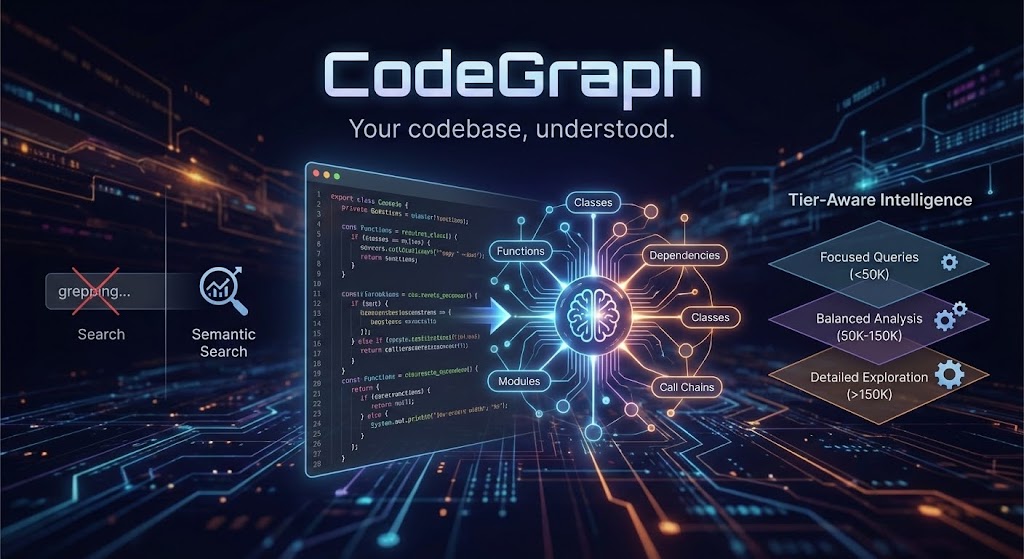
# CodeGraph
**你的代码库,了然于胸。**
CodeGraph 将你的整个代码库转化为一个语义可搜索的知识图谱,让 AI 智能体能够真正*推理*——而不仅仅是 grep 搜索。
## > **已经配置好了?** 请参阅[使用指南](docs/USAGE_GUIDE.md),了解如何在使用 AI 助手时充分利用 CodeGraph 的技巧。
## 问题所在
AI 编程助手非常强大,但它们犹如盲人摸象。它们一次只能看到一个文件,通过 grep 搜索模式,并浪费大量 token 来试图理解你的架构。每一次对话都从零开始。
## **如果你的 AI 助手已经了解了你的代码库会怎样?**
## CodeGraph 的与众不同之处
### 1. 图谱 + 嵌入 = 真正的理解
#### 大多数语义搜索工具只是创建了嵌入就完事了。CodeGraph 则构建了一个**真正的知识图谱**:
你的代码 → 构建上下文 → AST + FastML → LSP 解析 → 丰富化处理 → 图谱 + 嵌入
↓ ↓ ↓ ↓ ↓ ↓
包 节点/边 类型感知的 API 表面 图谱 语义
特性 快速模式 链接 模块图 遍历 搜索
#### 目标 跨度 定义 数据流/文档 (混合)
当你进行搜索时,你得到的不仅仅是“相似的代码”——你得到的是**保留其关系**的代码。不仅包含与你查询匹配的函数,还包括调用它的对象、它的依赖项,以及它在架构中的位置。
索引丰富化处理新增了:
- 模块节点以及用于跨文件导航的模块级导入/包含边
- Rust 本地数据流边(`defines`、`uses`、`flows_to`、`returns`、`mutates`),用于影响分析
- 链接到 `README.md`、`docs/**/*.md` 和 `schema/**/*.surql` 中反引号符号的文档/规范节点
- 架构信号(包循环 + 可选的边界违规)
#### 索引层级(速度与丰富度对比)
索引是分层级的,因此你可以在速度/存储和图谱丰富度之间进行选择。默认值为 **fast**。
| 层级 | 启用的功能 | 典型用途 |
|------|-----------------|-------------|
| `fast` | 仅限 AST 节点 + 核心边(无 LSP 或丰富化处理) | 快速索引,低存储 |
| `balanced` | LSP 符号 + 文档/丰富化处理 + 模块链接 | 无需全部开销即可获得良好的智能体结果 |
| `full` | 所有分析器 + LSP 定义 + 数据流 + 架构 | 最大准确度/丰富度 |
层级行为详情:
- `fast`:禁用构建上下文、LSP、丰富化处理、模块链接、数据流、文档/契约和架构;过滤掉 `Uses`/`References` 边。
- `balanced`:启用构建上下文、LSP 符号、丰富化处理、模块链接和文档/契约;过滤掉 `References` 边。
- `full`:启用所有分析器和 LSP 定义;不过滤任何边。
配置层级:
- CLI:`codegraph index --index-tier balanced`
- 环境变量:`CODEGRAPH_INDEX_TIER=balanced`
- 配置文件:`[indexing] tier = "balanced"`
#### 索引前置条件(启用 LSP 的层级)
当层级启用 LSP(`balanced`/`full`)时,如果缺少所需的外部工具,索引将**快速失败**。
按语言划分的所需工具:
- Rust:`rust-analyzer`
- TypeScript/JavaScript:`node` 和 `typescript-language-server`
- Python:`node` 和 `pyright-langserver`
- Go:`gopls`
- Java:`jdtls`
- C/C++:`clangd`
如果在 LSP 解析期间索引似乎停滞不前,你可以调整每个请求的超时时间:
- `CODEGRAPH_LSP_REQUEST_TIMEOUT_SECS`(默认为 `600`,最小值为 `5`)
如果 LSP 解析立即失败,并且错误信息类似于 `Unknown binary 'rust-analyzer' in official toolchain ...`,说明你的 `rust-analyzer` 是一个没有安装二进制文件的 rustup shim。请安装一个可运行的 `rust-analyzer`(例如通过 `brew install rust-analyzer`,或者切换到提供该工具的工具链)。
#### 可选的架构边界规则
如果你希望 CodeGraph 标记禁止的包依赖关系,请在项目根目录中添加 `codegraph.boundaries.toml`:
```
[[deny]]
from = "your_crate"
to = "forbidden_crate"
#### reason = "解释边界"
Indexing will emit `violates_boundary` edges when a `depends_on` relationship matches a deny rule.
### 2. 智能体工具,不仅是搜索
CodeGraph doesn't return a list of files and wish you luck. It ships **4 consolidated agentic tools** that do the thinking:
| Tool | What It Actually Does |
|------|----------------------|
| `agentic_context` | Gathers the context you need—searches code, builds comprehensive context, answers semantic questions |
| `agentic_impact` | Maps change impact—dependency chains, call flows, what breaks if you touch something |
| `agentic_architecture` | The big picture—system structure, API surfaces, architectural patterns |
| `agentic_quality` | Risk assessment—complexity hotspots, coupling metrics, refactoring priorities |
Each tool accepts an optional `focus` parameter for precision when needed:
| Tool | Focus Values | Default Behavior |
|------|-------------|-----------------|
| `agentic_context` | `"search"`, `"builder"`, `"question"` | Auto-selects based on query |
| `agentic_impact` | `"dependencies"`, `"call_chain"` | Analyzes both |
| `agentic_architecture` | `"structure"`, `"api_surface"` | Provides both |
| `agentic_quality` | `"complexity"`, `"coupling"`, `"hotspots"` | Comprehensive assessment |
Each tool runs a **reasoning agent** that plans, searches, analyzes graph relationships, and synthesizes an answer. Not a search result—an *answer*.
> **[View Agent Context Gathering Flow](docs/architecture/agent-context-gathering-flow.html)** - Interactive diagram showing how agents use graph tools to gather context.
#### Agent 架构
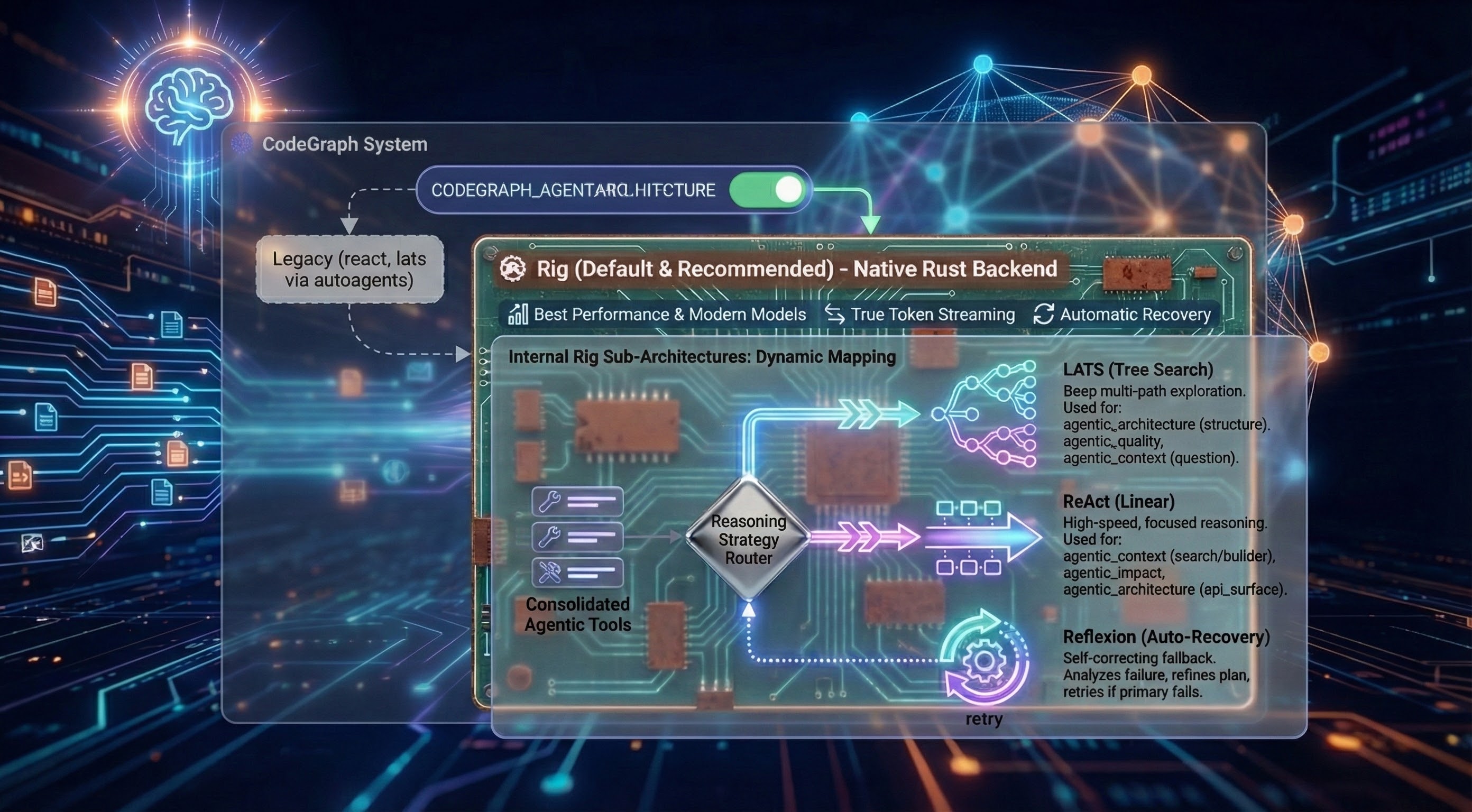
CodeGraph implements agents using **Rig** the default and recommended choice (legacy `react` and `lats` implemented with autoagents still work). Selectable at runtime via `CODEGRAPH_AGENT_ARCHITECTURE=rig`:
**Why Rig is Default:**
The Rig-based backend delivers the best performance with modern thinking and reasoning models. It is a native Rust implementation that supports internal sub-architectures and provides features like **True Token Streaming** and **Automatic Recovery**.
**Internal Rig Sub-Architectures:**
When using the `rig` backend, the system automatically maps the **consolidated agentic tools** to the most effective reasoning strategy:
- **LATS (Tree Search)**: Deep multi-path exploration for complex, non-linear tasks.
- Automatically used for: `agentic_architecture` (structure), `agentic_quality`, and `agentic_context` (question).
- **ReAct (Linear)**: High-speed, focused reasoning for direct data lookups.
- Automatically used for: `agentic_context` (search/builder), `agentic_impact`, and `agentic_architecture` (api_surface).
- **Reflexion (Auto-Recovery)**: A self-correcting fallback that kicks in automatically if the primary strategy fails to find an answer. It analyzes the failure and retries with a refined plan.
### Agent 引导上下文
Agents can start with lightweight project context so their first tool calls are not blind. Enable via env:
- `CODEGRAPH_ARCH_BOOTSTRAP=true` — includes a brief directory/structure bootstrap + contents of README.md and CLAUDE.md+AGENTS.md or GEMINI.md (if present) in the agent’s initial context.
- `CODEGRAPH_ARCH_PRIMER=""` — optional custom primer injected into startup instructions (e.g., areas to focus on).
Why? Faster, more relevant early steps, fewer wasted graph/semantic queries, and better architecture answers on large repos.
Notes:
- Bootstrap is small (top directories summary), not a replacement for graph queries.
- Uses the same project selection as indexing (`CODEGRAPH_PROJECT_ID` or current working directory).
```bash
# 使用 Rig 以在使用思维和推理模型时获得最佳性能(推荐)
CODEGRAPH_AGENT_ARCHITECTURE=rig ./codegraph start stdio
# 为传统指令模型使用默认 ReAct
./codegraph start stdio
# 为复杂分析使用 LATS
#### CODEGRAPH_AGENT_ARCHITECTURE=lats ./codegraph start stdio
All architectures use the same 4 consolidated agentic tools (backed by 6 internal graph analysis tools) and tier-aware prompting—only the reasoning strategy differs.
### 3. 层级感知智能
Here's something clever: CodeGraph automatically adjusts its behavior based on the LLM's context window that you configured for the codegraph agent.
Running a small local model? Get focused, efficient queries.
Using GPT-5.1 or Claude with 200K context? Get comprehensive, exploratory analysis.
Using grok-4-1-fast-reasoning with 2M context? Get detailed analysis with intelligent result management.
The Agent only uses the amount of steps that it requires to produce the answer so tool execution times vary based on the query and amount of data indexed in the database.
During development the agent used 3-6 steps on average to produce answers for test scenarios.
The Agent is stateless it only has conversational memory for the span of tool execution it does not accumulate context/memory over multiple chained tool calls this is already handled by your client of choice, it accumulates that context so codegraph needs to just provide answers.
| Your Model | CodeGraph's Behavior |
|------------|---------------------|
| < 50K tokens | Terse prompts, max 3 steps |
| 50K-150K | Balanced analysis, max 5 steps |
| 150K-500K | Detailed exploration, max 6 steps |
| > 500K (Grok, etc.) | Comprehensive analysis, max 8 steps |
**Hard cap:** Maximum 8 steps regardless of tier (10 with env override). This prevents runaway costs and context overflow while still allowing thorough analysis.
**Same tool, automatically optimized for your setup.**
### 4. 上下文溢出保护
CodeGraph includes multi-layer protection against context overflow—preventing expensive failures when tool results exceed your model's limits.
**Per-Tool Result Truncation:**
- Each tool result is limited based on your configured context window
- Large results (e.g., dependency trees with 1000+ nodes) are intelligently truncated
- Truncated results include `_truncated: true` metadata so the agent knows data was cut
- Array results keep the most relevant items that fit within limits
**Context Accumulation Guard:**
- Monitors total accumulated context across multi-step reasoning
- Fails fast with clear error message if accumulated tool results exceed safe threshold
- Threshold: 80% of context window × 4 (conservative estimate for token overhead)
**Configure via environment:**
```bash
# 关键:设置此值以匹配你 Agent 的 LLM 上下文窗口
CODEGRAPH_CONTEXT_WINDOW=128000 # Default: 128K
# 单工具结果限制自动计算得出:context_window × 2 bytes
# 累积限制自动计算得出:context_window × 4 × 0.8 bytes
```
**为什么这很重要:** 如果没有这些防护措施,在大型代码库上执行一次 `agentic_impact` 查询可能会返回超过 600 万个 token——这远远超出了大多数模型的限制,并会导致昂贵的失败。
### 5. 真正有效的混合搜索
在“嵌入与关键词”之争中,我们不偏袒任何一方。CodeGraph 结合了:
- **70% 向量相似度**(语义理解)
- **30% 词汇搜索**(精确匹配很重要)
- **图遍历**(关系和上下文)
- **可选的重新排序**(交叉编码器精度)
## 结果如何?当你搜索“login logic”时,你能找到 `handleUserAuth`——而在搜索“handleUserAuth”时同样也能找到它。
## 为什么这对 AI 编程至关重要
当你将 CodeGraph 连接到 Claude Code、Cursor 或任何兼容 MCP 的智能体时:
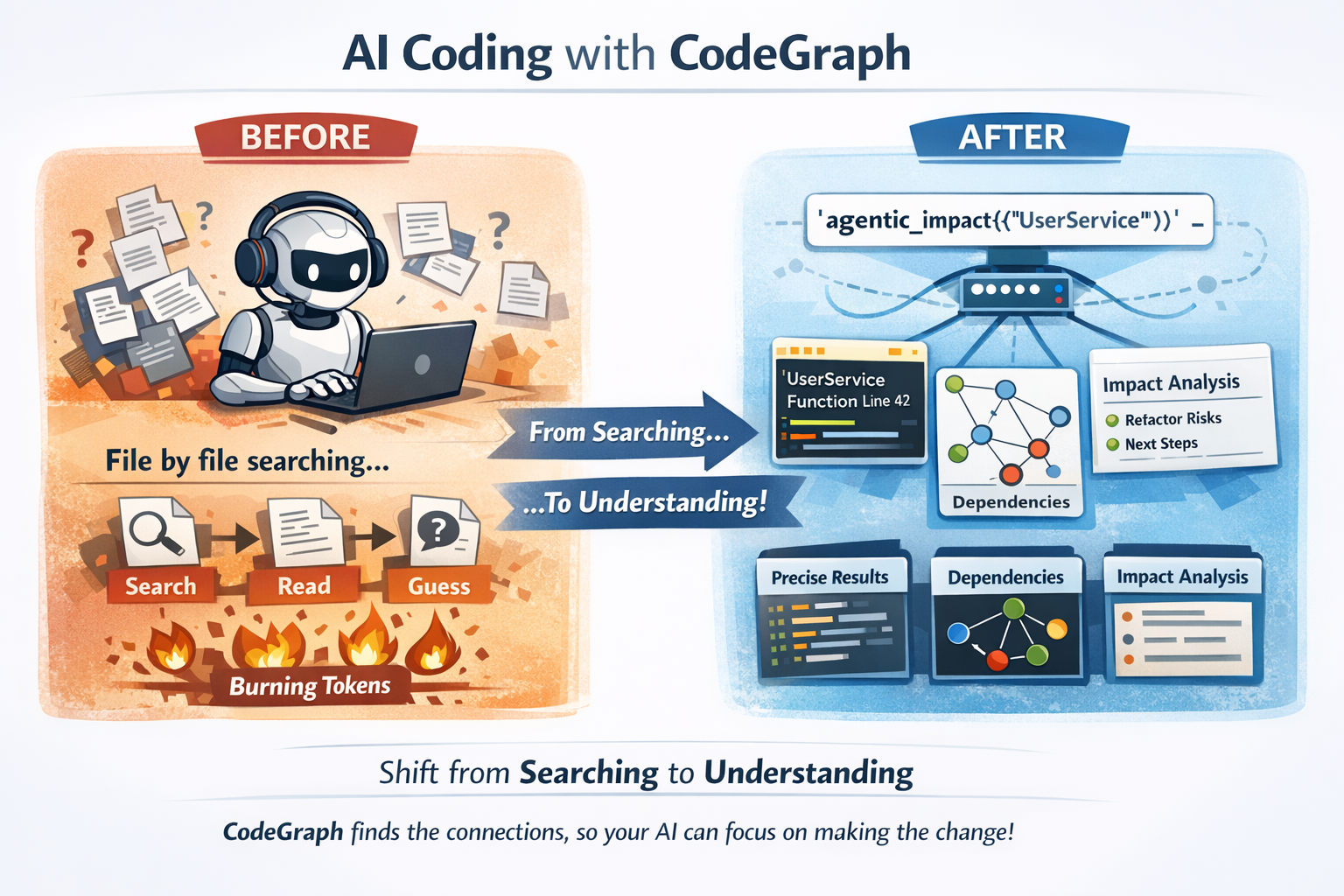
**之前:** 你的 AI 逐个读取文件,四处 grep 搜索,将 token 浪费在上下文收集上。
**之后:** 你的 AI 调用 `agentic_impact({"query": "UserService"})`,就能立即知道重构它会破坏什么。
这不是渐进式的改进。这是*搜索*代码的 AI 与*理解*代码的 AI 之间的本质区别。
### 为什么这对代码智能体非常强大
CodeGraph 将*认知负荷*(搜索 + 相关性 + 依赖推理)转移到了 CodeGraph 的智能体工具中,这样你的代码智能体就可以将其上下文预算花在*进行修改*上,而不是*发现要修改什么*。
#### 智能体工具的返回示例
`agentic_impact` 返回结构化输出(文件路径、行号和有界的代码片段/高亮部分)以及分析:
```
{
"analysis_type": "dependency_analysis",
"query": "PromptSelector",
"structured_output": {
"analysis": "…what depends on PromptSelector and why…",
"highlights": [
{ "file_path": "crates/codegraph-mcp-server/src/prompt_selector.rs", "line_number": 42, "snippet": "pub struct PromptSelector { … }" }
],
"next_steps": ["…"]
},
"steps_taken": "5",
"tool_use_count": 5
#### }
#### 否则代码 Agent 必须执行的操作
Without CodeGraph’s agentic tools, a code agent typically needs multiple “single-purpose” calls to reach the same confidence:
- search for the symbol (often multiple strategies: text + semantic + ripgrep-style search)
- open and read multiple files (definition + usages + callers + related modules)
- reconstruct dependency/call graphs mentally from partial evidence
- repeat when a guess is wrong (more reads, more tokens)
This burns context quickly: reading “just” a handful of medium-sized files + surrounding context can easily consume tens of thousands of tokens, and larger repos can push into hundreds of thousands depending on how much code gets pulled into context.
## 借助 CodeGraph,Agent 可以获得*精确定位的位置和关系*(以及有界的上下文),并能为规划和实施更改保留更多的上下文窗口可用空间。
## 快速入门
### 1. 安装
```bash
# 克隆并构建所有功能
git clone https://github.com/yourorg/codegraph-rust
cd codegraph-rust
#### ./install-codegraph-full-features.sh
#### macOS 更快构建 (LLVM lld)
If you develop on macOS, you can opt into LLVM's `lld` linker for faster linking:
```bash
# 安装 LLVM,以便 ld64.lld 位于 PATH 中 (Homebrew)
brew install llvm
# 使用仓库提供的 Makefile 目标
make build-llvm
#### make test-llvm
### 2. 启动 SurrealDB
```bash
# 本地持久化存储
#### surreal start --bind 0.0.0.0:3004 --user root --pass root file://$HOME/.codegraph/surreal.db
### 3. 应用 Schema
```bash
#### cd schema && ./apply-schema.sh
### 4. 索引你的代码
```bash
#### codegraph index /path/to/project -r -l rust,typescript,python
> **🔒 Security Note:** Indexing automatically respects `.gitignore` and filters out common secrets patterns (`.env`, `credentials.json`, `*.pem`, API keys, etc.). Your secrets won't be embedded or exposed to the agent.
### 5. 连接到 Claude Code
Add to your MCP config:
```json
{
"mcpServers": {
"codegraph": {
"command": "/full/path/to/codegraph",
"args": ["start", "stdio", "--watch"]
}
}
#### }
## **就是这样。** 你的 AI 现在已经理解了你的代码库。
## 架构
#### > **[查看交互式架构图](docs/architecture/codegraph-architecture.html)** - 通过可点击的组件和层级过滤探索完整的工作区结构。
┌─────────────────────────────────────────────────────────────────┐
│ Claude Code / MCP Client │
└─────────────────────────────────┬───────────────────────────────┘
│ MCP Protocol
▼
┌─────────────────────────────────────────────────────────────────┐
│ CodeGraph MCP Server │
│ ┌───────────────────────────────────────────────────────────┐ │
│ │ Agentic Tools Layer │ │
│ │ ┌─────────┐ ┌─────────┐ ┌─────────┐ ┌─────────────────┐ │ │
│ │ │ Rig │ │ ReAct │ │ LATS │ │ Tool Execution │ │ │
│ │ │ Agent │ │ Agent │ │ Agent │ │ Pipeline │ │ │
│ │ └────┬────┘ └────┬────┘ └────┬────┘ └────────┬────────┘ │ │
│ └───────┼───────────┼───────────┼───────────────┼───────────┘ │
│ └───────────┴───────────┴───────────────┘ │
│ │ │
│ ┌───────────────────────────┼───────────────────────────────┐ │
│ │ Inner Graph Tools │ │
│ │ ┌──────────────┐ ┌──────────────┐ ┌──────────────────┐ │ │
│ │ │ Transitive │ │ Call │ │ Coupling │ │ │
│ │ │ Dependencies │ │ Chains │ │ Metrics │ │ │
│ │ └──────────────┘ └──────────────┘ └──────────────────┘ │ │
│ │ ┌──────────────┐ ┌──────────────┐ ┌──────────────────┐ │ │
│ │ │ Reverse │ │ Cycle │ │ Hub │ │ │
│ │ │ Deps │ │ Detection │ │ Nodes │ │ │
│ │ └──────────────┘ └──────────────┘ └──────────────────┘ │ │
│ └───────────────────────────┬───────────────────────────────┘ │
└──────────────────────────────┼──────────────────────────────────┘
│
┌──────────────────────────────┼──────────────────────────────────┐
│ SurrealDB │
│ ┌─────────────┐ ┌─────────────┐ ┌─────────────────────────┐ │
│ │ Nodes │ │ Edges │ │ Chunks + Embeddings │ │
│ │ (AST + │ │ (calls, │ │ (HNSW vector index) │ │
│ │ FastML) │ │ imports) │ │ │ │
│ └─────────────┘ └─────────────┘ └─────────────────────────┘ │
│ │
│ ┌────────────────────────────────────────────────────────────┐ │
│ │ SurrealQL Graph Functions │ │
│ │ fn::semantic_search_nodes_via_chunks │ │
│ │ fn::semantic_search_chunks_with_context │ │
│ │ fn::get_transitive_dependencies │ │
│ │ fn::trace_call_chain │ │
│ │ fn::calculate_coupling_metrics │ │
│ └────────────────────────────────────────────────────────────┘ │
#### └─────────────────────────────────────────────────────────────────┘
**Key insight:** The agentic tools don't just call one function. They *reason* about which graph operations to perform, chain them together, and synthesize results. A single `agentic_impact` call might:
1. Search for the target component semantically
2. Get its direct dependencies
3. Trace transitive dependencies
4. Check for circular dependencies
5. Calculate coupling metrics
6. Identify hub nodes that might be affected
## 7. 将所有发现综合成一个可执行的答案
## 支持的语言
CodeGraph uses tree-sitter for initial parsing and enhances results with FastML algorithms and supports:
## Rust • Python • TypeScript • JavaScript • Go • Java • C++ • C • Swift • Kotlin • C# • Ruby • PHP • Dart
## Provider 灵活性
### Embeddings
Use any model with dimensions 384-4096:
- **Local:** Ollama, LM Studio, ONNX Runtime
- **Cloud:** OpenAI, Jina AI
### LLM (用于 Agent 推理)
- **Local:** Ollama, LM Studio
- **Cloud:** Anthropic Claude, OpenAI, xAI Grok, OpenAI Compliant
### 数据库
- **SurrealDB** with HNSW vector index (2-5ms queries)
## - 提供免费云套餐,访问 [surrealdb.com/cloud](https://surrealdb.com/cloud)
## 配置
Global config in `~/.codegraph/config.toml`:
```toml
[embedding]
provider = "ollama"
model = "qwen3-embedding:0.6b"
dimension = 1024
[llm]
provider = "anthropic"
model = "claude-sonnet-4"
[database.surrealdb]
connection = "ws://localhost:3004"
namespace = "ouroboros"
#### database = "codegraph"
See [INSTALLATION_GUIDE.md](docs/INSTALLATION_GUIDE.md) for complete configuration options.
### 实验性 graph schema (可选)
CodeGraph can run against an experimental SurrealDB **graphdb-style schema** (`schema/codegraph_graph_experimental.surql`) that is interoperable with the existing CodeGraph tools and indexing pipeline.
Compared to the relational/vanilla schema (`schema/codegraph.surql`), the experimental schema is designed for faster and more efficient graph-query operations (traversals, neighborhood expansion, and tool-driven graph analytics) on large codebases.
To use it:
1) Load the schema into a dedicated database (once):
```bash
# 示例 (SurrealDB CLI)
#### surreal sql --conn ws://localhost:3004 --ns ouroboros --db codegraph_experimental < schema/codegraph_graph_experimental.surql
2) Point CodeGraph at that database:
```bash
CODEGRAPH_USE_GRAPH_SCHEMA=true
#### CODEGRAPH_GRAPH_DB_DATABASE=codegraph_experimental
Notes:
- The schema file defines HNSW indexes for multiple embedding dimensions (384–4096) so you can switch embedding models without reworking the DB.
- Schema loading is not currently performed automatically at runtime; you must apply the `.surql` file to the target database before indexing.
## - 当 `CODEGRAPH_USE_GRAPH_SCHEMA=true` 时,`CODEGRAPH_GRAPH_DB_DATABASE` 用于控制 Surreal 数据库的 indexing/tools 使用。
## Daemon 模式
Keep your index fresh automatically:
```bash
# 使用 MCP server (推荐)
codegraph start stdio --watch
# 独立 Daemon
#### codegraph daemon start /path/to/project --languages rust,typescript
## 变更会被检测、防抖并在后台重新索引。
## 下一步
- [ ] More language support
- [ ] Cross-repository analysis
- [ ] Custom graph schemas
## - [ ] 用于自定义分析器的插件系统
## 理念
CodeGraph exists because we believe AI coding assistants should be *augmented*, not replaced. The best AI-human collaboration happens when the AI has deep context about what you're working with.
We're not trying to replace your IDE, your type checker, or your tests. We're giving your AI the context it needs to actually help.
## **你的代码库是一个图。让你的 AI 以这种方式看待它。**
## 许可证
## MIT
## 链接
- [Installation Guide](docs/INSTALLATION_GUIDE.md)
- [SurrealDB Cloud](https://surrealdb.com/cloud) (free tier)
- [Jina AI](https://jina.ai) (free API tokens)
## - [Ollama](https://ollama.com) (本地模型)
```
标签:AI智能体, AI编程助手, AI辅助开发, AI风险缓解, AST解析, DLL 劫持, FastML, GraphRAG, IPv6支持, LSP, MCP协议, MCP工具, RAG, Rust, SurrealDB, 云安全监控, 代码上下文管理, 代码分析, 代码架构分析, 代码检索, 代码知识图谱, 代码索引, 凭证管理, 可视化界面, 向量嵌入, 图遍历, 大语言模型, 威胁情报, 开发者工具, 检索增强生成, 混合检索, 网络流量审计, 语义搜索, 通知系统, 静态分析