ndouglas-cloudsmith/exploit-check
GitHub: ndouglas-cloudsmith/exploit-check
一款多维度的漏洞风险评估命令行工具,通过聚合 CVSS、EPSS、KEV 及 OSV 数据来对比漏洞评分并检测开源包中的恶意软件。
Stars: 10 | Forks: 3
# 漏洞利用检查
该项目最初旨在通过简单的命令行界面将 CVSS 分数与 EPSS 数据进行比较。目前,该项目已超越了最初的漏洞检测和漏洞利用缓解范畴,发展到在 Kubernetes 中运行的容器化工作负载中[检测恶意软件](https://github.com/ndouglas-cloudsmith/exploit-check/tree/main?tab=readme-ov-file#open-source-malware-osm)。
下载扫描器并将其转换为可执行文件: ``` wget https://raw.githubusercontent.com/ndouglas-cloudsmith/exploit-check/refs/heads/main/exploit-check.sh chmod +x exploit-check.sh ``` 如果你需要更新扫描器(EPSS 记录每天刷新),请运行以下命令: ``` ./exploit-check.sh update ``` 要查询特定的 CVE(例如,```CVE-2021-44228```),请运行以下命令: ``` ./exploit-check.sh query CVE-2021-44228 ``` 要获取 KEV 发现的完整输出,请使用 ```--full``` 标志 ``` ./exploit-check.sh query CVE-2021-44228 --full ```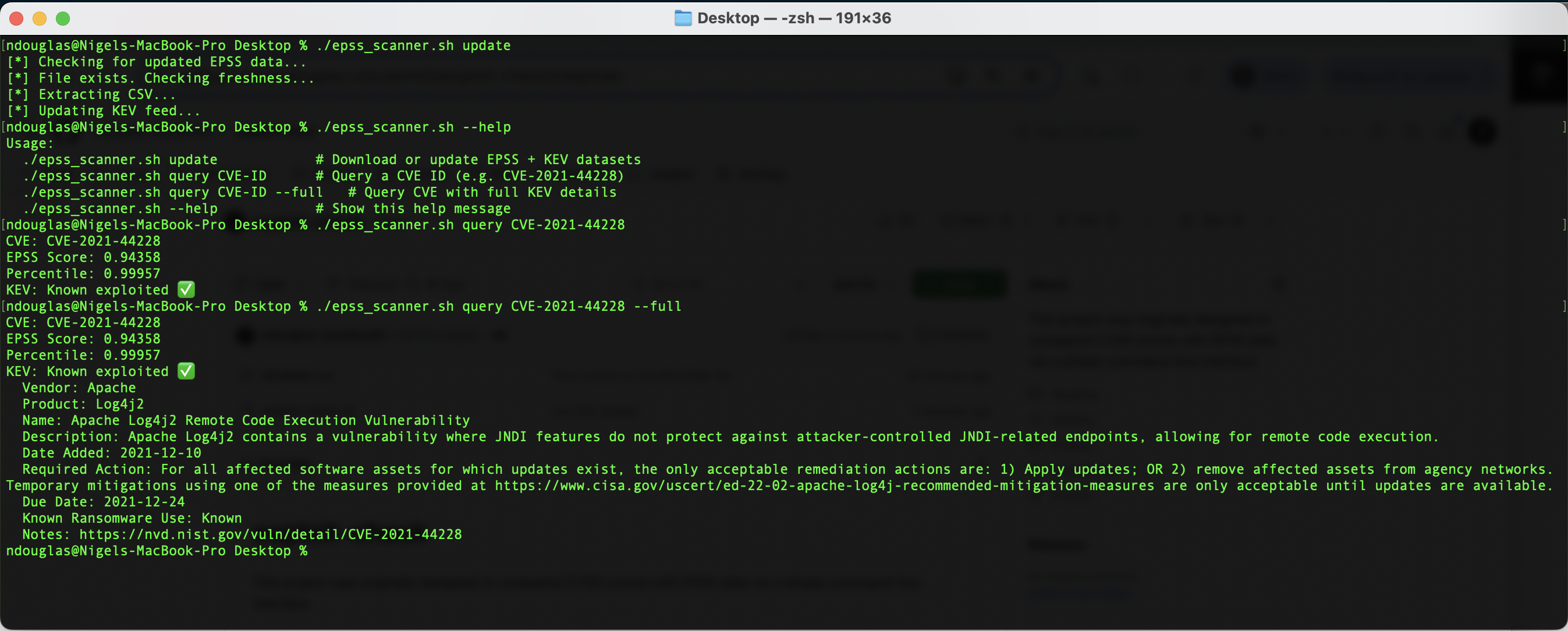 列出所有 KEV CVE(简短形式):
```
./exploit-check.sh list
```
列出所有 KEV CVE 及其详细信息:
```
./exploit-check.sh list --full
```
## 将 CVSS 分数与 EPSS 百分位数进行比较并检查已知漏洞利用
| CVE ID | CVSS 严重程度 | CVSS 分数 | EPSS 百分比 | KEV | ExploitDB | OSV |
| --- |:---------:|:---------:|:---------:|:---------:|:---------:|:---------:|
| `CVE-2021-45786` | **严重** | **9.8** | 0.41% | ❌ | ❌ | ❌ |
| `CVE-2024-0646` | 高危 | 7.0 | 0.02% | ❌ | ❌ | ✅ |
| `CVE-2024-25062` | 高危 | 7.5 | 0.11% | ❌ | ❌ | ✅ |
| `CVE-2021-44228` | **严重** | **10.0** | **94.47%** | ✅ | ✅ | ✅ |
| `CVE-2024-38285` | ❌ | ❌ | 0.08% | ❌ | ❌ | ❌ |
| `CVE-2017-0144` | 高危 | 8.8 | **94.42%** | ✅ | ✅ | ❌ |
| `CVE-2024-20024` | 中危 | 6.0 | 0.02% | ❌ | ❌ | ❌ |
| `CVE-2014-0160` | 高危 | 7.5 | **94.45%** | ✅ | ✅ | ✅ |
| `CVE-2024-9482` | 中危 | 5.1 | 0.03% | ❌ | ❌ | ❌ |
| `CVE-2017-5638` | **严重** | **9.8** | **94.27%** | ✅ | ✅ | N/A|
| `CVE-2024-28085` | 低危 | 3.3 | 9.83% | ❌ | ❌ | ✅ |
| `CVE-2024-50302` | 中危 | 5.5 | 0.30% | ✅ | ❌ | ✅ |
| `CVE-2025-47273` | 高危 | **8.8** | 0.16% | ❌ | ❌ | ✅ |
| `CVE-2024-6345` | ❌ | ❌ | 4.36% | ❌ | ❌ | ✅ |
| `CVE-2016-5195` | 高危 | 7.0 | **94.18%** | ✅ | ✅ | ✅ |
| `CVE-2022-48477` | 中危 | 4.1 | **0.00%** | ❌ | ❌ | ❌ |
列出所有 KEV CVE(简短形式):
```
./exploit-check.sh list
```
列出所有 KEV CVE 及其详细信息:
```
./exploit-check.sh list --full
```
## 将 CVSS 分数与 EPSS 百分位数进行比较并检查已知漏洞利用
| CVE ID | CVSS 严重程度 | CVSS 分数 | EPSS 百分比 | KEV | ExploitDB | OSV |
| --- |:---------:|:---------:|:---------:|:---------:|:---------:|:---------:|
| `CVE-2021-45786` | **严重** | **9.8** | 0.41% | ❌ | ❌ | ❌ |
| `CVE-2024-0646` | 高危 | 7.0 | 0.02% | ❌ | ❌ | ✅ |
| `CVE-2024-25062` | 高危 | 7.5 | 0.11% | ❌ | ❌ | ✅ |
| `CVE-2021-44228` | **严重** | **10.0** | **94.47%** | ✅ | ✅ | ✅ |
| `CVE-2024-38285` | ❌ | ❌ | 0.08% | ❌ | ❌ | ❌ |
| `CVE-2017-0144` | 高危 | 8.8 | **94.42%** | ✅ | ✅ | ❌ |
| `CVE-2024-20024` | 中危 | 6.0 | 0.02% | ❌ | ❌ | ❌ |
| `CVE-2014-0160` | 高危 | 7.5 | **94.45%** | ✅ | ✅ | ✅ |
| `CVE-2024-9482` | 中危 | 5.1 | 0.03% | ❌ | ❌ | ❌ |
| `CVE-2017-5638` | **严重** | **9.8** | **94.27%** | ✅ | ✅ | N/A|
| `CVE-2024-28085` | 低危 | 3.3 | 9.83% | ❌ | ❌ | ✅ |
| `CVE-2024-50302` | 中危 | 5.5 | 0.30% | ✅ | ❌ | ✅ |
| `CVE-2025-47273` | 高危 | **8.8** | 0.16% | ❌ | ❌ | ✅ |
| `CVE-2024-6345` | ❌ | ❌ | 4.36% | ❌ | ❌ | ✅ |
| `CVE-2016-5195` | 高危 | 7.0 | **94.18%** | ✅ | ✅ | ✅ |
| `CVE-2022-48477` | 中危 | 4.1 | **0.00%** | ❌ | ❌ | ❌ |
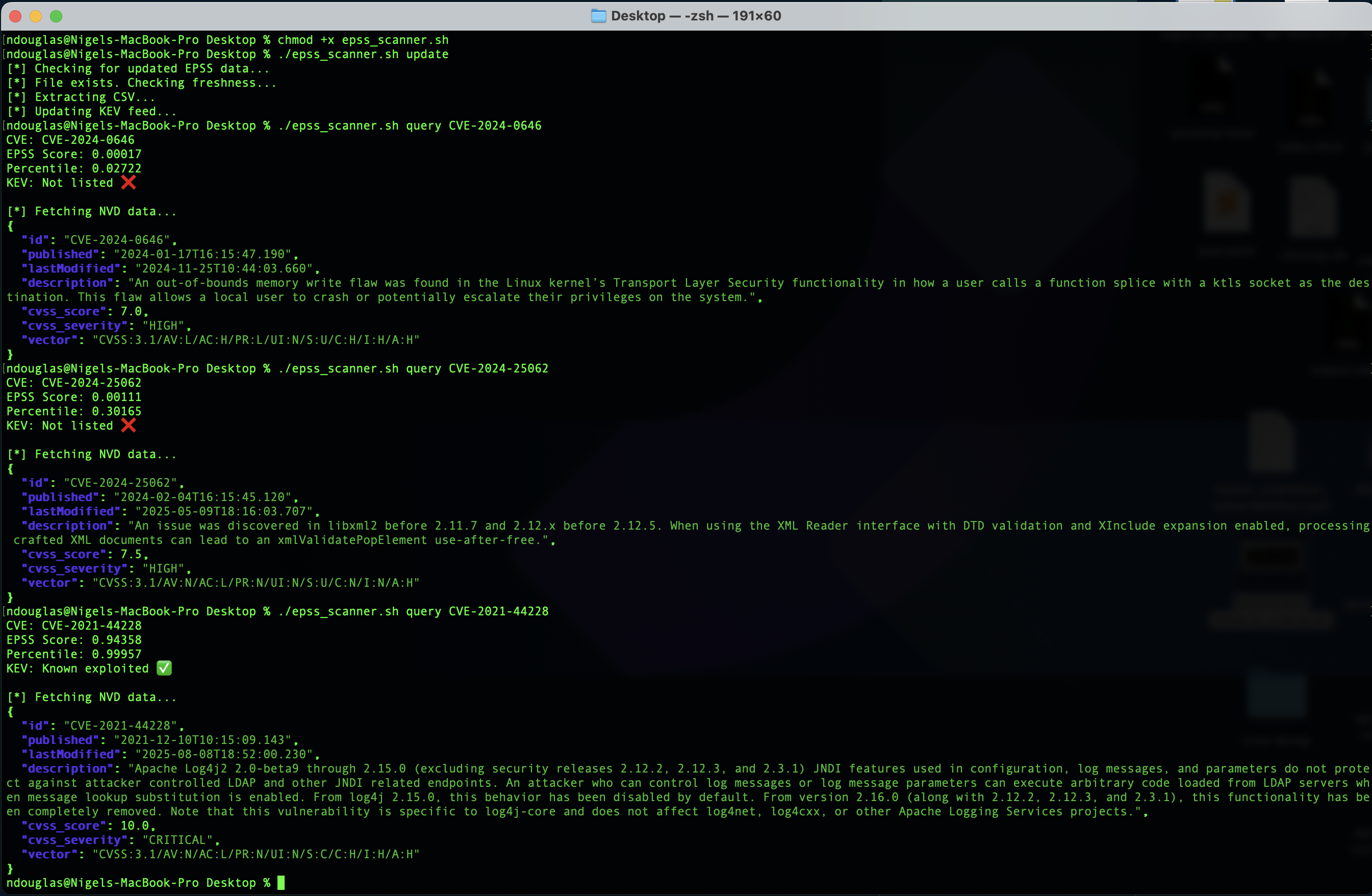 ## 基于 CVE 或包名进行过滤
如果你从 Trivy 或类似工具获取到 CVE ID,你将获得该 CVE 的上述所有数据的简明响应:
```
./exploit-check.sh query CVE-2024-6345
```
如果你想从 OSV.dev 获取相关的包级别洞察,可以添加 ```--package-info``` 标志:
```
./exploit-check.sh query CVE-2024-6345 --package-info
```
## 通过 OSV.dev 查询上游包
| 生态系统名称 | 描述 | 示例包名 | 漏洞利用检查查询 |
| --- |:---------:|:---------:|:---------:|
| `pypi` | 来自 Python Package Index 的 Python 包。 | **requests** | ```./exploit-check.sh pkg pypi requests``` |
| `npm` | 来自 Node Package Manager 注册中心的 JavaScript/TypeScript 包。 | **react** | ```./exploit-check.sh pkg npm react``` |
| `maven` | Java 和其他 JVM 语言包。使用 `GroupId:ArtifactId` 格式。 | **log4j** | ```./exploit-check.sh pkg maven log4j``` |
| `rubygems` | Ruby 包(gems)。 | **rails** | ```./exploit-check.sh pkg rubygems rails``` |
| `pub` | 来自 Pub 仓库的 Dart 和 Flutter 包。 | **http** | ```./exploit-check.sh pkg pub http``` |
| `debian` | Debian Linux 包。包含不同版本(例如:`debian:11`)。 | **openssl** | ```./exploit-check.sh pkg debian openssl``` |
| `conancenter` | 来自 ConanCenter 的 C/C++ 包。 | **openssl** | ```./exploit-check.sh pkg conancenter openssl ``` |
| `hex` | Elixir 和 Erlang 包。 | **phoenix** | ```./exploit-check.sh pkg hex phoenix``` |
| `alpine` | Alpine Linux 包。包含不同版本(例如:`alpine:v3.16`)。 | **curl** | ```./exploit-check.sh pkg alpine curl``` |
你可以使用 ```pkg``` 包命令来查询特定生态系统(如 ```PyPi```)的包:
```
./exploit-check.sh pkg pypi requests
```
最后,运行 ```--follow-cves``` 标志,以查找这些记录在 OSV 别名中发现的映射 CVE:
```
./exploit-check.sh pkg pypi requests --follow-cves
```
## 项目简单工作流
我们可以扫描一个公开提供的包,以了解其是否包含漏洞:
```
./exploit-check.sh pkg Alpine:v3.22 setuptools
```
## 基于 CVE 或包名进行过滤
如果你从 Trivy 或类似工具获取到 CVE ID,你将获得该 CVE 的上述所有数据的简明响应:
```
./exploit-check.sh query CVE-2024-6345
```
如果你想从 OSV.dev 获取相关的包级别洞察,可以添加 ```--package-info``` 标志:
```
./exploit-check.sh query CVE-2024-6345 --package-info
```
## 通过 OSV.dev 查询上游包
| 生态系统名称 | 描述 | 示例包名 | 漏洞利用检查查询 |
| --- |:---------:|:---------:|:---------:|
| `pypi` | 来自 Python Package Index 的 Python 包。 | **requests** | ```./exploit-check.sh pkg pypi requests``` |
| `npm` | 来自 Node Package Manager 注册中心的 JavaScript/TypeScript 包。 | **react** | ```./exploit-check.sh pkg npm react``` |
| `maven` | Java 和其他 JVM 语言包。使用 `GroupId:ArtifactId` 格式。 | **log4j** | ```./exploit-check.sh pkg maven log4j``` |
| `rubygems` | Ruby 包(gems)。 | **rails** | ```./exploit-check.sh pkg rubygems rails``` |
| `pub` | 来自 Pub 仓库的 Dart 和 Flutter 包。 | **http** | ```./exploit-check.sh pkg pub http``` |
| `debian` | Debian Linux 包。包含不同版本(例如:`debian:11`)。 | **openssl** | ```./exploit-check.sh pkg debian openssl``` |
| `conancenter` | 来自 ConanCenter 的 C/C++ 包。 | **openssl** | ```./exploit-check.sh pkg conancenter openssl ``` |
| `hex` | Elixir 和 Erlang 包。 | **phoenix** | ```./exploit-check.sh pkg hex phoenix``` |
| `alpine` | Alpine Linux 包。包含不同版本(例如:`alpine:v3.16`)。 | **curl** | ```./exploit-check.sh pkg alpine curl``` |
你可以使用 ```pkg``` 包命令来查询特定生态系统(如 ```PyPi```)的包:
```
./exploit-check.sh pkg pypi requests
```
最后,运行 ```--follow-cves``` 标志,以查找这些记录在 OSV 别名中发现的映射 CVE:
```
./exploit-check.sh pkg pypi requests --follow-cves
```
## 项目简单工作流
我们可以扫描一个公开提供的包,以了解其是否包含漏洞:
```
./exploit-check.sh pkg Alpine:v3.22 setuptools
```
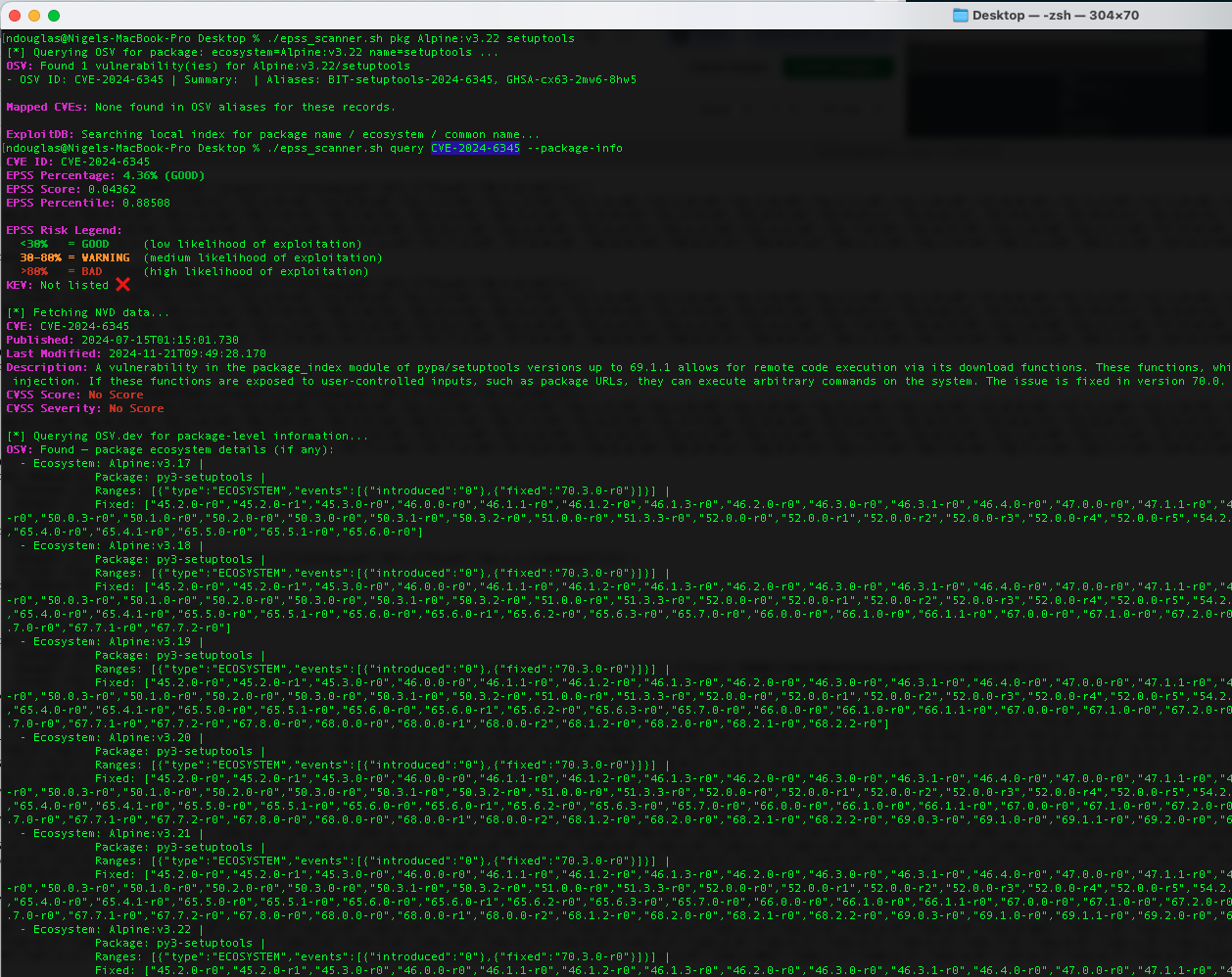
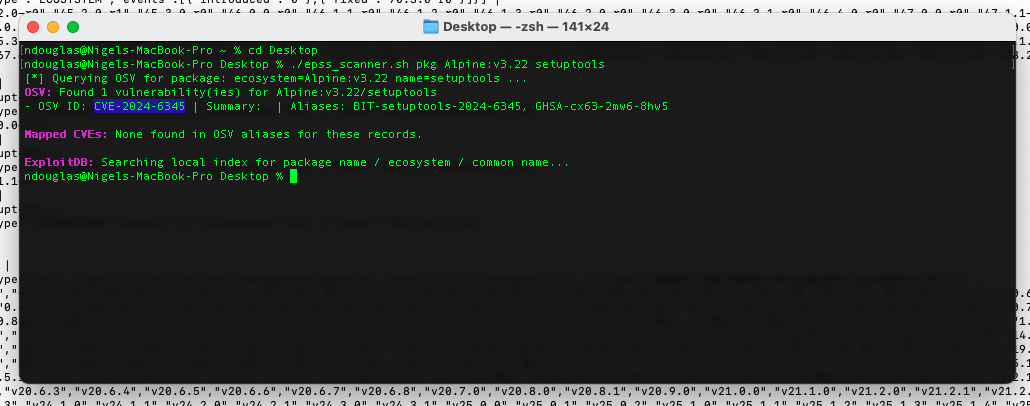 然后,用户可以使用同一工具扫描关联的 CVE ID,以了解与该漏洞相关的实际风险:
```
./exploit-check.sh query CVE-2024-6345 --package-info
```
然后,用户可以使用同一工具扫描关联的 CVE ID,以了解与该漏洞相关的实际风险:
```
./exploit-check.sh query CVE-2024-6345 --package-info
```
 ## 域名抢注示例
使用 [GitHub 搜索](https://github.com/search?q=typosquatting+repo%3Aossf%2Fmalicious-packages&type=code),我能够在 OpenSSF 的恶意包项目中搜索到仅为域名抢注而发布的包示例:
## 域名抢注示例
使用 [GitHub 搜索](https://github.com/search?q=typosquatting+repo%3Aossf%2Fmalicious-packages&type=code),我能够在 OpenSSF 的恶意包项目中搜索到仅为域名抢注而发布的包示例:
类型:域名抢注 (TYPOSQUATTING) ``` ./exploit-check.sh query MAL-2023-8358 ``` 类型:网络活动 (NETWORK_ACTIVITY) ``` ./exploit-check.sh query MAL-2025-5829 ``` 类型:域名抢注 (TYPOSQUATTING) ``` ./exploit-check.sh query MAL-2025-2549 ``` 类型:域名抢注 (TYPOSQUATTING) ``` ./exploit-check.sh query MAL-2023-8360 ``` [GitHub 搜索](https://github.com/search?q=requirements.txt&type=code) 也可用于过滤包含域名抢注依赖项的所有公开 Python `requirements.txt` 文件实例。这个 [GitHub 搜索](https://github.com/search?q=%22import+requess%22+language%3Apython&type=code) 至少返回了一个在 Python 应用程序中使用域名抢注依赖项的实例。问题是,这个过程非常繁琐。相反,我需要定义一个已在 OSSF 恶意包项目中列出的域名抢注包名列表,以便我可以通过 [GitHub 搜索](https://github.com/search?q=%28%22import+requess%22+OR+%22import+reqest%22+OR+%22import+requestss%22+OR+%22requestss2%22%29+language%3Apython&type=code) 查询它们,从而证明组织正受到域名抢注或 LLM 幻觉拼写错误的影响。 ## 恶意软件发现 (WIP) ``` ./exploit-check.sh pkg npm eslint-plugin-react_editor ``` 如果你想对任何发现的 CVE 同时运行 ```query_cve```(这不会对 ```MAL-*``` 项运行 query_cve,因为它们不是 CVE),请添加 ```--follow-cves```: ``` ./exploit-check.sh pkg npm eslint-plugin-react_editor --follow-cves ``` 一个包含 CVE 和 MAL 别名的单一安全公告记录的明确示例显示在 OSV / GitHub 安全公告数据中:```backslash@0.2.1``` 的公告将 ```CVE-2025-59140``` 和 ```MAL-2025-46968``` 列为别名(即,同一事件/公告被标记了两种 ID)。 ``` ./exploit-check.sh pkg npm backslash --follow-cves ``` 发生这种情况的原因:不同的机构/数据库对事件的标记方式不同 —— 一些记录将事件标记为“恶意包”(```MAL-...```),而漏洞数据库则为相同的潜在问题(或在同一包/公告中发现的相关问题)分配 CVE 标识符。当它们指向同一事件时,OSV/GitHub 安全公告数据库通常会将这些别名聚合到一条记录中。
[GHSA-53mq-f4w3-f7qv](https://github.com/Qix-/node-backslash/security/advisories/GHSA-53mq-f4w3-f7qv):在 npm 账户被接管后,backslash@0.2.1 包含恶意软件
[CVE-2025-59140](https://api.osv.dev/v1/vulns/CVE-2025-59140):"未找到漏洞,但发现以下别名:GHSA-53mq-f4w3-f7qv GHSA-m2xf-jp99-f298 MAL-2025-46968"
[CVE-2021-44228](https://api.osv.dev/v1/vulns/CVE-2021-44228):"aliases":"GHSA-jfh8-c2jp-5v3q"
用户现在可以查询已知的安全公告,以更好地理解映射标识符(```CVE-```、```GHSA-```、```MAL-```)之间的关系,从而更好地了解高风险包: ``` ./exploit-check.sh query GHSA-53mq-f4w3-f7qv --package-info ``` #### 最佳(直接)方法 —— 使用 OSV API POST /v1/query OSV 的 API 接受包含 ```package``` 和(可选)```version``` 的 JSON 请求体。如果你提供 ```version```,OSV 将仅返回实际匹配该特定版本的漏洞(如果不匹配则无返回)。 ``` # 用你需要的任何内容替换 0.2.1 和反斜杠 curl -s -X POST https://api.osv.dev/v1/query -d '{ "package": { "ecosystem":"npm", "name":"backslash" }, "version":"0.2.1" }' -H 'Content-Type: application/json' | jq . ``` #### 最佳(直接)方法 —— 使用 OSV API POST /v1/query 有时安全公告列出的是受影响的 ```ranges``` 而不是确切枚举的版本。在这种情况下,你可以向 OSV 查询该包的所有漏洞,然后检查你的版本是否包含在任何受影响的范围内(需要工具/逻辑)。例如: ``` # 获取该 package 的所有 vuln 记录 curl -s -X POST https://api.osv.dev/v1/query -d '{ "package": { "ecosystem":"npm", "name":"backslash" } }' -H 'Content-Type: application/json' | jq . ``` 查看每个 ```affected[].ranges``` 条目(它们使用 semver 范围或 git 提交范围)。你可以编写一个 semver 检查脚本(node、python semver 库,或使用 OSV 自己的匹配逻辑)来测试 ```0.2.1``` 是否属于某个范围。当需要匹配确切版本时,OSV 文档/讨论中展示了这种方法。
针对确切版本的正确 OSV 查询: ``` curl -s -X POST https://api.osv.dev/v1/query -d '{"package":{"ecosystem":"npm","name":"backslash"},"version":"0.2.1"}' -H 'Content-Type: application/json' | jq ``` - 如果没有返回任何内容,请在不带 ```version``` 的情况下进行查询,并检查 ```affected[].ranges``` 以确认 ```0.2.1``` 是否属于某个范围。 - 不要将 ```backslash@0.2.1``` 作为包名传递 —— 应分别拆分名称和版本。我正在处理代码中的这一区别。 或者直接查询恶意软件发现结果: ``` curl -s "https://api.osv.dev/v1/vulns/MAL-2023-8358" | jq ``` 对于像 ```LiteLLM``` 这样流行的软件包,显式过滤以恶意包 ID (MALICIOUS PACKAGE ID) 开头的漏洞 ID 是很有意义的。 ``` curl -s -X POST https://api.osv.dev/v1/query \ -d '{"package":{"ecosystem":"PyPI","name":"litellm"},"version":"1.82.7"}' \ -H 'Content-Type: application/json' | \ jq '.vulns[] | select(.id | startswith("MAL-"))' ``` #### 搜索 FIRST 的 EPSS 内容 在 FIRST 的 EPSS API 中检查单个 CVE,并可选择将其与漏洞利用检查器进行比较: ``` ./exploit-check.sh query CVE-2022-48477 --full --package-info curl -s "https://api.first.org/data/v1/epss?cve=CVE-2022-48477" | jq ``` 或者同时查询多个 CVE: ``` curl -s "https://api.first.org/data/v1/epss?cve=CVE-2022-48477,CVE-2024-9916" | jq ``` #### 使用中的高危和严重漏洞扫描 使用 kubectl,我们可以创建 ```custom-columns``` 来了解我们的 Kubernetes 集群中正在运行哪些容器镜像。
``` kubectl get pods -A -o custom-columns='NAMESPACE:.metadata.namespace,NAME:.metadata.name,IMAGES:.spec.containers[*].image' ``` 目前还没有为此构建具体用例,但最终我们需要将各项能力与实际可被利用的 CVE 条件进行对比: ``` kubectl get pods -A -o custom-columns='NAMESPACE:.metadata.namespace,NAME:.metadata.name,IMAGES:.spec.containers[*].image,CAPS_ADD:.spec.containers[*].securityContext.capabilities.add,CAPS_DROP:.spec.containers[*].securityContext.capabilities.drop' ``` 目标是将这些镜像自动通过管道传递给 Trivy 扫描,以便我们了解哪些 ```HIGH``` 或 ```CRITICAL``` 漏洞正在使用中。 ``` kubectl get pods -A -o jsonpath='{.items[*].spec.containers[*].image}' \ | tr ' ' '\n' \ | sort -u \ | xargs -n1 trivy image --scanners vuln --severity HIGH,CRITICAL ``` 查找活动集群命名空间中所有 CVE 的一种更有效的方法是使用以下命令: ``` ./exploit-check.sh kubernetes namespace default --severity high,critical ``` 注意:这基于命名空间工作,并且需要将 Trivy 作为执行此自动扫描的先决条件。
现在,我们可以使用简单的纯文本搜索标志,在你的 Kubernetes 中找到所有正在使用的容器镜像: ``` ./exploit-check.sh images namespace -A --source cloudsmith ```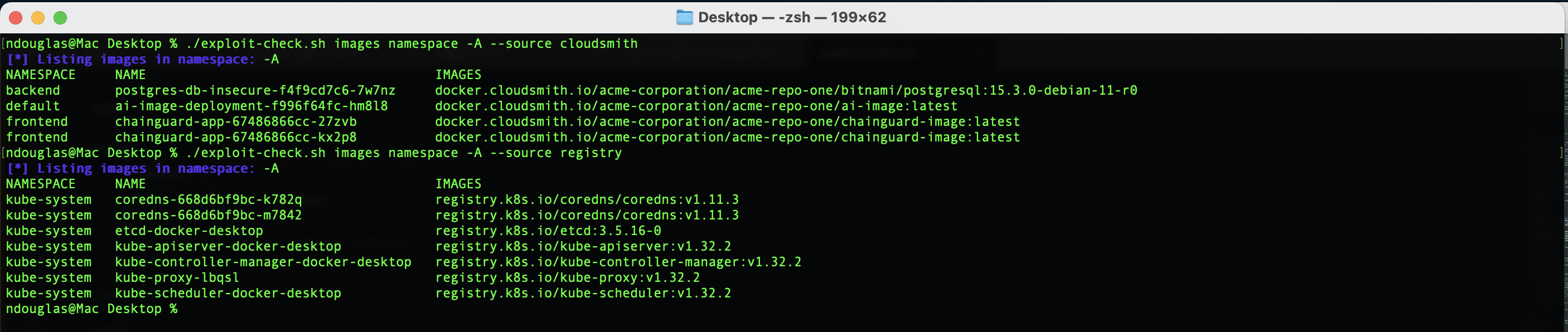 #### 软件溯源与识别域名抢注
所有的包都有经过签名的作者吗?简而言之,不是。PyPI 具有:
#### 软件溯源与识别域名抢注
所有的包都有经过签名的作者吗?简而言之,不是。PyPI 具有:
不对元数据中的作者/维护者进行加密验证。
唯一“真正”的事实来源是列为维护者的 PyPI 账户(在 ```web UI``` 上可见,而在 ```JSON API``` 中不可见)。
这就是为什么域名抢注会奏效的原因:JSON 元数据非常薄弱,且这些字段可能为空或具有误导性。 ``` curl https://pypi.org/pypi/fabric/json | jq '.info.name, .info.author, .info.home_page' ``` 你可能还想跟踪与软件包相关的官方文档/问题,以确认其有效性。
专业提示:如果你经常这样做,可以将其封装成一个 函数,如下所示: ``` pypi_urls () { curl -s https://pypi.org/pypi/$1/json | jq -r '..|strings?|select(test("\\.com|\\.io"))' | grep --color=always -E '\.com|\.io' } ``` 然后你可以运行: ``` pypi_urls requests ``` #### 清理脚本 如果你想/需要删除本地数据源并移除 Gatekeeper 准入控制器,可以运行以下命令: ``` rm -v -- exploitdb_exploits.csv epss_scores-current.csv epss_scores-current.csv.gz known_exploited_vulnerabilities.json && kubectl delete -f https://raw.githubusercontent.com/open-policy-agent/gatekeeper/release-3.13/deploy/gatekeeper.yaml ``` 当你运行 ```update``` 命令时,这些数据源将被重新拉取: ``` ./exploit-check.sh update ``` #### 近期活动 - [网络研讨会](https://cloudsmith.com/events/webinars/from-cve-scores-to-action-enforcing-artifact-management-policies-in-opa) 演示:只是让 kubectl 的输出更易读一点: ``` brew install kubecolor alias kubectl=kubecolor ``` ## Kubernetes 特定 CVE 如果你想要一份包含关键信息的 2025 年 CVE 整洁列表: ``` curl -sL https://kubernetes.io/docs/reference/issues-security/official-cve-feed/index.json \ | jq '.items | map(select(.date_published | startswith("2025-"))) | sort_by(.date_published) | reverse | map({id, date_published, summary})' ``` 或者获取简单的表格输出: ``` curl -sL https://kubernetes.io/docs/reference/issues-security/official-cve-feed/index.json \ | jq -r '.items | map(select(.date_published | startswith("2025-"))) | sort_by(.date_published) | reverse[] | "\(.date_published)\t\(.id)\t\(.summary)"' ``` ## 开源恶意软件 (OSM) OSM 是一个社区数据库、API 和协作平台,旨在帮助识别和防范开源恶意软件:[https://opensourcemalware.com/api-docs](https://opensourcemalware.com/api-docs)
检查一个**包**: ``` curl -X GET "https://api.opensourcemalware.com/functions/v1/check-malicious?report_type=package&resource_identifier=rank4222wun&ecosystem=npm" -H "Authorization: Bearer $OSM_KEY" | jq ``` 检查一个**仓库**: ``` curl -X GET "https://api.opensourcemalware.com/functions/v1/check-malicious?report_type=repository&resource_identifier=https://github.com/SettleMint-Tech/SettleMint_platform" -H "Authorization: Bearer $OSM_KEY" | jq ``` 检查一个 **URL**: ``` curl -s -X GET "https://api.opensourcemalware.com/functions/v1/check-malicious?report_type=url&resource_identifier=ab498.pythonanywhere.com/static/in4.js" -H "Authorization: Bearer $OSM_KEY" | jq ``` 检查一个**域名**: ``` curl -X GET "https://api.opensourcemalware.com/functions/v1/check-malicious?report_type=domain&resource_identifier=vscode-ext-git.vercel.app" -H "Authorization: Bearer $OSM_KEY" | jq ``` ## checkmalware.py 下载脚本,使其可执行,并设置别名为 ```checkmalware```: ``` wget https://raw.githubusercontent.com/ndouglas-cloudsmith/exploit-check/refs/heads/main/checkmalware.py chmod +x checkmalware.py alias checkmalware='python3 checkmalware.py' ``` 你需要 ```requests``` 库。
我们将考虑从 ```Cloudsmith``` 公开获取此内容: ``` pip install requests --break-system-packages ``` 运行 OSM 命令的辅助函数: ``` checkmalware -h ``` 被标记为 ```CRITICAL``` 的 JavaScript ```npm``` 包: ``` python3 checkmalware.py pkg npm rank4222wun ``` 被标记为 ```LOW``` 严重程度的 Python ```PyPI``` 包: ``` python3 checkmalware.py pkg pypi spellcheckerpy ``` 被标记为 ```CRITICAL``` 严重程度的域名抢注 Java ```Maven``` 包: ``` python3 checkmalware.py pkg maven org.fasterxml.jackson.core:jackson-databind ``` 被标记为 ```CRITICAL``` 严重程度的 .NET ```NuGet``` 包: ``` python3 checkmalware.py pkg nuget LagoVista.CloudStorage.Net ``` 被标记为 ```HIGH``` 严重程度的 ```RybyGems``` 包: ``` python3 checkmalware.py pkg rubygems znowflake_client ``` 被标记为 ```HIGH``` 严重程度的 ```AI Skill``` 包: ``` python3 checkmalware.py pkg skills https://www.clawhub.ai/gvillanueva84/wed-1-0-1 ``` #### OSSF OSV 与 OSM 对比 包生态系统支持: | 生态系统 | OSV | OSM | | --------- | --- | --- | | `npm` | ✅ | ✅ | | `pypi` | ✅ | ✅ | | `maven` | ✅ | ✅ | | `rubygems` | ✅ | ✅ | | `packagist` | ❌ | ✅ | | `crates.io` | ✅ | ✅ | | `Go` modules | ✅ | ✅ | | `Go modules` | ✅ | ✅ | | `OpenVSX` | ✅ | ✅ | | `VScode` | ✅ | ✅ | | `AI Skills` | ❌ | ✅ | 我最初将其视为 OSV 与 OSM 的对比。但实际上,应该是 OSM 结合 OSV。
https://opensourcemalware.com/?tag=ossf
OSV 只是另一个报告框架,用于对可在 OSM 中使用的恶意软件进行分类:
https://github.com/ossf/malicious-packages/tree/main/osv/malicious
https://api.github.com/repositories/611884074/contents/osv/malicious ## 识别运行中容器内的恶意软件 我们正在运行两个独立的脚本。
```malware-scanner.py``` 检测正在运行的 Kubernetes 工作负载中的恶意依赖项。
```checkmalware.py``` 通过 OSM 和 OSV 数据库检查该包,以便用户更好地了解该恶意软件。
扫描 Kubernetes 默认网络命名空间: ``` python3 malware-scanner.py --namespace default ``` 扫描在 **PyPI** 开源上游源中发现的 ```typosquatted``` 恶意软件示例: ``` python3 checkmalware.py pkg pypi reuests ``` 扫描 PyPI 上的 ```litellm``` 包 - 作为活跃供应链攻击的一部分,该 [AI 网关被植入后门](https://www.trendmicro.com/en_us/research/26/c/inside-litellm-supply-chain-compromise.html): ``` python3 checkmalware.py pkg pypi litellm ``` Visual Studio Code 中的恶意代码 - ```checkmarx.ast-results``` - 被追踪为 **[MAL-2026-2231](https://github.com/ossf/malicious-packages/blob/519df2d01b301238995440e559573e5e5e15fc50/osv/malicious/vscode%3Aopen-vsx.org/checkmarx.ast-results/MAL-2026-2231.json#L7)**: ``` ./exploit-check.sh query MAL-2026-2231 ``` Aqua Security 官方的 Trivy 漏洞扫描器扩展实际上是 Trivy 官方 VSCode 扩展的一个受损版本 - 被追踪为 **[MAL-2026-2230](https://github.com/ossf/malicious-packages/blob/519df2d01b301238995440e559573e5e5e15fc50/osv/malicious/vscode%3Aopen-vsx.org/aquasecurityofficial.trivy-vulnerability-scanner/MAL-2026-2230.json#L6)**: ``` ./exploit-check.sh query MAL-2026-2230 ``` 这些包被 **TeamPCP** 威胁行为者在 **CanisterWorm** 活动中进行了攻击破坏。
恶意载荷以用户 **systemd** 服务的形式建立持久性,并在受感染的主机上植入后门。
该恶意软件还会窃取 **npm 凭据**并能够自动传播。
https://github.com/search?q=repo%3Aossf%2Fmalicious-packages+teampcp&type=code&p=1 ## 克服 NVD 限流问题 ``` wget https://raw.githubusercontent.com/ndouglas-cloudsmith/exploit-check/refs/heads/main/exploit-check2.sh chmod +x exploit-check2.sh ./exploit-check.sh2 update ```
下载扫描器并将其转换为可执行文件: ``` wget https://raw.githubusercontent.com/ndouglas-cloudsmith/exploit-check/refs/heads/main/exploit-check.sh chmod +x exploit-check.sh ``` 如果你需要更新扫描器(EPSS 记录每天刷新),请运行以下命令: ``` ./exploit-check.sh update ``` 要查询特定的 CVE(例如,```CVE-2021-44228```),请运行以下命令: ``` ./exploit-check.sh query CVE-2021-44228 ``` 要获取 KEV 发现的完整输出,请使用 ```--full``` 标志 ``` ./exploit-check.sh query CVE-2021-44228 --full ```
列出所有 KEV CVE(简短形式):
```
./exploit-check.sh list
```
列出所有 KEV CVE 及其详细信息:
```
./exploit-check.sh list --full
```
## 将 CVSS 分数与 EPSS 百分位数进行比较并检查已知漏洞利用
| CVE ID | CVSS 严重程度 | CVSS 分数 | EPSS 百分比 | KEV | ExploitDB | OSV |
| --- |:---------:|:---------:|:---------:|:---------:|:---------:|:---------:|
| `CVE-2021-45786` | **严重** | **9.8** | 0.41% | ❌ | ❌ | ❌ |
| `CVE-2024-0646` | 高危 | 7.0 | 0.02% | ❌ | ❌ | ✅ |
| `CVE-2024-25062` | 高危 | 7.5 | 0.11% | ❌ | ❌ | ✅ |
| `CVE-2021-44228` | **严重** | **10.0** | **94.47%** | ✅ | ✅ | ✅ |
| `CVE-2024-38285` | ❌ | ❌ | 0.08% | ❌ | ❌ | ❌ |
| `CVE-2017-0144` | 高危 | 8.8 | **94.42%** | ✅ | ✅ | ❌ |
| `CVE-2024-20024` | 中危 | 6.0 | 0.02% | ❌ | ❌ | ❌ |
| `CVE-2014-0160` | 高危 | 7.5 | **94.45%** | ✅ | ✅ | ✅ |
| `CVE-2024-9482` | 中危 | 5.1 | 0.03% | ❌ | ❌ | ❌ |
| `CVE-2017-5638` | **严重** | **9.8** | **94.27%** | ✅ | ✅ | N/A|
| `CVE-2024-28085` | 低危 | 3.3 | 9.83% | ❌ | ❌ | ✅ |
| `CVE-2024-50302` | 中危 | 5.5 | 0.30% | ✅ | ❌ | ✅ |
| `CVE-2025-47273` | 高危 | **8.8** | 0.16% | ❌ | ❌ | ✅ |
| `CVE-2024-6345` | ❌ | ❌ | 4.36% | ❌ | ❌ | ✅ |
| `CVE-2016-5195` | 高危 | 7.0 | **94.18%** | ✅ | ✅ | ✅ |
| `CVE-2022-48477` | 中危 | 4.1 | **0.00%** | ❌ | ❌ | ❌ |
## 基于 CVE 或包名进行过滤
如果你从 Trivy 或类似工具获取到 CVE ID,你将获得该 CVE 的上述所有数据的简明响应:
```
./exploit-check.sh query CVE-2024-6345
```
如果你想从 OSV.dev 获取相关的包级别洞察,可以添加 ```--package-info``` 标志:
```
./exploit-check.sh query CVE-2024-6345 --package-info
```
## 通过 OSV.dev 查询上游包
| 生态系统名称 | 描述 | 示例包名 | 漏洞利用检查查询 |
| --- |:---------:|:---------:|:---------:|
| `pypi` | 来自 Python Package Index 的 Python 包。 | **requests** | ```./exploit-check.sh pkg pypi requests``` |
| `npm` | 来自 Node Package Manager 注册中心的 JavaScript/TypeScript 包。 | **react** | ```./exploit-check.sh pkg npm react``` |
| `maven` | Java 和其他 JVM 语言包。使用 `GroupId:ArtifactId` 格式。 | **log4j** | ```./exploit-check.sh pkg maven log4j``` |
| `rubygems` | Ruby 包(gems)。 | **rails** | ```./exploit-check.sh pkg rubygems rails``` |
| `pub` | 来自 Pub 仓库的 Dart 和 Flutter 包。 | **http** | ```./exploit-check.sh pkg pub http``` |
| `debian` | Debian Linux 包。包含不同版本(例如:`debian:11`)。 | **openssl** | ```./exploit-check.sh pkg debian openssl``` |
| `conancenter` | 来自 ConanCenter 的 C/C++ 包。 | **openssl** | ```./exploit-check.sh pkg conancenter openssl ``` |
| `hex` | Elixir 和 Erlang 包。 | **phoenix** | ```./exploit-check.sh pkg hex phoenix``` |
| `alpine` | Alpine Linux 包。包含不同版本(例如:`alpine:v3.16`)。 | **curl** | ```./exploit-check.sh pkg alpine curl``` |
你可以使用 ```pkg``` 包命令来查询特定生态系统(如 ```PyPi```)的包:
```
./exploit-check.sh pkg pypi requests
```
最后,运行 ```--follow-cves``` 标志,以查找这些记录在 OSV 别名中发现的映射 CVE:
```
./exploit-check.sh pkg pypi requests --follow-cves
```
## 项目简单工作流
我们可以扫描一个公开提供的包,以了解其是否包含漏洞:
```
./exploit-check.sh pkg Alpine:v3.22 setuptools
```
然后,用户可以使用同一工具扫描关联的 CVE ID,以了解与该漏洞相关的实际风险:
```
./exploit-check.sh query CVE-2024-6345 --package-info
```
## 域名抢注示例
使用 [GitHub 搜索](https://github.com/search?q=typosquatting+repo%3Aossf%2Fmalicious-packages&type=code),我能够在 OpenSSF 的恶意包项目中搜索到仅为域名抢注而发布的包示例:
类型:域名抢注 (TYPOSQUATTING) ``` ./exploit-check.sh query MAL-2023-8358 ``` 类型:网络活动 (NETWORK_ACTIVITY) ``` ./exploit-check.sh query MAL-2025-5829 ``` 类型:域名抢注 (TYPOSQUATTING) ``` ./exploit-check.sh query MAL-2025-2549 ``` 类型:域名抢注 (TYPOSQUATTING) ``` ./exploit-check.sh query MAL-2023-8360 ``` [GitHub 搜索](https://github.com/search?q=requirements.txt&type=code) 也可用于过滤包含域名抢注依赖项的所有公开 Python `requirements.txt` 文件实例。这个 [GitHub 搜索](https://github.com/search?q=%22import+requess%22+language%3Apython&type=code) 至少返回了一个在 Python 应用程序中使用域名抢注依赖项的实例。问题是,这个过程非常繁琐。相反,我需要定义一个已在 OSSF 恶意包项目中列出的域名抢注包名列表,以便我可以通过 [GitHub 搜索](https://github.com/search?q=%28%22import+requess%22+OR+%22import+reqest%22+OR+%22import+requestss%22+OR+%22requestss2%22%29+language%3Apython&type=code) 查询它们,从而证明组织正受到域名抢注或 LLM 幻觉拼写错误的影响。 ## 恶意软件发现 (WIP) ``` ./exploit-check.sh pkg npm eslint-plugin-react_editor ``` 如果你想对任何发现的 CVE 同时运行 ```query_cve```(这不会对 ```MAL-*``` 项运行 query_cve,因为它们不是 CVE),请添加 ```--follow-cves```: ``` ./exploit-check.sh pkg npm eslint-plugin-react_editor --follow-cves ``` 一个包含 CVE 和 MAL 别名的单一安全公告记录的明确示例显示在 OSV / GitHub 安全公告数据中:```backslash@0.2.1``` 的公告将 ```CVE-2025-59140``` 和 ```MAL-2025-46968``` 列为别名(即,同一事件/公告被标记了两种 ID)。 ``` ./exploit-check.sh pkg npm backslash --follow-cves ``` 发生这种情况的原因:不同的机构/数据库对事件的标记方式不同 —— 一些记录将事件标记为“恶意包”(```MAL-...```),而漏洞数据库则为相同的潜在问题(或在同一包/公告中发现的相关问题)分配 CVE 标识符。当它们指向同一事件时,OSV/GitHub 安全公告数据库通常会将这些别名聚合到一条记录中。
[GHSA-53mq-f4w3-f7qv](https://github.com/Qix-/node-backslash/security/advisories/GHSA-53mq-f4w3-f7qv):在 npm 账户被接管后,backslash@0.2.1 包含恶意软件
[CVE-2025-59140](https://api.osv.dev/v1/vulns/CVE-2025-59140):"未找到漏洞,但发现以下别名:GHSA-53mq-f4w3-f7qv GHSA-m2xf-jp99-f298 MAL-2025-46968"
[CVE-2021-44228](https://api.osv.dev/v1/vulns/CVE-2021-44228):"aliases":"GHSA-jfh8-c2jp-5v3q"
用户现在可以查询已知的安全公告,以更好地理解映射标识符(```CVE-```、```GHSA-```、```MAL-```)之间的关系,从而更好地了解高风险包: ``` ./exploit-check.sh query GHSA-53mq-f4w3-f7qv --package-info ``` #### 最佳(直接)方法 —— 使用 OSV API POST /v1/query OSV 的 API 接受包含 ```package``` 和(可选)```version``` 的 JSON 请求体。如果你提供 ```version```,OSV 将仅返回实际匹配该特定版本的漏洞(如果不匹配则无返回)。 ``` # 用你需要的任何内容替换 0.2.1 和反斜杠 curl -s -X POST https://api.osv.dev/v1/query -d '{ "package": { "ecosystem":"npm", "name":"backslash" }, "version":"0.2.1" }' -H 'Content-Type: application/json' | jq . ``` #### 最佳(直接)方法 —— 使用 OSV API POST /v1/query 有时安全公告列出的是受影响的 ```ranges``` 而不是确切枚举的版本。在这种情况下,你可以向 OSV 查询该包的所有漏洞,然后检查你的版本是否包含在任何受影响的范围内(需要工具/逻辑)。例如: ``` # 获取该 package 的所有 vuln 记录 curl -s -X POST https://api.osv.dev/v1/query -d '{ "package": { "ecosystem":"npm", "name":"backslash" } }' -H 'Content-Type: application/json' | jq . ``` 查看每个 ```affected[].ranges``` 条目(它们使用 semver 范围或 git 提交范围)。你可以编写一个 semver 检查脚本(node、python semver 库,或使用 OSV 自己的匹配逻辑)来测试 ```0.2.1``` 是否属于某个范围。当需要匹配确切版本时,OSV 文档/讨论中展示了这种方法。
针对确切版本的正确 OSV 查询: ``` curl -s -X POST https://api.osv.dev/v1/query -d '{"package":{"ecosystem":"npm","name":"backslash"},"version":"0.2.1"}' -H 'Content-Type: application/json' | jq ``` - 如果没有返回任何内容,请在不带 ```version``` 的情况下进行查询,并检查 ```affected[].ranges``` 以确认 ```0.2.1``` 是否属于某个范围。 - 不要将 ```backslash@0.2.1``` 作为包名传递 —— 应分别拆分名称和版本。我正在处理代码中的这一区别。 或者直接查询恶意软件发现结果: ``` curl -s "https://api.osv.dev/v1/vulns/MAL-2023-8358" | jq ``` 对于像 ```LiteLLM``` 这样流行的软件包,显式过滤以恶意包 ID (MALICIOUS PACKAGE ID) 开头的漏洞 ID 是很有意义的。 ``` curl -s -X POST https://api.osv.dev/v1/query \ -d '{"package":{"ecosystem":"PyPI","name":"litellm"},"version":"1.82.7"}' \ -H 'Content-Type: application/json' | \ jq '.vulns[] | select(.id | startswith("MAL-"))' ``` #### 搜索 FIRST 的 EPSS 内容 在 FIRST 的 EPSS API 中检查单个 CVE,并可选择将其与漏洞利用检查器进行比较: ``` ./exploit-check.sh query CVE-2022-48477 --full --package-info curl -s "https://api.first.org/data/v1/epss?cve=CVE-2022-48477" | jq ``` 或者同时查询多个 CVE: ``` curl -s "https://api.first.org/data/v1/epss?cve=CVE-2022-48477,CVE-2024-9916" | jq ``` #### 使用中的高危和严重漏洞扫描 使用 kubectl,我们可以创建 ```custom-columns``` 来了解我们的 Kubernetes 集群中正在运行哪些容器镜像。
``` kubectl get pods -A -o custom-columns='NAMESPACE:.metadata.namespace,NAME:.metadata.name,IMAGES:.spec.containers[*].image' ``` 目前还没有为此构建具体用例,但最终我们需要将各项能力与实际可被利用的 CVE 条件进行对比: ``` kubectl get pods -A -o custom-columns='NAMESPACE:.metadata.namespace,NAME:.metadata.name,IMAGES:.spec.containers[*].image,CAPS_ADD:.spec.containers[*].securityContext.capabilities.add,CAPS_DROP:.spec.containers[*].securityContext.capabilities.drop' ``` 目标是将这些镜像自动通过管道传递给 Trivy 扫描,以便我们了解哪些 ```HIGH``` 或 ```CRITICAL``` 漏洞正在使用中。 ``` kubectl get pods -A -o jsonpath='{.items[*].spec.containers[*].image}' \ | tr ' ' '\n' \ | sort -u \ | xargs -n1 trivy image --scanners vuln --severity HIGH,CRITICAL ``` 查找活动集群命名空间中所有 CVE 的一种更有效的方法是使用以下命令: ``` ./exploit-check.sh kubernetes namespace default --severity high,critical ``` 注意:这基于命名空间工作,并且需要将 Trivy 作为执行此自动扫描的先决条件。
现在,我们可以使用简单的纯文本搜索标志,在你的 Kubernetes 中找到所有正在使用的容器镜像: ``` ./exploit-check.sh images namespace -A --source cloudsmith ```
#### 软件溯源与识别域名抢注
所有的包都有经过签名的作者吗?简而言之,不是。PyPI 具有:不对元数据中的作者/维护者进行加密验证。
唯一“真正”的事实来源是列为维护者的 PyPI 账户(在 ```web UI``` 上可见,而在 ```JSON API``` 中不可见)。
这就是为什么域名抢注会奏效的原因:JSON 元数据非常薄弱,且这些字段可能为空或具有误导性。 ``` curl https://pypi.org/pypi/fabric/json | jq '.info.name, .info.author, .info.home_page' ``` 你可能还想跟踪与软件包相关的官方文档/问题,以确认其有效性。
专业提示:如果你经常这样做,可以将其封装成一个 函数,如下所示: ``` pypi_urls () { curl -s https://pypi.org/pypi/$1/json | jq -r '..|strings?|select(test("\\.com|\\.io"))' | grep --color=always -E '\.com|\.io' } ``` 然后你可以运行: ``` pypi_urls requests ``` #### 清理脚本 如果你想/需要删除本地数据源并移除 Gatekeeper 准入控制器,可以运行以下命令: ``` rm -v -- exploitdb_exploits.csv epss_scores-current.csv epss_scores-current.csv.gz known_exploited_vulnerabilities.json && kubectl delete -f https://raw.githubusercontent.com/open-policy-agent/gatekeeper/release-3.13/deploy/gatekeeper.yaml ``` 当你运行 ```update``` 命令时,这些数据源将被重新拉取: ``` ./exploit-check.sh update ``` #### 近期活动 - [网络研讨会](https://cloudsmith.com/events/webinars/from-cve-scores-to-action-enforcing-artifact-management-policies-in-opa) 演示:只是让 kubectl 的输出更易读一点: ``` brew install kubecolor alias kubectl=kubecolor ``` ## Kubernetes 特定 CVE 如果你想要一份包含关键信息的 2025 年 CVE 整洁列表: ``` curl -sL https://kubernetes.io/docs/reference/issues-security/official-cve-feed/index.json \ | jq '.items | map(select(.date_published | startswith("2025-"))) | sort_by(.date_published) | reverse | map({id, date_published, summary})' ``` 或者获取简单的表格输出: ``` curl -sL https://kubernetes.io/docs/reference/issues-security/official-cve-feed/index.json \ | jq -r '.items | map(select(.date_published | startswith("2025-"))) | sort_by(.date_published) | reverse[] | "\(.date_published)\t\(.id)\t\(.summary)"' ``` ## 开源恶意软件 (OSM) OSM 是一个社区数据库、API 和协作平台,旨在帮助识别和防范开源恶意软件:[https://opensourcemalware.com/api-docs](https://opensourcemalware.com/api-docs)
检查一个**包**: ``` curl -X GET "https://api.opensourcemalware.com/functions/v1/check-malicious?report_type=package&resource_identifier=rank4222wun&ecosystem=npm" -H "Authorization: Bearer $OSM_KEY" | jq ``` 检查一个**仓库**: ``` curl -X GET "https://api.opensourcemalware.com/functions/v1/check-malicious?report_type=repository&resource_identifier=https://github.com/SettleMint-Tech/SettleMint_platform" -H "Authorization: Bearer $OSM_KEY" | jq ``` 检查一个 **URL**: ``` curl -s -X GET "https://api.opensourcemalware.com/functions/v1/check-malicious?report_type=url&resource_identifier=ab498.pythonanywhere.com/static/in4.js" -H "Authorization: Bearer $OSM_KEY" | jq ``` 检查一个**域名**: ``` curl -X GET "https://api.opensourcemalware.com/functions/v1/check-malicious?report_type=domain&resource_identifier=vscode-ext-git.vercel.app" -H "Authorization: Bearer $OSM_KEY" | jq ``` ## checkmalware.py 下载脚本,使其可执行,并设置别名为 ```checkmalware```: ``` wget https://raw.githubusercontent.com/ndouglas-cloudsmith/exploit-check/refs/heads/main/checkmalware.py chmod +x checkmalware.py alias checkmalware='python3 checkmalware.py' ``` 你需要 ```requests``` 库。
我们将考虑从 ```Cloudsmith``` 公开获取此内容: ``` pip install requests --break-system-packages ``` 运行 OSM 命令的辅助函数: ``` checkmalware -h ``` 被标记为 ```CRITICAL``` 的 JavaScript ```npm``` 包: ``` python3 checkmalware.py pkg npm rank4222wun ``` 被标记为 ```LOW``` 严重程度的 Python ```PyPI``` 包: ``` python3 checkmalware.py pkg pypi spellcheckerpy ``` 被标记为 ```CRITICAL``` 严重程度的域名抢注 Java ```Maven``` 包: ``` python3 checkmalware.py pkg maven org.fasterxml.jackson.core:jackson-databind ``` 被标记为 ```CRITICAL``` 严重程度的 .NET ```NuGet``` 包: ``` python3 checkmalware.py pkg nuget LagoVista.CloudStorage.Net ``` 被标记为 ```HIGH``` 严重程度的 ```RybyGems``` 包: ``` python3 checkmalware.py pkg rubygems znowflake_client ``` 被标记为 ```HIGH``` 严重程度的 ```AI Skill``` 包: ``` python3 checkmalware.py pkg skills https://www.clawhub.ai/gvillanueva84/wed-1-0-1 ``` #### OSSF OSV 与 OSM 对比 包生态系统支持: | 生态系统 | OSV | OSM | | --------- | --- | --- | | `npm` | ✅ | ✅ | | `pypi` | ✅ | ✅ | | `maven` | ✅ | ✅ | | `rubygems` | ✅ | ✅ | | `packagist` | ❌ | ✅ | | `crates.io` | ✅ | ✅ | | `Go` modules | ✅ | ✅ | | `Go modules` | ✅ | ✅ | | `OpenVSX` | ✅ | ✅ | | `VScode` | ✅ | ✅ | | `AI Skills` | ❌ | ✅ | 我最初将其视为 OSV 与 OSM 的对比。但实际上,应该是 OSM 结合 OSV。
https://opensourcemalware.com/?tag=ossf
OSV 只是另一个报告框架,用于对可在 OSM 中使用的恶意软件进行分类:
https://github.com/ossf/malicious-packages/tree/main/osv/malicious
https://api.github.com/repositories/611884074/contents/osv/malicious ## 识别运行中容器内的恶意软件 我们正在运行两个独立的脚本。
```malware-scanner.py``` 检测正在运行的 Kubernetes 工作负载中的恶意依赖项。
```checkmalware.py``` 通过 OSM 和 OSV 数据库检查该包,以便用户更好地了解该恶意软件。
扫描 Kubernetes 默认网络命名空间: ``` python3 malware-scanner.py --namespace default ``` 扫描在 **PyPI** 开源上游源中发现的 ```typosquatted``` 恶意软件示例: ``` python3 checkmalware.py pkg pypi reuests ``` 扫描 PyPI 上的 ```litellm``` 包 - 作为活跃供应链攻击的一部分,该 [AI 网关被植入后门](https://www.trendmicro.com/en_us/research/26/c/inside-litellm-supply-chain-compromise.html): ``` python3 checkmalware.py pkg pypi litellm ``` Visual Studio Code 中的恶意代码 - ```checkmarx.ast-results``` - 被追踪为 **[MAL-2026-2231](https://github.com/ossf/malicious-packages/blob/519df2d01b301238995440e559573e5e5e15fc50/osv/malicious/vscode%3Aopen-vsx.org/checkmarx.ast-results/MAL-2026-2231.json#L7)**: ``` ./exploit-check.sh query MAL-2026-2231 ``` Aqua Security 官方的 Trivy 漏洞扫描器扩展实际上是 Trivy 官方 VSCode 扩展的一个受损版本 - 被追踪为 **[MAL-2026-2230](https://github.com/ossf/malicious-packages/blob/519df2d01b301238995440e559573e5e5e15fc50/osv/malicious/vscode%3Aopen-vsx.org/aquasecurityofficial.trivy-vulnerability-scanner/MAL-2026-2230.json#L6)**: ``` ./exploit-check.sh query MAL-2026-2230 ``` 这些包被 **TeamPCP** 威胁行为者在 **CanisterWorm** 活动中进行了攻击破坏。
恶意载荷以用户 **systemd** 服务的形式建立持久性,并在受感染的主机上植入后门。
该恶意软件还会窃取 **npm 凭据**并能够自动传播。
https://github.com/search?q=repo%3Aossf%2Fmalicious-packages+teampcp&type=code&p=1 ## 克服 NVD 限流问题 ``` wget https://raw.githubusercontent.com/ndouglas-cloudsmith/exploit-check/refs/heads/main/exploit-check2.sh chmod +x exploit-check2.sh ./exploit-check.sh2 update ```
标签:Cutter, GPT, 威胁情报, 开发者工具, 漏洞管理