mikeyobrien/ralph-orchestrator
GitHub: mikeyobrien/ralph-orchestrator
基于 Ralph Wiggum 技术的自主 AI Agent 编排框架,通过持续迭代循环和 Hat 角色系统驱动复杂开发任务自动完成。
Stars: 2943 | Forks: 279
# Ralph Orchestrator
[](LICENSE)
[](https://www.rust-lang.org/)
[](https://github.com/mikeyobrien/ralph-orchestrator/actions)
[](coverage/index.html)
[](https://github.com/hesreallyhim/awesome-claude-code)
[](https://mikeyobrien.github.io/ralph-orchestrator/)
一个基于 Hat 的编排框架,让 AI Agent 持续循环运行直到任务完成。
**[文档](https://mikeyobrien.github.io/ralph-orchestrator/)** | **[快速入门](https://mikeyobrien.github.io/ralph-orchestrator/getting-started/quick-start/)** | **[预设](https://mikeyobrien.github.io/ralph-orchestrator/guide/presets/)**
## 安装
### 通过 npm(推荐)
```
npm install -g @ralph-orchestrator/ralph-cli
```
### 通过 Homebrew(macOS/Linux)
```
brew install ralph-orchestrator
```
### 通过 Cargo
```
cargo install ralph-cli
```
## 快速入门
```
# 1. 使用您首选的 backend 初始化 Ralph
ralph init --backend claude
# 2. 规划您的功能(交互式 PDD 会话)
ralph plan "Add user authentication with JWT"
# 创建:specs/user-authentication/requirements.md, design.md, implementation-plan.md
# 3. 实现该功能
ralph run -p "Implement the feature in specs/user-authentication/"
```
Ralph 会持续迭代,直到输出 `LOOP_COMPLETE` 或达到迭代限制。
对于简单的任务,可以跳过规划直接运行:
```
ralph run -p "Add input validation to the /users endpoint"
```
## Web Dashboard(Alpha)
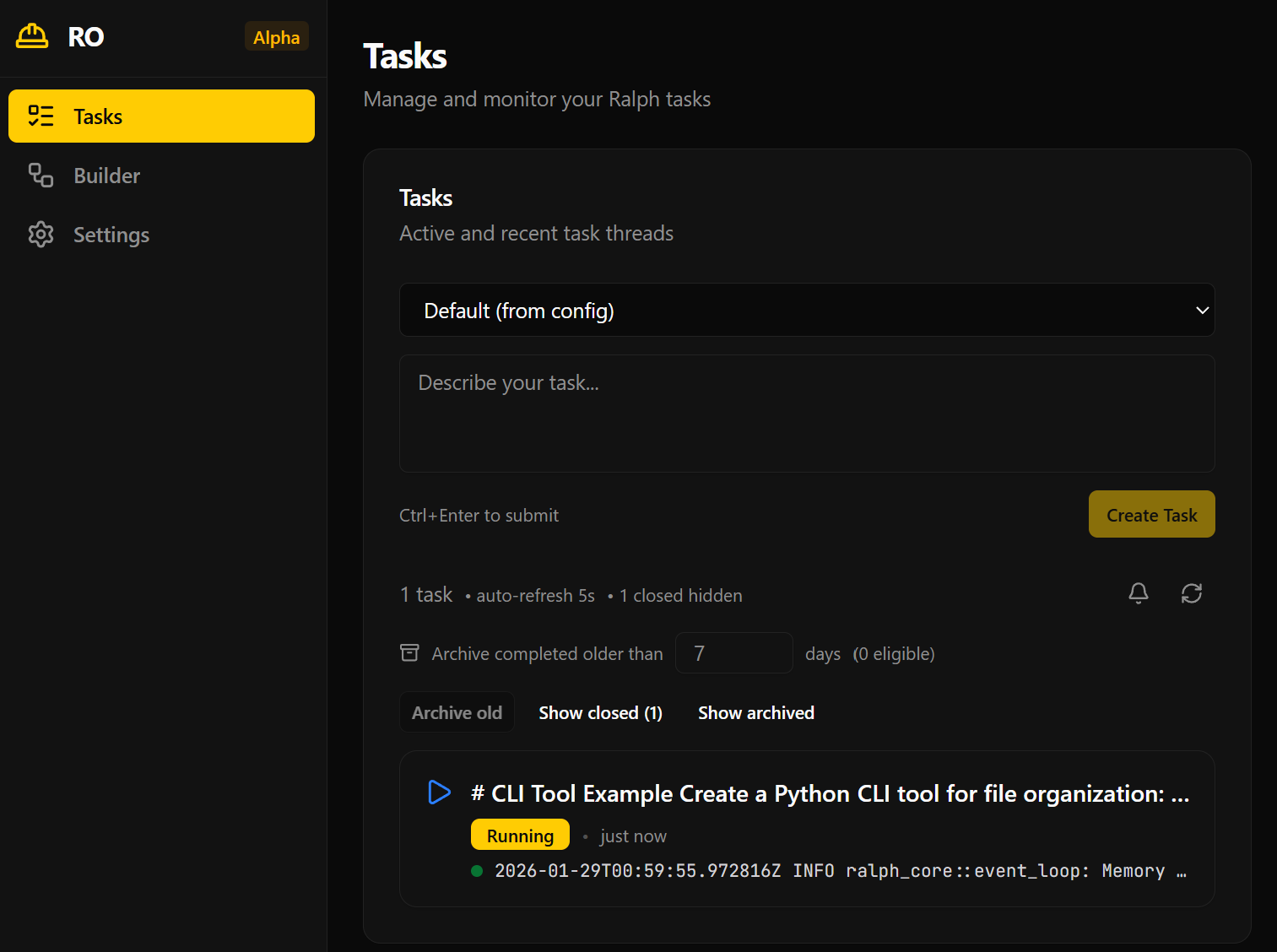 Ralph 包含一个用于监控和管理编排循环的 Web Dashboard。
```
ralph web # starts Rust RPC API + frontend + opens browser
ralph web --no-open # skip browser auto-open
ralph web --backend-port 4000 # custom RPC API port
ralph web --frontend-port 8080 # custom frontend port
ralph web --legacy-node-api # opt into deprecated Node tRPC backend
```
**要求:**
- Rust toolchain(用于 `ralph-api`)
- Node.js >= 18 + npm(用于前端)
首次运行时,`ralph web` 会自动检测缺失的 `node_modules` 并运行 `npm install`。
设置 Node.js:
```
# 选项 1:nvm(推荐)
nvm install # reads .nvmrc
# 选项 2:direct install
# https://nodejs.org/
```
用于开发:
```
npm install # install frontend + legacy backend deps
npm run dev:api # Rust RPC API (port 3000)
npm run dev:web # frontend (port 5173)
npm run dev # frontend only (default)
npm run dev:legacy-server # deprecated Node backend (optional)
npm run test # all frontend/backend workspace tests
```
## 什么是 Ralph?
Ralph 实现了 [Ralph Wiggum 技术](https://ghuntley.com/ralph/) —— 通过持续迭代实现自主任务完成。它支持:
- **多后端支持** — Claude Code、Kiro、Gemini CLI、Codex、Amp、Copilot CLI、OpenCode
- **Hat 系统** — 通过事件协调的专业化角色
- **背压机制** — 拒绝不完整工作(测试、lint、typecheck)的关卡
- **记忆与任务** — 持久化学习和运行时工作追踪
- **31 种预设** — TDD、规格驱动、调试等
## RObot(人机协同)
Ralph 通过 Telegram 支持编排过程中的人机交互。Agent 可以提出问题并阻塞等待回答;人类可以随时发送主动指导。
快速上手(Telegram):
```
ralph bot onboard --telegram # guided setup (token + chat id)
ralph bot status # verify config
ralph bot test # send a test message
ralph run -c ralph.bot.yml -p "Help the human"
```
```
# ralph.yml
RObot:
enabled: true
telegram:
bot_token: "your-token" # Or RALPH_TELEGRAM_BOT_TOKEN env var
```
- **Agent 提问** — Agent 发出 `human.interact` 事件;循环会阻塞直到收到响应或超时
- **主动指导** — 随时发送消息来引导循环中的 Agent
- **并行循环路由** — 消息通过回复、`@loop-id` 前缀进行路由,或默认路由到主循环
- **Telegram 命令** — `/status`、`/tasks`、`/restart` 用于实时查看循环状态
详见 [Telegram 指南](https://mikeyobrien.github.io/ralph-orchestrator/guide/telegram/)。
## 文档
完整文档请访问 **[mikeyobrien.github.io/ralph-orchestrator](https://mikeyobrien.github.io/ralph-orchestrator/)**:
- [安装](https://mikeyobrien.github.io/ralph-orchestrator/getting-started/installation/)
- [快速入门](https://mikeyobrien.github.io/ralph-orchestrator/getting-started/quick-start/)
- [配置](https://mikeyobrien.github.io/ralph-orchestrator/guide/configuration/)
- [CLI 参考](https://mikeyobrien.github.io/ralph-orchestrator/guide/cli-reference/)
- [预设](https://mikeyobrien.github.io/ralph-orchestrator/guide/presets/)
- [概念:Hat 与事件](https://mikeyobrien.github.io/ralph-orchestrator/concepts/hats-and-events/)
- [架构](https://mikeyobrien.github.io/ralph-orchestrator/advanced/architecture/)
## 贡献
欢迎贡献!请参阅 [CONTRIBUTING.md](CONTRIBUTING.md) 了解指南,[CODE_OF_CONDUCT.md](CODE_OF_CONDUCT.md) 了解社区标准。
## 许可证
MIT 许可证 — 详情请参阅 [LICENSE](LICENSE)。
## 致谢
- **[Geoffrey Huntley](https://ghuntley.com/ralph/)** — Ralph Wiggum 技术的创造者
- **[Strands Agents SOP](https://github.com/strands-agents/agent-sop)** — Agent SOP 框架
- **[ratatui](https://ratatui.rs/)** — Terminal UI 框架
*"I'm learnding!" - Ralph Wiggum*
Ralph 包含一个用于监控和管理编排循环的 Web Dashboard。
```
ralph web # starts Rust RPC API + frontend + opens browser
ralph web --no-open # skip browser auto-open
ralph web --backend-port 4000 # custom RPC API port
ralph web --frontend-port 8080 # custom frontend port
ralph web --legacy-node-api # opt into deprecated Node tRPC backend
```
**要求:**
- Rust toolchain(用于 `ralph-api`)
- Node.js >= 18 + npm(用于前端)
首次运行时,`ralph web` 会自动检测缺失的 `node_modules` 并运行 `npm install`。
设置 Node.js:
```
# 选项 1:nvm(推荐)
nvm install # reads .nvmrc
# 选项 2:direct install
# https://nodejs.org/
```
用于开发:
```
npm install # install frontend + legacy backend deps
npm run dev:api # Rust RPC API (port 3000)
npm run dev:web # frontend (port 5173)
npm run dev # frontend only (default)
npm run dev:legacy-server # deprecated Node backend (optional)
npm run test # all frontend/backend workspace tests
```
## 什么是 Ralph?
Ralph 实现了 [Ralph Wiggum 技术](https://ghuntley.com/ralph/) —— 通过持续迭代实现自主任务完成。它支持:
- **多后端支持** — Claude Code、Kiro、Gemini CLI、Codex、Amp、Copilot CLI、OpenCode
- **Hat 系统** — 通过事件协调的专业化角色
- **背压机制** — 拒绝不完整工作(测试、lint、typecheck)的关卡
- **记忆与任务** — 持久化学习和运行时工作追踪
- **31 种预设** — TDD、规格驱动、调试等
## RObot(人机协同)
Ralph 通过 Telegram 支持编排过程中的人机交互。Agent 可以提出问题并阻塞等待回答;人类可以随时发送主动指导。
快速上手(Telegram):
```
ralph bot onboard --telegram # guided setup (token + chat id)
ralph bot status # verify config
ralph bot test # send a test message
ralph run -c ralph.bot.yml -p "Help the human"
```
```
# ralph.yml
RObot:
enabled: true
telegram:
bot_token: "your-token" # Or RALPH_TELEGRAM_BOT_TOKEN env var
```
- **Agent 提问** — Agent 发出 `human.interact` 事件;循环会阻塞直到收到响应或超时
- **主动指导** — 随时发送消息来引导循环中的 Agent
- **并行循环路由** — 消息通过回复、`@loop-id` 前缀进行路由,或默认路由到主循环
- **Telegram 命令** — `/status`、`/tasks`、`/restart` 用于实时查看循环状态
详见 [Telegram 指南](https://mikeyobrien.github.io/ralph-orchestrator/guide/telegram/)。
## 文档
完整文档请访问 **[mikeyobrien.github.io/ralph-orchestrator](https://mikeyobrien.github.io/ralph-orchestrator/)**:
- [安装](https://mikeyobrien.github.io/ralph-orchestrator/getting-started/installation/)
- [快速入门](https://mikeyobrien.github.io/ralph-orchestrator/getting-started/quick-start/)
- [配置](https://mikeyobrien.github.io/ralph-orchestrator/guide/configuration/)
- [CLI 参考](https://mikeyobrien.github.io/ralph-orchestrator/guide/cli-reference/)
- [预设](https://mikeyobrien.github.io/ralph-orchestrator/guide/presets/)
- [概念:Hat 与事件](https://mikeyobrien.github.io/ralph-orchestrator/concepts/hats-and-events/)
- [架构](https://mikeyobrien.github.io/ralph-orchestrator/advanced/architecture/)
## 贡献
欢迎贡献!请参阅 [CONTRIBUTING.md](CONTRIBUTING.md) 了解指南,[CODE_OF_CONDUCT.md](CODE_OF_CONDUCT.md) 了解社区标准。
## 许可证
MIT 许可证 — 详情请参阅 [LICENSE](LICENSE)。
## 致谢
- **[Geoffrey Huntley](https://ghuntley.com/ralph/)** — Ralph Wiggum 技术的创造者
- **[Strands Agents SOP](https://github.com/strands-agents/agent-sop)** — Agent SOP 框架
- **[ratatui](https://ratatui.rs/)** — Terminal UI 框架
*"I'm learnding!" - Ralph Wiggum*
Ralph 包含一个用于监控和管理编排循环的 Web Dashboard。
```
ralph web # starts Rust RPC API + frontend + opens browser
ralph web --no-open # skip browser auto-open
ralph web --backend-port 4000 # custom RPC API port
ralph web --frontend-port 8080 # custom frontend port
ralph web --legacy-node-api # opt into deprecated Node tRPC backend
```
**要求:**
- Rust toolchain(用于 `ralph-api`)
- Node.js >= 18 + npm(用于前端)
首次运行时,`ralph web` 会自动检测缺失的 `node_modules` 并运行 `npm install`。
设置 Node.js:
```
# 选项 1:nvm(推荐)
nvm install # reads .nvmrc
# 选项 2:direct install
# https://nodejs.org/
```
用于开发:
```
npm install # install frontend + legacy backend deps
npm run dev:api # Rust RPC API (port 3000)
npm run dev:web # frontend (port 5173)
npm run dev # frontend only (default)
npm run dev:legacy-server # deprecated Node backend (optional)
npm run test # all frontend/backend workspace tests
```
## 什么是 Ralph?
Ralph 实现了 [Ralph Wiggum 技术](https://ghuntley.com/ralph/) —— 通过持续迭代实现自主任务完成。它支持:
- **多后端支持** — Claude Code、Kiro、Gemini CLI、Codex、Amp、Copilot CLI、OpenCode
- **Hat 系统** — 通过事件协调的专业化角色
- **背压机制** — 拒绝不完整工作(测试、lint、typecheck)的关卡
- **记忆与任务** — 持久化学习和运行时工作追踪
- **31 种预设** — TDD、规格驱动、调试等
## RObot(人机协同)
Ralph 通过 Telegram 支持编排过程中的人机交互。Agent 可以提出问题并阻塞等待回答;人类可以随时发送主动指导。
快速上手(Telegram):
```
ralph bot onboard --telegram # guided setup (token + chat id)
ralph bot status # verify config
ralph bot test # send a test message
ralph run -c ralph.bot.yml -p "Help the human"
```
```
# ralph.yml
RObot:
enabled: true
telegram:
bot_token: "your-token" # Or RALPH_TELEGRAM_BOT_TOKEN env var
```
- **Agent 提问** — Agent 发出 `human.interact` 事件;循环会阻塞直到收到响应或超时
- **主动指导** — 随时发送消息来引导循环中的 Agent
- **并行循环路由** — 消息通过回复、`@loop-id` 前缀进行路由,或默认路由到主循环
- **Telegram 命令** — `/status`、`/tasks`、`/restart` 用于实时查看循环状态
详见 [Telegram 指南](https://mikeyobrien.github.io/ralph-orchestrator/guide/telegram/)。
## 文档
完整文档请访问 **[mikeyobrien.github.io/ralph-orchestrator](https://mikeyobrien.github.io/ralph-orchestrator/)**:
- [安装](https://mikeyobrien.github.io/ralph-orchestrator/getting-started/installation/)
- [快速入门](https://mikeyobrien.github.io/ralph-orchestrator/getting-started/quick-start/)
- [配置](https://mikeyobrien.github.io/ralph-orchestrator/guide/configuration/)
- [CLI 参考](https://mikeyobrien.github.io/ralph-orchestrator/guide/cli-reference/)
- [预设](https://mikeyobrien.github.io/ralph-orchestrator/guide/presets/)
- [概念:Hat 与事件](https://mikeyobrien.github.io/ralph-orchestrator/concepts/hats-and-events/)
- [架构](https://mikeyobrien.github.io/ralph-orchestrator/advanced/architecture/)
## 贡献
欢迎贡献!请参阅 [CONTRIBUTING.md](CONTRIBUTING.md) 了解指南,[CODE_OF_CONDUCT.md](CODE_OF_CONDUCT.md) 了解社区标准。
## 许可证
MIT 许可证 — 详情请参阅 [LICENSE](LICENSE)。
## 致谢
- **[Geoffrey Huntley](https://ghuntley.com/ralph/)** — Ralph Wiggum 技术的创造者
- **[Strands Agents SOP](https://github.com/strands-agents/agent-sop)** — Agent SOP 框架
- **[ratatui](https://ratatui.rs/)** — Terminal UI 框架
*"I'm learnding!" - Ralph Wiggum*标签:AI代理编排, AI编程助手, Claude, CVE检测, Homebrew, JWT认证示例, MITM代理, npm包, PDD规划, Rust, Web仪表盘, 任务自动化, 任务规划, 可视化界面, 循环执行框架, 数字取证, 暗色界面, 生产力工具, 网络流量审计, 自主智能体, 自动化脚本, 软件开发自动化, 迭代开发, 通知系统, 通知系统