connormcgarr/SkBridge
GitHub: connormcgarr/SkBridge
一个用于从 VTL 0 内核模式向 VTL 1 发起 Virtual Secure Mode 安全调用的概念验证工具,由内核驱动和用户模式客户端组成。
Stars: 81 | Forks: 7
# SkBridge
SkBridge 是一个软件包,由驱动程序(`SkBridgeDriver`)和用户模式客户端(`SkBridgeClient`)组成。它能够通过 `nt!VslpEnterIumSecureMode` 从 Virtual Trust Level 0 (VTL 0) 的内核模式向 Virtual Trust Level 1 (VTL 1) 的内核模式发起 Virtual Secure Mode (VSM) 调用。这些也被称为“secure calls”。SkBridge 仅支持 64 位构建,并且仅在 Windows 11 24H2 版本上进行了测试。此工具不会发布预编译版本(您必须从源代码编译)。
关于 secure calls 的相关博文可以在这里找到:https://connormcgarr.github.io/secure-calls-and-skbridge/
## 输出
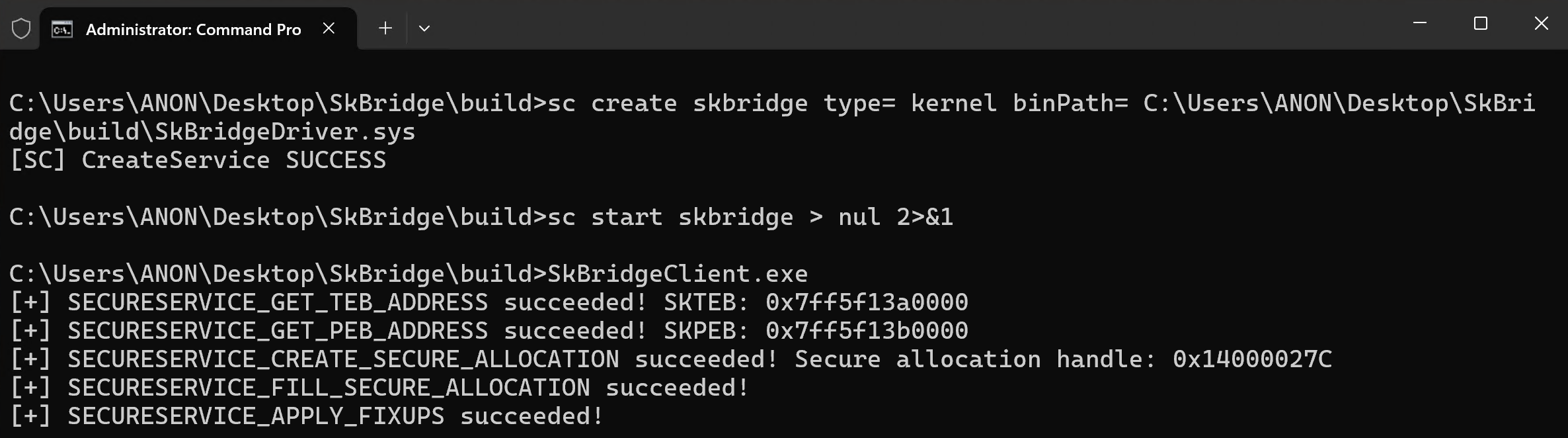
## 构建与使用
SkBridgeClient _必须_ 以管理员身份运行,并且 _必须_ 从构建目录(`SkBridge/build`)运行。这是因为 SkBridge 依赖符号文件。因此,在 `SkBridge/SkBridgeClient/SymbolDlls` 目录中,我已经提供了适当的 `dbghelp.dll` 和 `symsrv.dll` DLL。如果您不想使用我提供的二进制文件,只需将您自己的 Windows SDK 中的 `dbghelp.dll` 和 `symsrv.dll` 文件放入上述目录即可。
构建项目,然后从管理员命令提示符运行:
```
cd C:\Full\Path\To\SkBridge\build
sc create skbridge type= kernel binPath= C:\Full\Path\To\SkBridge\build\SkBridgeDriver.sys
sc start skbridge
.\SkBridgeClient.exe
sc stop skbridge
```
## 文档
您可以在 README 的这一节中找到相关文档。请注意,`SkBridge/SkBridgeClient/Source Files/Examples.cpp` 包含了许多使用 SkBridgeClient 与 SkBridge 交互并将 secure call 值检索回用户模式的示例,但本节将至少提供更多细节。
该项目的“要点”在于,您可以在发起 secure calls 时指定_参数_和_参数修饰符_。例如:
```
secureCallData.SecureCallFields.Field1.u.Value = lsaIsoPid;
secureCallData.SecureCallFieldDescriptors.Field1Descriptor = ScDescOptPidToSecureProcessHandle;
```
这表示:
1. 第一个 secure call 参数(`Field1`)被设置为 `LsaIso.exe` 的进程 ID (PID)。
2. 该 PID 将被_修改_,实际上成为 `LsaIso.exe` 的“secure process handle”(位于 `KPROCESS` 结构中)
在上面的例子中,传递给此 secure call 的_真实_参数是一个 secure process handle。然而,此信息对用户模式是不可访问的(`SkBridgeClient.exe` 运行在用户模式,也就是运行上述代码的地方)。因此,SkBridge 公开了参数_修饰符_(称为“字段描述符选项”)。支持的选项可以在 `SkBridge/Shared.hpp` 中找到。“当前”的选项(将来可能会更改)如下:
```
//
// Secure call parameter descriptor values
//
enum SecureCallParameterDescriptorOptions : ULONG
{
ScDescOptNone = 0,
ScDescOptEncapsulateAsMdl = 0x1,
ScDescOptPidToProcessObject = 0x2,
ScDescOptPidToSecureProcessHandle = 0x4,
ScDescOptTidToThreadObject = 0x8,
ScDescOptTidToSecureThreadCookie = 0x10,
//
// A "special" flag which will create a handle to the section object
// of a loaded image.
//
ScDescOptPidToSectionObjectHandle = 0x20,
//
// A "special" flag which will retrieve the associated secure image handle
// from an already-mapped process or kernel-mode image.
//
ScDescOptPidToSecureImageHandle = 0x40,
ScDescOptKernelImageBaseToSecureImageHandle = 0x80,
//
// Converts the specified VA to PFN
//
ScDescOptConvertVirtualAddressToPageFrameNumber = 0x100,
//
// A common pattern in SK is to provide the PFN for an MDL,
// which already describes a parameter, as a parameter itself.
// This flag instructs SkBridgeDriver as to what argument number
// the MDL exists at for which this field should be a PFN
//
// An example is Field2.u.Value = address;
//
// If Field2 has the "encapsulate as MDL" flag, set this
// value to 2. This will make the target argument the PFN
// of that MDL.
//
ScDescOptGetPfnForMdlAtTargetArgumentField = 0x200,
//
// Reserved for SkBridgeDriver
//
ScDescOptReleaseResource = 0x81000000,
};
```
`ScDescOptGetPfnForMdlAtTargetArgumentField` 非常重要。secure calls 中的一个常见模式是将某些参数封装为 MDL,然后提供与 MDL 关联的页帧号 (PFN)。这允许 Secure Kernel 将参数映射到 VTL 1 的虚拟地址空间并验证 MDL。这些标志的使用示例如下:
1. 提供一个参数
2. 要求将该参数封装为 MDL。提供参数的大小(`OptionalMdlSize`)
3. _下一个_参数允许您设置 MDL 所在的字段编号(参数编号)。SkBridgeDriver 随后将提取 MDL 的 PFN 并正确设置 PFN 参数。
```
//
// Technically MDL describing the allocation.
//
// This setup will ask SkBridge to encapsulate the address as an MDL and to use
// the following size when creating the MDL.
//
secureCallData.SecureCallFields.Field3.u.Value = (ULONGLONG)allocation;
secureCallData.SecureCallFields.Field3.OptionalMdlSize = 0x1000;
secureCallData.SecureCallFieldDescriptors.Field3Descriptor = ScDescOptEncapsulateAsMdl;
//
// This instructs SkBridgeDriver to make argument 4 the PFN of argument 3 (which is an MDL).
// This flag requires that the target field has "ScDescOptEncapsulateAsMdl" set.
//
// A very common pattern is to encapsulate a parameter as an MDL and the _next_ parameter becomes the PFN
// of the MDL which describes the parameter which has been encapsulated by an MDL.
//
secureCallData.SecureCallFields.Field4.u.Value = 3;
secureCallData.SecureCallFieldDescriptors.Field4Descriptor = ScDescOptGetPfnForMdlAtTargetArgumentField;
```
另一个需要注意的事情是有“扩展”参数。如果需要,Secure Kernel 将根据“secure thread cookie”选择特定的线程。这是执行 secure call 的目标线程上下文。只有 secure processes 拥有 secure threads。如果您为目标 secure thread cookie 设置了扩展参数选项,SkBridgeDriver 将在目标线程的_上下文_中发起 secure call(因此,secure call 将在此线程的上下文中发起):
```
secureCallData.ExtendedParameters.OptionalSecureThreadCookieThreadId = lsaIsoTid;
secureCallData.ExtendedParameterOptions = ScExtendedParameterHasSecureThreadCookie;
```
这里没有提供“secure calls 列表”。使用 `SkBridge/SkBridgeClient/Source Files/Helpers.cpp` 中的 `GetSecureCallValue`,您可以通过 NT 符号指定在 `nt!_SKSERVICE` 枚举中找到的 secure call 字符串(SkBridgeClient 将加载这些符号):
```
secureCallData.SecureCallType = GetSecureCallValue(L"SECURESERVICE_CREATE_SECURE_ALLOCATION");
```
(显然)您不限于使用 `SkBridge/SkBridgeClient/Source Files/Examples.cpp` 中的内容。唯一的要求是在您的应用程序中首先调用 `InitializeSkBridge`,并在应用程序退出时调用 `CleanupSkBridgeClient`。
## 注意事项
SkBridge 依赖内核模式驱动程序。因此,您需要启用测试签名。如果您正在使用 Bit Locker,请确保在更改计算机上的测试签名策略之前暂停 Bit Locker 保护(并且在关闭测试签名时执行相同操作)。因此,强烈建议在虚拟机 (VM) 中运行此项目。
您必须启用 Virtualization-Based Security (VBS) 才能与 VTL 1 交互。
SkBridge 将符号路径硬编码为 `srv*C:\\Symbols*http://msdl.microsoft.com/download/symbols`。要更改此设置,您应该编辑 `SkBridge/SkBridgeClient/Source Files/Initialization.cpp`,特别是这一行:
```
if (SymSetSearchPathW_I(GetCurrentProcess(),
L"srv*C:\\Symbols*http://msdl.microsoft.com/download/symbols") == FALSE)
{
wprintf(L"[-] Error! SymSetSearchPathW failed in InitializeSymbols. (GLE: %d)\n", GetLastError());
goto Exit;
}
```
此项目使用未公开的结构和结构中的偏移量。它仅在 Windows 11 24H2 上进行了测试,但 `SkBridgeClient` _确实_使用符号提取相关结构/函数的偏移量,而不是硬编码它们。无法保证结构布局保持不变(例如,“这个”结构成员位于“那个”联合中。联合可能会添加更多字段,从而可能将“目标”结构移动到别处)。如果 SkBridgeClient 无法提取这些结构/函数偏移量,SkBridgeDriver 将永远不会完全初始化。
最后,SkBridge 解决方案的 Visual Studio 项目中设置了自定义生成后事件。因此,在“重新生成”或“清理”时,生成目录将被清空。这将尝试删除 `SkBridgeDriver.sys`。因此,如果您要重新生成整个解决方案或清理它,则需要停止驱动程序:
`sc stop skbridge`
此代码应被视为 POC(概念验证)质量,不提供任何保证!请不要部署到生产环境。
标签:0day挖掘, Conpot, DBGHHELP, EDR/AV规避, Hyper-V, IUM, UML, VSM, VTL0, VTL1, Windows内核, Windows安全, 内核安全, 内核驱动开发, 安全攻防, 安全调用, 白帽子, 端点可见性, 符号解析, 虚拟信任级别, 虚拟安全模式, 隔离用户模式, 驱动程序