scrapfly/Antibot-Detector
GitHub: scrapfly/Antibot-Detector
一款 Chrome 扩展,用于实时检测和识别网站部署的反机器人系统、验证码及浏览器指纹技术。
Stars: 286 | Forks: 30
# Scrapfly Anti-bot 检测器
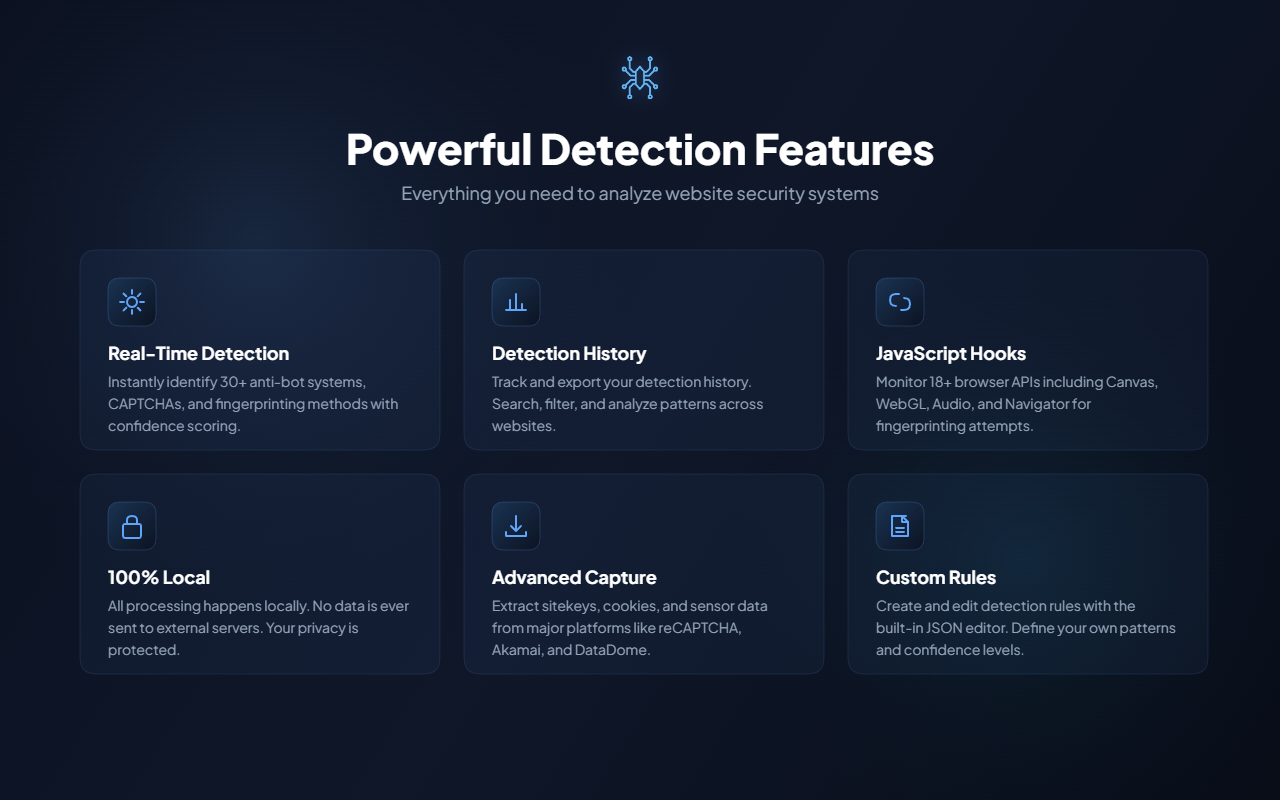 ## 截图
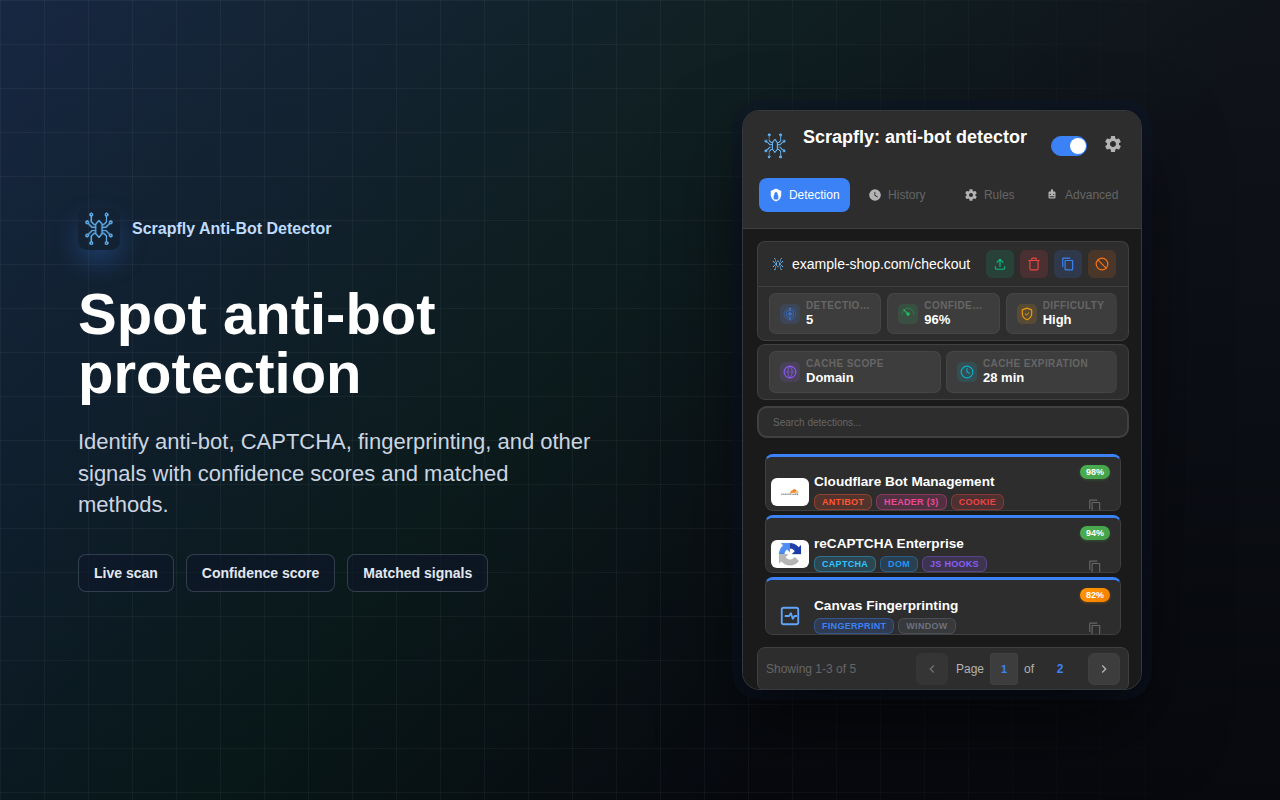
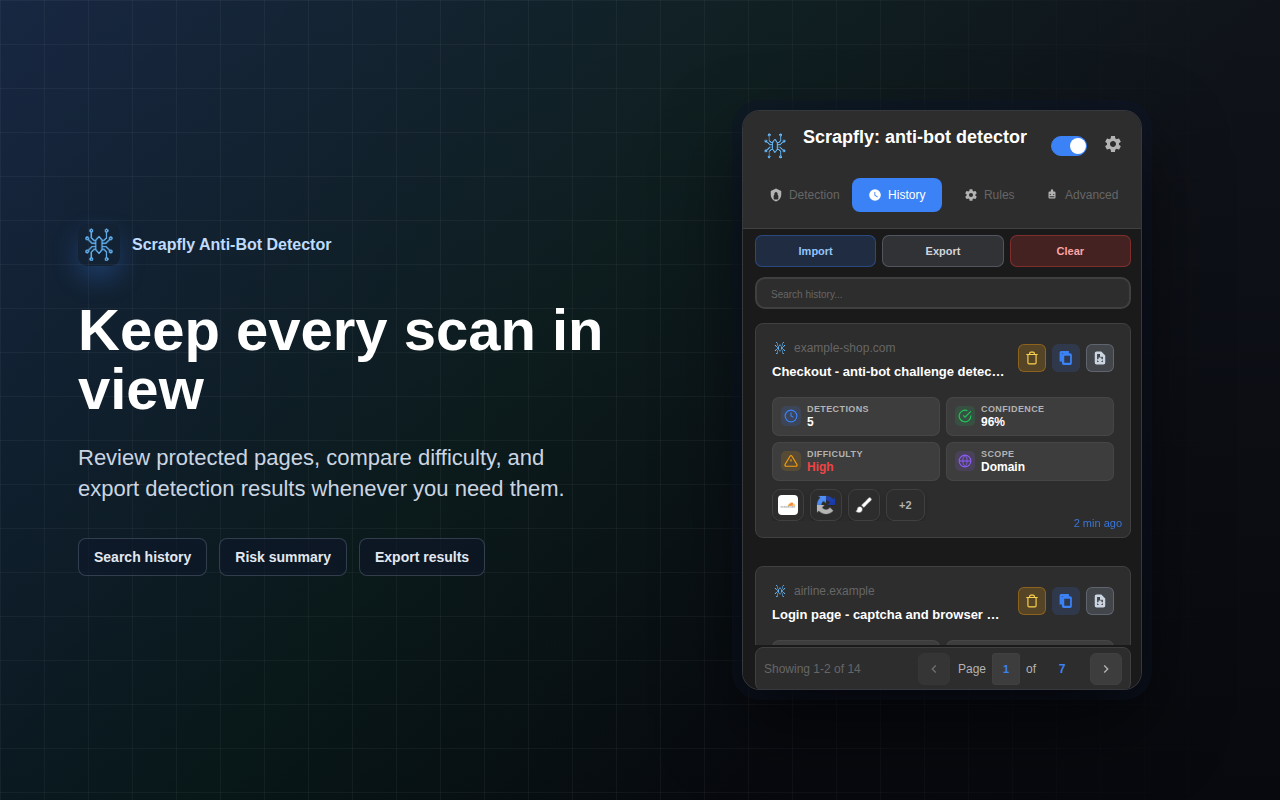
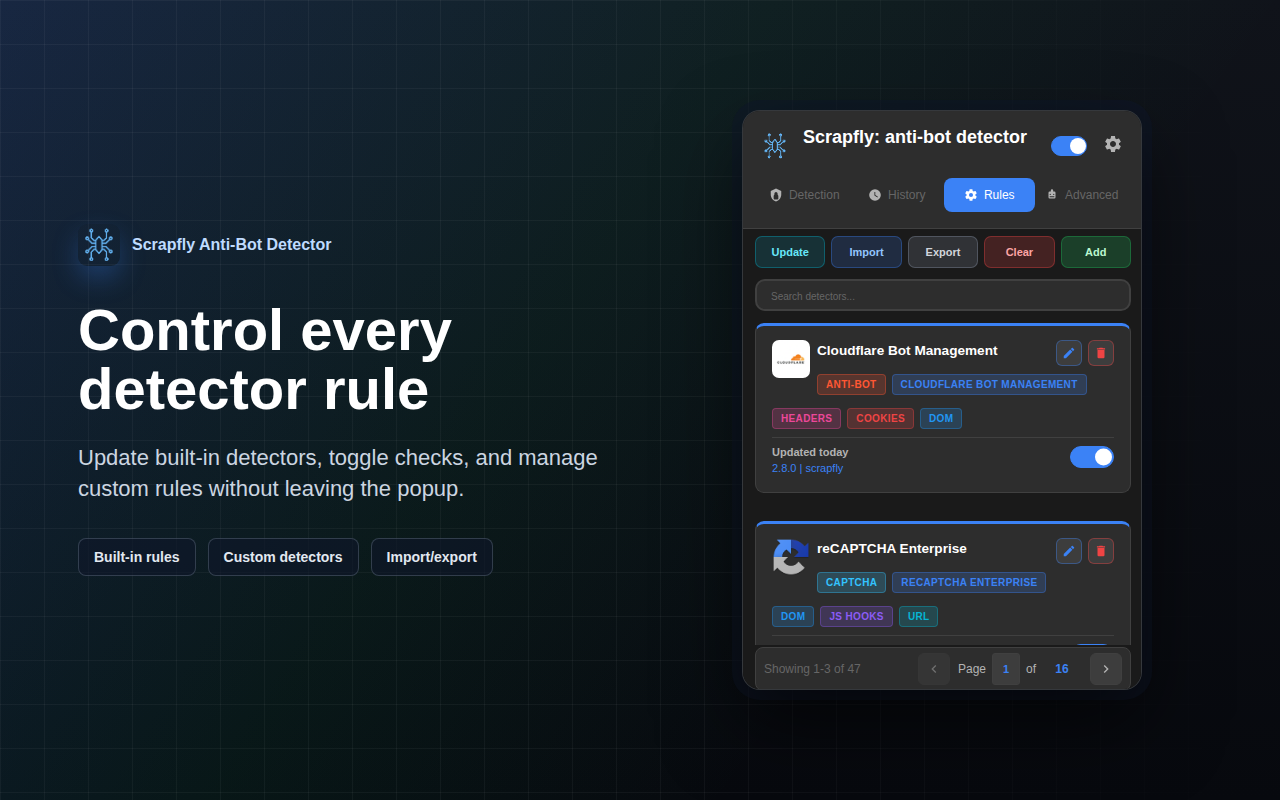
| 检测 | 历史记录 | 规则 |
|-----------|---------|-------|
|  |  |  |
| 高级工具 | 设置 |
|----------------|----------|
| 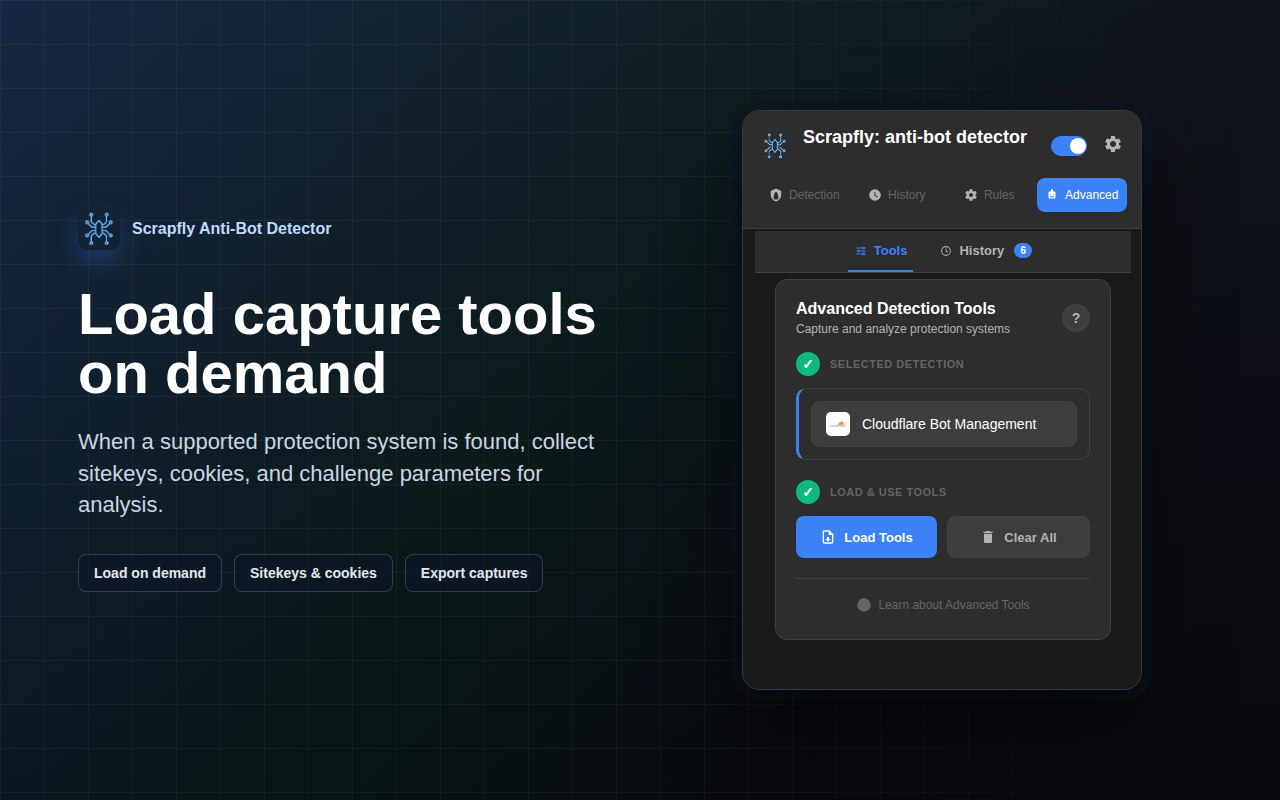 | 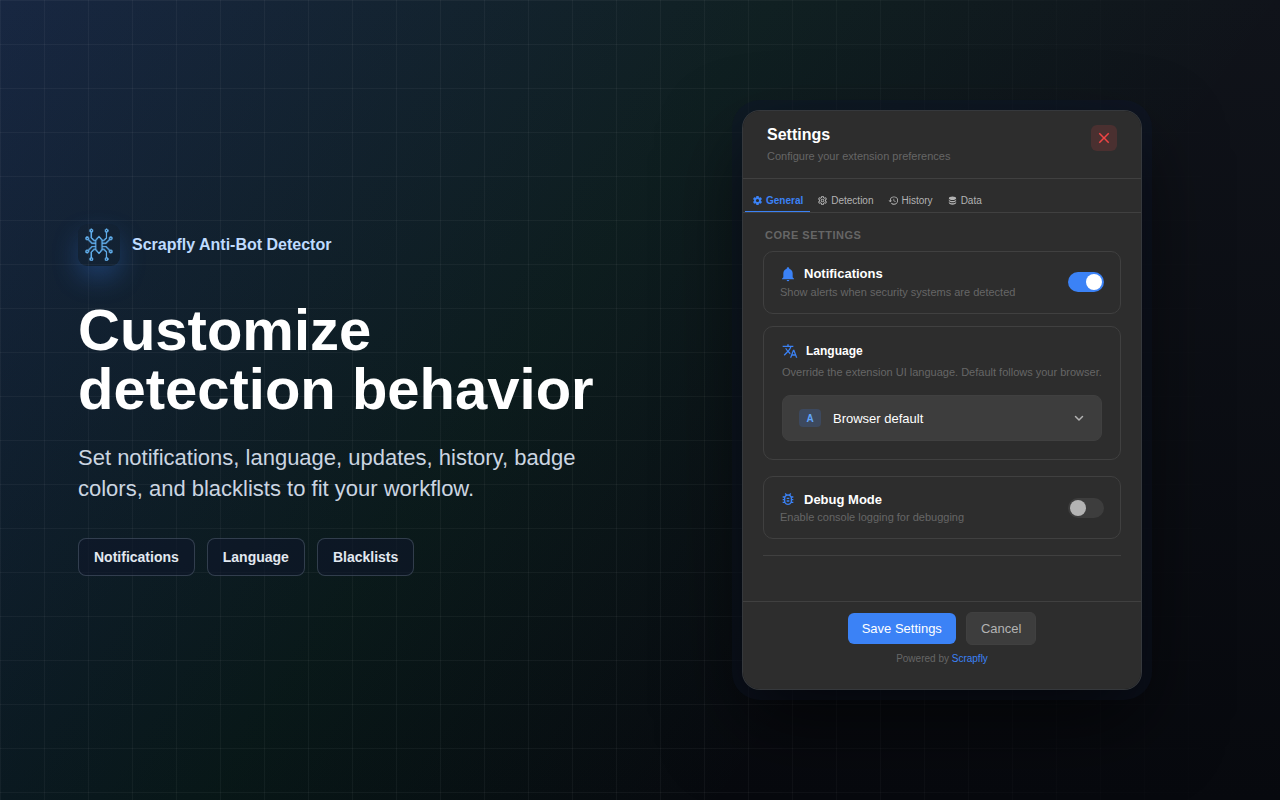 |
## 功能
### 多层检测系统
- **DOM 分析**:检测脚本、类和 HTML 元素
- **网络监控**:分析 cookie、header 和 URL
- **Payload 分析**:检查带有 URL 模式和 HTTP 方法过滤的请求体
- **JavaScript Hooks**:拦截指纹 API(Canvas、WebGL、Audio、Performance、Navigator、Storage 等)—— hook 目标完全由检测器定义驱动,在 `document_start` 时同步安装
- **Window Properties**:检查全局作用域中的反机器人对象
### 现代 UI
- **实时检测**:显示带有置信度分数的实时检测结果
- **徽标指示器**:在扩展程序图标上显示检测计数
- **检测历史记录**:跨浏览会话跟踪已检测到的系统
- **高级捕获工具**:用于 reCAPTCHA、hCaptcha、FunCaptcha、GeeTest、Akamai、DataDome、Cloudflare Turnstile、Imperva、Shape Security 和 AWS WAF 的专用工具
- **中间页处理**:在重定向前自动从挑战页捕获数据
- **规则编辑器**:通过完整的 CRUD 操作自定义和管理检测规则
- **设置面板**:配置缓存持续时间、历史记录限制、URL 黑名单和调试模式
### 性能优化
- **智能缓存**:12 小时检测缓存,带有后台验证和缓存命中提前退出
- **模式缓存**:用于已编译正则表达式模式的 LRU 缓存(快 60-80%)
- **提前退出**:找到高置信度匹配项后停止检测
- **惰性求值**:根据已启用的检测器按需收集数据
- **批量操作**:优化的 DOM 遍历和存储写入
- **Hook 完成**:2 秒不活动超时,最长 8 秒窗口期
### 隐私与安全
- **不收集数据**:所有检测均在您的浏览器中本地完成
- **符合 CSP**:无内联事件处理程序或 unsafe-eval
- **上下文隔离**:MAIN 和 ISOLATED 世界之间的适当分离
- **安全条件**:预编译的评估器(无 eval/任意代码执行)
## 使用说明
### 基本检测
1. **导航至网站**:扩展程序会自动扫描页面
2. **打开弹出菜单**:点击扩展程序图标查看结果
3. **查看详情**:点击任意检测卡片查看完整详情
4. **复制结果**:使用复制按钮导出检测数据
### 高级捕获工具
| 系统 | 功能 |
|--------|----------|
| **reCAPTCHA** | 开始捕获、获取 Selector、提取 SiteKey、回调检测 |
| **Akamai** | 开始捕获、提取 Sensor Data |
| **Imperva** | 检查 Cookie、分析脚本、开始捕获 |
| **Shape Security** | 检查 Header、分析脚本、开始捕获 |
| **AWS WAF** | 检查 Cookie、分析脚本 |
| **hCaptcha** | 提取 SiteKey、分析脚本 |
| **FunCaptcha** | 提取 Public Key、分析脚本 |
| **GeeTest** | 提取 Challenge 参数、分析脚本 |
| **DataDome** | 检查 Cookie、分析脚本 |
| **Cloudflare Turnstile** | 提取 SiteKey、分析脚本 |
### 规则编辑器
1. **浏览检测器**:按类别(反机器人、CAPTCHA、指纹)查看所有检测规则
2. **编辑规则**:修改检测模式、置信度分数和设置
3. **添加方法**:创建新的检测方法(Cookie、Header、URL、Content、DOM、Window、JS Hooks、Payload)
4. **模式选项**:配置正则表达式、全词匹配和大小写敏感匹配
5. **导入/导出**:通过 JSON 文件共享规则
### 设置
- **缓存持续时间**:设置检测缓存到期时间(1-24 小时)
- **历史记录限制**:控制最大历史记录条目(10-500)
- **URL 黑名单**:将特定域名排除在检测之外
- **调试模式**:启用详细日志记录至 Service Worker 控制台
- **自动清理**:自动使历史记录过期
## 架构
### 项目结构
```
core/
├── manifest.json # Extension configuration (Manifest V3)
├── background.js # Service worker (message handling, detection)
├── content.js # Content script (ISOLATED world - orchestration)
├── content-main-world.js # JS hooks installer (MAIN world - API interception)
├── popup.js/html/css # Extension popup UI
│
├── detectors/ # JSON detector definitions
│ ├── antibot/ # Cloudflare, Akamai, DataDome, Imperva, etc.
│ ├── captcha/ # reCAPTCHA, hCaptcha, FunCaptcha, GeeTest, Turnstile
│ ├── fingerprint/ # Canvas, WebGL, Audio, Performance (21 detectors)
│ └── index.json # Category configuration
│
├── modules/ # Core managers & helpers (singleton pattern)
│ ├── core/ # logger, storage-manager, ttl-map, badge-constants,
│ │ # log-collector, update-manager
│ ├── detection/
│ │ ├── engine/ # DetectionEngineManager + analysis/extractors/
│ │ │ # matching/hooks helpers (orchestration & batching)
│ │ ├── managers/ # detector-manager, category-manager, confidence-manager
│ │ └── hooks/ # hook-resilience-manager, window-condition-language,
│ │ # window-property-tracker, worker-keepalive-manager
│ ├── ui/ # color-manager, notification-manager, pagination-manager
│ └── styles/ # CSS stylesheets (popup, detection, rules, settings, …)
│
├── sections/ # UI sections (modular architecture)
│ ├── detection/ # Detection results tab
│ ├── history/ # Detection history tab
│ ├── rules/ # Detector rules editor
│ ├── settings/ # Settings & configuration
│ └── advanced/ # Advanced capture tools
│ ├── base-interceptor-helpers.js # Service worker utilities
│ ├── advanced-utils.js # Popup UI utilities
│ ├── base-advanced-module.js # Base class for modules
│ └── modules/ # Detector-specific tools
│ ├── recaptcha/
│ ├── akamai/
│ ├── imperva/
│ ├── shapesecurity/
│ ├── awswaf/
│ ├── hcaptcha/
│ ├── funcaptcha/
│ ├── geetest/
│ ├── datadome/
│ └── cloudflare/
│
└── utils/ # Utility functions
├── utils.js # Core utilities (data collection, URL handling)
├── format-utils.js # HTML escaping & formatting helpers
├── url-utils.js # URL hashing, favicon & locale-flag helpers
├── detection-utils.js # Detection/difficulty helpers
└── pattern-cache.js # LRU compiled-regex cache (ReDoS-guarded)
```
### 检测流程
```
┌─────────────────────────────────────────────────────────────┐
│ 1. Page Load (document_start) │
│ └─> content-main-world.js installs JS hooks │
│ • Detector-driven fingerprinting API hooks │
│ • Must install BEFORE page scripts execute │
└─────────────────────────────────────────────────────────────┘
↓
┌─────────────────────────────────────────────────────────────┐
│ 2. Cache Check │
│ └─> background.js cache check (async) │
│ • If cache hit: Skip detection, show cached results │
│ • If cache miss: Proceed to data collection │
└─────────────────────────────────────────────────────────────┘
↓
┌─────────────────────────────────────────────────────────────┐
│ 3. Data Collection (content.js - ISOLATED world) │
│ └─> DetectionEngineManager.collectPageData() │
│ • DOM elements, scripts, classes │
│ • Cookies, headers (via background.js) │
│ • Window properties (via authenticated bridge) │
│ • JS hooks (via authenticated bridge) │
│ • Request payloads (via background.js) │
└─────────────────────────────────────────────────────────────┘
↓
┌─────────────────────────────────────────────────────────────┐
│ 4. Hook Completion (content-main-world.js) │
│ └─> Completion triggers: │
│ • 2-second inactivity timeout (no hook activity) │
│ • 8-second maximum window (absolute cap) │
│ └─> Hooks uninstalled immediately after firing │
└─────────────────────────────────────────────────────────────┘
↓
┌─────────────────────────────────────────────────────────────┐
│ 5. Detection (background.js) │
│ └─> DetectionEngineManager.detectOnPage() │
│ • Pattern matching against enabled detectors │
│ • Confidence score calculation │
│ • Results aggregation & deduplication │
└─────────────────────────────────────────────────────────────┘
↓
┌─────────────────────────────────────────────────────────────┐
│ 6. Storage & Display │
│ └─> Cache results (12-hour expiry) │
│ └─> Update badge with detection count │
│ └─> Update popup UI with detections │
└─────────────────────────────────────────────────────────────┘
```
### 关键设计模式
- **单例管理器**:DetectorManager、CategoryManager、StorageManager 用于集中状态管理
- **事件驱动通信**:经过身份验证的桥接事件用于 MAIN 与 ISOLATED 世界之间的通信
- **模块化区域**:每个 UI 区域都是独立的(JS + HTML + CSS)
- **JSON 驱动的检测器**:所有检测规则均存储在 JSON 中,便于更新
- **LRU 缓存**:模式缓存、URL 哈希缓存以提高性能
- **集中式日志记录**:所有日志均通过 Logger 模块路由至 Service Worker 控制台
- **符合 CSP**:使用事件委托代替内联处理程序
## 开发
无需构建步骤 —— 它是纯 JavaScript。将 `src/` 文件夹作为已解压的扩展程序加载:
1. 打开 `chrome://extensions/`
2. 启用**开发者模式**(右上角)
3. **加载已解压的扩展程序** → 选择此文件夹
4. 更改后,点击扩展程序卡片上的重新加载图标
### 验证
```
npm run verify # syntax + structure + locale parity + unit tests
```
个别检查:
```
npm run check:syntax # node --check across all .js files
npm run check:structure # HTML tag balance, JSON validity, modal-header pattern
npm run check:locale # _locales/* key parity across all languages
npm test # node:test unit suite
```
单元测试位于 `test/` 中,并在 Node 的内置测试运行程序上运行(零依赖)。它们涵盖了模式缓存、window-condition 语言和 Rules-UI 回退奇偶校验、TTL 映射、置信度评分、detection-engine 存储锁定、worker keepalive 以及 detection-UI 状态转换。CI 在每次推送时运行 `npm run verify`。
## 许可证
该项目基于 **Non-Profit Open Software License 3.0 (NPOSL-3.0)** 获得许可。
版权所有 (c) 2026 Scrapfly
### 完整许可证
有关完整的条款和条件,请参阅 [LICENSE](LICENSE) 文件。
## 截图
| 检测 | 历史记录 | 规则 |
|-----------|---------|-------|
|  |  |  |
| 高级工具 | 设置 |
|----------------|----------|
|  |  |
## 功能
### 多层检测系统
- **DOM 分析**:检测脚本、类和 HTML 元素
- **网络监控**:分析 cookie、header 和 URL
- **Payload 分析**:检查带有 URL 模式和 HTTP 方法过滤的请求体
- **JavaScript Hooks**:拦截指纹 API(Canvas、WebGL、Audio、Performance、Navigator、Storage 等)—— hook 目标完全由检测器定义驱动,在 `document_start` 时同步安装
- **Window Properties**:检查全局作用域中的反机器人对象
### 现代 UI
- **实时检测**:显示带有置信度分数的实时检测结果
- **徽标指示器**:在扩展程序图标上显示检测计数
- **检测历史记录**:跨浏览会话跟踪已检测到的系统
- **高级捕获工具**:用于 reCAPTCHA、hCaptcha、FunCaptcha、GeeTest、Akamai、DataDome、Cloudflare Turnstile、Imperva、Shape Security 和 AWS WAF 的专用工具
- **中间页处理**:在重定向前自动从挑战页捕获数据
- **规则编辑器**:通过完整的 CRUD 操作自定义和管理检测规则
- **设置面板**:配置缓存持续时间、历史记录限制、URL 黑名单和调试模式
### 性能优化
- **智能缓存**:12 小时检测缓存,带有后台验证和缓存命中提前退出
- **模式缓存**:用于已编译正则表达式模式的 LRU 缓存(快 60-80%)
- **提前退出**:找到高置信度匹配项后停止检测
- **惰性求值**:根据已启用的检测器按需收集数据
- **批量操作**:优化的 DOM 遍历和存储写入
- **Hook 完成**:2 秒不活动超时,最长 8 秒窗口期
### 隐私与安全
- **不收集数据**:所有检测均在您的浏览器中本地完成
- **符合 CSP**:无内联事件处理程序或 unsafe-eval
- **上下文隔离**:MAIN 和 ISOLATED 世界之间的适当分离
- **安全条件**:预编译的评估器(无 eval/任意代码执行)
## 使用说明
### 基本检测
1. **导航至网站**:扩展程序会自动扫描页面
2. **打开弹出菜单**:点击扩展程序图标查看结果
3. **查看详情**:点击任意检测卡片查看完整详情
4. **复制结果**:使用复制按钮导出检测数据
### 高级捕获工具
| 系统 | 功能 |
|--------|----------|
| **reCAPTCHA** | 开始捕获、获取 Selector、提取 SiteKey、回调检测 |
| **Akamai** | 开始捕获、提取 Sensor Data |
| **Imperva** | 检查 Cookie、分析脚本、开始捕获 |
| **Shape Security** | 检查 Header、分析脚本、开始捕获 |
| **AWS WAF** | 检查 Cookie、分析脚本 |
| **hCaptcha** | 提取 SiteKey、分析脚本 |
| **FunCaptcha** | 提取 Public Key、分析脚本 |
| **GeeTest** | 提取 Challenge 参数、分析脚本 |
| **DataDome** | 检查 Cookie、分析脚本 |
| **Cloudflare Turnstile** | 提取 SiteKey、分析脚本 |
### 规则编辑器
1. **浏览检测器**:按类别(反机器人、CAPTCHA、指纹)查看所有检测规则
2. **编辑规则**:修改检测模式、置信度分数和设置
3. **添加方法**:创建新的检测方法(Cookie、Header、URL、Content、DOM、Window、JS Hooks、Payload)
4. **模式选项**:配置正则表达式、全词匹配和大小写敏感匹配
5. **导入/导出**:通过 JSON 文件共享规则
### 设置
- **缓存持续时间**:设置检测缓存到期时间(1-24 小时)
- **历史记录限制**:控制最大历史记录条目(10-500)
- **URL 黑名单**:将特定域名排除在检测之外
- **调试模式**:启用详细日志记录至 Service Worker 控制台
- **自动清理**:自动使历史记录过期
## 架构
### 项目结构
```
core/
├── manifest.json # Extension configuration (Manifest V3)
├── background.js # Service worker (message handling, detection)
├── content.js # Content script (ISOLATED world - orchestration)
├── content-main-world.js # JS hooks installer (MAIN world - API interception)
├── popup.js/html/css # Extension popup UI
│
├── detectors/ # JSON detector definitions
│ ├── antibot/ # Cloudflare, Akamai, DataDome, Imperva, etc.
│ ├── captcha/ # reCAPTCHA, hCaptcha, FunCaptcha, GeeTest, Turnstile
│ ├── fingerprint/ # Canvas, WebGL, Audio, Performance (21 detectors)
│ └── index.json # Category configuration
│
├── modules/ # Core managers & helpers (singleton pattern)
│ ├── core/ # logger, storage-manager, ttl-map, badge-constants,
│ │ # log-collector, update-manager
│ ├── detection/
│ │ ├── engine/ # DetectionEngineManager + analysis/extractors/
│ │ │ # matching/hooks helpers (orchestration & batching)
│ │ ├── managers/ # detector-manager, category-manager, confidence-manager
│ │ └── hooks/ # hook-resilience-manager, window-condition-language,
│ │ # window-property-tracker, worker-keepalive-manager
│ ├── ui/ # color-manager, notification-manager, pagination-manager
│ └── styles/ # CSS stylesheets (popup, detection, rules, settings, …)
│
├── sections/ # UI sections (modular architecture)
│ ├── detection/ # Detection results tab
│ ├── history/ # Detection history tab
│ ├── rules/ # Detector rules editor
│ ├── settings/ # Settings & configuration
│ └── advanced/ # Advanced capture tools
│ ├── base-interceptor-helpers.js # Service worker utilities
│ ├── advanced-utils.js # Popup UI utilities
│ ├── base-advanced-module.js # Base class for modules
│ └── modules/ # Detector-specific tools
│ ├── recaptcha/
│ ├── akamai/
│ ├── imperva/
│ ├── shapesecurity/
│ ├── awswaf/
│ ├── hcaptcha/
│ ├── funcaptcha/
│ ├── geetest/
│ ├── datadome/
│ └── cloudflare/
│
└── utils/ # Utility functions
├── utils.js # Core utilities (data collection, URL handling)
├── format-utils.js # HTML escaping & formatting helpers
├── url-utils.js # URL hashing, favicon & locale-flag helpers
├── detection-utils.js # Detection/difficulty helpers
└── pattern-cache.js # LRU compiled-regex cache (ReDoS-guarded)
```
### 检测流程
```
┌─────────────────────────────────────────────────────────────┐
│ 1. Page Load (document_start) │
│ └─> content-main-world.js installs JS hooks │
│ • Detector-driven fingerprinting API hooks │
│ • Must install BEFORE page scripts execute │
└─────────────────────────────────────────────────────────────┘
↓
┌─────────────────────────────────────────────────────────────┐
│ 2. Cache Check │
│ └─> background.js cache check (async) │
│ • If cache hit: Skip detection, show cached results │
│ • If cache miss: Proceed to data collection │
└─────────────────────────────────────────────────────────────┘
↓
┌─────────────────────────────────────────────────────────────┐
│ 3. Data Collection (content.js - ISOLATED world) │
│ └─> DetectionEngineManager.collectPageData() │
│ • DOM elements, scripts, classes │
│ • Cookies, headers (via background.js) │
│ • Window properties (via authenticated bridge) │
│ • JS hooks (via authenticated bridge) │
│ • Request payloads (via background.js) │
└─────────────────────────────────────────────────────────────┘
↓
┌─────────────────────────────────────────────────────────────┐
│ 4. Hook Completion (content-main-world.js) │
│ └─> Completion triggers: │
│ • 2-second inactivity timeout (no hook activity) │
│ • 8-second maximum window (absolute cap) │
│ └─> Hooks uninstalled immediately after firing │
└─────────────────────────────────────────────────────────────┘
↓
┌─────────────────────────────────────────────────────────────┐
│ 5. Detection (background.js) │
│ └─> DetectionEngineManager.detectOnPage() │
│ • Pattern matching against enabled detectors │
│ • Confidence score calculation │
│ • Results aggregation & deduplication │
└─────────────────────────────────────────────────────────────┘
↓
┌─────────────────────────────────────────────────────────────┐
│ 6. Storage & Display │
│ └─> Cache results (12-hour expiry) │
│ └─> Update badge with detection count │
│ └─> Update popup UI with detections │
└─────────────────────────────────────────────────────────────┘
```
### 关键设计模式
- **单例管理器**:DetectorManager、CategoryManager、StorageManager 用于集中状态管理
- **事件驱动通信**:经过身份验证的桥接事件用于 MAIN 与 ISOLATED 世界之间的通信
- **模块化区域**:每个 UI 区域都是独立的(JS + HTML + CSS)
- **JSON 驱动的检测器**:所有检测规则均存储在 JSON 中,便于更新
- **LRU 缓存**:模式缓存、URL 哈希缓存以提高性能
- **集中式日志记录**:所有日志均通过 Logger 模块路由至 Service Worker 控制台
- **符合 CSP**:使用事件委托代替内联处理程序
## 开发
无需构建步骤 —— 它是纯 JavaScript。将 `src/` 文件夹作为已解压的扩展程序加载:
1. 打开 `chrome://extensions/`
2. 启用**开发者模式**(右上角)
3. **加载已解压的扩展程序** → 选择此文件夹
4. 更改后,点击扩展程序卡片上的重新加载图标
### 验证
```
npm run verify # syntax + structure + locale parity + unit tests
```
个别检查:
```
npm run check:syntax # node --check across all .js files
npm run check:structure # HTML tag balance, JSON validity, modal-header pattern
npm run check:locale # _locales/* key parity across all languages
npm test # node:test unit suite
```
单元测试位于 `test/` 中,并在 Node 的内置测试运行程序上运行(零依赖)。它们涵盖了模式缓存、window-condition 语言和 Rules-UI 回退奇偶校验、TTL 映射、置信度评分、detection-engine 存储锁定、worker keepalive 以及 detection-UI 状态转换。CI 在每次推送时运行 `npm run verify`。
## 许可证
该项目基于 **Non-Profit Open Software License 3.0 (NPOSL-3.0)** 获得许可。
版权所有 (c) 2026 Scrapfly
### 完整许可证
有关完整的条款和条件,请参阅 [LICENSE](LICENSE) 文件。




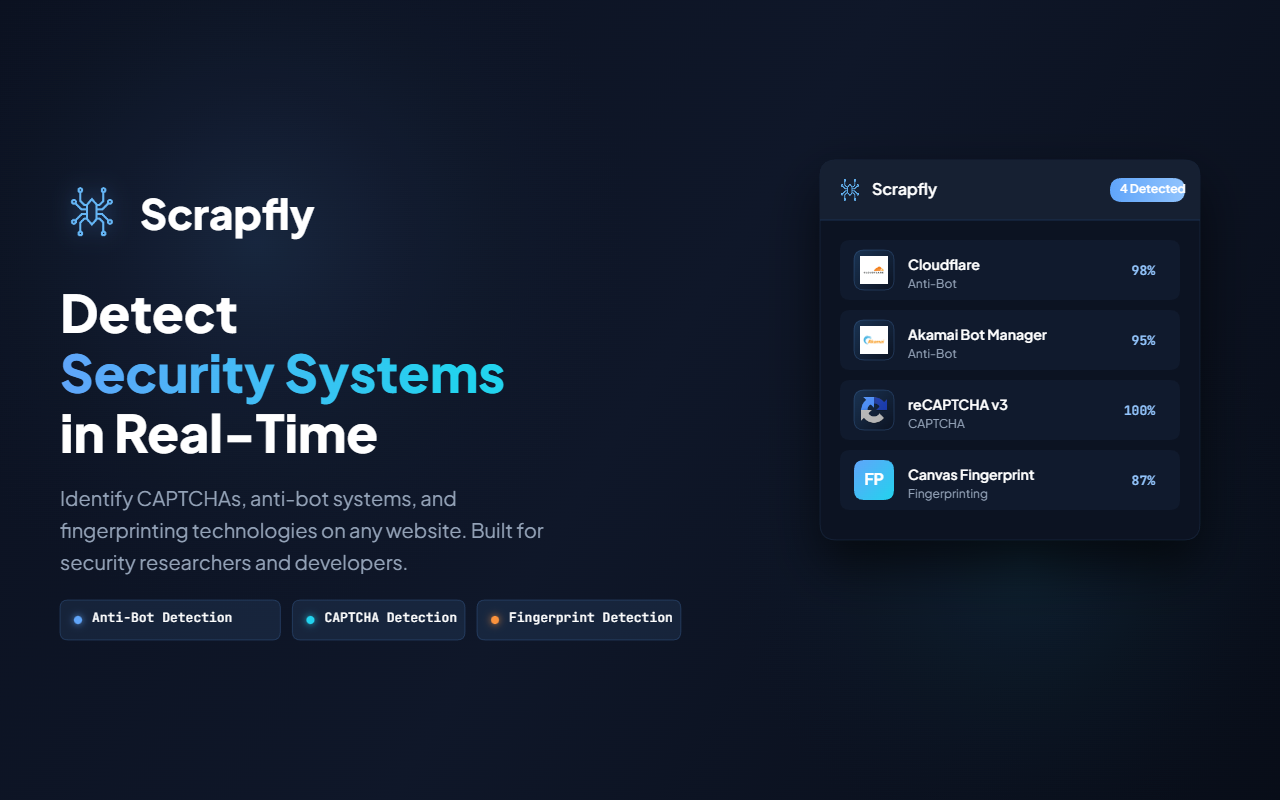
**实时检测反机器人系统、CAPTCHA 与浏览器指纹** [从 Chrome Web Store 安装](https://chromewebstore.google.com/detail/scrapfly/pdpakdgmjhkfimgaihlgaaiijlbilkca)
## 概述
Scrapfly Anti-bot Detector 是一款 Manifest V3 Chrome 扩展程序,旨在帮助安全研究人员、Web 开发人员和机器人检测爱好者识别和分析:
- **CAPTCHA**:reCAPTCHA、hCaptcha、FunCaptcha、GeeTest、Cloudflare Turnstile
- **反机器人系统**:Cloudflare、Akamai、DataDome、PerimeterX、Shape Security、AWS WAF、Imperva、Kasada 等
- **指纹技术**:Canvas、WebGL、Audio、Font、WebRTC、Performance、Navigator、Storage 及其他浏览器指纹方法
**实时检测反机器人系统、CAPTCHA 与浏览器指纹** [从 Chrome Web Store 安装](https://chromewebstore.google.com/detail/scrapfly/pdpakdgmjhkfimgaihlgaaiijlbilkca)
标签:C2日志可视化, CMS安全, JavaScript, 反爬虫识别, 多模态安全, 指纹识别, 数据可视化, 浏览器扩展, 自定义脚本