Knuspii/CrunchyCleaner

GitHub: Knuspii/CrunchyCleaner

一款轻量级的跨平台缓存清理工具,通过简洁的 TUI 界面帮助 Windows 和 Linux 用户一键清除系统和各类应用的缓存文件。

Stars: 95 | Forks: 4

Build Release Downloads Stars

CrunchyCleaner Logo

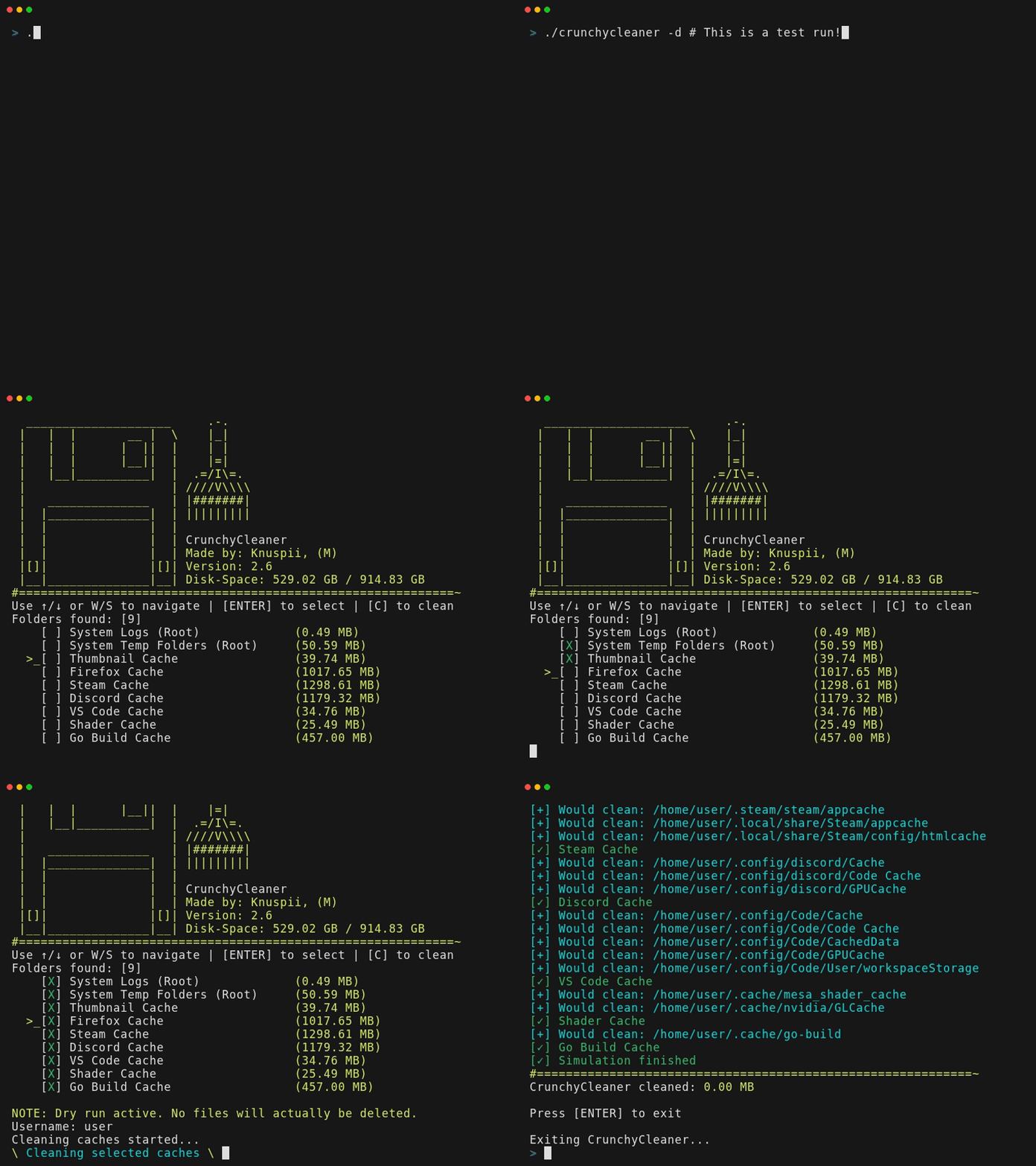
Preview
### 🧹 一款适用于 Windows 和 Linux 的轻量级软件[缓存](https://wikipedia.org/wiki/Cache_(computing))清理工具。 - **跨平台:** 同时支持 **Windows** 和 **Linux** - **轻量级:** 单一二进制文件,无依赖(下载即可运行) - **TUI (文本用户界面):** 简洁、极简的界面,没有令人困惑的菜单 ### 支持的软件列表: | 类别 | 软件 / 路径 | | :--- | :--- | | **系统:** | 系统日志、系统临时文件、缩略图、Shell 历史记录、包管理器、Shader Cache | | **浏览器:** | Firefox、Google Chrome、Microsoft Edge、Brave、Opera | | **开发:** | Visual Studio Code、Slack、JetBrains IDE、Go、Pip、NPM、Yarn、Cargo、NuGet、Gradle | | **游戏:** | Steam、Epic Games(Heroic) | | **应用:** | Discord、Spotify、Thunderbird、Telegram | **支持 Flatpak** \ **不支持 Snap** ## 📥 如何安装和下载 ![Download](https://img.shields.io/github/downloads/knuspii/crunchycleaner/total?color=green) **下载最新的二进制文件并直接运行/打开它:[[点击此处下载]](https://github.com/knuspii/crunchycleaner/releases)** \ 或者将相应的命令粘贴到你的终端中,然后重启终端以完成安装。 \ \ 对于 Linux(使用 sudo): ``` curl -L https://github.com/Knuspii/CrunchyCleaner/releases/latest/download/crunchycleaner -o cc && sudo install -m 755 cc /usr/local/bin/crunchycleaner && rm cc ``` 对于 Windows(使用管理员权限的 Powershell): ``` $d="$env:ProgramFiles\CrunchyCleaner"; md $d -F; iwr "https://github.com/Knuspii/CrunchyCleaner/releases/latest/download/crunchycleaner.exe" -OutFile "$d\crunchycleaner.exe"; $p=[Environment]::GetEnvironmentVariable('Path',2); if($p -notlike "$d"){[Environment]::SetEnvironmentVariable('Path',"$p;$d",2)} ``` 对于 Go(使用 go install): ``` go install github.com/knuspii/crunchycleaner/v2@latest ``` 之后,你只需在终端中输入 `crunchycleaner -v` 即可验证是否已安装。 ## 选项: ``` -a Automate cleaning (select all and start immediately) -d Simulation mode without deleting files (for testing) -v Display version information ``` ## 问答 (Q&A) **问:** 这会损坏我的系统吗? \ **答:** 不会。\ \ **问:** 它实际上会删除什么? \ **答:** 仅删除缓存文件和临时文件。\ \ **问:** 为什么还要开发另一个清理工具? \ **答:** 因为这款工具易用、简单、小巧且轻量。 ## 其他下载渠道 CrunchyCleaner 也可在 SourceForge 上获取 \ \ [![Download CrunchyCleaner](https://a.fsdn.com/con/app/sf-download-button)](https://sourceforge.net/projects/crunchycleaner/files/latest/download) [![Total Downloads](https://img.shields.io/sourceforge/dt/crunchycleaner.svg)](https://sourceforge.net/projects/crunchycleaner/files/latest/download) ### 🎖️ 收录于 [![Awesome TUIs](https://img.shields.io/badge/Awesome-TUIs-orange?style=flat-square)](https://github.com/rothgar/awesome-tuis) [![Awesome Go](https://img.shields.io/badge/Awesome-Go-blue?style=flat-square)](https://github.com/avelino/awesome-go) [![Awesome Windows](https://img.shields.io/badge/Awesome-Windows-blueviiet?style=flat-square)](https://github.com/0PandaDEV/awesome-windows) ### 第三方依赖 本项目使用了以下第三方依赖: - **[github.com/eiannone/keyboard](https://github.com/eiannone/keyboard)** – 用于跨平台键盘输入(MIT License) - **[github.com/shirou/gopsutil](https://github.com/shirou/gopsutil)** – 用于获取跨平台系统和硬件指标(BSD 3-Clause License)
标签:EVTX分析, Go, Ruby工具, TUI, 日志审计, 系统工具, 缓存清理