azat-io/actions-up
GitHub: azat-io/actions-up
一款交互式 CLI 工具,用于扫描并更新 GitHub Actions 到最新版本,同时将 Actions 固定到提交 SHA 以增强安全性。
Stars: 614 | Forks: 18
# Actions Up
 [](https://npmjs.com/package/actions-up)
[](https://codecov.io/gh/azat-io/actions-up)
[](https://github.com/azat-io/actions-up/blob/main/license.md)
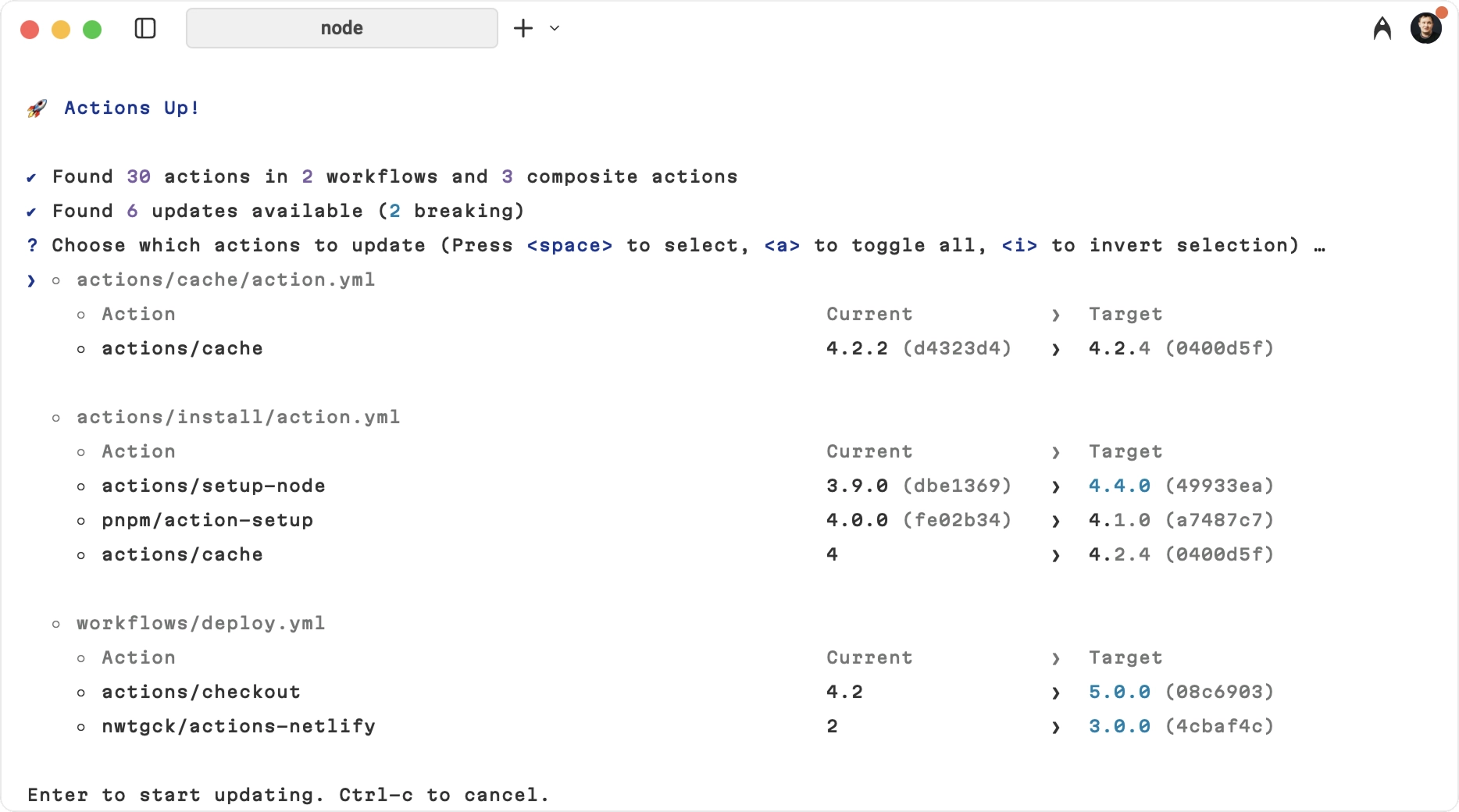
Actions Up 扫描您的工作流和组合 Actions,发现所有引用的 GitHub Action,然后检查是否有新版本。
交互式升级并将 Actions 精确固定到提交 SHA,以实现安全、可重现的 CI 和低维护成本。
## 功能
- **自动发现**:扫描所有工作流(`.github/workflows/*.yml`)和组合 Actions(`.github/actions/*/action.yml` 以及根目录的 `action.yml`/`action.yaml`)
- **可复用工作流**:检测并更新作业级别的可复用工作流调用
- **SHA 固定**:更新 Actions 使用提交 SHA 而非标签,以提高安全性
- **批量更新**:一次更新多个 Actions
- **交互式选择**:选择要更新的 Actions
- **重大变更检测**:警告主要版本更新
- **快速高效**:优化 API 使用,进行去重查询
- **CI/CD 集成**:在 GitHub Actions 工作流中使用,进行自动化 PR 检查
###
[](https://npmjs.com/package/actions-up)
[](https://codecov.io/gh/azat-io/actions-up)
[](https://github.com/azat-io/actions-up/blob/main/license.md)
Actions Up 扫描您的工作流和组合 Actions,发现所有引用的 GitHub Action,然后检查是否有新版本。
交互式升级并将 Actions 精确固定到提交 SHA,以实现安全、可重现的 CI 和低维护成本。
## 功能
- **自动发现**:扫描所有工作流(`.github/workflows/*.yml`)和组合 Actions(`.github/actions/*/action.yml` 以及根目录的 `action.yml`/`action.yaml`)
- **可复用工作流**:检测并更新作业级别的可复用工作流调用
- **SHA 固定**:更新 Actions 使用提交 SHA 而非标签,以提高安全性
- **批量更新**:一次更新多个 Actions
- **交互式选择**:选择要更新的 Actions
- **重大变更检测**:警告主要版本更新
- **快速高效**:优化 API 使用,进行去重查询
- **CI/CD 集成**:在 GitHub Actions 工作流中使用,进行自动化 PR 检查
###
## 为什么
保持 GitHub Actions 更新既关键又耗时。Actions Up 扫描所有工作流,突出显示可用更新,并将 Actions 固定到 SHA 以实现可重现性。
| 不使用 Actions Up | 使用 Actions Up |
| :----------------------------- | :------------------------------- |
| 手动检查每个 Action | 几秒钟内扫描所有工作流 |
| 风险使用易受攻击的版本 | SHA 固定实现最大安全性 |
| 每个仓库需要 30+ 分钟 | 总计不到 1 分钟 |
### 安全动机
GitHub Actions 在您的 CI 中运行任意代码。如果作业有 secrets 可用,该作业中使用的任何 Action 都可以读取环境并窃取这些 secrets。受损的 Action 或可变的版本标签是泄露的直接途径。
Actions Up 通过以下方式降低风险:
- 将 Actions 固定到提交 SHA 以防止标签劫持
- 使过时的 Actions 可见,并准确显示 CI 中运行的内容
- 警告重大更新,以便您在应用之前审查更改
注意:secrets 在 `push`、`workflow_dispatch`、`schedule` 和 `pull_request_target` 触发器上可用(如果在 fork PR 上明确启用也会可用)。始终将工作流权限限制到最低要求。
## 安装
快速使用(无需安装)
```
npx actions-up
```
全局安装
```
npm install -g actions-up
```
项目级安装
```
npm install --save-dev actions-up
```
或者,您可以使用 [Homebrew](https://brew.sh) 安装 Actions Up
```
brew install actions-up
```
## 使用方法
### 交互模式(默认)
在仓库根目录运行:
```
npx actions-up
```
这将:
1. 扫描所有 `.github/workflows/*.yml` 和 `.github/actions/*/action.yml` 文件,以及根目录的 `action.yml`/`action.yaml`
2. 检查可用更新
3. 显示交互式列表以选择更新
4. 应用选定的更新并固定 SHA
### 自动更新模式
跳过所有提示并更新所有内容:
```
npx actions-up --yes
# or
npx actions-up -y
```
### 试运行模式
检查更新但不进行任何更改:
```
npx actions-up --dry-run
```
### 自定义目录
默认情况下,Actions Up 扫描 `.github`。
使用 `--dir` 选择另一个目录,多次传递以扫描多个目录:
```
npx actions-up --dir .gitea
npx actions-up --dir .github --dir ./other/.github
```
### 递归扫描
使用 `--recursive`(`-r`)在选定目录中递归扫描 YAML 工作流/组合 Action 文件:
```
npx actions-up -r
npx actions-up --dir ./gh-repo-defaults -r
```
当使用 `--recursive` 而没有 `--dir` 时,Actions Up 从当前目录(`.`)开始扫描。
### 分支引用
默认情况下,跳过固定到分支引用(例如 `@main`、`@release/v1`)的 Actions,以避免更改故意浮动的引用。跳过的条目会在输出中列出。要在更新检查中包含它们,请传递 `--include-branches`。
### 更新模式
默认情况下,Actions Up 允许主要更新。使用 `--mode` 限制更新:
```
npx actions-up --mode minor
npx actions-up --mode patch
```
在 `minor` 和 `patch` 模式下,Actions Up 首先尝试找到最新的兼容标签(例如,在 `minor` 模式下从 `@v4` 会选择最新的 `v4.x.y`)。如果不存在兼容版本,则跳过该 Action。
## GitHub Actions 集成
### 自动化 PR 检查
您可以将 Actions Up 集成到 CI/CD 管道中,以在每个拉取请求上自动检查过时的 Actions。这有助于维护安全性,并确保您的团队了解可用更新。
创建
```
name: Check for outdated GitHub Actions
on:
pull_request:
types: [edited, opened, synchronize, reopened]
jobs:
check-actions:
name: Check for GHA updates
runs-on: ubuntu-latest
permissions:
contents: read
pull-requests: write
issues: write
steps:
- name: Checkout repository
uses: actions/checkout@v4
- name: Setup Node.js
uses: actions/setup-node@v4
with:
node-version: '20'
- name: Install actions-up
run: npm install -g actions-up
- name: Run actions-up check
id: actions-check
env:
GITHUB_TOKEN: ${{ secrets.GITHUB_TOKEN }}
run: |
set -euo pipefail
echo "## GitHub Actions Update Check" >> $GITHUB_STEP_SUMMARY
echo "" >> $GITHUB_STEP_SUMMARY
# Initialize variables
HAS_UPDATES=false
UPDATE_COUNT=0
# Run actions-up and capture output
echo "Running actions-up to check for updates..."
actions-up --dry-run > actions-up-raw.txt 2>&1
# Parse the output to detect updates
if grep -q "→" actions-up-raw.txt; then
HAS_UPDATES=true
# Count the number of updates (lines with arrows)
UPDATE_COUNT=$(grep -c "→" actions-up-raw.txt || echo "0")
fi
# Create formatted output
if [ "$HAS_UPDATES" = true ]; then
echo "Found $UPDATE_COUNT GitHub Actions with available updates" >> $GITHUB_STEP_SUMMARY
echo "" >> $GITHUB_STEP_SUMMARY
echo "
## 示例
### 常规 Actions
```
# Before
- uses: actions/checkout@v3
- uses: actions/setup-node@v3
# After running actions-up
- uses: actions/checkout@08c6903cd8c0fde910a37f88322edcfb5dd907a8 # v5.0.0
- uses: actions/setup-node@49933ea5288caeca8642d1e84afbd3f7d6820020 # v4.4.0
```
### 可复用工作流
Actions Up 还可以检测和更新可复用工作流调用:
```
# Before
jobs:
call-workflow:
uses: org/repo/.github/workflows/ci.yml@v1.0.0
with:
config: production
# After running actions-up
jobs:
call-workflow:
uses: org/repo/.github/workflows/ci.yml@a1b2c3d4e5f6 # v2.0.0
with:
config: production
```
## 高级用法
### GitHub Token
使用 `GITHUB_TOKEN`(或 PAT)将 API 速率限制从 60 提升到 5000 请求/小时。
```
GITHUB_TOKEN=your_token_here npx actions-up
```
或在 GitHub Actions 中:
```
- name: Check for updates
env:
GITHUB_TOKEN: ${{ secrets.GITHUB_TOKEN }}
run: npx actions-up --dry-run
```
### 跳过更新
使用 CLI 排除或 YAML 忽略注释。
```
npx actions-up --exclude "my-org/.*" --exclude ".*/internal-.*"
```
```
npx actions-up --min-age 7
```
忽略注释(文件/块/下一行/内联):
```
# actions-up-ignore-file
# actions-up-ignore-next-line
- uses: actions/checkout@v3
- uses: actions/setup-node@v3 # actions-up-ignore
# actions-up-ignore-start
- uses: actions/cache@v3
# actions-up-ignore-end
```
## 为什么选择 Actions Up?
面向希望控制 GitHub Actions 更新的开发者的交互式 CLI。
- **vs. Dependabot/Renovate:** Dependabot 和 Renovate 通过拉取请求更新;Actions Up 是具有明确 SHA 固定的交互式 CLI。
- **vs. pinact:** pinact 是一个用于固定和更新 Actions 及可复用工作流的 CLI;Actions Up 添加了交互式选择和重大更新警告。
- **零配置:** `npx actions-up` 立即运行。
- **重大变更警告:** 在应用之前标记主要更新。
## 贡献
请参阅[贡献指南](https://github.com/azat-io/actions-up/blob/main/contributing.md)。
## 许可证
MIT © [Azat S.](https://azat.io)
[](https://npmjs.com/package/actions-up)
[](https://codecov.io/gh/azat-io/actions-up)
[](https://github.com/azat-io/actions-up/blob/main/license.md)
Actions Up 扫描您的工作流和组合 Actions,发现所有引用的 GitHub Action,然后检查是否有新版本。
交互式升级并将 Actions 精确固定到提交 SHA,以实现安全、可重现的 CI 和低维护成本。
## 功能
- **自动发现**:扫描所有工作流(`.github/workflows/*.yml`)和组合 Actions(`.github/actions/*/action.yml` 以及根目录的 `action.yml`/`action.yaml`)
- **可复用工作流**:检测并更新作业级别的可复用工作流调用
- **SHA 固定**:更新 Actions 使用提交 SHA 而非标签,以提高安全性
- **批量更新**:一次更新多个 Actions
- **交互式选择**:选择要更新的 Actions
- **重大变更检测**:警告主要版本更新
- **快速高效**:优化 API 使用,进行去重查询
- **CI/CD 集成**:在 GitHub Actions 工作流中使用,进行自动化 PR 检查
###
创建 .github/workflows/check-actions-updates.yml。
```
name: Check for outdated GitHub Actions
on:
pull_request:
types: [edited, opened, synchronize, reopened]
jobs:
check-actions:
name: Check for GHA updates
runs-on: ubuntu-latest
permissions:
contents: read
pull-requests: write
issues: write
steps:
- name: Checkout repository
uses: actions/checkout@v4
- name: Setup Node.js
uses: actions/setup-node@v4
with:
node-version: '20'
- name: Install actions-up
run: npm install -g actions-up
- name: Run actions-up check
id: actions-check
env:
GITHUB_TOKEN: ${{ secrets.GITHUB_TOKEN }}
run: |
set -euo pipefail
echo "## GitHub Actions Update Check" >> $GITHUB_STEP_SUMMARY
echo "" >> $GITHUB_STEP_SUMMARY
# Initialize variables
HAS_UPDATES=false
UPDATE_COUNT=0
# Run actions-up and capture output
echo "Running actions-up to check for updates..."
actions-up --dry-run > actions-up-raw.txt 2>&1
# Parse the output to detect updates
if grep -q "→" actions-up-raw.txt; then
HAS_UPDATES=true
# Count the number of updates (lines with arrows)
UPDATE_COUNT=$(grep -c "→" actions-up-raw.txt || echo "0")
fi
# Create formatted output
if [ "$HAS_UPDATES" = true ]; then
echo "Found $UPDATE_COUNT GitHub Actions with available updates" >> $GITHUB_STEP_SUMMARY
echo "" >> $GITHUB_STEP_SUMMARY
echo "" >> $GITHUB_STEP_SUMMARY
echo "
" >> $GITHUB_STEP_SUMMARY
# Create detailed markdown report with better formatting
{
echo "## GitHub Actions Update Report"
echo ""
echo "### Summary"
echo "- **Updates available:** $UPDATE_COUNT"
echo ""
# See the raw output above for details.
echo "### How to Update"
echo ""
echo "Choose from several ways to update these actions:"
echo ""
echo "#### Option 1: Automatic Update (Recommended)"
echo '```bash'
echo "# Run this command locally in your repository"
echo "npx actions-up"
echo '```'
echo ""
echo "#### Option 2: Manual Update"
echo "1. Review each update in the table above"
echo "2. For breaking changes, click the Release Notes link to review changes"
echo "3. Edit the workflows and update the version numbers"
echo "4. Test the changes in your CI/CD pipeline"
echo ""
echo "---"
echo ""
echo "Click to see details
" >> $GITHUB_STEP_SUMMARY echo "" >> $GITHUB_STEP_SUMMARY echo '```' >> $GITHUB_STEP_SUMMARY cat actions-up-raw.txt >> $GITHUB_STEP_SUMMARY echo '```' >> $GITHUB_STEP_SUMMARY echo ""
echo "
"
} > actions-up-report.md
echo "has-updates=true" >> $GITHUB_OUTPUT
echo "update-count=$UPDATE_COUNT" >> $GITHUB_OUTPUT
else
echo "All GitHub Actions are up to date!" >> $GITHUB_STEP_SUMMARY
{
echo "## GitHub Actions Update Report"
echo ""
echo "### All GitHub Actions in this repository are up to date!"
echo ""
echo "No action required. Your workflows are using the latest versions of all GitHub Actions."
} > actions-up-report.md
echo "has-updates=false" >> $GITHUB_OUTPUT
echo "update-count=0" >> $GITHUB_OUTPUT
fi
- name: Comment PR with updates
if:
github.event_name == 'pull_request' &&
github.event.pull_request.head.repo.full_name == github.repository
uses: actions/github-script@v7
with:
script: |
const fs = require('fs');
const report = fs.readFileSync('actions-up-report.md', 'utf8');
const hasUpdates = '${{ steps.actions-check.outputs.has-updates }}' === 'true';
const updateCount = '${{ steps.actions-check.outputs.update-count }}';
// Check if we already commented
const comments = await github.rest.issues.listComments({
owner: context.repo.owner,
repo: context.repo.repo,
issue_number: context.issue.number
});
const botComment = comments.data.find(comment =>
comment.user.type === 'Bot' &&
comment.body.includes('GitHub Actions Update Report')
);
const commentBody = `${report}
---
*Generated by [actions-up](https://github.com/azat-io/actions-up) | Last check: ${new Date().toISOString()}*`;
// Only comment if there are updates or if we previously commented
if (hasUpdates || botComment) {
if (botComment) {
// Update existing comment
await github.rest.issues.updateComment({
owner: context.repo.owner,
repo: context.repo.repo,
comment_id: botComment.id,
body: commentBody
});
console.log('Updated existing comment');
} else {
// Create new comment only if there are updates
await github.rest.issues.createComment({
owner: context.repo.owner,
repo: context.repo.repo,
issue_number: context.issue.number,
body: commentBody
});
console.log('Created new comment');
}
} else {
console.log('No updates found and no previous comment exists - skipping comment');
}
// Add or update PR labels based on status
const labels = await github.rest.issues.listLabelsOnIssue({
owner: context.repo.owner,
repo: context.repo.repo,
issue_number: context.issue.number
});
const hasOutdatedLabel = labels.data.some(label => label.name === 'outdated-actions');
if (hasUpdates && !hasOutdatedLabel) {
// Add label if updates are found
try {
await github.rest.issues.addLabels({
owner: context.repo.owner,
repo: context.repo.repo,
issue_number: context.issue.number,
labels: ['outdated-actions']
});
console.log('Added outdated-actions label');
} catch (error) {
console.log('Could not add label (might not exist in repo):', error.message);
}
} else if (!hasUpdates && hasOutdatedLabel) {
// Remove label if no updates
try {
await github.rest.issues.removeLabel({
owner: context.repo.owner,
repo: context.repo.repo,
issue_number: context.issue.number,
name: 'outdated-actions'
});
console.log('Removed outdated-actions label');
} catch (error) {
console.log('Could not remove label:', error.message);
}
}
- name: Fail if outdated actions found
if: steps.actions-check.outputs.has-updates == 'true'
run: |
echo "::error:: Found ${{ steps.actions-check.outputs.update-count }} outdated GitHub Actions. Please update them before merging."
echo ""
echo "You can update them by running: npx actions-up"
echo "Or manually update the versions in your workflows."
exit 1
```
Raw actions-up output
" echo "" echo '```' cat actions-up-raw.txt echo '```' echo "标签:GitHub Actions, GitHub Advanced Security, GNU通用公共许可证, MITM代理, Node.js, npm包, SHA固定, SOC Prime, 交互式工具, 安全加固, 工作流优化, 开发工具, 开源框架, 持续部署, 持续集成, 暗色界面, 版本管理, 网络调试, 自动化, 自动化攻击, 自动笔记