Neon Vision Editor
一款适用于 macOS、iPhone 和 iPad 的原生 Markdown、笔记和代码编辑器。
设计简约。快速编辑,高效文件访问,无 IDE 冗杂。
下载:
GitHub Releases
·
App Store
·
TestFlight
## v0.7.0 和 v0.7.1 版本更新
### 升级理由
- v0.7.1 对完整的编辑器界面进行了打磨,为文档标签页、侧边栏、目录、minimap 和 Markdown 预览引入了更清晰的圆角 UI 系统。
- v0.7.0 添加了更大的导航和基础工作流功能:代码 minimap、持久化侧边栏终端、可选的 `nve` 辅助工具指导、Markdown 预览主题以及大文件性能优化。
- 两个版本共同作用,使日常编辑在 macOS、iOS 和 iPadOS 上更加流畅,同时保持应用轻量级和沙盒友好。
### v0.7.1 UI 全面革新
- 优化了项目侧边栏、目录侧边栏、文档标签页、编辑器边缘、minimap 容器和 Markdown 预览,使其圆角更一致、轮廓更清晰、分割线冲突更少。
- 改进了半透明模式背景,使编辑器、预览、minimap 和侧边栏之间的间隙保持可读,而不会变得过于透明。
- 减少了 iPhone/iPad 在目录和项目行中的间距,移除了 iOS/iPad 文档标签页分隔线,并使标签页淡入淡出行为仅在目录重叠实际需要时出现。
- 通过更强的符号样式、语言感知条目、行标记以及更清晰的 Swift 和其他支持文件类型的行呈现,使目录项更加醒目。
- 将 macOS 工具栏的终端按钮路由到现有的侧边栏终端标签页,而不是打开单独的终端窗口,从而在切换标签页时保留当前终端会话。
- 移除了模拟的 Apple Intelligence 补全输出,使补全依赖于真实的 Apple Foundation Models 路径,而非占位符文本。
### v0.7.0 工作流基础
- 添加了可选的代码 minimap 支持,包含节、声明、导入、属性、控制流、注释和代码标记。
- 在侧边栏中添加了轻量级的集成终端标签页,同时在切换标签页时保留当前终端会话。
- 添加了应用内命令行辅助部分和可选的 bundled `nve` 辅助工具流程,该流程保持用户发起、透明且沙盒友好。
- 添加了 Markdown 预览主题优化、项目树忽略文件夹处理、可复用的侧边栏结构以及更多可复用的 ContentView 部分。
- 通过为支持的代码文件提供更宽、滚动同步、颜色编码的 minimap,改进了大型编辑器的导航。
### 修复
- 通过从实际编辑器视口和共享的 minimap 偏移量数学中推导视口分数,修复了 minimap 滚动同步问题。
- 通过加宽条带、避免全蓝色强调块以及减少 minimap 边缘周围的视觉噪音,提高了 minimap 的可读性。
- 减少了文件夹比较、diff 过滤、Markdown 导出、主题解析、语法高亮和项目树刷新路径中的重复大文件处理工作。
- 改进了设置下拉菜单的大小/对齐方式、侧边栏标签页的点击目标、默认侧边栏宽度以及可调整大小的侧边栏行为。
- 在 macOS、iOS 和 iPadOS 上收紧了 Markdown 预览/导出行为和侧边栏人体工程学。
## 从这里开始
- 跳转:[安装](#install) | [功能](#features) | [贡献](#contributing-quickstart)
- 快速安装:[GitHub Releases](https://github.com/h3pdesign/Neon-Vision-Editor/releases),[App Store](https://apps.apple.com/de/app/neon-vision-editor/id6758950965),[TestFlight](https://testflight.apple.com/join/YWB2fGAP)
- 需要快速帮助:[故障排除](#troubleshooting) | [常见问题](#faq) | [已知问题](#known-issues)
### 60 秒入门(源码构建)
1. `git clone https://github.com/h3pdesign/Neon-Vision-Editor.git`
2. `cd Neon-Vision-Editor`
3. `xcodebuild -project "Neon Vision Editor.xcodeproj" -scheme "Neon Vision Editor" -destination 'platform=macOS,name=My Mac' build`
4. `open "Neon Vision Editor.xcodeproj"` 并运行,然后使用 `Cmd+P` 进行快速打开。
| 适用于 | 不适用于 |
|---|---|
| macOS、iOS、iPadOS 上的快速原生编辑 | 包含深度重构/调试器堆栈的完整 IDE 工作流 |
| Markdown 编写以及带高亮显示的脚本/配置编辑 | 今天就需要完整 Intel Mac 验证的团队 |
| 追求低开销和快速文件访问的用户 | 期望在 iPhone 上获得完整桌面 IDE 功能的用户 |
## 目录
从这里开始 ·
发布渠道 ·
核心工作流 ·
下载指标 ·
项目文档 ·
功能
发布亮点 ·
平台矩阵 ·
路线图(近期) ·
故障排除 ·
常见问题 ·
更新日志 ·
贡献快速入门 ·
支持与反馈
## 发布渠道
Channel
Best for
Delivery
Direct notarized builds and fastest stable updates
GitHub Releases
Apple-managed install/update flow
App Store
Early testing of upcoming changes
TestFlight
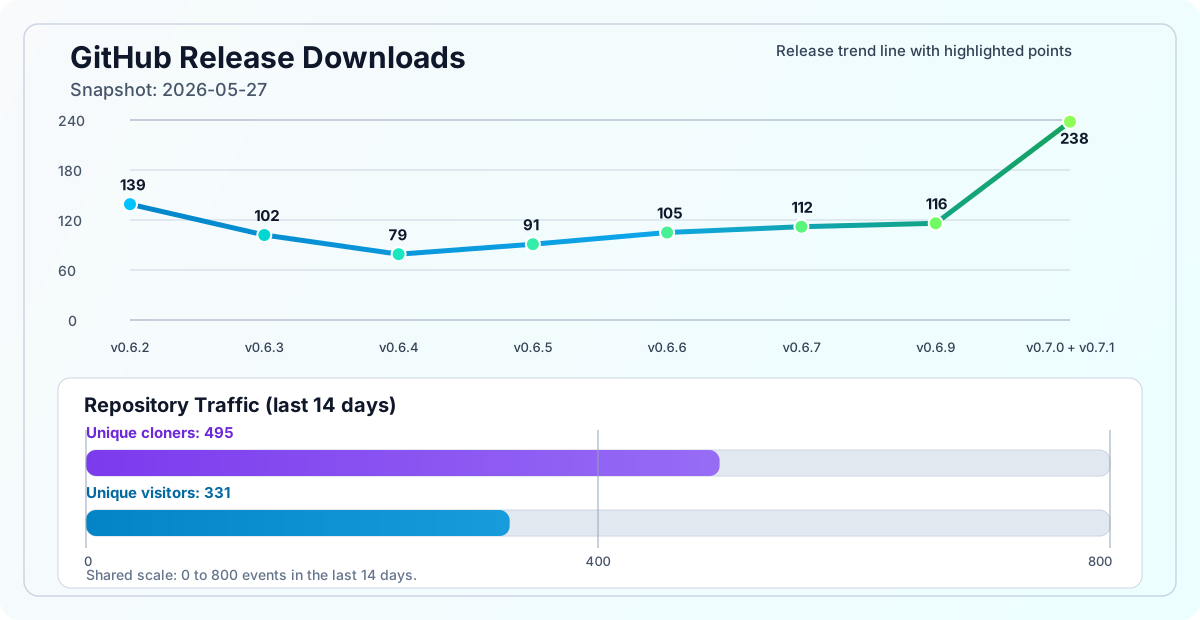
## 下载指标
发布下载 + 流量趋势
Styled line chart shows per-release totals with 14-day traffic counters for clones and views.
## 项目文档
| 文档 | 目的 |
|---|---|
| [`CHANGELOG.md`](CHANGELOG.md) | 完整的发布历史和里程碑问题覆盖范围 |
| [`CONTRIBUTING.md`](CONTRIBUTING.md) | 本地设置、构建和贡献工作流 |
| [`PRIVACY.md`](PRIVACY.md) | 隐私保证和数据处理政策 |
| [`SECURITY.md`](SECURITY.md) | 安全政策和负责任披露 |
| [`release/`](release/) | TestFlight、App Store 和发布预检清单 |
## 这是谁?
| 最适合 | 选择 Neon Vision Editor 的理由 |
|---|---|
| 快速笔记记录者 | 快速的原生启动和低 UI 开销,便于快速编辑 |
| 专注于 Markdown 的作者 | 在 Apple 设备上进行简洁编辑并拥有快速预览工作流 |
| 编辑脚本/配置文件的开发者 | 无需完整 IDE 复杂性的语法高亮 + 快速文件导航 |
## 为什么选择它而不是完整 IDE?
| 优势 | 意义 |
|---|---|
| 更快的启动速度 | 短编辑会话开销更低 |
| 聚焦的界面 | 以编辑器为首的工作流,没有项目系统的臃肿 |
| 原生 Apple 行为 | 在 macOS、iOS 和 iPadOS 上获得一致的体验 |
## 下载
预构建二进制文件可在 [GitHub Releases](https://github.com/h3pdesign/Neon-Vision-Editor/releases) 获取。
| 渠道 | 最适合 | 下载 | 发布轨道 | 备注 |
|---|---|---|---|---|
| **稳定版** | 直接经过公证的构建和最快的稳定更新 | [GitHub Releases](https://github.com/h3pdesign/Neon-Vision-Editor/releases) | **v0.7.1** | 已在 Apple Silicon 测试,Intel 未完全验证 |
| **商店** | Apple 管理的安装和更新 | [Neon Vision Editor on the App Store](https://apps.apple.com/de/app/neon-vision-editor/id6758950965) | App Store | 自动的商店交付/更新流程 |
| **测试版** | 在稳定版之前测试即将推出的功能 | [TestFlight Invite](https://testflight.apple.com/join/YWB2fGAP) | TestFlight | 用于反馈的早期访问构建 |
## 安装
### 快速安装(curl)
直接安装最新版本:
```
curl -fsSL https://raw.githubusercontent.com/h3pdesign/Neon-Vision-Editor/main/scripts/install.sh | sh
```
无需管理员密码提示的安装(用户本地应用文件夹):
```
curl -fsSL https://raw.githubusercontent.com/h3pdesign/Neon-Vision-Editor/main/scripts/install.sh | sh -s -- --appdir "$HOME/Applications"
```
### Homebrew
```
brew tap h3pdesign/tap
brew install --cask neon-vision-editor
```
Tap 仓库:[h3pdesign/homebrew-tap](https://github.com/h3pdesign/homebrew-tap)
如果 Homebrew 要求输入管理员密码,通常是因为 cask 安装到 `/Applications`。
使用以下方式避免:
```
brew install --cask --appdir="$HOME/Applications" neon-vision-editor
```
### 命令行助手
macOS 应用捆绑了一个可选的 `nve` 助手,用于终端工作流。仅在需要 shell 命令时安装它:
1. 打开 **设置 > 支持**。
2. 复制 **命令行助手** 安装命令。
3. 在终端中运行它,将捆绑的助手链接到 `$HOME/bin`。
```
nve README.md
nve --wait --new-window "Neon Vision Editor/UI/ContentView.swift"
nve --line 42 "Neon Vision Editor/UI/ContentView.swift"
```
开发版本也可以链接仓库副本:
```
ln -sf "$PWD/scripts/nve" "$HOME/.local/bin/nve"
```
权限模型:该助手是可选的且用户链接的。它通过 `/usr/bin/open` 调用 macOS Launch Services,本身不读取文件内容。Neon Vision Editor 在沙盒内处理文档打开请求,具有用户选择的读写文件访问权限和安全范围文件访问权限。它不需要完全磁盘访问、辅助功能访问、管理员权限、后台服务或遥测。参见 [`docs/CommandLineHelper.md`](docs/CommandLineHelper.md)。
### Gatekeeper(macOS 26 Tahoe)
如果 macOS 阻止首次启动:
1. 打开 **系统设置**。
2. 前往 **隐私与安全性**。
3. 在 **安全性** 中,找到被阻止的应用消息。
4. 点击 **仍然打开**。
5. 确认对话框。
## 核心工作流
Project Sidebar keeps Files, Search, Diff, and Git in one stable surface. Markdown Preview keeps style and export in one toolbar flow. Quick Open keeps file navigation immediate.
## 功能
Neon Vision Editor 保持界面简约,专注于快速编写/编码工作流。
平台特定的可用性在下面的 [平台矩阵](#platform-matrix) 部分跟踪。
Editing Core
Navigation & Preview
Platform, Output & Customization
Safety & Privacy
### 编辑核心
- 常规和大型文本文件的快速加载与标签页编辑。
- 广泛的 Swift 6 就绪语法高亮(包括 TeX/LaTeX)、带 Tab 接受的内联补全以及带全部替换的正则查找/替换。
- iPhone 和 iPad 上的不可见字符标记在轻量级覆盖层中渲染,以便空格、制表符和换行符在滚动时保持对齐。
- 可选的 Vim 工作流支持以及常见语言的入门模板。
### 导航与工作流
- 快速打开(`Cmd+P`)、项目侧边栏导航和递归项目树渲染。
- 文件、搜索、差异和 Git 共享更大的卡片式侧边栏标签页,具有可见的灰色非活动状态和一致的 450 pt 默认宽度。
- macOS 项目侧边栏包含一个终端标签页,可在切换标签页时保留输出,提供项目/主目录工作目录选择,并提供清除/重启控件。
- `scripts/nve` 从终端打开文件,并支持 `--wait`、`--new-window` 和 `--line` 兼容性标志。
- 在文件中查找时,当匹配项打开时,Mac 和 iPad 上的结果保持可见,而替换目标默认不选中。
- 项目快速操作(`全部展开` / `全部折叠`)、最近的项目文件夹、仅支持文件过滤以及默认忽略的重型文件夹(`.git`、`.build`、`node_modules`、`DerivedData`)。
### 设置同步
- 可选的 iCloud 外观与主题同步保持外观、主题颜色、自定义主题数据、格式切换和 Markdown 预览主题行为在已登录设备间保持一致。
- 同步状态包括最新的本地 iCloud 结果和时间戳。文档、API 令牌、远程会话和编辑器内容不会同步。
- 用于“与磁盘比较”和“比较打开的标签页”工作流的原生并排差异视图,带有更改导航。
- 跨平台“另存为…”和带确认的关闭所有标签页。
### 预览、平台和安全性
- macOS/iOS/iPadOS 上的原生 Markdown 预览模板,以及 iPhone 底部工作表预览。
- 在所有平台上通过 XML 模式和括号助手支持 `.svg` 文件。
- Markdown 和 Swift 源码导出在 iOS 上正确声明其内容类型。
- 不支持文件的打开/导入安全防护以及先前打开的项目文件夹的会话恢复。
### 自定义与诊断
- 内置主题集合:Dracula、One Dark Pro、Nord、Tokyo Night、Gruvbox 和 Neon Glow。
- 分组设置、可选的 StoreKit 支持流程以及 macOS 上的 AI 活动日志诊断。
## 发布亮点
- 可选的代码 minimap 支持添加了颜色编码的节和标记,同时默认禁用。
- 侧边栏终端集成可在切换标签页时保持当前会话存活。
- Markdown 预览主题、导出路径和大文件呈现工作已得到加强。
- 项目树刷新、差异过滤、文件夹比较、主题解析和 Markdown 导出的重复工作更少。
- 可选的 `nve` 命令行助手流程保持用户触发且 App Store 审核友好。
## 架构一览
```
flowchart LR
Mac["Platform: macOS shell (SwiftUI + AppKit bridges)"]
IOS["Platform: iOS/iPadOS shell (SwiftUI + UIKit bridges)"]
ACT["App Layer: user actions (toolbar/menu/shortcuts)"]
VM["App Layer: EditorViewModel (@MainActor state owner)"]
CMD["App Layer: command reducers (Flux-style mutations)"]
IO["Core: file I/O + load/sanitize pipeline"]
HL["Core: syntax highlighting + runtime limits"]
FIND["Core: find/replace + selection engine"]
PREV["Core: markdown preview renderer"]
SAFE["Core: unsupported-file safety guards"]
STORE["Infra: tabs + session restore store"]
PREFS["Infra: settings + persistence"]
SEC["Infra: SecureTokenStore (Keychain)"]
UPD["Infra: release update manager"]
Mac --> ACT
IOS --> ACT
ACT --> VM
VM --> CMD
CMD --> STORE
VM --> IO
VM --> HL
VM --> FIND
VM --> PREV
VM --> SAFE
VM --> PREFS
VM --> UPD
PREFS --> STORE
IO --> STORE
VM --> SEC
classDef platform stroke:#2563EB,stroke-width:3px,fill:transparent,font-family:ui-monospace\, SFMono-Regular\, Menlo\, Monaco\, Consolas\, Liberation Mono\, monospace,font-size:13px;
classDef app stroke:#059669,stroke-width:3px,fill:transparent,font-family:ui-monospace\, SFMono-Regular\, Menlo\, Monaco\, Consolas\, Liberation Mono\, monospace,font-size:13px;
classDef core stroke:#EA580C,stroke-width:3px,fill:transparent,font-family:ui-monospace\, SFMono-Regular\, Menlo\, Monaco\, Consolas\, Liberation Mono\, monospace,font-size:13px;
classDef infra stroke:#9333EA,stroke-width:3px,fill:transparent,font-family:ui-monospace\, SFMono-Regular\, Menlo\, Monaco\, Consolas\, Liberation Mono\, monospace,font-size:13px;
class Mac,IOS platform;
class ACT,VM,CMD app;
class IO,HL,FIND,PREV,SAFE core;
class STORE,PREFS,SEC,UPD infra;
linkStyle 0,1 stroke:#2563EB,stroke-width:2px;
linkStyle 2,3 stroke:#059669,stroke-width:2px;
linkStyle 5,6,7,8,9,13 stroke:#EA580C,stroke-width:2px;
linkStyle 4,10,11,12,14 stroke:#9333EA,stroke-width:2px;
```
- `EditorViewModel` 是每个窗口/场景的单个面向 UI 的编排点。
- 命令可预测地改变编辑器状态;会话/标签页通过存储服务持久化。
- 文件访问和解析在主线程之外进行;UI 状态更改在主线程上进行。
- 平台壳层保持精简,并将交互路由到共享的应用/核心服务中。
- 安全敏感的凭据存储在钥匙串(`SecureTokenStore`)中,而不是普通首选项中。
- 图中颜色键:蓝色 = 平台壳层,绿色 = 应用编排,橙色 = 核心服务,紫色 = 基础设施。
完整架构参考:[`architecture.md`](architecture.md)。该参考跟踪当前的 Swift 6 跨平台结构、平台防护、编辑器渲染路径、性能规则和发布验证工作流。
### 架构原则
- 将 UI 变更保持在主线程上(`@MainActor`),将繁重工作保持在 UI 线程之外。
- 保持窗口/场景状态隔离,以避免意外的跨窗口耦合。
- 保持严格的安全默认设置:令牌存储在钥匙串中,默认不进行遥测。
- 保持平台包装器精简,并将共享行为推送到通用服务中。
## 平台矩阵
大多数编辑器功能在 macOS、iOS 和 iPadOS 之间共享。
### 所有平台共享
- 带语法高亮的快速文本编辑。
- Markdown 预览模板(默认、文档、文章、紧凑)。
- 项目侧边栏,带支持文件过滤器和更大的卡片式文件/搜索/差异/Git 标签页。
- 不支持文件的安全警报。
- 通过 XML 模式支持 SVG(`.svg`)。
- 带确认的关闭所有标签页。
- 括号助手和分组设置卡片。
- 跨平台发布关卡覆盖 macOS、iOS 模拟器和 iPad 模拟器构建。
### 平台特定差异
| 功能 | macOS | iOS | iPadOS | 备注 |
|---|---|---|---|---|
| 快速打开
`Cmd+P` |  |  |  | iOS 需要硬件键盘
才能使用快捷键驱动的流程。 |
| 项目侧边栏标签页
v0.6.9 |  |  |  | 文件/搜索/差异/Git 使用更大的卡片目标;
常规宽度侧边栏默认为 450 pt。 |
| 在文件中查找
v0.6.8-v0.6.9 |  |  |  | Mac/iPad 在打开匹配项时结果保持打开状态;
替换目标默认不选中。 |
| 不可见字符
v0.6.9 |  |  |  | iPhone/iPad 标记在轻量级视口覆盖层中绘制,
以在滚动时保持对齐。 |
| 括号助手 |  |  |  | 跨平台行为相同;
仅 UI 表面不同。 |
| Markdown 预览 |  |  |  | 交互适应屏幕大小
和平台输入模型。 |
| 差异工作流
v0.6.8-v0.6.9 |  |  |  | iPhone 使用紧凑的侧边栏/工作表呈现;
Mac/iPad 保持稳定的侧边栏宽度。 |
| Git 侧边栏
v0.6.7+ |  |  |  | Git 使用仅限 macOS 的服务,因为它通过 shell 调用
本地 Git 可执行文件。 |
| 另存为 / 文本导出
v0.6.9 |  |  |  | iOS/iPadOS 导出为文本保存声明 Markdown 和 Swift 源码
内容类型。 |
## 信任与可靠性信号
- 经公证的发布流水线:[release-notarized.yml](https://github.com/h3pdesign/Neon-Vision-Editor/actions/workflows/release-notarized.yml)
- 发布前验证关卡:[pre-release-ci.yml](https://github.com/h3pdesign/Neon-Vision-Editor/actions/workflows/pre-release-ci.yml)
- 安全扫描:[CodeQL 工作流](https://github.com/h3pdesign/Neon-Vision-Editor/actions/workflows/codeql.yml)
- Homebrew cask 同步:[update-cask.yml](https://github.com/h3pdesign/homebrew-tap/actions/workflows/update-cask.yml)
更多发布完整性详情:[发布完整性](#release-integrity)
## 平台画廊
- [macOS](#macos)
- [iPad](#ipad)
- [iPhone](#iphone)
- 文档的源图片索引:[`docs/images/README.md`](docs/images/README.md)
- App Store 画廊:[Neon Vision Editor on App Store](https://apps.apple.com/de/app/neon-vision-editor/id6758950965)
- 最新发布资产:[GitHub Releases](https://github.com/h3pdesign/Neon-Vision-Editor/releases)
### macOS
General editing workflow on macOS
Wide editing workspace with tabs and status bar context
### iPad
Project navigation and editing workflow on iPad
Markdown preview workflow in the editor context
### iPhone
Editing workflow with syntax highlighting and accessory bar
Overflow menu actions in the editor workflow
Markdown preview sheet with template, PDF mode, and export action
Theme color editing on iPhone
## 发布流程(已完成 + 即将进行)
Click to open full-size SVG and zoom. In full view, each card links to release notes or the roadmap hub.
## 路线图(近期)
### 当前(v0.7.1)
-  发布了 minimap、持久化侧边栏终端、Markdown 预览主题优化、可选的 `nve` 辅助工具指导,以及针对大文件工作流的又一次性能优化。
跟踪:[Release v0.7.0](https://github.com/h3pdesign/Neon-Vision-Editor/releases/tag/v0.7.0)
### 下一版(v0.7.2)
-  在 v0.7.0 经公证的发布和 App Store 上线检查完成后开始下一版规划。
跟踪:[Milestones](https://github.com/h3pdesign/Neon-Vision-Editor/milestones)
### 后续(v0.7.2+)
-  在 0.7.0 的 minimap、终端和助手基础得到验证后,进行更大的工作流扩展。
## 已知问题
- 打开的已知问题(实时过滤):[label:known-issue](https://github.com/h3pdesign/Neon-Vision-Editor/issues?q=is%3Aissue%20is%3Aopen%20label%3Aknown-issue)
## 故障排除
1. 应用首次启动被阻止:请在 `隐私与安全性` 中使用上面的 Gatekeeper 步骤。
2. Markdown 预览不可见:确保您使用的是 macOS 或 iPadOS(iPhone 上不可用)。
3. iOS 上快捷键不起作用:连接硬件键盘以使用基于快捷键的流程,如 `Cmd+P`。
4. iPad 上侧边栏/布局感觉拥挤:切换方向或在预览前关闭侧面板。
5. 更新后设置感觉不对:退出/重新启动应用,并在设置中验证当前发布版本。
## 配置
- 主题和外观:`设置 > 设计`
- 外观/主题 iCloud 同步:`设置 > 通用 > 窗口`
- 编辑器行为(字体、行高、换行、代码片段):`设置 > 编辑器`
- 启动/会话行为:`设置 > 通用`
- 支持和购买选项:`设置 > 更多`(平台相关)
## 常见问题
- **Neon Vision Editor 支持 Intel Mac 吗?**
Intel 目前尚未完全验证。如果您能帮助测试,请参阅 [Help wanted: Intel Mac test coverage](https://github.com/h3pdesign/Neon-Vision-Editor/issues/41)。
- **我可以离线使用吗?**
是的,用于核心编辑;网络仅用于可选的外部服务(例如选定的 AI 提供商)。
- **我需要启用 AI 才能使用编辑器吗?**
不需要。核心编辑、导航和预览功能无需 AI 即可工作。
- **令牌存储在哪里?**
存储在钥匙串中(通过 `SecureTokenStore`),不在 `UserDefaults` 中。
## 键盘快捷键
所有快捷键均使用 `Cmd`(`⌘`)。iPad/iOS 需要硬件键盘。
 
## 更新日志
最新稳定版:**v0.7.1**(2026-05-20)
### 近期发布(一览)
| 版本 | 日期 | 亮点 | 修复 | 破坏性变更 | 迁移 |
|---|---|---|---|---|---|
| [`v0.7.1`](https://github.com/h3pdesign/Neon-Vision-Editor/releases/tag/v0.7.1) | 2026-05-20 | 优化了项目/侧边栏视觉系统,具有更明显的圆角容器、更清晰的标签卡片、更强的轮廓、更清晰的项目路径呈现以及更紧凑的 iPhone/iPad 行间距;目录呈现具有更独特的符号、标记、行徽章、语言感知项、圆角侧边栏框架以及跨 macOS、iOS 和 iPadOS 的更清晰间距;打磨了 Markdown 预览和文档标签页过渡,具有圆角预览框架、更柔和的分割过渡以及仅在 UI 实际需要的地方进行标签页淡入淡出;通过移除冲突的分割线、减少视觉噪音和改进半透明窗格背景,清理了 minimap/编辑器/侧边栏边缘 | macOS 工具栏终端按钮,使其选择现有的侧边栏终端标签页并在切换标签页时保留该侧边栏终端会话;移除了打开单独终端窗口的旧集成终端工作表路径;移除了模拟的 Apple Intelligence 补全输出,并停止将不可用消息文本作为补全返回 | 未注明 | 不需要 |
| [`v0.7.0`](https://github.com/h3pdesign/Neon-Vision-Editor/releases/tag/v0.7.0) | 2026-05-19 | 可选的代码 minimap 支持,包含节、声明、导入、属性、控制流、注释和代码标记;应用内命令行辅助部分和可选的 bundled `nve` 辅助工具流程,保持用户发起且沙盒友好;侧边栏终端集成、Markdown 预览主题优化、项目树忽略文件夹处理以及更多可复用的 ContentView/侧边栏结构 | 通过从实际编辑器视口和共享的 minimap 偏移量数学中推导视口分数,修复了 minimap 滚动同步问题;通过加宽条带并避免全蓝色强调块,修复了 minimap 可读性问题;减少了文件夹比较、diff 过滤、Markdown 导出、主题解析和项目树刷新路径中的重复大文件处理工作 | 未注明 | 不需要 |
| [`v0.6.9`](https://github.com/h3pdesign/Neon-Vision-Editor/releases/tag/v0.6.9) | 2026-05-15 | 跨 macOS、iOS 和 iPadOS 的项目侧边栏标签页提示,具有更大的卡片式文件/搜索/差异/Git 目标和可见的灰色非活动状态;通过在跨后台高亮闭包时将高亮值类型标记为 `Sendable`,收紧了 Swift 6 语法高亮数据流;更新了当前 Swift 6、跨平台编辑器结构的架构和 不可见字符渲染,使空格、制表符和换行符标记在滚动时保持对齐,而不是随重复使用的文本内容漂移;通过在非交互式视口覆盖层中绘制标记并在首选项未更改时避免完整的 TextKit 失效,减少了 iOS 不可见字符开销;通过在共享缓存锁之外编译正则表达式并在插入符号附近限制后备括号范围搜索,提高了语法高亮的响应性 | 未注明 | 不需要 |
- 完整发布历史:[`CHANGELOG.md`](CHANGELOG.md)
- 最新发布:**v0.7.1**
- 比较近期更改:[v0.7.0...v0.7.1](https://github.com/h3pdesign/Neon-Vision-Editor/compare/v0.7.0...v0.7.1)
## 已知限制
- Intel Mac 支持尚未完全验证。
- Vim 模式故意保持轻量级,不是完整的 Vim 仿真。
- iPhone 和 iPad 工作流提供的功能集仍然比 macOS 小。
## 隐私与安全
- 隐私政策:[`PRIVACY.md`](PRIVACY.md)。
- API 密钥存储在钥匙串(`SecureTokenStore`)中,不在 `UserDefaults` 中。
- 网络流量使用 HTTPS。
- 无遥测。
- 仅当启用代码补全并选择了提供商时,才会发生外部 AI 请求。
- 安全政策和报告详情:[`SECURITY.md`](SECURITY.md)。
- 新的仓库提交使用 SSH 签名;较旧的历史提交可能早于提交签名。
- 此克隆中的本地 SSH 签名验证可以使用仓库范围的 `.git_allowed_signers` 文件。
## 发布完整性
- 标签:`v0.7.1`
- 标签提交:发布标签目标
- 验证本地标签目标:
```
git rev-parse --verify v0.7.1
```
- 在本地验证下载的制品校验和:
```
shasum -a 256
```
- 在此克隆中验证本地 SSH 提交签名:
```
git config --local gpg.ssh.allowedSignersFile .git_allowed_signers
git log --show-signature -1
```
## 发布政策
- `稳定版`:用于日常使用的带标签的 GitHub 发布。
- `测试版`:TestFlight 构建可能包含进行中的用户体验和平台优化。
- 节奏:修复/优化可以在次要标签之间发布,摘要说明同步到 README 和 `CHANGELOG.md`。
## 要求
### 应用运行时
- macOS 26 (Tahoe)
- 推荐使用 Apple Silicon
### 构建要求
- 带有 macOS 26 工具链的 Xcode
- 在 Xcode 中安装了 iOS 和 iPadOS 模拟器运行时,用于跨平台验证
## 从源码构建
如果您已经完成了 [60 秒入门(源码构建)](#start-in-60s-source-build),您可以直接从 Xcode 打开并运行。
```
git clone https://github.com/h3pdesign/Neon-Vision-Editor.git
cd Neon-Vision-Editor
open "Neon Vision Editor.xcodeproj"
```
## 贡献快速入门
贡献者指南:[`CONTRIBUTING.md`](CONTRIBUTING.md)
1. Fork 仓库并创建一个专注的分支。
2. 为您的更改实施最小的安全差异。
3. 首先在 macOS 上构建。
4. 运行跨平台验证脚本。
5. 打开一个 PR,包含 UI 更改的截图和简短的风险说明。
6. 链接到相关的 issue/里程碑,并指出用户可见的影响。
```
git clone https://github.com/h3pdesign/Neon-Vision-Editor.git
cd Neon-Vision-Editor
xcodebuild -project "Neon Vision Editor.xcodeproj" -scheme "Neon Vision Editor" -destination 'platform=macOS,name=My Mac' build
```
锁定安全的跨平台验证(顺序 macOS + iOS 模拟器 + iPad 模拟器):
```
scripts/ci/build_platform_matrix.sh
```
## 支持与反馈
### 反馈脉搏
分享应用和 README 哪些地方做得好,哪些地方需要改进。
Share positive feedback
·
Share negative feedback
- 问题和想法:[GitHub Discussions](https://github.com/h3pdesign/Neon-Vision-Editor/discussions)
- 项目看板(当前 / 下一步 / 后续):[Neon Vision Editor Roadmap](https://github.com/users/h3pdesign/projects/2)
- 已知问题:[Known Issues Hub #50](https://github.com/h3pdesign/Neon-Vision-Editor/issues/50)
- 贡献者入口点:[good first issue](https://github.com/h3pdesign/Neon-Vision-Editor/issues?q=is%3Aissue%20is%3Aopen%20label%3A%22good%20first%20issue%22) | [help wanted](https://github.com/h3pdesign/Neon-Vision-Editor/issues?q=is%3Aissue%20is%3Aopen%20label%3A%22help%20wanted%22)
- Issue 过滤器:[enhancement](https://github.com/h3pdesign/Neon-Vision-Editor/issues?q=is%3Aissue%20is%3Aopen%20label%3Aenhancement) | [known-issue](https://github.com/h3pdesign/Neon-Vision-Editor/issues?q=is%3Aissue%20is%3Aopen%20label%3Aknown-issue) | [regression](https://github.com/h3pdesign/Neon-Vision-Editor/issues?q=is%3Aissue%20is%3Aopen%20label%3Aregression)
### 支持 Neon Vision Editor
使其保持免费、可持续并不断改进。
- Neon Vision Editor 将始终免费使用。
- 无订阅,无付费墙。
- 维护应用仍然有实际成本:Apple 开发者计划费用、维护、更新和长期支持。
- 可选支持小费(消耗品):**$4.99**,可多次购买。
- 您的支持有助于支付 Apple 开发者费用、错误修复和更新、未来改进和功能以及长期支持。
- 感谢您帮助保持 Neon Vision Editor 对所有人免费。
- 应用内支持小费:`设置 > 更多`(平台相关)
- 外部支持:[Buy Me a Coffee](https://buymeacoffee.com/h3pdesign)
- 外部支持:[Patreon](https://www.patreon.com/h3p)
- h3p apps 门户,提供文档、设置指南和发布工作流:[>h3p apps](https://apps-h3p.com)
- 外部支持:[PayPal](https://www.paypal.com/paypalme/HilthartPedersen)
### 创建者站点
- 讨论类别:[Ideas](https://github.com/h3pdesign/Neon-Vision-Editor/discussions/categories/ideas) | [Q&A](https://github.com/h3pdesign/Neon-Vision-Editor/discussions/categories/q-a) | [Showcase](https://github.com/h3pdesign/Neon-Vision-Editor/discussions/categories/show-and-tell)
## Git hooks
在每次提交时自动递增 Xcode `CURRENT_PROJECT_VERSION`:
```
scripts/install_git_hooks.sh
```
## 变更许可证
Neon Vision Editor 根据 Apache License, Version 2.0 许可。
参见 [`LICENSE`](LICENSE)。
该项目迁移到 Apache-2.0,因为它保持了相同的宽松开源模型,同时为贡献者和下游用户添加了明确的专利授予和专利终止保护。这更符合一个可能随着时间的推移收到贡献、集成和商业再分发的开发者工具。