purplesectools/DeepProbe
GitHub: purplesectools/DeepProbe
基于 Volatility 3 构建的 AI 辅助内存取证平台,自动运行检测插件、跨层关联发现结果并重构攻击链,为 DFIR 团队提供可视化判定与报告生成能力。
Stars: 16 | Forks: 0
# DeepProbe
### 借助 AI 辅助的内存取证与攻击链分析,实现自动化内存取证
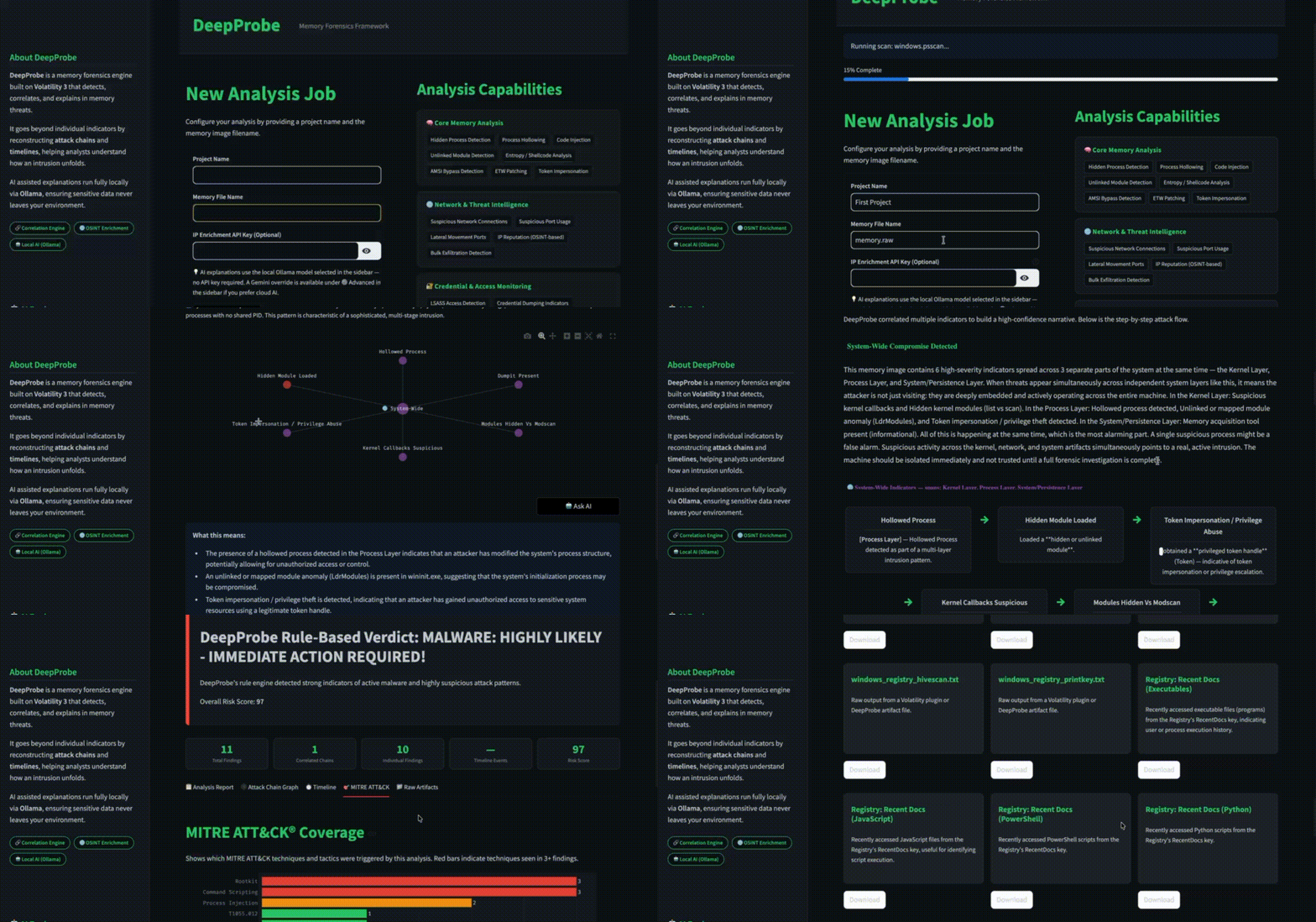
DeepProbe 是一个基于 [Volatility 3](https://github.com/volatilityfoundation/volatility3) 构建的开源内存取证平台。它自动化了事件响应中最繁重的环节:运行插件、跨层关联发现结果、重构攻击链以及生成严格受限于证据的 AI 解释;所有这些都通过一个简洁的浏览器 UI 完成。
专为 DFIR 分析师、威胁猎手和安全工程师设计。
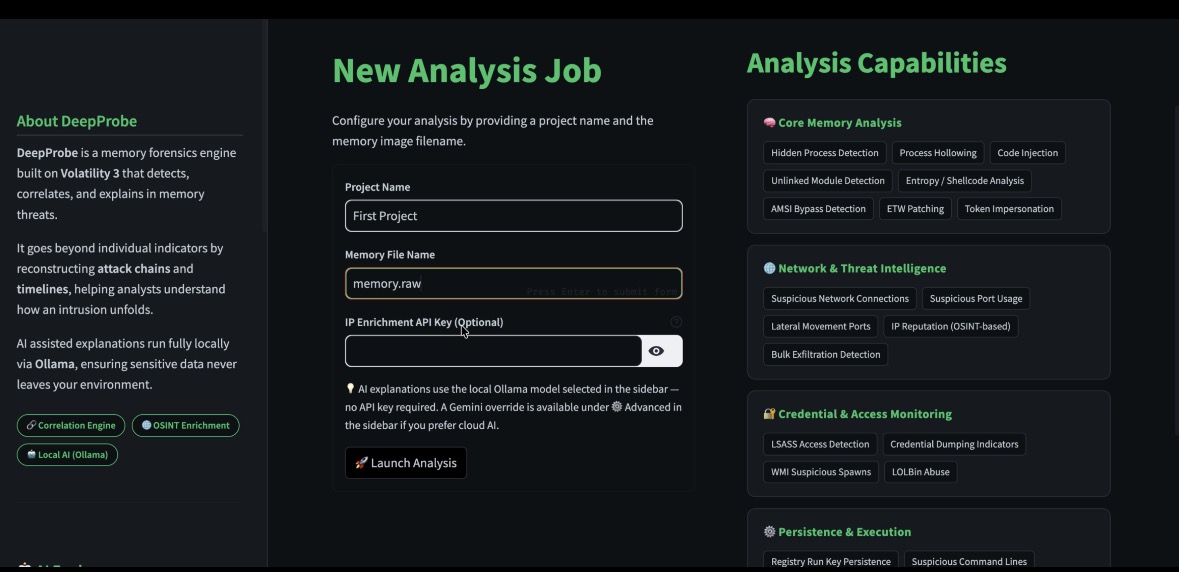
## 为什么选择 DeepProbe?
现代攻击者潜伏在内存中。他们注入合法进程、修补 kernel 回调、禁用日志,并在不触及磁盘的情况下外发数据。要捕获他们,需要同时关联数十个 Volatility 输出;这项工作即使对熟练的分析师也需要数小时,且极易出错。
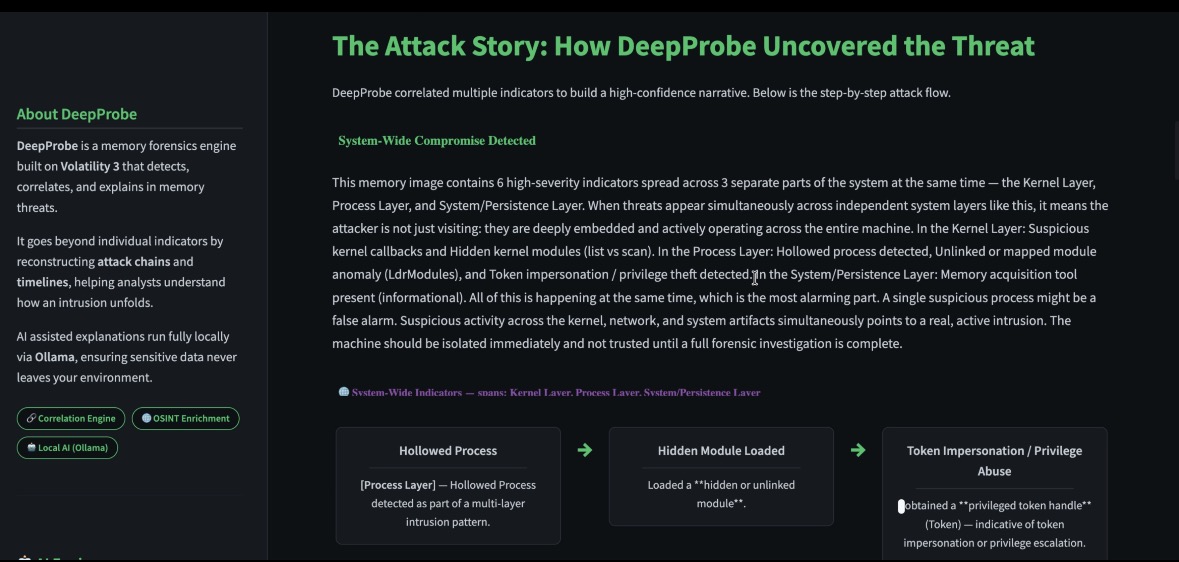
DeepProbe 实现了这种关联的自动化。它将每一个发现归类到相应的取证层(Process、Kernel、Network、System),通过 PID 和父子进程关系将它们联系起来,检测全系统范围的感染模式,并以交互式攻击链图的形式呈现全貌。当您需要通俗易懂的解释时,只需点击一下即可调用本地或云端 AI。严格的证据约束机制确保模型永远不会臆造文件路径或虚构攻击叙事。
## 🔍 示例输出
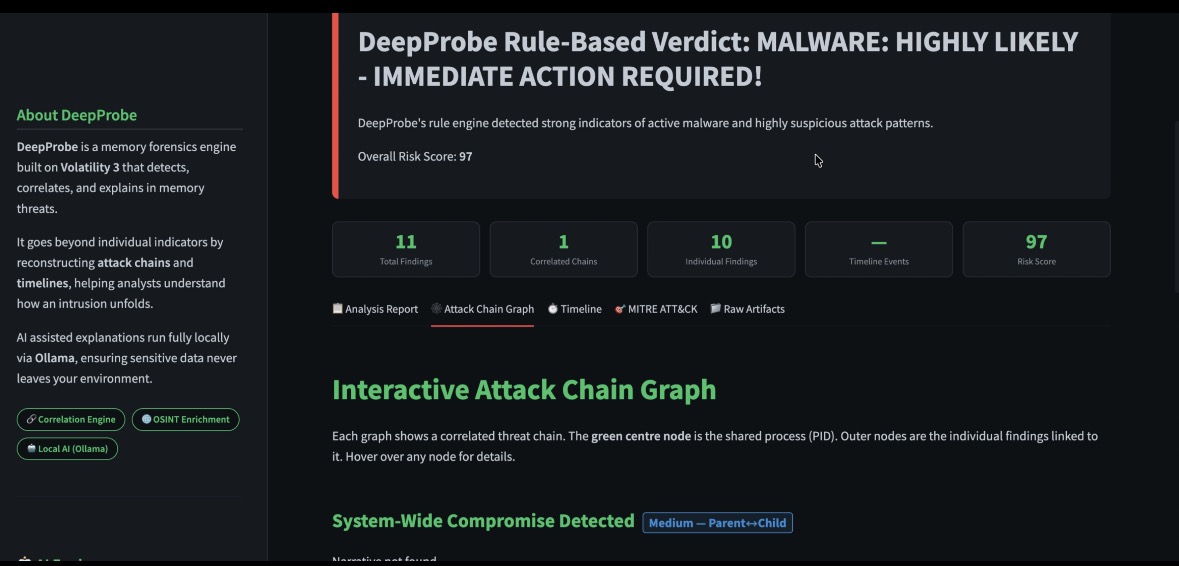
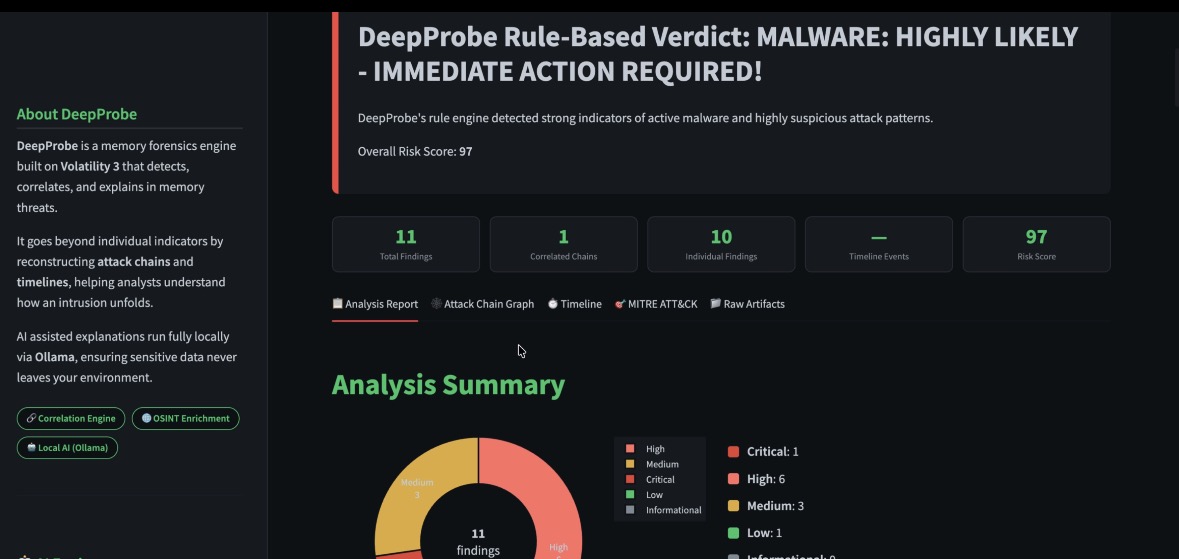
### 基于规则的判定
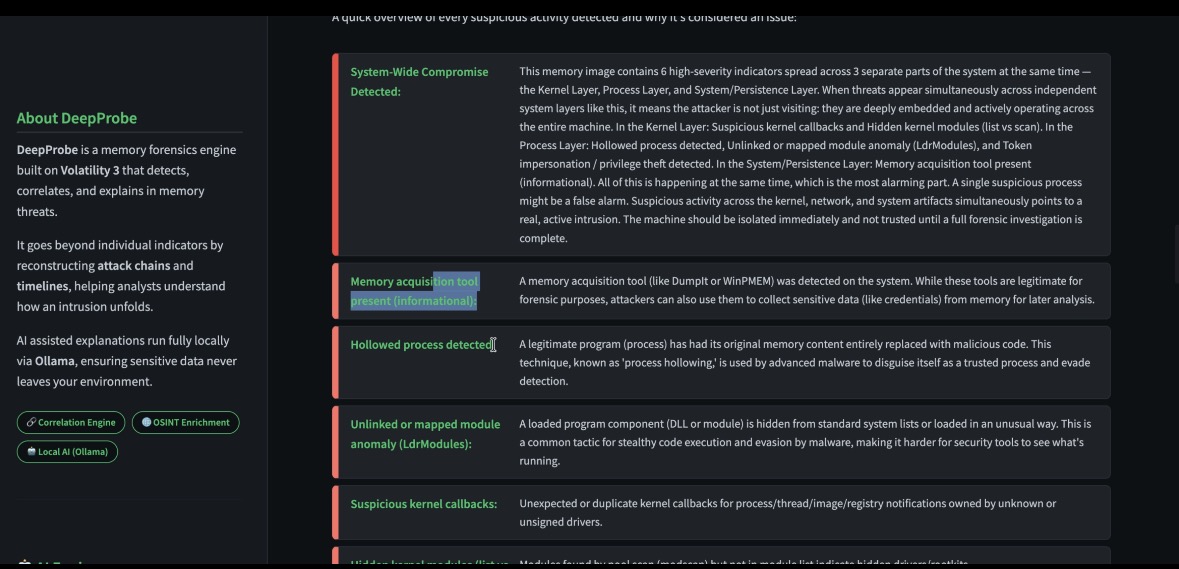
DeepProbe 为您提供即时的分流结果,包含关联的发现结果、风险评分以及快速上报途径。
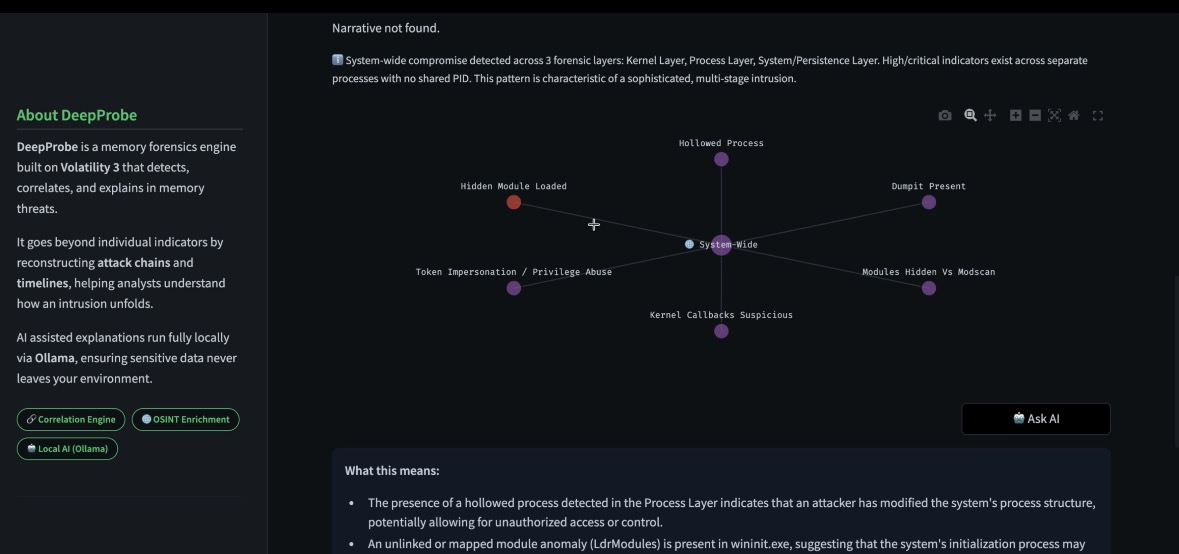
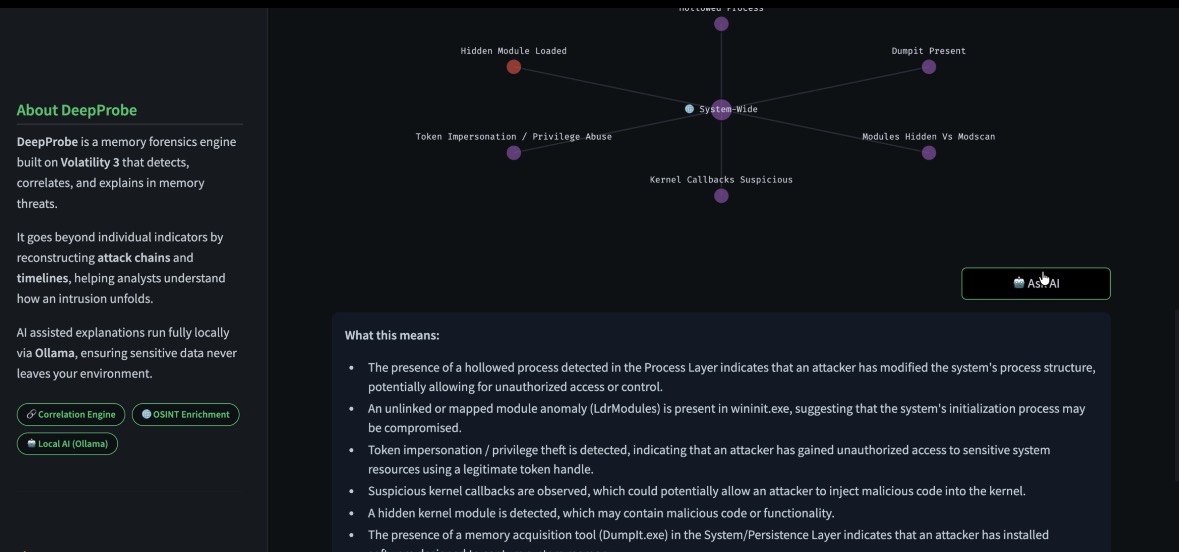
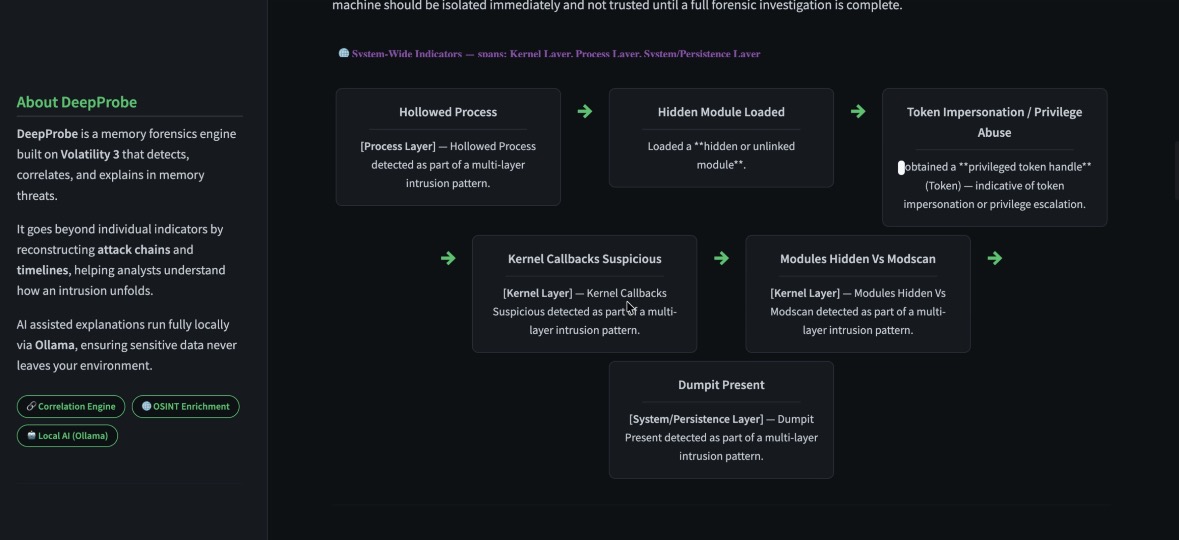
### 攻击链关联
DeepProbe 将跨系统层的独立发现结果整合为单一的攻击叙事。
### 分析摘要
提供发现结果、严重性分布和风险评分的高层级概览。
## 核心功能亮点
### 检测引擎
- 跨越 Windows、Linux 和 macOS 的 **70+ 条检测规则** — 全部可在 `detections.yaml` 中配置
- 规则涵盖进程隐藏、代码注入、kernel rootkit、网络 C2、LOLBin 滥用、凭证访问、持久化、防御规避和数据外发
- 具备可配置区间的严重性评分:Informational → Low → Medium → High → Critical
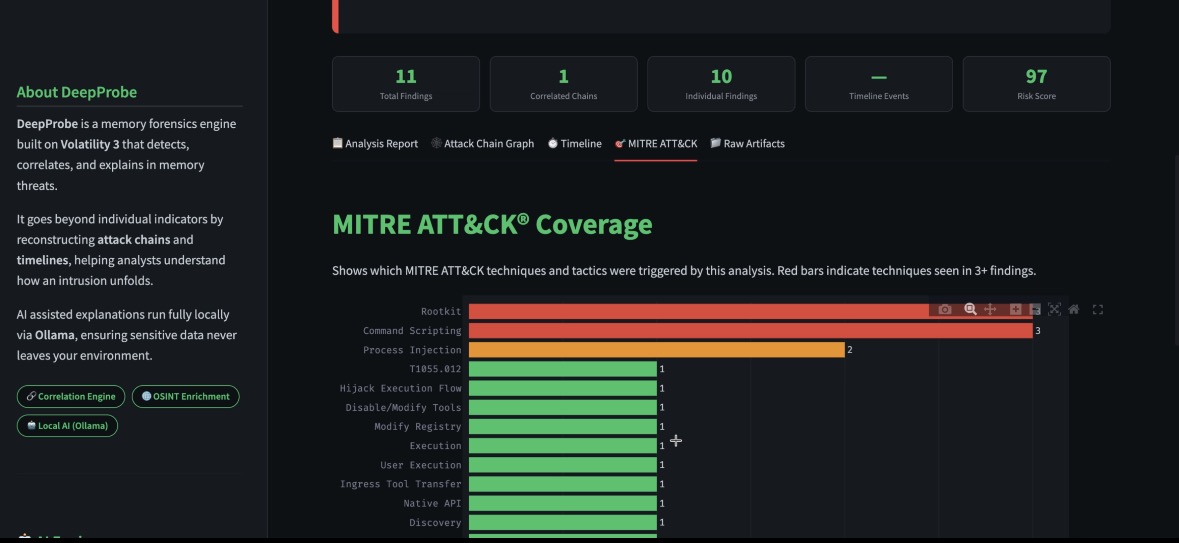
- 每条规则均附带 MITRE ATT&CK 标签以实现对齐框架
### 关联引擎 — 三层级 + 全系统范围
DeepProbe 的关联引擎远不止于 PID 匹配:
| 层级 | 方法 | 置信度 |
|------|--------|------------|
| 强 | 发现结果中具有相同的 PID | 🟢 强 |
| 中 | 父 → 子进程关系 | 🔵 中 |
| 弱 | 跨镜像的行为共存 | 🟠 弱 |
| 系统范围 | 同时具有 ≥2 个包含高/严重发现结果的取证层 | 🟣 系统范围 |
全系统范围检测器在所有基于配对的关联完成后独立运行 — 当 Process、Kernel、Network 或 System 工件层同时包含高严重性发现结果时,无论是否共享 PID,它都会被触发。
### 现代攻击技术检测(8 种新引擎)
| 引擎 | 检测内容 |
|--------|----------------|
| `amsi_bypass` | 通过 PowerShell / cmdline 进行 AMSI 修补或禁用 |
| `etw_patching` | ETW 或 Windows 事件日志清除 / 禁用 |
| `token_impersonation` | 持有 Token 句柄并具有模拟权限的非系统进程 |
| `lateral_movement_ports` | 针对 SMB (445)、WinRM (5985/5986)、RPC (135) 的出站连接 |
| `wmi_suspicious_spawn` | WmiPrvSE.exe 或 MMC 生成命令行 shell |
| `lolbin_enhanced` | Certutil、mshta、rundll32、regsvr32、msiexec 被用作攻击代理 |
| `archive_staging` | 数据外发前在 Temp/Desktop/Downloads 中暂存的归档文件 |
| `exfil_connections` | 具有 5 个以上同时连接到外部 IP 的出站连接的进程 |
### AI 驱动的解释
- **本地 Ollama**(Llama 3、Mistral、Phi-3 等)— 完全离线,数据不会离开您的机器
- **Google Gemini** — 在没有 GPU 资源时使用的云端选项
- **自动拉取**:DeepProbe 会检查所选模型是否已下载,如果没有则自动拉取
- **基于证据的提示词**:严格的约束可防止幻觉 — 不会臆造文件路径,不会虚构 PID,不会重新映射 MITRE,也不会提供不安全的进程终止建议
- 根据实际发现结果生成的动态叙事 — 每一次解释都是针对**当前**内存镜像定制的,而非套话
### 攻击链可视化
- 交互式 Plotly 网络图,节点颜色根据置信度编码
- 紫色 🌐 系统范围节点用于表示多层级的感染
- 每个发现的悬停提示会显示进程角色、证据摘要和共存标志
- 每个攻击链卡片均附带置信度徽章(强 / 中 / 弱 / 系统范围)
### 报告生成
- **PDF 报告**(基于 ReportLab)— 专业的暗色主题,包含封面、执行摘要、高严重性发现、关联攻击链、时间线以及所有发现参考
- **HTML 报告** — 独立的单文件报告,便于分享
- **`findings.jsonl`** — 结构化发现结果,用于 SIEM 摄取或自定义工具
- **`correlated_findings.json`** — 单独导出的关联攻击链,用于外部分析
### 其他功能
- 基于 Shimcache 和 Amcache 注册表配置单元工件的执行时间线
- MITRE ATT&CK 覆盖热力图标签页
- 结合 AbuseIPDB 的 IP 富化(地理位置 + 信誉)
- 基线偏差检测
- 带有实时发现计数、风险评分和时间线事件计数的摘要面板
- 跨平台:支持 Windows、Linux 和 macOS 内存转储
## 快速入门
### 方式 1 — Docker Compose(推荐)
这是将 DeepProbe 与 Ollama 作为 sidecar 一起运行的最简单方法(无需单独安装 Ollama):
```
git clone https://github.com/purplesectools/DeepProbe.git
cd deepprobe
mkdir -p memory out
docker compose up --build
```
然后在浏览器中打开 **http://localhost:8501**。
`docker-compose.yml` 将 Ollama 配置为一个命名服务,以便 DeepProbe 可以通过 `http://ollama:11434` 访问它。当您第一次在侧边栏中选择模型时,DeepProbe 会自动将其拉取。
### 方式 2 — Docker(独立运行)
如果您的主机上已经运行了 Ollama:
```
# 构建 image
docker build -t deepprobe-app .
# 创建隔离网络
docker network create isolated-net
# 运行 container
docker run --rm \
--network=isolated-net \
-p 127.0.0.1:8501:8501 \
-v "$(pwd)/memory:/app/memory" \
-v "$(pwd)/out:/app/out" \
deepprobe-app
```
### 前置条件
- [Docker Desktop](https://www.docker.com/products/docker-desktop/) (macOS / Windows) 或 Docker Engine (Linux)
- 至少 **8 GB RAM** 可供容器用于处理大型内存镜像
- Ollama(如果使用 docker-compose 则为可选 — 会自动包含)
## 使用 DeepProbe
1. **放置您的内存镜像** 到 `memory/` 文件夹中(例如 `memory/workstation.raw`)
2. **打开 UI** 访问 `http://localhost:8501`
3. **在侧边栏配置分析**:
- 输入 **Project Name** 和 **Memory File Name**
- 可选择添加 **AbuseIPDB API key** 用于 IP 富化
- 可选择添加 **Gemini API key** 用于云端 AI 解释
- 选择您的**本地 Ollama 模型**(或让 DeepProbe 拉取一个)
4. **点击 Launch Analysis(启动分析)**
5. **跨五个标签页浏览结果**:
- 📋 **Analysis Report(分析报告)** — 判定、严重性图表、攻击故事、发现叙事、带有 Ask AI 的详细发现
- 🕸️ **Attack Chain Graph(攻击链图)** — 带有置信度徽章的交互式关联网络
- ⏱️ **Timeline(时间线)** — shimcache/amcache 执行时间线
- 🎯 **MITRE ATT&CK** — 映射到发现结果的技术覆盖
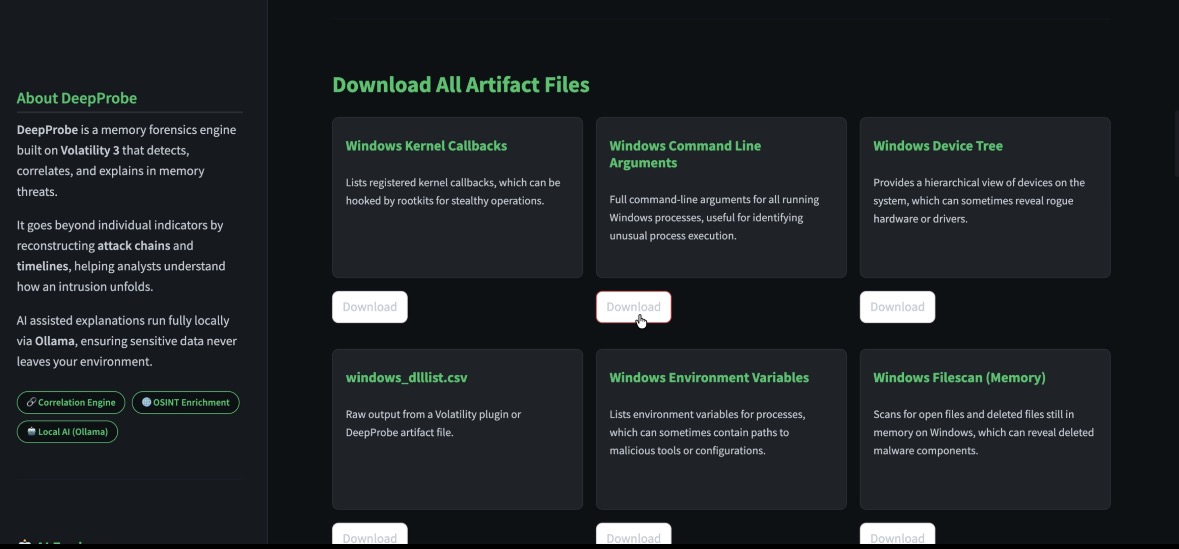
- 📁 **Raw Artifacts(原始工件)** — 完整的 Volatility 插件输出
## 输出文件
所有输出都会写入您主机上的 `out//` 目录:
| 文件 | 描述 |
|------|-------------|
| `findings.jsonl` | 以换行符分隔的所有 JSON 发现结果 |
| `correlated_findings.json` | 仅包含关联后的攻击链 |
| `report.html` | 独立的 HTML 报告 |
| `report.pdf` | 专业的 PDF 报告 |
| `artifacts/` | 原始的 Volatility 插件 CSV 和文本输出 |
## 配置说明
### 检测规则 — `detections.yaml`
每一条检测规则都在 `detections.yaml` 中定义。规则指定了:
- `id`, `title`, `narrative` — 身份标识与显示信息
- `weight` — 贡献于整体风险评分
- `mitre` — MITRE ATT&CK 技术 ID
- `engine` — 哪个分析函数处理此规则
- `enabled` — 无需删除即可开启/关闭规则
- `params` — 引擎特定的参数(阈值、模式、允许列表)
### 基线 — `baseline.yaml`
定义您环境的预期状态:受信任的进程、已知的网络范围、允许的端口以及预期的模块列表。DeepProbe 使用基线来抑制预期内的活动,并呈现出真正的异常情况。
### AI 模型选择
DeepProbe 内置了一份精选的推荐 Ollama 模型列表:
| 模型 | 大小 | 备注 |
|-------|------|-------|
| `llama3.2:3b` | ~2 GB | 快速,适用于任何机器 |
| `llama3.1:8b` | ~5 GB | 推理能力更好 |
| `mistral:7b` | ~4 GB | 优秀的指令遵循能力 |
| `phi3:mini` | ~2.3 GB | 最轻量的选择 |
| `gemma2:2b` | ~1.6 GB | 极其轻量 |
在侧边栏中选择您的模型。如果尚未下载,DeepProbe 将在运行第一次查询之前将其拉取。
## 项目结构
```
deepprobe/
├── app.py # Streamlit UI and AI integration
├── runner.py # Volatility wrapper, detection engines, correlation, PDF generation
├── detections.yaml # Detection rules, scoring bands, OS profiles
├── baseline.yaml # Environment baseline for deviation detection
├── requirements.txt # Python dependencies
├── Dockerfile # Container definition
├── docker-compose.yml # DeepProbe + Ollama compose stack
├── memory/ # Place memory dump files here
└── out/ # Analysis output (auto-created)
```
## 许可证
DeepProbe 是一个基于 [Volatility 3 Framework](https://github.com/volatilityfoundation/volatility3) 构建的封装工具,采用 **Volatility Software License (VSL), Version 1.0** 进行分发 — 这是一种 copyleft 许可证,要求基于 Volatility 框架构建的扩展和封装工具必须在相同的条款下公开。
完整的许可证副本可在 [`LICENSE`](./LICENSE) 文件中找到。
## 致谢与与 Volatility 的关系
DeepProbe 是建立在 Volatility 3 框架基础之上的独立社区项目。
Volatility 和 Volatility 3 由 Volatility Foundation 开发:
https://github.com/volatilityfoundation/volatility3
DeepProbe 未受到 Volatility Foundation 的官方附属或认可。
标签:AI风险缓解, Kubernetes, SecList, 人工智能, 内存取证, 库, 应急响应, 攻击链分析, 用户模式Hook绕过, 请求拦截, 逆向工具