dstreefkerk/detection-nexus
GitHub: dstreefkerk/detection-nexus
检测枢纽:聚合、翻译和搜索SIEM/EDR检测规则的Python工具。
Stars: 0 | Forks: 0
# 检测枢纽
一个用于聚合、翻译和搜索来自多个来源的SIEM/EDR检测规则的Python工具。使用包括严重性、日期范围、MITRE ATT&CK技术/战术、提供商、标签和全文搜索在内的细粒度过滤器,找到您需要的检测内容。
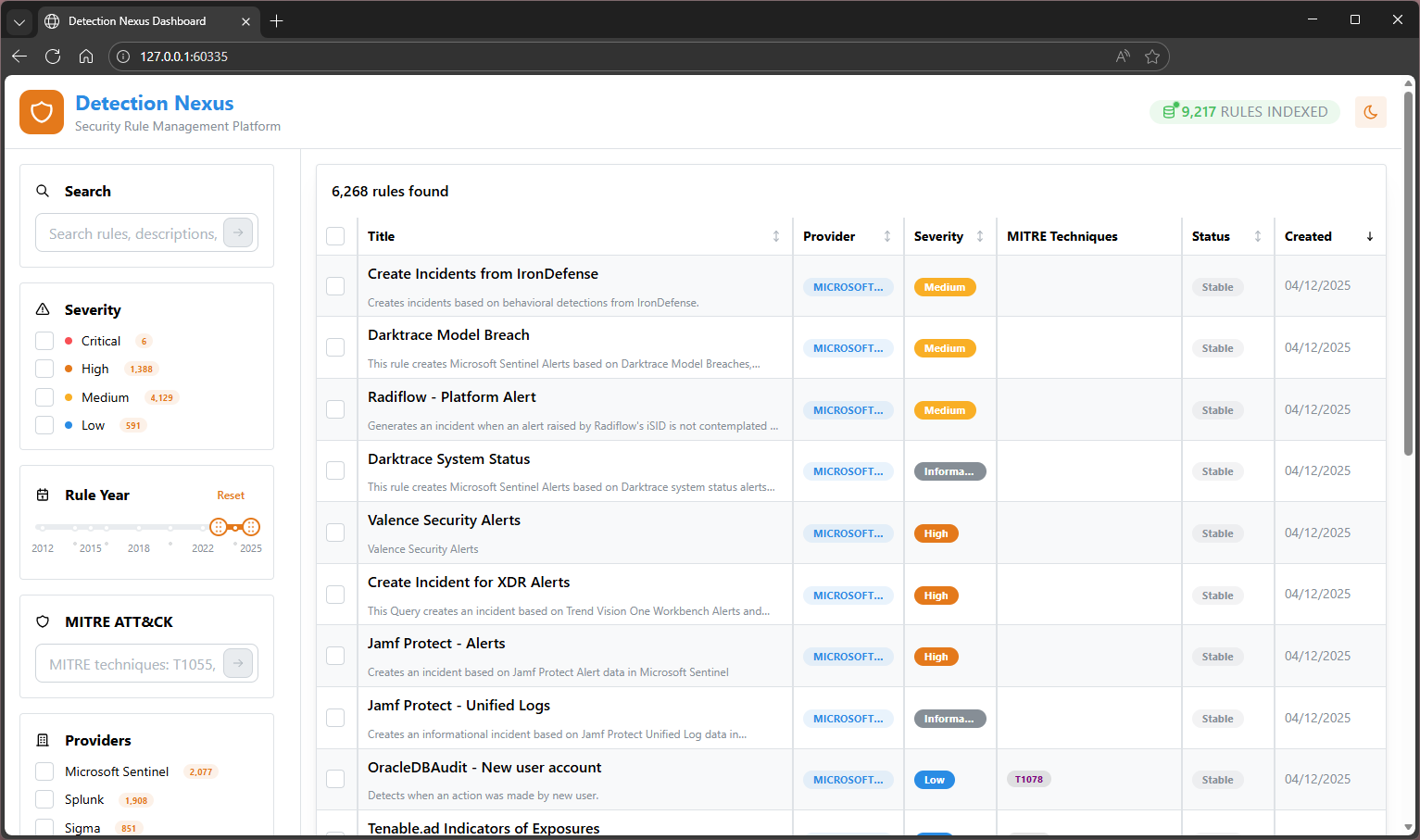
## 概述
检测枢纽从多个来源(Sigma、Elastic、Splunk、Microsoft Sentinel、Anvilogic)同步检测规则存储库,将它们转换为统一模式,并提供了强大的搜索功能,帮助安全团队在7000多条规则中找到相关的检测内容。
## 功能
- **多源支持**:处理Sigma、Elastic、Splunk、Sentinel和Anvilogic规则格式
- **基于Git的同步**:使用git进行高效的增量同步
- **路径感知处理**:仅处理配置的规则目录中的文件
- **稀疏检出**:针对大型存储库(例如Azure Sentinel)进行优化
- **统一模式**:支持所有主要SIEM平台的全面模式
- **官方MITRE ATT&CK集成**:企业ATT&CK v16.0,包含340多种技术和官方STIX标识符
- **通用插件架构**:可扩展的钩子系统,用于规则增强和验证
- **高级搜索数据库**:DuckDB驱动的搜索,具有MITRE技术过滤和全文搜索
- **Web仪表板**:基于React的现代界面,用于浏览、过滤和分析检测规则
- **多格式导出**:将规则导出到CSV、JSON或PowerPoint演示文稿
- **MCP服务器集成**:模型上下文协议服务器,用于与并发只读访问的AI助手无缝集成
- **零幻觉**:所有MITRE数据直接来自官方ATT&CK框架
- **版本固定**:可配置的ATT&CK版本,以实现供应商兼容性
## 安装
### 先决条件
- Python 3.9或更高版本
- Git
- Node.js LTS + npm(用于构建Web仪表板UI)
- 因特网连接(用于MITRE ATT&CK数据下载)
### 快速设置(推荐)
从存储库根目录运行bootstrap脚本。它检查先决条件、安装Python包并构建Web仪表板:
```
# Windows (PowerShell)
.\setup.ps1
# Linux/macOS
./setup.sh
```
然后跳转到**首次运行设置**(以下第5步)。
### 手动设置
1. 克隆或创建项目:
```
cd detection-nexus
```
2. 安装依赖项:
```
pip install detection-nexus
```
3. 对于开发,使用dev依赖项安装:
```
pip install -e ".[dev]"
```
4. **构建Web仪表板UI**(对于`detection-nexus dashboard`是必需的):
```
cd dashboard-ui
npm ci # install UI dependencies
npm run build # produces dashboard-ui/dist (served by the dashboard command)
cd ..
```
5. **首次运行设置**(自动):
- 在首次运行时,检测枢纽自动创建用户配置目录:
- **Windows**:`%APPDATA%\detection-nexus`
- **Linux/Mac**:`~/.config/detection-nexus`
- 从包中复制配置模板到用户目录:
- `main.toml` - 全局设置和数据目录路径
- `repositories/*.toml` - 单个存储库配置(sigma、splunk、elastic、sentinel、anvilogic)
- `plugins/` - 插件配置文件
- `hooks/` - 钩子系统配置
- `mitre/` - MITRE ATT&CK配置
- `database/` - 数据库配置
- 提示您设置数据目录以存储存储库、翻译和缓存
- 默认建议:`{current-directory}\detection-nexus-data`(Windows)或`{current-directory}/detection-nexus-data`(Linux/Mac)
- 所有操作数据都存储在Git存储库之外,以实现干净的分离
- 配置更改在包更新之间持久化
## 配置
该工具使用位于以下位置的用户可写配置文件:
- **Windows**:`%APPDATA%\detection-nexus\`
- **Linux/Mac**:`~/.config/detection-nexus/`
配置在首次运行时自动从包模板复制。关键配置文件:
**主配置**(`main.toml`):
```
# 全局配置设置
[settings]
data_directory = "C:\\DetectionRuleData" # Base directory for all data
# 标准子目录:repos/,output/,mitre-attack/,logs/,data/
# 最大并行处理
max_workers = 4
# 启用详细日志
verbose = false
# Git 设置
[settings.git]
timeout = 300
clean_on_sync = true
shallow_clone = true
# 同步设置
[settings.sync]
state_file = "sync_state.json"
max_file_size_mb = 10
backup_previous = false
```
**单个存储库配置**(`repositories/sigma.toml`、`repositories/splunk.toml`等):
```
# 示例:repositories/sigma.toml
[repository]
url = "https://github.com/SigmaHQ/sigma"
branch = "master"
rule_paths = ["rules/"]
file_patterns = ["*.yml", "*.yaml"]
translator = "sigma"
sync_frequency = "daily"
enabled = true
description = "Sigma detection rules - vendor-agnostic detection rule format"
```
**插件配置**(在`plugins/`目录中):
```
# 示例:plugins/mitre_enhancement.toml
[plugin]
enabled = true
type = "enhancer"
hooks = ["post_translate"]
priority = 100
```
## 使用
### 命令行界面
```
# 显示帮助
detection-nexus --help
# 列出配置的仓库
detection-nexus list-repos
# 检查综合系统状态(配置、目录、仓库)
detection-nexus status
# 同步所有仓库(Windows上下载到 data_directory\repos\,Linux/Mac上下载到 data_directory/repos/)
# 同步后自动翻译更改的文件
detection-nexus sync
# 同步特定仓库(带自动翻译)
detection-nexus sync --repo sigma
# 不自动翻译同步(如果以后想手动翻译)
detection-nexus sync --no-translate
# 强制完全重新同步(重新下载所有仓库)
detection-nexus sync --force
# 翻译规则(输出到 Windows 上的 data_directory\output\,Linux/Mac 上的 data_directory/output/)
# 智能模式:仅翻译上次同步后更改的文件(默认)
detection-nexus translate
# 测试限制翻译
detection-nexus translate --limit 5
# 强制全部重新翻译所有规则(不仅仅是更改的文件)
detection-nexus translate --force
# 重置同步状态(下次强制完全重新同步)
detection-nexus reset
# 列出可用的翻译器
detection-nexus translators
# 测试 MITRE ATT&CK 集成
detection-nexus test-mitre
# 验证插件配置
detection-nexus validate-plugins
# 搜索数据库命令
detection-nexus search rebuild-db # Rebuild search database from translated rules
detection-nexus search stats # Show database statistics and coverage
detection-nexus search rules # List all rules (default: 20 results)
detection-nexus search rules --limit 50 # List more results
detection-nexus search rules --provider splunk # Filter by provider (case-insensitive)
detection-nexus search rules --severity high # Filter by severity (case-insensitive)
detection-nexus search rules --mitre-technique T1055 # Filter by MITRE technique ID
detection-nexus search rules --mitre-tactic execution # Filter by MITRE tactic
detection-nexus search rules --query "process injection" # Full-text search
detection-nexus search rules --tag persistence # Filter by rule tags
detection-nexus search rules --format json # Output as JSON instead of table
detection-nexus search rule # Get detailed information for specific rule
# Web 仪表板命令
detection-nexus dashboard # Start web dashboard with auto-open browser
detection-nexus dashboard --port 8080 # Start on specific port
detection-nexus dashboard --host 0.0.0.0 # Allow external connections (security considerations apply)
detection-nexus dashboard --no-browser # Start without opening browser
# MCP 服务器命令(AI 助手集成)
detection-nexus mcp-server # Start MCP server for AI assistant connections (read-only, supports multiple concurrent instances)
```
### 基本工作流程
1. **首次运行**:检测枢纽自动设置用户配置并提示数据目录位置
2. **检查状态**:运行`detection-nexus status`以查看配置、数据目录和存储库状态
3. **初始同步**:运行`detection-nexus sync`以克隆存储库并翻译规则
- 存储库被克隆到`data_directory\repos\`(Windows)或`data_directory/repos/`(Linux/Mac)
- **自动翻译**:同步后自动翻译已更改的文件
- MITRE ATT&CK数据缓存在`data_directory\mitre-attack\`(Windows)或`data_directory/mitre-attack/`(Linux/Mac)
- 翻译输出保存到`data_directory\output\`(Windows)或`data_directory/output/`(Linux/Mac)
- 使用`--no-translate`标志跳过自动翻译(如果需要)
4. **手动翻译**(可选):运行`detection-nexus translate`以进行手动控制
- **智能模式**:仅翻译自上次同步以来更改的文件(默认)
- 使用`--force`标志重新翻译所有规则,无论是否更改
- 在翻译器代码更改或故障排除后很有用
5. **构建搜索数据库**:运行`detection-nexus search rebuild-db`以索引翻译后的规则
- 在`data_directory\data\search.duckdb`(Windows)或`data_directory/data/search.duckdb`(Linux/Mac)处创建可搜索的数据库
- 索引所有规则元数据、MITRE技术和检测查询
6. **搜索和分析**:使用`detection-nexus search`命令查找和分析规则
- 通过提供商、严重性、MITRE技术或文本内容进行搜索
- 获取全面的统计信息和覆盖率分析
7. **AI助手集成**:使用`detection-nexus mcp-server`启动MCP服务器以启用AI助手查询规则
- 提供对所有搜索功能的编程访问
- 支持Claude、ChatGPT和其他MCP兼容的AI工具
- 实时规则分析和威胁狩猎辅助
- **支持多个并发实例**:非阻塞只读访问允许多个AI助手同时连接
8. **Web仪表板访问**:使用`detection-nexus dashboard`启动Web仪表板以进行可视规则探索
- 用于浏览、过滤和分析规则的现代界面
- 带实时结果的先进搜索
- 带MITRE映射的详细规则检查
- 批量规则选择和导出功能
9. **定期更新**:只需运行`detection-nexus sync`即可 - 它将获取最新更改并自动翻译已修改的文件
10. **自定义配置**:编辑用户配置目录中的文件(Windows上的`%APPDATA%\detection-nexus`或Linux/Mac上的`~/.config/detection-nexus`)
## 目录结构
### 代码库结构(Git存储库)
```
detection-detection-nexus/
├── src/
│ ├── models/ # Pydantic models for unified schema
│ ├── translators/ # Translation plugins for each format
│ ├── plugins/ # Universal plugin system
│ ├── hooks/ # Hook management and execution
│ ├── mitre/ # MITRE ATT&CK data management and lookup
│ ├── search/ # DuckDB-powered search engine and database
│ ├── git_manager/ # Git repository management
│ ├── mcp_server.py # Model Context Protocol server for AI integration
│ └── main.py # CLI entry point
├── config/ # Configuration templates (copied to user directory on first run)
│ ├── main.toml # Main configuration template
│ ├── repositories/ # Individual repository configuration templates
│ │ ├── sigma.toml
│ │ ├── splunk.toml
│ │ ├── elastic.toml
│ │ ├── sentinel.toml
│ │ └── anvilogic.toml
│ ├── plugins/ # Plugin configuration templates
│ ├── hooks/ # Hook system configuration templates
│ ├── mitre/ # MITRE ATT&CK configuration templates
│ └── database/ # Database configuration templates
├── tests/ # Test suite (including comprehensive MCP server tests)
├── docs/ # Documentation (including MCP usage guides)
├── .gitignore # Excludes data/ and output/ folders
├── DOCUMENTATION-INDEX.md # Complete navigation guide to all documentation
├── SCHEMA.md # Unified schema specification and reference
├── MITRE-Integration-Status.md # MITRE ATT&CK integration status and achievements
├── Plugin-Writing-Guide.md # Comprehensive plugin development guide
├── SIEM-Translation-Guide.md # SIEM translator implementation guide
├── CLAUDE.md # Technical insights and troubleshooting (AI assistant context)
└── ROADMAP.md # Development roadmap and future plans
```
### 用户配置结构
```
# Windows:%APPDATA%\detection-nexus\
# Linux/Mac:~/.config/detection-nexus/
├── main.toml # Main configuration file (user-editable)
├── repositories/ # Individual repository configurations
│ ├── sigma.toml
│ ├── splunk.toml
│ ├── elastic.toml
│ ├── sentinel.toml
│ └── anvilogic.toml
├── database/ # Database configuration
├── mitre/ # MITRE ATT&CK configuration
├── plugins/ # Plugin configurations
└── hooks/ # Hook system configuration
```
### 数据存储结构(用户配置位置)
```
# Windows 示例:C:\DetectionRuleData\
data_directory\
├── repos\ # Cloned source repositories
│ ├── sigma\ # SigmaHQ/sigma repository
│ ├── elastic\ # elastic/detection-rules repository
│ ├── splunk\ # splunk/security_content repository (sparse checkout)
│ ├── anvilogic\ # anvilogic-forge/armory repository
│ └── sync_state.json # Repository synchronization state
├── mitre-attack\ # MITRE ATT&CK data cache
│ ├── attack-16.0-enterprise-attack.json # Main ATT&CK data
│ └── metadata-16.0.json # Cache metadata
├── output\ # Translated rules organized by repository
│ ├── sigma\ # Translated Sigma rules
│ ├── splunk\ # Translated Splunk rules
│ └── ...
├── data\ # Search database and temporary files
│ ├── search.duckdb # High-performance search database
│ ├── search.duckdb.tmp
│ └── temp\ # Temporary processing files
└── logs\ # Application logs
└── detection-nexus-YYYY-MM-DD.log
# Linux/Mac 示例:~/detection-nexus-data/
data_directory/
├── repos/ # Cloned source repositories
│ ├── sigma/ # SigmaHQ/sigma repository
│ ├── elastic/ # elastic/detection-rules repository
│ ├── splunk/ # splunk/security_content repository (sparse checkout)
│ ├── anvilogic/ # anvilogic-forge/armory repository
│ └── sync_state.json # Repository synchronization state
├── mitre-attack/ # MITRE ATT&CK data cache
│ ├── attack-16.0-enterprise-attack.json # Main ATT&CK data
│ └── metadata-16.0.json # Cache metadata
├── output/ # Translated rules organized by repository
│ ├── sigma/ # Translated Sigma rules
│ ├── splunk/ # Translated Splunk rules
│ └── ...
├── data/ # Search database and temporary files
│ ├── search.duckdb # High-performance search database
│ ├── search.duckdb.tmp
│ └── temp/ # Temporary processing files
└── logs/ # Application logs
└── detection-nexus-YYYY-MM-DD.log
```
**新架构的关键优势:**
- ✅ **用户可写配置**:配置文件位于标准OS位置(`%APPDATA%` / `~/.config`)
- ✅ **干净的代码库**:没有嵌套的Git存储库或大型数据文件在代码库中
- ✅ **灵活的数据存储**:用户可以通过交互式提示选择数据目录位置
- ✅ **一致的行为**:无论当前工作目录如何,都按相同方式工作
- ✅ **保留自定义设置**:用户配置在包更新后仍然存在
- ✅ **更好的性能**:稀疏检出在没有Git冲突的情况下正常工作
- ✅ **可扩展性**:可以处理大型存储库而不会影响代码库
## 开发
### 设置开发环境
```
# 使用开发依赖项安装
pip install -e ".[dev]"
# 安装 pre-commit 钩子
pre-commit install
# 运行测试
pytest
# 运行代码风格检查
black src/
isort src/
mypy src/
ruff check src/
```
### 添加新的翻译器
1. 创建一个新的继承自`BaseTranslator`的翻译器类
2. 实现所需的方法:
- `can_translate(file_path, content)`:检查文件是否可以处理
- `parse_file(file_path, content)`:解析源文件格式
- `translate_to_unified(parsed_data, source_metadata)`:转换为统一模式
3. 在适当的模块中注册翻译器
### 添加新的插件
1. 创建一个继承自`BasePlugin`的插件类
2. 实现所需的方法:
- `metadata`:返回插件元数据(名称、类型、支持的提供商/阶段)
- `can_process(rule, stage)`:检查插件是否应该处理规则
- `execute(rule, context, stage)`:执行插件逻辑
3. 将其放置在`src/plugins/`目录中以进行自动发现
4. 在用户配置目录下配置(在`[plugins]`)
### 当前实现状态
✅ **完成**:
- 项目结构和配置
- Pydantic模型用于统一模式
- Git存储库管理器具有增量同步
- 基础翻译器框架
- CLI界面具有基本命令
- **用户可写配置系统**:平台感知配置在`%APPDATA%` / `~/.config`
- **交互式数据目录设置**:用户提示,具有完整路径可见性
- **简化的单目录配置**:一个`data_directory`具有标准子目录
- **全面的状况命令**:显示配置路径、工作目录和存储库状态
- **通用的插件架构和钩子系统**
- **官方MITRE ATT&CK v16.0集成(340多种技术)**
- **所有主要翻译器都已实现**:Splunk、Sigma、Elasticsearch、Sentinel和Anvilogic
- **所有提供商的MITRE增强插件**:自动增强MITRE ATT&CK数据
- **零幻觉的MITRE数据来源**
- **高级搜索数据库**:DuckDB驱动的搜索,具有全文索引
- **全面的搜索API**:提供商、严重性、MITRE技术/战术过滤
- **不区分大小写的搜索**:所有搜索术语都支持灵活的大小写匹配
- **自动数据库更新**:基于钩子的集成,用于实时索引
- **MCP服务器集成**:模型上下文协议服务器,用于AI助手访问
- **全面的MCP测试套件**:MCP功能96.4%的测试覆盖率
- **并发MCP访问**:只读数据库连接允许多个MCP服务器实例同时运行
- **Web仪表板**:基于React的现代界面,具有实时搜索和高级过滤(Mantine v8 + TanStack)
- **仪表板API**:FastAPI驱动的REST API,为Web仪表板提供全面的规则访问
🚧 **进行中**:
- 扩展全面的测试套件
- 先进错误处理和验证
- 翻译器中的边缘情况处理
- 仪表板搜索改进(防抖动、引号术语、布尔运算符)
- 某些Anvilogic规则的唯一键冲突修复
📋 **计划**:
- 翻译验证和质量检查
- 大型规则集的性能优化
- 基于LLM的检测逻辑摘要
- 规则“购物车”系统,用于分析师工作流程
- 更多文档和示例
- CI/CD管道
⚠️ **已知问题**(Beta):
- 一些Anvilogic规则可能在数据库重建期间导致唯一键冲突
- 仪表板导出功能可能在某些情况下保留以前的选定内容
- 复杂规则的检测逻辑显示可能在详细面板中溢出
## 模式
统一模式支持所有主要SIEM平台,包括:
- 核心规则元数据(ID、标题、描述、严重性)
- 带有多种查询格式的检测逻辑
- **官方MITRE ATT&CK框架映射与企业v16.0数据**
- **准确的技术到战术关系和官方STIX标识符**
- 调度和执行参数
- 数据需求和连接器
- 平台特定的配置
- 插件增强的元数据和验证
有关完整的模式规范和字段文档,请参阅`SCHEMA.md`。
## 搜索数据库
该工具包含一个强大的搜索数据库系统,用于分析和探索检测规则:
### **数据库技术**
- **DuckDB引擎**:针对搜索工作负载进行优化的高性能分析数据库
- **全文搜索**:全面的文本索引,具有兼容性回退
- **MITRE集成**:对技术/战术过滤和分析的原生支持
- **实时更新**:在规则翻译或修改时自动索引
- **并发只读访问**:只读模式允许多个MCP服务器同时运行而不会阻塞
### **搜索功能**
- **提供商
标签:提示工程, 网络安全研究, 逆向工具