zhaohb/ollama_openvino
GitHub: zhaohb/ollama_openvino
该项目为Ollama添加了OpenVINO推理后端,使其能利用Intel硬件加速运行大语言模型与视觉语言模型。
Stars: 34 | Forks: 3
# OpenVINO 与 Ollama 的集成
# Ollama-ov
开始使用大语言模型并利用 [GenAI](https://github.com/openvinotoolkit/openvino.genai) 后端。
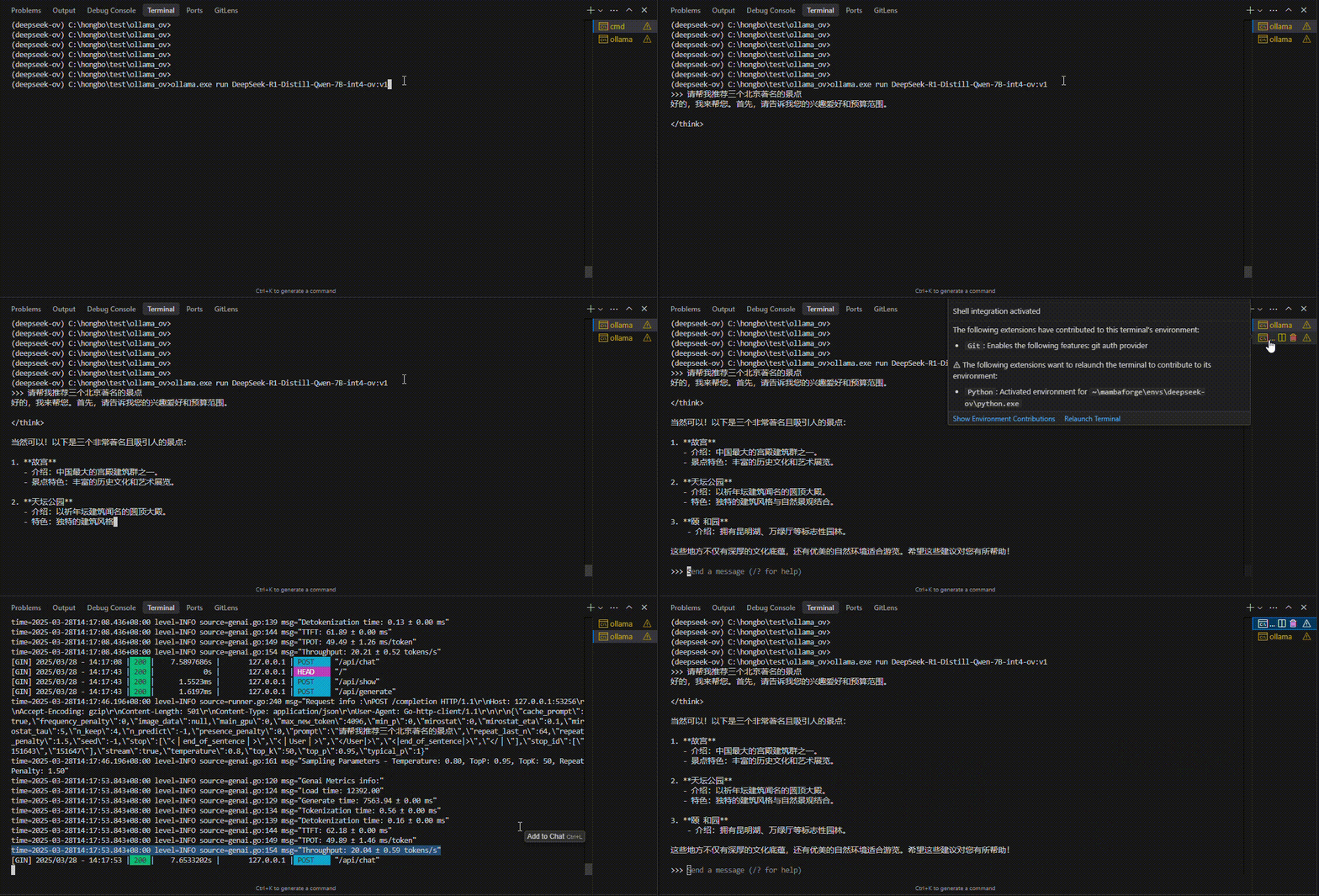
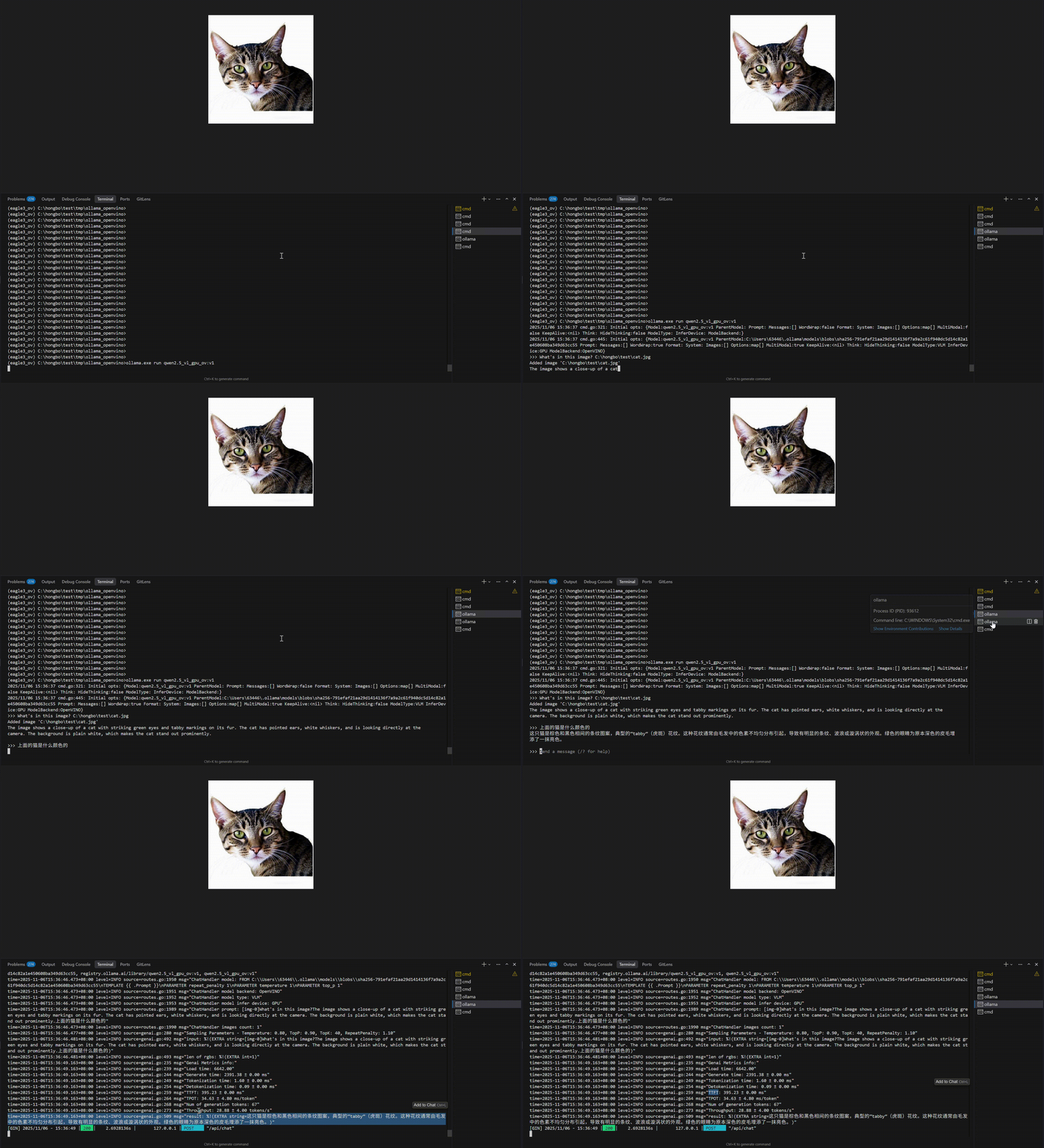 ## 当前功能 (OpenVINO 后端)
当模型在 Modelfile 中使用 **`ModelBackend "OpenVINO"`** 时 (Ollama-OV + [OpenVINO GenAI](https://github.com/openvinotoolkit/openvino.genai)),以下功能适用。
**LLM 和 VLM** 均在 `/api/chat` 上使用 OpenVINO GenAI **`chat_history`**:完整的 **`messages`**、**工具** / 函数调用以及 **`enable_thinking`** (当模型支持时)。**VLM** 还会从最新的 **`role: user`** 消息发送图像 (或作为后备使用顶级 **`image_data`**)。
| 领域 | 当前可用功能 |
|------|------------|
| **LLM** (`genairunner`) | `ov_genai_llm_pipeline` + **`generate_with_history`**;通过 Go 回调进行流式令牌生成。 |
| **VLM** (`vlmrunner`) | `ov_genai_vlm_pipeline` + **`generate_with_history`**,具有相同的消息 / 工具 / 思维连接;**图像仅应用于最后的用户轮次** (参见**模型库 (VLM)**)。当未发送 `messages` 时,旧版 **提示词 + `image_data`** 仍然有效。 |
| **聊天、工具、思维** | **`messages`** → `chat_history` + `set_tools` + `extra_context`;多轮 **`role: "tool"`** + **`tool_call_id`**。快速检查:`python scripts/test_vlm_tools.py`。 |
| **令牌使用** | **`ov_genai_perf_metrics`** 填充 **`prompt_eval_count` / `eval_count`** 以及 OpenAI 风格的 **`usage`** (LLM 和 VLM)。 |
| **设备** | **CPU**、**GPU** 和 **NPU** (如果模型包和驱动程序支持,参见模型表)。 |
| **GGUF (实验性)** | 可选的 GGUF → GenAI 路径,用于开发;**不建议用于生产** (参见下面的**从 GGUF 文件导入**)。 |
## Google Drive 下载链接
### Windows
- [ollama.exe 下载](https://drive.google.com/drive/folders/11fVeRbVfWS5MONAFX30w9Hsz2hMT3yaG?usp=sharing)
- [OpenVINO GenAI 下载](https://storage.openvinotoolkit.org/repositories/openvino_genai/packages/nightly/2026.3.0.0.dev20260516/openvino_genai_windows_2026.3.0.0.dev20260516_x86_64.zip)
## Docker
### Linux Docker
我们还准备了一个 Dockerfile 来帮助开发者快速构建 Docker 镜像 [Dockerfile](./Dockerfile_genai_ubuntu24):
```
docker build -t ollama_openvino_ubuntu24:v1 -f Dockerfile_genai_ubuntu24 .
```
然后,启动并进入 Docker 容器:
```
docker run -it --rm --device=/dev/dri:/dev/dri --device=/dev/accel:/dev/accel --entrypoint /bin/bash ollama_openvino_ubuntu24:v1
```
在容器内执行以下命令:
```
source /home/ollama_ov_server/openvino_genai_windows_2026.3.0.0.dev20260516_x86_64/setupvars.sh
ollama serve
```
## 模型库 (VLM)
原生 Ollama 仅支持 GGUF 格式的模型,Ollama-OV 调用 OpenVINO GenAI,后者需要 OpenVINO 格式的模型。因此,我们已在 Ollama 中启用了对 OpenVINO 模型文件的支持。对于公开的 VLM,你可以从 HuggingFace 或 ModelScope 访问并下载 OpenVINO IR 模型:
| 模型 | 参数 | 大小 | 压缩 | 下载链接 | 设备 |
| ------------------ | ---- | ----- | ---- | ---------------------------- | ---------- |
| Qwen2.5-VL-3B-Instruct-int4-ov | 3B | 2.5GB | INT4_ASYM_128 ratio 1.0 | [ModelScope](https://www.modelscope.cn/models/zhaohb/Qwen2.5-VL-3B-Instruct-int4-ov/summary) | CPU, GPU, NPU(base) |
| gemma-3-4b-it-ov-int4 | 4B | 3.5GB | INT4_ASYM_128 ratio 1.0 | [HuggingFace](https://huggingface.co/yangsu0423/gemma-3-4b-it-ov-int4) | CPU, GPU, NPU(base) |
## 模型库 (LLM)
| 模型 | 参数 | 大小 | 压缩 | 下载链接 | 设备 |
| ------------------ | ---- | ----- | ---- | ---------------------------- | ---------- |
| Qwen3-0.6B-int4-ov | 0.6B | 0.4GB | INT4_ASYM_128 ratio 0.8 | [ModelScope](https://www.modelscope.cn/models/OpenVINO/Qwen3-1.7B-int4-ov/summary) | CPU, GPU, NPU(base) |
| Qwen3-1.7B-int4-ov | 1.7B | 1.2GB | INT4_ASYM_128 ratio 0.8 | [ModelScope](https://www.modelscope.cn/models/OpenVINO/Qwen3-1.7B-int4-ov/) | CPU, GPU, NPU(base) |
| Qwen3-4B-int4-ov | 4B | 2.6GB | INT4_ASYM_128 ratio 0.8 | [ModelScope](https://www.modelscope.cn/models/OpenVINO/Qwen3-4B-int4-ov) | CPU, GPU, NPU(base) |
| Qwen3-1.7B-int4-sym-ov-npu | 1.7B | 1.0GB | INT4_SYM_CW | [ModelScope](https://modelscope.cn/models/zhaohb/Qwen3-1.7B-int4-sym-ov-npu) | NPU(best) |
| Qwen3-4B-int4-sym-ov-npu | 4B | 2.0GB | INT4_SYM_CW | [ModelScope](https://modelscope.cn/models/zhaohb/Qwen3-4B-int4-sym-ov-npu) | NPU(best) |
| Qwen3-8B-int4-sym-ov-npu | 8B | 4.5GB | INT4_SYM_CW | [ModelScope](https://modelscope.cn/models/zhaohb/Qwen3-8B-int4-sym-ov-npu) | NPU(best) |
| DeepSeek-R1-Distill-Qwen-1.5B-int4-ov | 1.5B | 1.4GB | INT4_ASYM_32 | [ModelScope](https://modelscope.cn/models/zhaohb/DeepSeek-R1-Distill-Qwen-1.5B-int4-gs-32-ov) | CPU, GPU, NPU(base) |
| DeepSeek-R1-Distill-Qwen-1.5B-int4-ov-npu | 1.5B | 1.1GB | INT4_SYM_CW | [ModelScope](https://modelscope.cn/models/zhaohb/DeepSeek-R1-Distill-Qwen-1.5B-int4-ov-npu/summary) | NPU(best) |
| DeepSeek-R1-Distill-Qwen-7B-int4-ov | 7B | 4.3GB | INT4_SYM_128 | [ModelScope](https://modelscope.cn/models/zhaohb/DeepSeek-R1-Distill-Qwen-7B-int4-ov) | CPU, GPU, NPU(base) |
| DeepSeek-R1-Distill-Qwen-7B-int4-ov-npu | 7B | 4.1GB | INT4_SYM_CW | [ModelScope](https://modelscope.cn/models/zhaohb/DeepSeek-R1-Distill-Qwen-7B-int4-ov-npu) | NPU(best) |
| DeepSeek-R1-Distill-Qwen-14B-int4-ov | 14B | 8.0GB | INT4_SYM_128 | [ModelScope](https://modelscope.cn/models/zhaohb/DeepSeek-R1-Distill-Qwen-14B-int4-ov) | CPU, GPU, NPU(base) |
| DeepSeek-R1-Distill-llama-8B-int4-ov | 8B | 4.5GB | INT4_SYM_128 | [ModelScope](https://modelscope.cn/models/zhaohb/DeepSeek-R1-Distill-Llama-8B-int4-ov) | CPU, GPU, NPU(base) |
| DeepSeek-R1-Distill-llama-8B-int4-ov-npu | 8B | 4.2GB | INT4_SYM_CW | [ModelScope](https://modelscope.cn/models/zhaohb/DeepSeek-R1-Distill-Llama-8B-int4-ov-npu) | NPU(best) |
| llama-3.2-1b-instruct-int4-ov | 1B | 0.8GB | INT4_SYM_128 | [ModelScope](https://modelscope.cn/models/FionaZhao/llama-3.2-1b-instruct-int4-ov/files) | CPU, GPU, NPU(base) |
| llama-3.2-3b-instruct-int4-ov | 3B | 1.9GB | INT4_SYM_128 | [ModelScope](https://modelscope.cn/models/FionaZhao/llama-3.2-3b-instruct-int4-ov/files) | CPU, GPU, NPU(base) |
| llama-3.2-3b-instruct-int4-ov-npu | 3B | 1.8GB | INT4_SYM_CW | [ModelScope](https://modelscope.cn/models/FionaZhao/llama-3.2-3b-instruct-int4-ov-npu/files) | NPU(best) |
| Phi-3.5-mini-instruct-int4-ov | 3.8B | 2.1GB | INT4_ASYM | [HF](https://hf-mirror.com/OpenVINO/Phi-3.5-mini-instruct-int4-ov/tree/main), [ModelScope](https://modelscope.cn/models/OpenVINO/Phi-3.5-mini-instruct-int4-ov) | CPU, GPU |
| Phi-3-mini-128k-instruct-int4-ov | 3.8B | 2.5GB | INT4_ASYM | [HF](https://hf-mirror.com/OpenVINO/Phi-3-mini-128k-instruct-int4-ov), [ModelScope](https://modelscope.cn/models/OpenVINO/Phi-3-mini-128k-instruct-int4-ov) | CPU, GPU |
| Phi-3-mini-4k-instruct-int4-ov | 3.8B | 2.2GB | INT4_ASYM | [HF](https://hf-mirror.com/OpenVINO/Phi-3-mini-4k-instruct-int4-ov), [ModelScope](https://modelscope.cn/models/OpenVINO/Phi-3-mini-4k-instruct-int4-ov) | CPU, GPU |
| Phi-3-medium-4k-instruct-int4-ov | 14B | 7.4GB | INT4_ASYM | [HF](https://hf-mirror.com/OpenVINO/Phi-3-medium-4k-instruct-int4-ov), [ModelScope](https://modelscope.cn/models/OpenVINO/Phi-3-medium-4k-instruct-int4-ov) | CPU, GPU |
| Qwen2.5-0.5B-Instruct-openvino-ovms-int4 | 0.5B | 0.3GB | INT4_SYM_128 | [ModelScope](https://modelscope.cn/models/kafufa/Qwen2.5-0.5B-Instruct-openvino-ovms-int4/summary) | CPU, GPU, NPU(base) |
| Qwen2.5-1.5B-Instruct-int4-ov | 1.5B | 0.9GB | INT4_SYM_128 | [ModelScope](https://www.modelscope.cn/models/OpenVINO/Qwen2.5-1.5B-Instruct-int4-ov/) | CPU, GPU, NPU(base) |
| Qwen2.5-3B-Instruct-gptq-ov | 3B | 2.7GB | INT4_GPTQ | [ModelScope](https://modelscope.cn/models/FionaZhao/Qwen2.5-3B-Instruct-gptq-ov/files) | CPU, GPU |
| Qwen2.5-7B-Instruct-int4-ov | 7B | 4.3GB | INT4_ASYM | [ModelScope](https://modelscope.cn/models/FionaZhao/Qwen2.5-7B-Instruct-int4-ov/files) | CPU, GPU |
| minicpm-1b-sft-int4-ov | 1B | 0.7GB | INT4_SYM | [ModelScope](https://modelscope.cn/models/FionaZhao/minicpm-1b-sft-int4-ov/files) | CPU, GPU, NPU(base) |
| gemma-2-9b-it-int4-ov | 9B | 5.3GB | INT4_ASYM | [HF](https://hf-mirror.com/OpenVINO/gemma-2-9b-it-int4-ov), [ModelScope](https://modelscope.cn/models/OpenVINO/gemma-2-9b-it-int4-ov/summary) | CPU, GPU |
| gemma-3-1b-it-int4-ov | 1B | 0.7G | INT4_SYM_128 | [ModelScope](https://modelscope.cn/models/zhaohb/gemma-3-1b-it-int4-ov/summary) | CPU, GPU |
| TinyLlama-1.1B-Chat-v1.0-int4-ov | 1.1B | 0.6GB | INT4_ASYM | [HF](https://hf-mirror.com/OpenVINO/TinyLlama-1.1B-Chat-v1.0-int4-ov), [ModelScope](https://modelscope.cn/models/OpenVINO/TinyLlama-1.1B-Chat-v1.0-int4-ov) | CPU, GPU |
* INT4_SYM_128: 使用 NNCF 的 INT4 对称压缩,组大小 128,所有线性层压缩。类似于 Q4_0 压缩。
* INT4_SYM_CW: 使用 NNCF 的 INT4 对称压缩,按通道压缩,以获得 NPU 最佳性能。
* INT4_ASYM: 使用 NNCF 的 INT4 非对称压缩,精度高于对称压缩,NPU 不支持非对称压缩。
* INT4_GPTQ: 使用 NNCF 的 INT4 GPTQ 压缩,与 Huggingface 对齐。
仅以上述部分模型链接为例,对于其他 LLM,你可以查看 [OpenVINO GenAI 模型支持列表](https://github.com/openvinotoolkit/openvino.genai/blob/master/SUPPORTED_MODELS.md)。如果你有自定义的 LLM,请遵循 [GenAI 模型转换步骤](https://github.com/openvinotoolkit/openvino.genai?tab=readme-ov-file#converting-and-compressing-text-generation-model-from-hugging-face-library)。
## 当前功能 (OpenVINO 后端)
当模型在 Modelfile 中使用 **`ModelBackend "OpenVINO"`** 时 (Ollama-OV + [OpenVINO GenAI](https://github.com/openvinotoolkit/openvino.genai)),以下功能适用。
**LLM 和 VLM** 均在 `/api/chat` 上使用 OpenVINO GenAI **`chat_history`**:完整的 **`messages`**、**工具** / 函数调用以及 **`enable_thinking`** (当模型支持时)。**VLM** 还会从最新的 **`role: user`** 消息发送图像 (或作为后备使用顶级 **`image_data`**)。
| 领域 | 当前可用功能 |
|------|------------|
| **LLM** (`genairunner`) | `ov_genai_llm_pipeline` + **`generate_with_history`**;通过 Go 回调进行流式令牌生成。 |
| **VLM** (`vlmrunner`) | `ov_genai_vlm_pipeline` + **`generate_with_history`**,具有相同的消息 / 工具 / 思维连接;**图像仅应用于最后的用户轮次** (参见**模型库 (VLM)**)。当未发送 `messages` 时,旧版 **提示词 + `image_data`** 仍然有效。 |
| **聊天、工具、思维** | **`messages`** → `chat_history` + `set_tools` + `extra_context`;多轮 **`role: "tool"`** + **`tool_call_id`**。快速检查:`python scripts/test_vlm_tools.py`。 |
| **令牌使用** | **`ov_genai_perf_metrics`** 填充 **`prompt_eval_count` / `eval_count`** 以及 OpenAI 风格的 **`usage`** (LLM 和 VLM)。 |
| **设备** | **CPU**、**GPU** 和 **NPU** (如果模型包和驱动程序支持,参见模型表)。 |
| **GGUF (实验性)** | 可选的 GGUF → GenAI 路径,用于开发;**不建议用于生产** (参见下面的**从 GGUF 文件导入**)。 |
## Google Drive 下载链接
### Windows
- [ollama.exe 下载](https://drive.google.com/drive/folders/11fVeRbVfWS5MONAFX30w9Hsz2hMT3yaG?usp=sharing)
- [OpenVINO GenAI 下载](https://storage.openvinotoolkit.org/repositories/openvino_genai/packages/nightly/2026.3.0.0.dev20260516/openvino_genai_windows_2026.3.0.0.dev20260516_x86_64.zip)
## Docker
### Linux Docker
我们还准备了一个 Dockerfile 来帮助开发者快速构建 Docker 镜像 [Dockerfile](./Dockerfile_genai_ubuntu24):
```
docker build -t ollama_openvino_ubuntu24:v1 -f Dockerfile_genai_ubuntu24 .
```
然后,启动并进入 Docker 容器:
```
docker run -it --rm --device=/dev/dri:/dev/dri --device=/dev/accel:/dev/accel --entrypoint /bin/bash ollama_openvino_ubuntu24:v1
```
在容器内执行以下命令:
```
source /home/ollama_ov_server/openvino_genai_windows_2026.3.0.0.dev20260516_x86_64/setupvars.sh
ollama serve
```
## 模型库 (VLM)
原生 Ollama 仅支持 GGUF 格式的模型,Ollama-OV 调用 OpenVINO GenAI,后者需要 OpenVINO 格式的模型。因此,我们已在 Ollama 中启用了对 OpenVINO 模型文件的支持。对于公开的 VLM,你可以从 HuggingFace 或 ModelScope 访问并下载 OpenVINO IR 模型:
| 模型 | 参数 | 大小 | 压缩 | 下载链接 | 设备 |
| ------------------ | ---- | ----- | ---- | ---------------------------- | ---------- |
| Qwen2.5-VL-3B-Instruct-int4-ov | 3B | 2.5GB | INT4_ASYM_128 ratio 1.0 | [ModelScope](https://www.modelscope.cn/models/zhaohb/Qwen2.5-VL-3B-Instruct-int4-ov/summary) | CPU, GPU, NPU(base) |
| gemma-3-4b-it-ov-int4 | 4B | 3.5GB | INT4_ASYM_128 ratio 1.0 | [HuggingFace](https://huggingface.co/yangsu0423/gemma-3-4b-it-ov-int4) | CPU, GPU, NPU(base) |
## 模型库 (LLM)
| 模型 | 参数 | 大小 | 压缩 | 下载链接 | 设备 |
| ------------------ | ---- | ----- | ---- | ---------------------------- | ---------- |
| Qwen3-0.6B-int4-ov | 0.6B | 0.4GB | INT4_ASYM_128 ratio 0.8 | [ModelScope](https://www.modelscope.cn/models/OpenVINO/Qwen3-1.7B-int4-ov/summary) | CPU, GPU, NPU(base) |
| Qwen3-1.7B-int4-ov | 1.7B | 1.2GB | INT4_ASYM_128 ratio 0.8 | [ModelScope](https://www.modelscope.cn/models/OpenVINO/Qwen3-1.7B-int4-ov/) | CPU, GPU, NPU(base) |
| Qwen3-4B-int4-ov | 4B | 2.6GB | INT4_ASYM_128 ratio 0.8 | [ModelScope](https://www.modelscope.cn/models/OpenVINO/Qwen3-4B-int4-ov) | CPU, GPU, NPU(base) |
| Qwen3-1.7B-int4-sym-ov-npu | 1.7B | 1.0GB | INT4_SYM_CW | [ModelScope](https://modelscope.cn/models/zhaohb/Qwen3-1.7B-int4-sym-ov-npu) | NPU(best) |
| Qwen3-4B-int4-sym-ov-npu | 4B | 2.0GB | INT4_SYM_CW | [ModelScope](https://modelscope.cn/models/zhaohb/Qwen3-4B-int4-sym-ov-npu) | NPU(best) |
| Qwen3-8B-int4-sym-ov-npu | 8B | 4.5GB | INT4_SYM_CW | [ModelScope](https://modelscope.cn/models/zhaohb/Qwen3-8B-int4-sym-ov-npu) | NPU(best) |
| DeepSeek-R1-Distill-Qwen-1.5B-int4-ov | 1.5B | 1.4GB | INT4_ASYM_32 | [ModelScope](https://modelscope.cn/models/zhaohb/DeepSeek-R1-Distill-Qwen-1.5B-int4-gs-32-ov) | CPU, GPU, NPU(base) |
| DeepSeek-R1-Distill-Qwen-1.5B-int4-ov-npu | 1.5B | 1.1GB | INT4_SYM_CW | [ModelScope](https://modelscope.cn/models/zhaohb/DeepSeek-R1-Distill-Qwen-1.5B-int4-ov-npu/summary) | NPU(best) |
| DeepSeek-R1-Distill-Qwen-7B-int4-ov | 7B | 4.3GB | INT4_SYM_128 | [ModelScope](https://modelscope.cn/models/zhaohb/DeepSeek-R1-Distill-Qwen-7B-int4-ov) | CPU, GPU, NPU(base) |
| DeepSeek-R1-Distill-Qwen-7B-int4-ov-npu | 7B | 4.1GB | INT4_SYM_CW | [ModelScope](https://modelscope.cn/models/zhaohb/DeepSeek-R1-Distill-Qwen-7B-int4-ov-npu) | NPU(best) |
| DeepSeek-R1-Distill-Qwen-14B-int4-ov | 14B | 8.0GB | INT4_SYM_128 | [ModelScope](https://modelscope.cn/models/zhaohb/DeepSeek-R1-Distill-Qwen-14B-int4-ov) | CPU, GPU, NPU(base) |
| DeepSeek-R1-Distill-llama-8B-int4-ov | 8B | 4.5GB | INT4_SYM_128 | [ModelScope](https://modelscope.cn/models/zhaohb/DeepSeek-R1-Distill-Llama-8B-int4-ov) | CPU, GPU, NPU(base) |
| DeepSeek-R1-Distill-llama-8B-int4-ov-npu | 8B | 4.2GB | INT4_SYM_CW | [ModelScope](https://modelscope.cn/models/zhaohb/DeepSeek-R1-Distill-Llama-8B-int4-ov-npu) | NPU(best) |
| llama-3.2-1b-instruct-int4-ov | 1B | 0.8GB | INT4_SYM_128 | [ModelScope](https://modelscope.cn/models/FionaZhao/llama-3.2-1b-instruct-int4-ov/files) | CPU, GPU, NPU(base) |
| llama-3.2-3b-instruct-int4-ov | 3B | 1.9GB | INT4_SYM_128 | [ModelScope](https://modelscope.cn/models/FionaZhao/llama-3.2-3b-instruct-int4-ov/files) | CPU, GPU, NPU(base) |
| llama-3.2-3b-instruct-int4-ov-npu | 3B | 1.8GB | INT4_SYM_CW | [ModelScope](https://modelscope.cn/models/FionaZhao/llama-3.2-3b-instruct-int4-ov-npu/files) | NPU(best) |
| Phi-3.5-mini-instruct-int4-ov | 3.8B | 2.1GB | INT4_ASYM | [HF](https://hf-mirror.com/OpenVINO/Phi-3.5-mini-instruct-int4-ov/tree/main), [ModelScope](https://modelscope.cn/models/OpenVINO/Phi-3.5-mini-instruct-int4-ov) | CPU, GPU |
| Phi-3-mini-128k-instruct-int4-ov | 3.8B | 2.5GB | INT4_ASYM | [HF](https://hf-mirror.com/OpenVINO/Phi-3-mini-128k-instruct-int4-ov), [ModelScope](https://modelscope.cn/models/OpenVINO/Phi-3-mini-128k-instruct-int4-ov) | CPU, GPU |
| Phi-3-mini-4k-instruct-int4-ov | 3.8B | 2.2GB | INT4_ASYM | [HF](https://hf-mirror.com/OpenVINO/Phi-3-mini-4k-instruct-int4-ov), [ModelScope](https://modelscope.cn/models/OpenVINO/Phi-3-mini-4k-instruct-int4-ov) | CPU, GPU |
| Phi-3-medium-4k-instruct-int4-ov | 14B | 7.4GB | INT4_ASYM | [HF](https://hf-mirror.com/OpenVINO/Phi-3-medium-4k-instruct-int4-ov), [ModelScope](https://modelscope.cn/models/OpenVINO/Phi-3-medium-4k-instruct-int4-ov) | CPU, GPU |
| Qwen2.5-0.5B-Instruct-openvino-ovms-int4 | 0.5B | 0.3GB | INT4_SYM_128 | [ModelScope](https://modelscope.cn/models/kafufa/Qwen2.5-0.5B-Instruct-openvino-ovms-int4/summary) | CPU, GPU, NPU(base) |
| Qwen2.5-1.5B-Instruct-int4-ov | 1.5B | 0.9GB | INT4_SYM_128 | [ModelScope](https://www.modelscope.cn/models/OpenVINO/Qwen2.5-1.5B-Instruct-int4-ov/) | CPU, GPU, NPU(base) |
| Qwen2.5-3B-Instruct-gptq-ov | 3B | 2.7GB | INT4_GPTQ | [ModelScope](https://modelscope.cn/models/FionaZhao/Qwen2.5-3B-Instruct-gptq-ov/files) | CPU, GPU |
| Qwen2.5-7B-Instruct-int4-ov | 7B | 4.3GB | INT4_ASYM | [ModelScope](https://modelscope.cn/models/FionaZhao/Qwen2.5-7B-Instruct-int4-ov/files) | CPU, GPU |
| minicpm-1b-sft-int4-ov | 1B | 0.7GB | INT4_SYM | [ModelScope](https://modelscope.cn/models/FionaZhao/minicpm-1b-sft-int4-ov/files) | CPU, GPU, NPU(base) |
| gemma-2-9b-it-int4-ov | 9B | 5.3GB | INT4_ASYM | [HF](https://hf-mirror.com/OpenVINO/gemma-2-9b-it-int4-ov), [ModelScope](https://modelscope.cn/models/OpenVINO/gemma-2-9b-it-int4-ov/summary) | CPU, GPU |
| gemma-3-1b-it-int4-ov | 1B | 0.7G | INT4_SYM_128 | [ModelScope](https://modelscope.cn/models/zhaohb/gemma-3-1b-it-int4-ov/summary) | CPU, GPU |
| TinyLlama-1.1B-Chat-v1.0-int4-ov | 1.1B | 0.6GB | INT4_ASYM | [HF](https://hf-mirror.com/OpenVINO/TinyLlama-1.1B-Chat-v1.0-int4-ov), [ModelScope](https://modelscope.cn/models/OpenVINO/TinyLlama-1.1B-Chat-v1.0-int4-ov) | CPU, GPU |
* INT4_SYM_128: 使用 NNCF 的 INT4 对称压缩,组大小 128,所有线性层压缩。类似于 Q4_0 压缩。
* INT4_SYM_CW: 使用 NNCF 的 INT4 对称压缩,按通道压缩,以获得 NPU 最佳性能。
* INT4_ASYM: 使用 NNCF 的 INT4 非对称压缩,精度高于对称压缩,NPU 不支持非对称压缩。
* INT4_GPTQ: 使用 NNCF 的 INT4 GPTQ 压缩,与 Huggingface 对齐。
仅以上述部分模型链接为例,对于其他 LLM,你可以查看 [OpenVINO GenAI 模型支持列表](https://github.com/openvinotoolkit/openvino.genai/blob/master/SUPPORTED_MODELS.md)。如果你有自定义的 LLM,请遵循 [GenAI 模型转换步骤](https://github.com/openvinotoolkit/openvino.genai?tab=readme-ov-file#converting-and-compressing-text-generation-model-from-hugging-face-library)。


点击此处展开/折叠内容
-
# Ollama
让大语言模型快速上手运行。
### macOS
[下载](https://ollama.com/download/Ollama-darwin.zip)
### Windows
[下载](https://ollama.com/download/OllamaSetup.exe)
### Linux
```
curl -fsSL https://ollama.com/install.sh | sh
```
[手动安装说明](https://github.com/ollama/ollama/blob/main/docs/linux.md)
### Docker
官方 [Ollama Docker 镜像](https://hub.docker.com/r/ollama/ollama) `ollama/ollama` 已在 Docker Hub 上可用。
### 库
- [ollama-python](https://github.com/ollama/ollama-python)
- [ollama-js](https://github.com/ollama/ollama-js)
## 快速开始
运行并与 [Llama 3.2](https://ollama.com/library/llama3.2) 聊天:
```
ollama run llama3.2
```
## 模型库
Ollama 支持 [ollama.com/library](https://ollama.com/library 'ollama model library') 上列出的模型列表。
以下是一些可以下载的示例模型:
| 模型 | 参数 | 大小 | 下载命令 |
| ------------------ | ---- | ----- | ------------------------------ |
| DeepSeek-R1 | 7B | 4.7GB | `ollama run deepseek-r1` |
| DeepSeek-R1 | 671B | 404GB | `ollama run deepseek-r1:671b` |
| Llama 3.3 | 70B | 43GB | `ollama run llama3.3` |
| Llama 3.2 | 3B | 2.0GB | `ollama run llama3.2` |
| Llama 3.2 | 1B | 1.3GB | `ollama run llama3.2:1b` |
| Llama 3.2 Vision | 11B | 7.9GB | `ollama run llama3.2-vision` |
| Llama 3.2 Vision | 90B | 55GB | `ollama run llama3.2-vision:90b` |
| Llama 3.1 | 8B | 4.7GB | `ollama run llama3.1` |
| Llama 3.1 | 405B | 231GB | `ollama run llama3.1:405b` |
| Phi 4 | 14B | 9.1GB | `ollama run phi4` |
| Phi 3 Mini | 3.8B | 2.3GB | `ollama run phi3` |
| Gemma 2 | 2B | 1.6GB | `ollama run gemma2:2b` |
| Gemma 2 | 9B | 5.5GB | `ollama run gemma2` |
| Gemma 2 | 27B | 16GB | `ollama run gemma2:27b` |
| Mistral | 7B | 4.1GB | `ollama run mistral` |
| Moondream 2 | 1.4B | 829MB | `ollama run moondream` |
| Neural Chat | 7B | 4.1GB | `ollama run neural-chat` |
| Starling | 7B | 4.1GB | `ollama run starling-lm` |
| Code Llama | 7B | 3.8GB | `ollama run codellama` |
| Llama 2 Uncensored | 7B | 3.8GB | `ollama run llama2-uncensored` |
| LLaVA | 7B | 4.5GB | `ollama run llava` |
| Solar | 10.7B | 6.1GB | `ollama run solar` |
## 自定义模型
### 从 GGUF 导入
Ollama 支持在 Modelfile 中导入 GGUF 模型:
1. 创建一个名为 `Modelfile` 的文件,其中包含一个 `FROM` 指令,指向你要导入的模型的本地文件路径。
FROM ./vicuna-33b.Q4_0.gguf
2. 在 Ollama 中创建模型
ollama create example -f Modelfile
3. 运行模型
ollama run example
### 从 Safetensors 导入
有关导入模型的更多信息,请参阅[指南](docs/import.md)。
### 自定义提示词
Ollama 库中的模型可以通过提示词进行自定义。例如,要自定义 `llama3.2` 模型:
```
ollama pull llama3.2
```
创建一个 `Modelfile`:
```
FROM llama3.2
# 将温度设置为 1 [数值越高越具创造性,越低越连贯]
PARAMETER temperature 1
# 设置系统消息
SYSTEM """
You are Mario from Super Mario Bros. Answer as Mario, the assistant, only.
"""
```
接下来,创建并运行模型:
```
ollama create mario -f ./Modelfile
ollama run mario
>>> hi
Hello! It's your friend Mario.
```
有关使用 Modelfile 的更多信息,请参阅 [Modelfile](docs/modelfile.md) 文档。
## CLI 参考
### 创建模型
`ollama create` 用于根据 Modelfile 创建模型。
```
ollama create mymodel -f ./Modelfile
```
### 拉取模型
```
ollama pull llama3.2
```
### 删除模型
```
ollama rm llama3.2
```
### 复制模型
```
ollama cp llama3.2 my-model
```
### 多行输入
对于多行输入,你可以用 `"""` 包裹文本:
```
>>> """Hello,
... world!
... """
I'm a basic program that prints the famous "Hello, world!" message to the console.
```
### 多模态模型
```
ollama run llava "What's in this image? /Users/jmorgan/Desktop/smile.png"
```
### 将提示词作为参数传递
```
ollama run llama3.2 "Summarize this file: $(cat README.md)"
```
### 显示模型信息
```
ollama show llama3.2
```
### 列出计算机上的模型
```
ollama list
```
### 列出当前已加载的模型
```
ollama ps
```
### 停止当前正在运行的模型
```
ollama stop llama3.2
```
### 启动 Ollama
当你想在不运行桌面应用程序的情况下启动 Ollama 时,可以使用 `ollama serve`。
## 构建
参阅[开发者指南](https://github.com/ollama/ollama/blob/main/docs/development.md)
### 运行本地构建
接下来,启动服务器:
```
./ollama serve
```
最后,在另一个终端中,运行一个模型:
```
./ollama run llama3.2
```
## REST API
Ollama 提供了一个用于运行和管理模型的 REST API。
### 生成响应
```
curl http://localhost:11434/api/generate -d '{
"model": "llama3.2",
"prompt":"Why is the sky blue?"
}'
```
### 与模型聊天
```
curl http://localhost:11434/api/chat -d '{
"model": "llama3.2",
"messages": [
{ "role": "user", "content": "why is the sky blue?" }
]
}'
```
有关所有端点,请参阅 [API 文档](./docs/api.md)。
## 社区集成
### Web 与桌面端
- [Open WebUI](https://github.com/open-webui/open-webui)
- [Enchanted (macOS 原生)](https://github.com/AugustDev/enchanted)
- [Hollama](https://github.com/fmaclen/hollama)
- [Lollms-Webui](https://github.com/ParisNeo/lollms-webui)
- [LibreChat](https://github.com/danny-avila/LibreChat)
- [Bionic GPT](https://github.com/bionic-gpt/bionic-gpt)
- [HTML UI](https://github.com/rtcfirefly/ollama-ui)
- [Saddle](https://github.com/jikkuatwork/saddle)
- [Chatbot UI](https://github.com/ivanfioravanti/chatbot-ollama)
- [Chatbot UI v2](https://github.com/mckaywrigley/chatbot-ui)
- [Typescript UI](https://github.com/ollama-interface/Ollama-Gui?tab=readme-ov-file)
- [用于 Ollama 模型的极简 React UI](https://github.com/richawo/minimal-llm-ui)
- [Ollamac](https://github.com/kevinhermawan/Ollamac)
- [big-AGI](https://github.com/enricoros/big-AGI/blob/main/docs/config-local-ollama.md)
- [Cheshire Cat 助手框架](https://github.com/cheshire-cat-ai/core)
- [Amica](https://github.com/semperai/amica)
- [chatd](https://github.com/BruceMacD/chatd)
- [Ollama-SwiftUI](https://github.com/kghandour/Ollama-SwiftUI)
- [Dify.AI](https://github.com/langgenius/dify)
- [MindMac](https://mindmac.app)
- [用于 Ollama 的 NextJS Web 界面](https://github.com/jakobhoeg/nextjs-ollama-llm-ui)
- [Msty](https://msty.app)
- [Chatbox](https://github.com/Bin-Huang/Chatbox)
- [WinForm Ollama Copilot](https://github.com/tgraupmann/WinForm_Ollama_Copilot)
- [NextChat](https://github.com/ChatGPTNextWeb/ChatGPT-Next-Web),附带[入门文档](https://docs.nextchat.dev/models/ollama)
- [Alpaca WebUI](https://github.com/mmo80/alpaca-webui)
- [OllamaGUI](https://github.com/enoch1118/ollamaGUI)
- [OpenAOE](https://github.com/InternLM/OpenAOE)
- [Odin Runes](https://github.com/leonid20000/OdinRunes)
- [LLM-X](https://github.com/mrdjohnson/llm-x) (渐进式 Web 应用)
- [AnythingLLM (Docker + macOS/Windows/Linux 原生应用)](https://github.com/Mintplex-Labs/anything-llm)
- [Ollama Basic Chat:使用 HyperDiv 响应式 UI](https://github.com/rapidarchitect/ollama_basic_chat)
- [Ollama-chats RPG](https://github.com/drazdra/ollama-chats)
- [IntelliBar](https://intellibar.app/) (macOS 的 AI 驱动助手)
- [QA-Pilot](https://github.com/reid41/QA-Pilot) (交互式聊天工具,可利用 Ollama 模型快速理解和导航 GitHub 代码仓库)
- [ChatOllama](https://github.com/sugarforever/chat-ollama) (基于 Ollama 的开源聊天机器人,带知识库)
- [CRAG Ollama Chat](https://github.com/Nagi-ovo/CRAG-Ollama-Chat) (带纠正性 RAG 的简单网络搜索)
- [RAGFlow](https://github.com/infiniflow/ragflow) (基于深度文档理解的开源检索增强生成引擎)
- [StreamDeploy](https://github.com/StreamDeploy-DevRel/streamdeploy-llm-app-scaffold) (LLM 应用脚手架)
- [chat](https://github.com/swuecho/chat) (面向团队的聊天 Web 应用)
- [Lobe Chat](https://github.com/lobehub/lobe-chat),附带[集成文档](https://lobehub.com/docs/self-hosting/examples/ollama)
- [Ollama RAG 聊天机器人](https://github.com/datvodinh/rag-chatbot.git) (使用 Ollama 和 RAG 进行本地多 PDF 聊天)
- [BrainSoup](https://www.nurgo-software.com/products/brainsoup) (灵活的原生客户端,支持 RAG 和多代理自动化)
- [macai](https://github.com/Renset/macai) (用于 Ollama、ChatGPT 和其他兼容 API 后端的 macOS 客户端)
- [RWKV-Runner](https://github.com/josStorer/RWKV-Runner) (RWKV 离线 LLM 部署工具,也可用作 ChatGPT 和 Ollama 的客户端)
- [Ollama Grid Search](https://github.com/dezoito/ollama-grid-search) (评估和比较模型的应用)
- [Olpaka](https://github.com/Otacon/olpaka) (用户友好的 Flutter Web 应用,用于 Ollama)
- [OllamaSpring](https://github.com/CrazyNeil/OllamaSpring) (macOS 的 Ollama 客户端)
- [LLocal.in](https://github.com/kartikm7/llocal) (易于使用的 Electron 桌面客户端,用于 Ollama)
- [Shinkai Desktop](https://github.com/dcSpark/shinkai-apps) (使用 Ollama + 文件 + RAG 的双击安装本地 AI)
- [AiLama](https://github.com/zeyoyt/ailama) (一款 Discord 用户应用,允许你在 Discord 任何位置与 Ollama 交互)
- [Ollama 与 Google Mesop](https://github.com/rapidarchitect/ollama_mesop/) (使用 Ollama 的 Mesop 聊天客户端实现)
- [R2R](https://github.com/SciPhi-AI/R2R) (开源 RAG 引擎)
- [Ollama-Kis](https://github.com/elearningshow/ollama-kis) (一个简单易用的 GUI,带有示例自定义 LLM,用于驾驶员教育)
- [OpenGPA](https://opengpa.org) (开源离线优先企业级代理应用)
- [Painting Droid](https://github.com/mateuszmigas/painting-droid) (集成 AI 的绘画应用)
- [Kerlig AI](https://www.kerlig.com/) (macOS 的 AI 写作助手)
- [AI Studio](https://github.com/MindWorkAI/AI-Studio)
- [Sidellama](https://github.com/gyopak/sidellama) (基于浏览器的 LLM 客户端)
- [LLMStack](https://github.com/trypromptly/LLMStack) (无代码多代理框架,用于构建 LLM 代理和工作流)
- [BoltAI for Mac](https://boltai.com) (Mac 的 AI 聊天客户端)
- [Harbor](https://github.com/av/harbor) (容器化 LLM 工具包,默认后端为 Ollama)
- [PyGPT](https://github.com/szczyglis-dev/py-gpt) (适用于 Linux、Windows 和 Mac 的 AI 桌面助手)
- [Alpaca](https://github.com/Jeffser/Alpaca) (使用 GTK4 和 Adwaita 制作的适用于 Linux 和 macOS 的 Ollama 客户端应用)
- [AutoGPT](https://github.com/Significant-Gravitas/AutoGPT/blob/master/docs/content/platform/ollama.md) (AutoGPT Ollama 集成)
- [Go-CREW](https://www.jonathanhecl.com/go-crew/) (Golang 中强大的离线 RAG)
- [PartCAD](https://github.com/openvmp/partcad/) (使用 OpenSCAD 和 CadQuery 生成 CAD 模型)
- [Ollama4j Web UI](https://github.com/ollama4j/ollama4j-web-ui) - 使用 Vaadin、Spring Boot 和 Ollama4j 构建的基于 Java 的 Ollama Web UI
- [PyOllaMx](https://github.com/kspviswa/pyOllaMx) - macOS 应用程序,能够与 Ollama 和 Apple MLX 模型聊天。
- [Claude Dev](https://github.com/saoudrizwan/claude-dev) - 用于多文件/整个仓库编码的 VSCode 扩展
- [Cherry Studio](https://github.com/kangfenmao/cherry-studio) (支持 Ollama 的桌面客户端)
- [ConfiChat](https://github.com/1runeberg/confichat) (轻量级、独立、多平台、注重隐私的 LLM 聊天界面,可选加密)
- [Archyve](https://github.com/nickthecook/archyve) (支持 RAG 的文档库)
- [crewAI with Mesop](https://github.com/rapidarchitect/ollama-crew-mesop) (Mesop Web 界面,用于运行 crewAI 与 Ollama)
- [基于 Tkinter 的客户端](https://github.com/chyok/ollama-gui) (基于 Python tkinter 的 Ollama 客户端)
- [LLMChat](https://github.com/trendy-design/llmchat) (注重隐私、100% 本地、直观的全能聊天界面)
- [本地多模态 AI 聊天](https://github.com/Leon-Sander/Local-Multimodal-AI-Chat) (基于 Ollama 的 LLM 聊天,支持多种功能,包括 PDF RAG、语音聊天、基于图像的交互以及与 OpenAI 的集成。)
- [ARGO](https://github.com/xark-argo/argo) (在 Mac/Windows/Linux 上本地下载并运行 Ollama 和 Huggingface 模型,支持 RAG)
- [OrionChat](https://github.com/EliasPereirah/OrionChat) - OrionChat 是一个用于与不同 AI 提供商聊天的 Web 界面
- [G1](https://github.com/bklieger-groq/g1) (使用类似 o1 的推理链通过提示策略改进 LLM 推理的原型。)
- [Web 管理](https://github.com/lemonit-eric-mao/ollama-web-management) (Web 管理页面)
- [Promptery](https://github.com/promptery/promptery) (Ollama 的桌面客户端。)
- [Ollama App](https://github.com/JHubi1/ollama-app) (现代且易于使用的多平台 Ollama 客户端)
- [chat-ollama](https://github.com/annilq/chat-ollama) (Ollama 的 React Native 客户端)
- [SpaceLlama](https://github.com/tcsenpai/spacellama) (Firefox 和 Chrome 扩展,可在侧边栏中使用 ollama 快速总结网页)
- [YouLama](https://github.com/tcsenpai/youlama) (Web 应用,可快速总结任何 YouTube 视频,支持 Invidious)
- [DualMind](https://github.com/tcsenpai/dualmind) (实验性应用,允许两个模型在终端或 Web 界面中相互对话)
- [ollamarama-matrix](https://github.com/h1ddenpr0cess20/ollamarama-matrix) (用于 Matrix 聊天协议的 Ollama 聊天机器人)
- [ollama-chat-app](https://github.com/anan1213095357/ollama-chat-app) (基于 Flutter 的聊天应用)
- [Perfect Memory AI](https://www.perfectmemory.ai/) (生产力 AI 助手,根据你在屏幕上看到的、在会议中听到和说的内容进行个性化定制)
- [Hexabot](https://github.com/hexastack/hexabot) (对话式 AI 构建器)
- [Reddit Rate](https://github.com/rapidarchitect/reddit_analyzer) (搜索并评级 Reddit 话题,使用加权求和)
- [OpenTalkGpt](https://github.com/adarshM84/OpenTalkGpt) (Chrome 扩展,管理 Ollama 支持的开源模型,创建自定义模型,并通过用户友好的界面与模型聊天)
- [VT](https://github.com/vinhnx/vt.ai) (一个极简的多模态 AI 聊天应用,具有动态对话路由。通过 Ollama 支持本地模型。)
- [Nosia](https://github.com/nosia-ai/nosia) (基于 Ollama 的易于安装和使用的 RAG 平台)
- [Witsy](https://github.com/nbonamy/witsy) (适用于 Mac/Windows/Linux 的 AI 桌面应用程序)
- [Abbey](https://github.com/US-Artificial-Intelligence/abbey) (一个可配置的 AI 界面服务器,带笔记本、文档存储和 YouTube 支持)
- [Minima](https://github.com/dmayboroda/minima) (本地部署或完全本地工作流的 RAG)
- [aidful-ollama-model-delete](https://github.com/AidfulAI/aidful-ollama-model-delete) (用于简化模型清理的用户界面)
- [Perplexica](https://github.com/ItzCrazyKns/Perplexica) (一个 AI 驱动的搜索引擎,Perplexity AI 的开源替代方案)
- [用于 Docker 的 Ollama 聊天 WebUI](https://github.com/oslook/ollama-webui) (支持本地 docker 部署,轻量级 ollama webui)
- [AI Toolkit for Visual Studio Code](https://aka.ms/ai-tooklit/ollama-docs) (Microsoft 官方 VSCode 扩展,用于聊天、测试、评估支持 Ollama 的模型,并在 AI 应用中使用它们。)
- [MinimalNextOllamaChat](https://github.com/anilkay/MinimalNextOllamaChat) (用于聊天和模型控制的极简 Web UI)
- [Chipper](https://github.com/TilmanGriesel/chipper) 面向爱好者的 AI 界面 (Ollama, Haystack RAG, Python)
- [ChibiChat](https://github.com/CosmicEventHorizon/ChibiChat) (基于 Kotlin 的 Android 应用,可与 Ollama 和 Koboldcpp API 端点聊天)
- [LocalLLM](https://github.com/qusaismael/localllm) (极简 Web 应用,可在其上运行 ollama 模型并带有 GUI)
- [Ollamazing](https://github.com/buiducnhat/ollamazing) (用于运行 Ollama 模型的 Web 扩展)
### 云端
- [Google Cloud](https://cloud.google.com/run/docs/tutorials/gpu-gemma2-with-ollama)
- [Fly.io](https://fly.io/docs/python/do-more/add-ollama/)
- [Koyeb](https://www.koyeb.com/deploy/ollama)
### 终端
- [oterm](https://github.com/ggozad/oterm)
- [Ellama Emacs 客户端](https://github.com/s-kostyaev/ellama)
- [Emacs 客户端](https://github.com/zweifisch/ollama)
- [neollama](https://github.com/paradoxical-dev/neollama) 用于从 Neovim 内部与模型交互的 UI 客户端
- [gen.nvim](https://github.com/David-Kunz/gen.nvim)
- [ollama.nvim](https://github.com/nomnivore/ollama.nvim)
- [ollero.nvim](https://github.com/marco-souza/ollero.nvim)
- [ollama-chat.nvim](https://github.com/gerazov/ollama-chat.nvim)
- [ogpt.nvim](https://github.com/huynle/ogpt.nvim)
- [gptel Emacs 客户端](https://github.com/karthink/gptel)
- [Oatmeal](https://github.com/dustinblackman/oatmeal)
- [cmdh](https://github.com/pgibler/cmdh)
- [ooo](https://github.com/npahlfer/ooo)
- [shell-pilot](https://github.com/reid41/shell-pilot) (在 Linux 或 macOS 上通过纯 shell 脚本与模型交互)
- [tenere](https://github.com/pythops/tenere)
- [llm-ollama](https://github.com/taketwo/llm-ollama) 用于 [Datasette 的 LLM CLI](https://llm.datasette.io/en/stable/)。
- [typechat-cli](https://github.com/anaisbetts/typechat-cli)
- [ShellOracle](https://github.com/djcopley/ShellOracle)
- [tlm](https://github.com/yusufcanb/tlm)
- [podman-ollama](https://github.com/ericcurtin/podman-ollama)
- [gollama](https://github.com/sammcj/gollama)
- [ParLlama](https://github.com/paulrobello/parllama)
- [Ollama 电子书摘要](https://github.com/cognitivetech/ollama-ebook-summary/)
- [50 行代码实现 Ollama 混合专家 (MOE)](https://github.com/rapidarchitect/ollama_moe)
- [vim-intelligence-bridge](https://github.com/pepo-ec/vim-intelligence-bridge) “Ollama” 与 Vim 编辑器的简单交互
- [x-cmd ollama](https://x-cmd.com/mod/ollama)
- [bb7](https://github.com/drunkwcodes/bb7)
- [SwollamaCLI](https://github.com/marcusziade/Swollama) 与 Swollama Swift 包捆绑。[演示](https://github.com/marcusziade/Swollama?tab=readme-ov-file#cli-usage)
- [aichat](https://github.com/sigoden/aichat) 一体化 LLM CLI 工具,具有 Shell 助手、聊天 REPL、RAG、AI 工具和代理功能,可访问 OpenAI、Claude、Gemini、Ollama、Groq 等。
- [PowershAI](https://github.com/rrg92/powershai) PowerShell 模块,将 AI 带到 Windows 终端,包括对 Ollama 的支持。
- [orbiton](https://github.com/xyproto/orbiton) 无需配置的文本编辑器和 IDE,支持使用 Ollama 进行制表符补全。
### Apple Vision Pro
- [Enchanted](https://github.com/AugustDev/enchanted)
### 数据库
- [pgai](https://github.com/timescale/pgai) - PostgreSQL 作为向量数据库 (使用 pgvector 从 Ollama 模型创建和搜索嵌入)
- [入门指南](https://github.com/timescale/pgai/blob/main/docs/vectorizer-quick-start.md)
- [MindsDB](https://github.com/mindsdb/mindsdb/blob/staging/mindsdb/integrations/handlers/ollama_handler/README.md) (将 Ollama 模型连接到近 200 个数据平台和应用)
- [chromem-go](https://github.com/philippgille/chromem-go/blob/v0.5.0/embed_ollama.go),附带[示例](https://github.com/philippgille/chromem-go/tree/v0.5.0/examples/rag-wikipedia-ollama)
- [Kangaroo](https://github.com/dbkangaroo/kangaroo) (AI 驱动的 SQL 客户端和主流数据库的管理工具)
### 包管理器
- [Pacman](https://archlinux.org/packages/extra/x86_64/ollama/)
- [Gentoo](https://github.com/gentoo/guru/tree/master/app-misc/ollama)
- [Homebrew](https://formulae.brew.sh/formula/ollama)
- [Helm Chart](https://artifacthub.io/packages/helm/ollama-helm/ollama)
- [Guix channel](https://codeberg.org/tusharhero/ollama-guix)
- [Nix package](https://search.nixos.org/packages?show=ollama&from=0&size=50&sort=relevance&type=packages&query=ollama)
- [Flox](https://flox.dev/blog/ollama-part-one)
### 库
- [LangChain](https://python.langchain.com/docs/integrations/llms/ollama) 和 [LangChain.js](https://js.langchain.com/docs/integrations/chat/ollama/),附带[示例](https://js.langchain.com/docs/tutorials/local_rag/)
- [Firebase Genkit](https://firebase.google.com/docs/genkit/plugins/ollama)
- [crewAI](https://github.com/crewAIInc/crewAI)
- [Yacana](https://remembersoftwares.github.io/yacana/) (用户友好的多代理框架,用于头脑风暴和执行预定义流程,并内置工具集成)
- [Spring AI](https://github.com/spring-projects/spring-ai),附带[参考](https://docs.spring.io/spring-ai/reference/api/chat/ollama-chat.html)和[示例](https://github.com/tzolov/ollama-tools)
- [LangChainGo](https://github.com/tmc/langchaingo/),附带[示例](https://github.com/tmc/langchaingo/tree/main/examples/ollama-completion-example)
- [LangChain4j](https://github.com/langchain4j/langchain4j),附带[示例](https://github.com/langchain4j/langchain4j-examples/tree/main/ollama-examples/src/main/java)
- [LangChainRust](https://github.com/Abraxas-365/langchain-rust),附带[示例](https://github.com/Abraxas-365/langchain-rust/blob/main/examples/llm_ollama.rs)
- [LangChain for .NET](https://github.com/tryAGI/LangChain),附带[示例](https://github.com/tryAGI/LangChain/blob/main/examples/LangChain.Samples.OpenAI/Program.cs)
- [LLPhant](https://github.com/theodo-group/LLPhant?tab=readme-ov-file#ollama)
- [LlamaIndex](https://docs.llamaindex.ai/en/stable/examples/llm/ollama/) 和 [LlamaIndexTS](https://ts.llamaindex.ai/modules/llms/available_llms/ollama)
- [LiteLLM](https://github.com/BerriAI/litellm)
- [OllamaFarm for Go](https://github.com/presbrey/ollamafarm)
- [OllamaSharp for .NET](https://github.com/awaescher/OllamaSharp)
- [Ollama for Ruby](https://github.com/gbaptista/ollama-ai)
- [Ollama-rs for Rust](https://github.com/pepperoni21/ollama-rs)
- [Ollama-hpp for C++](https://github.com/jmont-dev/ollama-hpp)
- [Ollama4j for Java](https://github.com/ollama4j/ollama4j)
- [ModelFusion TypeScript 库](https://modelfusion.dev/integration/model-provider/ollama)
- [OllamaKit for Swift](https://github.com/kevinhermawan/OllamaKit)
- [Ollama for Dart](https://github.com/breitburg/dart-ollama)
- [Ollama for Laravel](https://github.com/cloudstudio/ollama-laravel)
- [LangChainDart](https://github.com/davidmigloz/langchain_dart)
- [Semantic Kernel - Python](https://github.com/microsoft/semantic-kernel/tree/main/python/semantic_kernel/connectors/ai/ollama)
- [Haystack](https://github.com/deepset-ai/haystack-integrations/blob/main/integrations/ollama.md)
- [Elixir LangChain](https://github.com/brainlid/langchain)
- [Ollama for R - rollama](https://github.com/JBGruber/rollama)
- [Ollama for R - ollama-r](https://github.com/hauselin/ollama-r)
- [Ollama-ex for Elixir](https://github.com/lebrunel/ollama-ex)
- [用于 SAP ABAP 的 Ollama 连接器](https://github.com/b-tocs/abap_btocs_ollama)
- [Testcontainers](https://testcontainers.com/modules/ollama/)
- [Portkey](https://portkey.ai/docs/welcome/integration-guides/ollama)
- [PromptingTools.jl](https://github.com/svilupp/PromptingTools.jl),附带一个[示例](https://svilupp.github.io/PromptingTools.jl/dev/examples/working_with_ollama)
- [LlamaScript](https://github.com/Project-Llama/llamascript)
- [llm-axe](https://github.com/emirsahin1/llm-axe) (用于构建 LLM 驱动应用的 Python 工具包)
- [Gollm](https://docs.gollm.co/examples/ollama-example)
- [Gollama for Golang](https://github.com/jonathanhecl/gollama)
- [Ollamaclient for Golang](https://github.com/xyproto/ollamaclient)
- [Go 中的高级函数抽象](https://gitlab.com/tozd/go/fun)
- [Ollama PHP](https://github.com/ArdaGnsrn/ollama-php)
- [Agents-Flex for Java](https://github.com/agents-flex/agents-flex),附带[示例](https://github.com/agents-flex/agents-flex/tree/main/agents-flex-llm/agents-flex-llm-ollama)
- [Parakeet](https://github.com/parakeet-nest/parakeet) 是一个 GoLang 库,旨在简化使用 Ollama 开发小型生成式 AI 应用。
- [Haverscript](https://github.com/andygill/haverscript),附带[示例](https://github.com/andygill/haverscript/tree/main/examples)
- [Ollama for Swift](https://github.com/mattt/ollama-swift)
- [Swollama for Swift](https://github.com/marcusziade/Swollama),附带 [DocC](https://marcusziade.github.io/Swollama/documentation/swollama/)
- [GoLamify](https://github.com/prasad89/golamify)
- [Ollama for Haskell](https://github.com/tusharad/ollama-haskell)
- [multi-llm-ts](https://github.com/nbonamy/multi-llm-ts) (一个 TypeScript/JavaScript 库,允许通过统一 API 访问不同的 LLM)
- [LlmTornado](https://github.com/lofcz/llmtornado) (C# 库,为主要开源和商业推理 API 提供统一接口)
- [Ollama for Zig](https://github.com/dravenk/ollama-zig)
- [Abso](https://github.com/lunary-ai/abso) (与 OpenAI 兼容的 TypeScript SDK,适用于任何 LLM 提供商)
### 移动端
- [Enchanted](https://github.com/AugustDev/enchanted)
- [Maid](https://github.com/Mobile-Artificial-Intelligence/maid)
- [Ollama App](https://github.com/JHubi1/ollama-app) (现代且易于使用的多平台 Ollama 客户端)
- [ConfiChat](https://github.com/1runeberg/confichat) (轻量级、独立、多平台、注重隐私的 LLM 聊天界面,可选加密)
### 扩展与插件
- [Raycast 扩展](https://github.com/MassimilianoPasquini97/raycast_ollama)
- [Discollama](https://github.com/mxyng/discollama) (Ollama Discord 频道内的 Discord 机器人)
- [Continue](https://github.com/continuedev/continue)
- [Vibe](https://github.com/thewh1teagle/vibe) (使用 Ollama 转录和分析会议)
- [Obsidian Ollama 插件](https://github.com/hinterdupfinger/obsidian-ollama)
- [Logseq Ollama 插件](https://github.com/omagdy7/ollama-logseq)
- [NotesOllama](https://github.com/andersrex/notesollama) (Apple Notes Ollama 插件)
- [Dagger Chatbot](https://github.com/samalba/dagger-chatbot)
- [Discord AI Bot](https://github.com/mekb-turtle/discord-ai-bot)
- [Ollama Telegram Bot](https://github.com/ruecat/ollama-telegram)
- [Hass Ollama Conversation](https://github.com/ej52/hass-ollama-conversation)
- [Rivet 插件](https://github.com/abrenneke/rivet-plugin-ollama)
- [Obsidian BMO Chatbot 插件](https://github.com/longy2k/obsidian-bmo-chatbot)
- [LINK_URL_252/>) (支持 Ollama 的 Telegram 机器人)
- [Copilot for Obsidian 插件](https://github.com/logancyang/obsidian-copilot)
- [Obsidian Local GPT 插件](https://github.com/pfrankov/obsidian-local-gpt)
- [Open Interpreter](https://docs.openinterpreter.com/language-model-setup/local-models/ollama)
- [Llama Coder](https://github.com/ex3ndr/llama-coder) (使用 Ollama 的 Copilot 替代方案)
- [Ollama Copilot](https://github.com/bernardo-bruning/ollama-copilot) (代理,允许你像使用 GitHub Copilot 一样使用 ollama)
- [twinny](https://github.com/rjmacarthy/twinny) (使用 Ollama 的 Copilot 和 Copilot chat 替代方案)
- [Wingman-AI](https://github.com/RussellCanfield/wingman-ai) (使用 Ollama 和 Hugging Face 的 Copilot 代码和聊天替代方案)
- [Page Assist](https://github.com/n4ze3m/page-assist) (Chrome 扩展)
- [Plasmoid Ollama Control](https://github.com/imoize/plasmoid-ollamacontrol) (KDE Plasma 扩展,允许你快速管理/控制 Ollama 模型)
- [AI Telegram Bot](https://github.com/tusharhero/aitelegrambot) (后端使用 Ollama 的 Telegram 机器人)
- [AI ST Completion](https://github.com/yaroslavyaroslav/OpenAI-sublime-text) (Sublime Text 4 AI 助手插件,支持 Ollama)
- [Discord-Ollama Chat Bot](https://github.com/kevinthedang/discord-ollama) (通用 TypeScript Discord 机器人,附带调优文档)
- [ChatGPTBox:全能浏览器扩展](https://github.com/josStorer/chatGPTBox),附带[集成教程](https://github.com/josStorer/chatGPTBox/issues/616#issuecomment-1975186467)
- [Discord AI 聊天/审核机器人](https://github.com/rapmd73/Companion) 用 Python 编写的聊天/审核机器人。使用 Ollama 创建个性。
- [Headless Ollama](https://github.com/nischalj10/headless-ollama) (在任何操作系统上自动安装 ollama 客户端和模型的脚本,适用于依赖 ollama 服务器的应用)
- [Terraform AWS Ollama & Open WebUI](https://github.com/xuyangbocn/terraform-aws-self-host-llm) (一个 Terraform 模块,用于在 AWS 上部署开箱即用的 Ollama 服务,及其前端 Open WebUI 服务。)
- [node-red-contrib-ollama](https://github.com/jakubburkiewicz/node-red-contrib-ollama)
- [Local AI Helper](https://github.com/ivostoykov/localAI) (Chrome 和 Firefox 扩展,可与活动标签页交互并支持可自定义的 API 端点。包括用于用户提示的安全存储。)
- [vnc-lm](https://github.com/jake83741/vnc-lm) (通过 Ollama 和 LiteLLM 与 LLM 进行消息传递的 Discord 机器人。可在本地模型和旗舰模型之间无缝切换。)
- [LSP-AI](https://github.com/SilasMarvin/lsp-ai) (用于 AI 驱动功能的开源语言服务器)
- [QodeAssist](https://github.com/Palm1r/QodeAssist) (Qt Creator 的 AI 驱动编码助手插件)
- [Obsidian Quiz Generator 插件](https://github.com/ECuiDev/obsidian-quiz-generator)
- [AI Summmary Helper 插件](https://github.com/philffm/ai-summary-helper)
- [TextCraft](https://github.com/suncloudsmoon/TextCraft) (使用 Ollama 的 Word Copilot 替代方案)
- [Alfred Ollama](https://github.com/zeitlings/alfred-ollama) (Alfred 工作流)
- [TextLLaMA](https://github.com/adarshM84/TextLLaMA) 一个 Chrome 扩展,帮助你撰写邮件、纠正语法并翻译成任何语言
- [Simple-Discord-AI](https://github.com/zyphixor/simple-discord-ai)
### 支持的后端
- [llama.cpp](https://github.com/ggerganov/llama.cpp) 项目由 Georgi Gerganov 发起。
### 可观测性
- [Lunary](https://lunary.ai/docs/integrations/ollama) 是领先的开源 LLM 可观测性平台。它提供多种企业级功能,如实时分析、提示词模板管理、PII 掩码和全面的代理追踪。
- [OpenLIT](https://github.com/openlit/openlit) 是一个 OpenTelemetry 原生工具,用于使用追踪和指标监控 Ollama 应用程序和 GPU。
- [HoneyHive](https://docs.honeyhive.ai/integrations/ollama) 是一个面向 AI 代理的 AI 可观测性和评估平台。使用 HoneyHive 来评估代理性能、分析故障,并在生产环境中监控质量。
- [Langfuse](https://langfuse.com/docs/integrations/ollama) 是一个开源 LLM 可观测性平台,使团队能够协作监控、评估和调试 AI 应用程序。
- [MLflow Tracing](https://mlflow.org/docs/latest/llms/tracing/index.html#automatic-tracing) 是一个开源 LLM 可观测性工具,提供便捷的 API 来记录和可视化追踪,使调试和评估 GenAI 应用程序变得容易。