exiv703/ShieldEye-NeuralScan
GitHub: exiv703/ShieldEye-NeuralScan
一款基于 GTK4 的本地桌面源代码安全扫描器,通过启发式规则和可选的本地 AI 模型对源代码进行漏洞检测与解释。
Stars: 0 | Forks: 0
# 🛡️ ShieldEye NeuralScan
**本地桌面源代码安全扫描器**
*启发式检测 • 可选本地 AI 解释 • 可选 Trivy 文件系统扫描*
[](https://opensource.org/licenses/MIT)
[](https://www.python.org/)
[](https://www.gtk.org/)
[](https://huggingface.co/docs/transformers)
[](https://www.docker.com/)
[功能特性](#features) • [快速开始](#quick-start) • [截图](#screenshots) • [文档](#documentation) • [贡献指南](#contributing)
## 什么是 ShieldEye NeuralScan?
ShieldEye NeuralScan 是一款 GTK4 桌面应用,它使用基于正则表达式的安全规则扫描源文件,可选择生成本地 AI 解释,并可通过 Docker 添加可选的 Trivy 文件系统扫描结果。
目前实现的功能:
- 运行来自 `backend/rules.py` 的 **29 条检测规则**
- 支持本地 AI 模型:**StarCoder2-3B**、**StarCoder2-7B** 和 **Mixtral-8x7B**
- 在 AI 不可用时使用**启发式后备解释**
- 通过 Docker 可选运行 **Trivy 文件系统扫描** (`trivy fs`)
- 存储扫描历史并计算**安全评分**
- 通过 `backend/exporters.py` 中的 `export_report()` 支持报告导出(**目前尚无 GUI 导出触发器**)
## 功能特性
- **29 条启发式规则**,涵盖 SQL 注入、命令注入、动态代码执行 (`eval`/`exec`)、不安全的反序列化、弱加密、硬编码密钥、路径遍历/文件系统风险,以及网络/数据外泄指标
- 通过 Hugging Face Transformers 进行**本地 AI 推理**,可选模型包括:`bigcode/starcoder2-3b`、`bigcode/starcoder2-7b`、`mistralai/Mixtral-8x7B-Instruct-v0.1`
- 扫描结果中的**规则元数据映射**:CWE、OWASP Top 10 参考、PCI-DSS、NIST 和 GDPR 字段(在匹配的规则已定义的情况下)
- 支持对内联标记(如 `# nosec`)进行**屏蔽**(被屏蔽的扫描结果会被计入数量,但从最终结果列表中省略)
- **可选的 Trivy 集成**,用于基于 Docker 的文件系统扫描(`trivy fs --scanners vuln,secret`)
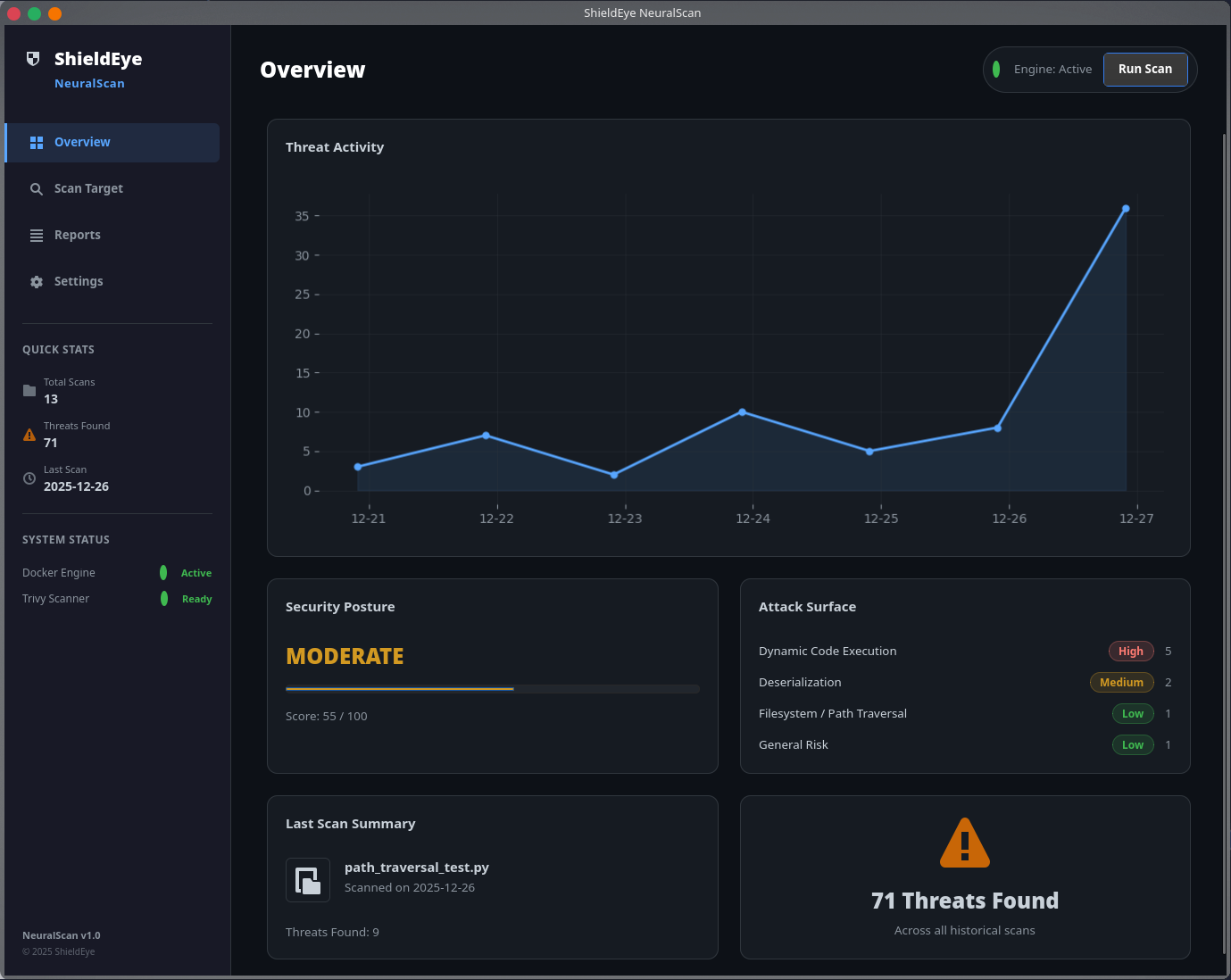
- **GTK4 深色 UI**,包含仪表盘、扫描、结果和设置视图
## 截图
| 仪表盘 | 结果 |
|:---------:|:-------:|
|  | 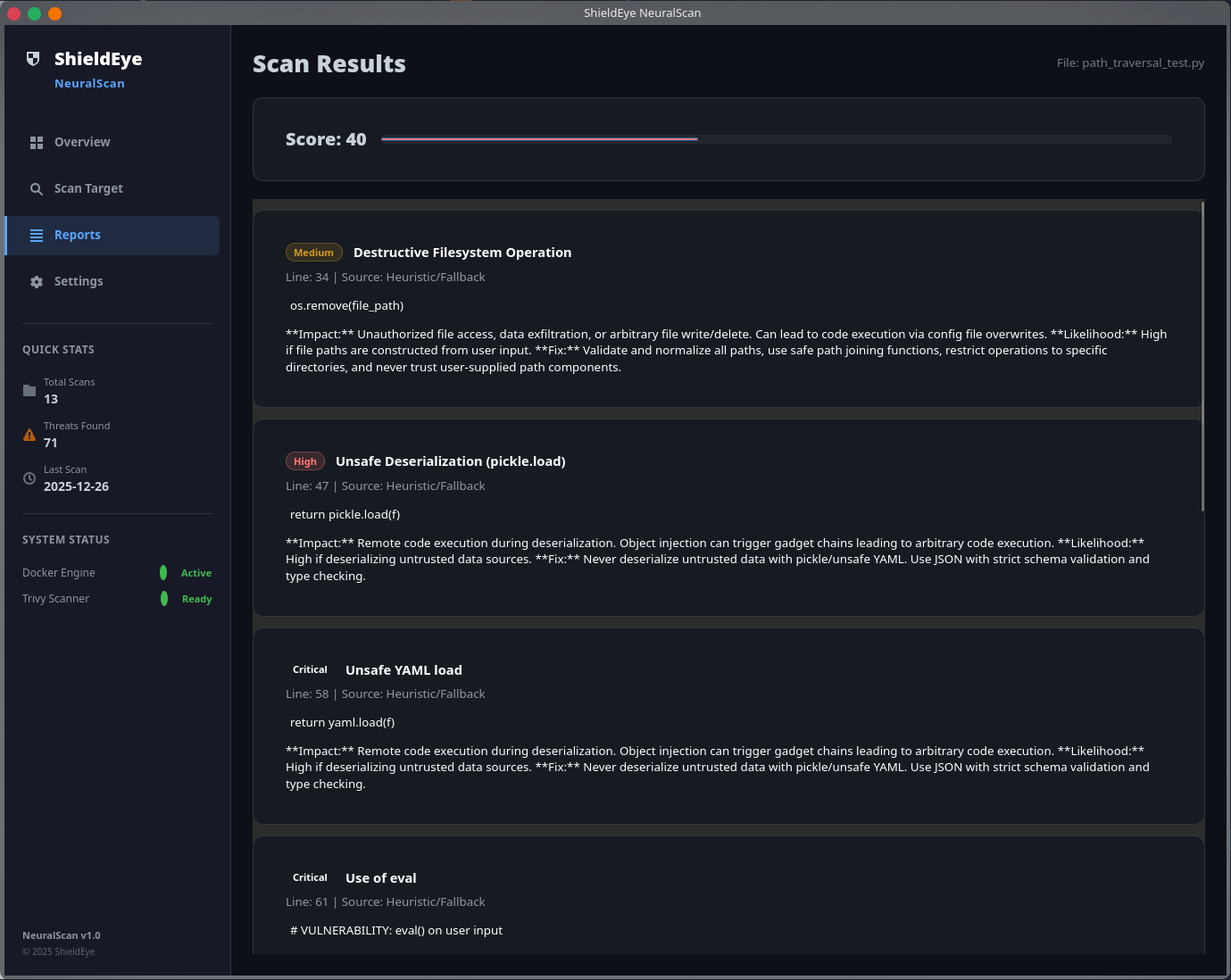 |
| *安全态势概览与威胁活动* | *带有严重级别的详细扫描结果* |
| 扫描配置 | 设置 |
|:------------------:|:--------:|
| 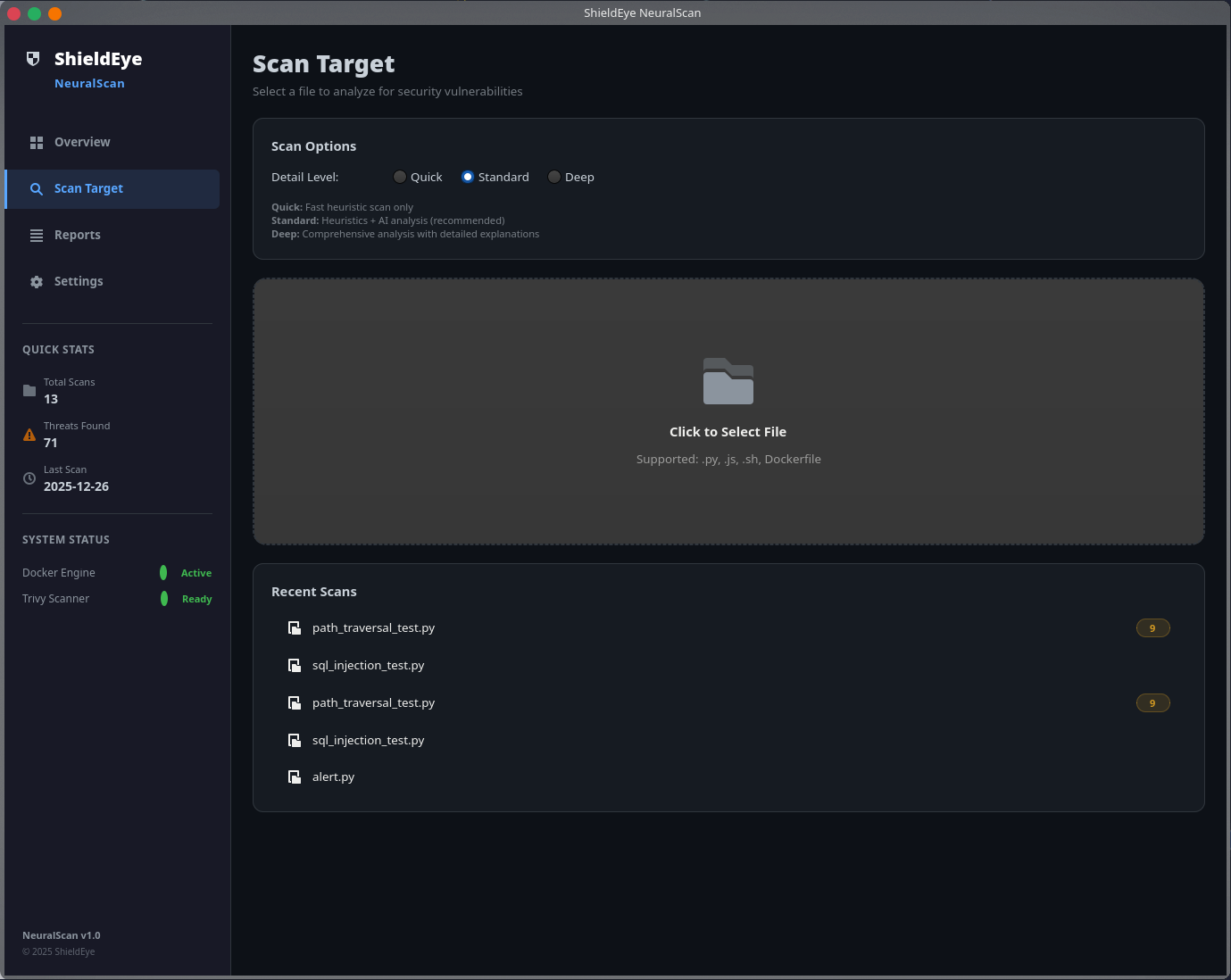 | 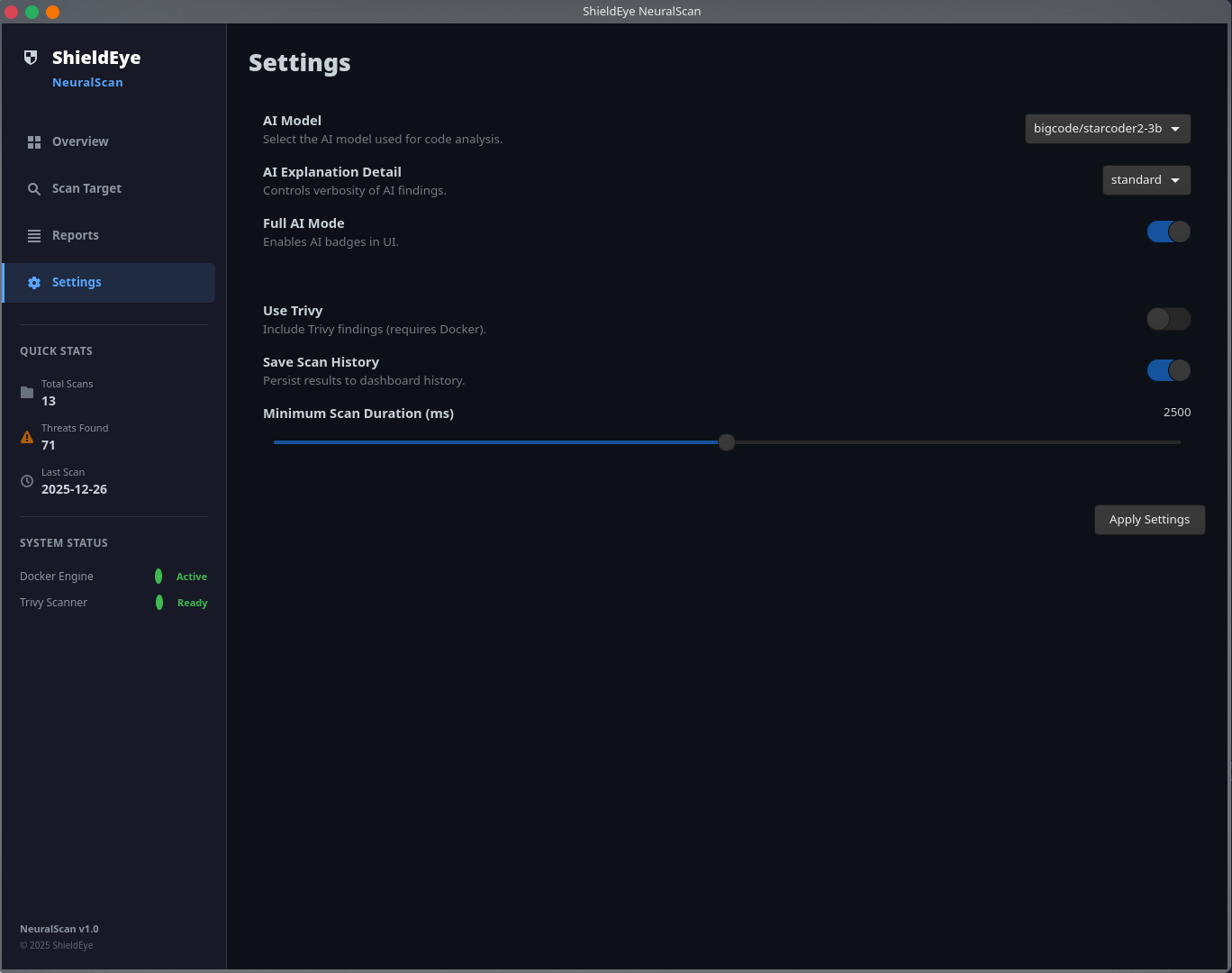 |
| *文件选择与扫描详细级别选项* | *AI 模型与扫描器配置* |
## 架构
当前模块布局:
```
┌──────────────────────────────────────────────────────────────┐
│ GTK4 Desktop Interface │
│ ┌──────────┬──────────┬──────────┬──────────┐ │
│ │Dashboard │ Scan │ Results │ Settings │ │
│ └──────────┴──────────┴──────────┴──────────┘ │
└─────────────────────────────┬────────────────────────────────┘
│
▼
┌──────────────────────────────────────────────────────────────┐
│ backend/scanner.py │
│ Orchestrates scan flow, AI fallback, scoring, suppression │
└───────────────┬──────────────────┬───────────────────────────┘
│ │
▼ ▼
backend/rules.py backend/ai_analyzer.py
backend/scoring.py backend/trivy.py
backend/exporters.py
│
▼
┌──────────────────────────────────────────────────────────────┐
│ Local Storage │
│ data/config.json, scan history │
└──────────────────────────────────────────────────────────────┘
```
### 技术栈
| 组件 | 技术 | 用途 |
|-----------|------------|---------|
| GUI | GTK 4, PyGObject | 桌面界面 |
| 扫描器 | Python 正则规则 | 启发式漏洞检测 |
| AI | Hugging Face Transformers | 可选的本地扫描结果解释 |
| Trivy | Docker + `aquasec/trivy` | 可选的文件系统漏洞/密钥扫描 |
| 存储 | `data/` 目录下的 JSON 文件 | 配置和扫描历史 |
## 快速开始
### 前置条件
| 需求 | 说明 |
|-------------|-------|
| Python 3.10+ | 必需 |
| GTK4 + PyGObject | 运行 GUI 必需 |
| Docker | 可选,仅用于 Trivy 扫描 |
### 1. 克隆仓库
```
git clone https://github.com/exiv703/ShieldEye-NeuralScan.git
cd ShieldEye-NeuralScan
```
### 2. 安装依赖
```
chmod +x run.sh
./run.sh --mode install
```
### 3. 启动应用
```
./run.sh
```
或者直接启动:
```
./run.sh --mode gui
```
### 4. 可选:启用 Trivy 扫描
安装/启动 Docker,然后在应用的设置视图中启用 **Use Trivy**。
### 5. 可选:运行测试
```
./run.sh --mode test
```
## 使用 `run.sh`
交互模式:
```
./run.sh
```
支持的运行模式:
- `./run.sh --mode gui`
- `./run.sh --mode install`
- `./run.sh --mode test`
- `./run.sh --mode exit`
帮助信息:
```
./run.sh --help
```
## 配置
运行时设置从 `data/config.json` 读取(如果文件不存在,则在安装时从 `config.default.json` 创建)。
应用运行时当前使用的配置项:
- `ai_enabled` (布尔值)
- `ai_model` (字符串)
- `ai_detail` (`short` | `standard` | `deep`)
- `use_trivy` (布尔值)
- `save_history` (布尔值)
- `scan_timeout` (整数,毫秒)
示例:
```
{
"ai_enabled": true,
"ai_model": "bigcode/starcoder2-3b",
"ai_detail": "standard",
"use_trivy": false,
"save_history": true,
"scan_timeout": 2500
}
```
## 文档
- 检测规则位于 `backend/rules.py` - 欢迎贡献。
- 扫描器编排:`backend/scanner.py`
- AI 模型加载/解释:`backend/ai_analyzer.py`
- 可选的 Trivy 集成:`backend/trivy.py`
- 报告导出器:`backend/exporters.py`
- 评分逻辑:`backend/scoring.py`
- 测试:`tests/`(8 个 pytest 测试)
## 开发
### 本地设置
```
python3 -m venv .venv
source .venv/bin/activate
pip install -r requirements.txt
python -m gui.main
```
### 运行测试
```
python -m pytest tests/ -v
```
### 项目结构
```
ShieldEye-NeuralScan/
├── backend/
│ ├── scanner.py # Scan orchestration
│ ├── rules.py # 29 heuristic rules
│ ├── scoring.py # Security score and risk summaries
│ ├── ai_analyzer.py # Local transformer model integration
│ ├── trivy.py # Optional Docker-based trivy fs integration
│ └── exporters.py # JSON/Markdown/HTML export
├── gui/
│ ├── main.py
│ ├── window.py
│ ├── style.css
│ └── views/
│ ├── dashboard.py
│ ├── scan.py
│ ├── results.py
│ └── settings.py
├── utils/
│ └── file_handler.py # Scan history persistence
├── tests/
│ ├── test_scanner.py
│ ├── test_file_handler.py
│ └── samples/
├── assets/
├── data/
├── config.default.json
├── requirements.txt
└── run.sh
```
## 许可证
本项目基于 **MIT License** 授权 – 详情请参阅 [LICENSE](LICENSE) 文件。
## 相关项目
**ShieldEye** 工具集的一部分:
- **[ShieldEye Core](https://github.com/exiv703/ShieldEye-Core)** - 网络安全扫描器 (Nmap + GTK4)
- **[ShieldEye SurfaceScan](https://github.com/exiv703/ShieldEye-SurfaceScan)** - Web 攻击面映射工具
- **[ShieldEye ComplianceScan](https://github.com/exiv703/ShieldEye_ComplianceScan)** - GDPR / PCI-DSS / ISO 27001 合规扫描器标签:DInvoke, GTK, 代码安全审计, 安全规则引擎, 本地AI, 桌面应用, 请求拦截, 逆向工具, 错误基检测, 静态代码分析