DanielLavrushin/b4
GitHub: DanielLavrushin/b4
基于 Linux netfilter 的数据包处理工具,通过流量混淆技术绕过深度包检测系统。
Stars: 1398 | Forks: 58
# B4


[[俄语](readme_ru.md)] [[telegram](https://t.me/byebyebigbro)]
通过 netfilter 队列操作绕过深度包检测 (DPI) 的网络数据包处理器。
 ## 系统要求
- Linux 系统(桌面、服务器或路由器)
- Root 权限 (sudo)
仅此而已。安装程序会处理其余部分。
## 安装
```
wget -O ~/b4install.sh https://raw.githubusercontent.com/DanielLavrushin/b4/main/install.sh && chmod +x ~/b4install.sh && ~/b4install.sh
```
如果出现问题,请尝试使用 `--sysinfo` 标志运行 - 这将诊断系统。
```
wget -O ~/b4install.sh https://raw.githubusercontent.com/DanielLavrushin/b4/main/install.sh && chmod +x ~/b4install.sh && ~/b4install.sh --sysinfo
```
或者传递 `--help` 以获取有关可能选项的更多信息。
```
wget -O ~/b4install.sh https://raw.githubusercontent.com/DanielLavrushin/b4/main/install.sh && chmod +x ~/b4install.sh && ~/b4install.sh --help
```
### 安装程序选项
```
# 安装最新 b4 版本
./b4install.sh
# 显示帮助信息
./b4install.sh -h
# 显示系统诊断和 b4 状态
./b4install.sh --sysinfo
# 安装特定版本
./b4install.sh v1.10.0
# 静默模式(抑制除错误外的输出)
./b4install.sh --quiet
# 指定 geosite.dat 源 URL 和目标
./b4install.sh --geosite-src=--geosite-src=https://example.com/geosite.dat --geosite-dst=/opt/etc/b4
# 更新 b4 到最新版本
./b4install.sh --update
# 卸载 b4
./b4install.sh --remove
```
### 从源代码构建
```
git clone https://github.com/daniellavrushin/b4.git
cd b4
# 构建 UI
cd src/http/ui
pnpm install && pnpm build
cd ../../..
# 构建二进制文件
make build
# 所有架构
make build-all
# 或构建特定架构
make linux-amd64
make linux-arm64
make linux-armv7
```
## Docker
### 快速开始
```
docker run --network host \
--cap-add NET_ADMIN --cap-add NET_RAW --cap-add SYS_MODULE \
-v /etc/b4:/etc/b4 \
lavrushin/b4:latest --config /opt/etc/b4/b4.json
```
Web UI:
## 系统要求
- Linux 系统(桌面、服务器或路由器)
- Root 权限 (sudo)
仅此而已。安装程序会处理其余部分。
## 安装
```
wget -O ~/b4install.sh https://raw.githubusercontent.com/DanielLavrushin/b4/main/install.sh && chmod +x ~/b4install.sh && ~/b4install.sh
```
如果出现问题,请尝试使用 `--sysinfo` 标志运行 - 这将诊断系统。
```
wget -O ~/b4install.sh https://raw.githubusercontent.com/DanielLavrushin/b4/main/install.sh && chmod +x ~/b4install.sh && ~/b4install.sh --sysinfo
```
或者传递 `--help` 以获取有关可能选项的更多信息。
```
wget -O ~/b4install.sh https://raw.githubusercontent.com/DanielLavrushin/b4/main/install.sh && chmod +x ~/b4install.sh && ~/b4install.sh --help
```
### 安装程序选项
```
# 安装最新 b4 版本
./b4install.sh
# 显示帮助信息
./b4install.sh -h
# 显示系统诊断和 b4 状态
./b4install.sh --sysinfo
# 安装特定版本
./b4install.sh v1.10.0
# 静默模式(抑制除错误外的输出)
./b4install.sh --quiet
# 指定 geosite.dat 源 URL 和目标
./b4install.sh --geosite-src=--geosite-src=https://example.com/geosite.dat --geosite-dst=/opt/etc/b4
# 更新 b4 到最新版本
./b4install.sh --update
# 卸载 b4
./b4install.sh --remove
```
### 从源代码构建
```
git clone https://github.com/daniellavrushin/b4.git
cd b4
# 构建 UI
cd src/http/ui
pnpm install && pnpm build
cd ../../..
# 构建二进制文件
make build
# 所有架构
make build-all
# 或构建特定架构
make linux-amd64
make linux-arm64
make linux-armv7
```
## Docker
### 快速开始
```
docker run --network host \
--cap-add NET_ADMIN --cap-add NET_RAW --cap-add SYS_MODULE \
-v /etc/b4:/etc/b4 \
lavrushin/b4:latest --config /opt/etc/b4/b4.json
```
Web UI:
### Docker Compose
```
services:
b4:
image: lavrushin/b4:latest
container_name: b4
network_mode: host
cap_add:
- NET_ADMIN
- NET_RAW
- SYS_MODULE
volumes:
- ./config:/etc/b4
command: ["--config", "/etc/b4/b4.json"]
restart: unless-stopped
```
### Docker 系统要求
- **仅限 Linux 主机** — b4 使用 netfilter 队列 (NFQUEUE),这是 Linux 内核功能
- `--network host` 是强制性的 — b4 必须直接访问主机网络栈
- 权限:`NET_ADMIN` (防火墙规则), `NET_RAW` (原始套接字), `SYS_MODULE` (内核模块加载)
- 主机内核必须支持 `nfqueue` (`xt_NFQUEUE`, `nf_conntrack` 模块)
## 使用
### 启动 B4
```
# 标准 Linux (systemd)
sudo systemctl start b4
sudo systemctl enable b4 # Start on load
# OpenWRT
/etc/init.d/b4 restart # start | stop
# Entware/MerlinWRT
/opt/etc/init.d/S99b4 restart # start | stop
```
### Web UI
```
http://your-device-ip:7000
```
### 命令行
```
# 打印帮助
b4 --help
# 基础 - 手动域名
b4 --sni-domains youtube.com,netflix.com
# 使用 geosite 分类
b4 --geosite /etc/b4/geosite.dat --geosite-categories youtube,netflix
# 自定义配置
b4 --config /path/to/config.json
```
## Web 界面
Web 界面可通过 `http://your-ip:7000` 访问(默认端口,可在 `config` 文件中更改)。
**功能:**
- 实时指标(连接、数据包、带宽)
- 支持过滤和快捷键的日志流(p 暂停流,del 清除日志)
- 动态域名/IP 配置(在域名选项卡中点击域名或 IP 即可将其添加到集合中)
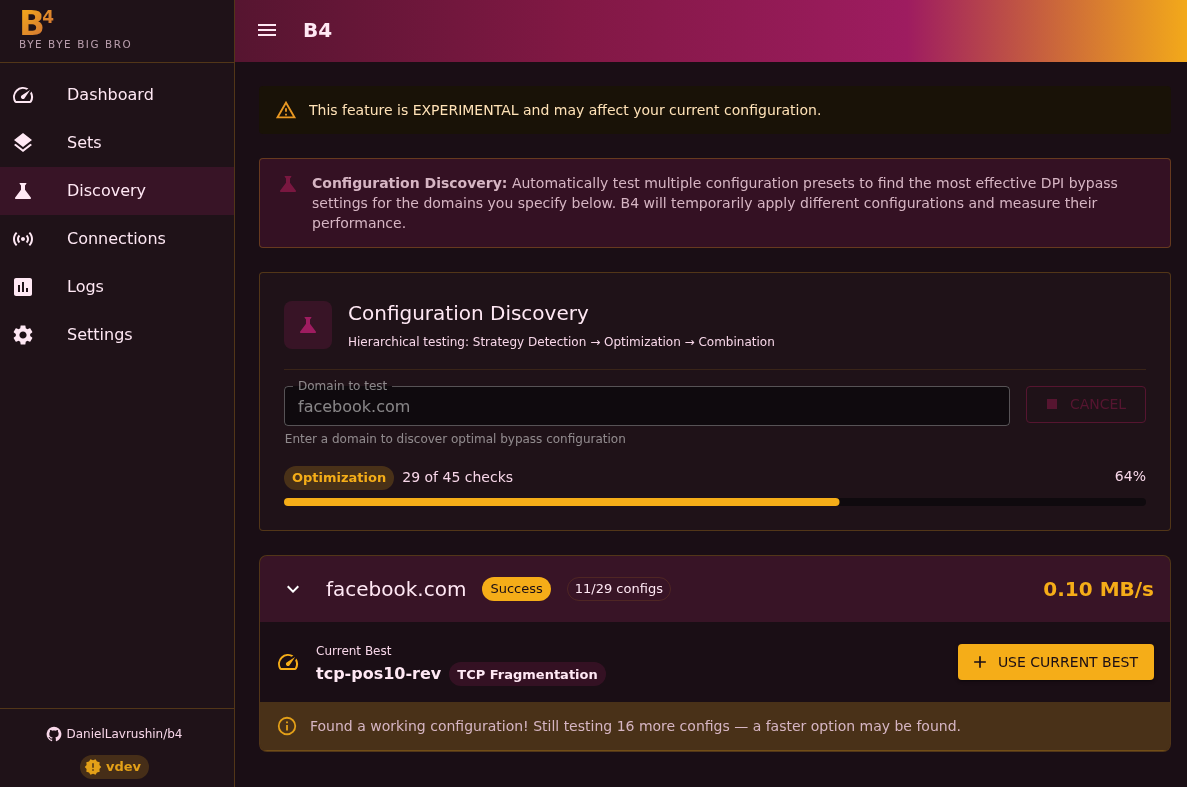
- 快速域名测试和特定域名绕过策略发现
- 用于 ASN 扫描的 ipinfo.io API 集成
- 自定义 payload 捕获以进行伪造
## HTTPS / TLS 支持
您可以在 Web UI 的 **Settings > Network Configuration > Web Server**(TLS Certificate / TLS Key 字段)下为 Web 界面启用 HTTPS,或者在 config JSON 中设置 `tls_cert` 和 `tls_key`:
```
{
"system": {
"web_server": {
"tls_cert": "/path/to/server.crt",
"tls_key": "/path/to/server.key"
}
}
}
```
安装程序会自动检测 **OpenWrt** (uhttpd) 和 **Asus Merlin** 上的路由器证书,如果找到,会在配置中启用 HTTPS。
## SOCKS5 代理
B4 包含一个内置的 SOCKS5 代理服务器。支持 SOCKS5 的应用程序(浏览器、curl、torrent 客户端等)无需任何系统级配置即可通过 B4 路由流量。
在 Web UI 的 **Settings > Network Configuration > SOCKS5 Server** 下启用它,或者在 config JSON 中配置:
```
{
"system": {
"socks5": {
"enabled": true,
"port": 1080,
"bind_address": "0.0.0.0",
"username": "",
"password": ""
}
}
}
```
将 `username` 和 `password` 留空表示无需认证。
**示例:**
```
# curl
curl --socks5 127.0.0.1:1080 https://example.com
# Firefox: 首选项 > 网络设置 > 手动代理
# SOCKS 主机: 127.0.0.1, 端口: 1080, SOCKS v5
# Git
git config --global http.proxy socks5://127.0.0.1:1080
```
## Geosite 集成
B4 支持来自不同来源的 [v2ray/xray `geosite.dat`](https://github.com/v2fly/domain-list-community) 文件:
```
# Loyalsoldier
wget https://github.com/Loyalsoldier/v2ray-rules-dat/releases/latest/download/geosite.dat
# RUNET Freedom
wget https://raw.githubusercontent.com/runetfreedom/russia-v2ray-rules-dat/release/geosite.dat
# Nidelon
wget https://github.com/Nidelon/ru-block-v2ray-rules/releases/latest/download/geosite.dat
```
将文件放在 `/etc/b4/geosite.dat` 并配置类别:
```
sudo b4 --geosite /etc/b4/geosite.dat --geosite-categories youtube,netflix,facebook
```
## 致谢
基于以下项目的研究:
- [youtubeUnblock](https://github.com/Waujito/youtubeUnblock) - 基于 C 的 DPI 绕过
- [GoodbyeDPI](https://github.com/ValdikSS/GoodbyeDPI) - Windows DPI 规避
- [zapret](https://github.com/bol-van/zapret) - 高级 DPI 绕过技术
- [dpi-detector](https://github.com/Runnin4ik/dpi-detector) - DPI/TSPU 检测技术
## 许可证
本项目仅供教育目的。用户需自行承担遵守适用法律法规的责任。
作者不对本软件的滥用承担责任。
## 系统要求
- Linux 系统(桌面、服务器或路由器)
- Root 权限 (sudo)
仅此而已。安装程序会处理其余部分。
## 安装
```
wget -O ~/b4install.sh https://raw.githubusercontent.com/DanielLavrushin/b4/main/install.sh && chmod +x ~/b4install.sh && ~/b4install.sh
```
如果出现问题,请尝试使用 `--sysinfo` 标志运行 - 这将诊断系统。
```
wget -O ~/b4install.sh https://raw.githubusercontent.com/DanielLavrushin/b4/main/install.sh && chmod +x ~/b4install.sh && ~/b4install.sh --sysinfo
```
或者传递 `--help` 以获取有关可能选项的更多信息。
```
wget -O ~/b4install.sh https://raw.githubusercontent.com/DanielLavrushin/b4/main/install.sh && chmod +x ~/b4install.sh && ~/b4install.sh --help
```
### 安装程序选项
```
# 安装最新 b4 版本
./b4install.sh
# 显示帮助信息
./b4install.sh -h
# 显示系统诊断和 b4 状态
./b4install.sh --sysinfo
# 安装特定版本
./b4install.sh v1.10.0
# 静默模式(抑制除错误外的输出)
./b4install.sh --quiet
# 指定 geosite.dat 源 URL 和目标
./b4install.sh --geosite-src=--geosite-src=https://example.com/geosite.dat --geosite-dst=/opt/etc/b4
# 更新 b4 到最新版本
./b4install.sh --update
# 卸载 b4
./b4install.sh --remove
```
### 从源代码构建
```
git clone https://github.com/daniellavrushin/b4.git
cd b4
# 构建 UI
cd src/http/ui
pnpm install && pnpm build
cd ../../..
# 构建二进制文件
make build
# 所有架构
make build-all
# 或构建特定架构
make linux-amd64
make linux-arm64
make linux-armv7
```
## Docker
### 快速开始
```
docker run --network host \
--cap-add NET_ADMIN --cap-add NET_RAW --cap-add SYS_MODULE \
-v /etc/b4:/etc/b4 \
lavrushin/b4:latest --config /opt/etc/b4/b4.json
```
Web UI: 标签:DPI绕过, EVTX分析, EVTX分析, EVTX分析, iptables, IP 地址批量处理, Linux工具, Netfilter Queue, Python, TCP SYN 扫描, Web UI, 代理工具, 抗审查, 数字权利, 无后门, 日志审计, 服务器工具, 流量混淆, 深度包检测规避, 端口探测, 网络安全, 网络审查, 网络层操纵, 网络流量伪装, 网络流量处理, 请求拦截, 路由器工具, 防火墙绕过, 隐私保护