nyudenkov/pysentry
GitHub: nyudenkov/pysentry
基于 Rust 的 Python 依赖漏洞扫描器,通过并发查询多个漏洞数据库检测项目依赖中的已知安全问题。
Stars: 247 | Forks: 8

# PySentry
**快速、可靠的 Python 依赖漏洞扫描工具。**
[](https://github.com/nyudenkov/pysentry/actions/workflows/ci.yml)
[](https://pypi.org/project/pysentry-rs/)
[](https://crates.io/crates/pysentry)
[](https://pepy.tech/projects/pysentry-rs)
[**文档**](https://docs.pysentry.com) · [**基准测试**](benchmarks/results/) · [帮助测试与改进](https://github.com/nyudenkov/pysentry/issues/12) · [使用调查](https://tally.so/r/mYNPNv)
PySentry 用于审计 Python 项目中已知的安全漏洞。它会读取你的 lock file 或 manifest,解析完整的依赖树,并针对三个漏洞数据库检查每一个包——然后报告哪些内容受到影响、严重程度如何,以及可以修复该问题的升级方案。
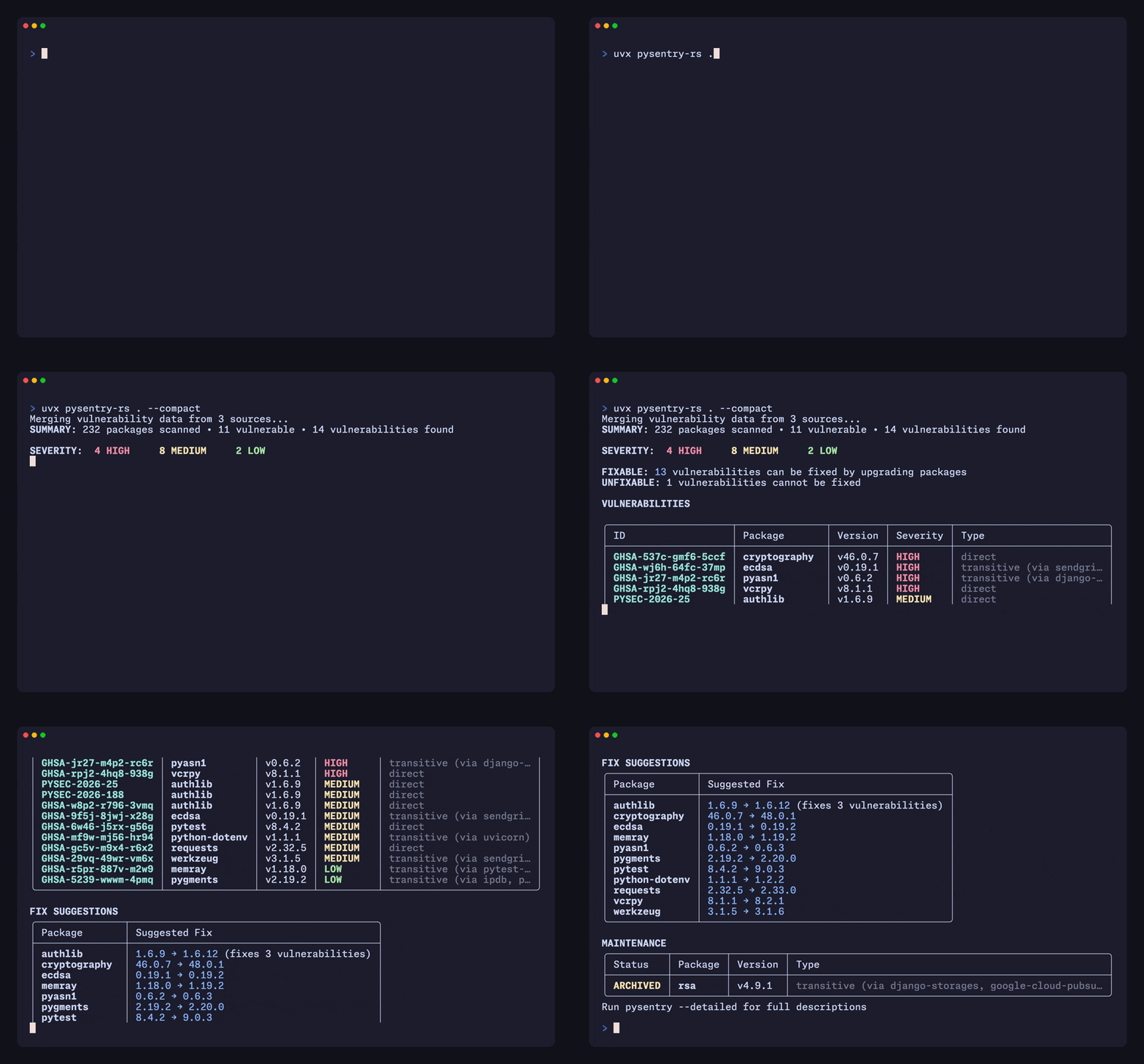
## 功能
- **支持各种依赖格式** — `uv.lock`, `poetry.lock`, `Pipfile.lock`, `pylock.toml`, `pyproject.toml`, `Pipfile`, `requirements.txt`, 以及 PEP 723 内联脚本元数据。同时存在 lock file 时会优先使用。
- **三大数据库,一份报告** — PyPA Advisory Database、PyPI JSON API 和 OSV.dev,并发查询并对结果进行合并和去重。
- **基于依赖树的扫描结果** — 区分直接依赖和间接依赖,并指出引入漏洞包的顶层包。
- **PEP 792 生命周期检查** — 标记已归档、已弃用和已隔离的包;`--forbid-quarantined` 可以将已知恶意软件转变为构建失败。
- **专为 CI 打造** — 支持人类可读格式、JSON、SARIF 和 Markdown 输出;`--fail-on` 可设置退出阈值,且不会隐藏较低严重级别的发现。
- **快速** — 采用 Rust 核心,支持异步获取和本地缓存。请参阅[基准测试](benchmarks/results/)。
## 使用方
PySentry 运行在 [Genkit](https://github.com/genkit-ai/genkit) (Google)、[OVD-Info](https://ovd.info/en)、[activist.org](https://activist.org) 和 [To Be Precise](https://tochno.st) 等项目的 CI 流水线中。
## 安装
```
# 免安装运行(推荐)
uvx pysentry-rs
# 或永久安装
pip install pysentry-rs # PyPI
cargo install pysentry # crates.io
```
预构建的二进制文件附在 [GitHub Releases](https://github.com/nyudenkov/pysentry/releases) 中。有关所有选项,请参阅[安装指南](https://docs.pysentry.com/getting-started/installation)。
## 快速开始
```
# 扫描当前目录
pysentry-rs
# 扫描其他项目
pysentry-rs /path/to/project
# 仅报告 high 和 critical 发现
pysentry-rs --severity high
# 仅为 critical 发现返回非零退出码
pysentry-rs --fail-on critical
# 为 GitHub code scanning 生成 SARIF 报告
pysentry-rs --format sarif --output results.sarif
# 拒绝被隔离(恶意)的包
pysentry-rs --forbid-quarantined
```
更多示例请参阅[快速入门指南](https://docs.pysentry.com/getting-started/quickstart)。
## Pre-commit
```
repos:
- repo: https://github.com/pysentry/pysentry-pre-commit
rev: v0.4.7
hooks:
- id: pysentry
# args: ['--compact'] # terser output for hook runs
```
## 配置
项目默认配置位于 `.pysentry.toml` 或 `pyproject.toml` 中;CLI 标志始终具有最高优先级:
```
version = 1
[defaults]
severity = "medium"
fail_on = "high"
[sources]
enabled = ["pypa", "osv"]
[ignore]
ids = ["CVE-2023-12345"]
```
所有选项均在[配置指南](https://docs.pysentry.com/configuration/config-files)中详细说明。
## 文档
完整文档位于 [docs.pysentry.com](https://docs.pysentry.com):
[安装](https://docs.pysentry.com/getting-started/installation) ·
[快速入门](https://docs.pysentry.com/getting-started/quickstart) ·
[CLI 选项](https://docs.pysentry.com/configuration/cli-options) ·
[配置文件](https://docs.pysentry.com/configuration/config-files) ·
[环境变量](https://docs.pysentry.com/configuration/environment-variables) ·
[故障排除](https://docs.pysentry.com/troubleshooting)
## 环境要求
- **Python** 3.9–3.14(适用于 PyPI 包)
- **Rust** 1.79+(仅用于 `cargo install` 或从源码构建)
- **`uv`**(推荐)或 **`pip-tools`**(用于扫描没有 lock file 的 manifest,如 `requirements.txt`、`pyproject.toml`、`Pipfile`)—— 审计 lock file 不需要任何外部工具
## 反馈
欢迎在[问题追踪器](https://github.com/nyudenkov/pysentry/issues)中提交 Bug 报告和功能请求;花几分钟填写[使用调查](https://tally.so/r/mYNPNv)将帮助我们规划未来的发展路线。其他事项请联系 nikita@pysentry.com。
如果 PySentry 节省了你的时间,可以考虑在 [GitHub 上赞助](https://github.com/sponsors/nyudenkov)或[请我喝杯咖啡](https://buymeacoffee.com/nyudenkov)。
## 致谢
灵感来源于 [pip-audit](https://github.com/pypa/pip-audit) 和 [uv #9189](https://github.com/astral-sh/uv/issues/9189)。漏洞数据由 [PyPA](https://github.com/pypa/advisory-database)、[PyPI](https://pypi.org/) 和 [OSV.dev](https://osv.dev/) 提供。
## 许可证
[MIT](LICENSE)
标签:Google AI, Python, Rust, 可视化界面, 无后门, 网络流量审计, 软件成分分析(SCA), 逆向工具, 通知系统