jamwithai/production-agentic-rag-course

GitHub: jamwithai/production-agentic-rag-course

一套完整的 7 周实战课程,指导从零构建具备混合检索、智能体编排及生产监控能力的 arXiv 论文问答系统。

Stars: 3254 | Forks: 878

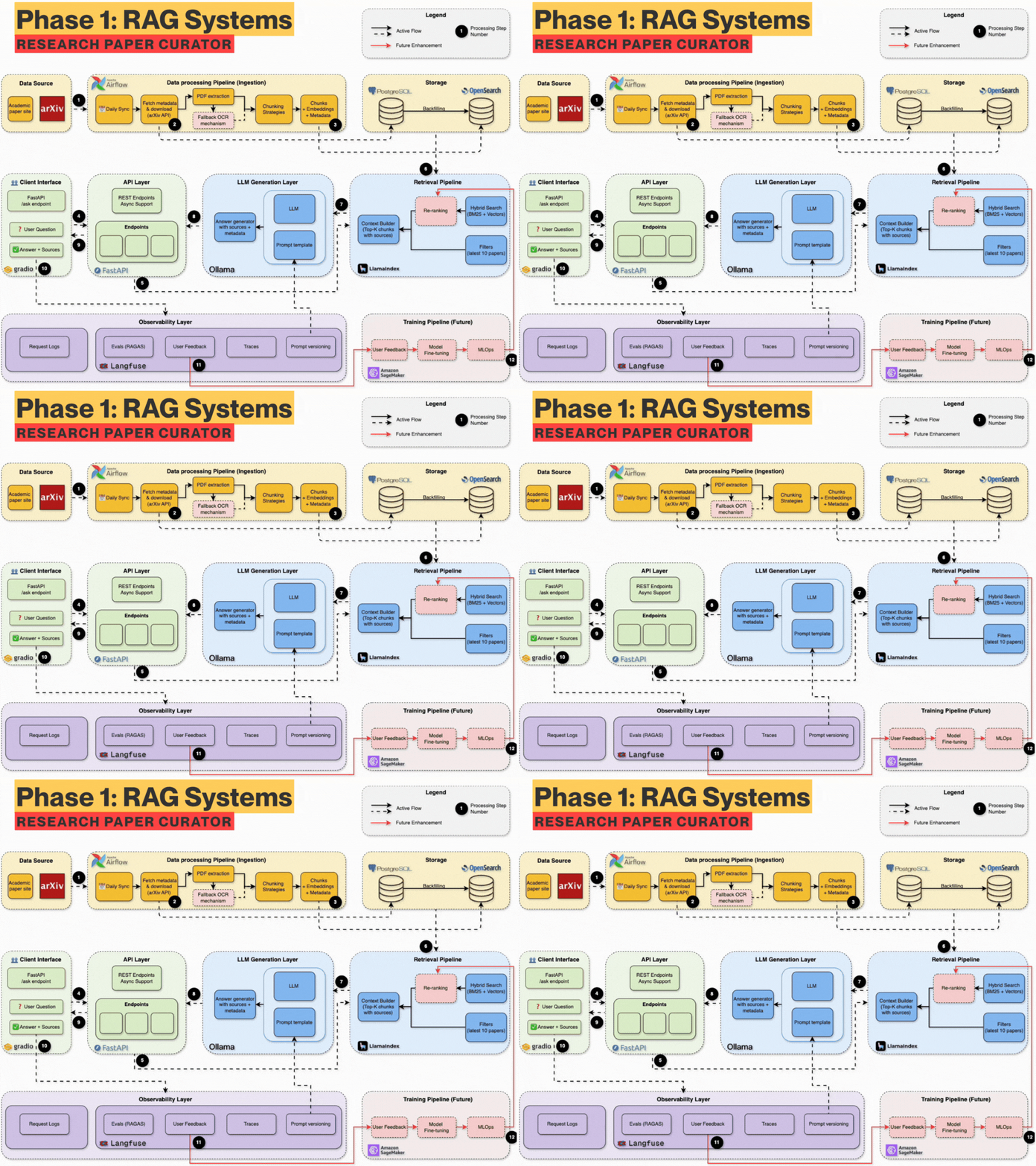
# AI 之母项目 ## 第一阶段 RAG 系统:arXiv 论文管理器

以学习者为中心的实战生产级 RAG 系统之旅

通过动手实践,从零开始学习构建现代 AI 系统

掌握市场需求最大的 AI 工程技能:RAG (检索增强生成)

Python Version FastAPI OpenSearch Docker Status


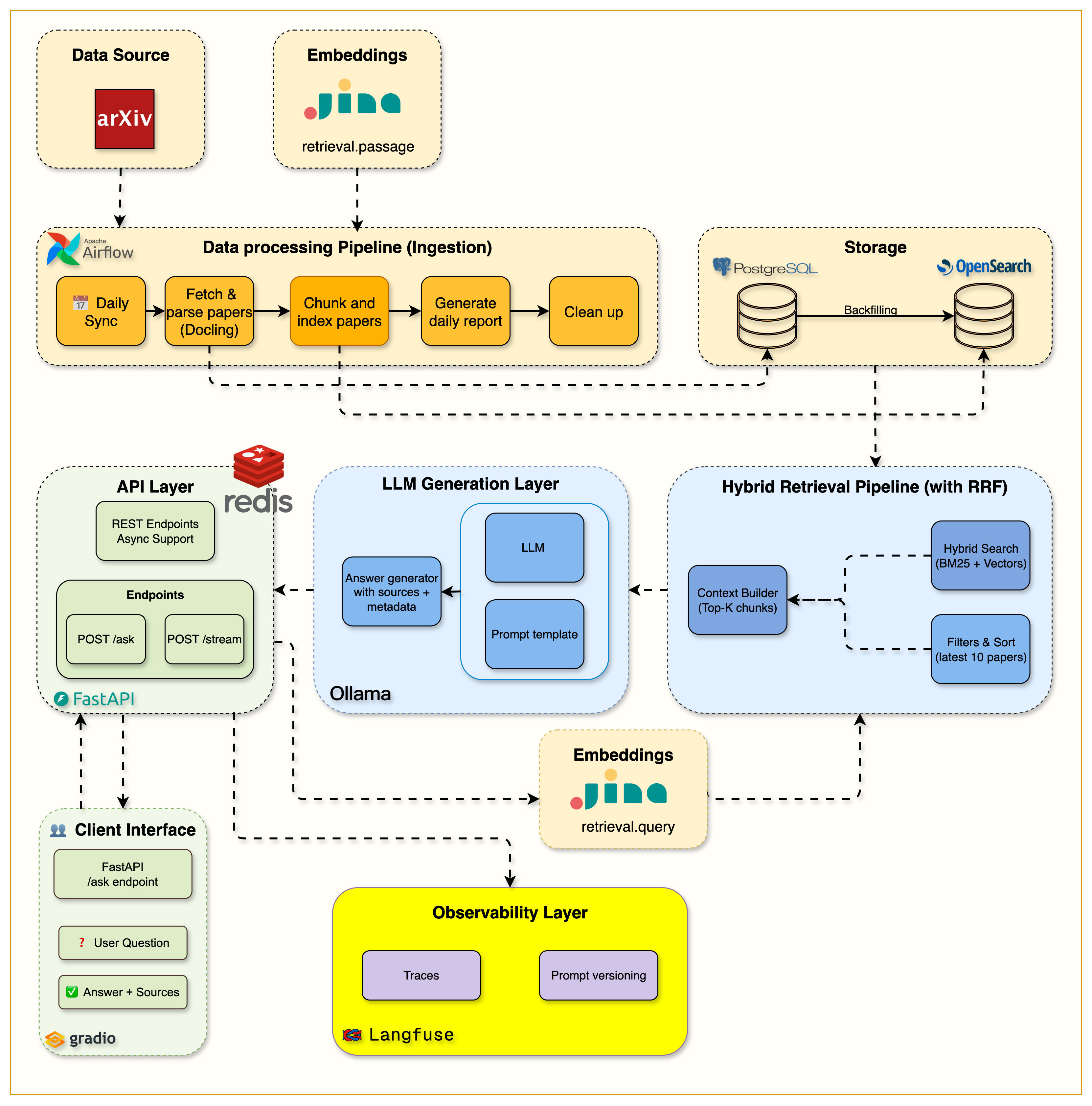
RAG Architecture

## 📖 关于本课程 这是一个**以学习者为中心的项目**,你将构建一个完整的研究助手系统,该系统能够自动获取学术论文、理解其内容,并使用先进的 RAG 技术回答你的研究问题。 **arXiv 论文管理器** 将教你如何使用**行业最佳实践构建生产级 RAG 系统**。与那些直接跳到向量搜索的教程不同,我们遵循**专业路径**:首先掌握关键词搜索的基础,然后通过向量增强以实现混合检索。 在本课程结束时,你将拥有自己的 AI 研究助手,以及为任何领域构建生产级 RAG 系统的深厚技术技能。 ### **🎓 你将构建什么** - **第 1 周:** 包含 Docker、FastAPI、PostgreSQL、OpenSearch 和 Airflow 的完整基础设施 - **第 2 周:** 自动化数据管道,用于从 arXiv 获取和解析学术论文 - **第 3 周:** 具有过滤和相关性评分的生产级 BM25 关键词搜索 - **第 4 周:** 智能分块 + 结合关键词与语义理解的混合搜索 - **第 5 周:** 包含本地 LLM、流式响应和 Gradio 界面的完整 RAG 管道 - **第 6 周:** 使用 Langfuse 追踪和 Redis 缓存进行生产监控以优化性能 - **第 7 周:** **使用 LangGraph 的 Agentic RAG 和用于移动访问的 Telegram Bot** ## 🏗️ 系统架构演进 ### 第 7 周:Agentic RAG 与 Telegram Bot 集成
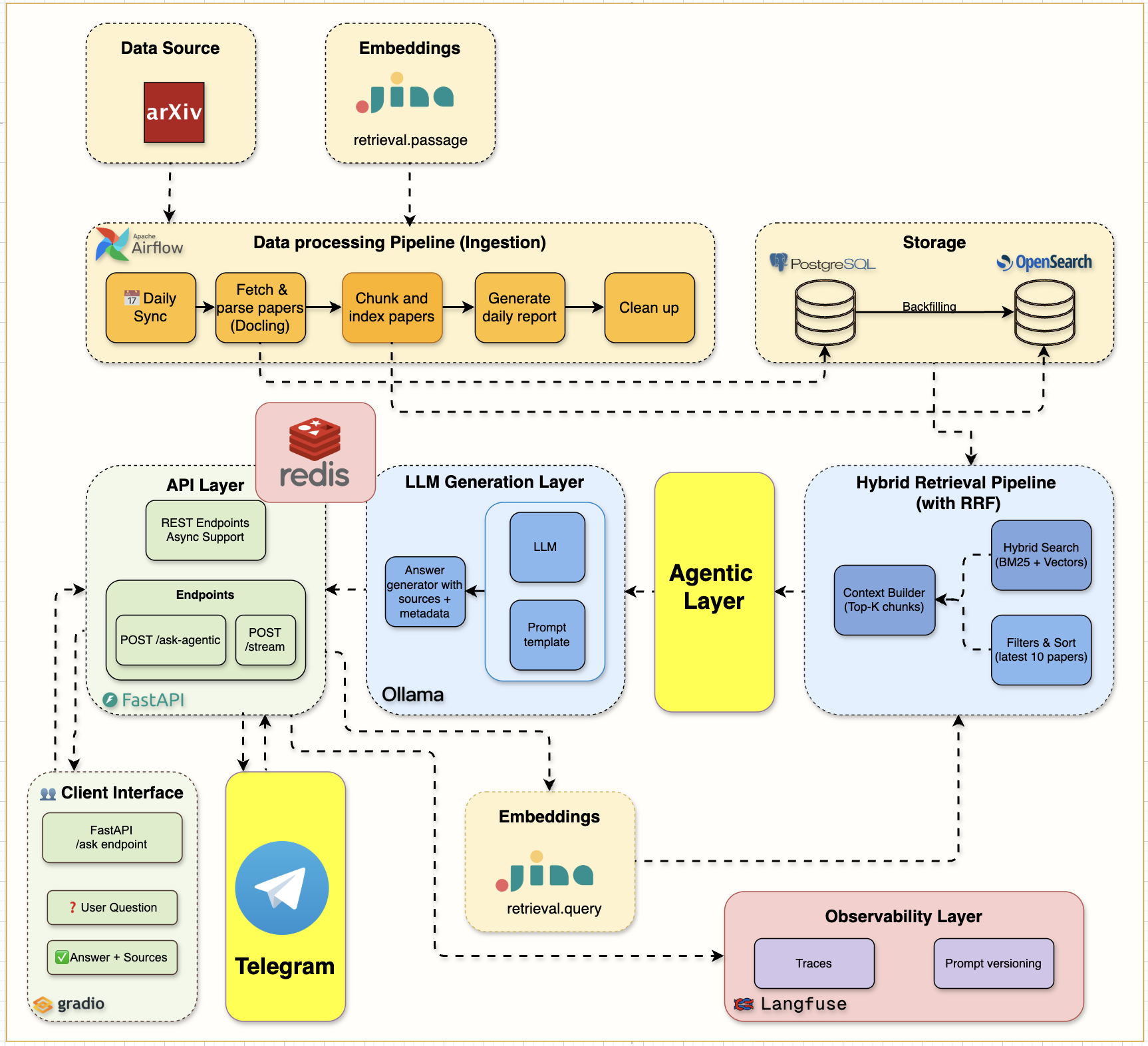
Week 7 Telegram and Agentic AI Architecture

Complete Week 7 architecture showing Telegram bot integration with the agentic RAG system

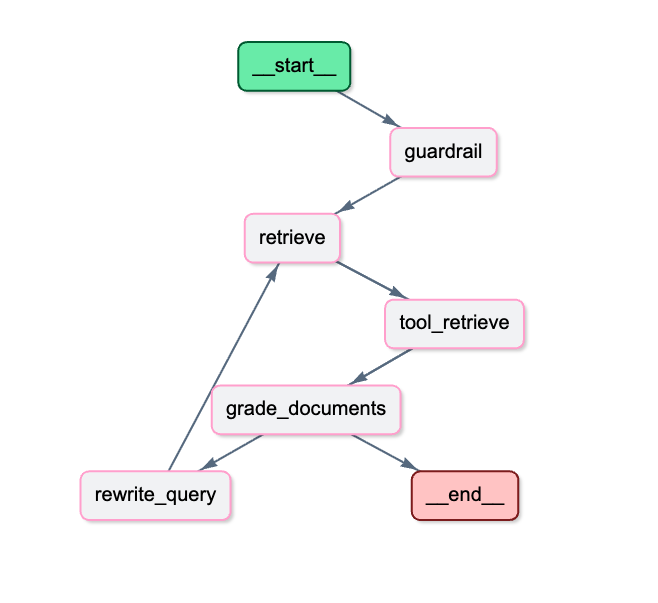
### LangGraph Agentic RAG 工作流
LangGraph Agentic RAG Flow

Detailed LangGraph workflow showing decision nodes, document grading, and adaptive retrieval
**第 7 周代码演示 + 博客:** [Agentic RAG with LangGraph and Telegram](https://jamwithai.substack.com/p/agentic-rag-with-langgraph-and-telegram) **第 7 周的关键创新:** - **智能决策制定**:Agent 评估并调整检索策略 - **文档分级**:通过语义评估进行自动相关性评估 - **查询重写**:当结果不足时进行自适应查询优化 - **护栏机制**:域外检测防止幻觉 - **移动访问**:在任何设备上通过 Telegram bot 进行对话式 AI - **透明度**:完整的推理步骤跟踪,用于调试和信任 ## 🚀 快速开始 ### **📋 前置条件** - **Docker Desktop** (包含 Docker Compose) - **Python 3.12+** - **UV 包管理器** ([安装指南](https://docs.astral.sh/uv/getting-started/installation/)) - **8GB+ 内存** 和 **20GB+ 可用磁盘空间** ### **⚡ 开始使用** ``` # 克隆与设置 git clone cd arxiv-paper-curator # 配置环境 (重要!) cp .env.example .env # .env 文件包含 OpenSearch、 # arXiv API 和服务连接的所有必要配置。默认设置即可直接使用。 # 你需要添加 Jina embeddings 免费 api key 和 langfuse keys (查看博客) # 安装依赖 uv sync # 启动所有服务 docker compose up --build -d # 验证一切正常 curl http://localhost:8000/health ``` ### **📚 每周学习路径** | 周次 | 主题 | 博客文章 | 代码发布 | |------|-------|-----------|--------------| | **第 0 周** | AI 之母项目 - 6 个阶段 | [The Mother of AI project](https://jamwithai.substack.com/p/the-mother-of-ai-project) | - | | **第 1 周** | 基础设施基础 | [The Infrastructure That Powers RAG Systems](https://jamwithai.substack.com/p/the-infrastructure-that-powers-rag) | [week1.0](https://github.com/jamwithai/arxiv-paper-curator/releases/tag/week1.0) | | **第 2 周** | 数据摄取管道 | [Building Data Ingestion Pipelines for RAG](https://jamwithai.substack.com/p/bringing-your-rag-system-to-life) | [week2.0](https://github.com/jamwithai/arxiv-paper-curator/releases/tag/week2.0) | | **第 3 周** | OpenSearch 摄取 & BM25 检索 | [The Search Foundation Every RAG System Needs](https://jamwithai.substack.com/p/the-search-foundation-every-rag-system) | [week3.0](https://github.com/jamwithai/arxiv-paper-curator/releases/tag/week3.0) | | **第 4 周** | **分块 & 混合搜索** | [The Chunking Strategy That Makes Hybrid Search Work](https://jamwithai.substack.com/p/chunking-strategies-and-hybrid-rag) | [week4.0](https://github.com/jamwithai/arxiv-paper-curator/releases/tag/week4.0) | | **第 5 周** | **完整 RAG 系统** | [The Complete RAG System](https://jamwithai.substack.com/p/the-complete-rag-system) | [week5.0](https://github.com/jamwithai/arxiv-paper-curator/releases/tag/week5.0) | | **第 6 周** | **生产监控 & 缓存** | [Production-ready RAG: Monitoring & Caching](https://jamwithai.substack.com/p/production-ready-rag-monitoring-and) | [week6.0](https://github.com/jamwithai/arxiv-paper-curator/releases/tag/week6.0) | | **第 7 周** | **Agentic RAG & Telegram Bot** | [Agentic RAG with LangGraph and Telegram](https://jamwithai.substack.com/p/agentic-rag-with-langgraph-and-telegram) | [week7.0](https://github.com/jamwithai/arxiv-paper-curator/releases/tag/week7.0) | **📥 克隆特定周次的发布版本:** ``` # 克隆特定周的代码 git clone --branch https://github.com/jamwithai/arxiv-paper-curator cd arxiv-paper-curator uv sync docker compose down -v docker compose up --build -d # 将 替换为: week1.0, week2.0 等。 ``` ### **📊 访问你的服务** | 服务 | URL | 用途 | |---------|-----|---------| | **API 文档** | http://localhost:8000/docs | 交互式 API 测试 | | **Gradio RAG 界面** | http://localhost:7861 | 用户友好的聊天界面 | | **Langfuse 仪表板** | http://localhost:3000 | RAG 管道监控 & 追踪 | | **Airflow 仪表板** | http://localhost:8080 | 工作流管理 | | **OpenSearch Dashboards** | http://localhost:5601 | 混合搜索引擎 UI | #### **注意**:请查看 airflow/simple_auth_manager_passwords.json.generated 获取 Airflow 的用户名和密码 ## 📚 第 1 周:基础设施基础 ✅ **从这里开始!** 掌握支撑现代 RAG 系统的基础设施。 ### **🎯 学习目标** - 使用 Docker Compose 完成基础设施设置 - FastAPI 开发,包含自动文档和健康检查 - PostgreSQL 数据库配置和管理 - OpenSearch 混合搜索引擎设置 - Ollama 本地 LLM 服务配置 - 服务编排和健康监控 - 使用代码质量工具的专业开发环境 ### **🏗️ 架构概览**

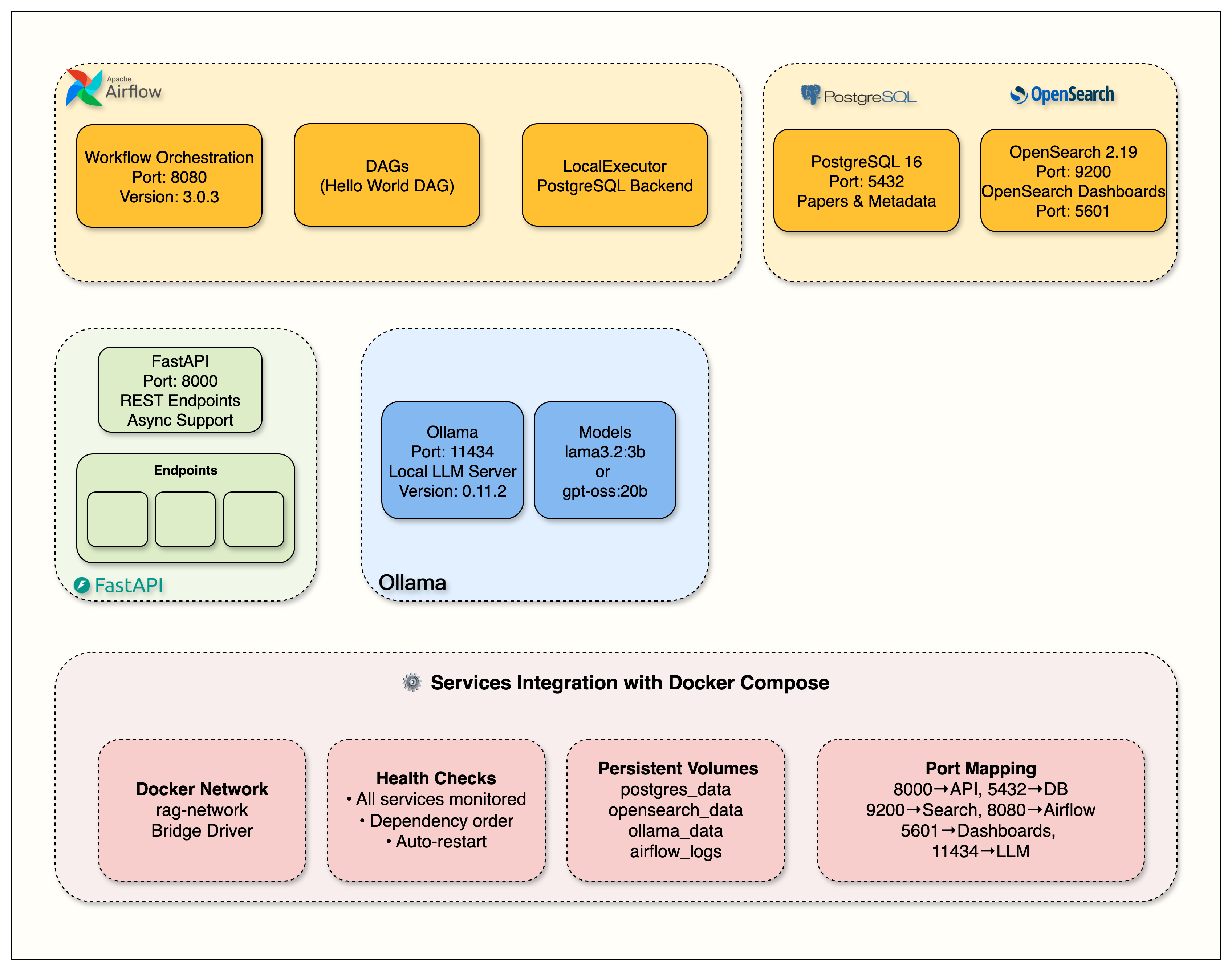
Week 1 Infrastructure Setup

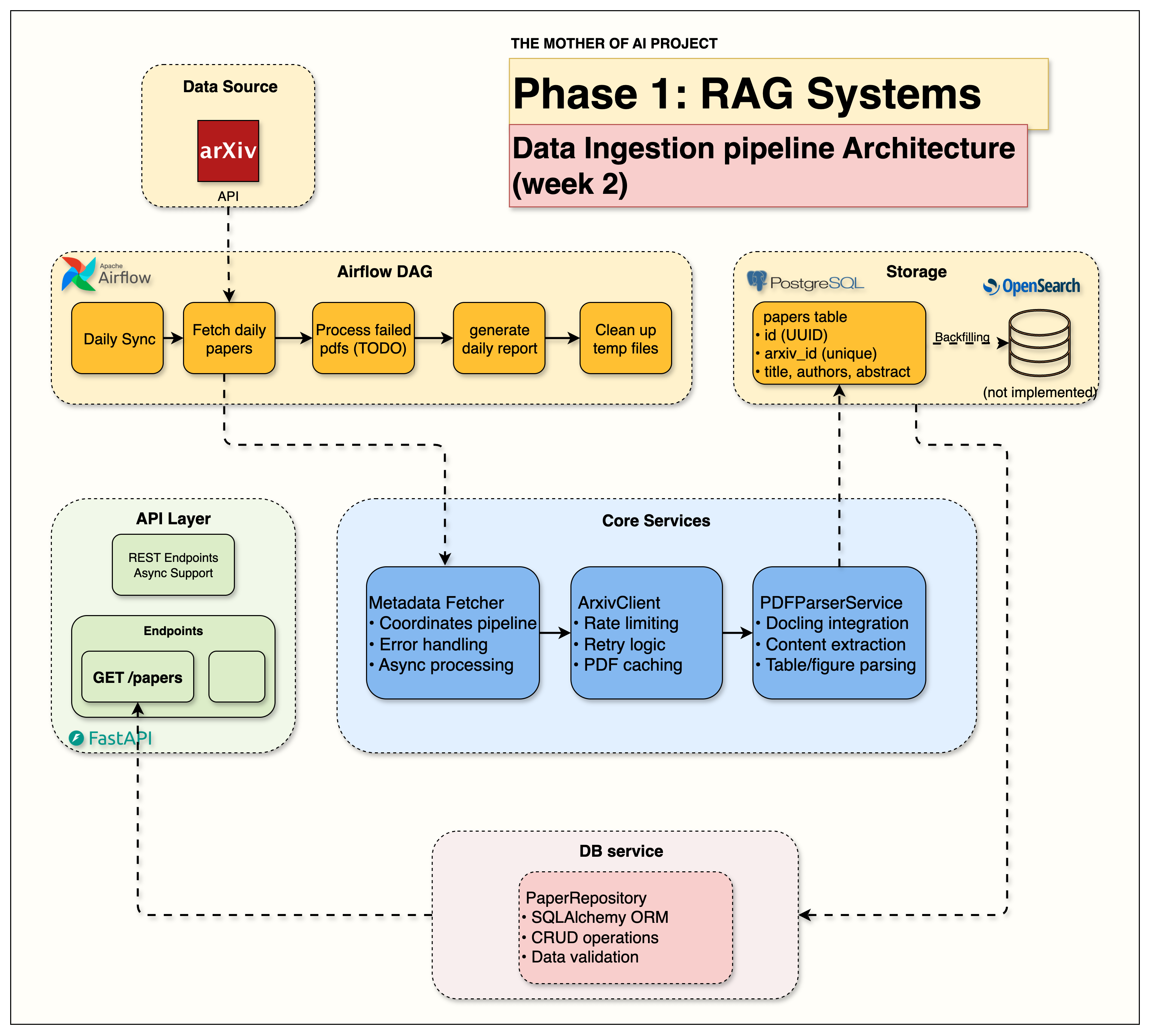
**基础设施组件:** - **FastAPI**:支持异步的 REST 端点 (端口 8000) - **PostgreSQL 16**:论文元数据存储 (端口 5432) - **OpenSearch 2.19**:带仪表板的搜索引擎 (端口 9200, 5601) - **Apache Airflow 3.0**:工作流编排 (端口 8080) - **Ollama**:本地 LLM 服务器 (端口 11434) ### **📓 设置指南** ``` # 启动 Week 1 notebook uv run jupyter notebook notebooks/week1/week1_setup.ipynb ``` **完成指南:** 按照 [第 1 周笔记本](notebooks/week1/week1_setup.ipynb) 进行动手设置和验证步骤。 ### **📖 深入探究** **博客文章:** [The Infrastructure That Powers RAG Systems](https://jamwithai.substack.com/p/the-infrastructure-that-powers-rag) - 详细演示和生产见解 ## 📚 第 2 周:数据摄取管道 ✅ **基于第 1 周的基础设施:** 学习自动获取、处理和存储学术论文。 ### **🎯 学习目标** - 带速率限制和重试逻辑的 arXiv API 集成 - 使用 Docling 进行科学 PDF 解析 - 使用 Apache Airflow 的自动化数据摄取管道 - 元数据提取和存储工作流 - 从 API 到数据库的完整论文处理流程 ### **🏗️ 架构概览**

Week 2 Data Ingestion Architecture

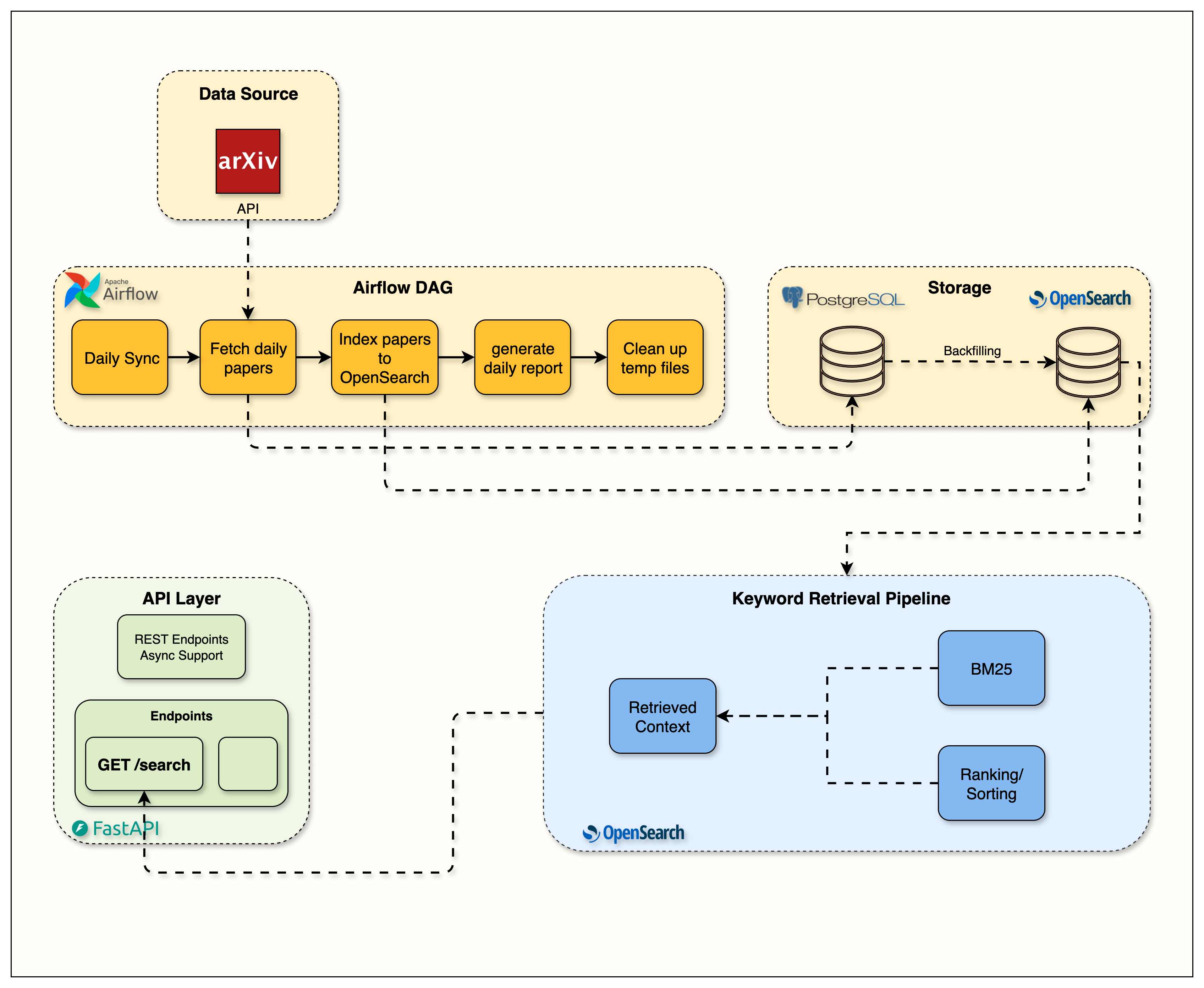
**数据管道组件:** - **MetadataFetcher**:🎯 协调整个管道的主要编排器 - **ArxivClient**:带重试逻辑的限速论文获取 - **PDFParserService**:Docling 驱动的科学文档处理 - **Airflow DAGs**:自动化每日论文摄取工作流 - **PostgreSQL Storage**:结构化论文元数据和内容 ### **📓 实现指南** ``` # 启动 Week 2 notebook uv run jupyter notebook notebooks/week2/week2_arxiv_integration.ipynb ``` **完成指南:** 按照 [第 2 周笔记本](notebooks/week2/week2_arxiv_integration.ipynb) 进行动手实现和验证步骤。 ### **📖 深入探究** **博客文章:** [Building Data Ingestion Pipelines for RAG](https://jamwithai.substack.com/p/bringing-your-rag-system-to-life) - arXiv API 集成和 PDF 处理 ## 📚 第 3 周:关键词搜索优先 - 关键基础 **基于第 1-2 周的基础:** 实现专业 RAG 系统所依赖的关键词搜索基础。 ### **🎯 学习目标** - 为什么关键词搜索对 RAG 系统至关重要(基础优先方法) - OpenSearch 索引管理、映射和搜索优化 - BM25 算法及其背后的有效关键词搜索数学原理 - 用于构建带过滤器和提升的复杂搜索查询的 Query DSL - 用于衡量相关性和性能的搜索分析 - 真实公司使用的生产模式 ### **🏗️ 架构概览**

Week 3 OpenSearch Flow Architecture

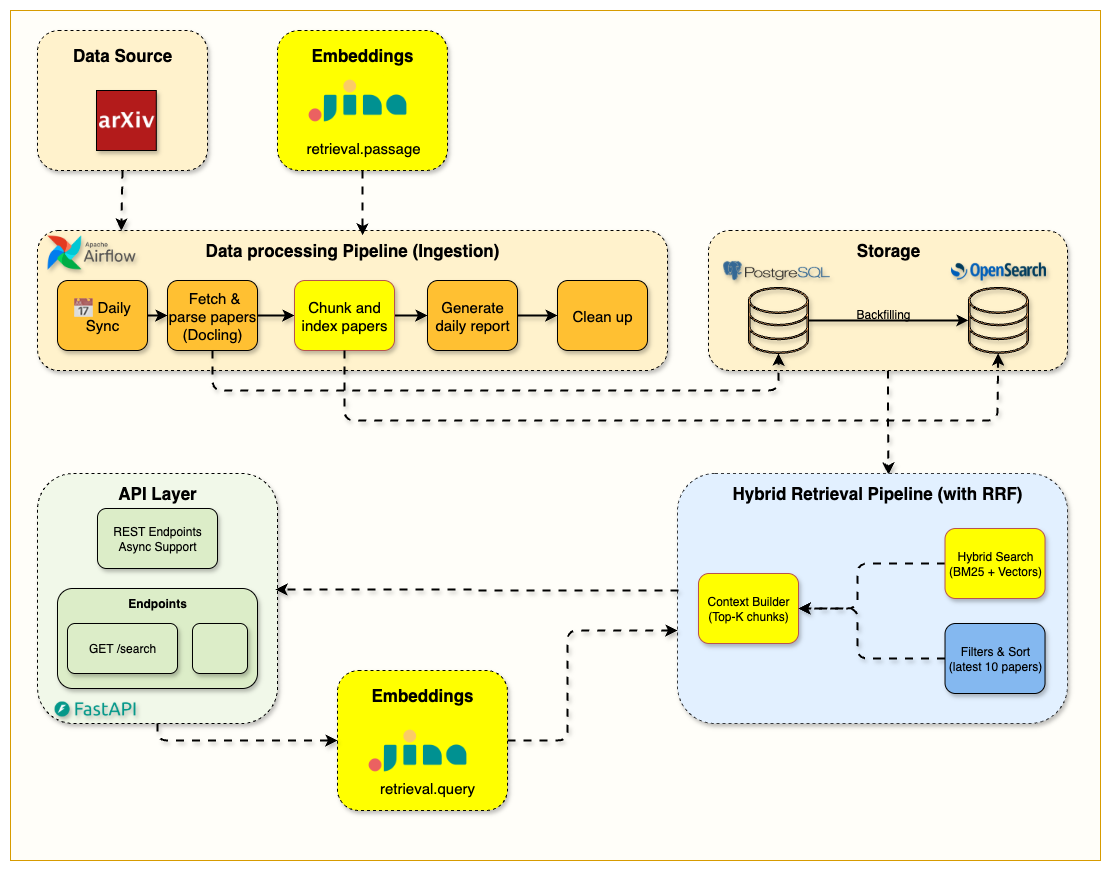
**搜索基础设施组件:** - **OpenSearch Service**:`src/services/opensearch/` - 专业搜索服务实现 - **Search API**:`src/routers/search.py` - 带 BM25 评分的搜索 API 端点 - **学习材料**:`notebooks/week3/` - 完整的 OpenSearch 集成指南 - **质量指标**:精确度、召回率和相关性评分 ### **📓 设置指南** ``` # 启动 Week 3 notebook uv run jupyter notebook notebooks/week3/week3_opensearch.ipynb ``` **完成指南:** 按照 [第 3 周笔记本](notebooks/week3/week3_opensearch.ipynb) 进行动手 OpenSearch 设置和 BM25 搜索实现。 ### **📖 深入探究** **博客文章:** [The Search Foundation Every RAG System Needs](https://jamwithai.substack.com/p/the-search-foundation-every-rag-system) - 使用 OpenSearch 的完整 BM25 实现 ## 📚 第 4 周:分块与混合搜索 - 语义层 **基于第 3 周的基础:** 添加使搜索真正智能的语义层。 ### **🎯 学习目标** - 基于章节的分块与智能文档分割 - 使用 Jina AI 集成和回退策略的生产级嵌入 - 使用 RRF 融合进行关键词 + 语义检索的混合搜索精通 - 统一 API 设计,单一端点支持多种搜索模式 - 搜索方法之间的性能分析和权衡 ### **🏗️ 架构概览**

Week 4 Hybrid Search Architecture

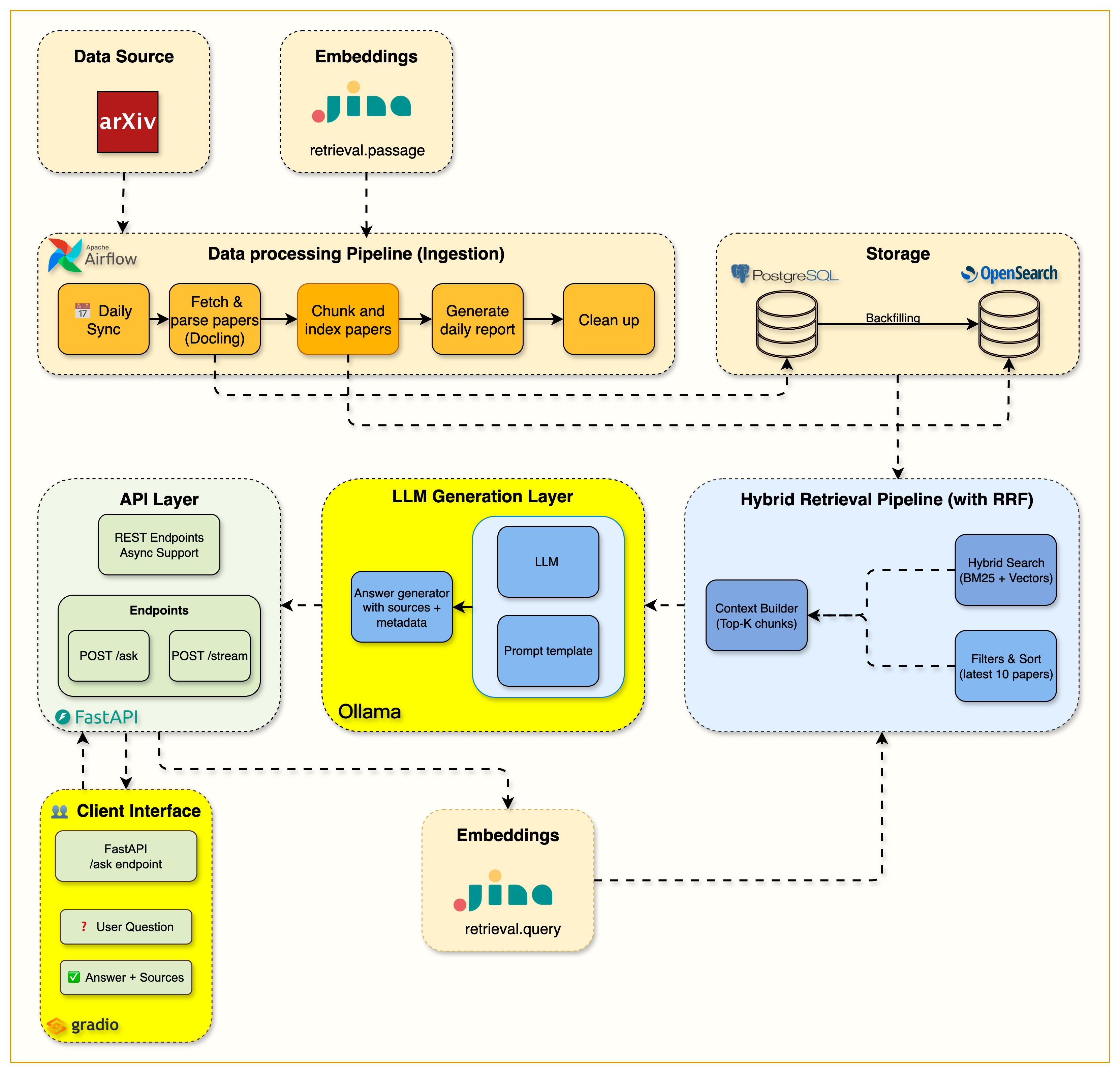
**混合搜索基础设施组件:** - **Text Chunker**:`src/services/indexing/text_chunker.py` - 带重叠策略的章节感知分块 - **Embeddings Service**:`src/services/embeddings/` - 使用 Jina AI 的生产级嵌入管道 - **Hybrid Search API**:`src/routers/hybrid_search.py` - 支持所有模式的统一搜索 API - **学习材料**:`notebooks/week4/` - 完整的混合搜索实现指南 ### **📓 设置指南** ``` # 启动 Week 4 notebook uv run jupyter notebook notebooks/week4/week4_hybrid_search.ipynb ``` **完成指南:** 按照 [第 4 周笔记本](notebooks/week4/week4_hybrid_search.ipynb) 进行动手实现和验证步骤。 ### **📖 深入探究** **博客文章:** [The Chunking Strategy That Makes Hybrid Search Work](https://jamwithai.substack.com/p/chunking-strategies-and-hybrid-rag) - 生产级分块和 RRF 融合实现 ## 📚 第 5 周:集成 LLM 的完整 RAG 管道 **基于第 4 周的混合搜索:** 添加将搜索转化为智能对话的 LLM 层。 ### **🎯 学习目标** - 使用 Ollama 的本地 LLM 集成,确保完全的数据隐私 - 性能优化,提示词减少 80%(6 倍速度提升) - 使用 Server-Sent Events 进行实时响应的流式实现 - 双 API 设计,包含标准和流式端点 - 带高级参数控制的交互式 Gradio 界面 ### **🏗️ 架构概览**

Week 5 Complete RAG System Architecture

**完整 RAG 基础设施组件:** - **RAG Endpoints**:`src/routers/ask.py` - 双端点 (`/api/v1/ask` + `/api/v1/stream`) - **Ollama Service**:`src/services/ollama/` - 带优化提示词的 LLM 客户端 - **System Prompt**:`src/services/ollama/prompts/rag_system.txt` - 针对学术论文优化 - **Gradio Interface**:`src/gradio_app.py` - 支持流式的交互式 Web UI - **Launcher Script**:`gradio_launcher.py` - 简易启动脚本(运行在端口 7861) ### **📓 设置指南** ``` # 启动 Week 5 notebook uv run jupyter notebook notebooks/week5/week5_complete_rag_system.ipynb # 启动 Gradio 界面 uv run python gradio_launcher.py # 打开 http://localhost:7861 ``` **完成指南:** 按照 [第 5 周笔记本](notebooks/week5/week5_complete_rag_system.ipynb) 进行动手 LLM 集成和 RAG 管道实现。 ### **📖 深入探究** **博客文章:** [The Complete RAG System](https://jamwithai.substack.com/p/the-complete-rag-system) - 包含本地 LLM 集成和优化技术的完整 RAG 系统 ## 📚 第 6 周:生产监控与缓存 **基于第 5 周的完整 RAG 系统:** 添加可观测性、性能优化和生产级监控### **🎯 学习目标** - 用于端到端 RAG 管道追踪的 Langfuse 集成 - 具备智能缓存键和 TTL 管理的 Redis 缓存策略 - 用于延迟和成本的实时仪表板性能监控 - 可观测性和优化的生产模式 - 成本分析和 LLM 使用优化(缓存带来 150-400 倍加速) ### **🏗️ 架构概览**

Week 6 Monitoring & Caching Architecture

**生产基础设施组件:** - **Langfuse Service**:`src/services/langfuse/` - 完整的追踪集成与 RAG 特定指标 - **Cache Service**:`src/services/cache/` - 带精确匹配缓存和优雅降级的 Redis 客户端 - **Updated Endpoints**:`src/routers/ask.py` - 集成追踪和缓存中间件 - **Docker Config**:`docker-compose.yml` - 添加 Redis 服务和 Langfuse 本地实例 - **学习材料**:`notebooks/week6/` - 完整的监控和缓存实现指南 ### **📓 设置指南** ``` # 启动 Week 6 notebook uv run jupyter notebook notebooks/week6/week6_cache_testing.ipynb ``` **完成指南:** 按照 [第 6 周笔记本](notebooks/week6/week6_cache_testing.ipynb) 进行动手 Langfuse 追踪和 Redis 缓存实现。 ### **📖 深入探究** **博客文章:** [Production-ready RAG: Monitoring & Caching](https://jamwithai.substack.com/p/production-ready-rag-monitoring-and) - 具备监控和缓存功能的生产级 RAG ## 📚 第 7 周:使用 LangGraph 的 Agentic RAG 和 Telegram Bot **基于第 6 周的生产系统:** 添加智能推理、多步决策制定以及 Telegram bot 集成,实现移动优先的 AI 交互。 ### **🎯 学习目标** - 用于基于状态的 Agent 编排的 LangGraph 工作流(含决策节点) - 用于查询验证和领域边界检测的 Guardrail 实现 - 带语义相关性评估的文档分级 - 用于自动查询优化和更好检索的查询重写 - 具有多轮尝试检索和智能回退的自适应检索 - 带异步操作和错误处理的 Telegram bot 集成 - 通过暴露 Agent 决策过程实现推理透明化 ### **🏗️ 架构概览**

Week 7 Agentic RAG & Telegram Architecture

**Agentic RAG 基础设施组件:** - **Agent Nodes**:`src/services/agents/nodes/` - Guardrail、retrieve、grade、rewrite 和 generate 节点 - **Workflow Orchestration**:`src/services/agents/agentic_rag.py` - LangGraph 工作流协调 - **Telegram Bot**:`src/services/telegram/` - 命令处理程序和消息处理 - **Agentic Endpoint**:`src/routers/agentic_ask.py` - Agentic RAG API 端点 - **学习材料**:`notebooks/week7/` - 第 7 周学习材料和示例 ### **📓 设置指南** ``` # 启动 Week 7 notebook uv run jupyter notebook notebooks/week7/week7_agentic_rag.ipynb ``` **完成指南:** 按照 [第 7 周笔记本](notebooks/week7/week7_agentic_rag.ipynb) 进行动手 LangGraph Agentic RAG 和 Telegram bot 实现。 ### **📖 深入探究** **博客文章:** [Agentic RAG with LangGraph and Telegram](https://jamwithai.substack.com/p/agentic-rag-with-langgraph-and-telegram) - 构建具备决策能力、自适应检索和移动访问的智能 Agent ## ⚙️ 配置 **设置:** ``` cp .env.example .env # 根据你的环境编辑 .env ``` **关键变量:** - `JINA_API_KEY` - 第 4 周及以后必需(用于带嵌入的混合搜索) - `TELEGRAM__BOT_TOKEN` - 第 7 周必需(Telegram bot 集成) - `LANGFUSE__PUBLIC_KEY` & `LANGFUSE__SECRET_KEY` - 第 6 周可选(监控) **完整配置:** 请参阅 [.env.example](.env.example) 获取所有可用选项和详细文档。 ## 🔧 参考与开发指南 ### **🛠️ 技术栈** | 服务 | 用途 | 状态 | |---------|---------|--------| | **FastAPI** | 带自动文档的 REST API | ✅ 就绪 | | **PostgreSQL 16** | 论文元数据和内容存储 | ✅ 就绪 | | **OpenSearch 2.19** | 混合搜索引擎 (BM25 + Vector) | ✅ 就绪 | | **Apache Airflow 3.0** | 工作流自动化 | ✅ 就绪 | | **Jina AI** | 嵌入生成 (第 4 周) | ✅ 就绪 | | **Ollama** | 本地 LLM 服务 (第 5 周) | ✅ 就绪 | | **Redis** | 高性能缓存 (第 6 周) | ✅ 就绪 | | **Langfuse** | RAG 管道可观测性 (第 6 周) | ✅ 就绪 | **开发工具:** UV, Ruff, MyPy, Pytest, Docker Compose ### **🏗️ 项目结构** ``` arxiv-paper-curator/ ├── src/ # Main application code │ ├── routers/ # API endpoints (search, ask, papers) │ ├── services/ # Business logic (opensearch, ollama, agents, cache) │ ├── models/ # Database models (SQLAlchemy) │ ├── schemas/ # Pydantic validation schemas │ └── config.py # Environment configuration ├── notebooks/ # Weekly learning materials (week1-7) ├── airflow/ # Workflow orchestration (DAGs) ├── tests/ # Test suite └── compose.yml # Docker service orchestration ``` ### **📡 API 端点参考** | 端点 | 方法 | 描述 | 周次 | |----------|--------|-------------|------| | `/health` | GET | 服务健康检查 | 第 1 周 | | `/api/v1/papers` | GET | 列出存储的论文 | 第 2 周 | | `/api/v1/papers/{id}` | GET | 获取特定论文 | 第 2 周 | | `/api/v1/search` | POST | BM25 关键词搜索 | 第 3 周 | | `/api/v1/hybrid-search/` | POST | 混合搜索 (BM25 + Vector) | **第 4 周** | **API 文档:** 访问 http://localhost:8000/docs 获取交互式 API 浏览器 ### **🔧 基本命令** #### **使用 Makefile**(推荐) ``` # 查看所有可用命令 make help # 快速工作流 make start # Start all services make health # Check all services health make test # Run tests make stop # Stop services ``` #### **所有可用命令** | 命令 | 描述 | |---------|-------------| | `make start` | 启动所有服务 | | `make stop` | 停止所有服务 | | `make restart` | 重启所有服务 | | `make status` | 显示服务状态 | | `make logs` | 显示服务日志 | | `make health` | 检查所有服务健康状况 | | `make setup` | 安装 Python 依赖 | | `make format` | 格式化代码 | | `make lint` | Lint 和类型检查 | | `make test` | 运行测试 | | `make test-cov` | 运行测试并生成覆盖率报告 | | `make clean` | 清理所有内容 | #### **直接命令**(替代方案) ``` # 如果你更喜欢直接使用命令 docker compose up --build -d # Start services docker compose ps # Check status docker compose logs # View logs uv run pytest # Run tests ``` ### **🎓 目标受众** | 谁 | 为什么 | |-----|-----| | **AI/ML 工程师** | 学习教程之外的生产级 RAG 架构 | | **软件工程师** | 使用最佳实践构建端到端 AI 应用 | | **数据科学家** | 使用现代工具实现生产级 AI 系统 | ## 🛠️ 故障排除 **常见问题:** - **服务无法启动?** 等待 2-3 分钟,检查 `docker compose logs` - **端口冲突?** 停止使用端口 8000, 8080, 5432, 9200 的其他服务 - **内存问题?** 增加 Docker Desktop 的内存分配 **获取帮助:** - 查看第 1 周笔记本中全面的故障排除部分 - 查看服务日志:`docker compose logs [service-name]` - 完全重置:`docker compose down --volumes && docker compose up --build -d` ## 💰 成本结构 **本课程完全免费!** 你只需要为可选服务支付极少费用: - **本地开发:** $0(所有内容都在本地运行) - **可选云 API:** 约 $2-5 用于外部 LLM 服务(如果选择使用)

🎉 准备好开始你的 AI 工程之旅了吗?

从第 1 周的设置笔记本开始,构建你的第一个生产级 RAG 系统!

献给希望掌握现代 AI 工程的学习者

Shirin Khosravi Jam & Shantanu Ladhwe 用心构建

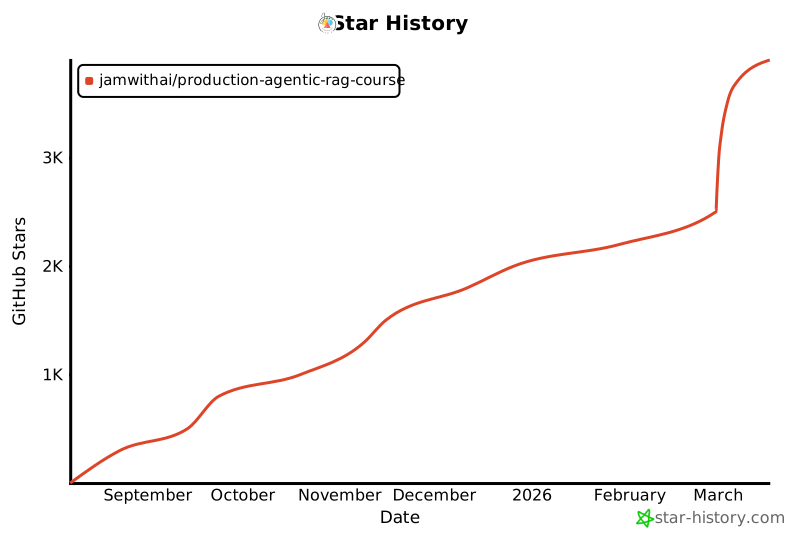
## Star History [![Star History Chart](https://api.star-history.com/svg?repos=jamwithai/production-agentic-rag-course&type=Date)](https://star-history.com/#jamwithai/production-agentic-rag-course&Date) ## 📄 许可证 MIT License - 详情请参阅 [LICENSE](LICENSE) 文件。
标签:AI, Airflow, AI风险缓解, Apex, arXiv, AV绕过, BM25, DLL 劫持, DNS解析, Docker, FastAPI, LLM, NLP, PostgreSQL, Python, RAG, Ruby, TruffleHog, Unmanaged PE, 人工智能, 向量搜索, 大语言模型, 学术论文, 安全防御评估, 开源项目, 搜索引擎查询, 数据管道, 无后门, 机器学习, 检索增强生成, 测试用例, 深度学习, 混合检索, 生产环境, 用户模式Hook绕过, 知识库, 科研助手, 系统架构, 编程教程, 自动化代码审查, 语义检索, 请求拦截, 软件工程, 逆向工具