msalihberk/ShadowLab
GitHub: msalihberk/ShadowLab
一款用于网络安全研究和对手模拟的模块化 Python C2 框架,提供加密通信与可扩展的后渗透模块系统。
Stars: 13 | Forks: 5
# ShadowLab




## ⚠️ 重要免责声明
**本项目仅供教育和授权的安全研究目的使用。**
本软件旨在帮助网络安全专业人员、研究人员和学生了解:
- 客户端-服务器架构和网络协议
- 加密和安全通信
- 系统级编程概念
- 红队操作和对手模拟
**使用限制:**
- 仅限在您拥有或获得明确书面授权测试的系统上使用
- 未经授权访问计算机系统是非法的,可能会受到刑事起诉
- 对于因滥用此工具造成的任何误用或损害,作者不承担任何责任
使用本项目即表示您同意负责任且符合道德规范地使用它。
## 📋 概述
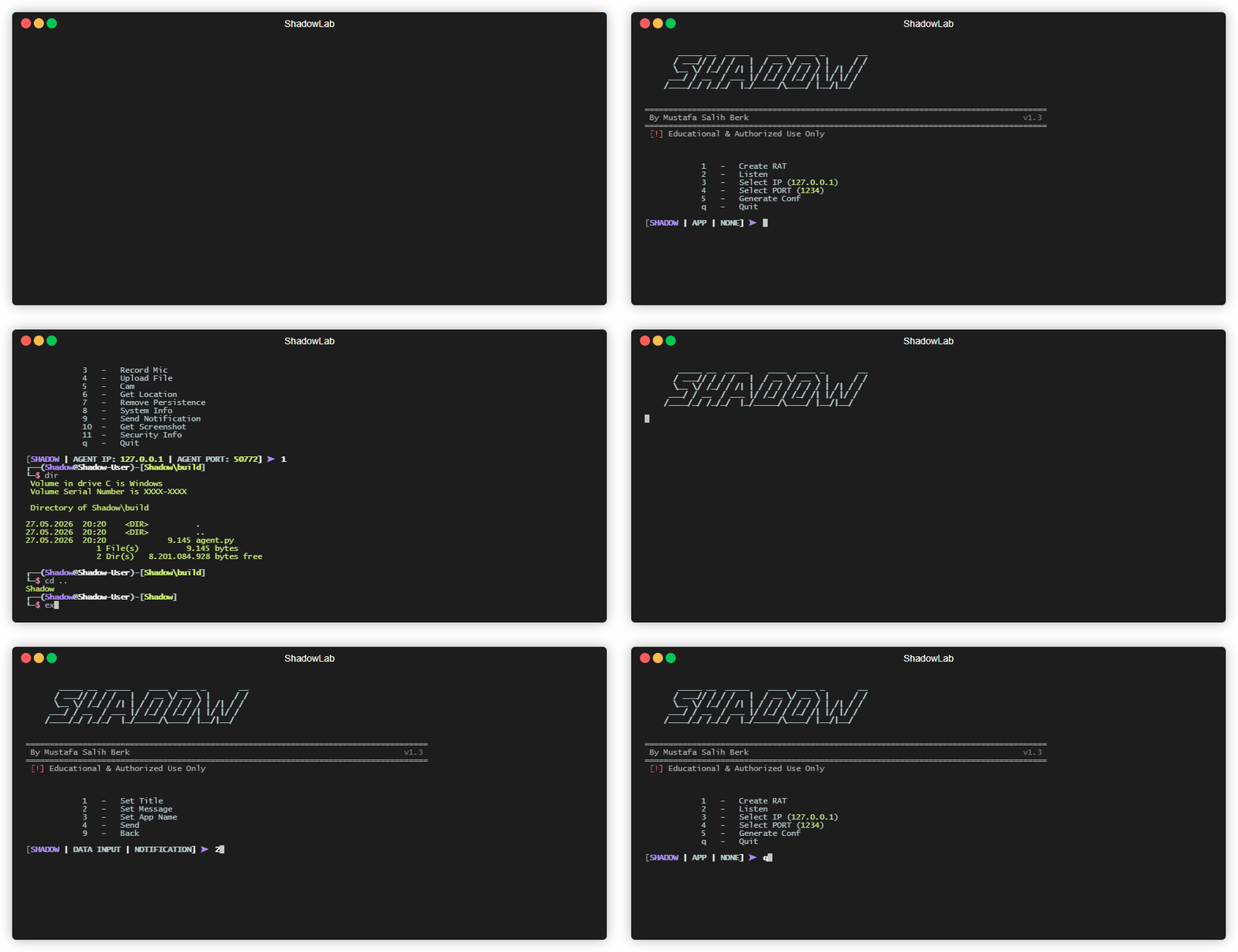
ShadowLab 是一个模块化的命令与控制(C2)框架,专为网络安全研究、红队实验室演练和防御者教育而构建。它在一个专注的 Python 项目中集成了加密传输、Staged 和 Unstaged payload 生成、主机侦察、远程交互以及全新且可扩展的 Post-Exploit 层。
### 🔥 新功能:Post-Exploit 模块系统
ShadowLab 现在包含一个专用的 **Post-Exploit** 工作流,用于在建立初始连接后扩展现有的活动会话。
| 功能 | 增加内容 |
|------------|--------------|
| **动态模块发现** | 放置在 `modules/` 下的模块可通过它们各自的 `config.json` 文件被发现 |
| **基于模板的 Payload** | 诸如监听器 IP、端口和内部密钥等模块占位符可在运行时填充 |
| **Agent 端注册** | Post-Exploit 模块可通过加密会话进行 Staged、注册和启动 |
| **控制器支持** | 模块可以暴露其自身专用的服务端控制器,用于交互式工作流 |
| **内置示例** | 内置一个可配置的 `KEYLOGGER` 模块模板和控制器 |
ShadowLab 演示了远程管理工具的生命周期,重点关注:
- **Socket 编程:** 使用长度前缀数据包进行低级别 TCP 通信。
- **密码学:** 使用 Fernet (AES-128) 对称算法进行端到端加密。
- **Payload 架构:** 实现 Staged(dropper)和 Unstaged(全功能)两种投递方法。
- **Post-Exploit 模块:** 运行时模块 staging、模板替换、注册以及基于控制器的执行。
- **Windows 集成:** 通过 WMI、Registry 和 Subprocess 模块与操作系统进行交互。
本项目非常适合:
- 学习 C2 基础设施的网络安全学生
- 研究攻击方法论的安全研究人员
- 练习对手模拟的红队专业人员
- 了解威胁以构建更好防御的防御者
## 🗺️ 教育实验室路线图与工程演进
## 🚀 功能
| 功能 | 描述 |
|---------|-------------|
| **反向连接** | 客户端发起的 TCP 架构,用于绕过防火墙 |
| **交互式 Shell** | 通过加密通道实时执行远程命令 |
| **加密 C2 通道** | 使用 Fernet 对称密钥的端到端 AES-128 加密 |
| **音频监控** | 远程麦克风捕获和窃取 |
| **视觉捕获** | 远程获取摄像头快照 (OpenCV) |
| **文件部署** | 将文件和工具从服务器安全地上传至 agent |
| **地理位置查询** | 通过 ipinfo.io 进行基于 IP 的地理映射 |
| **持久化逻辑** | 基于 Windows Registry 的启动机制以实现长久驻留 |
| **远程 UI 交互** | 通过 plyer 向目标传递 toast 通知 |
| **屏幕捕获** | 获取高质量桌面截图 (Pillow) |
| **模块化部署** | 同时支持 Staged (dropper) 和 Unstaged (独立) payload |
| **WMI 安全审计** | 通过 WMI 检测活动的 Antivirus 和防火墙产品 |
| **主机侦察** | 全面的硬件、OS 和网络元数据收集 |
| 🔥 **新功能:Post-Exploit 模块** | 动态模块发现、基于模板的 staging、加密的 agent 注册以及基于控制器的 payload 扩展 |
## 📁 项目结构
```
ShadowLab/
├── Shadow.py # Main C2 Server Application
├── requirements.txt # Python Package Dependencies
├── LICENSE # Project License File
├── SECURITY.md # Security Policy
├── FAQS.md # Frequently Asked Questions
├── CONTRIBUTING.md # Contribution Guidelines
├── README.md # Project Documentation
├── assets/ # Media & Resources
├── confs/ # Configuration Files
│ └── conf.json # Encryption Keys & Server Settings
├── mainclass/ # Core Server Modules
│ ├── builder.py # Agent/Payload Builder
│ ├── comm.py # Network Communication Handler
│ ├── encrypter.py # Encryption & Decryption Utilities
│ ├── pyi_progress.py # PyInstaller Integration & Progress Display
│ ├── options.py # Command-Line Options & Menus
│ ├── shell.py # Remote Command Handlers
│ ├── system.py # System Utilities & Display
├── modules/ # Post-Exploit module templates and controllers
│ └── Keylogger/
│ ├── controller.py # Controller interface for remote keylogger modules
│ ├── config.json # Keylogger module metadata and settings
│ ├── template.json # Template placeholders for module generation
│ └── keylogger.py # Keylogger payload template
├── payloads/ # Agent/Implant Code
│ ├── payload.py # Unstaged Payload (Full-Featured)
│ └── payload_staged.py # Staged Payload (Lightweight)
├── photos/ # Screenshot & Image Storage Directory
├── records/ # Audio Recording and Post Exploit Log Storage Directory
└── build/ # PyInstaller Build Output Directory
```
## 📦 安装
### 1. 克隆仓库
```
git clone https://github.com/msalihberk/ShadowLab.git
cd ShadowLab
```
### 2. 安装依赖
选择最适合您环境的安装方法:
**标准安装**
适用于对包管理不受限制的环境:
```
pip install -r requirements.txt
```
**虚拟环境安装**
适用于严格管理或需要隔离的环境,以避免包冲突:
```
python3 -m venv venv && source venv/bin/activate && pip install -r requirements.txt
```
## 💻 用法
### 第一步:启动 C2 Server
```
python Shadow.py
```
### 第二步:生成 Auth Code
运行服务端并选择 **选项 5 (生成配置)**。这将初始化 `confs/conf.json` 文件,创建安全 agent-server 握手所需的唯一 **Fernet 密钥** 和 **Auth Code**。
### 第三步:配置连接
- 选择选项 `3` 设置您的 IP 地址
- 选择选项 `4` 设置监听端口
### 第四步:构建 Agent
- 选择选项 `1` 构建 agent
- 选择格式(Python 或 EXE)
- 可选择绑定到另一个应用程序
- 选择 Staged 或 UnStaged 模式
### 第五步:启动监听器
- 选择选项 `2` 开始监听
- 等待传入的 agent 连接
### 第六步:管理会话
连接成功后,请使用以下命令:
| 命令 | 操作 |
|---------|--------|
| `1` | 远程 Shell |
| `2` | 创建持久化 |
| `3` | 录制麦克风 |
| `4` | 上传文件 |
| `5` | 摄像头快照 |
| `6` | 获取位置 |
| `7` | 移除持久化 |
| `8` | 系统信息 |
| `9` | 发送通知 |
| `10` | 获取屏幕截图 |
| `11` | 安全信息 |
| `12` | 🔥 管理 Post Exploit |
| `q` | 退出 |
### 🔥 第七步:启动 Post-Exploit 模块
全新的 Post-Exploit 管理器将 `modules/` 变为活动会话的扩展点。
1. 从已连接的 agent 菜单中选择命令 `12`
2. 选择一个已发现的模块,例如 `KEYLOGGER`
3. 在出现提示时填写运行时模板值
4. 通过加密的 C2 通道注册并启动模块
5. 当交互式输出可用时,打开模块控制器
当前包含的模块:
| 模块 | 描述 | 控制器 |
|--------|-------------|------------|
| `KEYLOGGER` | 可配置的 Post-Exploit 键盘记录器模块模板 | 是 |
## 🔧 要求
- **Python 3.13.x**
- colorama
- cryptography
- pyinstaller
- opencv-python
- requests
- sounddevice
- wavio
- pillow
- pynput
- simplejson
- pyfiglet
- wmi
- plyer
## 🔒 [安全策略](SECURITY.md)
查看我们严格的安全协议、道德使用边界,以及我们用于**负责任披露**的内部流程。了解如何通过 GitHub 的安全基础设施安全地报告发现的任何框架漏洞,而无需将遥测数据公开暴露。
## ❓ [常见问题](FAQS.md)
作为涵盖框架结构机制的操作目录,它定义了整体式与多阶段式投递的架构范围,以及在研究实验室中处理 Antivirus/EDR 排除项的安全测试方法,并提供了关于我们 **AES-128** 传输层加密的技术细节。
## 🤝 [贡献指南](CONTRIBUTING.md)
想要改进此 C2 框架?请阅读我们的技术贡献指南,以了解我们的模块化架构标准、Python 3.13.x 开发环境规则、加密密钥规范,以及如何安全地提交 Pull Request 的说明。
## 📝 许可证
本项目仅供教育和研究目的使用。详情请 [许可证](LICENSE)。
📦 阶段 1:核心实验室架构与同步基础 🟢 [已完成]
- [x] **Fernet 加密 Pipeline:** 使用唯一的对称密钥进行端到端 AES-128 传输层加密,以教授传输中数据的安全规范。 - [x] **长度前缀 TCP 传输:** 构建利用结构化数据边界的底层 socket 通信,以演示并解决经典的 TCP 数据包分片(“边界”)问题。 - [x] **双模式 Payload 构建器:** 自动编译 Staged(轻量级 dropper)和 Unstaged(独立整体式)payload,以分析投递链机制。 - [x] **主机侦察:** 通过原生 WMI 结构进行深度 OS 集成,查询硬件元数据和活动的安全软件,以进行端点审计模拟。🔥 阶段 2:动态 Post-Exploit 子系统 🟢 [已完成]
- [x] **运行时模块发现:** 设计了一个自动化跟踪引擎,通过模块化的 config.json 清单动态发现独立的 Post-Exploit 插件,展示运行时的可扩展性。 - [x] **基于模板的内存中 Staging:** 实现了动态环境替换(C2 IP、端口、密钥)到 Staged payload 模板中,以教授安全自动化和混淆基础知识。 - [x] **基于控制器的会话扩展:** 添加了专用的服务端交互控制器支持(例如集成的 KEYLOGGER 模块),在活动的传输会话中映射专用的子通道。🏗️ 阶段 3:异步核心迁移 🟡 [进行中]
- [ ] **Asyncio 事件循环核心:** 将阻塞式核心循环迁移到完全非阻塞的异步架构(asyncio.StreamReader/Writer),以演示大规模并发 socket 扩展。🏗️ *进行中* - [ ] **隔离的按 Agent 作业队列:** 实现多路复用的异步队列结构,以对高性能网络中的后台任务调度和同步进行建模。⏳ *已规划* - [ ] **非阻塞文件 I/O Worker:** 将繁重的下载/上传磁盘操作卸载到后台线程执行器,以研究 Event Loop 线程保留和瓶颈预防。⏳ *已规划*💻 阶段 4:Token 化命令解析与 CLI 升级 🔵 [已规划]
- [ ] **高级参数路由:** 使用兼容 POSIX 的 shlex 和支持自定义运行时标志(例如 recordmic -t 5)的绑定应用程序的 argparse 控制器,将标准选择菜单替换为交互式命令行。⏳ *已规划* - [ ] **一对多异步广播:** 设计自动化分发模块,将特定的 payload 命令同时广播到整个已连接 implant 集群,对分布式系统架构进行建模。⏳ *已规划*🌐 阶段 5:交互式 Web UI 与 FastAPI 网关 🔵 [已规划]
- [ ] **异步 API 网关:** 通过强大的 FastAPI REST 后端公开内部会话和作业管理器指标,以演示全栈后端与底层网络引擎的集成。⏳ *已规划* - [ ] **WebSocket 实时流:** 开发实时通知引擎,无需轮询即可立即将来自 implant 的终端输出和执行遥测流式传输到 Web 仪表板,教授事件驱动协议。⏳ *已规划* - [ ] **控制仪表板:** 利用 Tailwind CSS 打造简洁、响应式的管理界面,以实现无障碍的实验室操作。⏳ *已规划*📊 阶段 6:操作遥测与教育性 AV/EDR 模拟器 🔵 [已规划]
- [ ] **可视化分析监视器:** 集成实时流图表(Chart.js / ApexCharts)以跟踪网络吞吐量(字节/秒)和协议分布,让学生直观了解网络 payload 遥测。⏳ *已规划* - [ ] **启发式 EDR/AV 威胁模拟器:** 构建一个模拟的行为防御面板,根据 agent 操作实时计算内部的“威胁级别分数”,从视觉上教导学生蓝队如何发现异常行为。⏳ *已规划*标签:C2框架, IP 地址批量处理, Python, 后渗透攻击, 安全学习资源, 无后门, 无线安全, 漏洞挖掘, 网络信息收集, 计算机取证, 逆向工具