abhigyanpatwari/GitNexus
GitHub: abhigyanpatwari/GitNexus
一款零服务器的代码智能引擎,将代码库索引为知识图谱并通过 MCP 为 AI 智能体提供深度代码感知能力。
Stars: 42202 | Forks: 4783
# GitNexus
⚠️ 重要提示:** GitNexus 没有**官方的加密货币、代币或硬币。在 Pump.fun 或任何其他平台上使用 GitNexus 名称的任何代币/硬币都**不隶属于、不由本项目或其维护者认可或创建**。请勿购买任何声称与 GitNexus 有关的加密货币。



 **为智能体上下文构建神经系统。**
将任何代码库索引到知识图谱中 —— 涵盖每个依赖项、调用链、集群和执行流 —— 然后通过智能工具将其暴露,让 AI 智能体不再遗漏代码。
https://github.com/user-attachments/assets/172685ba-8e54-4ea7-9ad1-e31a3398da72
**太长不看:** **Web UI** 是与任何仓库聊天的快捷方式。**CLI + MCP** 是让你的 AI 智能体真正可靠的方法 —— 它为 Cursor、Claude Code 和朋友们提供了代码库的深度架构视图,从而停止遗漏依赖项、破坏调用链以及盲目编辑。即使是较小的模型也能获得完整的架构清晰度,使其能够与大型模型竞争。
## 使用 GitNexus 的两种方式
| | **CLI + MCP** | **Web UI** |
| ----------------- | -------------------------------------------------------------- | ------------------------------------------------------------ |
| **是什么** | 本地索引仓库,通过 MCP 连接 AI 智能体 | 浏览器中的可视化图谱探索器 + AI 聊天 |
| **适用于** | 使用 Cursor、Claude Code、Windsurf、OpenCode 进行日常开发 | 快速探索、演示、一次性分析 |
| **规模** | 完整仓库,任意大小 | 受浏览器内存限制(约 5k 文件),或通过后端模式无限制 |
| **安装** | `npm install -g gitnexus` | 无需安装 —[gitnexus.vercel.app](https://gitnexus.vercel.app) |
| **存储** | KuzuDB 原生(快速、持久) | KuzuDB WASM(内存中、按会话) |
| **解析** | Tree-sitter 原生绑定 | Tree-sitter WASM |
| **隐私** | 一切均在本地,无网络 | 一切均在浏览器内,无服务器 |
## CLI + MCP(推荐)
CLI 索引你的仓库并运行 MCP 服务器,赋予 AI 智能体深度代码库感知能力。
### 快速开始
```
# 索引您的仓库(从仓库根目录运行)
npx gitnexus analyze
```
就是这样。这一步会索引代码库、安装智能体技能、注册 Claude Code 钩子,并创建 `AGENTS.md` / `CLAUDE.md` 上下文文件 —— 全在一个命令中完成。
要为你的编辑器配置 MCP,运行一次 `npx gitnexus setup` —— 或按照下面的说明手动设置。
### MCP 设置
`gitnexus setup` 自动检测你的编辑器并写入正确的全局 MCP 配置。你只需要运行一次。
### 编辑器支持
| 编辑器 | MCP | 技能 | 钩子 (自动增强) | 支持 |
| --------------------- | --- | ------ | -------------------- | -------------- |
| **Claude Code** | 是 | 是 | 是 (PreToolUse) | **完整** |
| **Cursor** | 是 | 是 | — | MCP + 技能 |
| **Windsurf** | 是 | — | — | MCP |
| **OpenCode** | 是 | 是 | — | MCP + 技能 |
### 社区集成
| 智能体 | 安装 | 来源 |
|-------|---------|--------|
| [pi](https://pi.dev) | `pi install npm:pi-gitnexus` | [pi-gitnexus](https://github.com/tintinweb/pi-gitnexus) |
如果你更喜欢手动配置:
**Claude Code**(完整支持 — MCP + 技能 + 钩子):
```
claude mcp add gitnexus -- npx -y gitnexus@latest mcp
```
**Cursor**(`~/.cursor/mcp.json` — 全局,适用于所有项目):
```
{
"mcpServers": {
"gitnexus": {
"command": "npx",
"args": ["-y", "gitnexus@latest", "mcp"]
}
}
}
```
**OpenCode**(`~/.config/opencode/config.json`):
```
{
"mcp": {
"gitnexus": {
"command": "npx",
"args": ["-y", "gitnexus@latest", "mcp"]
}
}
}
```
### CLI 命令
```
gitnexus setup # Configure MCP for your editors (one-time)
gitnexus analyze [path] # Index a repository (or update stale index)
gitnexus analyze --force # Force full re-index
gitnexus analyze --skip-embeddings # Skip embedding generation (faster)
gitnexus mcp # Start MCP server (stdio) — serves all indexed repos
gitnexus serve # Start local HTTP server (multi-repo) for web UI connection
gitnexus list # List all indexed repositories
gitnexus status # Show index status for current repo
gitnexus clean # Delete index for current repo
gitnexus clean --all --force # Delete all indexes
gitnexus wiki [path] # Generate repository wiki from knowledge graph
gitnexus wiki --model
**为智能体上下文构建神经系统。**
将任何代码库索引到知识图谱中 —— 涵盖每个依赖项、调用链、集群和执行流 —— 然后通过智能工具将其暴露,让 AI 智能体不再遗漏代码。
https://github.com/user-attachments/assets/172685ba-8e54-4ea7-9ad1-e31a3398da72
**太长不看:** **Web UI** 是与任何仓库聊天的快捷方式。**CLI + MCP** 是让你的 AI 智能体真正可靠的方法 —— 它为 Cursor、Claude Code 和朋友们提供了代码库的深度架构视图,从而停止遗漏依赖项、破坏调用链以及盲目编辑。即使是较小的模型也能获得完整的架构清晰度,使其能够与大型模型竞争。
## 使用 GitNexus 的两种方式
| | **CLI + MCP** | **Web UI** |
| ----------------- | -------------------------------------------------------------- | ------------------------------------------------------------ |
| **是什么** | 本地索引仓库,通过 MCP 连接 AI 智能体 | 浏览器中的可视化图谱探索器 + AI 聊天 |
| **适用于** | 使用 Cursor、Claude Code、Windsurf、OpenCode 进行日常开发 | 快速探索、演示、一次性分析 |
| **规模** | 完整仓库,任意大小 | 受浏览器内存限制(约 5k 文件),或通过后端模式无限制 |
| **安装** | `npm install -g gitnexus` | 无需安装 —[gitnexus.vercel.app](https://gitnexus.vercel.app) |
| **存储** | KuzuDB 原生(快速、持久) | KuzuDB WASM(内存中、按会话) |
| **解析** | Tree-sitter 原生绑定 | Tree-sitter WASM |
| **隐私** | 一切均在本地,无网络 | 一切均在浏览器内,无服务器 |
## CLI + MCP(推荐)
CLI 索引你的仓库并运行 MCP 服务器,赋予 AI 智能体深度代码库感知能力。
### 快速开始
```
# 索引您的仓库(从仓库根目录运行)
npx gitnexus analyze
```
就是这样。这一步会索引代码库、安装智能体技能、注册 Claude Code 钩子,并创建 `AGENTS.md` / `CLAUDE.md` 上下文文件 —— 全在一个命令中完成。
要为你的编辑器配置 MCP,运行一次 `npx gitnexus setup` —— 或按照下面的说明手动设置。
### MCP 设置
`gitnexus setup` 自动检测你的编辑器并写入正确的全局 MCP 配置。你只需要运行一次。
### 编辑器支持
| 编辑器 | MCP | 技能 | 钩子 (自动增强) | 支持 |
| --------------------- | --- | ------ | -------------------- | -------------- |
| **Claude Code** | 是 | 是 | 是 (PreToolUse) | **完整** |
| **Cursor** | 是 | 是 | — | MCP + 技能 |
| **Windsurf** | 是 | — | — | MCP |
| **OpenCode** | 是 | 是 | — | MCP + 技能 |
### 社区集成
| 智能体 | 安装 | 来源 |
|-------|---------|--------|
| [pi](https://pi.dev) | `pi install npm:pi-gitnexus` | [pi-gitnexus](https://github.com/tintinweb/pi-gitnexus) |
如果你更喜欢手动配置:
**Claude Code**(完整支持 — MCP + 技能 + 钩子):
```
claude mcp add gitnexus -- npx -y gitnexus@latest mcp
```
**Cursor**(`~/.cursor/mcp.json` — 全局,适用于所有项目):
```
{
"mcpServers": {
"gitnexus": {
"command": "npx",
"args": ["-y", "gitnexus@latest", "mcp"]
}
}
}
```
**OpenCode**(`~/.config/opencode/config.json`):
```
{
"mcp": {
"gitnexus": {
"command": "npx",
"args": ["-y", "gitnexus@latest", "mcp"]
}
}
}
```
### CLI 命令
```
gitnexus setup # Configure MCP for your editors (one-time)
gitnexus analyze [path] # Index a repository (or update stale index)
gitnexus analyze --force # Force full re-index
gitnexus analyze --skip-embeddings # Skip embedding generation (faster)
gitnexus mcp # Start MCP server (stdio) — serves all indexed repos
gitnexus serve # Start local HTTP server (multi-repo) for web UI connection
gitnexus list # List all indexed repositories
gitnexus status # Show index status for current repo
gitnexus clean # Delete index for current repo
gitnexus clean --all --force # Delete all indexes
gitnexus wiki [path] # Generate repository wiki from knowledge graph
gitnexus wiki --model # Wiki with custom LLM model (default: gpt-4o-mini)
gitnexus wiki --base-url # Wiki with custom LLM API base URL
```
### 你的 AI 智能体获得什么
通过 MCP 暴露的 **7 个工具**:
| 工具 | 功能 | `repo` 参数 |
| ------------------ | ----------------------------------------------------------------- | -------------- |
| `list_repos` | 发现所有已索引的仓库 | — |
| `query` | 进程分组混合搜索 (BM25 + 语义 + RRF) | 可选 |
| `context` | 360 度符号视图 — 分类引用、进程参与 | 可选 |
| `impact` | 影响范围分析,包含深度分组和置信度 | 可选 |
| `detect_changes` | Git 差异影响 — 将更改的行映射到受影响的进程 | 可选 |
| `rename` | 多文件协同重命名,结合图谱 + 文本搜索 | 可选 |
| `cypher` | 原生 Cypher 图谱查询 | 可选 |
**资源** 用于即时上下文:
| 资源 | 用途 |
| ----------------------------------------- | ---------------------------------------------------- |
| `gitnexus://repos` | 列出所有已索引的仓库(先阅读这个) |
| `gitnexus://repo/{name}/context` | 代码库统计、新鲜度检查和可用工具 |
| `gitnexus://repo/{name}/clusters` | 所有功能集群及其内聚得分 |
| `gitnexus://repo/{name}/cluster/{name}` | 集群成员和详情 |
| `gitnexus://repo/{name}/processes` | 所有执行流 |
| `gitnexus://repo/{name}/process/{name}` | 包含步骤的完整进程追踪 |
| `gitnexus://repo/{name}/schema` | 用于 Cypher 查询的图谱模式 |
**2 个 MCP 提示词** 用于引导工作流:
| 提示词 | 功能 |
| ----------------- | ------------------------------------------------------------------------- |
| `detect_impact` | 提交前变更分析 — 范围、受影响的进程、风险等级 |
| `generate_map` | 从知识图谱生成架构文档,包含 mermaid 图表 |
**4 个智能体技能** 自动安装到 `.claude/skills/`:
- **探索** — 使用知识图谱导航陌生代码
- **调试** — 通过调用链追踪 Bug
- **影响分析** — 在更改前分析影响范围
- **重构** — 使用依赖映射规划安全的重构
## 多仓库 MCP 架构
GitNexus 使用 **全局注册表**,因此一个 MCP 服务器可以服务多个已索引的仓库。无需按项目配置 MCP —— 设置一次即可随处使用。
```
flowchart TD
subgraph CLI [CLI Commands]
Setup["gitnexus setup"]
Analyze["gitnexus analyze"]
Clean["gitnexus clean"]
List["gitnexus list"]
end
subgraph Registry ["~/.gitnexus/"]
RegFile["registry.json"]
end
subgraph Repos [Project Repos]
RepoA[".gitnexus/ in repo A"]
RepoB[".gitnexus/ in repo B"]
end
subgraph MCP [MCP Server]
Server["server.ts"]
Backend["LocalBackend"]
Pool["Connection Pool"]
ConnA["KuzuDB conn A"]
ConnB["KuzuDB conn B"]
end
Setup -->|"writes global MCP config"| CursorConfig["~/.cursor/mcp.json"]
Analyze -->|"registers repo"| RegFile
Analyze -->|"stores index"| RepoA
Clean -->|"unregisters repo"| RegFile
List -->|"reads"| RegFile
Server -->|"reads registry"| RegFile
Server --> Backend
Backend --> Pool
Pool -->|"lazy open"| ConnA
Pool -->|"lazy open"| ConnB
ConnA -->|"queries"| RepoA
ConnB -->|"queries"| RepoB
```
**工作原理:** 每次 `gitnexus analyze` 都会将索引存储在仓库内的 `.gitnexus/` 中(可移植、已 gitignore)并在 `~/.gitnexus/registry.json` 中注册一个指针。当 AI 智能体启动时,MCP 服务器会读取注册表并可以服务任何已索引的仓库。KuzuDB 连接在首次查询时延迟打开,并在不活动 5 分钟后逐出(最多 5 个并发)。如果只索引了一个仓库,所有工具上的 `repo` 参数都是可选的 —— 智能体无需更改任何内容。
## Web UI(基于浏览器)
完全客户端的图谱探索器和 AI 聊天。无服务器,无需安装 —— 你的代码永远不会离开浏览器。
**立即尝试:** [gitnexus.vercel.app](https://gitnexus.vercel.app) — 拖放 ZIP 文件即可开始探索。
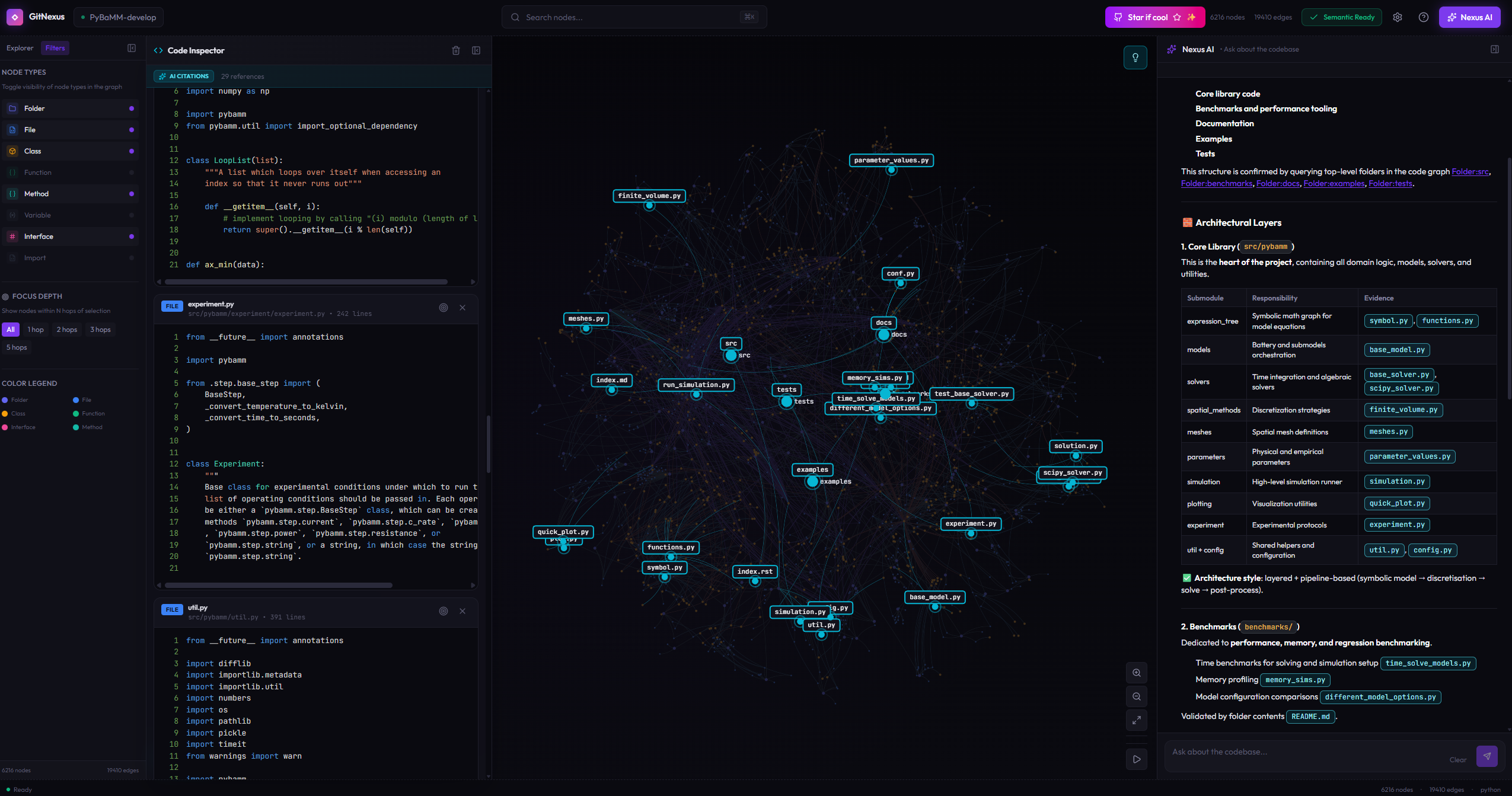 或在本地运行:
```
git clone https://github.com/abhigyanpatwari/gitnexus.git
cd gitnexus/gitnexus-web
npm install
npm run dev
```
Web UI 使用与 CLI 相同的索引流水线,但完全在 WebAssembly 中运行(Tree-sitter WASM、KuzuDB WASM、浏览器内嵌入)。它非常适合快速探索,但受浏览器内存限制,不适合较大的仓库。
**本地后端模式:** 运行 `gitnexus serve` 并在本地打开 Web UI —— 它会自动检测服务器并显示你所有已索引的仓库,并提供完整的 AI 聊天支持。无需重新上传或重新索引。智能体的工具(Cypher 查询、搜索、代码导航)会自动通过后端 HTTP API 路由。
## GitNexus 解决的问题
像 **Cursor**、**Claude Code**、**Cline**、**Roo Code** 和 **Windsurf** 这样的工具很强大 —— 但它们并不真正了解你的代码库结构。
**发生的情况:**
1. AI 编辑 `UserService.validate()`
2. 不知道有 47 个函数依赖于它的返回类型
3. **破坏性变更被发布**
### 传统图谱 RAG vs GitNexus
传统方法给 LLM 原始的图谱边,并希望它探索得足够多。GitNexus **在索引时预计算结构** —— 聚类、追踪、评分 —— 因此工具在一次调用中返回完整的上下文:
```
flowchart TB
subgraph Traditional["Traditional Graph RAG"]
direction TB
U1["User: What depends on UserService?"]
U1 --> LLM1["LLM receives raw graph"]
LLM1 --> Q1["Query 1: Find callers"]
Q1 --> Q2["Query 2: What files?"]
Q2 --> Q3["Query 3: Filter tests?"]
Q3 --> Q4["Query 4: High-risk?"]
Q4 --> OUT1["Answer after 4+ queries"]
end
subgraph GN["GitNexus Smart Tools"]
direction TB
U2["User: What depends on UserService?"]
U2 --> TOOL["impact UserService upstream"]
TOOL --> PRECOMP["Pre-structured response:
8 callers, 3 clusters, all 90%+ confidence"]
PRECOMP --> OUT2["Complete answer, 1 query"]
end
```
**核心创新:预计算关系智能**
- **可靠性** — LLM 不会遗漏上下文,它已经在工具响应中
- **Token 效率** — 不需要 10 次查询链来理解一个函数
- **模型普及化** — 较小的 LLM 也能工作,因为工具承担了繁重的工作
## 工作原理
GitNexus 通过多阶段索引流水线构建代码库的完整知识图谱:
1. **结构** — 遍历文件树并映射文件夹/文件关系
2. **解析** — 使用 Tree-sitter AST 提取函数、类、方法和接口
3. **解析** — 使用语言感知逻辑跨文件解析导入和函数调用
4. **聚类** — 将相关符号分组为功能社区
5. **进程** — 从入口点通过调用链追踪执行流
6. **搜索** — 构建混合搜索索引以实现快速检索
### 支持的语言
TypeScript, JavaScript, Python, Java, C, C++, C#, Go, Rust, PHP, Swift
## 工具示例
### 影响分析
```
impact({target: "UserService", direction: "upstream", minConfidence: 0.8})
TARGET: Class UserService (src/services/user.ts)
UPSTREAM (what depends on this):
Depth 1 (WILL BREAK):
handleLogin [CALLS 90%] -> src/api/auth.ts:45
handleRegister [CALLS 90%] -> src/api/auth.ts:78
UserController [CALLS 85%] -> src/controllers/user.ts:12
Depth 2 (LIKELY AFFECTED):
authRouter [IMPORTS] -> src/routes/auth.ts
```
选项:`maxDepth`、`minConfidence`、`relationTypes`(`CALLS`、`IMPORTS`、`EXTENDS`、`IMPLEMENTS`)、`includeTests`
### 进程分组搜索
```
query({query: "authentication middleware"})
processes:
- summary: "LoginFlow"
priority: 0.042
symbol_count: 4
process_type: cross_community
step_count: 7
process_symbols:
- name: validateUser
type: Function
filePath: src/auth/validate.ts
process_id: proc_login
step_index: 2
definitions:
- name: AuthConfig
type: Interface
filePath: src/types/auth.ts
```
### 上下文(360 度符号视图)
```
context({name: "validateUser"})
symbol:
uid: "Function:validateUser"
kind: Function
filePath: src/auth/validate.ts
startLine: 15
incoming:
calls: [handleLogin, handleRegister, UserController]
imports: [authRouter]
outgoing:
calls: [checkPassword, createSession]
processes:
- name: LoginFlow (step 2/7)
- name: RegistrationFlow (step 3/5)
```
### 检测变更(提交前)
```
detect_changes({scope: "all"})
summary:
changed_count: 12
affected_count: 3
changed_files: 4
risk_level: medium
changed_symbols: [validateUser, AuthService, ...]
affected_processes: [LoginFlow, RegistrationFlow, ...]
```
### 重命名(多文件)
```
rename({symbol_name: "validateUser", new_name: "verifyUser", dry_run: true})
status: success
files_affected: 5
total_edits: 8
graph_edits: 6 (high confidence)
text_search_edits: 2 (review carefully)
changes: [...]
```
### Cypher 查询
```
-- Find what calls auth functions with high confidence
MATCH (c:Community {heuristicLabel: 'Authentication'})<-[:CodeRelation {type: 'MEMBER_OF'}]-(fn)
MATCH (caller)-[r:CodeRelation {type: 'CALLS'}]->(fn)
WHERE r.confidence > 0.8
RETURN caller.name, fn.name, r.confidence
ORDER BY r.confidence DESC
```
## Wiki 生成
从你的知识图谱生成 LLM 驱动的文档:
```
# 需要 LLM API 密钥(OPENAI_API_KEY 等)
gitnexus wiki
# 使用自定义模型或提供商
gitnexus wiki --model gpt-4o
gitnexus wiki --base-url https://api.anthropic.com/v1
# 强制完全重新生成
gitnexus wiki --force
```
Wiki 生成器读取索引的图谱结构,通过 LLM 将文件分组为模块,生成每个模块的文档页面,并创建概览页面 —— 所有这些都带有指向知识图谱的交叉引用。
## 技术栈
| 层 | CLI | Web |
| ------------------------- | ------------------------------------- | --------------------------------------- |
| **运行时** | Node.js (原生) | 浏览器 (WASM) |
| **解析** | Tree-sitter 原生绑定 | Tree-sitter WASM |
| **数据库** | KuzuDB 原生 | KuzuDB WASM |
| **嵌入** | HuggingFace transformers.js (GPU/CPU) | transformers.js (WebGPU/WASM) |
| **搜索** | BM25 + 语义 + RRF | BM25 + 语义 + RRF |
| **智能体接口** | MCP (stdio) | LangChain ReAct agent |
| **可视化** | — | Sigma.js + Graphology (WebGL) |
| **前端** | — | React 18, TypeScript, Vite, Tailwind v4 |
| **聚类** | Graphology | Graphology |
| **并发** | Worker 线程 + async | Web Workers + Comlink |
## 路线图
### 正在积极开发
- [ ] **LLM 集群增强** — 通过 LLM API 生成语义集群名称
- [ ] **AST 装饰器检测** — 解析 @Controller、@Get 等。
- [ ] **增量索引** — 仅重新索引更改的文件
### 最近完成
- [X] Wiki 生成、多文件重命名、Git 差异影响分析
- [X] 进程分组搜索、360 度上下文、Claude Code 钩子
- [X] 多仓库 MCP、零配置设置、11 种语言支持
- [X] 社区检测、进程检测、置信度评分
- [X] 混合搜索、向量索引
## 安全与隐私
- **CLI**:一切都在你的机器上本地运行。无网络调用。索引存储在 `.gitnexus/`(已 gitignore)。全局注册表位于 `~/.gitnexus/`,仅路径和元数据。
- **Web**:一切都在你的浏览器中运行。无代码上传到任何服务器。API 密钥仅存储在 localStorage 中。
- 开源 —— 你可以自己审计代码。
## 致谢
- [Tree-sitter](https://tree-sitter.github.io/) — AST 解析
- [KuzuDB](https://kuzudb.com/) — 支持向量的嵌入式图数据库
- [Sigma.js](https://www.sigmajs.org/) — WebGL 图谱渲染
- [transformers.js](https://huggingface.co/docs/transformers.js) — 浏览器机器学习
- [Graphology](https://graphology.github.io/) — 图数据结构
- [MCP](https://modelcontextprotocol.io/) — 模型上下文协议
或在本地运行:
```
git clone https://github.com/abhigyanpatwari/gitnexus.git
cd gitnexus/gitnexus-web
npm install
npm run dev
```
Web UI 使用与 CLI 相同的索引流水线,但完全在 WebAssembly 中运行(Tree-sitter WASM、KuzuDB WASM、浏览器内嵌入)。它非常适合快速探索,但受浏览器内存限制,不适合较大的仓库。
**本地后端模式:** 运行 `gitnexus serve` 并在本地打开 Web UI —— 它会自动检测服务器并显示你所有已索引的仓库,并提供完整的 AI 聊天支持。无需重新上传或重新索引。智能体的工具(Cypher 查询、搜索、代码导航)会自动通过后端 HTTP API 路由。
## GitNexus 解决的问题
像 **Cursor**、**Claude Code**、**Cline**、**Roo Code** 和 **Windsurf** 这样的工具很强大 —— 但它们并不真正了解你的代码库结构。
**发生的情况:**
1. AI 编辑 `UserService.validate()`
2. 不知道有 47 个函数依赖于它的返回类型
3. **破坏性变更被发布**
### 传统图谱 RAG vs GitNexus
传统方法给 LLM 原始的图谱边,并希望它探索得足够多。GitNexus **在索引时预计算结构** —— 聚类、追踪、评分 —— 因此工具在一次调用中返回完整的上下文:
```
flowchart TB
subgraph Traditional["Traditional Graph RAG"]
direction TB
U1["User: What depends on UserService?"]
U1 --> LLM1["LLM receives raw graph"]
LLM1 --> Q1["Query 1: Find callers"]
Q1 --> Q2["Query 2: What files?"]
Q2 --> Q3["Query 3: Filter tests?"]
Q3 --> Q4["Query 4: High-risk?"]
Q4 --> OUT1["Answer after 4+ queries"]
end
subgraph GN["GitNexus Smart Tools"]
direction TB
U2["User: What depends on UserService?"]
U2 --> TOOL["impact UserService upstream"]
TOOL --> PRECOMP["Pre-structured response:
8 callers, 3 clusters, all 90%+ confidence"]
PRECOMP --> OUT2["Complete answer, 1 query"]
end
```
**核心创新:预计算关系智能**
- **可靠性** — LLM 不会遗漏上下文,它已经在工具响应中
- **Token 效率** — 不需要 10 次查询链来理解一个函数
- **模型普及化** — 较小的 LLM 也能工作,因为工具承担了繁重的工作
## 工作原理
GitNexus 通过多阶段索引流水线构建代码库的完整知识图谱:
1. **结构** — 遍历文件树并映射文件夹/文件关系
2. **解析** — 使用 Tree-sitter AST 提取函数、类、方法和接口
3. **解析** — 使用语言感知逻辑跨文件解析导入和函数调用
4. **聚类** — 将相关符号分组为功能社区
5. **进程** — 从入口点通过调用链追踪执行流
6. **搜索** — 构建混合搜索索引以实现快速检索
### 支持的语言
TypeScript, JavaScript, Python, Java, C, C++, C#, Go, Rust, PHP, Swift
## 工具示例
### 影响分析
```
impact({target: "UserService", direction: "upstream", minConfidence: 0.8})
TARGET: Class UserService (src/services/user.ts)
UPSTREAM (what depends on this):
Depth 1 (WILL BREAK):
handleLogin [CALLS 90%] -> src/api/auth.ts:45
handleRegister [CALLS 90%] -> src/api/auth.ts:78
UserController [CALLS 85%] -> src/controllers/user.ts:12
Depth 2 (LIKELY AFFECTED):
authRouter [IMPORTS] -> src/routes/auth.ts
```
选项:`maxDepth`、`minConfidence`、`relationTypes`(`CALLS`、`IMPORTS`、`EXTENDS`、`IMPLEMENTS`)、`includeTests`
### 进程分组搜索
```
query({query: "authentication middleware"})
processes:
- summary: "LoginFlow"
priority: 0.042
symbol_count: 4
process_type: cross_community
step_count: 7
process_symbols:
- name: validateUser
type: Function
filePath: src/auth/validate.ts
process_id: proc_login
step_index: 2
definitions:
- name: AuthConfig
type: Interface
filePath: src/types/auth.ts
```
### 上下文(360 度符号视图)
```
context({name: "validateUser"})
symbol:
uid: "Function:validateUser"
kind: Function
filePath: src/auth/validate.ts
startLine: 15
incoming:
calls: [handleLogin, handleRegister, UserController]
imports: [authRouter]
outgoing:
calls: [checkPassword, createSession]
processes:
- name: LoginFlow (step 2/7)
- name: RegistrationFlow (step 3/5)
```
### 检测变更(提交前)
```
detect_changes({scope: "all"})
summary:
changed_count: 12
affected_count: 3
changed_files: 4
risk_level: medium
changed_symbols: [validateUser, AuthService, ...]
affected_processes: [LoginFlow, RegistrationFlow, ...]
```
### 重命名(多文件)
```
rename({symbol_name: "validateUser", new_name: "verifyUser", dry_run: true})
status: success
files_affected: 5
total_edits: 8
graph_edits: 6 (high confidence)
text_search_edits: 2 (review carefully)
changes: [...]
```
### Cypher 查询
```
-- Find what calls auth functions with high confidence
MATCH (c:Community {heuristicLabel: 'Authentication'})<-[:CodeRelation {type: 'MEMBER_OF'}]-(fn)
MATCH (caller)-[r:CodeRelation {type: 'CALLS'}]->(fn)
WHERE r.confidence > 0.8
RETURN caller.name, fn.name, r.confidence
ORDER BY r.confidence DESC
```
## Wiki 生成
从你的知识图谱生成 LLM 驱动的文档:
```
# 需要 LLM API 密钥(OPENAI_API_KEY 等)
gitnexus wiki
# 使用自定义模型或提供商
gitnexus wiki --model gpt-4o
gitnexus wiki --base-url https://api.anthropic.com/v1
# 强制完全重新生成
gitnexus wiki --force
```
Wiki 生成器读取索引的图谱结构,通过 LLM 将文件分组为模块,生成每个模块的文档页面,并创建概览页面 —— 所有这些都带有指向知识图谱的交叉引用。
## 技术栈
| 层 | CLI | Web |
| ------------------------- | ------------------------------------- | --------------------------------------- |
| **运行时** | Node.js (原生) | 浏览器 (WASM) |
| **解析** | Tree-sitter 原生绑定 | Tree-sitter WASM |
| **数据库** | KuzuDB 原生 | KuzuDB WASM |
| **嵌入** | HuggingFace transformers.js (GPU/CPU) | transformers.js (WebGPU/WASM) |
| **搜索** | BM25 + 语义 + RRF | BM25 + 语义 + RRF |
| **智能体接口** | MCP (stdio) | LangChain ReAct agent |
| **可视化** | — | Sigma.js + Graphology (WebGL) |
| **前端** | — | React 18, TypeScript, Vite, Tailwind v4 |
| **聚类** | Graphology | Graphology |
| **并发** | Worker 线程 + async | Web Workers + Comlink |
## 路线图
### 正在积极开发
- [ ] **LLM 集群增强** — 通过 LLM API 生成语义集群名称
- [ ] **AST 装饰器检测** — 解析 @Controller、@Get 等。
- [ ] **增量索引** — 仅重新索引更改的文件
### 最近完成
- [X] Wiki 生成、多文件重命名、Git 差异影响分析
- [X] 进程分组搜索、360 度上下文、Claude Code 钩子
- [X] 多仓库 MCP、零配置设置、11 种语言支持
- [X] 社区检测、进程检测、置信度评分
- [X] 混合搜索、向量索引
## 安全与隐私
- **CLI**:一切都在你的机器上本地运行。无网络调用。索引存储在 `.gitnexus/`(已 gitignore)。全局注册表位于 `~/.gitnexus/`,仅路径和元数据。
- **Web**:一切都在你的浏览器中运行。无代码上传到任何服务器。API 密钥仅存储在 localStorage 中。
- 开源 —— 你可以自己审计代码。
## 致谢
- [Tree-sitter](https://tree-sitter.github.io/) — AST 解析
- [KuzuDB](https://kuzudb.com/) — 支持向量的嵌入式图数据库
- [Sigma.js](https://www.sigmajs.org/) — WebGL 图谱渲染
- [transformers.js](https://huggingface.co/docs/transformers.js) — 浏览器机器学习
- [Graphology](https://graphology.github.io/) — 图数据结构
- [MCP](https://modelcontextprotocol.io/) — 模型上下文协议
加入官方 Discord 讨论想法、问题等!
或在本地运行:
```
git clone https://github.com/abhigyanpatwari/gitnexus.git
cd gitnexus/gitnexus-web
npm install
npm run dev
```
Web UI 使用与 CLI 相同的索引流水线,但完全在 WebAssembly 中运行(Tree-sitter WASM、KuzuDB WASM、浏览器内嵌入)。它非常适合快速探索,但受浏览器内存限制,不适合较大的仓库。
**本地后端模式:** 运行 `gitnexus serve` 并在本地打开 Web UI —— 它会自动检测服务器并显示你所有已索引的仓库,并提供完整的 AI 聊天支持。无需重新上传或重新索引。智能体的工具(Cypher 查询、搜索、代码导航)会自动通过后端 HTTP API 路由。
## GitNexus 解决的问题
像 **Cursor**、**Claude Code**、**Cline**、**Roo Code** 和 **Windsurf** 这样的工具很强大 —— 但它们并不真正了解你的代码库结构。
**发生的情况:**
1. AI 编辑 `UserService.validate()`
2. 不知道有 47 个函数依赖于它的返回类型
3. **破坏性变更被发布**
### 传统图谱 RAG vs GitNexus
传统方法给 LLM 原始的图谱边,并希望它探索得足够多。GitNexus **在索引时预计算结构** —— 聚类、追踪、评分 —— 因此工具在一次调用中返回完整的上下文:
```
flowchart TB
subgraph Traditional["Traditional Graph RAG"]
direction TB
U1["User: What depends on UserService?"]
U1 --> LLM1["LLM receives raw graph"]
LLM1 --> Q1["Query 1: Find callers"]
Q1 --> Q2["Query 2: What files?"]
Q2 --> Q3["Query 3: Filter tests?"]
Q3 --> Q4["Query 4: High-risk?"]
Q4 --> OUT1["Answer after 4+ queries"]
end
subgraph GN["GitNexus Smart Tools"]
direction TB
U2["User: What depends on UserService?"]
U2 --> TOOL["impact UserService upstream"]
TOOL --> PRECOMP["Pre-structured response:
8 callers, 3 clusters, all 90%+ confidence"]
PRECOMP --> OUT2["Complete answer, 1 query"]
end
```
**核心创新:预计算关系智能**
- **可靠性** — LLM 不会遗漏上下文,它已经在工具响应中
- **Token 效率** — 不需要 10 次查询链来理解一个函数
- **模型普及化** — 较小的 LLM 也能工作,因为工具承担了繁重的工作
## 工作原理
GitNexus 通过多阶段索引流水线构建代码库的完整知识图谱:
1. **结构** — 遍历文件树并映射文件夹/文件关系
2. **解析** — 使用 Tree-sitter AST 提取函数、类、方法和接口
3. **解析** — 使用语言感知逻辑跨文件解析导入和函数调用
4. **聚类** — 将相关符号分组为功能社区
5. **进程** — 从入口点通过调用链追踪执行流
6. **搜索** — 构建混合搜索索引以实现快速检索
### 支持的语言
TypeScript, JavaScript, Python, Java, C, C++, C#, Go, Rust, PHP, Swift
## 工具示例
### 影响分析
```
impact({target: "UserService", direction: "upstream", minConfidence: 0.8})
TARGET: Class UserService (src/services/user.ts)
UPSTREAM (what depends on this):
Depth 1 (WILL BREAK):
handleLogin [CALLS 90%] -> src/api/auth.ts:45
handleRegister [CALLS 90%] -> src/api/auth.ts:78
UserController [CALLS 85%] -> src/controllers/user.ts:12
Depth 2 (LIKELY AFFECTED):
authRouter [IMPORTS] -> src/routes/auth.ts
```
选项:`maxDepth`、`minConfidence`、`relationTypes`(`CALLS`、`IMPORTS`、`EXTENDS`、`IMPLEMENTS`)、`includeTests`
### 进程分组搜索
```
query({query: "authentication middleware"})
processes:
- summary: "LoginFlow"
priority: 0.042
symbol_count: 4
process_type: cross_community
step_count: 7
process_symbols:
- name: validateUser
type: Function
filePath: src/auth/validate.ts
process_id: proc_login
step_index: 2
definitions:
- name: AuthConfig
type: Interface
filePath: src/types/auth.ts
```
### 上下文(360 度符号视图)
```
context({name: "validateUser"})
symbol:
uid: "Function:validateUser"
kind: Function
filePath: src/auth/validate.ts
startLine: 15
incoming:
calls: [handleLogin, handleRegister, UserController]
imports: [authRouter]
outgoing:
calls: [checkPassword, createSession]
processes:
- name: LoginFlow (step 2/7)
- name: RegistrationFlow (step 3/5)
```
### 检测变更(提交前)
```
detect_changes({scope: "all"})
summary:
changed_count: 12
affected_count: 3
changed_files: 4
risk_level: medium
changed_symbols: [validateUser, AuthService, ...]
affected_processes: [LoginFlow, RegistrationFlow, ...]
```
### 重命名(多文件)
```
rename({symbol_name: "validateUser", new_name: "verifyUser", dry_run: true})
status: success
files_affected: 5
total_edits: 8
graph_edits: 6 (high confidence)
text_search_edits: 2 (review carefully)
changes: [...]
```
### Cypher 查询
```
-- Find what calls auth functions with high confidence
MATCH (c:Community {heuristicLabel: 'Authentication'})<-[:CodeRelation {type: 'MEMBER_OF'}]-(fn)
MATCH (caller)-[r:CodeRelation {type: 'CALLS'}]->(fn)
WHERE r.confidence > 0.8
RETURN caller.name, fn.name, r.confidence
ORDER BY r.confidence DESC
```
## Wiki 生成
从你的知识图谱生成 LLM 驱动的文档:
```
# 需要 LLM API 密钥(OPENAI_API_KEY 等)
gitnexus wiki
# 使用自定义模型或提供商
gitnexus wiki --model gpt-4o
gitnexus wiki --base-url https://api.anthropic.com/v1
# 强制完全重新生成
gitnexus wiki --force
```
Wiki 生成器读取索引的图谱结构,通过 LLM 将文件分组为模块,生成每个模块的文档页面,并创建概览页面 —— 所有这些都带有指向知识图谱的交叉引用。
## 技术栈
| 层 | CLI | Web |
| ------------------------- | ------------------------------------- | --------------------------------------- |
| **运行时** | Node.js (原生) | 浏览器 (WASM) |
| **解析** | Tree-sitter 原生绑定 | Tree-sitter WASM |
| **数据库** | KuzuDB 原生 | KuzuDB WASM |
| **嵌入** | HuggingFace transformers.js (GPU/CPU) | transformers.js (WebGPU/WASM) |
| **搜索** | BM25 + 语义 + RRF | BM25 + 语义 + RRF |
| **智能体接口** | MCP (stdio) | LangChain ReAct agent |
| **可视化** | — | Sigma.js + Graphology (WebGL) |
| **前端** | — | React 18, TypeScript, Vite, Tailwind v4 |
| **聚类** | Graphology | Graphology |
| **并发** | Worker 线程 + async | Web Workers + Comlink |
## 路线图
### 正在积极开发
- [ ] **LLM 集群增强** — 通过 LLM API 生成语义集群名称
- [ ] **AST 装饰器检测** — 解析 @Controller、@Get 等。
- [ ] **增量索引** — 仅重新索引更改的文件
### 最近完成
- [X] Wiki 生成、多文件重命名、Git 差异影响分析
- [X] 进程分组搜索、360 度上下文、Claude Code 钩子
- [X] 多仓库 MCP、零配置设置、11 种语言支持
- [X] 社区检测、进程检测、置信度评分
- [X] 混合搜索、向量索引
## 安全与隐私
- **CLI**:一切都在你的机器上本地运行。无网络调用。索引存储在 `.gitnexus/`(已 gitignore)。全局注册表位于 `~/.gitnexus/`,仅路径和元数据。
- **Web**:一切都在你的浏览器中运行。无代码上传到任何服务器。API 密钥仅存储在 localStorage 中。
- 开源 —— 你可以自己审计代码。
## 致谢
- [Tree-sitter](https://tree-sitter.github.io/) — AST 解析
- [KuzuDB](https://kuzudb.com/) — 支持向量的嵌入式图数据库
- [Sigma.js](https://www.sigmajs.org/) — WebGL 图谱渲染
- [transformers.js](https://huggingface.co/docs/transformers.js) — 浏览器机器学习
- [Graphology](https://graphology.github.io/) — 图数据结构
- [MCP](https://modelcontextprotocol.io/) — 模型上下文协议标签:AI代理, DLL 劫持, DNS解析, GraphRAG, MCP, MITM代理, WebSocket, 云安全态势管理, 云安全监控, 代码分析, 代码助手, 代码探索, 代码智能, 代码检索, 依赖分析, 凭证管理, 前端应用, 向量检索, 大语言模型, 威胁情报, 客户端应用, 开发者工具, 开源项目, 无服务器, 浏览器扩展, 自动化攻击, 自动化攻击, 自动化攻击, 调用链分析, 软件架构, 零服务器架构, 静态分析