mozillazg/kube-audit-mcp
GitHub: mozillazg/kube-audit-mcp
一个 MCP 服务器项目,使 AI agent 能够跨多云日志平台查询和分析 Kubernetes 审计日志。
Stars: 19 | Forks: 2
# kube-audit-mcp
English | [简体中文](README.zh-CN.md)
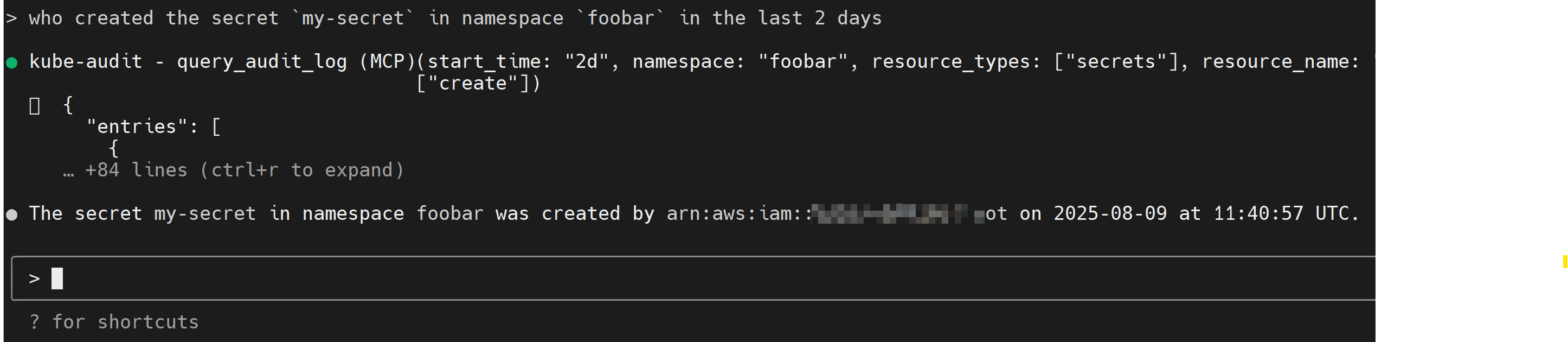
kube-audit-mcp 是一个 Model Context Protocol (MCP) 服务器,赋予 AI agent、助手和聊天机器人查询 Kubernetes Audit Logs 的能力。
## 目录
* [安装](#installation)
* [MCP 客户端](#mcp-clients)
* [Claude Code](#claude-code)
* [Claude Desktop](#claude-desktop)
* [Gemini CLI](#gemini-cli)
* [VS Code](#vs-code)
* [kubectl-ai](#kubectl-ai)
* [传输选项](#transport-options)
* [STDIO 传输(默认)](#stdio-transport-default)
* [配置](#configurations)
* [配置示例](#sample-config)
* [Provider](#provider)
* [Alibaba Cloud Log Service](#alibaba-cloud-log-service)
* [AWS CloudWatch Logs](#aws-cloudwatch-logs)
* [Google Cloud Logging](#google-cloud-logging)
* [可用工具](#available-tools)
* [query_audit_log](#query_audit_log)
* [list_clusters](#list_clusters)
* [list_common_resource_types](#list_common_resource_types)
## 安装
1. 首先,从 [发布页面](https://github.com/mozillazg/kube-audit-mcp/releases) 下载并安装最新的版本。
* 你也可以通过 docker 安装:
docker pull quay.io/mozillazg/kube-audit-mcp:latest
2. 然后,配置 Kubernetes Audit Logs 的 provider。详情请参阅 [配置](#configurations)。
## MCP 客户端
理论上,任何 MCP 客户端都应该能与 kube-audit-mcp 一起工作。
**标准配置** 适用于大多数客户端:
```
{
"mcpServers": {
"kube-audit": {
"type": "stdio",
"command": "kube-audit-mcp",
"args": [
"mcp"
]
}
}
}
```
### Claude Code
或者将示例配置保存到默认的配置文件路径:
```
kube-audit-mcp sample-config --save
```
### Provider
#### Alibaba Cloud Log Service
前置条件:
* [安装并配置带有凭证的 Alibaba Cloud CLI](https://www.alibabacloud.com/help/en/cli/configure-credentials)
* 确保你的阿里云用户或角色具有从指定 Log Service 项目和 logstore 读取数据的必要权限。
以下策略可用于授予必要的权限:
配置:
```
name: alibaba-sls
alibaba_sls:
endpoint: cn-hangzhou.log.aliyuncs.com # Replace with your Log Service endpoint
logstore: ${log_store} # Replace with your Log Service logstore
project: ${project_name} # Replace with your Log Service project
```
#### AWS CloudWatch Logs
前置条件:
* [安装并配置带有凭证的 AWS CLI](https://docs.aws.amazon.com/cli/latest/userguide/cli-chap-configure.html)
* 确保你的 AWS IAM 用户或角色具有从指定 CloudWatch Logs 日志组读取数据的必要权限。
以下策略可用于授予必要的权限:
配置:
```
name: aws-cloudwatch-logs
aws_cloudwatch_logs:
log_group_name: /aws/eks/${cluster_name}/cluster # Replace with your CloudWatch Logs log group name
```
#### Google Cloud Logging
前置条件:
* [安装并配置带有 Application Default Credentials 的 Google Cloud CLI](https://cloud.google.com/docs/authentication/provide-credentials-adc)
* 确保你的 Google Cloud IAM 用户或服务账号具有从指定 Cloud Logging 日志存储桶读取数据的必要权限。
以下角色可用于授予必要的权限:`roles/logging.viewer`。
配置:
```
name: gcp-cloud-logging
gcp_cloud_logging:
project_id: ${project_id} # Replace with your Project ID
cluster_name: ${cluster_name} # Replace with your GKE cluster name (optional)
```
## 可用工具
此 MCP 服务器向 AI agent 公开了以下工具:
### `query_audit_log`
从配置的 provider 查询 Kubernetes 审计日志。这是用于调查集群中活动的主要工具。
**参数:**
* `cluster_name` (字符串,可选):要查询的集群名称。你可以使用 `list_clusters` 工具查看可用的集群。默认为配置的 `default_cluster`。
* `start_time` (字符串,可选):查询的开始时间。可以是 ISO 8601 格式(`2024-01-01T10:00:00`)或相对时间(`7d`, `1h`, `30m`)。默认为 `7d`。
* `end_time` (字符串,可选):查询的结束时间。如果省略,默认为当前时间。
* `limit` (数字,可选):返回的最大日志条目数。默认为 `10`,最大为 `20`。
* `namespace` (字符串,可选):按特定 namespace 过滤日志。支持后缀通配符(例如,`kube-*`)。
* `resource_types` (字符串数组,可选):按一个或多个 Kubernetes 资源类型(例如,`pods`, `deployments`)过滤。支持简称(例如,`po`, `deploy`)。使用 `list_common_resource_types` 来发现可用的类型。
* `resource_name` (字符串,可选):按特定的资源名称过滤。支持后缀通配符。
* `verbs` (字符串数组,可选):按一个或多个动作 verbs 过滤(例如,`create`, `delete`, `update`)。
* `user` (字符串,可选):按执行动作的用户过滤。支持后缀通配符。
### `list_clusters`
列出在 `config.yaml` 文件中配置的所有集群。这对于发现你可以作为查询目标的集群非常有用。
**参数:** 无
### `list_common_resource_types`
返回按类别(例如,“Core Resources”, “Apps Resources”)分组的常见 Kubernetes 资源类型列表。这有助于为 `query_audit_log` 工具中的 `resource_types` 参数找到正确的值。
**参数:** 无
使用 docker 运行
你也可以通过 docker 运行 kube-audit-mcp,使用以下配置: ``` { "mcpServers": { "kube-audit": { "type": "stdio", "command": "docker", "args": [ "run", "-i", "--rm", "-v", "/etc/kube-audit-mcp/config.yaml:/etc/kube-audit-mcp/config.yaml:ro", "quay.io/mozillazg/kube-audit-mcp:latest", "mcp", "--config", "/etc/kube-audit-mcp/config.yaml" ], "env": { "ALIBABA_CLOUD_ACCESS_KEY_ID": "needed_if_you_use_alibaba_sls_provider", "ALIBABA_CLOUD_ACCESS_KEY_SECRET": "needed_if_you_use_alibaba_sls_provider", "AWS_ACCESS_KEY_ID": "needed_if_you_use_aws_cloudwatch_logs_provider", "AWS_SECRET_ACCESS_KEY": "needed_if_you_use_aws_cloudwatch_logs_provider", "GOOGLE_APPLICATION_CREDENTIALS": "needed_if_you_use_gcp_cloud_logging_provider" } } } } ```
使用 Claude Code CLI 添加 kube-audit-mcp:
```
claude mcp add kube-audit kube-audit-mcp mcp
```
### Claude Desktop
请遵循 MCP 安装 [指南](https://modelcontextprotocol.io/quickstart/user),使用上面的标准配置。
### Gemini CLI
请遵循 MCP 安装 [指南](https://github.com/google-gemini/gemini-cli/blob/main/docs/tools/mcp-server.md#configure-the-mcp-server-in-settingsjson),
使用上面的标准配置。
### VS Code
请遵循 MCP 安装 [指南](https://code.visualstudio.com/docs/copilot/chat/mcp-servers#_add-an-mcp-server),
使用上面的标准配置。你也可以使用 VS Code CLI 安装 kube-audit-mcp MCP 服务器:
```
# 对于 VS Code
code --add-mcp '''{"name":"kube-audit","command":"kube-audit-mcp","args":["mcp"]}'''
```
安装完成后,你就可以在 VS Code 中配合你的 GitHub Copilot agent 使用 kube-audit-mcp MCP 服务器了。
### kubectl-ai
请遵循 MCP 安装 [指南](https://github.com/GoogleCloudPlatform/kubectl-ai/blob/main/pkg/mcp/README.md#local-stdio-based-server-configuration),
使用如下配置:
```
servers:
# Local MCP server (stdio-based)
- name: kube-audit
command: kube-audit-mcp
args:
- mcp
```
## 传输选项
### STDIO 传输(默认)
默认传输模式使用标准输入/输出进行通信。
这是大多数客户端(如 Claude Desktop)使用的标准 MCP 传输方式。
```
# 使用默认 stdio transport 运行
kube-audit-mcp mcp
# 或显式指定 stdio
kube-audit-mcp mcp --transport stdio
```
## 配置
kube-audit-mcp 需要一个配置文件来指定 Kubernetes Audit Logs 的 provider。
配置文件通常位于 `~/.config/kube-audit-mcp/config.yaml`
或者可以通过 `--config` 标志来指定。
### 配置示例
你可以通过以下命令获取配置示例:
```
kube-audit-mcp sample-config
```
这里是一个配置文件示例
``` default_cluster: prod # The default cluster to use clusters: # List of clusters - name: prod # Name of the cluster provider: # Provider configuration, see below for details name: aws-cloudwatch-logs # Use CloudWatch Logs as the provider aws_cloudwatch_logs: log_group_name: /aws/eks/test/cluster # Replace with your CloudWatch Logs log group name - name: dev # Name of the cluster provider: name: alibaba-sls # Use Alibaba Cloud Log Service as the provider alibaba_sls: endpoint: cn-hangzhou.log.aliyuncs.com # Replace with your Log Service endpoint project: k8s-log-cxxx # Replace with your Log Service project logstore: audit-cxxx # Replace with your Log Service logstore - name: test provider: name: gcp-cloud-logging # Use Google Cloud Logging as the provider gcp_cloud_logging: project_id: test-233xxx # Replace with your Project ID cluster_name: test-cluster # Replace with your GKE cluster name (optional) ```RAM 权限
``` { "Version": "1", "Statement": [ { "Effect": "Allow", "Action": [ "log:GetLogStoreLogs" ], "Resource": "*" } ] } ```IAM 权限
``` { "Version": "2012-10-17", "Statement": [ { "Effect": "Allow", "Action": [ "logs:StartQuery", "logs:GetQueryResults" ], "Resource": "*" } ] } ```标签:AI代理, EVTX分析, MCP, 审计日志, 日志审计, 请求拦截, 运维工具