rix4uni/GarudRecon
GitHub: rix4uni/GarudRecon
一款基于 Bash 的综合侦察自动化框架,编排 80 余种开源工具以实现从子域名资产发现到 XSS、SQLi 等漏洞检测的全流程覆盖。
Stars: 262 | Forks: 56










## GarudRecon
GarudRecon 是一个综合性的基于 Bash 的侦察自动化框架,旨在为安全专业人员和 Bug 赏金猎人简化资产发现和漏洞评估流程。该工具编排了 80 多种开源安全工具,可跨多个攻击向量提供彻底的侦察能力。
## 目录
- [核心功能](#core-capabilities)
- [灵活的侦察模式](#flexible-reconnaissance-modes)
- [高级功能](#advanced-features)
- [历史](#history)
- [前置条件](#prerequisites)
- [安装](#installation)
- [快速入门](#quick-start)
- [用法](#usage)
- [配置](#configuration)
- [故障排除](#troubleshooting)
- [常见问题](#faq)
- [贡献](#contributing)
- [支持的操作系统](#operating-systems-supported)
- [工具](#tools)
- [致谢](#thanks-)
### 核心功能
GarudRecon 在多个关键领域的自动发现和漏洞检测方面表现出色:
**资产发现与枚举**
- 使用 20 多种工具进行子域枚举,包括 subfinder、amass 和 chaos
- 通过多个 CT 日志源进行证书透明度监控
- 利用高级暴力破解和排列技术进行 DNS 枚举
- 集成 naabu、masscan 和 nmap 进行端口扫描
- 虚拟主机发现和 Web 技术指纹识别
**漏洞检测**
- 使用多种 Payload 集进行跨站脚本 (XSS) 检测
- 通过自动参数模糊测试进行 SQL 注入测试
- 本地文件包含 (LFI) 和远程代码执行 (RCE) 检查
- 子域接管漏洞扫描
- 开放重定向检测与验证
- 暴露的 .git 目录和敏感文件发现
### 灵活的侦察模式
该框架提供三种不同的操作模式,以适应不同的探测范围:
- **SmallScope Mode** - 专为针对性子域侦察(例如 support.domain.com)设计,在有限的攻击面上进行深度漏洞分析。
- **MediumScope Mode** - 全面的通配符域扫描(例如 *.domain.com),在覆盖范围和性能优化之间取得平衡。
- **LargeScope Mode** - 组织级侦察,用于最大化资产发现和广泛的漏洞覆盖。
- **CidrScope Mode** - ⚠️ 即将推出 - 基于 CIDR 的侦察,用于 IP 范围扫描
- **Workflow Mode** - 将多个工具链接到一个可重复使用的 pipeline 中,以便您可以使用单个命令运行复杂的扫描。
- **Fleet Mode** - 在多个 VPS 实例之间分配工作 —— 自动拆分输入并在 100 多台主机上并行运行 workflow。
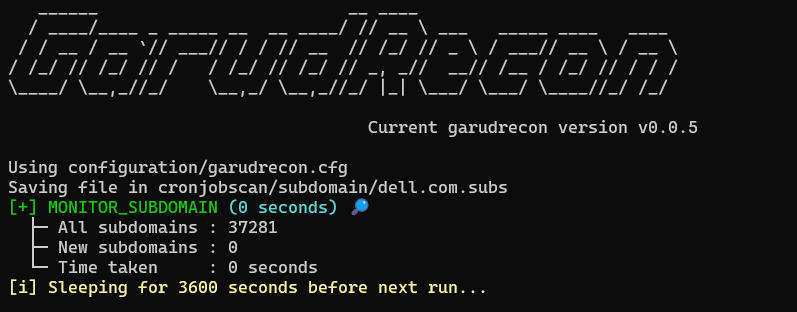
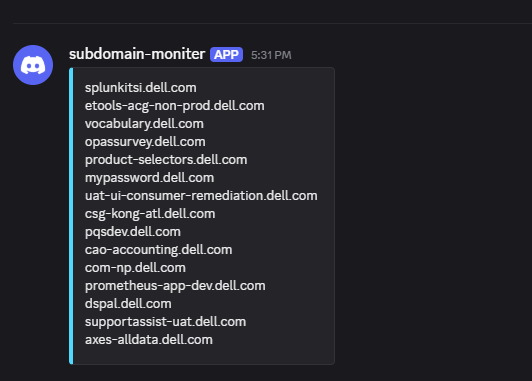
- **CronJobs Mode** - 计划和监控周期性侦察任务(子域名、开放端口、JS 泄露、模板、警报)。
### 高级功能
**自动监控**
- 带有变更检测的持续子域监控
- 端口状态变更通知
- 针对新端点的 JavaScript 文件监控
- 通过 cron 集成的自动定时侦察
**智能资源管理**
- 针对不同系统规格的 RAM 优化配置
- VPS 部署优化设置
- 具有可配置线程限制的并行处理
- 基于目标特征的自定义字典生成
## 历史
我最初在 2022 年创建了 **GarudRecon**,但在意外泄露了一些 API 密钥后,我将其删除了。尽管如此,有人 fork 了该项目并将其保留在[这里](https://github.com/polling-repo-continua/GarudRecon)。
之后,我尝试用 **Python** 和 **Go** 重写 GarudRecon,但我发现这些语言中繁重的字符串拼接并不吸引人。最后,我决定回归 **Bash**,这对我来说感觉更简单、更自然。
## 前置条件
在安装 GarudRecon 之前,请确保您具备:
- **Root 权限**(切换到 root 用户,而不是 `sudo su`)
- **Bash shell**(使用 `echo $SHELL` 验证)
- **互联网连接**,用于下载工具和依赖项
- **至少 4GB RAM**(建议 8GB+ 用于大规模扫描)
- **足够的磁盘空间**(至少 10GB 可用空间用于工具和输出)
## 安装
### Docker
### 快速安装(无需 Clone)
```
# 通过 curl 直接安装(推荐用于快速设置)
bash <(curl -s https://raw.githubusercontent.com/rix4uni/GarudRecon/main/setup)
```
### 使用 Git Clone
```
git clone --depth 1 https://github.com/rix4uni/GarudRecon.git
cd GarudRecon
bash setup
```
### 下载预构建二进制文件
```
wget -q https://github.com/rix4uni/GarudRecon/archive/refs/tags/v0.1.2.zip
unzip v0.1.2.zip
cd GarudRecon
bash setup
```
## 快速入门
安装后,您可以立即开始使用 GarudRecon:
```
# 小范围扫描(单个子域名)
garudrecon smallscope -d support.example.com
# 中等范围扫描(通配符域名)
garudrecon mediumscope -d example.com
# 大范围扫描(组织范围)
garudrecon largescope -d example
# Workflow 模式
garudrecon workflow ls
# CronJobs 模式
garudrecon cronjobs -d example.com -f MONITOR_SUBDOMAIN
```
有关更详细的用法示例,请参阅下面的[用法](#usage)部分。
## 配置
GarudRecon 使用位于 `configuration/` 目录中的配置文件。主配置文件是 `garudrecon.cfg`。
### 关键配置选项
- **API Keys**:配置各种服务的 API 密钥(subfinder、amass、chaos 等)
- **Thread Limits**:根据您的系统资源调整并行处理线程
- **Output Directories**:自定义扫描结果的存储位置
- **Tool Paths**:如果工具安装在非标准位置,请指定自定义路径
要使用自定义配置文件:
```
garudrecon mediumscope -d example.com -c /path/to/custom.cfg
```
## 用法
SmallScope Mode
```
Quick recon for a single host or subdomain (e.g. support.domain.com).
Lightweight, fast checks — ideal for a single target when you want quick visibility without a full-scale scan.
Usage:
garudrecon smallscope [flags]
Flags:
-d, --domain Scan a domain (e.g. support.domain.com)
-ef, --exclude-functions Exclude a function from running (e.g. WAYMORE)
-rx, --recon-xss Run full recon with XSS checks
-rs, --recon-sqli Run full recon with SQLi checks
-rl, --recon-lfi Run full recon with LFI checks
-rst, --recon-subtakeover Run full recon with Subdomain Takeover checks
-rr, --recon-rce Run full recon with RCE checks
-ri, --recon-iis Run full recon with IIS checks
-c, --config Custom configuration file path
-r, --resume Resume stopped/uncompleted scan from /root/.garudrecon/scans/ (e.g., --resume support.domain.com or --resume support.domain.com_1). Skips functions already completed in resume.cfg.
-h, --help help for smallscope
Example:
# 完整 Recon
garudrecon smallscope -d support.domain.com
# 仅包含 XSS 的 Recon
garudrecon smallscope -d support.domain.com -rx
# 仅包含 SQLi 的 Recon
garudrecon smallscope -d support.domain.com -rs
# 手动排除功能
garudrecon smallscope -d support.domain.com -ef "GOSPIDER,WAYMORE"
# 组合
garudrecon smallscope -d support.domain.com -rx -ef "WAYMORE"
# 跳过 resume.cfg 中已完成的功能。
garudrecon smallscope -d support.domain.com -rx --resume support.domain.com_1
```
#### 输出
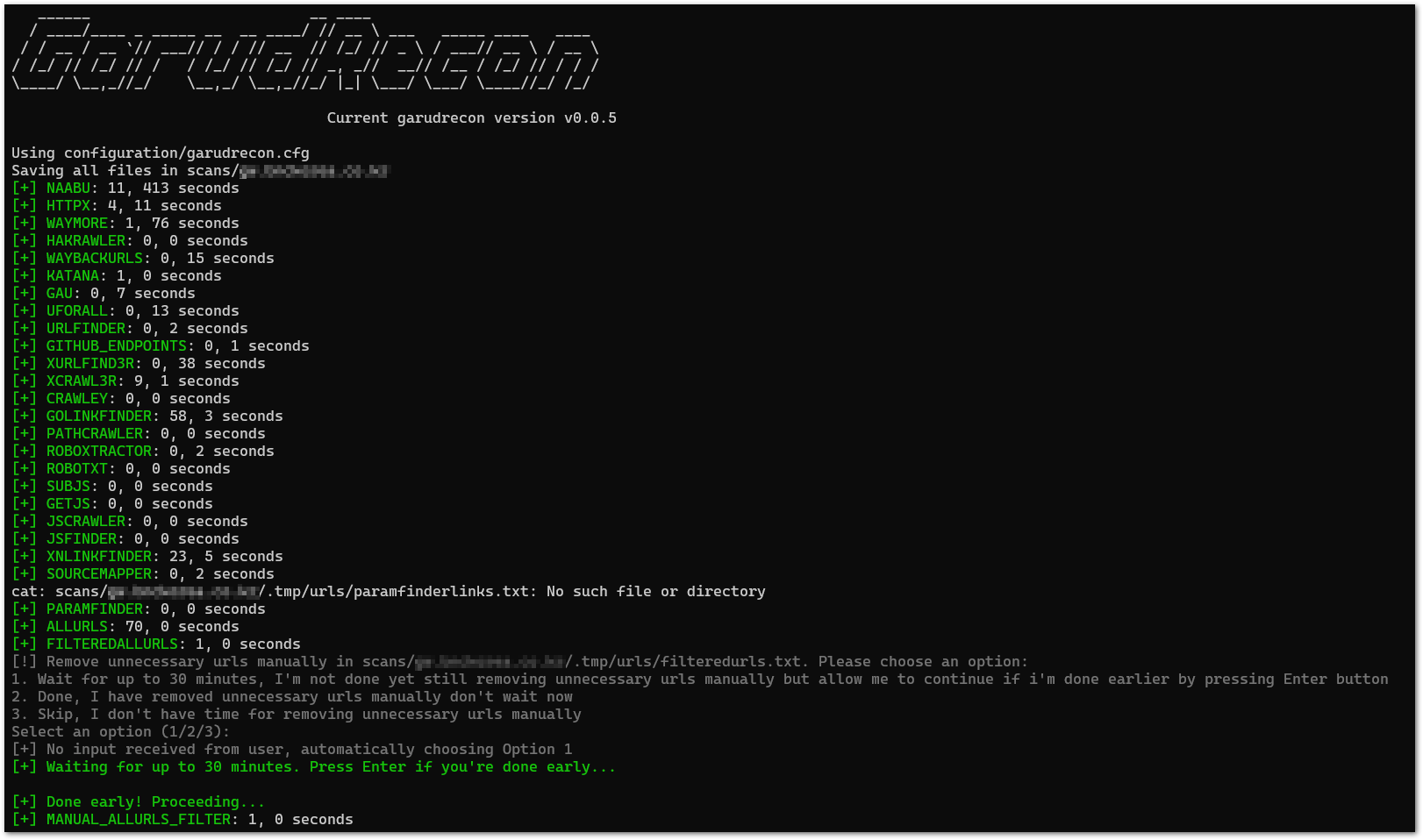
MediumScope Mode
```
Moderate recon for a wildcard domain (e.g. *.domain.com) with optional vuln checks.
Balanced scan depth: discovers subdomains, does basic service/port checks and optional lightweight vulnerability checks.
Usage:
garudrecon mediumscope [flags]
Flags:
-d, --domain Scan a domain (e.g. domain.com)
-ef, --exclude-functions Exclude a function from running (e.g. AMASS)
-s, --recon-subdomain Run Subdomain Enumeration only
-a, --active Run Active Subdomain Enumeration also (e.g. puredns, altdns)
-su, --recon-subdomainurls Run Subdomain Enumeration + Url Crawling only
-rx, --recon-xss Run full recon with XSS checks
-rs, --recon-sqli Run full recon with SQLi checks
-rl, --recon-lfi Run full recon with LFI checks
-rst, --recon-subtakeover Run full recon with Subdomain Takeover checks
-rr, --recon-rce Run full recon with RCE checks
-ri, --recon-iis Run full recon with IIS checks
-oos, --outofscope Exclude outofscope subdomains from a list (e.g. domain.com.oos)
-c, --config Custom configuration file path
-r, --resume Resume stopped/uncompleted scan from /root/.garudrecon/scans/ (e.g., --resume domain.com or --resume domain.com_1). Skips functions already completed in resume.cfg.
-h, --help help for mediumscope
Example:
# 包含所有漏洞扫描的完整 Recon
garudrecon mediumscope -d domain.com
# 仅 Recon 子域名枚举
garudrecon mediumscope -d domain.com -s
# 同时运行 Active Subdomain Enumeration(例如 puredns, altdns)
garudrecon mediumscope -d domain.com -s -a
# 仅 Recon 子域名枚举 + Url 抓取
garudrecon mediumscope -d domain.com -su
# 仅包含 XSS 的 Recon
garudrecon mediumscope -d domain.com -rx
# 仅包含 SQLi 的 Recon
garudrecon mediumscope -d domain.com -rs
# 手动排除功能
garudrecon mediumscope -d domain.com -ef "SUBFINDER,AMASS"
# 组合
garudrecon mediumscope -d domain.com -rx -ef "AMASS"
# 跳过 resume.cfg 中已完成的功能。
garudrecon mediumscope -d domain.com -rx --resume domain.com_1
```
#### 输出
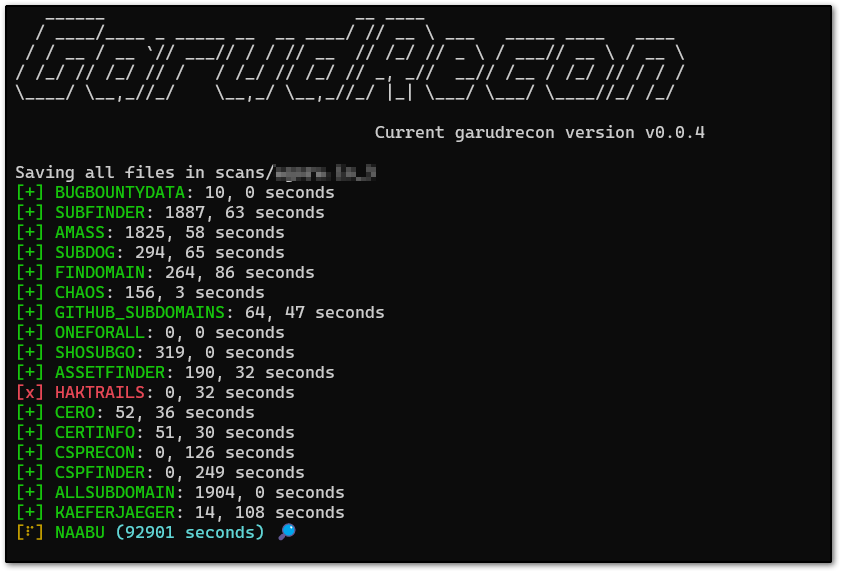
LargeScope Mode
```
Full-scale recon for an organization.
Deep discovery and enumeration (subdomains, ports, asset correlation, extensive vuln checks) for comprehensive coverage.
Usage:
garudrecon largescope [flags]
Flags:
-d, --domain Scan a domain (e.g. domain)
-ef, --exclude-functions Exclude a function from running (e.g. AMASS)
-s, --recon-subdomain Run Subdomain Enumeration only
-a, --active Run Active Subdomain Enumeration also (e.g. puredns, altdns)
-su, --recon-subdomainurls Run Subdomain Enumeration + Url Crawling only
-rx, --recon-xss Run full recon with XSS checks
-rs, --recon-sqli Run full recon with SQLi checks
-rl, --recon-lfi Run full recon with LFI checks
-rst, --recon-subtakeover Run full recon with Subdomain Takeover checks
-rr, --recon-rce Run full recon with RCE checks
-ri, --recon-iis Run full recon with IIS checks
-oos, --outofscope Exclude outofscope subdomains from a list (e.g. domain.oos)
-c, --config Custom configuration file path
-r, --resume Resume stopped/uncompleted scan from /root/.garudrecon/scans/ (e.g., --resume domain or --resume domain_1). Skips functions already completed in resume.cfg.
-h, --help help for largescope
Example:
# 包含所有漏洞扫描的完整 Recon
garudrecon largescope -d domain
# 仅 Recon 子域名枚举
garudrecon largescope -d domain -s
# 同时运行 Active Subdomain Enumeration(例如 puredns, altdns)
garudrecon largescope -d domain -s -a
# 仅 Recon 子域名枚举 + Url 抓取
garudrecon largescope -d domain -su
# 仅包含 XSS 的 Recon
garudrecon largescope -d domain -rx
# 仅包含 SQLi 的 Recon
garudrecon largescope -d domain -rs
# 手动排除功能
garudrecon largescope -d domain -ef "SUBFINDER,AMASS"
# 组合
garudrecon largescope -d domain -rx -ef "AMASS"
# 跳过 resume.cfg 中已完成的功能。
garudrecon largescope -d domain -rx --resume domain_1
```
#### 输出

CidrScope Mode
此模式将允许您:
- 扫描整个 CIDR 范围以查找开放端口和服务
- 发现 IP 范围内的资产
- 对基于 IP 的目标执行漏洞评估
敬请期待更新!
#### 输出
_即将推出_
Workflow Mode
```
Chain multiple tools into a reusable pipeline so you can run complex scans with a single command.
Compose small steps (mapcidr → httpx → nuclei …) into one workflow file and execute it without manually installing or running each tool.
Usage:
garudrecon workflow [flags]
Flags:
-i, --input Pass the input
-o, --output Location where you want to save output
-v, --verbose enable verbose mode
-h, --help help for workflows
Example:
garudrecon workflow amass --input --output [--verbose]
garudrecon workflow CVE-2025-0133 -i all.cidr -o CVE-2025-0133.nuclei
garudrecon workflow ls
garudrecon workflow ls [workflow]
garudrecon workflow cat [workflow]
garudrecon workflow add [workflow]
garudrecon workflow edit [workflow]
garudrecon workflow delete [workflow]
```
### 验证 Workflow
检查所有 workflow JSON 文件是否有效:
```
for f in workflow/*.json; do
echo -n "Checking $f ... "
jq empty "$f" && echo "✅ OK" || echo "❌ INVALID"
done
```
#### 输出


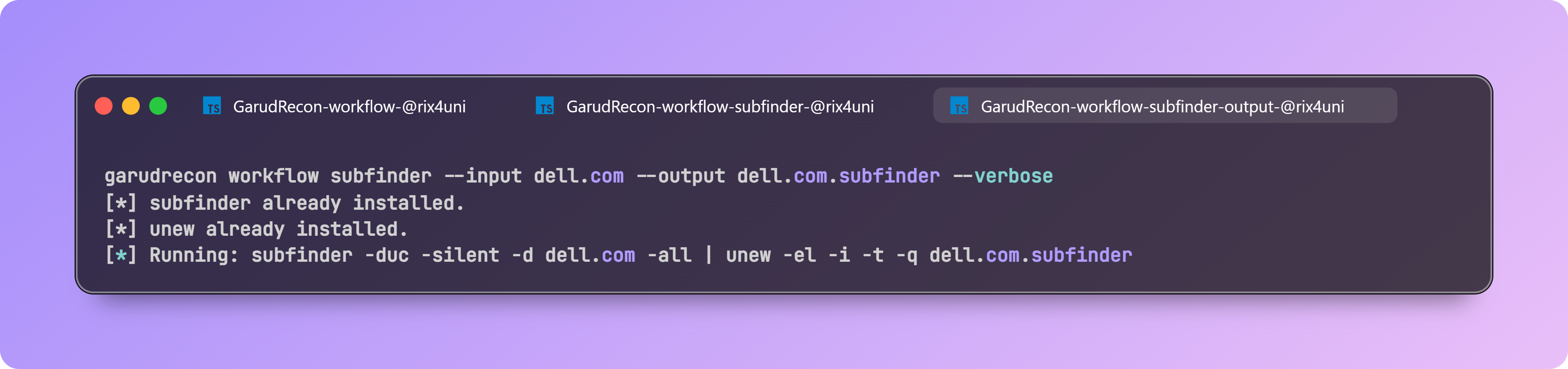
Fleet Mode
### 设置
1. **创建 fleet.yaml 配置文件:**
```
# 创建配置文件
mkdir -p ~/.garudrecon
nano ~/.garudrecon/fleet.yaml
```
以 YAML 格式添加您的凭据:
```
worker:
- root@192.168.1.10:PASSWORD1
- root@192.168.1.11:PASSWORD2
- root@192.168.1.12:PASSWORD3
master:
- root@192.168.1.1:MASTER_PASSWORD
```
2. **在主 VPS 中设置:**
直接在您的主 VPS 上运行此命令(无需 clone 仓库):
```
bash <(curl -s https://raw.githubusercontent.com/rix4uni/GarudRecon/main/setup)
```
3. **在 worker 中设置(在主 VPS 中运行):**
主节点设置完成后,在主 VPS 上运行此命令以自动配置所有 worker。`fleetsetup` 脚本将:
- 在所有 worker VPS 实例上安装 GarudRecon
- 设置 SSH 密钥以实现无密码通信
- 测试主节点与 worker 之间的连接性
```
bash <(curl -s https://raw.githubusercontent.com/rix4uni/GarudRecon/main/fleetsetup)
```
选项:
- `--skip-install` - 跳过 GarudRecon 安装(仅设置 SSH 密钥)
- `--skip-keys` - 跳过 SSH 密钥设置(仅安装 GarudRecon)
- `--test-only` - 仅测试连接性(跳过安装和密钥设置)
### 用法
```
Distribute work across many VPS instances — split input automatically and run workflows in parallel on 100+ hosts.
Use one command to shard data, push jobs to remote nodes, run the chosen workflow, and collect consolidated results. Perfect for massively-parallel scans.
Usage:
garudrecon fleet [flags]
Flags:
-i, --input Pass the input
-o, --output Location where you want to save output
-m, --module workflow name you want to run
-v, --verbose enable verbose mode
-h, --help help for workflows
Example:
garudrecon fleet -m -i -o [--verbose]
garudrecon fleet -m httpx -i subs.txt -o subs.httpx --verbose
garudrecon fleet -m subfinder -i wildcards.txt -o wildcards.subs
```
### 测试
设置完成后,使用简单的扫描进行测试:
```
# 创建测试输入文件
echo "example.com" > subs.txt
echo "test.example.com" >> subs.txt
# 运行 fleet 测试
garudrecon fleet -m httpx -i subs.txt -o subs.httpx --verbose
```
CronJobs Mode
```
Schedule and monitor recurring recon tasks (subdomains, open ports, JS leaks, templates, alerts).
Run continuous monitoring: periodic scans, delta detection, and notifications when new assets or issues appear.
Usage:
garudrecon cronjobs [flags]
Flags:
-d, --domain Domain to monitor
-f, --function Function to run (e.g. MONITOR_SUBDOMAIN)
-c, --config Custom configuration file path
-i, --interval Customize the sleep duration (e.g. 1800)
-v, --verbose enable verbose mode
-h, --help help for cronjobs
Example:
garudrecon cronjobs -d domain.com -f MONITOR_SUBDOMAIN
garudrecon cronjobs -d domain.com -f MONITOR_PORTS
garudrecon cronjobs -d domain.com -f MONITOR_ALIVESUBD
garudrecon cronjobs -d domain.com -f MONITOR_JS
garudrecon cronjobs -d domain.com -f MONITOR_JSLEAKS
```
#### 输出
✅ 短命令
```
👉 Short commands automatically adds in ~/.bashrc during installation:
gs="garudrecon smallscope"
gm="garudrecon mediumscope"
gl="garudrecon largescope"
gcidr="garudrecon cidrscope"
gw="garudrecon workflow"
gf="garudrecon fleet"
gc="garudrecon cronjobs"
```
## 演示
有关视觉演示,请参阅上述每种模式部分的输出截图。
## 故障排除
### 常见问题
**问题:权限被拒绝错误**
- **解决方案:** 确保您以 root 用户身份运行(而不是使用 `sudo su`)。使用 `su -` 或 `sudo -i` 切换到 root。
**问题:工具未安装**
- **解决方案:** 手动安装失败的工具。检查安装日志以了解具体错误。确保您有互联网连接和足够的磁盘空间。
**问题:找不到 Bash**
- **解决方案:** 验证您的 shell 是否为 bash:`echo $SHELL`。如果不是,切换到 bash:`bash` 或 `chsh -s /bin/bash`。
**问题:扫描停止或挂起**
- **解决方案:** 检查系统资源(RAM、磁盘空间)。使用 `-ef` 标志排除有问题的功能。使用 `--resume` 继续中断的扫描。
**问题:API 速率限制**
- **解决方案:** 在配置文件中配置 API 密钥以提高速率限制。某些工具有免费层限制。
### 获取帮助
- 检查现有的 [Issues](https://github.com/rix4uni/GarudRecon/issues)
- 创建一个新 issue 并附上:
- 错误消息
- 使用的命令
- 系统信息
- 相关日志
## 常见问题
**问:我需要手动安装所有工具吗?**
答:不需要,`setup` 脚本会自动安装大多数工具。如果有任何工具失败,您需要手动安装它。
**问:我可以在没有 root 权限的情况下运行扫描吗?**
答:某些工具需要 root 权限才能执行特定操作(如端口扫描)。建议以 root 身份运行。
**问:扫描通常需要多长时间?**
答:扫描持续时间变化很大,取决于许多因素:
- **目标大小**:发现的子域、端点和资产数量
- **启用的工具**:包含/排除了哪些功能(通过 `-ef` 标志或配置中的 `DEFAULT_EXCLUDE_FUNCS`)
- **扫描模式**:各种工具的 NORMAL 与 ADVANCED 模式(在 `garudrecon.cfg` 中配置)
- **TIMELIMITX 设置**:为单个工具设置的时间限制(例如 `WAYMORE_TIMELIMITX="1h"`)
- **RAM 配置**:系统 RAM 决定运行哪些工具(1g/2g 配置排除许多工具)
- **系统资源**:CPU、RAM、磁盘 I/O 和网络速度
- **API 速率限制**:某些工具受 API 配额限制
启用最少工具的小型目标可能在几分钟内完成,而启用所有工具的大型组织扫描可能需要数天。检查您的配置文件(`garudrecon.cfg`)以查看哪些工具和模式处于活动状态。
**问:我可以暂停和恢复扫描吗?**
答:可以!使用带有扫描文件夹名称的 `--resume` 标志来继续中断的扫描。
**问:如何排除特定工具的运行?**
答:使用 `-ef` 标志:`garudrecon mediumscope -d example.com -ef "AMASS,SUBFINDER"`
**问:扫描结果存储在哪里?**
答:结果默认存储在 `/root/.garudrecon/scans/
/` 中。
**问:我可以自定义运行哪些漏洞检查吗?**
答:可以,使用 `-rx` (XSS)、`-rs` (SQLi)、`-rl` (LFI) 等标志。有关详细信息,请参阅[用法](#usage)部分。
## 贡献
欢迎贡献!您可以通过以下方式提供帮助:
1. **报告错误**:开启一个包含详细信息的 issue
2. **建议功能**:分享您的改进想法
3. **提交 Pull Request**:
- Fork 仓库
- 创建功能分支
- 进行更改
- 提交 pull request
### 开发指南
- 遵循现有的代码风格和约定
- 彻底测试您的更改
- 根据需要更新文档
- 尽可能确保向后兼容性
有关更多详细信息,请参阅 [CONTRIBUTING.md](CONTRIBUTING.md)(如果可用)或开启 issue 讨论您的贡献。
## 支持的操作系统
| OS | 支持 | 易于安装 | 已测试 |
| ---------- | --------- | ------------ | ------------- |
| Ubuntu | ✅ | ✅ | Ubuntu 24.04 |
| Kali | ✅ | ✅ | Kali 2025.2 |
| Debian | ✅ | ✅ | ❌ |
| Windows | ✅ | ✅ | WSL Ubuntu |
| MacOS | ✅ | ✅ | ❌ |
| Arch Linux | ✅ | ❌ | ❌ |
## 工具
### 子域名枚举
- [subfinder](https://github.com/projectdiscovery/subfinder)
- [amass](https://github.com/owasp-amass/amass)
- [subdog](https://github.com/rix4uni/subdog)
- [xsubfind3r](https://github.com/hueristiq/xsubfind3r)
- [findomain](https://github.com/Findomain/Findomain)
- [chaos](https://github.com/projectdiscovery/chaos-client)
- [github-subdomains](https://github.com/gwen001/github-subdomains)
- [bbot](https://github.com/blacklanternsecurity/bbot)
- [shosubgo](https://github.com/incogbyte/shosubgo)
- [assetfinder](https://github.com/tomnomnom/assetfinder)
- [haktrails](https://github.com/hakluke/haktrails)
-haktrailsfree](https://github.com/rix4uni/haktrailsfree)
- [org2asn](https://github.com/rix4uni/org2asn)
- [ipfinder](https://github.com/rix4uni/ipfinder)
- [arinrange](https://github.com/rix4uni/arinrange)
- [spk](https://github.com/dhn/spk)
- [analyticsrelationships](https://github.com/Josue87/analyticsrelationships)
- [udon](https://github.com/dhn/udon)
- [builtwithsubs](https://github.com/rix4uni/builtwithsubs)
- [whoxysubs](https://github.com/rix4uni/whoxysubs)
### 证书透明度
- [cero](https://github.com/glebarez/cero)
- [certinfo](https://github.com/rix4uni/certinfo)
- [csprecon](https://github.com/edoardottt/csprecon)
- [cspfinder](https://github.com/rix4uni/cspfinder)
- [jsubfinder](https://github.com/ThreatUnkown/jsubfinder)
- [subwiz](https://github.com/hadriansecurity/subwiz)
### 子域名排列
- [altdns](https://github.com/infosec-au/altdns)
- [puredns](https://github.com/d3mondev/puredns)
- [alterx](https://github.com/projectdiscovery/alterx)
- [gotator](https://github.com/Josue87/gotator)
- [dnsgen](https://github.com/ProjectAnte/dnsgen)
- [goaltdns](https://github.com/subfinder/goaltdns)
- [ripgen](https://github.com/resyncgg/ripgen)
- [dmut](https://github.com/bp0lr/dmut)
### 子域名解析
- [puredns](https://github.com/d3mondev/puredns)
- [shuffledns](https://github.com/projectdiscovery/shuffledns)
- [massdns](https://github.com/blechschmidt/massdns)
### 子域名 DNS 枚举
- [dnsx](https://github.com/projectdiscovery/dnsx)
### 端口扫描
- [naabu](https://github.com/projectdiscovery/naabu)
- [masscan](https://github.com/robertdavidgraham/masscan)
- [rustscan](https://github.com/RustScan/RustScan)
- [nmap](https://github.com/nmap/nmap)
### 子域名探测
- [httpx](https://github.com/projectdiscovery/httpx)
### 子域名爆破
- [subdomainfuzz](https://github.com/rix4uni/subdomainfuzz)
### VHOST 发现
- [ffuf](https://github.com/ffuf/ffuf)
### Favicon 查询
- [favinfo](https://github.com/rix4uni/favinfo)
- [favirecon](https://github.com/edoardottt/favirecon)
### 屏幕截图
- [gowitness](https://github.com/sensepost/gowitness)
- [httpx](https://github.com/projectdiscovery/httpx)
### 目录枚举
- [ffuf](https://github.com/ffuf/ffuf)
- [dirsearch](https://github.com/maurosoria/dirsearch)
- [feroxbuster](https://github.com/epi052/feroxbuster)
### 邮箱枚举
- [emailfinder](https://github.com/rix4uni/emailfinder)
### URL 爬取
- [waymore](https://github.com/xnl-h4ck3r/waymore)
- [hakrawler](https://github.com/hakluke/hakrawler)
- [waybackurls](https://github.com/tomnomnom/waybackurls)
- [katana](https://github.com/projectdiscovery/katana)
- [gau](https://github.com/lc/gau)
- [gospider](https://github.com/jaeles-project/gospider)
- [uforall](https://github.com/rix4uni/uforall)
- [cariddi](https://github.com/edoardottt/cariddi)
- [urlfinder](https://github.com/projectdiscovery/urlfinder)
- [github-endpoints](https://github.com/gwen001/github-endpoints)
- [xurlfind3r](https://github.com/hueristiq/xurlfind3r)
- [xcrawl3r](https://github.com/hueristiq/xcrawl3r)
- [crawley](https://github.com/s0rg/crawley)
- [GoLinkFinder](https://github.com/rix4uni/GoLinkFinder)
- [galer](https://github.com/dwisiswant0/galer)
- [gourlex](https://github.com/trap-bytes/gourlex)
- [pathfinder](https://github.com/Print3M/pathfinder)
- [pathcrawler](https://github.com/rix4uni/pathcrawler)
- [roboxtractor](https://github.com/Josue87/roboxtractor)
- [robotxt](https://github.com/rix4uni/robotxt)
### Google Dorking
- [gorker](https://github.com/rix4uni/gorker)
### JS 爬取
- [subjs](https://github.com/lc/subjs)
- [getJS](https://github.com/003random/getJS)
- [jscrawler](https://github.com/rix4uni/jscrawler)
- [jsfinder](https://github.com/kacakb/jsfinder)
- [linkfinder](https://github.com/GerbenJavado/LinkFinder)
- [xnLinkFinder](https://github.com/xnl-h4ck3r/xnLinkFinder)
- [sourcemapper](https://github.com/denandz/sourcemapper)
- [linx](https://github.com/riza/linx)
- [jsluice](https://github.com/BishopFox/jsluice)
### 隐藏参数
- [paramfinder](https://github.com/rix4uni/paramfinder)
- [msarjun](https://github.com/rix4uni/msarjun)
- [x8](https://github.com/Sh1Yo/x8)
### 基于程序的字典生成器
- [unfurl](https://github.com/tomnomnom/unfurl)
### 子域名接管
- [subzy](https://github.com/rix4uni/subzy)
- [nuclei](https://github.com/projectdiscovery/nuclei)
### MX 接管
- [mx-takeover](https://github.com/musana/mx-takeover)
### DNS 接管
- [dnstake](https://github.com/pwnesia/dnstake)
### 区域传送
- dig (内置系统工具)
### 漏洞扫描
- [ftpx](https://github.com/rix4uni/ftpx)
- [s3scanner](https://github.com/sa7mon/s3scanner)
- [vulntechfinder](https://github.com/rix4uni/vulntechfinder)
- [pvreplace](https://github.com/rix4uni/pvreplace)
- [xsschecker](https://github.com/rix4uni/xsschecker)
- [pyxss](https://github.com/rix4uni/pyxss)
- [gosqli](https://github.com/rix4uni/gosqli)
- [commix](https://github.com/commixproject/commix)
- [goop](https://github.com/nyancrimew/goop)
- [trufflehog](https://github.com/trufflesecurity/trufflehog)
- [mantra](https://github.com/MrEmpy/mantra)
- [shortscan](https://github.com/bitquark/shortscan)
- [linkinspector](https://github.com/rix4uni/linkinspector)
- [brutespray](https://github.com/x90skysn3k/brutespray)
## 致谢 🙏
_感谢创建这些很棒的工具_
projectdiscovery
- [httpx](https://github.com/projectdiscovery/httpx)
- [nuclei](https://github.com/projectdiscovery/nuclei)
- [subfinder](https://github.com/projectdiscovery/subfinder)
- [cvemap](https://github.com/projectdiscovery/cvemap)
- [katana](https://github.com/projectdiscovery/katana)
- [naabu](https://github.com/projectdiscovery/naabu)
- [mapcidr](https://github.com/projectdiscovery/mapcidr)
- [shuffledns](https://github.com/projectdiscovery/shuffledns)
- [uncover](https://github.com/projectdiscovery/uncover)
- [asnmap](https://github.com/projectdiscovery/asnmap)
- [cdncheck](https://github.com/projectdiscovery/cdncheck)
- [dnsx](https://github.com/projectdiscovery/dnsx)
- [chaos](https://github.com/projectdiscovery/chaos)
- [tldfinder](https://github.com/projectdiscovery/tldfinder)
- [alterx](https://github.com/projectdiscovery/alterx)
- [tlsx](https://github.com/projectdiscovery/tlsx)
- [interactsh-client](https://github.com/projectdiscovery/interactsh-client)
tomnomnom
- [httprobe](https://github.com/tomnomnom/httprobe)
- [assetfinder](https://github.com/tomnomnom/assetfinder)
- [waybackurls](https://github.com/tomnomnom/waybackurls)
- [fff](https://github.com/tomnomnom/fff)
- [meg](https://github.com/tomnomnom/meg)
- [anew](https://github.com/tomnomnom/anew)
- [gron](https://github.com/tomnomnom/gron)
- [unfurl](https://github.com/tomnomnom/unfurl)
- [gf](https://github.com/tomnomnom/gf)
- [qsreplace](https://github.com/tomnomnom/qsreplace)
rix4uni
- [gocl](https://github.com/rix4uni/gocl)
- [gobuild](https://github.com/rix4uni/gobuild)
- [subdog](https://github.com/rix4uni/subdog)
- [stoppiracy](https://github.com/rix4uni/stoppiracy)
- [oosexclude](https://github.com/rix4uni/oosexclude)
- [emailextractor](https://github.com/rix4uni/emailextractor)
- [nsfwdetector](https://github.com/rix4uni/nsfwdetector)
- [querygen](https://github.com/rix4uni/querygen)
- [haktrailsfree](https://github.com/rix4uni/haktrailsfree)
- [org2asn](https://github.com/rix4uni/org2asn)
- [vulntechfinder](https://github.com/rix4uni/vulntechfinder)
- [sftpsender](https://github.com/rix4uni/sftpsender)
- [wordcount](https://github.com/rix4uni/wordcount)
- [whoxysubs](https://github.com/rix4uni/whoxysubs)
- [techfinder](https://github.com/rix4uni/techfinder)
- [ip2org](https://github.com/rix4uni/ip2org)
- [certinfo](https://github.com/rix4uni/certinfo)
- [xsschecker](https://github.com/rix4uni/xsschecker)
- [xssrecon](https://github.com/rix4uni/xssrecon)
- [gosqli](https://github.com/rix4uni/gosqli)
- [portmap](https://github.com/rix4uni/portmap)
- [tldscan](https://github.com/rix4uni/tldscan)
- [paramfinder](https://github.com/rix4uni/paramfinder)
- [Gxss](https://github.com/rix4uni/Gxss)
- [msarjun](https://github.com/rix4uni/msarjun)
- [socialfinder](https://github.com/rix4uni/socialfinder)
- [waybackurlsx](https://github.com/rix4uni/waybackurlsx)
- [originiphunter](https://github.com/rix4uni/originiphunter)
- [GoLinkFinder](https://github.com/rix4uni/GoLinkFinder)
- [linkinspector](https://github.com/rix4uni/linkinspector)
- [wordgen](https://github.com/rix4uni/wordgen)
- [bbpscraper](https://github.com/rix4uni/bbpscraper)
- [pvreplace](https://github.com/rix4uni/pvreplace)
- [ftpx](https://github.com/rix4uni/ftpx)
- [subzy](https://github.com/rix4uni/subzy)
- [timelimitx](https://github.com/rix4uni/timelimitx)
- [jscrawler](https://github.com/rix4uni/jscrawler)
- [robotxt](https://github.com/rix4uni/robotxt)
- [pathcrawler](https://github.com/rix4uni/pathcrawler)
- [uforall](https://github.com/rix4uni/uforall)
- [emailfinder](https://github.com/rix4uni/emailfinder)
- [favinfo](https://github.com/rix4uni/favinfo)
- [dlevel](https://github.com/rix4uni/dlevel)
- [subdomainfuzz](https://github.com/rix4uni/subdomainfuzz)
- [cspfinder](https://github.com/rix4uni/cspfinder)
- [dirless](https://github.com/rix4uni/dirless)
- [gitxpose](https://github.com/rix4uni/gitxpose)
- [bxssreplace](https://github.com/rix4uni/bxssreplace)
- [ipfinder](https://github.com/rix4uni/ipfinder)
hakluke
- [hakrawler](https://github.com/hakluke/hakrawler)
- [hakrevdns](https://github.com/hakluke/hakrevdns)
- [haklistgen](https://github.com/hakluke/haklistgen)
- [hakoriginfinder](https://github.com/hakluke/hakoriginfinder)
- [hakcheckurl](https://github.com/hakluke/hakcheckurl)
- [haktrails](https://github.com/hakluke/haktrails)
- [hakip2host](https://github.com/hakluke/hakip2host)
jaeles-project
- [gospider](https://github.com/jaeles-project/gospider)
- [jaeles](https://github.com/jaeles-project/jaeles)
lc
- [gau](https://github.com/lc/gau)
- [subjs](https://github.com/lc/subjs)
## 感谢 #bugbountytips 🙏
- https://xmind.app/m/hKKexj
- https://x.com/ADITYASHENDE17/status/1527294113552297986
- https://youtu.be/rbyifgOQIrc?t=17m38s
## 更新日志
有关详细的版本历史和更新,请参阅 [CHANGELOG.md](CHANGELOG.md)。
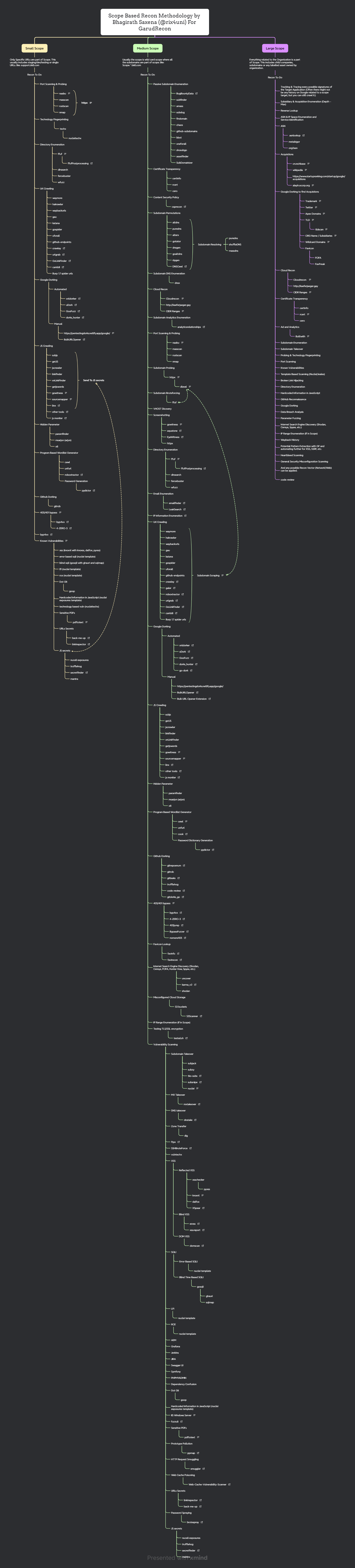
## 思维导图
_以不同格式查看思维导图 [mindmap](mindmap)_
标签:Bug Bounty, C2日志可视化, GitHub, LFI, RCE, XSS检测, 可自定义解析器, 子域名枚举, 实时处理, 密码管理, 应用安全, 开源安全工具, 指纹识别, 插件系统, 数据统计, 日志审计, 端口扫描, 系统安全, 网络安全, 自动化侦察, 请求拦截, 逆向工程平台, 隐私保护
