dmtrKovalenko/fff
GitHub: dmtrKovalenko/fff
一个以 Rust 为核心的常驻内存文件搜索库,通过索引缓存和频率排序为 AI 智能体和编辑器提供极速、容错的路径与内容搜索。
Stars: 9861 | Forks: 396

一个为人类和 AI 智能体设计的文件搜索工具包。速度极快。
容错的路径与内容搜索、基于访问频率排序的文件访问、后台监控器以及轻量级的内存内容索引。在任何需要多次搜索的长期运行进程中,它比 ripgrep 和 fzf 等 CLI 工具快得多。
最初是作为广受好评的 [Neovim 插件](#neovim-plugin) 起步的,但事实证明许多 AI 平台和代码编辑器都需要同样的东西:准确、快速的库级文件搜索。这正是 fff 的核心价值。
选择你感兴趣的部分:
MCP 服务器
兼容 Claude Code、Codex、OpenCode、Cursor、Cline 以及任何支持 MCP 的客户端。更少的 grep 往返次数,更少的上下文浪费,更快的响应速度。
### 一键安装
```
curl -L https://dmtrkovalenko.dev/install-fff-mcp.sh | bash
```
如果你想先查看源码,脚本位于 [`install-mcp.sh`](./install-mcp.sh)。
它会打印出适用于你客户端的具体配置说明。连接服务器后,要求智能体 "use fff",它就会自动加载 `ffgrep`、`fffind` 和 `fff-multi-grep` 工具。
### 推荐的智能体提示词
将以下内容放入你项目的 `CLAUDE.md` 或等效文件中:
```
For any file search or grep in the current git-indexed directory, use fff tools.
```
### 带来的改变
- 频率记忆。你实际打开过的文件下次排名会更高。通过 git 提交历史自动进行预热。
- 定义优先提示。看起来像代码定义的行会在 Rust 端进行分类,你的提示词中不会产生正则表达式开销。
- 智能大小写及自动模糊回退。`IsOffTheRecord` 能够找到 snake_case 变体;零匹配的查询会自动作为模糊搜索重试,并展示最佳的近似结果。
- 感知 Git 状态的标注。已修改、未跟踪和已暂存的文件会被打上标签,以便智能体能优先处理你正在更改的内容。
源码:[`crates/fff-mcp/`](./crates/fff-mcp/)。
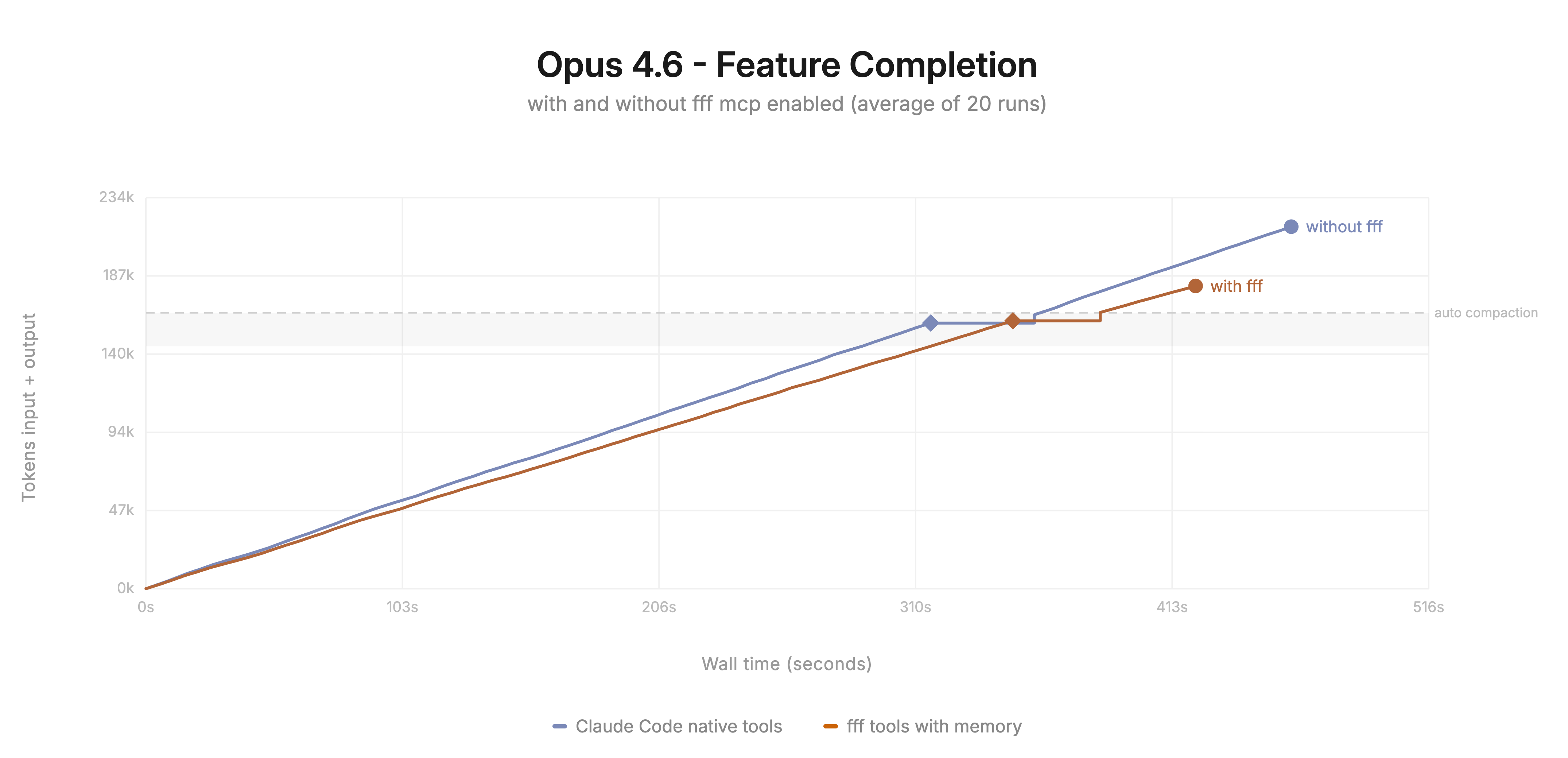
MCP 服务器为任何智能体提供了一个文件搜索工具,它比内置工具速度更快且消耗更少的 token。
Pi 智能体扩展
### 安装
```
pi install npm:@ff-labs/pi-fff
```
### 模式
三种操作模式,可在运行时通过 `/fff-mode` 切换:
| 模式 | 作用 |
| ------------------------ | --------------------------------------------------------------------------------- |
| `tools-and-ui` (默认) | 添加 `ffgrep` 和 `fffind` 工具,并用 FFF 替换 `@`-提及自动补全。 |
| `tools-only` | 仅注入工具。保留 pi 的原生编辑器自动补全。 |
| `override` | 用 FFF 的实现替换 pi 内置的 `grep`、`find` 和 `multi_grep`。 |
环境变量:`PI_FFF_MODE`、`FFF_FRECENCY_DB`、`FFF_HISTORY_DB`。命令行参数:`--fff-mode`、`--fff-frecency-db`、`--fff-history-db`。
### 面向智能体的工具
- `ffgrep`。内容搜索。接受 `path`、`exclude`(逗号、空格或数组;可选前导 `!`)、`caseSensitive`、`context` 和游标分页参数。自动检测正则表达式,在精确匹配为零时回退到模糊匹配,并直接拒绝 `.*` 样式的纯通配符模式。
- `fffind`。路径和文件名搜索。匹配整个仓库相对路径,而不仅仅是文件名。支持频率感知。弱匹配检测器会在零散的模糊噪音淹没智能体的上下文之前将其标记出来。
### 命令
- `/fff-mode [tools-and-ui | tools-only | override]`。显示或切换模式。
- `/fff-health`。选择器、频率记忆和 git 集成状态。
- `/fff-rescan`。强制重新扫描。
源码:[`packages/pi-fff/`](./packages/pi-fff/)。
Pi 扩展将 pi 的原生工具替换为 FFF 实现,并根据频率排名的索引为交互式编辑器的 `@`-提及自动补全提供数据。
Neovim 插件
在 Linux 内核仓库上的演示 (10万文件, 8GB):
https://github.com/user-attachments/assets/5d0e1ce9-642c-4c44-aa88-01b05bb86abb
### 安装
#### lazy.nvim
```
{
'dmtrKovalenko/fff.nvim',
build = function()
-- downloads a prebuilt binary or falls back to cargo build
require("fff.download").download_or_build_binary()
end,
-- for nixos:
-- build = "nix run .#release",
opts = {
debug = {
enabled = true,
show_scores = true,
},
},
lazy = false, -- the plugin lazy-initialises itself
keys = {
{ "ff", function() require('fff').find_files() end, desc = 'FFFind files' },
{ "fg", function() require('fff').live_grep() end, desc = 'LiFFFe grep' },
{ "fz",
function() require('fff').live_grep({ grep = { modes = { 'fuzzy', 'plain' } } }) end,
desc = 'Live fffuzy grep',
},
{ "fc",
function() require('fff').live_grep({ query = vim.fn.expand("") }) end,
desc = 'Search current word',
},
},
}
```
#### vim.pack
```
vim.pack.add({ 'https://github.com/dmtrKovalenko/fff.nvim' })
vim.api.nvim_create_autocmd('PackChanged', {
callback = function(ev)
local name, kind = ev.data.spec.name, ev.data.kind
if name == 'fff.nvim' and (kind == 'install' or kind == 'update') then
if not ev.data.active then vim.cmd.packadd('fff.nvim') end
require('fff.download').download_or_build_binary()
end
end,
})
vim.g.fff = {
lazy_sync = true,
debug = { enabled = true, show_scores = true },
}
vim.keymap.set('n', 'ff', function() require('fff').find_files() end, { desc = 'FFFind files' })
```
### 公共 API
```
require('fff').find_files() -- find files in current repo
require('fff').live_grep() -- live content grep
require('fff').scan_files() -- force rescan
require('fff').refresh_git_status() -- refresh git status
require('fff').find_files_in_dir(path) -- find in a specific dir
require('fff').change_indexing_directory(new_path) -- change root
```
### 命令
- `:FFFScan`。重新扫描文件。
- `:FFFRefreshGit`。刷新 git 状态。
- `:FFFClearCache [all|frecency|files]`。清除缓存。
- `:FFFHealth`。健康检查。
- `:FFFDebug [on|off|toggle]`。切换分数显示。
- `:FFFOpenLog`。打开 `~/.local/state/nvim/log/fff.log`。
### 配置
默认设置非常合理。只需覆盖你关心的部分。
```
require('fff').setup({
base_path = vim.fn.getcwd(),
prompt = '> ',
title = 'FFFiles',
max_results = 100,
max_threads = 4,
lazy_sync = true,
prompt_vim_mode = false,
layout = {
height = 0.8,
width = 0.8,
prompt_position = 'bottom', -- or 'top'
preview_position = 'right', -- 'left' | 'right' | 'top' | 'bottom'
preview_size = 0.5,
flex = { size = 130, wrap = 'top' },
show_scrollbar = true,
path_shorten_strategy = 'middle_number', -- 'middle_number' | 'middle' | 'end'
anchor = 'center',
},
preview = {
enabled = true,
max_size = 10 * 1024 * 1024,
chunk_size = 8192,
binary_file_threshold = 1024,
imagemagick_info_format_str = '%m: %wx%h, %[colorspace], %q-bit',
line_numbers = false,
cursorlineopt = 'both',
wrap_lines = false,
filetypes = {
svg = { wrap_lines = true },
markdown = { wrap_lines = true },
text = { wrap_lines = true },
},
},
keymaps = {
close = '',
select = '',
select_split = '',
select_vsplit = '',
select_tab = '',
move_up = { '', '' },
move_down = { '', '' },
preview_scroll_up = '',
preview_scroll_down = '',
toggle_debug = '',
cycle_grep_modes = '',
cycle_previous_query = '',
toggle_select = '',
send_to_quickfix = '',
focus_list = 'l',
focus_preview = 'p',
},
frecency = {
enabled = true,
db_path = vim.fn.stdpath('cache') .. '/fff_nvim',
},
history = {
enabled = true,
db_path = vim.fn.stdpath('data') .. '/fff_queries',
min_combo_count = 3,
combo_boost_score_multiplier = 100,
},
git = {
status_text_color = false, -- true to color filenames by git status
},
grep = {
max_file_size = 10 * 1024 * 1024,
max_matches_per_file = 100,
smart_case = true,
time_budget_ms = 150,
modes = { 'plain', 'regex', 'fuzzy' },
trim_whitespace = false,
},
debug = { enabled = false, show_scores = false },
logging = {
enabled = true,
log_file = vim.fn.stdpath('log') .. '/fff.log',
log_level = 'info',
},
})
```
### 实时 grep 模式
`` 在 `plain`、`regex` 和 `fuzzy` 之间循环。该列表可通过 `grep.modes` 配置,单模式设置将完全隐藏指示器。
单次调用覆盖:
```
require('fff').live_grep({ grep = { modes = { 'fuzzy', 'plain' } } })
require('fff').live_grep({ query = 'search term' }) -- pre-fill
```
### 约束条件
find 和 grep 都接受以下词元来细化查询:
- `git:modified`。可选值为 `modified`、`staged`、`deleted`、`renamed`、`untracked`、`ignored` 之一。
- `test/`。`test/` 的任何深层嵌套子级。
- `!something`、`!test/`、`!git:modified`。排除项。
- `./**/*.{rs,lua}`。任何有效的 glob,由 [zlob](https://github.com/dmtrKovalenko/zlob) 驱动。
仅限 Grep:
- `*.md`、`*.{c,h}`。扩展名过滤器。
- `src/main.rs`。在单个文件内 grep。
可自由组合:`git:modified src/**/*.rs !src/**/mod.rs user controller`。
### 多选与 quickfix
- ``。切换选择(在符号列中显示粗体 `▊`)。
- ``。将所选文件发送到 quickfix 列表并关闭选择器。
### Git 状态高亮
符号列指示器默认开启。要根据 git 状态为文件名文本着色,请设置 `git.status_text_color = true` 并调整 `hl.git_*` 组。完整列表请参见 `:help fff.nvim`。
### 文件过滤
FFF 遵循 `.gitignore`。对于不影响 git 的仅限选择器的忽略规则,请添加同级的 `.ignore` 文件:
```
*.md
docs/archive/**/*.md
```
运行 `:FFFScan` 以强制重新扫描。
### 故障排除
- `:FFFHealth` 验证选择器初始化、可选依赖项和数据库连接。
- `:FFFOpenLog` 打开日志文件。
最好的 neovim 文件搜索选择器,没有之一。速度更快,查询更直观,具备频率排名、定义分类以及更多功能。
Node 与 Bun SDK
```
npm install @ff-labs/fff-node
# 或者
bun add @ff-labs/fff-node
```
```
import { FileFinder } from "@ff-labs/fff-node";
const finder = FileFinder.create({ basePath: process.cwd(), aiMode: true });
if (!finder.ok) throw new Error(finder.error);
await finder.value.waitForScan(10_000);
const files = finder.value.fileSearch("incognito profile", { pageSize: 20 });
const hits = finder.value.grep("GetOffTheRecordProfile", {
mode: "plain",
smartCase: true,
beforeContext: 1,
afterContext: 1,
classifyDefinitions: true,
});
finder.value.destroy();
```
每个方法都返回一个 `Result`(`{ ok: true, value } | { ok: false, error }`)。完整类型参考:[`packages/fff-node/src/types.ts`](./packages/fff-node/src/types.ts)。
C 库的 TypeScript 封装,适用于 Node.js 和 Bun。可在 FFF 之上构建自定义的智能体工具、CLI 或 IDE 集成。
Rust Crate
### 添加依赖项
FFF 使用 Rust 编写,因此这是使用它开销最低的方式。
```
[dependencies]
fff-search = "0.6"
```
完整 API 文档:[docs.rs/fff-search](https://docs.rs/fff-search/latest/fff_search/)。
执行所有搜索的原生 Rust crate。稳定且文档齐全。
C 库
### 构建
```
# 仅构建 C cdylib (最快):
make build-c-lib
# 或者直接使用 cargo:
cargo build --release -p fff-c --features zlob
```
输出是一个 `cdylib`(`libfff_c.so` / `libfff_c.dylib` / `fff_c.dll`)。头文件位于 [`crates/fff-c/include/fff.h`](./crates/fff-c/include/fff.h)。
每个版本的预构建二进制文件(包括 main 分支上的每次提交)均可在[发布页](https://github.com/dmtrKovalenko/fff.nvim/releases)获取。相同的二进制文件也随 `@ff-labs/fff-bin-*` npm 包一起发布。
### 安装
```
# 系统级 (需要 sudo):
sudo make install
# 用户级,无需 sudo:
make install PREFIX=$HOME/.local
# 面向打包者的分阶段安装:
make install DESTDIR=/tmp/pkgroot PREFIX=/usr
```
将 `libfff_c.{so,dylib,dll}` 放入 `$(PREFIX)/lib`,将头文件放入 `$(PREFIX)/include/fff.h`。使用 `make uninstall` 移除,该命令遵循相同的 `PREFIX` 和 `DESTDIR`。
安装后进行链接:
```
cc my_app.c -lfff_c -o my_app
```
确保 `$(PREFIX)/lib` 位于你的运行时库搜索路径中(Linux 上是 `LD_LIBRARY_PATH`,macOS 上是 `DYLD_LIBRARY_PATH`,或是 `/etc/ld.so.conf.d/` 中的配置项)。
### 最小示例
```
#include
#include
int main(void) {
FffResult *res = fff_create_instance(
".", // base_path
"", // frecency_db_path (empty = default)
"", // history_db_path
false, // use_unsafe_no_lock
true, // enable_mmap_cache
true, // enable_content_indexing
true, // watch
false // ai_mode
);
if (!res->success) {
fprintf(stderr, "init failed: %s\n", res->error);
fff_free_result(res);
return 1;
}
void *handle = res->handle;
fff_free_result(res);
// Search
FffResult *search = fff_search(handle, "main.rs", "", 0, 0, 20, 100, 3);
// ... read FffSearchResult from search->handle, then fff_free_search_result()
fff_destroy(handle);
return 0;
}
```
### 注意事项
- 每个返回 `FffResult*` 的函数都使用 Rust 的 `Box` 进行分配。请使用 `fff_free_result` 释放,不要使用 malloc 的 free
- 负载(搜索结果、grep 结果、扫描进度)都有各自专用的释放函数,列在头文件中。
- 在 `handle` 字段中返回的 C 字符串(例如来自 `fff_get_base_path`)将使用 `fff_free_string` 释放。
源码:[`crates/fff-c/`](./crates/fff-c/)。
稳定的 C ABI。可通过 cgo 从 C/C++、Zig、Go 绑定,通过 ctypes 从 Python 绑定,或任何支持 C FFI 的语言进行绑定。
## 什么是 FFF,为什么比 ripgrep 或 fzf 更适合?
FFF 是一个文件搜索库,而不是一个 CLI。Ripgrep 和 fzf 是非常棒的工具,但它们是命令行程序:每次调用都会 fork 一个新进程,重新读取 `.gitignore`,重新统计目录,并在内存中重建所需的任何状态后才能响应。当你通过 shell 仅进行一次 grep 操作时,这没问题。但当编辑器或 AI 智能体需要在每个会话中运行数百次搜索时,这就很糟糕了。
FFF 将索引和文件缓存驻留在单个长期运行的进程中,并通过四个轻量级层公开相同的 Rust 核心:一个原生 crate(`fff-search`)、一个 C 库(`libfff_c`)、一个 Node/Bun SDK(`@ff-labs/fff-node`)和一个 MCP 服务器。你只需调用一次 `FileFinder.create()`,随后的每次搜索都会命中热内存。在一个包含 50 万个文件的 Chromium 检出库中,这相当于 ripgrep 每次启动耗时 3-9 **秒**与 FFF 每次查询耗时不到 10 毫秒之间的巨大差异。
模糊匹配算法比 fzf 的算法全面得多,它是**容错的**,并且我们提供了一种带有额外约束解析的查询语言用于预过滤,例如,"*.rs !test/ shcema" 对 fff 来说是完全有效的查询,但即使 "shcema" 中只有一个拼写错误,fzf 也什么都找不到。
### 为什么编程式 API 至关重要
- 无需进程创建。每次调用都在进程内进行,避免了在短暂的 `rg` 调用中占据大部分开销的 fork、exec、argv 解析和标准输出管道设置。
- 仅进行一次 FS 遍历、元数据收集和 `.gitignore` 解析。忽略遍历器在扫描时运行一次,其结果会在每次搜索中复用。
- 结果作为类型化对象返回,而不是你必须重新解析的文本。SDK 直接向你提供 `{ relativePath, lineNumber, lineContent, gitStatus, totalFrecencyScore, isDefinition, ... }`。
- 可跨调用保持的游标分页。Ripgrep 没有“这些匹配结果的第 2 页”的概念;FFF 有。
- 长期运行的进程可以实现一次性 CLI 无法应用的优化:热缓存、增量重新索引、跨查询频率和共享 SIMD 状态。
### 核心的实际作用
- **频率排序的模糊匹配。** 每个索引文件都带有访问分数和修改分数。搜索会将你最近和经常打开的文件排在冷门结果之上。这与 VS Code 的“最近打开”列表的理念相同,但应用到了每一个搜索结果中,而不仅仅是一个侧边栏。
- **针对路径和内容的错匹配。** Smith-Waterman 模糊评分可应用于 grep 路径;路径搜索使用 SIMD 加速的模糊匹配(通过衍生自 [`frizbee`](https://github.com/saghm/frizbee) 的核心),能够容忍字符丢失和重排。
- **具有三种模式的内容 grep。** 纯文本(SIMD memmem)、正则表达式(Rust `regex` crate)和模糊匹配(每行的 Smith-Waterman)。从模式自动检测使用哪种模式,当纯文本搜索返回零匹配时回退为模糊搜索。
- **多模式 OR 搜索。** SIMD Aho-Corasick 算法用于“一次查找这 20 个标识符中的任何一个”,这比正则表达式替换更快,也比运行 20 次单独的 ripgrep 快得多。
- **后台文件监控器。** 索引随着文件的改变而更新。你永远不需要在关键路径上为重新扫描付出代价。
- **感知 Git 状态。** 已修改、已暂存、未跟踪和被忽略的状态会被缓存并随每个结果返回,因此调用者无需启动 git 子进程即可对其进行排序或过滤。监控器直接与 libgit2 通信,而不是启动 `git` CLI。
- **定义分类器。** Rust 端的字节级扫描器会为以 `struct`、`fn`、`class`、`def`、`impl` 等开头的行打上标签。
### 重要的性能选择
- 高效的内存分配器和内存分配策略(见下一段)。默认使用 `mimalloc`
- 并行的多线程搜索管道,不受编排逻辑的干扰
- SIMD 优先的算法。高效且无分配的排序。
- 针对 FS 的特定平台优化([getdents64](https://linux.die.net/man/2/getdents64)、Windows 上的 NTFS api 等)
- 轻量级的动态内容索引,可用于实时甚至是容错的 grep
- 内存映射的内容缓存。我们将一些文件存储在虚拟内存中(数量有限制)
- 单一连续的内存池存储字符串块。显著减少了需要处理的内存量,并大幅提高了 CPU 缓存命中率。
### 内存分配
是的,fff 基本上比调用单个子进程需要更多的内存。这是速度提升的主要来源。在实践中,作为 Neovim 最受欢迎的文件搜索选择器之一,[fff 最终消耗的 RAM 比密集调用一系列 ripgrep 要少](https://x.com/neogoose_btw/status/2041606853155811442)。
FFF 还保留了一个内容索引,每个索引文件大约 360 字节,因此对于 10 万个文件的仓库大约是 36 MB。并非每个文件都会被索引——二进制文件、超大文件以及任何不适合 grep 的文件都会被跳过。如果连这点占用都嫌多,索引可以由内存映射文件支持,而不是匿名 RAM。
### 这在实践中意味着什么
如果你正在构建一个智能体、一个 IDE 扩展、一个预提交检查工具,或任何需要对同一仓库进行多次搜索的长期运行工具,将 FFF 作为库调用比通过 shell 调用 ripgrep 的成本低得多。权衡之处在于实际的内存消耗:FFF 将索引保留在 RAM 中,并作为热内容缓存。在一个包含 1.4 万个文件的仓库中,这大约占用 26 MB 常驻内存。在像 Chromium 这样包含 50 万个文件的仓库中,预计需要几百 MB。作为交换,每一次搜索都会被赋予 git 状态、频率排名、文件元数据、上次访问和编辑的时间戳等信息。
如果你只是在终端中运行一次 grep,`rg` 仍然是正确的工具。如果你在同一个进程中运行数十次 grep,FFF 从第二次调用开始就能回本。如果你从事 AI 智能体开发,fff 将在你的 AI 有机会调用它之前就完成准备工作。
### 横向对比
- **ripgrep**:FFF 使用了相同的底层正则表达式引擎以及更高级的纯文本匹配算法。存储内容索引和文件树。在重复搜索工作负载上取得完胜。在“通过 bash grep 一次就退出”的场景下则有所不如。
- **fzf**:FFF 的路径搜索像 fzf 一样是模糊的,但它同时也具备频率感知和 git 感知能力,并附带了一个容错性更强的算法。fzf 是一个纯粹的匹配-过滤工具;FFF 会根据你实际打开文件的频率对结果进行排名。
- **Telescope / fzf-lua / snacks.picker**:FFF 提供了自己的 Neovim 选择器,其排名机制与 MCP 服务器和 SDK 所使用的相同。选择器是可选的;核心是一样的。
- **Tantivy 或其他全文搜索引擎**:不同类别的工具。Tantivy 为大规模的查询时评分索引文档。FFF 的范围仅限于单个仓库,并针对 10 毫秒以下的响应进行了优化。它不会在磁盘上持久化倒排索引。
## 仓库布局
- `crates/fff-search`、`crates/fff-grep`、`crates/fff-query-parser` - Rust 核心。
- `crates/fff-c` - 每种语言绑定都用到的 C FFI。
- `crates/fff-nvim` - 用于 Neovim 插件的 Lua/mlua 绑定。
- `crates/fff-mcp` - MCP 服务器二进制文件。
- `packages/fff-node` - Node.js SDK (`@ff-labs/fff-node`)。
- `packages/fff-bun` - Bun SDK (`@ff-labs/fff-node`)。
- `packages/pi-fff` - pi 扩展 (`@ff-labs/pi-fff`)。
- `lua/` - Neovim 端的插件代码。
## 贡献
欢迎提交 Bug 报告和拉取请求。也欢迎使用智能体编程工具,但必须经过人工审查。
## 许可证
[MIT](./LICENSE) & 永远开源。
标签:AI Agent 工具, CLI 工具, C 语言, Frecency, fzf 替代, Git 感知, MCP Server, MITM代理, Neovim 插件, NodeJS, ripgrep 替代, Rust, 上下文优化, 代码搜索工具, 代码编辑器, 全文索引, 内存索引, 内容检索, 可视化界面, 威胁情报, 开发者工具, 文件搜索, 模糊搜索, 网络流量审计, 通知系统, 高效检索, 高频访问排序