OpenAI Harmony
OpenAI's response format for its open-weight model series gpt-oss
Try gpt-oss | Learn more | Model card
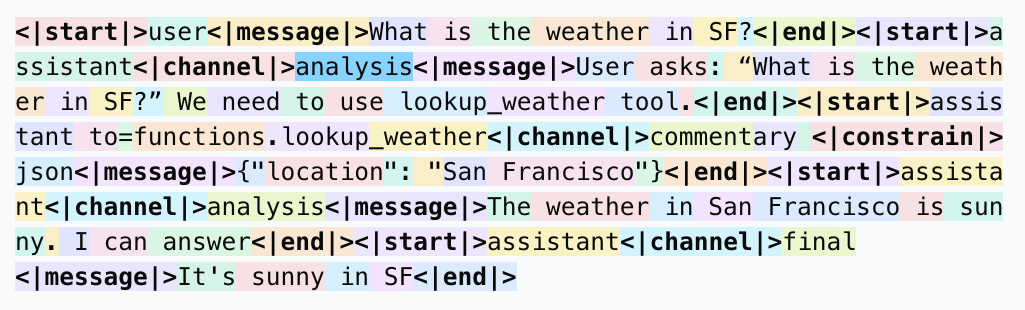
[gpt-oss 模型][gpt-oss] 基于用于定义对话结构、生成推理输出以及构建函数调用的 [harmony 响应格式][harmony-format] 进行了训练。如果你不是直接使用 gpt-oss,而是通过 API 或 HuggingFace、Ollama 或 vLLM 等提供商进行使用,你无需关注这些,因为你的推理解决方案会自动处理格式问题。如果你正在构建自己的推理解决方案,本指南将引导你了解该 prompt 格式。该格式旨在模仿 OpenAI Responses API,因此如果你之前使用过该 API,这种格式应该会让你感到熟悉。gpt-oss 必须在配合 harmony 格式的情况下使用,否则无法正常工作。
该格式使模型能够输出到多个不同的通道,用于进行思维链 (chain of thought)、工具调用前导指令以及常规响应。它还允许指定各种工具命名空间和结构化输出,并具备清晰的指令层级。[查看指南][harmony-format] 以了解有关该格式本身的更多信息。
```
<|start|>system<|message|>You are ChatGPT, a large language model trained by OpenAI.
Knowledge cutoff: 2024-06
Current date: 2025-06-28
Reasoning: high
# Valid channels: analysis, commentary, final. Channel must be included for every message.
Calls to these tools must go to the commentary channel: 'functions'.<|end|>
<|start|>developer<|message|># Instructions
Always respond in riddles
# Tools
## functions
namespace functions {
// Gets the location of the user.
type get_location = () => any;
// Gets the current weather in the provided location.
type get_current_weather = (_: {
// The city and state, e.g. San Francisco, CA
location: string,
format?: "celsius" | "fahrenheit", // default: celsius
}) => any;
} // namespace functions<|end|><|start|>user<|message|>What is the weather like in SF?<|end|><|start|>assistant
```
在使用采用 [harmony 响应格式][harmony-format] 的模型时,我们推荐使用此库
- **一致的格式化** – 用于渲染_和_解析的共享实现确保了 token 序列的无损转换。
- **极快的速度** – 繁重的处理工作在 Rust 中完成。
- **一流的 Python 支持** – 通过 `pip` 安装,包含类型 stub,与 Rust 测试套件保持 100% 的一致性。
## 使用 Harmony
### Python
[查看完整文档](./docs/python.md)
#### 安装说明
运行以下命令从 PyPI 安装该软件包
```
pip install openai-harmony
# or if you are using uv
uv pip install openai-harmony
```
#### 示例
```
from openai_harmony import (
load_harmony_encoding,
HarmonyEncodingName,
Role,
Message,
Conversation,
DeveloperContent,
SystemContent,
)
enc = load_harmony_encoding(HarmonyEncodingName.HARMONY_GPT_OSS)
convo = Conversation.from_messages([
Message.from_role_and_content(
Role.SYSTEM,
SystemContent.new(),
),
Message.from_role_and_content(
Role.DEVELOPER,
DeveloperContent.new().with_instructions("Talk like a pirate!")
),
Message.from_role_and_content(Role.USER, "Arrr, how be you?"),
])
tokens = enc.render_conversation_for_completion(convo, Role.ASSISTANT)
print(tokens)
# Later, after the model responded …
parsed = enc.parse_messages_from_completion_tokens(tokens, role=Role.ASSISTANT)
print(parsed)
```
### Rust
[查看完整文档](./docs/rust.md)
#### 安装说明
将依赖项添加到你的 `Cargo.toml` 中
```
[dependencies]
openai-harmony = { git = "https://github.com/openai/harmony" }
```
#### 示例
```
use openai_harmony::chat::{Message, Role, Conversation};
use openai_harmony::{HarmonyEncodingName, load_harmony_encoding};
fn main() -> anyhow::Result<()> {
let enc = load_harmony_encoding(HarmonyEncodingName::HarmonyGptOss)?;
let convo =
Conversation::from_messages([Message::from_role_and_content(Role::User, "Hello there!")]);
let tokens = enc.render_conversation_for_completion(&convo, Role::Assistant, None)?;
println!("{:?}", tokens);
Ok(())
}
```
### 仓库布局
```
.
├── src/ # Rust crate
│ ├── chat.rs # High-level data-structures (Role, Message, …)
│ ├── encoding.rs # Rendering & parsing implementation
│ ├── registry.rs # Built-in encodings
│ ├── tests.rs # Canonical Rust test-suite
│ └── py_module.rs # PyO3 bindings ⇒ compiled as openai_harmony.*.so
│
├── python/openai_harmony/ # Pure-Python wrapper around the binding
│ └── __init__.py # Dataclasses + helper API mirroring chat.rs
│
├── tests/ # Python test-suite (1-to-1 port of tests.rs)
├── Cargo.toml # Rust package manifest
├── pyproject.toml # Python build configuration for maturin
└── README.md # You are here 🖖
```
### 本地开发
#### 前置条件
- Rust 工具链 (稳定版) –
- Python ≥ 3.8 + virtualenv/venv
- [`maturin`](https://github.com/PyO3/maturin) – PyO3 项目的构建工具
#### 1. 克隆与初始化
```
git clone https://github.com/openai/harmony.git
cd harmony
# Create & activate a virtualenv
python -m venv .venv
source .venv/bin/activate
# Install maturin and test dependencies
pip install maturin pytest mypy ruff # tailor to your workflow
# Compile the Rust crate *and* install the Python package in editable mode
maturin develop --release
```
`maturin develop` 会使用 Cargo 构建 _harmony_,生成一个原生扩展
(`openai_harmony..so`) 并将其放置在你的 virtualenv 中,位于纯
Python 包装器旁边 – 类似于纯 Python 项目中的 `pip install -e .`。
#### 2. 运行测试套件
Rust:
```
cargo test # runs src/tests.rs
```
Python:
```
pytest # executes tests/ (mirrors the Rust suite)
```
一次性运行两者以确保一致性:
```
pytest && cargo test
```
#### 3. 类型检查与格式化(可选)
```
mypy harmony # static type analysis
ruff check . # linting
cargo fmt --all # Rust formatter
```