NevaMind-AI/memU
GitHub: NevaMind-AI/memU
memU 是一个为 7x24 小时长期运行 AI Agent 设计的主动记忆框架,能持续捕捉用户意图、预测需求并自主行动,同时显著降低 token 成本。
Stars: 13861 | Forks: 1036

 **[memU Bot](https://github.com/NevaMind-AI/memUBot)** —— 现已开源。企业级可用的 OpenClaw。你的能记住一切的主动 AI 助手。
- **下载即用,简单上手**(一键安装,< 3 分钟)。
- 建立长期记忆以**理解用户意图**并主动行动(7x24 小时)。
- 通过更小的上下文**节省 LLM token 成本**(约为同类用量的 1/10)。
立即体验:[memu.bot](https://memu.bot) · 源码:[GitHub 上的 memUBot](https://github.com/NevaMind-AI/memUBot)
## 🗃️ 记忆即文件系统,文件系统即记忆
memU 将**记忆视为文件系统**——结构化、层级化、即时可访问。
| 文件系统 | memU 记忆 |
|-------------|-------------|
| 📁 文件夹 | 🏷️ 分类(自动整理的主题) |
| 📄 文件 | 🧠 记忆项(提取的事实、偏好、技能) |
| 🔗 符号链接 | 🔄 交叉引用(相关记忆的链接) |
| 📂 挂载点 | 📥 资源(对话、文档、图片) |
**重要性:**
- **浏览记忆** 就像浏览目录——从宽泛的分类下钻到具体事实
- **即时挂载新知识**——对话和文档变为可查询的记忆
- **交叉链接一切**——记忆之间相互引用,构建连接的知识图谱
- **持久且可移植**——像文件一样导出、备份和传输记忆
```
memory/
├── preferences/
│ ├── communication_style.md
│ └── topic_interests.md
├── relationships/
│ ├── contacts/
│ └── interaction_history/
├── knowledge/
│ ├── domain_expertise/
│ └── learned_skills/
└── context/
├── recent_conversations/
└── pending_tasks/
```
正如文件系统将原始字节转化为有组织的数据,memU 将原始交互转化为**结构化、可搜索、主动的智能**。
## ✨ 核心功能
## | 能力 | 描述 |
|------------|-------------|
| 🤖 **7x24 小时主动 Agent** | 始终在线的记忆 agent,在后台持续工作——从不休眠,从不遗忘 |
| 🎯 **用户意图捕捉** | 自动理解并记住用户目标、偏好和跨会话上下文 |
| 💰 **成本高效** | 通过缓存洞察和避免冗余 LLM 调用来降低长期运行的 token 成本 |
## 🔄 主动记忆工作原理
```
cd examples/proactive
python proactive.py
```
### 主动记忆生命周期
```
┌──────────────────────────────────────────────────────────────────────────────────────────────────┐
│ USER QUERY │
└──────────────────────────────────────────────────────────────────────────────────────────────────┘
│ │
▼ ▼
┌────────────────────────────────────────┐ ┌────────────────────────────────────────────────┐
│ 🤖 MAIN AGENT │ │ 🧠 MEMU BOT │
│ │ │ │
│ Handle user queries & execute tasks │ ◄───► │ Monitor, memorize & proactive intelligence │
├────────────────────────────────────────┤ ├────────────────────────────────────────────────┤
│ │ │ │
│ ┌──────────────────────────────────┐ │ │ ┌──────────────────────────────────────────┐ │
│ │ 1. RECEIVE USER INPUT │ │ │ │ 1. MONITOR INPUT/OUTPUT │ │
│ │ Parse query, understand │ │ ───► │ │ Observe agent interactions │ │
│ │ context and intent │ │ │ │ Track conversation flow │ │
│ └──────────────────────────────────┘ │ │ └──────────────────────────────────────────┘ │
│ │ │ │ │ │
│ ▼ │ │ ▼ │
│ ┌──────────────────────────────────┐ │ │ ┌──────────────────────────────────────────┐ │
│ │ 2. PLAN & EXECUTE │ │ │ │ 2. MEMORIZE & EXTRACT │ │
│ │ Break down tasks │ │ ◄─── │ │ Store insights, facts, preferences │ │
│ │ Call tools, retrieve data │ │ inject │ │ Extract skills & knowledge │ │
│ │ Generate responses │ │ memory │ │ Update user profile │ │
│ └──────────────────────────────────┘ │ │ └──────────────────────────────────────────┘ │
│ │ │ │ │ │
│ ▼ │ │ ▼ │
│ ┌──────────────────────────────────┐ │ │ ┌──────────────────────────────────────────┐ │
│ │ 3. RESPOND TO USER │ │ │ │ 3. PREDICT USER INTENT │ │
│ │ Deliver answer/result │ │ ───► │ │ Anticipate next steps │ │
│ │ Continue conversation │ │ │ │ Identify upcoming needs │ │
│ └──────────────────────────────────┘ │ │ └──────────────────────────────────────────┘ │
│ │ │ │ │ │
│ ▼ │ │ ▼ │
│ ┌──────────────────────────────────┐ │ │ ┌──────────────────────────────────────────┐ │
│ │ 4. LOOP │ │ │ │ 4. RUN PROACTIVE TASKS │ │
│ │ Wait for next user input │ │ ◄─── │ │ Pre-fetch relevant context │ │
│ │ or proactive suggestions │ │ suggest│ │ Prepare recommendations │ │
│ └──────────────────────────────────┘ │ │ │ Update todolist autonomously │ │
│ │ │ └──────────────────────────────────────────┘ │
└────────────────────────────────────────┘ └────────────────────────────────────────────────┘
│ │
└───────────────────────────┬───────────────────────────────┘
▼
┌──────────────────────────────┐
│ CONTINUOUS SYNC LOOP │
│ Agent ◄──► MemU Bot ◄──► DB │
└──────────────────────────────┘
```
## 🎯 主动应用场景
### 1. **信息推荐**
*Agent 监控兴趣并主动呈现相关内容*
```
# 用户一直在研究 AI 主题
MemU tracks: reading history, saved articles, search queries
# 当新内容到达时:
Agent: "I found 3 new papers on RAG optimization that align with
your recent research on retrieval systems. One author
(Dr. Chen) you've cited before published yesterday."
# 主动行为:
- Learns topic preferences from browsing patterns
- Tracks author/source credibility preferences
- Filters noise based on engagement history
- Times recommendations for optimal attention
```
### 2. **邮件管理**
*Agent 学习沟通模式并处理日常通信*
```
# MemU 随时间观察邮件模式:
- Response templates for common scenarios
- Priority contacts and urgent keywords
- Scheduling preferences and availability
- Writing style and tone variations
# 主动邮件协助:
Agent: "You have 12 new emails. I've drafted responses for 3 routine
requests and flagged 2 urgent items from your priority contacts.
Should I also reschedule tomorrow's meeting based on the
conflict John mentioned?"
# 自主行动:
✓ Draft context-aware replies
✓ Categorize and prioritize inbox
✓ Detect scheduling conflicts
✓ Summarize long threads with key decisions
```
### 3. **交易与金融监控**
*Agent 跟踪市场背景和用户投资行为*
```
# MemU 学习交易偏好:
- Risk tolerance from historical decisions
- Preferred sectors and asset classes
- Response patterns to market events
- Portfolio rebalancing triggers
# 主动警报:
Agent: "NVDA dropped 5% in after-hours trading. Based on your past
behavior, you typically buy tech dips above 3%. Your current
allocation allows for $2,000 additional exposure while
maintaining your 70/30 equity-bond target."
# 持续监控:
- Track price alerts tied to user-defined thresholds
- Correlate news events with portfolio impact
- Learn from executed vs. ignored recommendations
- Anticipate tax-loss harvesting opportunities
```
...
## 🗂️ 分层记忆架构
MemU 的三层系统同时支持**被动查询**和**主动上下文加载**:
**[memU Bot](https://github.com/NevaMind-AI/memUBot)** —— 现已开源。企业级可用的 OpenClaw。你的能记住一切的主动 AI 助手。
- **下载即用,简单上手**(一键安装,< 3 分钟)。
- 建立长期记忆以**理解用户意图**并主动行动(7x24 小时)。
- 通过更小的上下文**节省 LLM token 成本**(约为同类用量的 1/10)。
立即体验:[memu.bot](https://memu.bot) · 源码:[GitHub 上的 memUBot](https://github.com/NevaMind-AI/memUBot)
## 🗃️ 记忆即文件系统,文件系统即记忆
memU 将**记忆视为文件系统**——结构化、层级化、即时可访问。
| 文件系统 | memU 记忆 |
|-------------|-------------|
| 📁 文件夹 | 🏷️ 分类(自动整理的主题) |
| 📄 文件 | 🧠 记忆项(提取的事实、偏好、技能) |
| 🔗 符号链接 | 🔄 交叉引用(相关记忆的链接) |
| 📂 挂载点 | 📥 资源(对话、文档、图片) |
**重要性:**
- **浏览记忆** 就像浏览目录——从宽泛的分类下钻到具体事实
- **即时挂载新知识**——对话和文档变为可查询的记忆
- **交叉链接一切**——记忆之间相互引用,构建连接的知识图谱
- **持久且可移植**——像文件一样导出、备份和传输记忆
```
memory/
├── preferences/
│ ├── communication_style.md
│ └── topic_interests.md
├── relationships/
│ ├── contacts/
│ └── interaction_history/
├── knowledge/
│ ├── domain_expertise/
│ └── learned_skills/
└── context/
├── recent_conversations/
└── pending_tasks/
```
正如文件系统将原始字节转化为有组织的数据,memU 将原始交互转化为**结构化、可搜索、主动的智能**。
## ✨ 核心功能
## | 能力 | 描述 |
|------------|-------------|
| 🤖 **7x24 小时主动 Agent** | 始终在线的记忆 agent,在后台持续工作——从不休眠,从不遗忘 |
| 🎯 **用户意图捕捉** | 自动理解并记住用户目标、偏好和跨会话上下文 |
| 💰 **成本高效** | 通过缓存洞察和避免冗余 LLM 调用来降低长期运行的 token 成本 |
## 🔄 主动记忆工作原理
```
cd examples/proactive
python proactive.py
```
### 主动记忆生命周期
```
┌──────────────────────────────────────────────────────────────────────────────────────────────────┐
│ USER QUERY │
└──────────────────────────────────────────────────────────────────────────────────────────────────┘
│ │
▼ ▼
┌────────────────────────────────────────┐ ┌────────────────────────────────────────────────┐
│ 🤖 MAIN AGENT │ │ 🧠 MEMU BOT │
│ │ │ │
│ Handle user queries & execute tasks │ ◄───► │ Monitor, memorize & proactive intelligence │
├────────────────────────────────────────┤ ├────────────────────────────────────────────────┤
│ │ │ │
│ ┌──────────────────────────────────┐ │ │ ┌──────────────────────────────────────────┐ │
│ │ 1. RECEIVE USER INPUT │ │ │ │ 1. MONITOR INPUT/OUTPUT │ │
│ │ Parse query, understand │ │ ───► │ │ Observe agent interactions │ │
│ │ context and intent │ │ │ │ Track conversation flow │ │
│ └──────────────────────────────────┘ │ │ └──────────────────────────────────────────┘ │
│ │ │ │ │ │
│ ▼ │ │ ▼ │
│ ┌──────────────────────────────────┐ │ │ ┌──────────────────────────────────────────┐ │
│ │ 2. PLAN & EXECUTE │ │ │ │ 2. MEMORIZE & EXTRACT │ │
│ │ Break down tasks │ │ ◄─── │ │ Store insights, facts, preferences │ │
│ │ Call tools, retrieve data │ │ inject │ │ Extract skills & knowledge │ │
│ │ Generate responses │ │ memory │ │ Update user profile │ │
│ └──────────────────────────────────┘ │ │ └──────────────────────────────────────────┘ │
│ │ │ │ │ │
│ ▼ │ │ ▼ │
│ ┌──────────────────────────────────┐ │ │ ┌──────────────────────────────────────────┐ │
│ │ 3. RESPOND TO USER │ │ │ │ 3. PREDICT USER INTENT │ │
│ │ Deliver answer/result │ │ ───► │ │ Anticipate next steps │ │
│ │ Continue conversation │ │ │ │ Identify upcoming needs │ │
│ └──────────────────────────────────┘ │ │ └──────────────────────────────────────────┘ │
│ │ │ │ │ │
│ ▼ │ │ ▼ │
│ ┌──────────────────────────────────┐ │ │ ┌──────────────────────────────────────────┐ │
│ │ 4. LOOP │ │ │ │ 4. RUN PROACTIVE TASKS │ │
│ │ Wait for next user input │ │ ◄─── │ │ Pre-fetch relevant context │ │
│ │ or proactive suggestions │ │ suggest│ │ Prepare recommendations │ │
│ └──────────────────────────────────┘ │ │ │ Update todolist autonomously │ │
│ │ │ └──────────────────────────────────────────┘ │
└────────────────────────────────────────┘ └────────────────────────────────────────────────┘
│ │
└───────────────────────────┬───────────────────────────────┘
▼
┌──────────────────────────────┐
│ CONTINUOUS SYNC LOOP │
│ Agent ◄──► MemU Bot ◄──► DB │
└──────────────────────────────┘
```
## 🎯 主动应用场景
### 1. **信息推荐**
*Agent 监控兴趣并主动呈现相关内容*
```
# 用户一直在研究 AI 主题
MemU tracks: reading history, saved articles, search queries
# 当新内容到达时:
Agent: "I found 3 new papers on RAG optimization that align with
your recent research on retrieval systems. One author
(Dr. Chen) you've cited before published yesterday."
# 主动行为:
- Learns topic preferences from browsing patterns
- Tracks author/source credibility preferences
- Filters noise based on engagement history
- Times recommendations for optimal attention
```
### 2. **邮件管理**
*Agent 学习沟通模式并处理日常通信*
```
# MemU 随时间观察邮件模式:
- Response templates for common scenarios
- Priority contacts and urgent keywords
- Scheduling preferences and availability
- Writing style and tone variations
# 主动邮件协助:
Agent: "You have 12 new emails. I've drafted responses for 3 routine
requests and flagged 2 urgent items from your priority contacts.
Should I also reschedule tomorrow's meeting based on the
conflict John mentioned?"
# 自主行动:
✓ Draft context-aware replies
✓ Categorize and prioritize inbox
✓ Detect scheduling conflicts
✓ Summarize long threads with key decisions
```
### 3. **交易与金融监控**
*Agent 跟踪市场背景和用户投资行为*
```
# MemU 学习交易偏好:
- Risk tolerance from historical decisions
- Preferred sectors and asset classes
- Response patterns to market events
- Portfolio rebalancing triggers
# 主动警报:
Agent: "NVDA dropped 5% in after-hours trading. Based on your past
behavior, you typically buy tech dips above 3%. Your current
allocation allows for $2,000 additional exposure while
maintaining your 70/30 equity-bond target."
# 持续监控:
- Track price alerts tied to user-defined thresholds
- Correlate news events with portfolio impact
- Learn from executed vs. ignored recommendations
- Anticipate tax-loss harvesting opportunities
```
...
## 🗂️ 分层记忆架构
MemU 的三层系统同时支持**被动查询**和**主动上下文加载**:
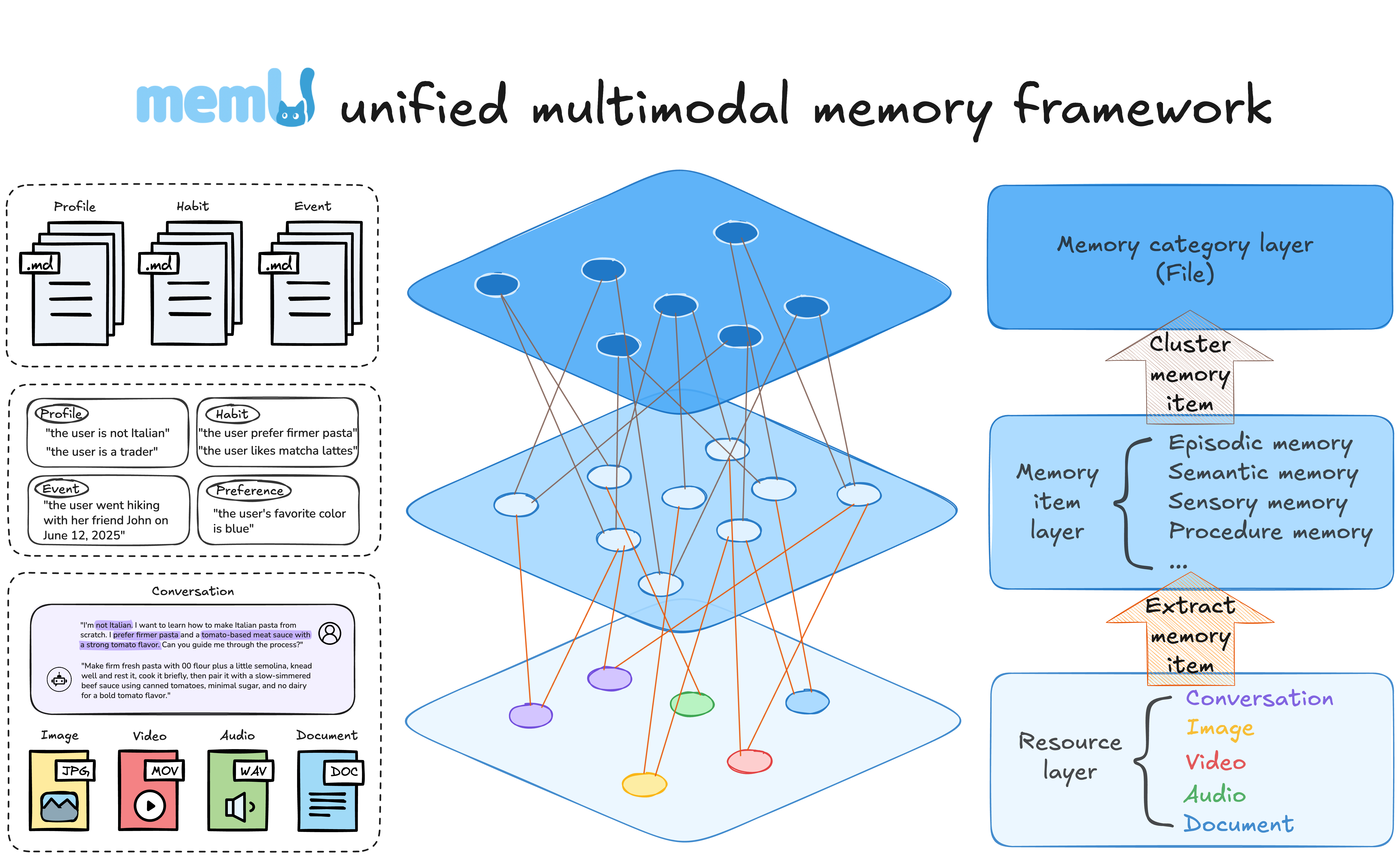 | 层级 | 被动用途 | 主动用途 |
|-------|--------------|---------------|
| **Resource** | 直接访问原始数据 | 后台监控新模式 |
| **Item** | 针对性事实检索 | 从持续交互中实时提取 |
| **Category** | 摘要级概览 | 自动组装上下文以进行预判 |
**主动优势:**
- **自动分类**:新记忆自动归类到主题中
- **模式检测**:系统识别重复出现的主题
- **上下文预测**:预判接下来需要哪些信息
## 🚀 快速开始
### 选项 1:云端版
即时体验主动记忆:
👉 **[memu.so](https://memu.so)** - 7x24 持续学习的托管服务
如需具有自定义主动工作流的企业部署,请联系 **info@nevamind.ai**
#### Cloud API (v3)
| Base URL | `https://api.memu.so` |
|----------|----------------------|
| Auth | `Authorization: Bearer YOUR_API_KEY` |
| Method | Endpoint | Description |
|--------|----------|-------------|
| `POST` | `/api/v3/memory/memorize` | 注册持续学习任务 |
| `GET` | `/api/v3/memory/memorize/status/{task_id}` | 检查实时处理状态 |
| `POST` | `/api/v3/memory/categories` | 列出自动生成的分类 |
| `POST` | `/api/v3/memory/retrieve` | 查询记忆(支持主动上下文加载) |
📚 **[完整 API 文档](https://memu.pro/docs#cloud-version)**
### 选项 2:自托管
#### 安装
```
pip install -e .
```
#### 基础示例
**测试持续学习**(内存模式):
```
export OPENAI_API_KEY=your_api_key
cd tests
python test_inmemory.py
```
**测试持久化存储**(PostgreSQL):
```
# 启动带 pgvector 的 PostgreSQL
docker run -d \
--name memu-postgres \
-e POSTGRES_USER=postgres \
-e POSTGRES_PASSWORD=postgres \
-e POSTGRES_DB=memu \
-p 5432:5432 \
pgvector/pgvector:pg16
# 运行持续学习测试
export OPENAI_API_KEY=your_api_key
cd tests
python test_postgres.py
```
这两个示例都展示了**主动记忆工作流**:
1. **持续摄入**:按顺序处理多个文件
2. **自动提取**:立即创建记忆
3. **主动检索**:感知上下文的记忆浮现
详见 [`tests/test_inmemory.py`](tests/test_inmemory.py) 和 [`tests/test_postgres.py`](tests/test_postgres.py)。
### 自定义 LLM 和 Embedding 提供商
MemU 支持除 OpenAI 之外的自定义 LLM 和 embedding 提供商。通过 `llm_profiles` 进行配置:
```
from memu import MemUService
service = MemUService(
llm_profiles={
# Default profile for LLM operations
"default": {
"base_url": "https://dashscope.aliyuncs.com/compatible-mode/v1",
"api_key": "your_api_key",
"chat_model": "qwen3-max",
"client_backend": "sdk" # "sdk" or "http"
},
# Separate profile for embeddings
"embedding": {
"base_url": "https://api.voyageai.com/v1",
"api_key": "your_voyage_api_key",
"embed_model": "voyage-3.5-lite"
}
},
# ... other configuration
)
```
### OpenRouter 集成
MemU 支持 [OpenRouter](https://openrouter.ai) 作为模型提供商,让你通过单一 API 访问多个 LLM 提供商。
#### 配置
```
from memu import MemoryService
service = MemoryService(
llm_profiles={
"default": {
"provider": "openrouter",
"client_backend": "httpx",
"base_url": "https://openrouter.ai",
"api_key": "your_openrouter_api_key",
"chat_model": "anthropic/claude-3.5-sonnet", # Any OpenRouter model
"embed_model": "openai/text-embedding-3-small", # Embedding model
},
},
database_config={
"metadata_store": {"provider": "inmemory"},
},
)
```
#### 环境变量
| 变量 | 描述 |
|----------|-------------|
| `OPENROUTER_API_KEY` | 你在 [openrouter.ai/keys](https://openrouter.ai/keys) 获取的 OpenRouter API key |
#### 支持的功能
| 功能 | 状态 | 备注 |
|---------|--------|-------|
| Chat Completions | 支持 | 适用于任何 OpenRouter chat 模型 |
| Embeddings | 支持 | 通过 OpenRouter 使用 OpenAI embedding 模型 |
| Vision | 支持 | 使用具备视觉能力的模型(如 `openai/gpt-4o`) |
#### 运行 OpenRouter 测试
```
export OPENROUTER_API_KEY=your_api_key
# 完整工作流测试(记忆 + 检索)
python tests/test_openrouter.py
# Embedding 专项测试
python tests/test_openrouter_embedding.py
# Vision 专项测试
python tests/test_openrouter_vision.py
```
完整示例见 [`examples/example_4_openrouter_memory.py`](examples/example_4_openrouter_memory.py)。
## 📖 核心 API
### `memorize()` - 持续学习流水线
实时处理输入并立即更新记忆:
| 层级 | 被动用途 | 主动用途 |
|-------|--------------|---------------|
| **Resource** | 直接访问原始数据 | 后台监控新模式 |
| **Item** | 针对性事实检索 | 从持续交互中实时提取 |
| **Category** | 摘要级概览 | 自动组装上下文以进行预判 |
**主动优势:**
- **自动分类**:新记忆自动归类到主题中
- **模式检测**:系统识别重复出现的主题
- **上下文预测**:预判接下来需要哪些信息
## 🚀 快速开始
### 选项 1:云端版
即时体验主动记忆:
👉 **[memu.so](https://memu.so)** - 7x24 持续学习的托管服务
如需具有自定义主动工作流的企业部署,请联系 **info@nevamind.ai**
#### Cloud API (v3)
| Base URL | `https://api.memu.so` |
|----------|----------------------|
| Auth | `Authorization: Bearer YOUR_API_KEY` |
| Method | Endpoint | Description |
|--------|----------|-------------|
| `POST` | `/api/v3/memory/memorize` | 注册持续学习任务 |
| `GET` | `/api/v3/memory/memorize/status/{task_id}` | 检查实时处理状态 |
| `POST` | `/api/v3/memory/categories` | 列出自动生成的分类 |
| `POST` | `/api/v3/memory/retrieve` | 查询记忆(支持主动上下文加载) |
📚 **[完整 API 文档](https://memu.pro/docs#cloud-version)**
### 选项 2:自托管
#### 安装
```
pip install -e .
```
#### 基础示例
**测试持续学习**(内存模式):
```
export OPENAI_API_KEY=your_api_key
cd tests
python test_inmemory.py
```
**测试持久化存储**(PostgreSQL):
```
# 启动带 pgvector 的 PostgreSQL
docker run -d \
--name memu-postgres \
-e POSTGRES_USER=postgres \
-e POSTGRES_PASSWORD=postgres \
-e POSTGRES_DB=memu \
-p 5432:5432 \
pgvector/pgvector:pg16
# 运行持续学习测试
export OPENAI_API_KEY=your_api_key
cd tests
python test_postgres.py
```
这两个示例都展示了**主动记忆工作流**:
1. **持续摄入**:按顺序处理多个文件
2. **自动提取**:立即创建记忆
3. **主动检索**:感知上下文的记忆浮现
详见 [`tests/test_inmemory.py`](tests/test_inmemory.py) 和 [`tests/test_postgres.py`](tests/test_postgres.py)。
### 自定义 LLM 和 Embedding 提供商
MemU 支持除 OpenAI 之外的自定义 LLM 和 embedding 提供商。通过 `llm_profiles` 进行配置:
```
from memu import MemUService
service = MemUService(
llm_profiles={
# Default profile for LLM operations
"default": {
"base_url": "https://dashscope.aliyuncs.com/compatible-mode/v1",
"api_key": "your_api_key",
"chat_model": "qwen3-max",
"client_backend": "sdk" # "sdk" or "http"
},
# Separate profile for embeddings
"embedding": {
"base_url": "https://api.voyageai.com/v1",
"api_key": "your_voyage_api_key",
"embed_model": "voyage-3.5-lite"
}
},
# ... other configuration
)
```
### OpenRouter 集成
MemU 支持 [OpenRouter](https://openrouter.ai) 作为模型提供商,让你通过单一 API 访问多个 LLM 提供商。
#### 配置
```
from memu import MemoryService
service = MemoryService(
llm_profiles={
"default": {
"provider": "openrouter",
"client_backend": "httpx",
"base_url": "https://openrouter.ai",
"api_key": "your_openrouter_api_key",
"chat_model": "anthropic/claude-3.5-sonnet", # Any OpenRouter model
"embed_model": "openai/text-embedding-3-small", # Embedding model
},
},
database_config={
"metadata_store": {"provider": "inmemory"},
},
)
```
#### 环境变量
| 变量 | 描述 |
|----------|-------------|
| `OPENROUTER_API_KEY` | 你在 [openrouter.ai/keys](https://openrouter.ai/keys) 获取的 OpenRouter API key |
#### 支持的功能
| 功能 | 状态 | 备注 |
|---------|--------|-------|
| Chat Completions | 支持 | 适用于任何 OpenRouter chat 模型 |
| Embeddings | 支持 | 通过 OpenRouter 使用 OpenAI embedding 模型 |
| Vision | 支持 | 使用具备视觉能力的模型(如 `openai/gpt-4o`) |
#### 运行 OpenRouter 测试
```
export OPENROUTER_API_KEY=your_api_key
# 完整工作流测试(记忆 + 检索)
python tests/test_openrouter.py
# Embedding 专项测试
python tests/test_openrouter_embedding.py
# Vision 专项测试
python tests/test_openrouter_vision.py
```
完整示例见 [`examples/example_4_openrouter_memory.py`](examples/example_4_openrouter_memory.py)。
## 📖 核心 API
### `memorize()` - 持续学习流水线
实时处理输入并立即更新记忆:
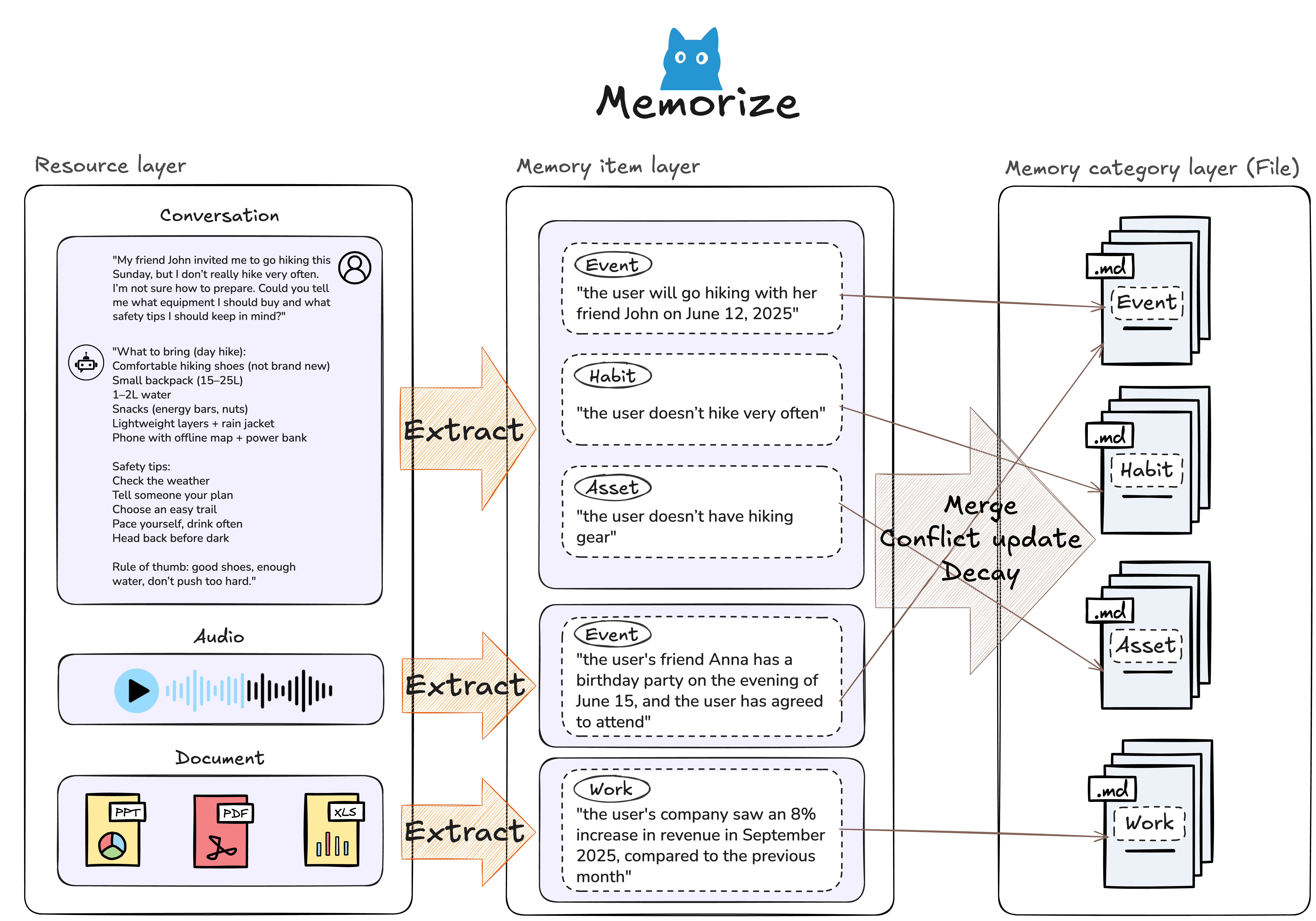 ```
result = await service.memorize(
resource_url="path/to/file.json", # File path or URL
modality="conversation", # conversation | document | image | video | audio
user={"user_id": "123"} # Optional: scope to a user
)
# 立即返回提取的记忆:
{
"resource": {...}, # Stored resource metadata
"items": [...], # Extracted memory items (available instantly)
"categories": [...] # Auto-updated category structure
}
```
**主动特性:**
- 零延迟处理——记忆立即可用
- 无需手动标记的自动分类
- 与现有记忆交叉引用以进行模式检测
### `retrieve()` - 双模态智能
MemU 同时支持**主动上下文加载**和**被动查询**:
```
result = await service.memorize(
resource_url="path/to/file.json", # File path or URL
modality="conversation", # conversation | document | image | video | audio
user={"user_id": "123"} # Optional: scope to a user
)
# 立即返回提取的记忆:
{
"resource": {...}, # Stored resource metadata
"items": [...], # Extracted memory items (available instantly)
"categories": [...] # Auto-updated category structure
}
```
**主动特性:**
- 零延迟处理——记忆立即可用
- 无需手动标记的自动分类
- 与现有记忆交叉引用以进行模式检测
### `retrieve()` - 双模态智能
MemU 同时支持**主动上下文加载**和**被动查询**:
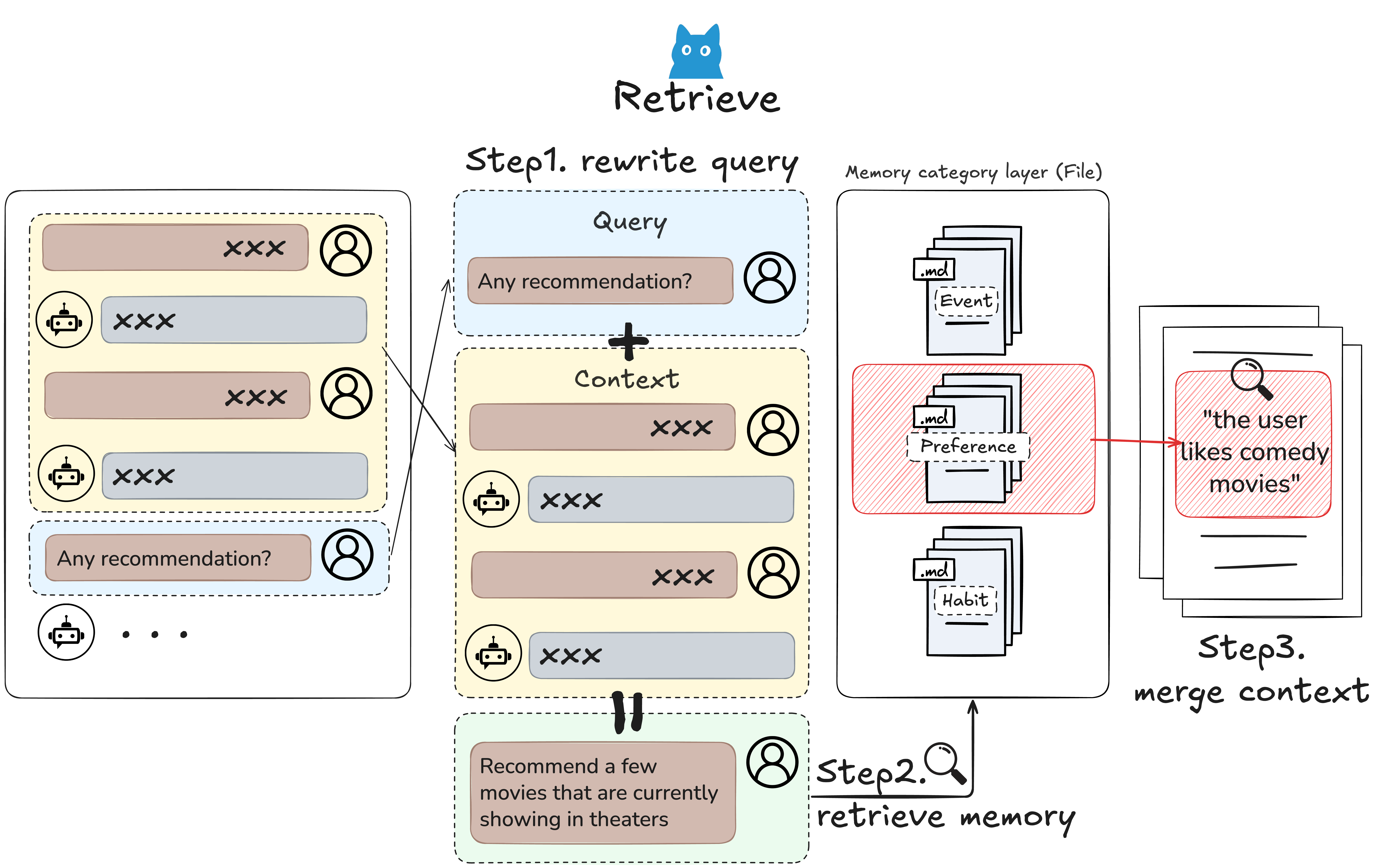 #### 基于 RAG 的检索 (`method="rag"`)
使用 embeddings 进行快速的**主动上下文组装**:
- ✅ **即时上下文**:亚秒级记忆浮现
- ✅ **后台监控**:可持续运行,无 LLM 成本
- ✅ **相似度评分**:自动识别最相关的记忆
#### 基于 LLM 的检索 (`method="llm"`)
针对复杂上下文的深度**预判推理**:
- ✅ **意图预测**:LLM 在用户提问前推断其需求
- ✅ **查询演进**:随着上下文发展自动优化搜索
- ✅ **早停机制**:收集到足够上下文时停止
#### 对比
| 方面 | RAG (快速上下文) | LLM (深度推理) |
|--------|-------------------|---------------------|
| **速度** | ⚡ 毫秒级 | 🐢 秒级 |
| **成本** | 💰 仅 Embedding | 💰💰 LLM 推理 |
| **主动使用** | 持续监控 | 触发式上下文加载 |
| **最适合** | 实时建议 | 复杂预判 |
#### 用法
```
# 结合上下文历史的主动检索
result = await service.retrieve(
queries=[
{"role": "user", "content": {"text": "What are their preferences?"}},
{"role": "user", "content": {"text": "Tell me about work habits"}}
],
where={"user_id": "123"}, # Optional: scope filter
method="rag" # or "llm" for deeper reasoning
)
# 返回感知上下文的结果:
{
"categories": [...], # Relevant topic areas (auto-prioritized)
"items": [...], # Specific memory facts
"resources": [...], # Original sources for traceability
"next_step_query": "..." # Predicted follow-up context
}
```
**主动过滤**:使用 `where` 限定持续监控范围:
- `where={"user_id": "123"}` - 用户特定上下文
- `where={"agent_id__in": ["1", "2"]}` - 多 agent 协调
- 省略 `where` 以获取全局上下文感知
## 💡 主动场景
### 示例 1:持续学习的助手
从每次交互中持续学习,无需显式的记忆指令:
```
export OPENAI_API_KEY=your_api_key
python examples/example_1_conversation_memory.py
```
**主动行为:**
- 自动从随意提及中提取偏好
- 从交互模式中构建关系模型
- 在未来的对话中浮现相关上下文
- 根据习得的偏好调整沟通风格
**最适合:** 个人 AI 助手、有记忆的客服、社交聊天机器人
### 示例 2:自我进化的 Agent
从执行日志中学习并主动建议优化:
```
export OPENAI_API_KEY=your_api_key
python examples/example_2_skill_extraction.py
```
**主动行为:**
- 持续监控 agent 行为和结果
- 识别成功与失败的模式
- 从经验中自动生成技能指南
- 为未来类似任务主动建议策略
**最适合:** DevOps 自动化、agent 自我改进、知识捕获
### 示例 3:多模态上下文构建器
跨不同输入类型统一记忆,提供全面的上下文:
```
export OPENAI_API_KEY=your_api_key
python examples/example_3_multimodal_memory.py
```
**主动行为:**
- 自动交叉引用文本、图像和文档
- 跨模态构建统一理解
- 在讨论相关主题时浮现视觉上下文
- 通过结合多个来源预判信息需求
**最适合:** 文档系统、学习平台、研究助手
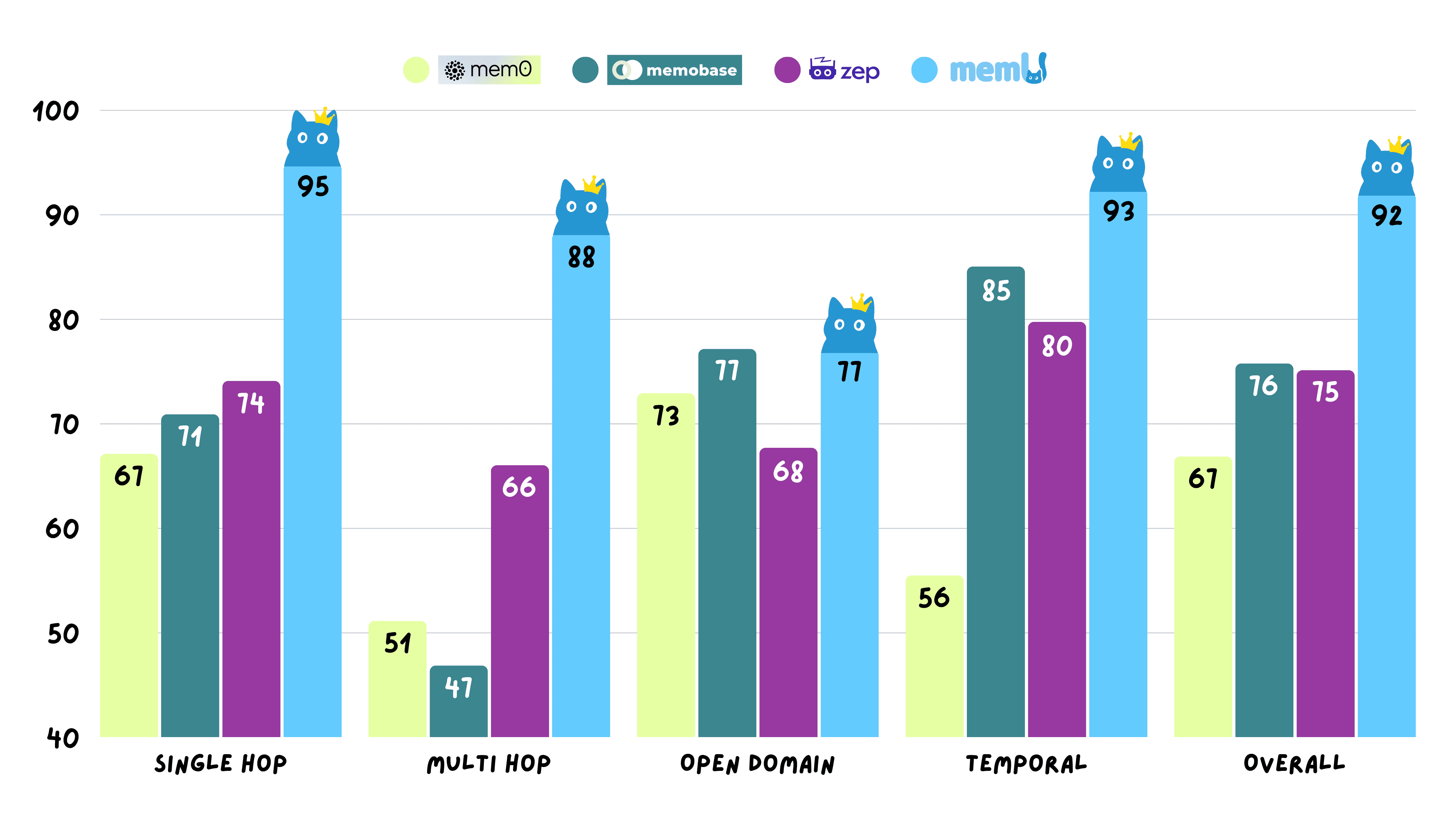
## 📊 性能
MemU 在 Locomo 基准测试的所有推理任务中取得了 **92.09% 的平均准确率**,展示了可靠的主动记忆操作能力。
#### 基于 RAG 的检索 (`method="rag"`)
使用 embeddings 进行快速的**主动上下文组装**:
- ✅ **即时上下文**:亚秒级记忆浮现
- ✅ **后台监控**:可持续运行,无 LLM 成本
- ✅ **相似度评分**:自动识别最相关的记忆
#### 基于 LLM 的检索 (`method="llm"`)
针对复杂上下文的深度**预判推理**:
- ✅ **意图预测**:LLM 在用户提问前推断其需求
- ✅ **查询演进**:随着上下文发展自动优化搜索
- ✅ **早停机制**:收集到足够上下文时停止
#### 对比
| 方面 | RAG (快速上下文) | LLM (深度推理) |
|--------|-------------------|---------------------|
| **速度** | ⚡ 毫秒级 | 🐢 秒级 |
| **成本** | 💰 仅 Embedding | 💰💰 LLM 推理 |
| **主动使用** | 持续监控 | 触发式上下文加载 |
| **最适合** | 实时建议 | 复杂预判 |
#### 用法
```
# 结合上下文历史的主动检索
result = await service.retrieve(
queries=[
{"role": "user", "content": {"text": "What are their preferences?"}},
{"role": "user", "content": {"text": "Tell me about work habits"}}
],
where={"user_id": "123"}, # Optional: scope filter
method="rag" # or "llm" for deeper reasoning
)
# 返回感知上下文的结果:
{
"categories": [...], # Relevant topic areas (auto-prioritized)
"items": [...], # Specific memory facts
"resources": [...], # Original sources for traceability
"next_step_query": "..." # Predicted follow-up context
}
```
**主动过滤**:使用 `where` 限定持续监控范围:
- `where={"user_id": "123"}` - 用户特定上下文
- `where={"agent_id__in": ["1", "2"]}` - 多 agent 协调
- 省略 `where` 以获取全局上下文感知
## 💡 主动场景
### 示例 1:持续学习的助手
从每次交互中持续学习,无需显式的记忆指令:
```
export OPENAI_API_KEY=your_api_key
python examples/example_1_conversation_memory.py
```
**主动行为:**
- 自动从随意提及中提取偏好
- 从交互模式中构建关系模型
- 在未来的对话中浮现相关上下文
- 根据习得的偏好调整沟通风格
**最适合:** 个人 AI 助手、有记忆的客服、社交聊天机器人
### 示例 2:自我进化的 Agent
从执行日志中学习并主动建议优化:
```
export OPENAI_API_KEY=your_api_key
python examples/example_2_skill_extraction.py
```
**主动行为:**
- 持续监控 agent 行为和结果
- 识别成功与失败的模式
- 从经验中自动生成技能指南
- 为未来类似任务主动建议策略
**最适合:** DevOps 自动化、agent 自我改进、知识捕获
### 示例 3:多模态上下文构建器
跨不同输入类型统一记忆,提供全面的上下文:
```
export OPENAI_API_KEY=your_api_key
python examples/example_3_multimodal_memory.py
```
**主动行为:**
- 自动交叉引用文本、图像和文档
- 跨模态构建统一理解
- 在讨论相关主题时浮现视觉上下文
- 通过结合多个来源预判信息需求
**最适合:** 文档系统、学习平台、研究助手
## 📊 性能
MemU 在 Locomo 基准测试的所有推理任务中取得了 **92.09% 的平均准确率**,展示了可靠的主动记忆操作能力。
 查看详细实验数据:[memU-experiment](https://github.com/NevaMind-AI/memU-experiment)
## 🧩 生态系统
| 仓库 | 描述 | 主动特性 |
|------------|-------------|-------------------|
| **[memU](https://github.com/NevaMind-AI/memU)** | 核心主动记忆引擎 | 7x24 学习流水线,自动分类 |
| **[memU-server](https://github.com/NevaMind-AI/memU-server)** | 支持持续同步的后端 | 实时记忆更新,webhook 触发 |
| **[memU-ui](https://github.com/NevaMind-AI/memU-ui)** | 可视化记忆仪表板 | 实时记忆演化监控 |
**快速链接:**
- 🚀 [试用 MemU 云端版](https://app.memu.so/quick-start)
- 📚 [API 文档](https://memu.pro/docs)
- 💬 [Discord 社区](https://discord.gg/memu)
## 🤝 合作伙伴
查看详细实验数据:[memU-experiment](https://github.com/NevaMind-AI/memU-experiment)
## 🧩 生态系统
| 仓库 | 描述 | 主动特性 |
|------------|-------------|-------------------|
| **[memU](https://github.com/NevaMind-AI/memU)** | 核心主动记忆引擎 | 7x24 学习流水线,自动分类 |
| **[memU-server](https://github.com/NevaMind-AI/memU-server)** | 支持持续同步的后端 | 实时记忆更新,webhook 触发 |
| **[memU-ui](https://github.com/NevaMind-AI/memU-ui)** | 可视化记忆仪表板 | 实时记忆演化监控 |
**快速链接:**
- 🚀 [试用 MemU 云端版](https://app.memu.so/quick-start)
- 📚 [API 文档](https://memu.pro/docs)
- 💬 [Discord 社区](https://discord.gg/memu)
## 🤝 合作伙伴








 ## 🤝 如何贡献
我们欢迎社区的贡献!无论是修复 bug、添加功能还是改进文档,我们都非常感谢。
### 开始之前
要开始为 MemU 做贡献,你需要设置开发环境:
#### 前置条件
- Python 3.13+
- [uv](https://github.com/astral-sh/uv)(Python 包管理器)
- Git
#### 设置开发环境
```
# 1. Fork 并 clone 仓库
git clone https://github.com/YOUR_USERNAME/memU.git
cd memU
# 2. 安装开发依赖项
make install
```
`make install` 命令将:
- 使用 `uv` 创建虚拟环境
- 安装所有项目依赖
- 设置用于代码质量检查的 pre-commit hooks
#### 运行质量检查
在提交贡献之前,请确保你的代码通过所有质量检查:
```
make check
```
`make check` 命令会运行:
- **Lock 文件验证**:确保 `pyproject.toml` 的一致性
- **Pre-commit hooks**:使用 Ruff 进行代码检查,使用 Black 格式化
- **类型检查**:运行 `mypy` 进行静态类型分析
- **依赖分析**:使用 `deptry` 查找过时的依赖
### 贡献指南
关于详细的贡献指南、代码规范和开发实践,请参阅 [CONTRIBUTING.md](CONTRIBUTING.md)。
**快速提示:**
- 为每个功能或 bug 修复创建新分支
- 编写清晰的提交信息
- 为新功能添加测试
- 根据需要更新文档
- 推送前运行 `make check`
## 📄 许可证
[Apache License 2.0](LICENSE.txt)
## 🌍 社区
- **GitHub Issues**: [报告 Bug & 请求功能](https://github.com/NevaMind-AI/memU/issues)
- **Discord**: [加入社区](https://discord.com/invite/hQZntfGsbJ)
- **X (Twitter)**: [关注 @memU_ai](https://x.com/memU_ai)
- **联系方式**: info@nevamind.ai
## 🤝 如何贡献
我们欢迎社区的贡献!无论是修复 bug、添加功能还是改进文档,我们都非常感谢。
### 开始之前
要开始为 MemU 做贡献,你需要设置开发环境:
#### 前置条件
- Python 3.13+
- [uv](https://github.com/astral-sh/uv)(Python 包管理器)
- Git
#### 设置开发环境
```
# 1. Fork 并 clone 仓库
git clone https://github.com/YOUR_USERNAME/memU.git
cd memU
# 2. 安装开发依赖项
make install
```
`make install` 命令将:
- 使用 `uv` 创建虚拟环境
- 安装所有项目依赖
- 设置用于代码质量检查的 pre-commit hooks
#### 运行质量检查
在提交贡献之前,请确保你的代码通过所有质量检查:
```
make check
```
`make check` 命令会运行:
- **Lock 文件验证**:确保 `pyproject.toml` 的一致性
- **Pre-commit hooks**:使用 Ruff 进行代码检查,使用 Black 格式化
- **类型检查**:运行 `mypy` 进行静态类型分析
- **依赖分析**:使用 `deptry` 查找过时的依赖
### 贡献指南
关于详细的贡献指南、代码规范和开发实践,请参阅 [CONTRIBUTING.md](CONTRIBUTING.md)。
**快速提示:**
- 为每个功能或 bug 修复创建新分支
- 编写清晰的提交信息
- 为新功能添加测试
- 根据需要更新文档
- 推送前运行 `make check`
## 📄 许可证
[Apache License 2.0](LICENSE.txt)
## 🌍 社区
- **GitHub Issues**: [报告 Bug & 请求功能](https://github.com/NevaMind-AI/memU/issues)
- **Discord**: [加入社区](https://discord.com/invite/hQZntfGsbJ)
- **X (Twitter)**: [关注 @memU_ai](https://x.com/memU_ai)
- **联系方式**: info@nevamind.ai
# memU
### 面向 AI Agents 的 7x24 小时全天候主动记忆
[](https://badge.fury.io/py/memu-py)
[](https://opensource.org/licenses/Apache-2.0)
[](https://www.python.org/downloads/)
[](https://discord.gg/memu)
[](https://x.com/memU_ai)
 **[English](readme/README_en.md) | [中文](readme/README_zh.md) | [日本語](readme/README_ja.md) | [한국어](readme/README_ko.md) | [Español](readme/README_es.md) | [Français](readme/README_fr.md)**
memU 是一个为 **7x24 小时主动 agents** 构建的记忆框架。
它专为长期运行场景设计,极大地**降低了保持 agents 始终在线的 LLM token 成本**,使得“永远在线、持续进化”的 agents 在生产系统中切实可行。
memU **持续捕捉并理解用户意图**。即使没有指令,agent 也能判断你接下来要做什么,并自主采取行动。
## 🤖 [OpenClaw (Moltbot, Clawdbot) 替代方案](https://github.com/NevaMind-AI/memUBot)
**[memU Bot](https://github.com/NevaMind-AI/memUBot)** —— 现已开源。企业级可用的 OpenClaw。你的能记住一切的主动 AI 助手。
- **下载即用,简单上手**(一键安装,< 3 分钟)。
- 建立长期记忆以**理解用户意图**并主动行动(7x24 小时)。
- 通过更小的上下文**节省 LLM token 成本**(约为同类用量的 1/10)。
立即体验:[memu.bot](https://memu.bot) · 源码:[GitHub 上的 memUBot](https://github.com/NevaMind-AI/memUBot)
## 🗃️ 记忆即文件系统,文件系统即记忆
memU 将**记忆视为文件系统**——结构化、层级化、即时可访问。
| 文件系统 | memU 记忆 |
|-------------|-------------|
| 📁 文件夹 | 🏷️ 分类(自动整理的主题) |
| 📄 文件 | 🧠 记忆项(提取的事实、偏好、技能) |
| 🔗 符号链接 | 🔄 交叉引用(相关记忆的链接) |
| 📂 挂载点 | 📥 资源(对话、文档、图片) |
**重要性:**
- **浏览记忆** 就像浏览目录——从宽泛的分类下钻到具体事实
- **即时挂载新知识**——对话和文档变为可查询的记忆
- **交叉链接一切**——记忆之间相互引用,构建连接的知识图谱
- **持久且可移植**——像文件一样导出、备份和传输记忆
```
memory/
├── preferences/
│ ├── communication_style.md
│ └── topic_interests.md
├── relationships/
│ ├── contacts/
│ └── interaction_history/
├── knowledge/
│ ├── domain_expertise/
│ └── learned_skills/
└── context/
├── recent_conversations/
└── pending_tasks/
```
正如文件系统将原始字节转化为有组织的数据,memU 将原始交互转化为**结构化、可搜索、主动的智能**。
## ✨ 核心功能
## | 能力 | 描述 |
|------------|-------------|
| 🤖 **7x24 小时主动 Agent** | 始终在线的记忆 agent,在后台持续工作——从不休眠,从不遗忘 |
| 🎯 **用户意图捕捉** | 自动理解并记住用户目标、偏好和跨会话上下文 |
| 💰 **成本高效** | 通过缓存洞察和避免冗余 LLM 调用来降低长期运行的 token 成本 |
## 🔄 主动记忆工作原理
```
cd examples/proactive
python proactive.py
```
### 主动记忆生命周期
```
┌──────────────────────────────────────────────────────────────────────────────────────────────────┐
│ USER QUERY │
└──────────────────────────────────────────────────────────────────────────────────────────────────┘
│ │
▼ ▼
┌────────────────────────────────────────┐ ┌────────────────────────────────────────────────┐
│ 🤖 MAIN AGENT │ │ 🧠 MEMU BOT │
│ │ │ │
│ Handle user queries & execute tasks │ ◄───► │ Monitor, memorize & proactive intelligence │
├────────────────────────────────────────┤ ├────────────────────────────────────────────────┤
│ │ │ │
│ ┌──────────────────────────────────┐ │ │ ┌──────────────────────────────────────────┐ │
│ │ 1. RECEIVE USER INPUT │ │ │ │ 1. MONITOR INPUT/OUTPUT │ │
│ │ Parse query, understand │ │ ───► │ │ Observe agent interactions │ │
│ │ context and intent │ │ │ │ Track conversation flow │ │
│ └──────────────────────────────────┘ │ │ └──────────────────────────────────────────┘ │
│ │ │ │ │ │
│ ▼ │ │ ▼ │
│ ┌──────────────────────────────────┐ │ │ ┌──────────────────────────────────────────┐ │
│ │ 2. PLAN & EXECUTE │ │ │ │ 2. MEMORIZE & EXTRACT │ │
│ │ Break down tasks │ │ ◄─── │ │ Store insights, facts, preferences │ │
│ │ Call tools, retrieve data │ │ inject │ │ Extract skills & knowledge │ │
│ │ Generate responses │ │ memory │ │ Update user profile │ │
│ └──────────────────────────────────┘ │ │ └──────────────────────────────────────────┘ │
│ │ │ │ │ │
│ ▼ │ │ ▼ │
│ ┌──────────────────────────────────┐ │ │ ┌──────────────────────────────────────────┐ │
│ │ 3. RESPOND TO USER │ │ │ │ 3. PREDICT USER INTENT │ │
│ │ Deliver answer/result │ │ ───► │ │ Anticipate next steps │ │
│ │ Continue conversation │ │ │ │ Identify upcoming needs │ │
│ └──────────────────────────────────┘ │ │ └──────────────────────────────────────────┘ │
│ │ │ │ │ │
│ ▼ │ │ ▼ │
│ ┌──────────────────────────────────┐ │ │ ┌──────────────────────────────────────────┐ │
│ │ 4. LOOP │ │ │ │ 4. RUN PROACTIVE TASKS │ │
│ │ Wait for next user input │ │ ◄─── │ │ Pre-fetch relevant context │ │
│ │ or proactive suggestions │ │ suggest│ │ Prepare recommendations │ │
│ └──────────────────────────────────┘ │ │ │ Update todolist autonomously │ │
│ │ │ └──────────────────────────────────────────┘ │
└────────────────────────────────────────┘ └────────────────────────────────────────────────┘
│ │
└───────────────────────────┬───────────────────────────────┘
▼
┌──────────────────────────────┐
│ CONTINUOUS SYNC LOOP │
│ Agent ◄──► MemU Bot ◄──► DB │
└──────────────────────────────┘
```
## 🎯 主动应用场景
### 1. **信息推荐**
*Agent 监控兴趣并主动呈现相关内容*
```
# 用户一直在研究 AI 主题
MemU tracks: reading history, saved articles, search queries
# 当新内容到达时:
Agent: "I found 3 new papers on RAG optimization that align with
your recent research on retrieval systems. One author
(Dr. Chen) you've cited before published yesterday."
# 主动行为:
- Learns topic preferences from browsing patterns
- Tracks author/source credibility preferences
- Filters noise based on engagement history
- Times recommendations for optimal attention
```
### 2. **邮件管理**
*Agent 学习沟通模式并处理日常通信*
```
# MemU 随时间观察邮件模式:
- Response templates for common scenarios
- Priority contacts and urgent keywords
- Scheduling preferences and availability
- Writing style and tone variations
# 主动邮件协助:
Agent: "You have 12 new emails. I've drafted responses for 3 routine
requests and flagged 2 urgent items from your priority contacts.
Should I also reschedule tomorrow's meeting based on the
conflict John mentioned?"
# 自主行动:
✓ Draft context-aware replies
✓ Categorize and prioritize inbox
✓ Detect scheduling conflicts
✓ Summarize long threads with key decisions
```
### 3. **交易与金融监控**
*Agent 跟踪市场背景和用户投资行为*
```
# MemU 学习交易偏好:
- Risk tolerance from historical decisions
- Preferred sectors and asset classes
- Response patterns to market events
- Portfolio rebalancing triggers
# 主动警报:
Agent: "NVDA dropped 5% in after-hours trading. Based on your past
behavior, you typically buy tech dips above 3%. Your current
allocation allows for $2,000 additional exposure while
maintaining your 70/30 equity-bond target."
# 持续监控:
- Track price alerts tied to user-defined thresholds
- Correlate news events with portfolio impact
- Learn from executed vs. ignored recommendations
- Anticipate tax-loss harvesting opportunities
```
...
## 🗂️ 分层记忆架构
MemU 的三层系统同时支持**被动查询**和**主动上下文加载**:
| 层级 | 被动用途 | 主动用途 |
|-------|--------------|---------------|
| **Resource** | 直接访问原始数据 | 后台监控新模式 |
| **Item** | 针对性事实检索 | 从持续交互中实时提取 |
| **Category** | 摘要级概览 | 自动组装上下文以进行预判 |
**主动优势:**
- **自动分类**:新记忆自动归类到主题中
- **模式检测**:系统识别重复出现的主题
- **上下文预测**:预判接下来需要哪些信息
## 🚀 快速开始
### 选项 1:云端版
即时体验主动记忆:
👉 **[memu.so](https://memu.so)** - 7x24 持续学习的托管服务
如需具有自定义主动工作流的企业部署,请联系 **info@nevamind.ai**
#### Cloud API (v3)
| Base URL | `https://api.memu.so` |
|----------|----------------------|
| Auth | `Authorization: Bearer YOUR_API_KEY` |
| Method | Endpoint | Description |
|--------|----------|-------------|
| `POST` | `/api/v3/memory/memorize` | 注册持续学习任务 |
| `GET` | `/api/v3/memory/memorize/status/{task_id}` | 检查实时处理状态 |
| `POST` | `/api/v3/memory/categories` | 列出自动生成的分类 |
| `POST` | `/api/v3/memory/retrieve` | 查询记忆(支持主动上下文加载) |
📚 **[完整 API 文档](https://memu.pro/docs#cloud-version)**
### 选项 2:自托管
#### 安装
```
pip install -e .
```
#### 基础示例
**测试持续学习**(内存模式):
```
export OPENAI_API_KEY=your_api_key
cd tests
python test_inmemory.py
```
**测试持久化存储**(PostgreSQL):
```
# 启动带 pgvector 的 PostgreSQL
docker run -d \
--name memu-postgres \
-e POSTGRES_USER=postgres \
-e POSTGRES_PASSWORD=postgres \
-e POSTGRES_DB=memu \
-p 5432:5432 \
pgvector/pgvector:pg16
# 运行持续学习测试
export OPENAI_API_KEY=your_api_key
cd tests
python test_postgres.py
```
这两个示例都展示了**主动记忆工作流**:
1. **持续摄入**:按顺序处理多个文件
2. **自动提取**:立即创建记忆
3. **主动检索**:感知上下文的记忆浮现
详见 [`tests/test_inmemory.py`](tests/test_inmemory.py) 和 [`tests/test_postgres.py`](tests/test_postgres.py)。
### 自定义 LLM 和 Embedding 提供商
MemU 支持除 OpenAI 之外的自定义 LLM 和 embedding 提供商。通过 `llm_profiles` 进行配置:
```
from memu import MemUService
service = MemUService(
llm_profiles={
# Default profile for LLM operations
"default": {
"base_url": "https://dashscope.aliyuncs.com/compatible-mode/v1",
"api_key": "your_api_key",
"chat_model": "qwen3-max",
"client_backend": "sdk" # "sdk" or "http"
},
# Separate profile for embeddings
"embedding": {
"base_url": "https://api.voyageai.com/v1",
"api_key": "your_voyage_api_key",
"embed_model": "voyage-3.5-lite"
}
},
# ... other configuration
)
```
### OpenRouter 集成
MemU 支持 [OpenRouter](https://openrouter.ai) 作为模型提供商,让你通过单一 API 访问多个 LLM 提供商。
#### 配置
```
from memu import MemoryService
service = MemoryService(
llm_profiles={
"default": {
"provider": "openrouter",
"client_backend": "httpx",
"base_url": "https://openrouter.ai",
"api_key": "your_openrouter_api_key",
"chat_model": "anthropic/claude-3.5-sonnet", # Any OpenRouter model
"embed_model": "openai/text-embedding-3-small", # Embedding model
},
},
database_config={
"metadata_store": {"provider": "inmemory"},
},
)
```
#### 环境变量
| 变量 | 描述 |
|----------|-------------|
| `OPENROUTER_API_KEY` | 你在 [openrouter.ai/keys](https://openrouter.ai/keys) 获取的 OpenRouter API key |
#### 支持的功能
| 功能 | 状态 | 备注 |
|---------|--------|-------|
| Chat Completions | 支持 | 适用于任何 OpenRouter chat 模型 |
| Embeddings | 支持 | 通过 OpenRouter 使用 OpenAI embedding 模型 |
| Vision | 支持 | 使用具备视觉能力的模型(如 `openai/gpt-4o`) |
#### 运行 OpenRouter 测试
```
export OPENROUTER_API_KEY=your_api_key
# 完整工作流测试(记忆 + 检索)
python tests/test_openrouter.py
# Embedding 专项测试
python tests/test_openrouter_embedding.py
# Vision 专项测试
python tests/test_openrouter_vision.py
```
完整示例见 [`examples/example_4_openrouter_memory.py`](examples/example_4_openrouter_memory.py)。
## 📖 核心 API
### `memorize()` - 持续学习流水线
实时处理输入并立即更新记忆:
```
result = await service.memorize(
resource_url="path/to/file.json", # File path or URL
modality="conversation", # conversation | document | image | video | audio
user={"user_id": "123"} # Optional: scope to a user
)
# 立即返回提取的记忆:
{
"resource": {...}, # Stored resource metadata
"items": [...], # Extracted memory items (available instantly)
"categories": [...] # Auto-updated category structure
}
```
**主动特性:**
- 零延迟处理——记忆立即可用
- 无需手动标记的自动分类
- 与现有记忆交叉引用以进行模式检测
### `retrieve()` - 双模态智能
MemU 同时支持**主动上下文加载**和**被动查询**:
#### 基于 RAG 的检索 (`method="rag"`)
使用 embeddings 进行快速的**主动上下文组装**:
- ✅ **即时上下文**:亚秒级记忆浮现
- ✅ **后台监控**:可持续运行,无 LLM 成本
- ✅ **相似度评分**:自动识别最相关的记忆
#### 基于 LLM 的检索 (`method="llm"`)
针对复杂上下文的深度**预判推理**:
- ✅ **意图预测**:LLM 在用户提问前推断其需求
- ✅ **查询演进**:随着上下文发展自动优化搜索
- ✅ **早停机制**:收集到足够上下文时停止
#### 对比
| 方面 | RAG (快速上下文) | LLM (深度推理) |
|--------|-------------------|---------------------|
| **速度** | ⚡ 毫秒级 | 🐢 秒级 |
| **成本** | 💰 仅 Embedding | 💰💰 LLM 推理 |
| **主动使用** | 持续监控 | 触发式上下文加载 |
| **最适合** | 实时建议 | 复杂预判 |
#### 用法
```
# 结合上下文历史的主动检索
result = await service.retrieve(
queries=[
{"role": "user", "content": {"text": "What are their preferences?"}},
{"role": "user", "content": {"text": "Tell me about work habits"}}
],
where={"user_id": "123"}, # Optional: scope filter
method="rag" # or "llm" for deeper reasoning
)
# 返回感知上下文的结果:
{
"categories": [...], # Relevant topic areas (auto-prioritized)
"items": [...], # Specific memory facts
"resources": [...], # Original sources for traceability
"next_step_query": "..." # Predicted follow-up context
}
```
**主动过滤**:使用 `where` 限定持续监控范围:
- `where={"user_id": "123"}` - 用户特定上下文
- `where={"agent_id__in": ["1", "2"]}` - 多 agent 协调
- 省略 `where` 以获取全局上下文感知
## 💡 主动场景
### 示例 1:持续学习的助手
从每次交互中持续学习,无需显式的记忆指令:
```
export OPENAI_API_KEY=your_api_key
python examples/example_1_conversation_memory.py
```
**主动行为:**
- 自动从随意提及中提取偏好
- 从交互模式中构建关系模型
- 在未来的对话中浮现相关上下文
- 根据习得的偏好调整沟通风格
**最适合:** 个人 AI 助手、有记忆的客服、社交聊天机器人
### 示例 2:自我进化的 Agent
从执行日志中学习并主动建议优化:
```
export OPENAI_API_KEY=your_api_key
python examples/example_2_skill_extraction.py
```
**主动行为:**
- 持续监控 agent 行为和结果
- 识别成功与失败的模式
- 从经验中自动生成技能指南
- 为未来类似任务主动建议策略
**最适合:** DevOps 自动化、agent 自我改进、知识捕获
### 示例 3:多模态上下文构建器
跨不同输入类型统一记忆,提供全面的上下文:
```
export OPENAI_API_KEY=your_api_key
python examples/example_3_multimodal_memory.py
```
**主动行为:**
- 自动交叉引用文本、图像和文档
- 跨模态构建统一理解
- 在讨论相关主题时浮现视觉上下文
- 通过结合多个来源预判信息需求
**最适合:** 文档系统、学习平台、研究助手
## 📊 性能
MemU 在 Locomo 基准测试的所有推理任务中取得了 **92.09% 的平均准确率**,展示了可靠的主动记忆操作能力。
查看详细实验数据:[memU-experiment](https://github.com/NevaMind-AI/memU-experiment)
## 🧩 生态系统
| 仓库 | 描述 | 主动特性 |
|------------|-------------|-------------------|
| **[memU](https://github.com/NevaMind-AI/memU)** | 核心主动记忆引擎 | 7x24 学习流水线,自动分类 |
| **[memU-server](https://github.com/NevaMind-AI/memU-server)** | 支持持续同步的后端 | 实时记忆更新,webhook 触发 |
| **[memU-ui](https://github.com/NevaMind-AI/memU-ui)** | 可视化记忆仪表板 | 实时记忆演化监控 |
**快速链接:**
- 🚀 [试用 MemU 云端版](https://app.memu.so/quick-start)
- 📚 [API 文档](https://memu.pro/docs)
- 💬 [Discord 社区](https://discord.gg/memu)
## 🤝 合作伙伴
⭐ **在 GitHub 上为我们加星** 以获取新版本发布通知!
标签:24/7在线, Clawdbot, DLL 劫持, DNS解析, Moltbot, NevaMind, OpenClaw替代, Petitpotam, Python, Token优化, 主动式Agent, 人工智能, 向量数据库, 大语言模型, 开源项目, 意图识别, 成本降低, 无后门, 智能助手, 机器人, 测试用例, 生产环境, 用户模式Hook绕过, 网络调试, 自动化, 记忆框架, 请求拦截, 逆向工具, 长期记忆