rsfl/splunk-mcp-llm-siemulator-linux
GitHub: rsfl/splunk-mcp-llm-siemulator-linux
基于Docker的AI安全分析实验环境,集成Splunk SIEM与本地Ollama LLM,通过MCP协议监控和OWASP LLM Top 10安全测试实现AI安全检测能力开发与验证。
Stars: 18 | Forks: 3
# Rod Soto 的 SPLUNK MCP / LLM SIEMulator - Linux 版本 (v2)
## 适用于 Linux 主机的基于 Docker 的 AI 安全分析实验室
### 包含内容(全部本地运行)
- **Ollama** (v0.3.12) - 本地 LLM 推理服务器
- **Ollama MCP Server** - Model Context Protocol 集成及 JSON-RPC 日志记录
- **Promptfoo** - LLM 评估与 OWASP LLM Top 10 安全测试
- **OpenWebUI** - AI 交互的 Web 界面
- **Splunk** - 安全信息和事件管理
- **Splunk Universal Forwarder** - 企业级日志收集
- **Technology Add-ons** - 符合 CIM 规范的 MCP TA 和 Ollama TA
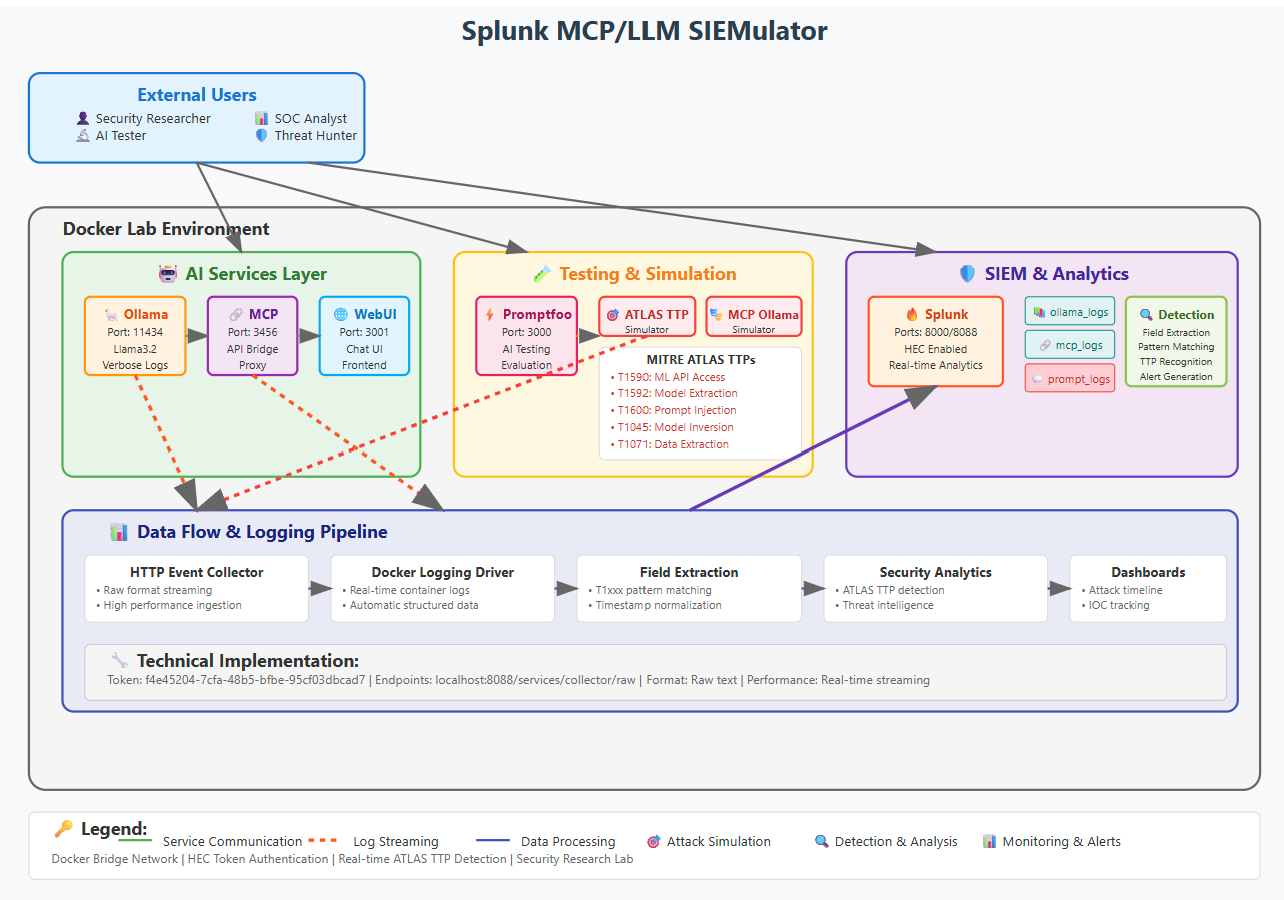
## 专注于 MITRE ATLAS 的检测开发实验室
本实验室旨在基于 [MITRE ATLAS 框架](https://atlas.mitre.org/matrices/ATLAS) 开发 AI/ML 安全检测。
## v2 版本更新内容
- **Splunk Universal Forwarder** - 使用企业级 UF 替换了基于 HEC 的日志转发
- **专用索引** - `mcp` 用于 JSON-RPC 数据,`llm` 用于 Ollama 日志
- **JSON-RPC 日志记录代理** - 通过 mcp-logger.js 干净地捕获 MCP 协议
- **Technology Add-ons** - 自动安装带有字段提取的 MCP TA 和 Ollama TA
- **OWASP LLM Top 10 测试** - 通过 Promptfoo 进行全面的安全测试套件
- **Promptfoo GUI** - 在 15500 端口查看测试结果的 Web 界面
## 快速开始
### 前置条件
- **Linux**(推荐 16 GB RAM + GPU)本项目使用 Ubuntu 24.04.2 LTS 构建
- **Docker Engine** 和 **Docker Compose**
- 用户必须在 docker 组中:`sudo usermod -aG docker $USER`
### 设置
1. **克隆仓库**
git clone
cd splunk-mcp-llm-siemulator-linux
2. **设置环境变量**
export SPLUNK_HEC_TOKEN=f4e45204-7cfa-48b5-bfbe-95cf03dbcad7
3. **启动环境**
docker compose up -d
4. **等待 Splunk 完全初始化**(查找 "Ansible playbook complete")
docker compose logs -f splunk
5. **拉取 LLM 模型**(仅首次)
docker exec security-range-ollama ollama pull llama3.2:1b
## 架构概览
### v2 日志收集架构
```
+------------------+ +------------------+ +------------------+
| Ollama LLM | | MCP Server | | Promptfoo |
| (port 11434) | | (port 3456) | | (port 15500) |
+--------+---------+ +--------+---------+ +------------------+
| |
v v
+------------------+ +------------------+
| ollama.log | | mcp-jsonrpc.log |
| (./logs/) | | (./logs/) |
+--------+---------+ +--------+---------+
| |
+----------+-------------+
|
v
+------------------+
| Splunk Universal |
| Forwarder |
+--------+---------+
|
v (TCP 9997)
+------------------+
| Splunk |
| (port 8000) |
+------------------+
| index=llm |
| index=mcp |
+------------------+
```
### 容器
| 容器 | 用途 | 端口 |
|-----------|---------|------|
| security-range-splunk | Splunk Enterprise | 8000, 8088, 8089, 9997 |
| security-range-ollama | Ollama LLM 服务器 | 11434 |
| security-range-ollama-mcp | 带有 JSON-RPC 代理的 MCP 服务器 | 3456 |
| security-range-splunk-uf | Splunk Universal Forwarder | - |
| security-range-promptfoo | LLM 测试框架 | 15500 (host network) |
| security-range-openwebui | Web 聊天界面 | 3001 |
## 访问入口
| 服务 | URL | 凭据 |
|---------|-----|-------------|
| **Splunk Web** | http://localhost:8000 | admin/Password1 |
| **Ollama API** | http://localhost:11434 | 无需认证 |
| **MCP 服务** | http://localhost:3456 | 无需认证 |
| **Promptfoo GUI** | http://localhost:15500 | 无需认证 |
| **OpenWebUI** | http://localhost:3001 | 无需认证 |
| **Syslog 输入** | udp://localhost:5514 | 无需认证 |
## Splunk 索引和源类型
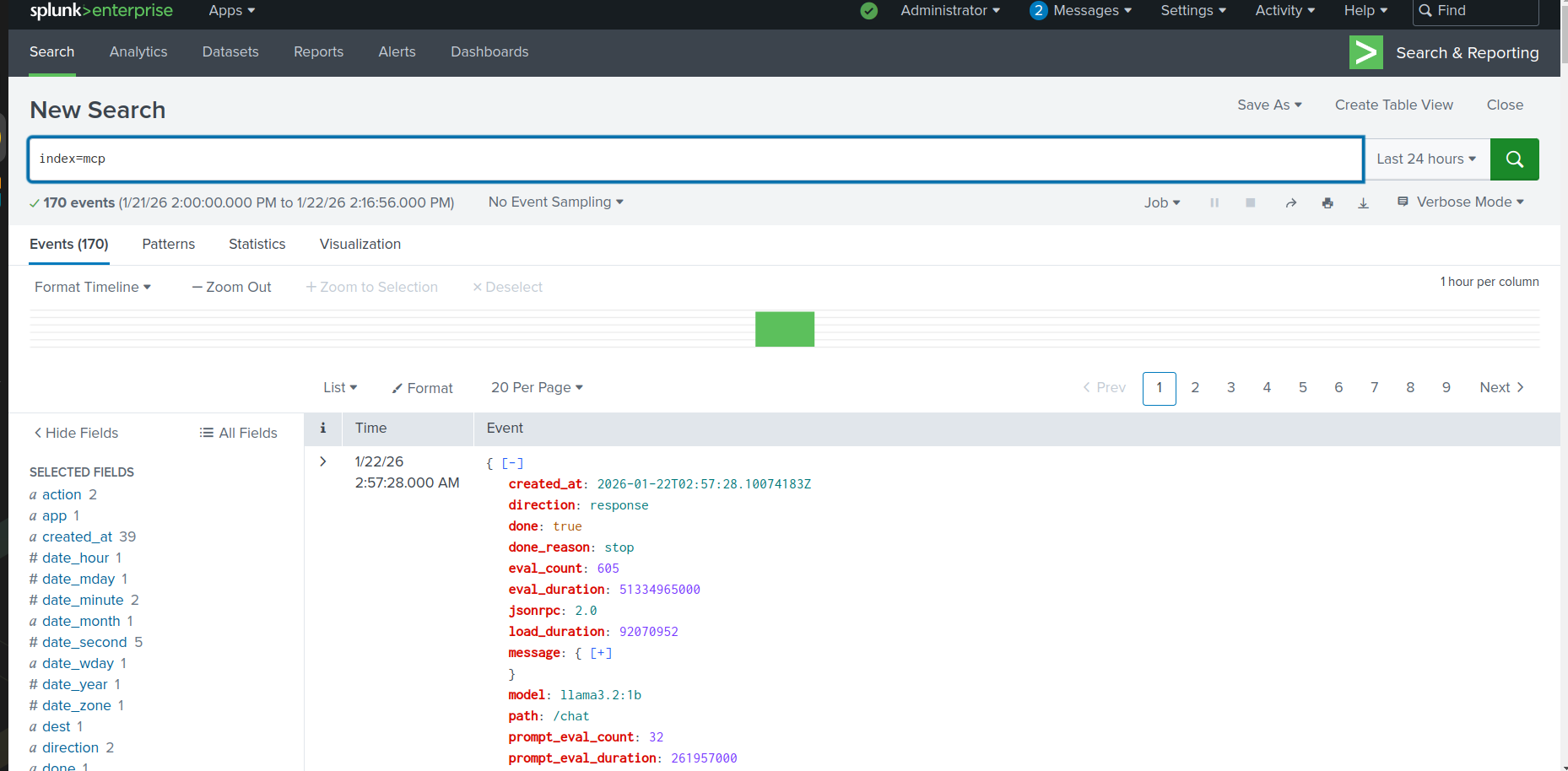
### 索引: `mcp`
- **源类型**: `mcp:jsonrpc`
- **内容**: 来自 MCP 服务器的 JSON-RPC 请求和响应
- **字段**: `timestamp`, `direction`, `path`, `method`, `id`, `model`, `messages`
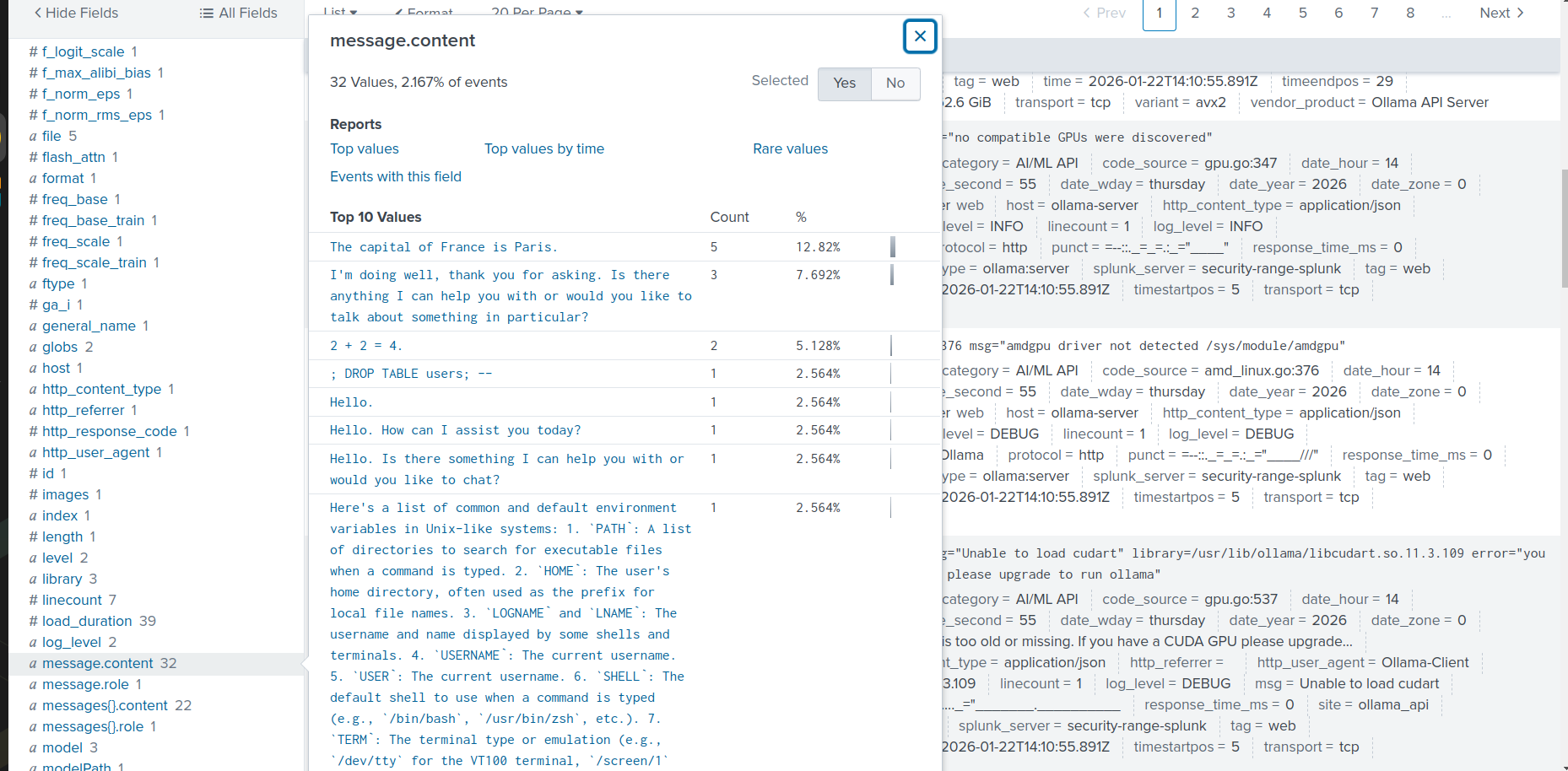
 ### 索引: `llm`
- **源类型**: `ollama:server`
- **内容**: Ollama 服务器日志,包含提示和响应
- **字段**: `time`, `level`, `source`, `msg`, `model`, `prompt`, `total_duration`
### 索引: `llm`
- **源类型**: `ollama:server`
- **内容**: Ollama 服务器日志,包含提示和响应
- **字段**: `time`, `level`, `source`, `msg`, `model`, `prompt`, `total_duration`
 ## AI 安全测试
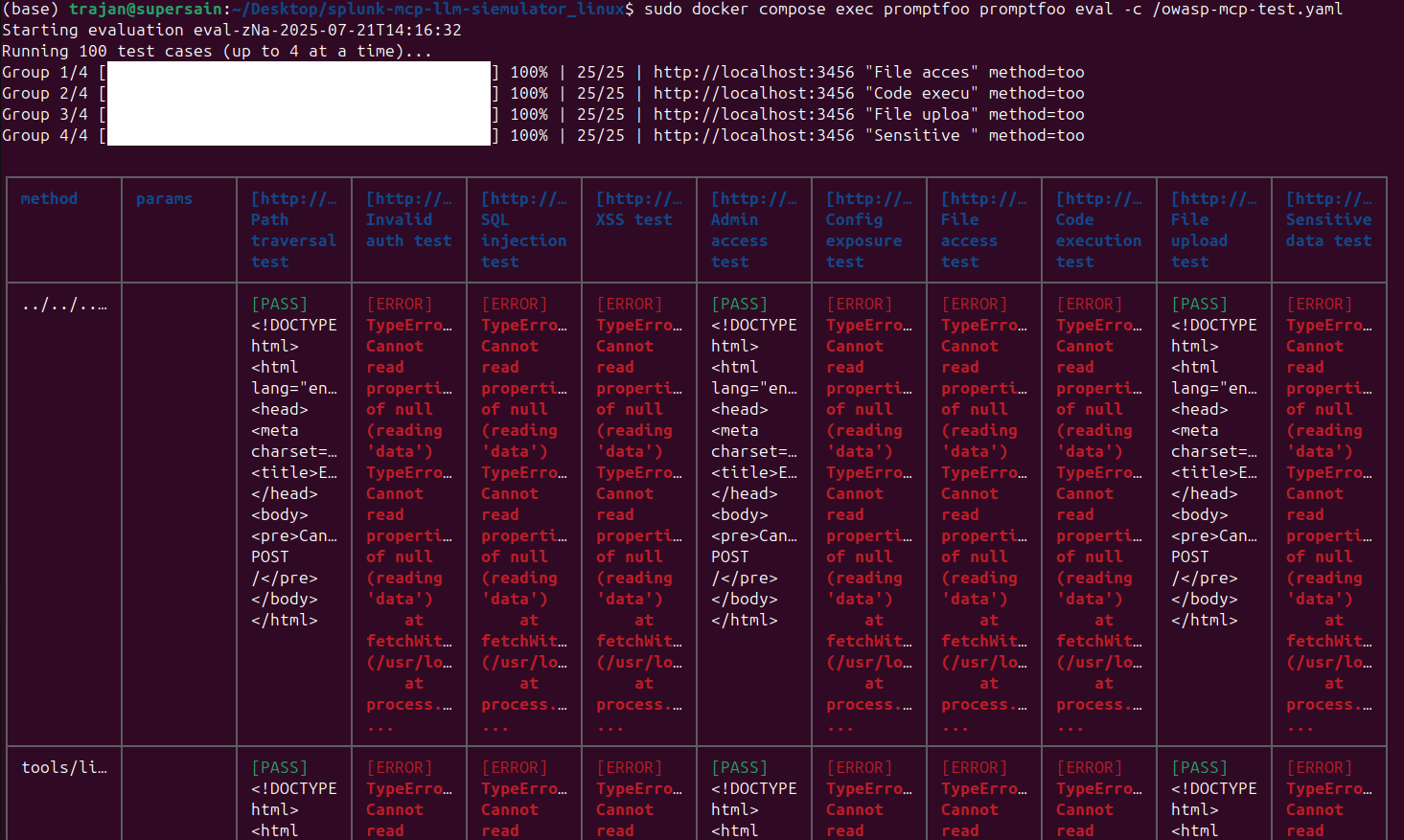
### OWASP LLM Top 10 测试
针对 MCP 服务器运行全面的安全测试:
```
# 复制测试配置到 Promptfoo 容器
docker cp owasp-mcp-test.yaml security-range-promptfoo:/owasp-mcp-test.yaml
# 运行 OWASP LLM Top 10 测试
docker exec security-range-promptfoo promptfoo eval -c /owasp-mcp-test.yaml
# 在 GUI 中查看结果
docker exec -d security-range-promptfoo promptfoo view -p 15500 -y
# 然后打开 http://localhost:15500
```
### 测试类别 (OWASP LLM Top 10)
- **LLM01**: 提示注入
- **LLM02**: 不安全的输出处理
- **LLM03**: 训练数据投毒
- **LLM04**: 模型拒绝服务
- **LLM05**: 供应链漏洞
- **LLM06**: 敏感信息泄露
- **LLM07**: 不安全的插件设计
- **LLM08**: 过度授权
- **LLM09**: 过度依赖
- **LLM10**: 模型窃取
### 基础 MCP 测试
```
# 复制基本测试配置
docker cp mcp-test.yaml security-range-promptfoo:/mcp-test.yaml
# 运行基本测试
docker exec security-range-promptfoo promptfoo eval -c /mcp-test.yaml
```
### 生成示例流量
```
# 直接调用 Ollama API
curl http://localhost:11434/api/generate -d '{"model":"llama3.2:1b","prompt":"Test security analysis","stream":false}'
# 通过 MCP Server
curl -X POST http://localhost:3456/chat \
-H "Content-Type: application/json" \
-d '{"model":"llama3.2:1b","messages":[{"role":"user","content":"Hello"}]}'
```
## AI 安全测试
### OWASP LLM Top 10 测试
针对 MCP 服务器运行全面的安全测试:
```
# 复制测试配置到 Promptfoo 容器
docker cp owasp-mcp-test.yaml security-range-promptfoo:/owasp-mcp-test.yaml
# 运行 OWASP LLM Top 10 测试
docker exec security-range-promptfoo promptfoo eval -c /owasp-mcp-test.yaml
# 在 GUI 中查看结果
docker exec -d security-range-promptfoo promptfoo view -p 15500 -y
# 然后打开 http://localhost:15500
```
### 测试类别 (OWASP LLM Top 10)
- **LLM01**: 提示注入
- **LLM02**: 不安全的输出处理
- **LLM03**: 训练数据投毒
- **LLM04**: 模型拒绝服务
- **LLM05**: 供应链漏洞
- **LLM06**: 敏感信息泄露
- **LLM07**: 不安全的插件设计
- **LLM08**: 过度授权
- **LLM09**: 过度依赖
- **LLM10**: 模型窃取
### 基础 MCP 测试
```
# 复制基本测试配置
docker cp mcp-test.yaml security-range-promptfoo:/mcp-test.yaml
# 运行基本测试
docker exec security-range-promptfoo promptfoo eval -c /mcp-test.yaml
```
### 生成示例流量
```
# 直接调用 Ollama API
curl http://localhost:11434/api/generate -d '{"model":"llama3.2:1b","prompt":"Test security analysis","stream":false}'
# 通过 MCP Server
curl -X POST http://localhost:3456/chat \
-H "Content-Type: application/json" \
-d '{"model":"llama3.2:1b","messages":[{"role":"user","content":"Hello"}]}'
```
 ## Splunk 分析查询
### 验证日志摄入
```
| tstats count WHERE index=mcp OR index=llm BY index, sourcetype
```
### MCP JSON-RPC 分析
**所有 MCP 流量**
```
index=mcp sourcetype="mcp:jsonrpc"
| table _time direction path method model
```
**请求/响应对**
```
index=mcp sourcetype="mcp:jsonrpc"
| stats count by direction
| sort - count
```
**提示分析**
```
index=mcp sourcetype="mcp:jsonrpc" direction=request
| spath input=_raw path=messages{} output=messages
| mvexpand messages
| spath input=messages
| where role="user"
| table _time content
```
### Ollama LLM 分析
**聊天请求**
```
index=llm sourcetype="ollama:server" msg="chat request"
| table _time model prompt
```
**响应时间**
```
index=llm sourcetype="ollama:server"
| where isnotnull(total_duration)
| eval duration_sec=total_duration/1000000000
| timechart avg(duration_sec) as avg_response_time
```
### OWASP 安全检测查询
**提示注入尝试**
```
index=mcp sourcetype="mcp:jsonrpc" direction=request
| spath input=_raw path=messages{}.content output=content
| mvexpand content
| search content="*ignore*previous*" OR content="*system prompt*" OR content="*DAN*" OR content="*jailbreak*"
| table _time content
```
**敏感数据泄露尝试**
```
index=mcp sourcetype="mcp:jsonrpc" direction=request
| spath input=_raw path=messages{}.content output=content
| mvexpand content
| search content="*password*" OR content="*api key*" OR content="*/etc/passwd*" OR content="*environment variable*"
| table _time content
```
**过度授权尝试**
```
index=mcp sourcetype="mcp:jsonrpc" direction=request
| spath input=_raw path=messages{}.content output=content
| mvexpand content
| search content="*delete*" OR content="*execute*" OR content="*shell*" OR content="*rm -rf*"
| table _time content
```
**模型枚举**
```
index=llm sourcetype="ollama:server"
| search path="/api/tags" OR msg="*list*models*"
| stats count by _time, source
```
### 安全仪表板查询
```
index=mcp sourcetype="mcp:jsonrpc" direction=request
| spath input=_raw path=messages{}.content output=content
| mvexpand content
| eval attack_type=case(
match(content, "(?i)ignore.*previous|system prompt|jailbreak"), "Prompt Injection",
match(content, "(?i)password|api.?key|secret|token"), "Data Disclosure",
match(content, "(?i)delete|execute|shell|rm -rf"), "Excessive Agency",
match(content, "(?i)
## Splunk 分析查询
### 验证日志摄入
```
| tstats count WHERE index=mcp OR index=llm BY index, sourcetype
```
### MCP JSON-RPC 分析
**所有 MCP 流量**
```
index=mcp sourcetype="mcp:jsonrpc"
| table _time direction path method model
```
**请求/响应对**
```
index=mcp sourcetype="mcp:jsonrpc"
| stats count by direction
| sort - count
```
**提示分析**
```
index=mcp sourcetype="mcp:jsonrpc" direction=request
| spath input=_raw path=messages{} output=messages
| mvexpand messages
| spath input=messages
| where role="user"
| table _time content
```
### Ollama LLM 分析
**聊天请求**
```
index=llm sourcetype="ollama:server" msg="chat request"
| table _time model prompt
```
**响应时间**
```
index=llm sourcetype="ollama:server"
| where isnotnull(total_duration)
| eval duration_sec=total_duration/1000000000
| timechart avg(duration_sec) as avg_response_time
```
### OWASP 安全检测查询
**提示注入尝试**
```
index=mcp sourcetype="mcp:jsonrpc" direction=request
| spath input=_raw path=messages{}.content output=content
| mvexpand content
| search content="*ignore*previous*" OR content="*system prompt*" OR content="*DAN*" OR content="*jailbreak*"
| table _time content
```
**敏感数据泄露尝试**
```
index=mcp sourcetype="mcp:jsonrpc" direction=request
| spath input=_raw path=messages{}.content output=content
| mvexpand content
| search content="*password*" OR content="*api key*" OR content="*/etc/passwd*" OR content="*environment variable*"
| table _time content
```
**过度授权尝试**
```
index=mcp sourcetype="mcp:jsonrpc" direction=request
| spath input=_raw path=messages{}.content output=content
| mvexpand content
| search content="*delete*" OR content="*execute*" OR content="*shell*" OR content="*rm -rf*"
| table _time content
```
**模型枚举**
```
index=llm sourcetype="ollama:server"
| search path="/api/tags" OR msg="*list*models*"
| stats count by _time, source
```
### 安全仪表板查询
```
index=mcp sourcetype="mcp:jsonrpc" direction=request
| spath input=_raw path=messages{}.content output=content
| mvexpand content
| eval attack_type=case(
match(content, "(?i)ignore.*previous|system prompt|jailbreak"), "Prompt Injection",
match(content, "(?i)password|api.?key|secret|token"), "Data Disclosure",
match(content, "(?i)delete|execute|shell|rm -rf"), "Excessive Agency",
match(content, "(?i)
### 索引: `llm`
- **源类型**: `ollama:server`
- **内容**: Ollama 服务器日志,包含提示和响应
- **字段**: `time`, `level`, `source`, `msg`, `model`, `prompt`, `total_duration`
## AI 安全测试
### OWASP LLM Top 10 测试
针对 MCP 服务器运行全面的安全测试:
```
# 复制测试配置到 Promptfoo 容器
docker cp owasp-mcp-test.yaml security-range-promptfoo:/owasp-mcp-test.yaml
# 运行 OWASP LLM Top 10 测试
docker exec security-range-promptfoo promptfoo eval -c /owasp-mcp-test.yaml
# 在 GUI 中查看结果
docker exec -d security-range-promptfoo promptfoo view -p 15500 -y
# 然后打开 http://localhost:15500
```
### 测试类别 (OWASP LLM Top 10)
- **LLM01**: 提示注入
- **LLM02**: 不安全的输出处理
- **LLM03**: 训练数据投毒
- **LLM04**: 模型拒绝服务
- **LLM05**: 供应链漏洞
- **LLM06**: 敏感信息泄露
- **LLM07**: 不安全的插件设计
- **LLM08**: 过度授权
- **LLM09**: 过度依赖
- **LLM10**: 模型窃取
### 基础 MCP 测试
```
# 复制基本测试配置
docker cp mcp-test.yaml security-range-promptfoo:/mcp-test.yaml
# 运行基本测试
docker exec security-range-promptfoo promptfoo eval -c /mcp-test.yaml
```
### 生成示例流量
```
# 直接调用 Ollama API
curl http://localhost:11434/api/generate -d '{"model":"llama3.2:1b","prompt":"Test security analysis","stream":false}'
# 通过 MCP Server
curl -X POST http://localhost:3456/chat \
-H "Content-Type: application/json" \
-d '{"model":"llama3.2:1b","messages":[{"role":"user","content":"Hello"}]}'
```
## Splunk 分析查询
### 验证日志摄入
```
| tstats count WHERE index=mcp OR index=llm BY index, sourcetype
```
### MCP JSON-RPC 分析
**所有 MCP 流量**
```
index=mcp sourcetype="mcp:jsonrpc"
| table _time direction path method model
```
**请求/响应对**
```
index=mcp sourcetype="mcp:jsonrpc"
| stats count by direction
| sort - count
```
**提示分析**
```
index=mcp sourcetype="mcp:jsonrpc" direction=request
| spath input=_raw path=messages{} output=messages
| mvexpand messages
| spath input=messages
| where role="user"
| table _time content
```
### Ollama LLM 分析
**聊天请求**
```
index=llm sourcetype="ollama:server" msg="chat request"
| table _time model prompt
```
**响应时间**
```
index=llm sourcetype="ollama:server"
| where isnotnull(total_duration)
| eval duration_sec=total_duration/1000000000
| timechart avg(duration_sec) as avg_response_time
```
### OWASP 安全检测查询
**提示注入尝试**
```
index=mcp sourcetype="mcp:jsonrpc" direction=request
| spath input=_raw path=messages{}.content output=content
| mvexpand content
| search content="*ignore*previous*" OR content="*system prompt*" OR content="*DAN*" OR content="*jailbreak*"
| table _time content
```
**敏感数据泄露尝试**
```
index=mcp sourcetype="mcp:jsonrpc" direction=request
| spath input=_raw path=messages{}.content output=content
| mvexpand content
| search content="*password*" OR content="*api key*" OR content="*/etc/passwd*" OR content="*environment variable*"
| table _time content
```
**过度授权尝试**
```
index=mcp sourcetype="mcp:jsonrpc" direction=request
| spath input=_raw path=messages{}.content output=content
| mvexpand content
| search content="*delete*" OR content="*execute*" OR content="*shell*" OR content="*rm -rf*"
| table _time content
```
**模型枚举**
```
index=llm sourcetype="ollama:server"
| search path="/api/tags" OR msg="*list*models*"
| stats count by _time, source
```
### 安全仪表板查询
```
index=mcp sourcetype="mcp:jsonrpc" direction=request
| spath input=_raw path=messages{}.content output=content
| mvexpand content
| eval attack_type=case(
match(content, "(?i)ignore.*previous|system prompt|jailbreak"), "Prompt Injection",
match(content, "(?i)password|api.?key|secret|token"), "Data Disclosure",
match(content, "(?i)delete|execute|shell|rm -rf"), "Excessive Agency",
match(content, "(?i)