RunanywhereAI/runanywhere-sdks

GitHub: RunanywhereAI/runanywhere-sdks

一套跨平台端侧 AI SDK,让开发者能在 iOS、Android、Web 等平台上构建完全离线运行的 LLM、语音识别、语音合成和图像生成应用。

Stars: 10134 | Forks: 292

RunAnywhere Logo

RunAnywhere

全平台端侧 AI。
本地运行 LLM、语音转文字及文字转语音 —— 私密、离线、极速。

Download on App Store   Get it on Google Play

GitHub Stars License Discord

## 实际演示
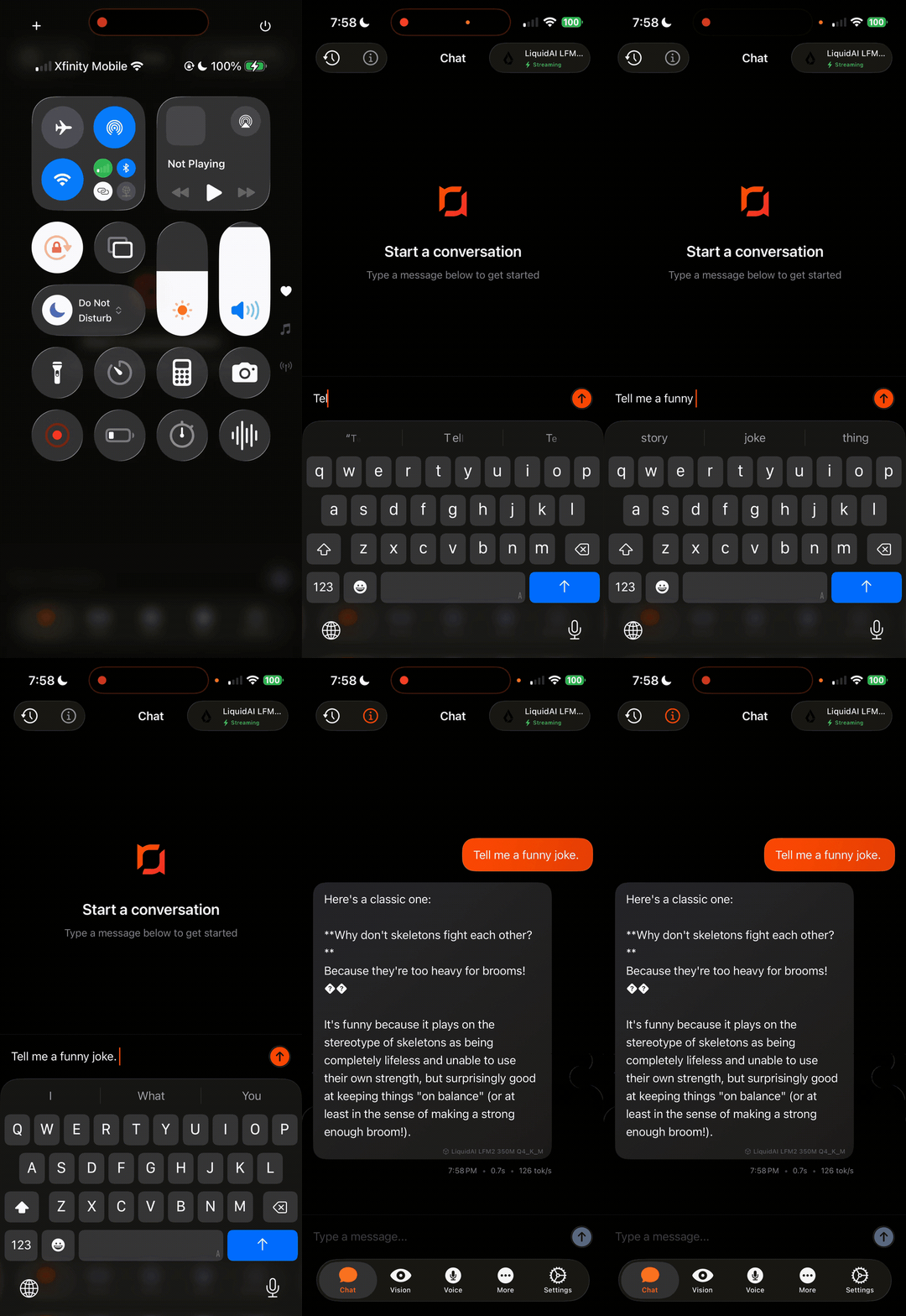
Text Generation

Text Generation
LLM inference — 100% on-device
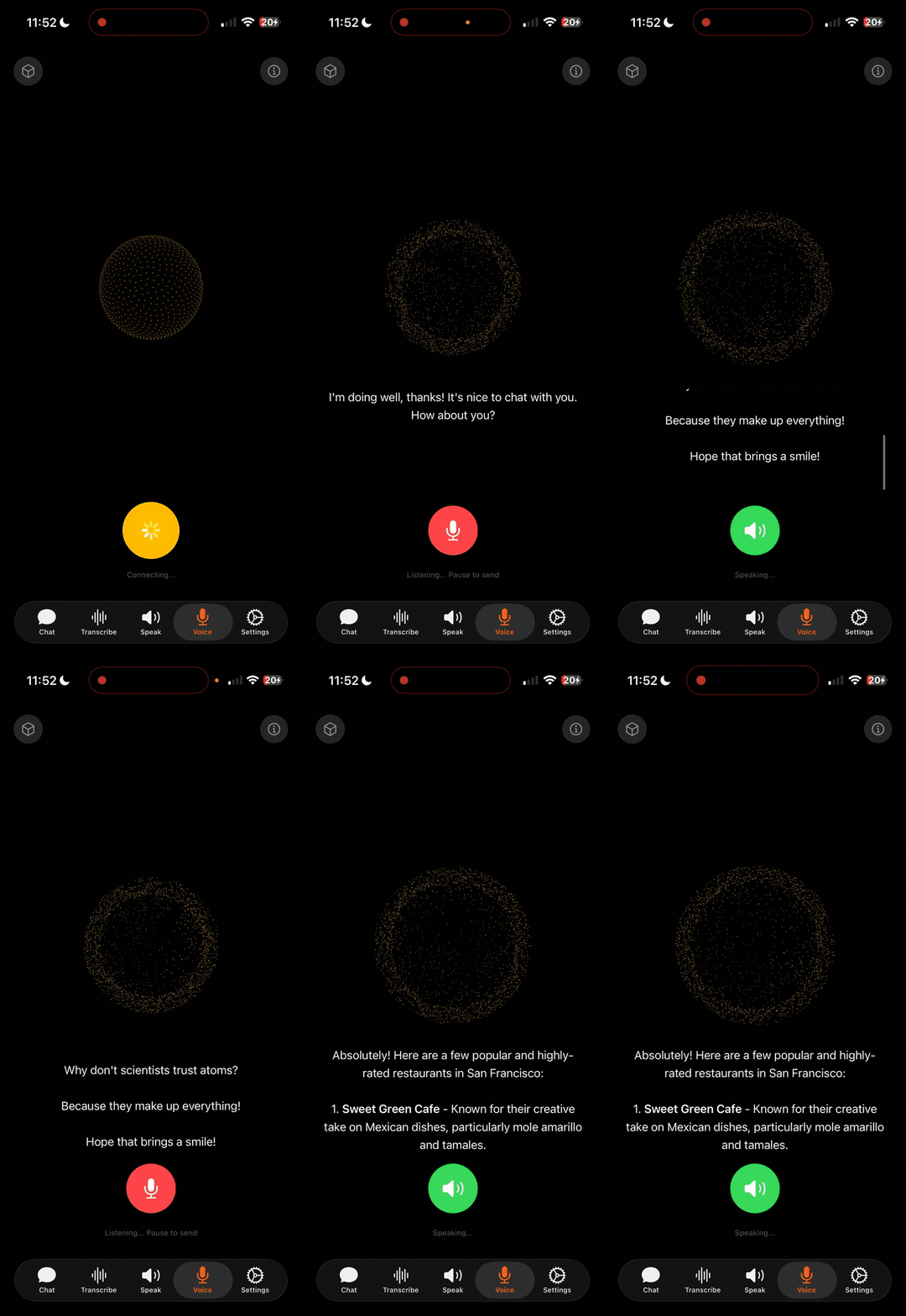
Voice AI

Voice AI
STT → LLM → TTS pipeline — fully offline
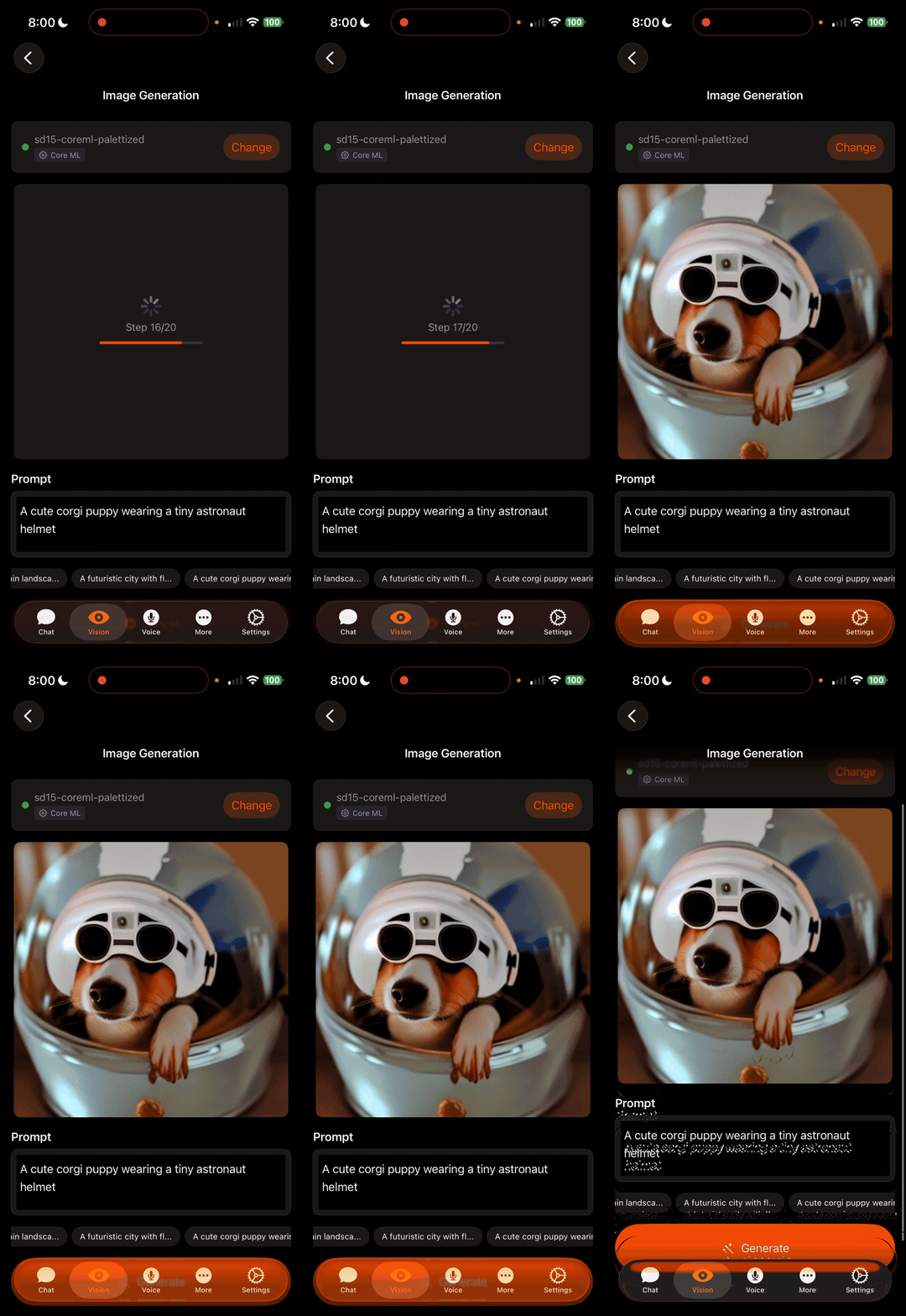
Image Generation

Image Generation
On-device diffusion model
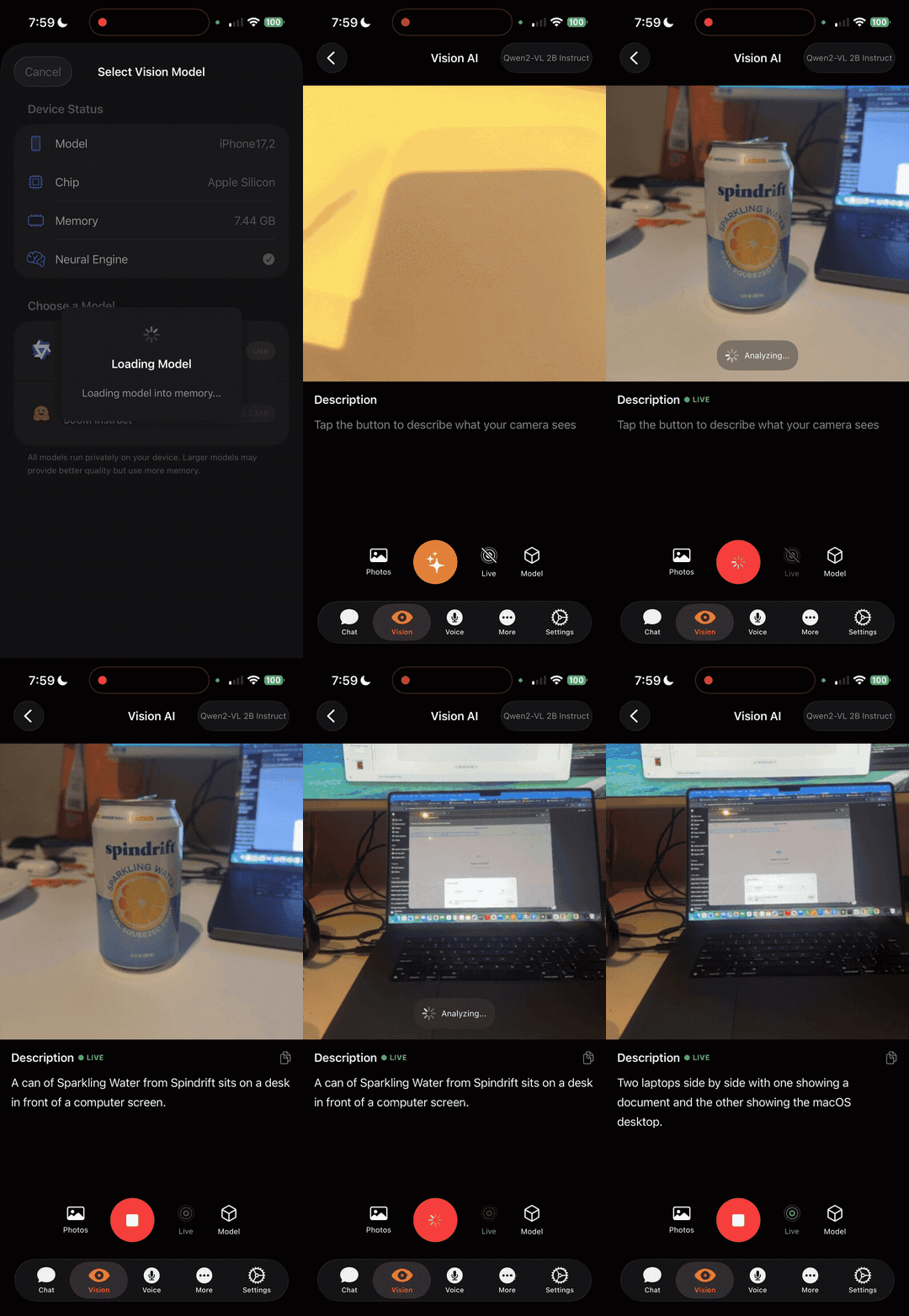
Visual Language Model

Visual Language Model
Vision + language understanding on-device
## 什么是 RunAnywhere? RunAnywhere 让您能够为应用添加完全在设备端运行的 AI 功能: - **LLM Chat** — Llama、Mistral、Qwen、SmolLM 等 - **Speech-to-Text** — 基于 Whisper 的转录 - **Text-to-Speech** — 神经语音合成 - **Voice Assistant** — 完整的 STT → LLM → TTS 流水线 无云依赖。无延迟。数据不离开设备。 ## SDK | 平台 | 状态 | 安装方式 | 文档 | |----------|--------|--------------|---------------| | **Swift** (iOS/macOS) | 稳定版 | [Swift Package Manager](#swift-ios--macos) | [docs.runanywhere.ai/swift](https://docs.runanywhere.ai/swift/introduction) | | **Kotlin** (Android) | 稳定版 | [Gradle](#kotlin-android) | [docs.runanywhere.ai/kotlin](https://docs.runanywhere.ai/kotlin/introduction) | | **Web** (浏览器) | 公测版 | [npm](#web-browser) | [SDK README](sdk/runanywhere-web/) | | **React Native** | 公测版 | [npm](#react-native) | [docs.runanywhere.ai/react-native](https://docs.runanywhere.ai/react-native/introduction) | | **Flutter** | 公测版 | [pub.dev](#flutter) | [docs.runanywhere.ai/flutter](https://docs.runanywhere.ai/flutter/introduction) | ## 快速开始 ### Swift (iOS / macOS) ``` import RunAnywhere import LlamaCPPRuntime // 1. Initialize LlamaCPP.register() try RunAnywhere.initialize() // 2. Load a model try await RunAnywhere.downloadModel("smollm2-360m") try await RunAnywhere.loadModel("smollm2-360m") // 3. Generate let response = try await RunAnywhere.chat("What is the capital of France?") print(response) // "Paris is the capital of France." ``` **通过 Swift Package Manager 安装:** ``` https://github.com/RunanywhereAI/runanywhere-sdks ``` [完整文档 →](https://docs.runanywhere.ai/swift/introduction) · [源代码](sdk/runanywhere-swift/) ### Kotlin (Android) ``` import com.runanywhere.sdk.public.RunAnywhere import com.runanywhere.sdk.public.extensions.* // 1. Initialize LlamaCPP.register() RunAnywhere.initialize(environment = SDKEnvironment.DEVELOPMENT) // 2. Load a model RunAnywhere.downloadModel("smollm2-360m").collect { println("${it.progress * 100}%") } RunAnywhere.loadLLMModel("smollm2-360m") // 3. Generate val response = RunAnywhere.chat("What is the capital of France?") println(response) // "Paris is the capital of France." ``` **通过 Gradle 安装:** ``` dependencies { implementation("com.runanywhere.sdk:runanywhere-kotlin:0.1.4") implementation("com.runanywhere.sdk:runanywhere-core-llamacpp:0.1.4") } ``` [完整文档 →](https://docs.runanywhere.ai/kotlin/introduction) · [源代码](sdk/runanywhere-kotlin/) ### React Native ``` import { RunAnywhere, SDKEnvironment } from '@runanywhere/core'; import { LlamaCPP } from '@runanywhere/llamacpp'; // 1. Initialize await RunAnywhere.initialize({ environment: SDKEnvironment.Development }); LlamaCPP.register(); // 2. Load a model await RunAnywhere.downloadModel('smollm2-360m'); await RunAnywhere.loadModel(modelPath); // 3. Generate const response = await RunAnywhere.chat('What is the capital of France?'); console.log(response); // "Paris is the capital of France." ``` **通过 npm 安装:** ``` npm install @runanywhere/core @runanywhere/llamacpp ``` [完整文档 →](https://docs.runanywhere.ai/react-native/introduction) · [源代码](sdk/runanywhere-react-native/) ### Flutter ``` import 'package:runanywhere/runanywhere.dart'; import 'package:runanywhere_llamacpp/runanywhere_llamacpp.dart'; // 1. Initialize await RunAnywhere.initialize(); await LlamaCpp.register(); // 2. Load a model await RunAnywhere.downloadModel('smollm2-360m'); await RunAnywhere.loadModel('smollm2-360m'); // 3. Generate final response = await RunAnywhere.chat('What is the capital of France?'); print(response); // "Paris is the capital of France." ``` **通过 pub.dev 安装:** ``` dependencies: runanywhere: ^0.15.11 runanywhere_llamacpp: ^0.15.11 ``` [完整文档 →](https://docs.runanywhere.ai/flutter/introduction) · [源代码](sdk/runanywhere-flutter/) ### Web (浏览器) ``` import { RunAnywhere, TextGeneration } from '@runanywhere/web'; // 1. Initialize await RunAnywhere.initialize({ environment: 'development' }); // 2. Load a model await TextGeneration.loadModel('/models/qwen2.5-0.5b-instruct-q4_0.gguf', 'qwen2.5-0.5b'); // 3. Generate const result = await TextGeneration.generate('What is the capital of France?'); console.log(result.text); // "Paris is the capital of France." ``` **通过 npm 安装:** ``` npm install @runanywhere/web ``` [完整文档 →](sdk/runanywhere-web/) · [源代码](sdk/runanywhere-web/) ## 示例应用 展示 SDK 功能的全功能演示应用: | 平台 | 源代码 | 下载 | |----------|-------------|----------| | iOS | [examples/ios/RunAnywhereAI](examples/ios/RunAnywhereAI/) | [App Store](https://apps.apple.com/us/app/runanywhere/id6756506307) | | Android | [examples/android/RunAnywhereAI](examples/android/RunAnywhereAI/) | [Google Play](https://play.google.com/store/apps/details?id=com.runanywhere.runanywhereai) | | Web | [examples/web/RunAnywhereAI](examples/web/RunAnywhereAI/) | 从源码构建 | | React Native | [examples/react-native/RunAnywhereAI](examples/react-native/RunAnywhereAI/) | 从源码构建 | | Flutter | [examples/flutter/RunAnywhereAI](examples/flutter/RunAnywhereAI/) | 从源码构建 | ## 入门示例 在各平台上快速上手 RunAnywhere 的最小化入门项目: | 平台 | 仓库 | |----------|------------| | Kotlin (Android) | [RunanywhereAI/kotlin-starter-example](https://github.com/RunanywhereAI/kotlin-starter-example) | | Swift (iOS) | [RunanywhereAI/swift-starter-example](https://github.com/RunanywhereAI/swift-starter-example) | | Flutter | [RunanywhereAI/flutter-starter-example](https://github.com/RunanywhereAI/flutter-starter-example) | | React Native | [RunanywhereAI/react-native-starter-app](https://github.com/RunanywhereAI/react-native-starter-app) | ## 实战演练 使用 RunAnywhere 构建的、突破端侧 AI 边界的真实项目。每一个都可以作为独立应用构建和运行。 ### [Android Use Agent](Playground/android-use-agent/) 一个完全在设备端运行的自主 Android 代理,可以控制您的手机。给它一个目标,比如“打开 YouTube 并搜索 lofi 音乐”,它会通过 Accessibility API 读取屏幕,使用端侧 LLM (Qwen3-4B) 推理下一步操作,并执行点击、滑动和文本输入 —— 全程无需云端调用。包含可将推理速度提升 15 倍的三星前台加速功能、通过 Android intent 的智能预启动以及循环检测和自动恢复。在 Galaxy S24 上对四个 LLM 模型进行了基准测试。**[完整基准测试](Playground/android-use-agent/ASSESSMENT.md)** ### [端侧浏览器代理](Playground/on-device-browser-agent/) 一个使用 WebLLM 和 WebGPU 在设备端完全自动化浏览器任务的 Chrome 扩展。采用双代理架构 —— 一个负责将目标分解为步骤的规划器 和一个与页面元素交互的导航器 —— 同时支持基于 DOM 和基于视觉的页面理解。包含针对 Amazon、YouTube 等网站的特定工作流。在初次下载模型后,所有 AI 推理均在您的 GPU 上本地运行。 ### [Swift Starter App](Playground/swift-starter-app/) 一个功能完备的 iOS 应用,在简洁的 SwiftUI 界面中演示了 RunAnywhere SDK 的核心 AI 能力。包含基于端侧语言模型的 LLM 聊天、基于 Whisper 的语音转文字、神经文字转语音,以及通过语音活动检测将 STT、LLM 和 TTS 串联起来的完整语音流水线。这是在 iOS 上构建隐私优先 AI 功能的良好起点。 ### [Linux Voice Assistant](Playground/linux-voice-assistant/) 一个适用于 Linux (树莓派 5、x86_64、ARM64) 的完整端侧语音 AI 流水线。说“Hey Jarvis”激活,自然说话并获得响应 —— 全程本地运行,零云依赖。在单个 C++ 二进制文件中链入了唤醒词检测 (openWakeWord)、语音活动检测 (Silero VAD)、语音转文字 (Whisper Tiny EN)、LLM 推理 (Qwen2.5 0.5B Q4) 和文字转语音 (Piper neural TTS)。 ### [OpenClaw Hybrid Assistant](Playground/openclaw-hybrid-assistant/) 一个混合语音助手,将延迟敏感的组件保留在设备端 (唤醒词、VAD、STT、TTS),同时通过 OpenClaw WebSocket 将推理路由到云端 LLM。支持打断功能 (通过说唤醒词中断 TTS)、用于云端响应反馈的等待提示音,以及带有突发过滤的抗噪 VAD。专为那些端侧 LLM 太慢但仍希望进行私密音频处理的场景而构建。 ## 功能特性 | 功能 | iOS | Android | Web | React Native | Flutter | |---------|-----|---------|-----|--------------|---------| | LLM 文本生成 | ✅ | ✅ | ✅ | ✅ | ✅ | | 流式输出 | ✅ | ✅ | ✅ | ✅ | ✅ | | 语音转文字 | ✅ | ✅ | ✅ | ✅ | ✅ | | 文字转语音 | ✅ | ✅ | ✅ | ✅ | ✅ | | 语音助手流水线 | ✅ | ✅ | ✅ | ✅ | ✅ | | 视觉语言模型 | ✅ | — | ✅ | — | — | | 模型下载 + 进度 | ✅ | ✅ | ✅ | ✅ | ✅ | | 结构化输出 (JSON) | ✅ | ✅ | ✅ | 🔜 | 🔜 | | Tool Calling | ✅ | ✅ | ✅ | — | — | | Embeddings | — | — | ✅ | — | — | | Apple Foundation Models | ✅ | — | — | — | — | ## 支持的模型 ### LLM (基于 llama.cpp 的 GGUF 格式) | 模型 | 大小 | 所需内存 | 用例 | |-------|------|--------------|----------| | SmolLM2 360M | ~400MB | 500MB | 快速、轻量级 | | Qwen 2.5 0.5B | ~500MB | 600MB | 多语言 | | Llama 3.2 1B | ~1GB | 1.2GB | 均衡 | | Mistral 7B Q4 | ~4GB | 5GB | 高质量 | ### 语音转文字 (基于 ONNX 的 Whisper) | 模型 | 大小 | 语言 | |-------|------|-----------| | Whisper Tiny | ~75MB | 英语 | | Whisper Base | ~150MB | 多语言 | ### 文字转语音 (基于 ONNX 的 Piper) | 语音 | 大小 | 语言 | |-------|------|----------| | Piper US English | ~65MB | 英语 (美国) | | Piper British English | ~65MB | 英语 (英国) | ## 仓库结构 ``` runanywhere-sdks/ ├── sdk/ │ ├── runanywhere-swift/ # iOS/macOS SDK │ ├── runanywhere-kotlin/ # Android SDK │ ├── runanywhere-web/ # Web SDK (WebAssembly) │ ├── runanywhere-react-native/ # React Native SDK │ ├── runanywhere-flutter/ # Flutter SDK │ └── runanywhere-commons/ # Shared C++ core │ ├── examples/ │ ├── ios/RunAnywhereAI/ # iOS sample app │ ├── android/RunAnywhereAI/ # Android sample app │ ├── web/RunAnywhereAI/ # Web sample app │ ├── react-native/RunAnywhereAI/ # React Native sample app │ └── flutter/RunAnywhereAI/ # Flutter sample app │ ├── Playground/ │ ├── swift-starter-app/ # iOS AI playground app │ ├── on-device-browser-agent/ # Chrome browser automation agent │ ├── android-use-agent/ # On-device autonomous Android agent │ ├── linux-voice-assistant/ # Linux on-device voice assistant │ └── openclaw-hybrid-assistant/ # Hybrid voice assistant (on-device + cloud) │ └── docs/ # Documentation ``` ## 系统要求 | 平台 | 最低版本 | 推荐版本 | |----------|---------|-------------| | iOS | 17.0+ | 17.0+ | | macOS | 14.0+ | 14.0+ | | Android | API 24 (7.0) | API 28+ | | Web | Chrome 96+ / Edge 96+ | Chrome 120+ | | React Native | 0.74+ | 0.76+ | | Flutter | 3.10+ | 3.24+ | **内存:** 最低 2GB,运行较大模型推荐 4GB+ ## 贡献 我们欢迎各种贡献。详情请参阅我们的[贡献指南](CONTRIBUTING.md)。 ``` # Clone repo git clone https://github.com/RunanywhereAI/runanywhere-sdks.git # 设置特定 SDK (示例: Swift) cd runanywhere-sdks/sdk/runanywhere-swift ./scripts/build-swift.sh --setup # 运行 sample app cd ../../examples/ios/RunAnywhereAI open RunAnywhereAI.xcodeproj ``` ## 支持 - **Discord:** [加入社区](https://discord.gg/N359FBbDVd) - **GitHub Issues:** [报告 Bug 或请求功能](https://github.com/RunanywhereAI/runanywhere-sdks/issues) - **Email:** founders@runanywhere.ai - **Twitter:** [@RunanywhereAI](https://twitter.com/RunanywhereAI) ## 许可证 Apache 2.0 — 详情请见 [LICENSE](LICENSE)。
标签:AI工具, AI工具包, Android, CNCF毕业项目, DLL 劫持, DSL, iOS, LLM推理, Spyse API, STT, TTS, 人工智能, 大语言模型, 实时告警, 开源搜索引擎, 开源模型, 文本生成, 本地AI, 本地部署, 深度学习, 用户模式Hook绕过, 离线运行, 移动应用开发, 端侧智能, 网络安全, 设备端AI, 语音AI, 语音合成, 语音识别, 边缘计算, 隐私保护