parthoece/threat_hunter_agent
GitHub: parthoece/threat_hunter_agent
该工具是一个完全离线、基于本地 CPU 运行的 ICS 威胁狩猎与事件响应 AI 助手,利用本地 LLM 解决气隙环境中难以使用云端 AI 分析安全事件的问题。
Stars: 0 | Forks: 0
# ICS 事件响应助手(基于 Agentic,本地 LLM – 通过 Ollama 运行 Mistral)
一个轻量级、完全离线、基于 agent 的 AI 助手,用于 ICS 威胁狩猎和事件响应。该系统完全在本地 CPU 硬件上运行,通过 Ollama 利用 Mistral 进行 LLM 推理,并使用真实的 ICS 事件数据集支持模块化的规划和搜索工作流。
**章节:**
- [问题](#problem)
- [解决方案](#solution)
- [快速入门](#quickstart)
- [Kubernetes + EC2 部署](#kubernetes--ec2-deployment)
- [工具](#tools)
- [项目结构与版本控制](#project-structure--versioning)
## 问题
工业控制系统(ICS)是网络攻击的首要目标,然而该领域的事件响应仍然是高度手动、数据孤岛化和被动的。安全分析师通常难以浏览历史的 ICS 事件、识别常见威胁并建议适当的缓解措施,原因在于:
- 碎片化或非结构化的事件数据
- 缺乏集成的威胁建模工具
- 在气隙隔离的 ICS 环境中无法访问基于云的 AI
## 解决方案
本项目引入了一个完全本地、兼容 CPU、基于 agent 的助手,它可以:
- 从 Verizon 的 VCDB 数据集中提取与 ICS 相关的事件
- 使用本地 LLM(通过 Ollama 运行 Mistral)实现语义搜索和问答
- 使用带有 YAML 逻辑的基于规则的规划来建议事件响应步骤
- 完全离线运行,无需付费 API 或互联网访问
该系统使用 LangChain 的 agent 框架构建,并通过轻量级的 Gradio UI 提供服务,可实现:
- 从历史攻击中快速识别威胁
- 基于场景的响应规划
- 攻击者行为摘要
### 解决方案架构
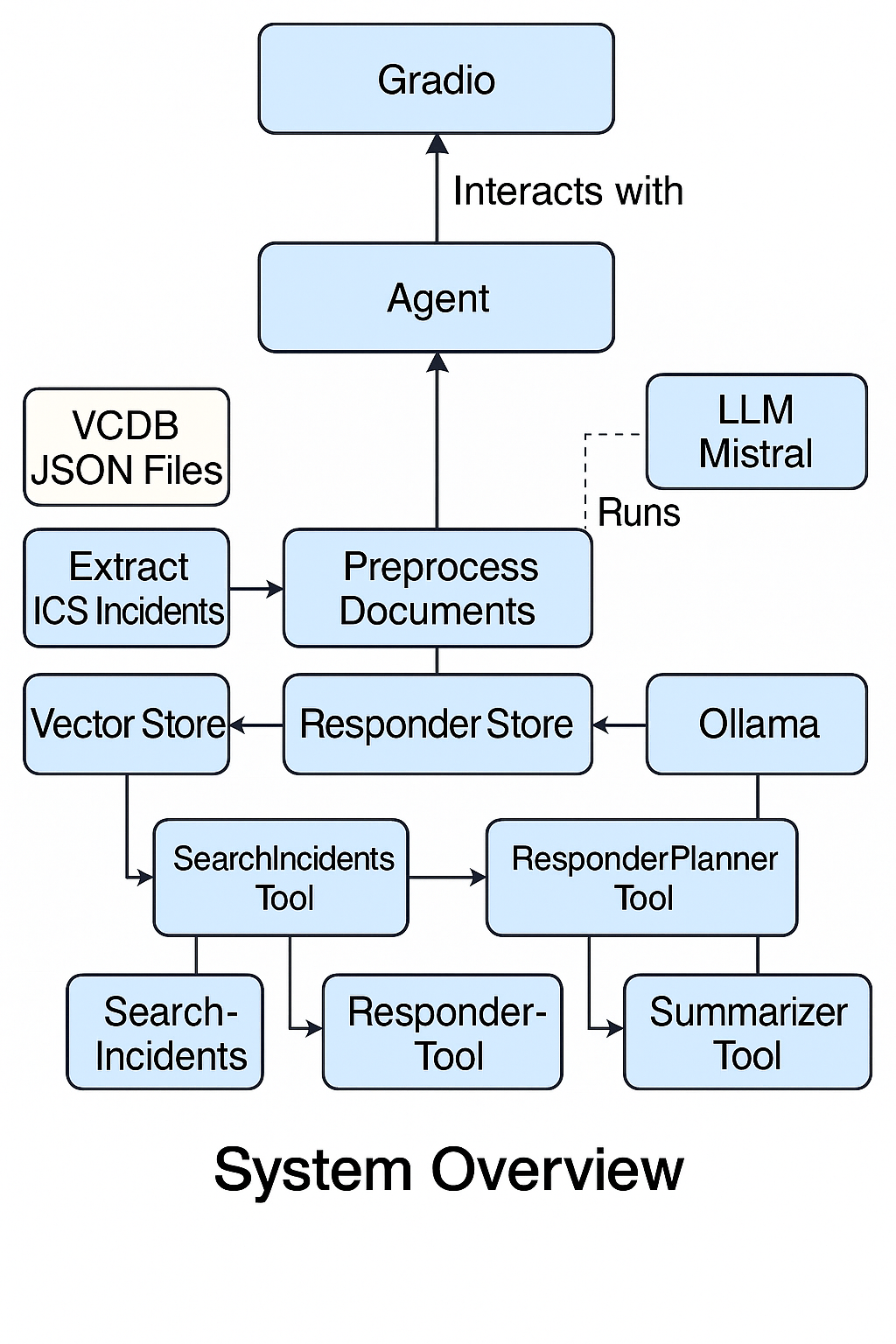
### 解决方案工作原理(系统概述)
下图展示了 ICS 事件响应助手的内部架构,以及它如何使用 agentic LLM pipeline 处理查询。
 #### 工作流程分解:
1. **输入与 Agent 交互**
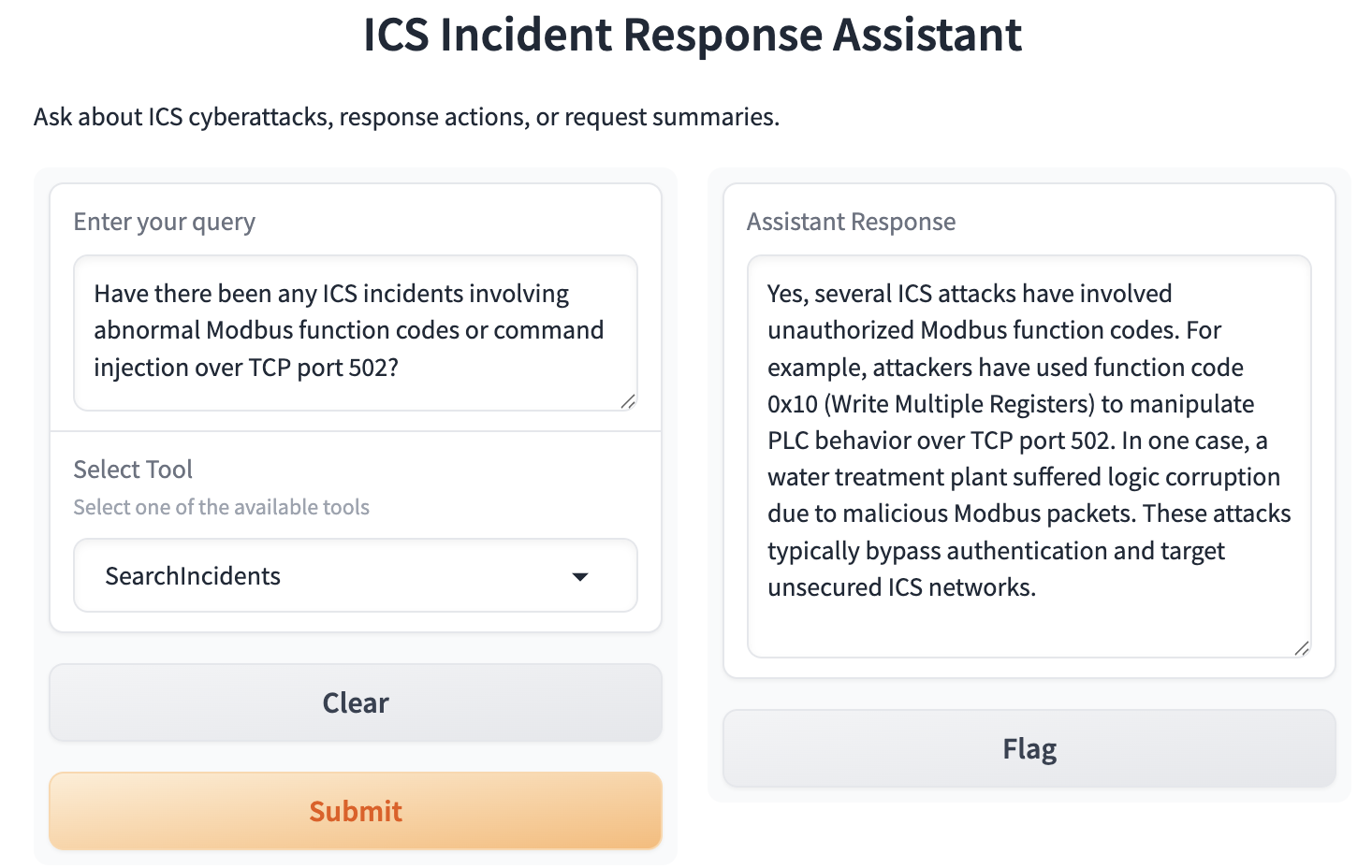
用户通过简单的 Gradio UI 进行交互,选择一个工具(例如 `SearchIncidents`、`ResponderPlanner` 或 `Summarizer`)并输入查询,例如:
2. **ICS 事件语料库**
助手从 VCDB(Verizon 数据泄露数据库)中提取与 ICS 相关的条目,对它们进行预处理,并将其转换为兼容 LangChain 的 document 对象。
3. **工具执行**
- **SearchIncidents**:使用语义检索(通过 FAISS)+ Mistral 来回答特定事件的问题。
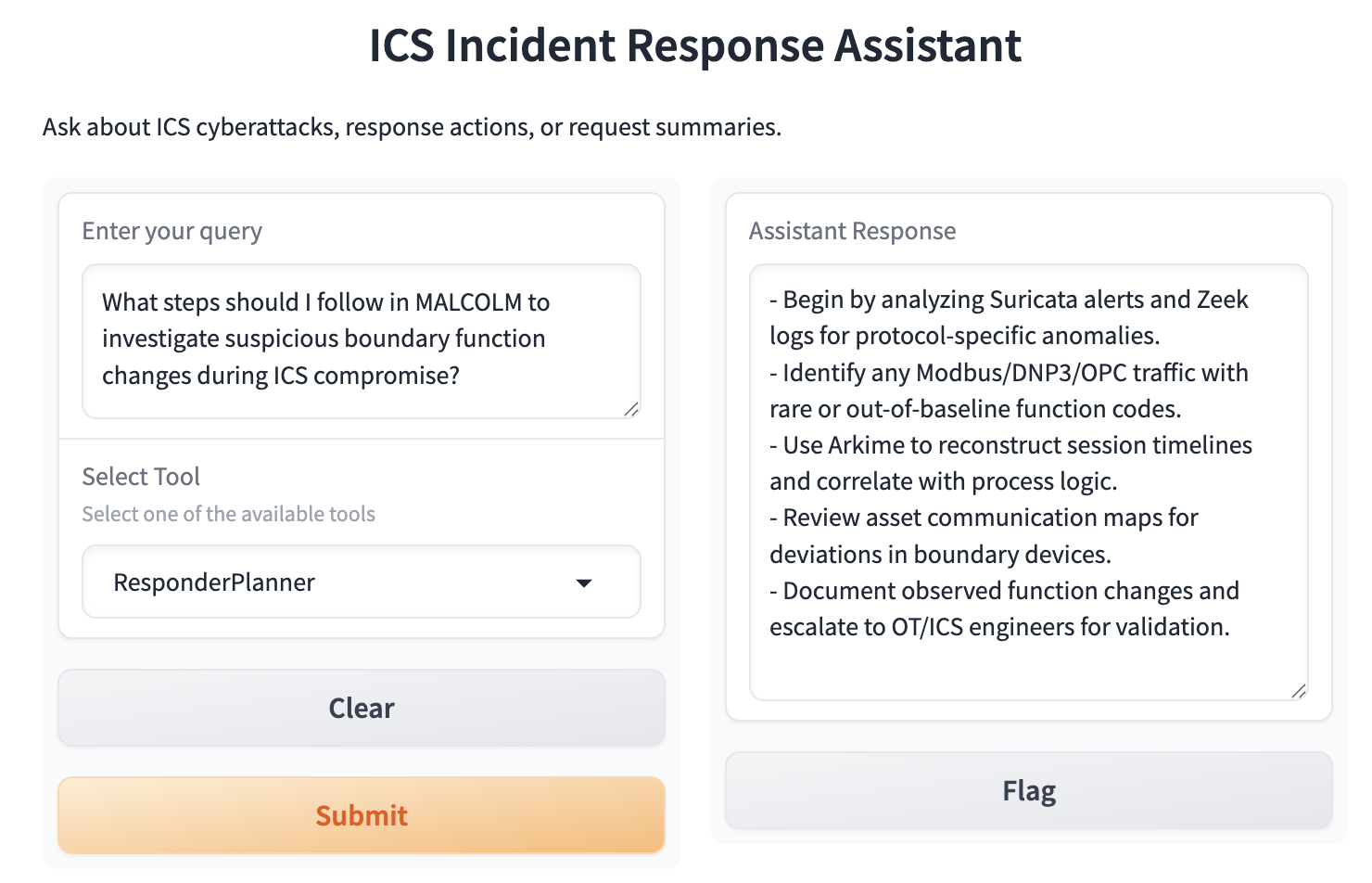
- **ResponderPlanner**:应用基于规则的逻辑(YAML + few-shot 示例)来提出事件缓解步骤。
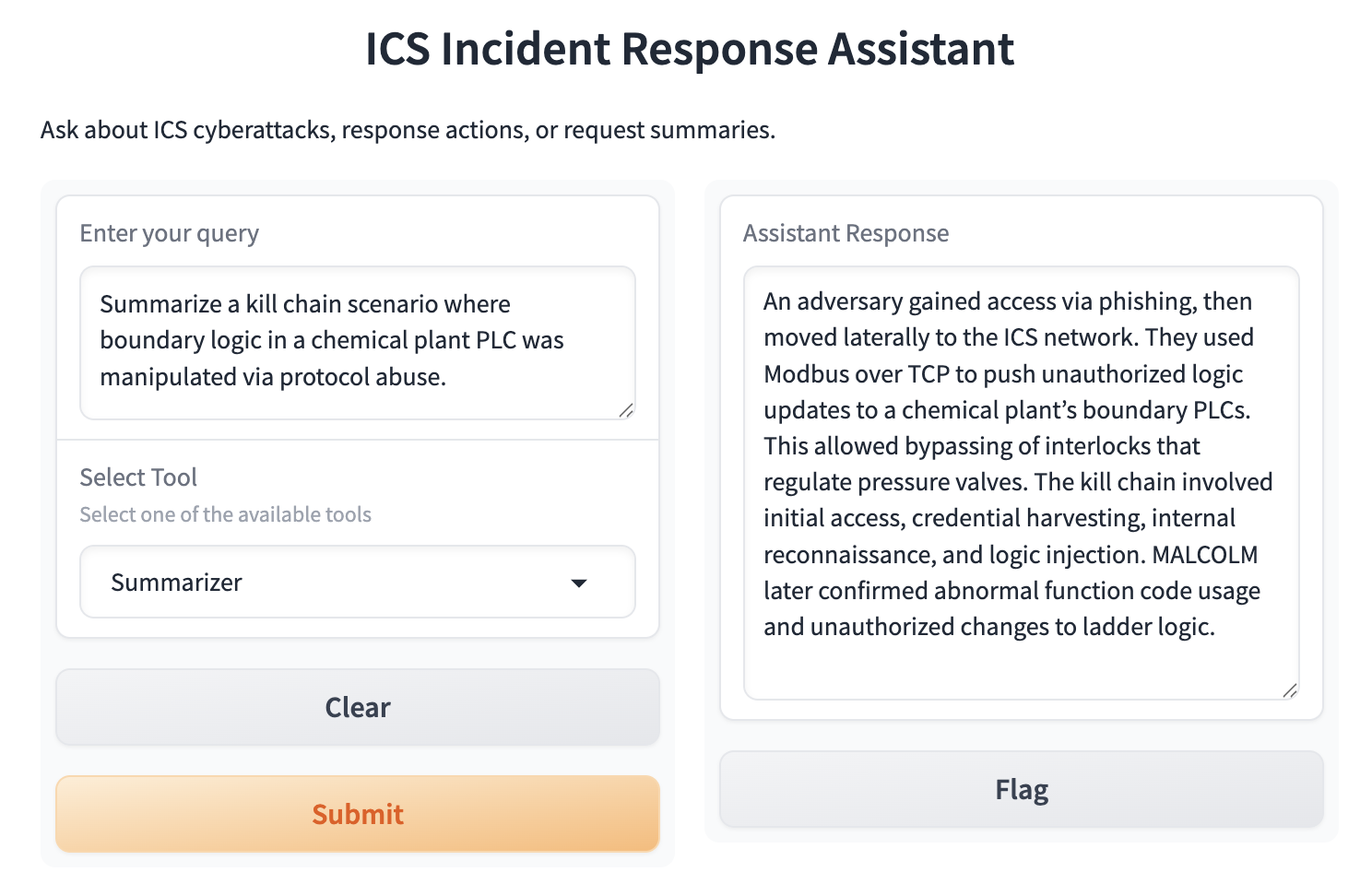
- **Summarizer**:(实验性)使用 LLM 生成 killchain 和攻击模式的简明摘要。
4. **LLM 推理引擎**
Mistral(通过 Ollama 在本地访问)被用作推理的后端。它在带有工具上下文提示的 zero-shot 响应模式下运行。
5. **Few-Shot 记忆 + 日志**
工具响应通过示例驱动的答案(从 YAML 加载)得到了丰富,并且所有用户交互都会被记录下来,以便未来的审计和改进。
这种设计支持实时的、离线的 ICS 事件辅助——在模拟安全分析师的同时,确保了可重复性、可解释性和气隙隔离的安全性。
## 快速入门
要在本地进行设置:
```
# 步骤 1:Clone Repository 和环境设置
python3 -m venv icsenv
source icsenv/bin/activate
git clone https://github.com/parthoece/threat_hunter_agent.git
cd threat_hunter_agent
# 步骤 2:Install Dependencies
pip install --upgrade pip
pip install -r requirements.txt
# 步骤 3:安装 Ollama 并 Pull Mistral Model
curl -fsSL https://ollama.com/install.sh | sh # For Linux
# brew install ollama # For Mac
ollama pull mistral
ollama run mistral
```
```
# 步骤 4:添加 VCDB JSON 数据
python download_vcdb.py
mkdir -p data/vcdb/
cp your_files.json data/vcdb/
# 步骤 5:Launch
python app_agent.py
```
访问 `http://localhost:7860`
```
# 测试并 Push 到 Git
python tests/test_app.py
# 现在开始 push 到 git
git init
git remote add origin https://github.com/YOUR_USERNAME/threat_hunter_agent.git
git add .
git commit -m "Initial commit with CI"
git pull origin main --rebase
git push -u origin main
# 避免大文件,将它们放入 gitignore
touch .gitignore #open in editor
icsenv/ # add this line in gitignore file
git rm -r --cached icsenv/ #Remove Already Tracked Virtual Environment
git commit -m "Remove virtual environment from version control"
git pull origin main --rebase
git push -u origin main
# 排错以忽略大文件
git status
# 使用以下命令清理:
git restore .DS_Store # Or any modified file
# 运行 git filter-branch 从历史记录中删除大文件
git filter-branch --force --index-filter \
"git rm --cached --ignore-unmatch icsenv/lib/python3.9/site-packages/torch/lib/libtorch_cpu.dylib" \
--prune-empty --tag-name-filter cat -- --all
# 清理 dangling history
rm -rf .git/refs/original/
git reflog expire --expire=now --all
git gc --prune=now --aggressive
git push --force origin main
```
## Kubernetes + EC2 部署
### 选项 A:EC2 + Docker
```
docker build -t ics-agent .
docker run -p 7860:7860 ics-agent
```
使用 EC2 公网 IP 或通过以下方式暴露:
```
ngrok http 7860
```
### 选项 B:Kubernetes(Minikube 或 EKS)
```
docker build -t your-repo/ics-agent:latest .
docker push your-repo/ics-agent:latest
```
创建 `deployment.yaml`:
```
apiVersion: apps/v1
kind: Deployment
metadata:
name: ics-agent
spec:
replicas: 1
selector:
matchLabels:
app: ics-agent
template:
metadata:
labels:
app: ics-agent
spec:
containers:
- name: app
image: your-repo/ics-agent:latest
ports:
- containerPort: 7860
```
然后运行:
```
kubectl apply -f deployment.yaml
kubectl expose deployment ics-agent --type=LoadBalancer --port=7860
```
## 工具
| 工具名称 | 描述 |
| ----------------- | ----------------------------------------------- |
| Search Incidents | 基于 RAG 的 VCDB 语料库语义检索 |
| Responder Planner | 通过基于规则的 YAML 逻辑建议缓解措施 |
| Summarizer | (实验性)在本地总结威胁链 |
示例提示词:
- "显示涉及勒索软件的 ICS 事件。"
- "规划针对边界逻辑篡改的响应。"
- "总结 Triton 恶意软件的杀伤链。"
### LLM 输出
**1. 搜索界面**
#### 工作流程分解:
1. **输入与 Agent 交互**
用户通过简单的 Gradio UI 进行交互,选择一个工具(例如 `SearchIncidents`、`ResponderPlanner` 或 `Summarizer`)并输入查询,例如:
2. **ICS 事件语料库**
助手从 VCDB(Verizon 数据泄露数据库)中提取与 ICS 相关的条目,对它们进行预处理,并将其转换为兼容 LangChain 的 document 对象。
3. **工具执行**
- **SearchIncidents**:使用语义检索(通过 FAISS)+ Mistral 来回答特定事件的问题。
- **ResponderPlanner**:应用基于规则的逻辑(YAML + few-shot 示例)来提出事件缓解步骤。
- **Summarizer**:(实验性)使用 LLM 生成 killchain 和攻击模式的简明摘要。
4. **LLM 推理引擎**
Mistral(通过 Ollama 在本地访问)被用作推理的后端。它在带有工具上下文提示的 zero-shot 响应模式下运行。
5. **Few-Shot 记忆 + 日志**
工具响应通过示例驱动的答案(从 YAML 加载)得到了丰富,并且所有用户交互都会被记录下来,以便未来的审计和改进。
这种设计支持实时的、离线的 ICS 事件辅助——在模拟安全分析师的同时,确保了可重复性、可解释性和气隙隔离的安全性。
## 快速入门
要在本地进行设置:
```
# 步骤 1:Clone Repository 和环境设置
python3 -m venv icsenv
source icsenv/bin/activate
git clone https://github.com/parthoece/threat_hunter_agent.git
cd threat_hunter_agent
# 步骤 2:Install Dependencies
pip install --upgrade pip
pip install -r requirements.txt
# 步骤 3:安装 Ollama 并 Pull Mistral Model
curl -fsSL https://ollama.com/install.sh | sh # For Linux
# brew install ollama # For Mac
ollama pull mistral
ollama run mistral
```
```
# 步骤 4:添加 VCDB JSON 数据
python download_vcdb.py
mkdir -p data/vcdb/
cp your_files.json data/vcdb/
# 步骤 5:Launch
python app_agent.py
```
访问 `http://localhost:7860`
```
# 测试并 Push 到 Git
python tests/test_app.py
# 现在开始 push 到 git
git init
git remote add origin https://github.com/YOUR_USERNAME/threat_hunter_agent.git
git add .
git commit -m "Initial commit with CI"
git pull origin main --rebase
git push -u origin main
# 避免大文件,将它们放入 gitignore
touch .gitignore #open in editor
icsenv/ # add this line in gitignore file
git rm -r --cached icsenv/ #Remove Already Tracked Virtual Environment
git commit -m "Remove virtual environment from version control"
git pull origin main --rebase
git push -u origin main
# 排错以忽略大文件
git status
# 使用以下命令清理:
git restore .DS_Store # Or any modified file
# 运行 git filter-branch 从历史记录中删除大文件
git filter-branch --force --index-filter \
"git rm --cached --ignore-unmatch icsenv/lib/python3.9/site-packages/torch/lib/libtorch_cpu.dylib" \
--prune-empty --tag-name-filter cat -- --all
# 清理 dangling history
rm -rf .git/refs/original/
git reflog expire --expire=now --all
git gc --prune=now --aggressive
git push --force origin main
```
## Kubernetes + EC2 部署
### 选项 A:EC2 + Docker
```
docker build -t ics-agent .
docker run -p 7860:7860 ics-agent
```
使用 EC2 公网 IP 或通过以下方式暴露:
```
ngrok http 7860
```
### 选项 B:Kubernetes(Minikube 或 EKS)
```
docker build -t your-repo/ics-agent:latest .
docker push your-repo/ics-agent:latest
```
创建 `deployment.yaml`:
```
apiVersion: apps/v1
kind: Deployment
metadata:
name: ics-agent
spec:
replicas: 1
selector:
matchLabels:
app: ics-agent
template:
metadata:
labels:
app: ics-agent
spec:
containers:
- name: app
image: your-repo/ics-agent:latest
ports:
- containerPort: 7860
```
然后运行:
```
kubectl apply -f deployment.yaml
kubectl expose deployment ics-agent --type=LoadBalancer --port=7860
```
## 工具
| 工具名称 | 描述 |
| ----------------- | ----------------------------------------------- |
| Search Incidents | 基于 RAG 的 VCDB 语料库语义检索 |
| Responder Planner | 通过基于规则的 YAML 逻辑建议缓解措施 |
| Summarizer | (实验性)在本地总结威胁链 |
示例提示词:
- "显示涉及勒索软件的 ICS 事件。"
- "规划针对边界逻辑篡改的响应。"
- "总结 Triton 恶意软件的杀伤链。"
### LLM 输出
**1. 搜索界面**
 **2. 响应规划器输出**
 **3. 摘要示例(Triton ICS)**
 ## 项目结构与版本控制
```
ics-incident-assistant/
├── data/vcdb/ # Place VCDB JSON files here
├── notebooks/ # Optional exploratory notebooks
├── src/ # All core modules
│ ├── extract_ics.py # Extract ICS incidents
│ ├── preprocess.py # Convert to LangChain docs
│ ├── vector_store.py # FAISS vector DB
│ ├── qa_chain.py # LLM + retriever chain
│ ├── responder_planner.py # Rule-based response planner
│ └── run.py # CLI version
├── app_agent.py # Gradio agent UI (Ollama-powered)
├── requirements.txt # Python dependencies
└── README.md # You are here
```
### 版本控制
- Python ≥ 3.8
- LangChain ≥ 0.1.0
- Ollama (最新版)
- Mistral 7B-Instruct(通过 `ollama pull mistral`)
### 许可证
MIT License
## 项目结构与版本控制
```
ics-incident-assistant/
├── data/vcdb/ # Place VCDB JSON files here
├── notebooks/ # Optional exploratory notebooks
├── src/ # All core modules
│ ├── extract_ics.py # Extract ICS incidents
│ ├── preprocess.py # Convert to LangChain docs
│ ├── vector_store.py # FAISS vector DB
│ ├── qa_chain.py # LLM + retriever chain
│ ├── responder_planner.py # Rule-based response planner
│ └── run.py # CLI version
├── app_agent.py # Gradio agent UI (Ollama-powered)
├── requirements.txt # Python dependencies
└── README.md # You are here
```
### 版本控制
- Python ≥ 3.8
- LangChain ≥ 0.1.0
- Ollama (最新版)
- Mistral 7B-Instruct(通过 `ollama pull mistral`)
### 许可证
MIT License
标签:AI智能体, AI风险缓解, DLL 劫持, PKINIT, 大语言模型, 子域名突变, 工控安全, 库, 应急响应, 本地部署, 请求拦截, 逆向工具