anonghosty/shadowserver_email_automation
GitHub: anonghosty/shadowserver_email_automation
该工具包通过自动化 Shadowserver 威胁情报报告的邮件获取、解析、分类与报告生成流程,帮助 CERT 和安全团队摆脱繁琐的手工处理并提升运营效率。
Stars: 0 | Forks: 0
# Shadowserver 报告获取与情报工具包
**作者:** Ike Owuraku Amponsah\
**专业贡献者:** KeCIRT(MICROSOFT GRAPH 实现及文档编写)\
**LinkedIn:** [https://www.linkedin.com/in/iowuraku](https://www.linkedin.com/in/iowuraku)\
**文档:** [文档请看这里](https://shadowserver-report-ingestion-intelligence-toolkit.readthedocs.io)
## 在此感谢对我批判性思维培养的付出
这款工具包献给我的导师 Kwadwo Osafo-Maafo(加纳)和 Spilker Wiredu(加纳),以及我异国的好兄弟 Mark Kilizo(肯尼亚)。
他们将不可能化为可能,并给予我极大的专注力,让这一切成为现实。此外,还要向 DeepDarkCTI 致谢!!
## 概述
该项目自动化了来自 [Shadowserver](https://www.shadowserver.org/) 威胁情报源的收集、解析、分类和报告生成,消除了许多 CERT 多年来面临的复杂性。

主要功能包括:
- IMAP 基本认证邮件获取(通用型),Microsoft Graph 集成
- 归档及附件提取(ZIP, RAR, 7z)
- CSV 验证,地理/IP/ASN 扩充
- 组织映射与告警追踪
- 4 种风格的每日报告生成变体 - CSV {可用于自动化},2 种 PDF {可用于正式报告},HTML {包含图表和搜索栏}
- 便携式仪表板,便于在会议中快速可视化、了解当前威胁形势报告并做出通报发布的决策
- 完全支持基于 MongoDB 的扩充
- Chrome + Selenium 自动化,用于抓取报告元数据
- 新功能(实验性)- 两种用于获取和报告实现的 GUI 选项(使用前请等待视频教程 :P )
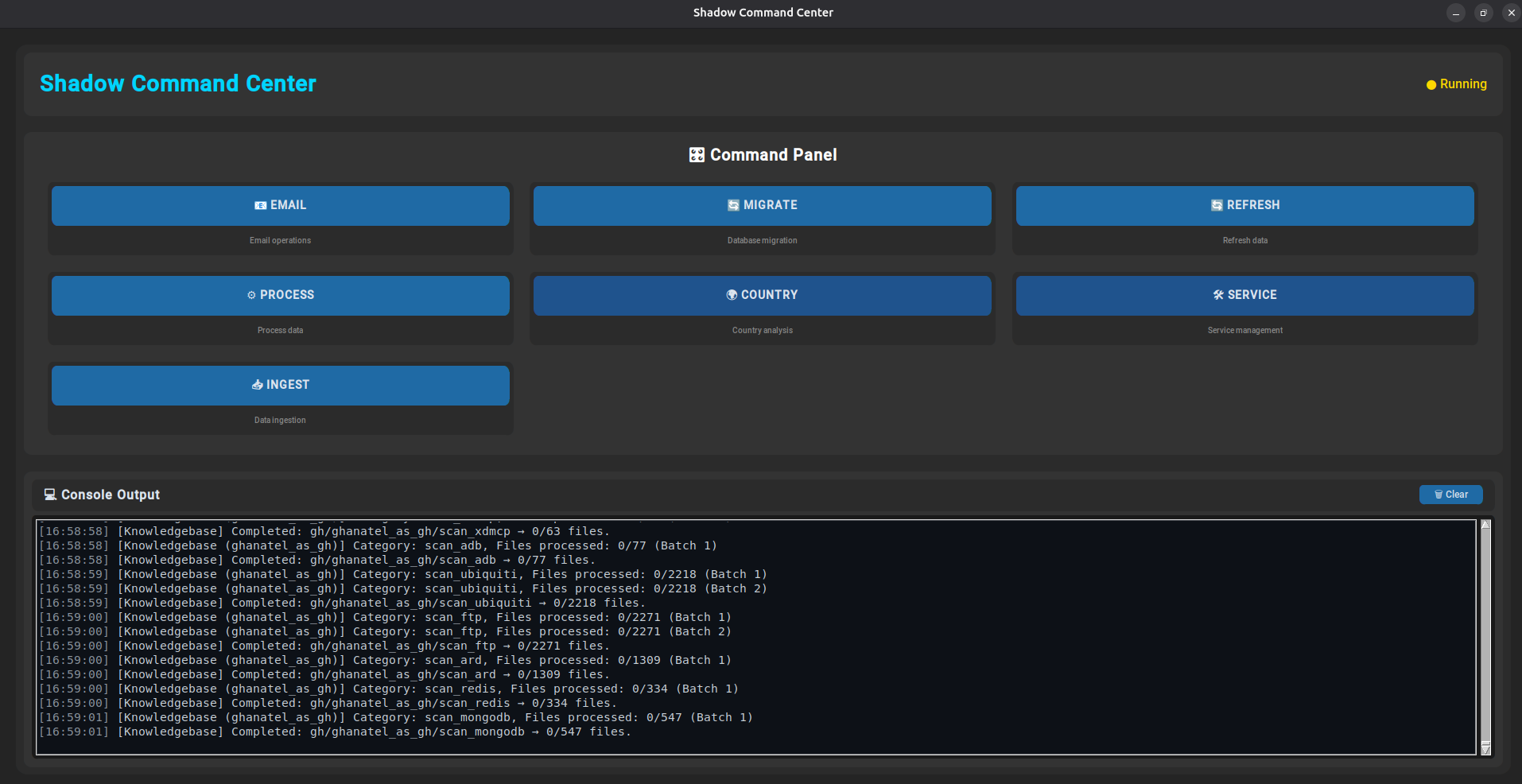

## 更新 – 2025年8月1日
2025年8月1日,我收到了肯尼亚国家 CIRT 关于 O365 和 Gmail 的 IMAP 限制问题的消息。CSIRT Kenya 强调了影响所述平台用户的问题,并分享了一个将要实施的解决方案。如果您想查看详细信息和解决方案,这里是该文件:
[关于 KE National CSIRT 对 O365 和 Gmail 的实施的反馈 (2025-08-02)](docs/feedback_ke_national_csirt_implementation_of_0365_and_gmail_20250802.pdf)
## 更新 - 2025年8月3日
在 KeCIRT 故障排除会议之后,将进行另一项实现:对于 Microsoft Graph 选项,将像 IMAP 选项那样,通过邮件正文中的链接拉取不带附件的邮件。
## 更新 - 2025年8月4日
目前正在实施更改,并且也发现了 Microsoft Graph 下载中的限制。敬请期待。
- 限制问题已解决
- IMAP 和 Microsoft Graph 的无附件问题均已解决
- 完成了 Tracker clear 的实现
- 意识到报告代码可能会扩展到 6 个字符,已对此进行了处理

## 教程 – 设置用于 Microsoft Graph 的 O365 应用程序
对于需要配置 O365 应用程序以安全、正确地与 Microsoft Graph 交互的组织,CSIRT Kenya 还提供了一份设置指南。您可以在下面找到该教程:
[National KE CSIRT 创建 O365 应用程序的步骤 (2025-02-08)](docs/national_ke_csirt_steps_0365_google_workspace_application_creation_20250208.pdf)
## 项目结构
需要使用 MongoDB。请参阅:[https://www.howtoforge.com/tutorial/install-mongodb-on-ubuntu/](https://www.howtoforge.com/tutorial/install-mongodb-on-ubuntu/)\
在此处获取最新的 Mongo 仓库:[https://www.mongodb.com/docs/manual/tutorial/install-mongodb-on-ubuntu/](https://www.mongodb.com/docs/manual/tutorial/install-mongodb-on-ubuntu/)
```
.
├── bootstrap_shadowserver_environment.py # Sets up OS, pip, Chrome & ChromeDriver
├── install_python_and_run_bootstrap.sh # Prepares system with Python3 & pip
├── generate_statistics_reported_from_shadowserver_unverified.py
├── get_shadowserver_report_types.py
├── shadow_server_data_analysis_system_builder_and_updater.py
├── report_template.html
├── reset_db_by_deleting all _as databases.py
├── generate_reported_malicious_communication_reports.py
├── portable_analytics_dashboard.py
├── LICENSE # MIT (Modified)
├── .env # Configuration file
└── README.md
```
## 系统要求
### 操作系统级别依赖(Ubuntu)
```
| # | Package | Purpose |
| -- | -------------------- | ------------------------------------------------------------------------ |
| 1 | `python3` | Python interpreter for executing the application |
| 2 | `python3-pip` | Python package manager used to install dependencies |
| 3 | `unzip` | Utility for extracting `.zip` files |
| 4 | `zip` | Utility for creating `.zip` archives |
| 5 | `p7zip-full` | Full-featured 7-Zip tool for `.7z` archive extraction |
| 6 | `p7zip-rar` | Enables RAR archive support in 7-Zip |
| 7 | `unrar` | Standalone utility for extracting `.rar` files |
| 8 | `libnss3` | Required security library for Chrome/Chromium (used by Selenium) |
| 9 | `libxss1` | X11 Screen Saver extension (required for headless browser stability) |
| 10 | `libappindicator3-1` | Enables application indicators in headless browser environments |
| 11 | `fonts-liberation` | Provides standard web fonts used in headless Chrome rendering |
| 12 | `whois` | Performs ASN and WHOIS lookups for IP metadata enrichment |
| 13 | `wget` | Command-line tool to download files and data from the web |
| 14 | `ca-certificates` | Installs trusted CA certificates for secure HTTPS communication |
| 15 | `gnupg` | Enables digital signing, encryption, and verification |
| 16 | `lsb-release` | Provides distro version info for environment detection and compatibility |
```
## Python 依赖
通过 pip 安装:
```
| # | Package | Purpose |
| -- | ---------------- | -------------------------------------------------------------------------------------- |
| 1 | `aiofiles` | Asynchronous file operations without blocking the event loop |
| 2 | `aiohttp` | Asynchronous HTTP requests and web client support |
| 3 | `async-lru` | Caching for async functions to improve performance |
| 4 | `beautifulsoup4` | HTML/XML parsing for web scraping and document analysis |
| 5 | `bs4` | Import alias for BeautifulSoup (required by some packages) |
| 6 | `colorama` | Cross-platform colored terminal output |
| 7 | `pandas` | High-level data structures and analysis tools for CSV/JSON |
| 8 | `pymongo` | MongoDB driver to insert and query intelligence data |
| 9 | `py7zr` | 7-Zip archive extraction and creation |
| 10 | `rarfile` | Handle `.rar` files |
| 11 | `reportlab` | Generate structured PDF reports dynamically |
| 12 | `selenium` | Web automation for browser-based scraping or headless downloads |
| 13 | `tqdm` | Lightweight progress bars in loops and pipelines |
| 14 | `python-dotenv` | Load environment variables from `.env` for config and secrets |
| 15 | `msal` | Microsoft Authentication Library for Azure AD integration and secure token acquisition |
| 16 | `dash` | Framework for building interactive web dashboards using Python |
| 17 | `geopandas` | Extend Pandas for geospatial data handling and mapping |
| 18 | `pycountry` | Access ISO country, subdivision, currency, and language lists |
| 19 | `matplotlib` | Data visualization and chart plotting for analytics and reports |
```
## 环境配置 (`.env`)
" 替换为小写的国家名称
geo_csv_regex="^\\d{4}-\\d{2}-\\d{2}-(.*?)--geo_as\\d+\\.csv$"
geo_csv_fallback_regex="^\\d{4}-\\d{2}-\\d{2}-(.*?)(?:-\\d{3})?-_as\\d+\\.csv$"
# ====== Feature Spotlight:Anomaly Pattern Detection ======
#=Special Detection In Case Of Issues---run just service flag to troubleshoot----
#Increase the number of anomaly pattern checks
anomaly_pattern_count=5
#Real Life Scenarios
# 用于 Shadowserver consultation 的 Anomaly patterns -Blocked_IPs Report
enable_anomaly_pattern_1="true"
anomaly_pattern_1="^\d{4}-\d{2}-\d{2}-(\d+)_as\d+\.csv$"
#Detected government asn naming at suffix
enable_anomaly_pattern_2="true"
anomaly_pattern_2="^\d{4}-\d{2}-\d{2}-(.*?)-[_-][a-z0-9\-]*_as\d+\.csv$"
#Ransomware Reports Service Sorting
enable_anomaly_pattern_3="true"
anomaly_pattern_3="^\d{4}-\d{2}-\d{2}-(.*?)--geo\.csv$"
enable_anomaly_pattern_4="false"
anomaly_pattern_4=""
```
## 初始化环境
运行:
```
chmod +x install_python_and_run_bootstrap.sh
./install_python_and_run_bootstrap.sh
```
此脚本将:
- 安装 Python3 和 pip
- 运行 `bootstrap_shadowserver_environment.py` 以安装:
- 所需的 pip 包
- Google Chrome(自动更新 Google Chrome 并获取更新版本的 Chromedriver)
- 匹配的 ChromeDriver
- 系统依赖项
## 通过 IMAP 获取 Shadowserver 报告
```
Sequence: Really Important To Observe the sequence so you can build flavors in automation
+---------+ +---------+ +---------+ +----------+ +-----------+ +-----------+ +--------+
| email | --> | migrate | --> | refresh | --> | process | --> | country | --> | service | --> | ingest |
+---------+ +---------+ +---------+ +----------+ +-----------+ +-----------+ +--------+
│ │ │ │ │ │ │
▼ ▼ ▼ ▼ ▼ ▼ ▼
Pull Emails Sort Extensions Refresh ASN/ Normalize & Sort by Country Sort by Service Ingest into
& Extract Unzip and Extract WHOIS Info Parse Reports (ISO 3166-1) (Report Type) Knowledgebase
Attachments Reports Advisories
From Attachments
Directory
python3 shadow_server_data_analysis_system_builder_and_updater.py [email|refresh|process|country|service|ingest|all] [--tracker] [--tracker=auto] [--tracker-service=auto|manual|off] [--tracker-ingest=auto|manual|off]
email → Pull Emails Including Shadowserver Reports, Save as EML, and Extract Attachments
migrate → Sort Extensions, Unzip and Extract. Reports advisories from attachments directory
refresh → Refresh Stored ASN/WHOIS data from Previous Shadowserver Reports
process → Parse and Normalize Shadowserver CSV/JSON Files
country → Sort Processed Reports by Country Code (based on IP WHOIS geolocation)
service → Sort Processed Reports by Detected Service Type (via Filename Pattern Analysis)
ingest → Ingest Cleaned Shadowserver Data into the Knowledgebase (Databases & Collections)
```
📬 邮件子方法
| 方法 | 描述 |
|--------------------|---------------------------------------------|
| **IMAP** | 直接连接到邮箱并解析 `.eml` 附件。 |
| **Microsoft Graph**| 使用 OAuth2 通过 Microsoft 365 Graph API 访问邮件。 |
| **Google Workspace**| 通过 Gmail API 进行身份验证以获取附件。尚未实现 |
### 🧭 使用 `all` 时的任务流程
```
email → Pull Emails Gmail(TODO), Microsoft Graph (New Implementation: KE-CIRT Contribution, IMAP)
↓
migrate → Extract Shadowserver Attachments
↓
refresh → Refresh Stored ASN/WHOIS data
↓
process → Normalize and Parse Extracted CSV/JSON Reports
↓
country → Sort by IP Country Code (ISO 3166-1)
↓
service → Sort by Shadowserver Report Type Patterns
↓
ingest → Ingest Parsed Data into Local/Cloud Knowledgebase (Mongodb Instance)
```
示例:
```
# 仅 Ingest emails
python3 shadow_server_data_analysis_system_builder_and_updater.py email
# 重置 Email 选择
python3 shadow_server_data_analysis_system_builder_and_updater.py email --reset-email-method
# 运行 email、处理和 country mapping,并使用 auto tracking
python3 shadow_server_data_analysis_system_builder_and_updater.py all --tracker=auto
# 仅处理已下载的 reports,不进行 ingestion
python3 shadow_server_data_analysis_system_builder_and_updater.py process --tracker-service=manual
# 选择顺序执行模式 (flavor):
python3 shadow_server_data_analysis_system_builder_and_updater.py email process country service
python3 shadow_server_data_analysis_system_builder_and_updater.py email refresh country service
python3 shadow_server_data_analysis_system_builder_and_updater.py refresh country service ingest
```
| # | 方法 | 描述 |
|----|--------------------|-----------------------------------------------------------------------------|
| 1 | **IMAP** | 通过 IMAP 直接连接到邮箱,提取 `.eml`,并保存附件。 |
| 2 | **Microsoft Graph**| 结合 OAuth2 使用 Microsoft Graph API 访问收件箱并解析附件。 |
| 3 | **Google Workspace**| 使用 OAuth2 凭据访问 Gmail API 以获取并提取文件。尚未实现 |
## 抓取 Shadowserver 报告元数据(在生成报告前运行)
```
python3 get_shadowserver_report_types.py
```
输出存储于:
- HTML: `shadowserver_report_types_http_files/`
- CSV: `shadowserver_url_descriptions/`
## 按组织生成统计数据
使用 `shadowserver_analysis_system/detected_companies/constituent_map.csv` 中的组成映射。
将名为 "logo.png" 的公司徽标放置在根目录中
```
python3 generate_statistics_reported_from_shadowserver_unverified.py
```
输出内容:
- 位于 `statistical_data//` 下的 CSV 和 PDF 文件
- ASN-类别映射、IP 前缀、摘要计数
点击查看 .env 配置示例
``` # MongoDB 凭据 mongo_username="anon" mongo_password="input password" mongo_auth_source="admin" # change if using a different auth DB mongo_host="127.0.0.1" mongo_port=27017 # Email 设置 mail_server="mail.example.com" email_address="cookies@example.com" email_password="cookiesonthelu" imap_shadowserver_folder_or_email_processing_folder="INBOX" # Advisory metadata(未来计划) advisory_prefix="default-cert-" # Report metadata reference_nomenclature="default-cert-stat-" cert_name="DEFAULT-CERT" # ====== Performance 设置 ====== buffer_size="1024" flush_row_count=100 tracker_batch_size=1000 service_sorting_batch_size=1000 number_of_files_ingested_into_knowledgebase_per_batch=2000 # ====== REGEX 部分 ====== # 将 "标签:威胁情报, 安全运营, 开发者工具, 扫描框架, 网络调试, 自动化, 逆向工具