Barre/ZeroFS
GitHub: Barre/ZeroFS
ZeroFS 将 S3 兼容对象存储转换为可通过 NFS、9P 和 NBD 访问的加密 POSIX 文件系统与块设备。
Stars: 2935 | Forks: 108


**[文档](https://www.zerofs.net)** | **[快速开始](https://www.zerofs.net/quickstart)**
# ZeroFS — 面向 S3 的日志结构文件系统
ZeroFS 通过 NFS 和 9P 将兼容 S3 的 bucket 作为 POSIX 文件系统提供,并通过 NBD 将其作为原始块设备提供。这三个服务端均运行在同一个用户态进程中。数据在上传前会进行压缩和加密。
| | |
|---|---|
| **文件访问** | NFS 和 9P 服务端。推荐使用内置的 FUSE 客户端 `zerofs mount` 作为 Linux 挂载方式。 |
| **块访问** | 支持 TRIM 的 NBD 设备。FLUSH 和 FUA 回复仅在数据持久化后才会返回。 |
| **加密** | Extent 使用 XChaCha20-Poly1305 加密。数据密钥通过 Argon2id 封装。 |
| **压缩** | 在加密前使用 zstd 或 lz4。编解码器可随时更改,无需迁移。 |
| **缓存** | 内存和磁盘分层。 |
| **高可用性** | 可选的基于同一 bucket 的 leader/standby 模式,用于自动故障转移。 |
| **Web UI** | 文件管理器、仪表盘、浏览器内终端。 |
| **后端** | Amazon S3, Google Cloud Storage, Azure Blob, 任何兼容 S3 的存储以及本地磁盘。 |
## 快速开始
### apt / dnf(推荐,amd64/arm64)
```
# Debian / Ubuntu
curl -fsSL https://pkgs.zerofs.net/zerofs.gpg | sudo gpg --dearmor -o /usr/share/keyrings/zerofs.gpg
echo "deb [signed-by=/usr/share/keyrings/zerofs.gpg] https://pkgs.zerofs.net/deb stable main" | sudo tee /etc/apt/sources.list.d/zerofs.list
sudo apt update && sudo apt install zerofs
# Fedora / RHEL / Rocky
curl -fsSL https://pkgs.zerofs.net/zerofs.repo | sudo tee /etc/yum.repos.d/zerofs.repo
sudo dnf install zerofs
```
这些软件包还会安装一个 systemd 服务(`zerofs.service`,默认禁用)以及位于 `/etc/zerofs/` 下的配置骨架。请在 `/etc/zerofs/zerofs.env` 中设置 `ZEROFS_PASSWORD` 和凭证,在 `/etc/zerofs/config.toml` 中设置 `[storage]` url,然后执行 `sudo systemctl enable --now zerofs`。详情请见:[packaging/README.md](packaging/README.md)。
### 安装脚本
```
curl -sSfL https://sh.zerofs.net | sh
# 固定一个 release 并在没有 root 权限的情况下安装
curl -sSfL https://sh.zerofs.net | VERSION=v1.2.5 INSTALL_DIR=$HOME/.local/bin sh
```
下载发布版的 tarball,校验已发布的 SHA-256 校验和,并安装预编译二进制文件:Linux (amd64, arm64), macOS (x86_64, aarch64), FreeBSD (amd64)。完整矩阵:[快速开始](https://www.zerofs.net/quickstart#installation)。
### Docker
```
docker pull ghcr.io/barre/zerofs:latest
# 在主机上生成一个初始 config(“-” 写入 stdout)
docker run --rm ghcr.io/barre/zerofs:latest init - > zerofs.toml
$EDITOR zerofs.toml
docker run --rm -v "$PWD/zerofs.toml:/zerofs.toml" \
ghcr.io/barre/zerofs:latest run -c /zerofs.toml
```
容器以 UID 1001 运行,而非 root;绑定挂载的缓存目录必须对 UID 1001 可写。要从宿主机访问服务端,请将地址绑定到 `0.0.0.0`,并为每个启用的服务端映射一个端口:2049 (NFS), 5564 (9P), 10809 (NBD)。
### 运行
```
zerofs init # Generate zerofs.toml
$EDITOR zerofs.toml # Set S3 credentials
zerofs run -c zerofs.toml
```
## 测试
- **[pjdfstest](https://github.com/Barre/ZeroFS/actions/workflows/ci.yml)** — 8,662 个 POSIX 测试用例 ([pjdfstest_nfs](https://github.com/Barre/pjdfstest_nfs)),每个协议(NFS、9P、FUSE)各运行一次。各协议的排除列表位于 [`.github/`](https://github.com/Barre/ZeroFS/tree/main/.github) 中。
- **[xfstests](https://github.com/Barre/ZeroFS/actions/workflows/ci.yml)** — 标准的文件系统回归测试套件,覆盖 NFS、9P 和 FUSE。
- **[内核构建](https://github.com/Barre/ZeroFS/actions/workflows/ci.yml)** — Linux 内核可以通过 `make -j$(nproc)` 在 NFS、9P 和 FUSE 挂载点上编译。
- **[stress-ng](https://github.com/Barre/ZeroFS/actions/workflows/ci.yml)** — 文件处理压力测试程序并发运行于活动的挂载点之上。 - **[ZFS](https://github.com/Barre/ZeroFS/actions/workflows/ci.yml)** — 基于 ZeroFS 块设备构建 ZFS 存储池;进行内核源码解压,随后执行 scrub。
- **[Jepsen local-fs](https://github.com/Barre/ZeroFS/actions/workflows/ci.yml)** — 针对 9P 挂载点生成的随机操作历史记录,并使用参考模型进行校验 ([local-fs](https://github.com/jepsen-io/local-fs))。崩溃模式会在运行期间杀死服务端,并验证恢复状态与最后一次 fsync 是否一致。 - **[Jepsen HA](https://github.com/Barre/ZeroFS/actions/workflows/ci.yml)** — 在 MinIO 之上建立 leader/standby 对,并施加杀死或暂停节点的 nemesis;在故障转移期间,任何已确认的写入都不得丢失、复活或损坏。local-fs 模型检查器也会在注入故障转移的情况下运行。
## Web UI
```
[servers.webui]
addresses = ["127.0.0.1:8080"]
uid = 1000 # POSIX identity for file operations from the browser; required
gid = 1000 # Required
```
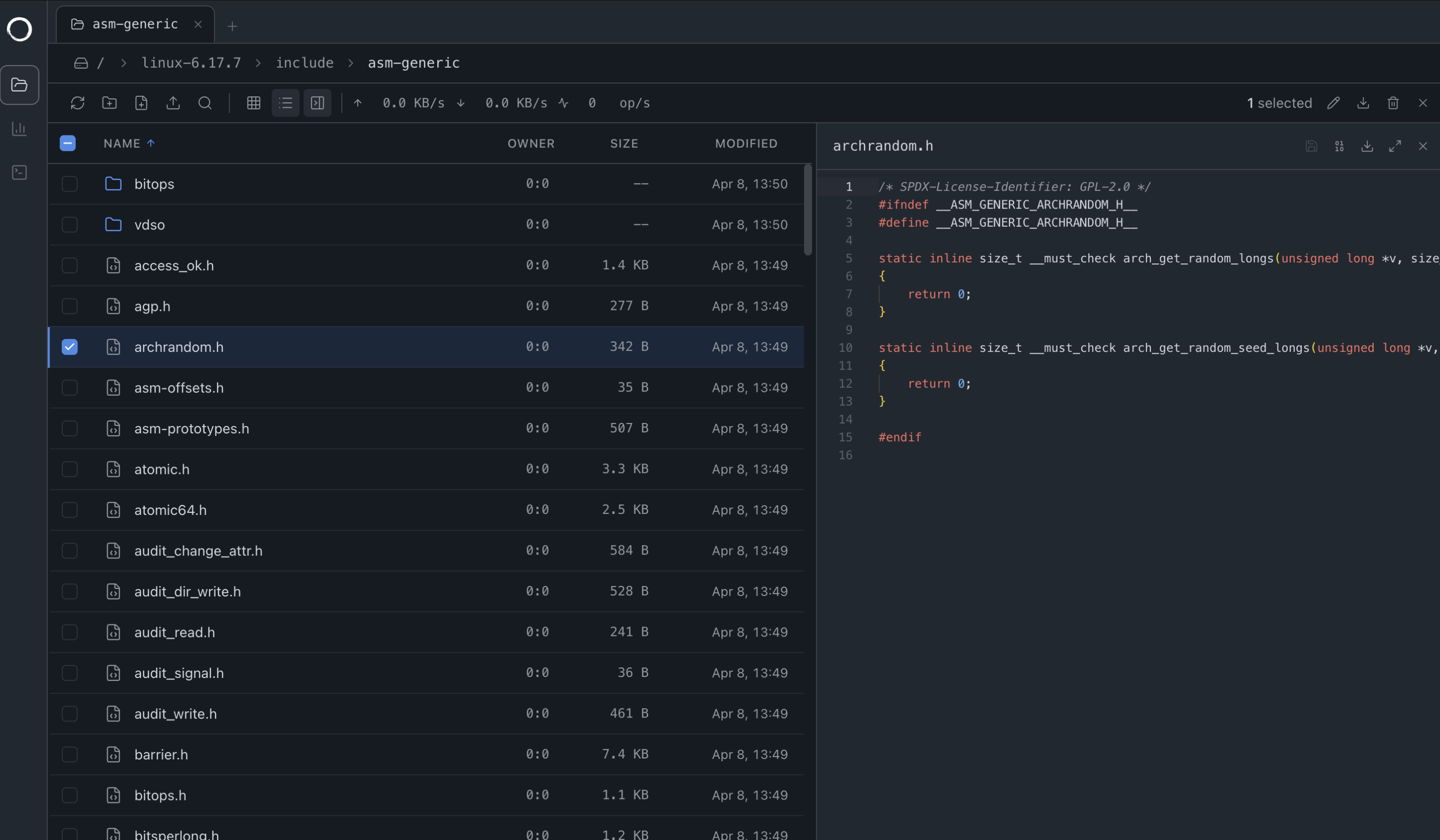
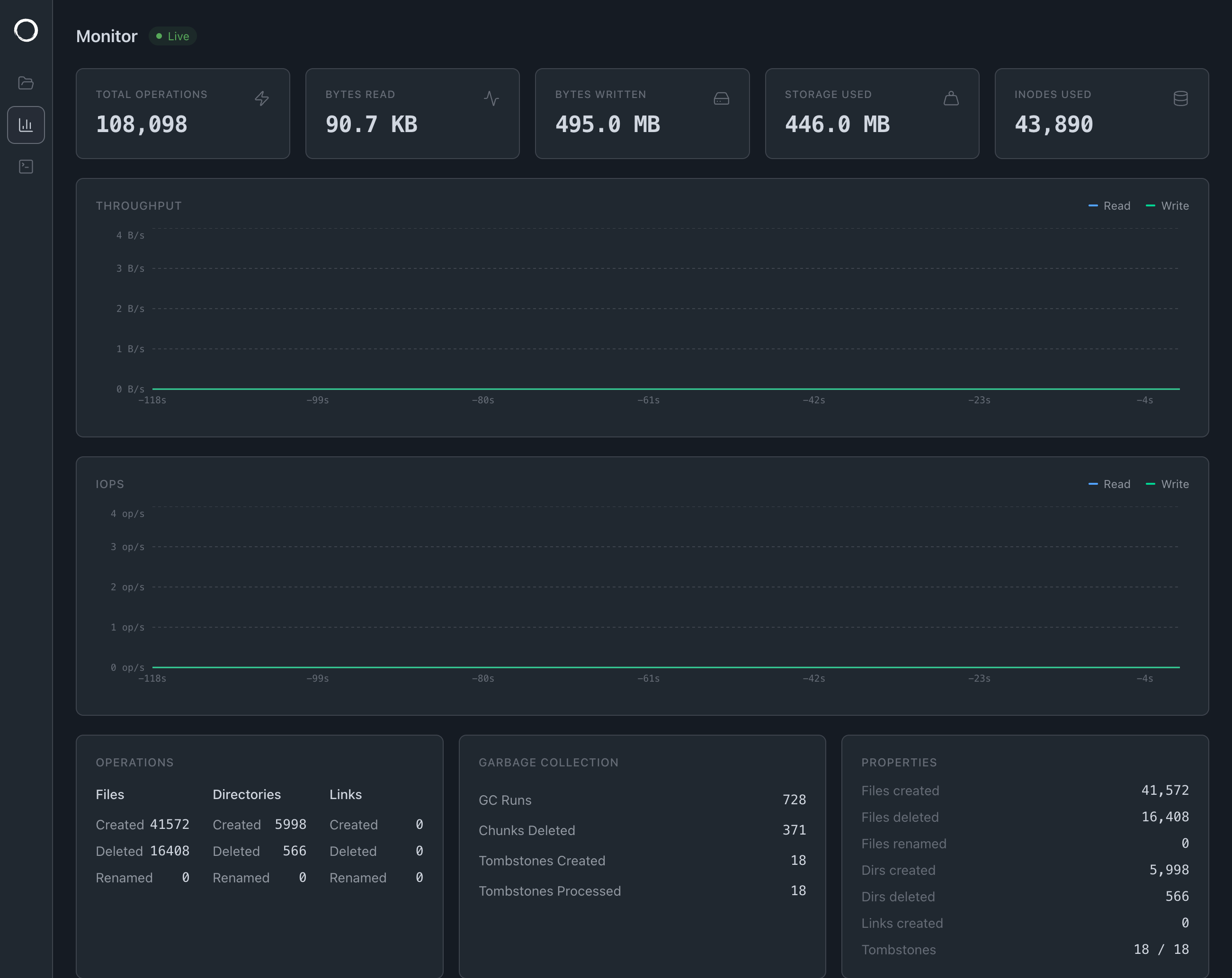
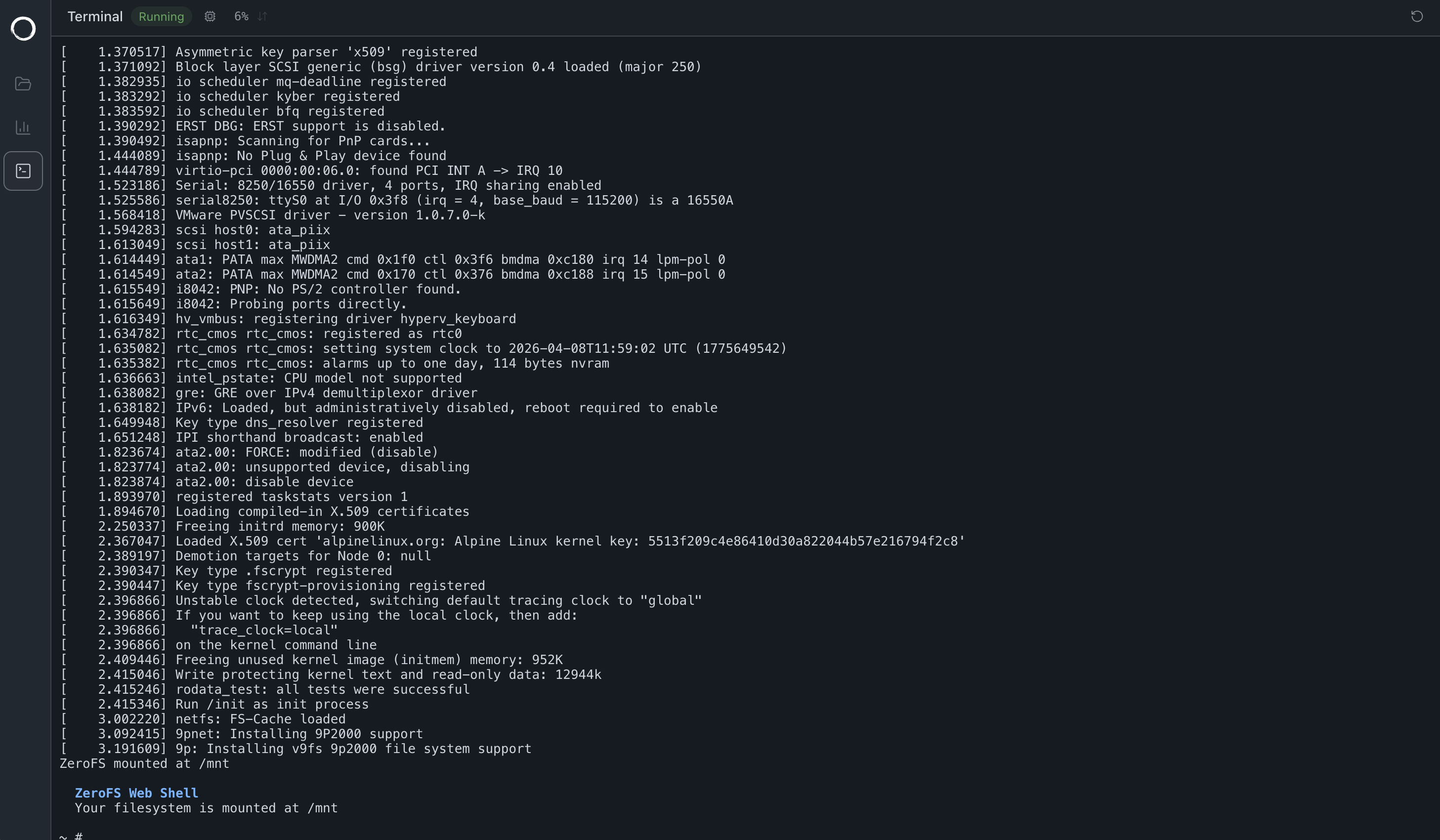
file data as compressed, encrypted frames] SLATE[LSM tree
metadata + 32-byte extent pointers] CACHE[Local Cache] NFSD --> VFS P9D --> VFS NBDD --> VFS WEBUI --> VFS VFS --> SEG VFS --> SLATE SEG --> CACHE SLATE --> CACHE end subgraph "Storage Backend" SEGOBJ[Immutable segment objects
segments/shard/epoch/counter] SSTS[Metadata SSTs + manifest] S3[S3 Object Store] CACHE --> SEGOBJ CACHE --> SSTS SEGOBJ --> S3 SSTS --> S3 end NFS --> NFSD P9 --> P9D NBD --> NBDD WEB --> WEBUI ``` ## 高可用性 `[replication]` 部分用于运行由同一个 bucket 支撑的 leader 和 standby;无需配置数据的第二份副本。standby 会半同步地复制已确认但未刷新的写入,并在 leader 失败时在几秒内接管。Writer-epoch fencing 可防止脑裂:被罢免的 leader 无法提交数据。设计、保证与配置:[高可用性](https://www.zerofs.net/high-availability)。 ## 配置 使用支持 `$VAR`/`${VAR}` 环境变量替换的 TOML 格式;所有引用的变量都必须已设置。`[cache]`、`[storage]` 和 `[servers]` 是必填项。完整的选项参考:[配置指南](https://www.zerofs.net/configuration)。 ``` [cache] dir = "${HOME}/.cache/zerofs" disk_size_gb = 10.0 memory_size_gb = 1.0 # Optional, defaults to 0.25 [storage] url = "s3://my-bucket/zerofs-data" encryption_password = "${ZEROFS_PASSWORD}" [filesystem] max_size_gb = 100.0 # Optional; writes past the quota return ENOSPC (default 16 EiB) compression = "zstd-3" # Optional: "zstd-{1-22}" (default "zstd-3") or "lz4" [servers.nfs] addresses = ["127.0.0.1:2049"] [servers.ninep] addresses = ["127.0.0.1:5564"] unix_socket = "/tmp/zerofs.9p.sock" # Optional [servers.nbd] addresses = ["127.0.0.1:10809"] unix_socket = "/tmp/zerofs.nbd.sock" # Optional [servers.rpc] addresses = ["127.0.0.1:7000"] # Needed by zerofs checkpoint, flush, monitor, fatrace, otrace [aws] access_key_id = "${AWS_ACCESS_KEY_ID}" secret_access_key = "${AWS_SECRET_ACCESS_KEY}" # endpoint = "https://s3.us-east-1.amazonaws.com" # 对于 S3 兼容的服务 # default_region = "us-east-1" # allow_http = "true" # 对于非 HTTPS endpoint(例如,MinIO) # conditional_put = "redis://localhost:6379" # 对于不支持 conditional-put 的存储 ``` ### 后端 ``` url = "s3://bucket/path" # + [aws] credentials url = "azure://container/path" # + [azure] storage_account_name / storage_account_key url = "gs://bucket/path" # + [gcp] service_account, or ambient ADC on GCP VMs/GKE url = "file:///path/to/storage" # Local disk; no credentials ``` 更多协议方案(`s3a://`、`abfs://`、基于主机路由的 `https://`、`memory://`):[配置指南](https://www.zerofs.net/configuration)。 ZeroFS 需要条件写入(put-if-not-exists)来实现 fencing。AWS S3 原生支持此功能;对于不支持此功能的存储,请将 `conditional_put` 设置为一个 Redis URL。 `[storage]` 下的可选 `storage_class` 会原样传递给后端(S3 的 `x-amz-storage-class`、GCS 的 `x-goog-storage-class`、Azure 的 `x-ms-access-tier`)。请使用高频、标准访问级别的存储:归档层会导致卷不可用,而低频访问层会因 ZeroFS 持续读取而产生检索费用,其成本通常会更高。 ## 挂载 在 9P 协议下,fsync 仅在数据到达稳定存储后返回;而 NFS 的 COMMIT 语义允许 fsync 在此之前返回。如果您依赖 fsync 的持久性,请使用基于 9P 的挂载。 ### `zerofs mount`(在 Linux 上推荐) ``` zerofs mount 127.0.0.1:5564 /mnt/zerofs # TCP zerofs mount /tmp/zerofs.9p.sock /mnt/zerofs # Unix socket ``` ### 内核 9P 客户端 ``` mount -t 9p -o trans=tcp,port=5564,version=9p2000.L,cache=mmap,access=user 127.0.0.1 /mnt/9p # Unix socket mount -t 9p -o trans=unix,version=9p2000.L,cache=mmap,access=user /tmp/zerofs.9p.sock /mnt/9p ``` ### NFS ZeroFS 会将处于缓冲状态的 NFS 写入报告为稳定状态;已测试的客户端(macOS, Linux)在 fsync 时不会发送 COMMIT。在关注 fsync 持久性的场景下,请使用 9P 挂载。 ``` # macOS mount -t nfs -o async,nolocks,rsize=1048576,wsize=1048576,tcp,port=2049,mountport=2049,hard 127.0.0.1:/ mnt # Linux mount -t nfs -o async,nolock,rsize=1048576,wsize=1048576,tcp,port=2049,mountport=2049,hard 127.0.0.1:/ /mnt ``` 挂载选项、持久挂载、Windows:[NFS 访问](https://www.zerofs.net/nfs-access)。 ## NBD 块设备 位于 `.nbd` 目录下的设备文件将作为原始块设备挂载: ``` # 通过任意文件挂载创建设备 mkdir -p /mnt/zerofs/.nbd truncate -s 1G /mnt/zerofs/.nbd/device1 # 连接(推荐:对于 S3 延迟使用 -persist、-timeout 600,使用 -connections 4) nbd-client 127.0.0.1 10809 /dev/nbd0 -N device1 -persist -timeout 600 -connections 4 # Unix socket nbd-client -unix /tmp/zerofs.nbd.sock /dev/nbd1 -N device1 -persist -timeout 600 -connections 4 mkfs.ext4 /dev/nbd0 # 或者 zpool create mypool /dev/nbd0 ``` 握手阶段会广播对 FLUSH、FUA 以及多连接的支持。FLUSH 和 FUA 的回复仅在数据持久化后返回,并且任何连接上的 FLUSH 都会覆盖所有连接,因此写入屏障对 ZFS 存储池和数据库是有效的。详情:[NBD 设备](https://www.zerofs.net/nbd-devices)。 运行时会自动加载新的设备文件。大小在创建时固定:要调整大小,需要断开连接、删除并重新创建。要移除设备,请断开客户端连接(`nbd-client -d /dev/nbd0`),然后 `rm` 该文件。 ### TRIM ``` fstrim /mnt/block # Manual mount -o discard /dev/nbd0 /mnt/block # Automatic (filesystems) zpool set autotrim=on mypool # Automatic (ZFS) ``` TRIM 会删除 extent 指针并扣减每个 segment 的有效字节计数器;每 60 秒进行一次 GC 会删除无效的 segment 并对碎片化的 segment 进行重打包,从而回收 S3 中的空间。 ## 限制 - 最大文件大小:16 EiB - 最大文件系统大小:16 EiB - 文件系统生命周期内的文件数:2^64 - 每个文件的硬链接数:2^32 这些属于格式限制(64 位的 inode 和大小字段,32 KiB 的 extent),而不是测试得出的限制;提供商的限制和存储成本会率先生效。参见 [架构](https://www.zerofs.net/architecture)。 ## 许可证 采用 GNU AGPL v3(功能完备,用于开源使用)和[商业许可证](https://www.zerofs.net/licensing)双重许可。
标签:FUSE, NFS, S3存储, 分布式文件系统, 块存储, 数据加密, 通知系统, 高可用