google/langextract
GitHub: google/langextract
基于 LLM 的非结构化文本结构化提取库,支持精确源文本定位和交互式可视化,可处理长文档并适配多种云端和本地模型。
Stars: 36893 | Forks: 2544

# LangExtract
[](https://pypi.org/project/langextract/)
[](https://github.com/google/langextract)

[](https://doi.org/10.5281/zenodo.17015089)
## 目录
- [简介](#introduction)
- [为什么选择 LangExtract?](#why-langextract)
- [快速入门](#quick-start)
- [安装](#installation)
- [云端模型 API Key 设置](#api-key-setup-for-cloud-models)
- [添加自定义模型提供商](#adding-custom-model-providers)
- [使用 OpenAI 模型](#using-openai-models)
- [通过 Ollama 使用本地 LLM](#using-local-llms-with-ollama)
- [更多示例](#more-examples)
- [《罗密欧与朱丽叶》全文提取](#romeo-and-juliet-full-text-extraction)
- [药物提取](#medication-extraction)
- [放射学报告结构化:RadExtract](#radiology-report-structuring-radextract)
- [社区提供商](#community-providers)
- [贡献](#contributing)
- [测试](#testing)
- [免责声明](#disclaimer)
## 简介
LangExtract 是一个 Python 库,它使用 LLM 根据用户定义的指令从非结构化文本文档中提取结构化信息。它处理诸如临床笔记或报告之类的材料,识别并组织关键细节,同时确保提取的数据与源文本相对应。
## 为什么选择 LangExtract?
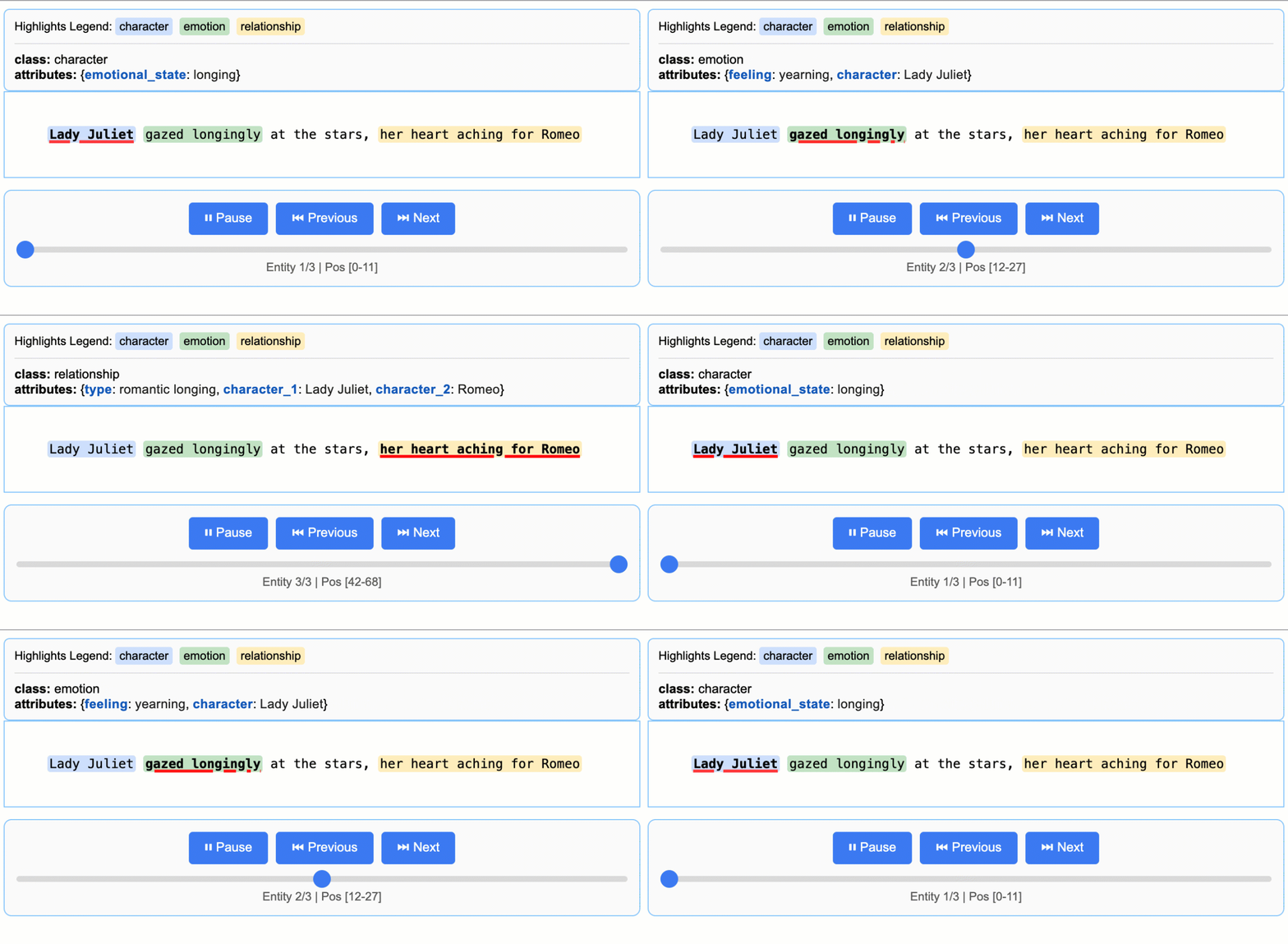
1. **精确的源文本定位:** 将每次提取映射到源文本中的确切位置,支持视觉高亮显示,便于追溯和验证。
2. **可靠的结构化输出:** 基于您的少样本(few-shot)示例强制执行一致的输出 schema,利用 Gemini 等支持模型中的受控生成来保证稳健、结构化的结果。
3. **针对长文档优化:** 通过使用文本分块、并行处理和多轮遍历的优化策略,克服了大型文档提取中“大海捞针”的挑战,从而实现更高的召回率。
4. **交互式可视化:** 即时生成一个独立的交互式 HTML 文件,以在原始上下文中可视化和审查数千个提取的实体。
5. **灵活的 LLM 支持:** 支持您首选的模型,从 Google Gemini 系列等云端 LLM 到通过内置 Ollama 接口的本地开源模型。
6. **适应任何领域:** 仅需几个示例即可定义任何领域的提取任务。LangExtract 可适应您的需求,无需任何模型微调。
7. **利用 LLM 世界知识:** 利用精确的提示词措辞和少样本示例来影响提取任务利用 LLM 知识的方式。任何推断信息的准确性及其对任务规范的遵守程度取决于所选的 LLM、任务的复杂性、提示词指令的清晰度以及提示词示例的性质。
## 快速入门
只需几行代码即可提取结构化信息。
### 1. 定义提取任务
首先,创建一个清晰描述您想要提取内容的提示词。然后,提供一个高质量示例来引导模型。
```
import langextract as lx
import textwrap
# 1. 定义 prompt 和提取规则
prompt = textwrap.dedent("""\
Extract characters, emotions, and relationships in order of appearance.
Use exact text for extractions. Do not paraphrase or overlap entities.
Provide meaningful attributes for each entity to add context.""")
# 2. 提供高质量示例以指导模型
examples = [
lx.data.ExampleData(
text="ROMEO. But soft! What light through yonder window breaks? It is the east, and Juliet is the sun.",
extractions=[
lx.data.Extraction(
extraction_class="character",
extraction_text="ROMEO",
attributes={"emotional_state": "wonder"}
),
lx.data.Extraction(
extraction_class="emotion",
extraction_text="But soft!",
attributes={"feeling": "gentle awe"}
),
lx.data.Extraction(
extraction_class="relationship",
extraction_text="Juliet is the sun",
attributes={"type": "metaphor"}
),
]
)
]
```
### 2. 运行提取
将您的输入文本和提示词材料提供给 `lx.extract` 函数。
```
# 待处理的输入文本
input_text = "Lady Juliet gazed longingly at the stars, her heart aching for Romeo"
# 运行提取
result = lx.extract(
text_or_documents=input_text,
prompt_description=prompt,
examples=examples,
model_id="gemini-2.5-flash",
)
```
### 3. 可视化结果
提取结果可以保存为 `.jsonl` 文件,这是一种用于处理语言模型数据的常用格式。然后,LangExtract 可以从该文件生成交互式 HTML 可视化,以便在上下文中审查实体。
```
# 将结果保存到 JSONL 文件
lx.io.save_annotated_documents([result], output_name="extraction_results.jsonl", output_dir=".")
# 从文件生成可视化
html_content = lx.visualize("extraction_results.jsonl")
with open("visualization.html", "w") as f:
if hasattr(html_content, 'data'):
f.write(html_content.data) # For Jupyter/Colab
else:
f.write(html_content)
```
这将创建一个动画交互式 HTML 文件:
### 扩展到更长的文档
对于较大的文本,您可以直接从 URL 处理整个文档,并支持并行处理和增强的敏感度:
```
# 直接从 Project Gutenberg 处理 Romeo & Juliet
result = lx.extract(
text_or_documents="https://www.gutenberg.org/files/1513/1513-0.txt",
prompt_description=prompt,
examples=examples,
model_id="gemini-2.5-flash",
extraction_passes=3, # Improves recall through multiple passes
max_workers=20, # Parallel processing for speed
max_char_buffer=1000 # Smaller contexts for better accuracy
)
```
这种方法可以在保持高准确性的同时,从完整小说中提取数百个实体。交互式可视化可以无缝处理大型结果集,便于从输出 JSONL 文件中探索数百个实体。**[查看完整的《罗密欧与朱丽叶》提取示例 →](https://github.com/google/langextract/blob/main/docs/examples/longer_text_example.md)** 以获取详细结果和性能见解。
### Vertex AI 批处理
通过启用 Vertex AI Batch API 来节省大规模任务的成本:`language_model_params={"vertexai": True, "batch": {"enabled": True}}`。
请参阅 [此示例](docs/examples/batch_api_example.md) 中关于 Vertex AI Batch API 用法的示例。
## 安装
### 从 PyPI 安装
```
pip install langextract
```
*推荐大多数用户使用。对于隔离环境,建议使用虚拟环境:*
```
python -m venv langextract_env
source langextract_env/bin/activate # On Windows: langextract_env\Scripts\activate
pip install langextract
```
### 从源码安装
LangExtract 使用带有 `pyproject.toml` 的现代 Python 打包方式进行依赖管理:
*使用 `-e` 安装会将包置于开发模式,允许您修改代码而无需重新安装。*
```
git clone https://github.com/google/langextract.git
cd langextract
# 对于基础安装:
pip install -e .
# 对于开发(包括 linting 工具):
pip install -e ".[dev]"
# 对于测试(包括 pytest):
pip install -e ".[test]"
```
### Docker
```
docker build -t langextract .
docker run --rm -e LANGEXTRACT_API_KEY="your-api-key" langextract python your_script.py
```
## 云端模型 API Key 设置
当将 LangExtract 与云端托管模型(如 Gemini 或 OpenAI)结合使用时,您需要
设置 API Key。设备端模型不需要 API Key。对于使用本地 LLM 的开发者,LangExtract 提供了对 Ollama 的内置支持,并可以通过更新推理端点扩展到其他第三方 API。
### API Key 来源
从以下位置获取 API Key:
* [AI Studio](https://aistudio.google.com/app/apikey) 用于 Gemini 模型
* [Vertex AI](https://cloud.google.com/vertex-ai/generative-ai/docs/sdks/overview) 用于企业用途
* [OpenAI Platform](https://platform.openai.com/api-keys) 用于 OpenAI 模型
### 在您的环境中设置 API Key
**选项 1:环境变量**
```
export LANGEXTRACT_API_KEY="your-api-key-here"
```
**选项 2:.env 文件(推荐)**
将您的 API Key 添加到 `.env` 文件中:
```
# 将 API key 添加到 .env 文件
cat >> .env << 'EOF'
LANGEXTRACT_API_KEY=your-api-key-here
EOF
# 保护您的 API key 安全
echo '.env' >> .gitignore
```
在您的 Python 代码中:
```
import langextract as lx
result = lx.extract(
text_or_documents=input_text,
prompt_description="Extract information...",
examples=[...],
model_id="gemini-2.5-flash"
)
```
**选项 3:直接提供 API Key(生产环境不推荐)**
您也可以直接在代码中提供 API Key,但这不推荐用于生产环境:
```
result = lx.extract(
text_or_documents=input_text,
prompt_description="Extract information...",
examples=[...],
model_id="gemini-2.5-flash",
api_key="your-api-key-here" # Only use this for testing/development
)
```
**选项 4:Vertex AI(服务账号)**
使用 [Vertex AI](https://cloud.google.com/vertex-ai/docs/start/introduction-unified-platform) 通过服务账号进行身份验证:
```
result = lx.extract(
text_or_documents=input_text,
prompt_description="Extract information...",
examples=[...],
model_id="gemini-2.5-flash",
language_model_params={
"vertexai": True,
"project": "your-project-id",
"location": "global" # or regional endpoint
}
)
```
## 添加自定义模型提供商
LangExtract 通过轻量级插件系统支持自定义 LLM 提供商。您可以在不更改核心代码的情况下添加对新模型的支持。
- 独立于核心库添加新模型支持
- 将您的提供商作为独立的 Python 包分发
- 保持自定义依赖项隔离
- 通过基于优先级的解析覆盖或扩展内置提供商
请参阅 [提供商系统文档](langextract/providers/README.md) 中的详细指南,以了解如何:
- 使用 `@registry.register(...)` 注册提供商
- 发布用于发现的入口点
- 可选地通过 `get_schema_class()` 提供 schema 以用于结构化输出
- 通过 `create_model(...)` 与工厂集成
## 使用 OpenAI 模型
LangExtract 支持 OpenAI 模型(需要可选依赖项:`pip install langextract[openai]`):
```
import langextract as lx
result = lx.extract(
text_or_documents=input_text,
prompt_description=prompt,
examples=examples,
model_id="gpt-4o", # Automatically selects OpenAI provider
api_key=os.environ.get('OPENAI_API_KEY'),
fence_output=True,
use_schema_constraints=False
)
```
注意:OpenAI 模型需要 `fence_output=True` 和 `use_schema_constraints=False`,因为 LangExtract 尚未为 OpenAI 实现约束。
## 通过 Ollama 使用本地 LLM
LangExtract 支持使用 Ollama 进行本地推理,允许您在没有 API Key 的情况下运行模型:
```
import langextract as lx
result = lx.extract(
text_or_documents=input_text,
prompt_description=prompt,
examples=examples,
model_id="gemma2:2b", # Automatically selects Ollama provider
model_url="http://localhost:11434",
fence_output=False,
use_schema_constraints=False
)
```
**快速设置:** 从 [ollama.com](https://ollama.com/) 安装 Ollama,运行 `ollama pull gemma2:2b`,然后运行 `ollama serve`。
有关详细的安装、Docker 设置和示例,请参阅 [`examples/ollama/`](examples/ollama/)。
## 更多示例
LangExtract 的更多实际应用示例:
### 《罗密欧与朱丽叶》全文提取
LangExtract 可以直接从 URL 处理完整文档。此示例演示了从 Project Gutenberg 的《罗密欧与朱丽叶》全文(147,843 个字符)中进行提取,展示了并行处理、顺序提取遍历以及针对长文档处理的性能优化。
**[查看《罗密欧与朱丽叶》全文示例 →](https://github.com/google/langextract/blob/main/docs/examples/longer_text_example.md)**
### 药物提取
LangExtract 擅长从临床文本中提取结构化医疗信息。这些示例演示了基本实体识别(药物名称、剂量、途径)和关系提取(将药物与其属性连接起来),展示了 LangExtract 在医疗保健应用中的有效性。
**[查看药物示例 →](https://github.com/google/langextract/blob/main/docs/examples/medication_examples.md)**
### 放射学报告结构化:RadExtract
探索 RadExtract,这是 HuggingFace Spaces 上的一个实时交互式演示,展示了 LangExtract 如何自动构建放射学报告。无需任何设置,即可直接在浏览器中试用。
**[查看 RadExtract 演示 →](https://huggingface.co/spaces/google/radextract)**
## 社区提供商
使用自定义模型提供商扩展 LangExtract!查看我们的 [社区提供商插件](COMMUNITY_PROVIDERS.md) 注册表,以发现社区创建的提供商或添加您自己的提供商。
有关创建提供商插件的详细说明,请参阅 [自定义提供商插件示例](examples/custom_provider_plugin/)。
## 贡献
欢迎贡献!请参阅 [CONTRIBUTING.md](https://github.com/google/langextract/blob/main/CONTRIBUTING.md) 开始
开发、测试和 Pull Request。您必须签署
[贡献者许可协议](https://cla.developers.google.com/about)
然后才能提交补丁。
## 测试
要从源代码在本地运行测试:
```
# 克隆仓库
git clone https://github.com/google/langextract.git
cd langextract
# 安装测试依赖
pip install -e ".[test]"
# 运行所有测试
pytest tests
```
或者使用 tox 在本地重现完整的 CI 矩阵:
```
tox # runs pylint + pytest on Python 3.10 and 3.11
```
### Ollama 集成测试
如果您在本地安装了 Ollama,则可以运行集成测试:
```
# 测试 Ollama 集成(需要运行带有 gemma2:2b 模型的 Ollama)
tox -e ollama-integration
```
此测试将自动检测 Ollama 是否可用,并运行真实的推理测试。
## 开发
### 代码格式化
本项目使用自动格式化工具来保持一致的代码风格:
```
# 自动格式化所有代码
./autoformat.sh
# 或者分别运行格式化工具
isort langextract tests --profile google --line-length 80
pyink langextract tests --config pyproject.toml
```
### Pre-commit 钩子
用于自动格式化检查:
```
pre-commit install # One-time setup
pre-commit run --all-files # Manual run
```
### 代码检查
在提交 PR 之前运行代码检查:
```
pylint --rcfile=.pylintrc langextract tests
```
有关完整的开发指南,请参阅 [CONTRIBUTING.md](CONTRIBUTING.md)。
## 免责声明
这不是一个官方支持的 Google 产品。如果您在生产环境或
出版物中使用 LangExtract,请相应引用并
确认使用情况。使用受 [Apache 2.0 许可证](https://github.com/google/langextract/blob/main/LICENSE) 管辖。
对于健康相关的应用,LangExtract 的使用还受
[Health AI Developer Foundations 使用条款](https://developers.google.com/health-ai-developer-foundations/terms) 的约束。
**祝您提取愉快!**
标签:AI风险缓解, DLL 劫持, DNS解析, Google, LLM, LLM评估, NLP, Nuclei, Ollama, OpenAI, Python, RAG, Unmanaged PE, 临床文本处理, 交互式可视化, 信息抽取, 内存规避, 医疗信息提取, 大语言模型, 开源项目, 放射学报告, 数据标注, 数据清洗, 文书挖掘, 文本分析, 无后门, 时序数据库, 服务枚举, 本地模型, 源定位, 结构化数据, 请求拦截, 逆向工具, 非结构化文本