## 📣Latest News
Previous News
## 🌟Key Features
- **Highly Integrated**: This toolkit integrates mainstream compression algorithms into a unified framework, offering developers one-click access with exceptional ease of use.
- **Continuous Innovation**: Beyond integrating widely-used industry algorithms, we are continuously researching better compression algorithms, which will be gradually open-sourced in the future.
- **Performance-Driven**: We continuously optimize end-to-end performance in model compression workflows and algorithm deployment, such as enabling quantization of models like Qwen3-235B and DeepSeek-R1 on a single GPU.
## 💼Technical Overview
## 🛎️How to Use
### 1. Install AngelSlim
We recommend using `pip` to install the latest stable version of `AngelSlim`:
pip install angelslim
Alternatively, you can clone the repository and install from source in editable mode:
cd AngelSlim && python setup.py install
For more detailed installation instructions and platform-specific guidance, please refer to the [Installation Documentation](https://angelslim.readthedocs.io/zh-cn/latest/getting_started/installation.html).
### 2. Quick Start
#### 2.1 Speculative Decoding
After installing AngelSlim, you can quickly start Eagle3 training with the following scripts:
# Start the vLLM server
bash scripts/speculative/run_vllm_server.sh
# Generate training data
bash scripts/speculative/generate_data_for_target_model.sh
# Perform online training for the Eagle3 model
bash scripts/speculative/train_eagle3_online.sh
Training and Deployment Guide for Eagle3: [LLM](https://angelslim.readthedocs.io/zh-cn/latest/features/speculative_decoding/eagle/eagle.html) | [VLM](https://angelslim.readthedocs.io/zh-cn/latest/features/speculative_decoding/eagle/vlm_eagle.html) | [Audio(ASR)](https://angelslim.readthedocs.io/zh-cn/latest/features/speculative_decoding/eagle/audio_asr_eagle.html) | [Audio(TTS)](https://angelslim.readthedocs.io/zh-cn/latest/features/speculative_decoding/eagle/audio_tts_eagle.html).
#### 2.2 LLM/VLM/Audio Model Quantization
After installing `AngelSlim`, you can launch static FP8 quantization for the Qwen3-1.7B model with the following one-command script:
python3 tools/run.py -c configs/qwen3/fp8_static/qwen3-1_7b_fp8_static.yaml
This example produces quantized model weights by performing PTQ calibration on a model loaded from HuggingFace.
For **Hy3-preview** (MoE A20B) FP8-Static quantization:
python tools/run.py -c configs/hunyuan/fp8_static/hunyuanv3_a20b_fp8_static_c8.yaml
Code-based Start
To perform dynamic `FP8` quantization on `Qwen3-1.7B`:
from angelslim.engine import Engine
slim_engine = Engine()
# Prepare model
slim_engine.prepare_model(model_name="Qwen", model_path="Qwen/Qwen3-1.7B",)
# Initialize compressor
slim_engine.prepare_compressor("PTQ", default_method="fp8_dynamic")
# Compress model
slim_engine.run()
# Save compressed model
slim_engine.save("./output")
For more details, please refer to the [Quick Start Documentation](https://angelslim.readthedocs.io/zh-cn/latest/getting_started/quickstrat.html).
#### 2.3 Diffusion Model Quantization
Use the `scripts/diffusion/run_diffusion.py` for quantization and inference:
# Online quantization and inference
python scripts/diffusion/run_diffusion.py \
--model-name-or-path black-forest-labs/FLUX.1-schnell \
--quant-type fp8-per-tensor \
--prompt "A cat holding a sign that says hello world" \
--height 1024 --width 1024 --steps 4 --guidance 0.0 --seed 0
For more quantization inference methods, please refer to [the Diffusion Model Quantization Documentation](https://angelslim.readthedocs.io/zh-cn/latest/features/diffusion/quantization.html).
#### 2.4 Token Compression (VLM)
AngelSlim provides a universal metadata-driven framework for vision token pruning and merging. You can quickly verify a compression strategy (e.g., **VisionZip**) with a smoke test:
python tools/test_universal_pruning.py \
--model_path "Qwen/Qwen2.5-VL-3B-Instruct" \
--config "configs/qwen2_5_vl/pruning/visionzip_r0.9.yaml"
For more details on implementing new strategies, please refer to the [Token Compressor Documentation](https://angelslim.readthedocs.io/zh-cn/latest/features/token_compressor/index.html).
### 3. Deployment and Testing
#### 3.1 Offline Inference
To test offline inference with a quantized model loaded via `transformers`.
Run script details
python scripts/deploy/offline.py $MODEL_PATH "Hello, my name is"
Where `MODEL_PATH` is the path to the quantized model output.
#### 3.2 API Service Deployment
After specifying the quantized model path `MODEL_PATH`, you can deploy an OpenAI-compatible API service using **vLLM** and **SGLang** inference frameworks.
Run script details
- **vLLM**
Use the following script to launch a [vLLM](https://github.com/vllm-project/vllm) server, recommended version `vllm>=0.8.5.post1`. For MOE INT8 quantized models, vllm>=0.9.0 is required.
bash scripts/deploy/run_vllm.sh --model-path $MODEL_PATH --port 8080 -d 0,1,2,3 -t 4 -p 1 -g 0.8 --max-model-len 4096
Where `-d` is the visible devices, `-t` is tensor parallel size, `-p` is pipeline parallel size, and `-g` is the GPU memory utilization.
- **SGLang**
Use the following script to launch a [SGLang](https://github.com/sgl-project/sglang) server, recommended version `sglang>=0.4.6.post1`.
bash scripts/deploy/run_sglang.sh --model-path $MODEL_PATH --port 8080 -d 0,1,2,3 -t 4 -g 0.8
#### 3.3 Service Invocation
Invoke requests via [OpenAI's API format](https://platform.openai.com/docs/api-reference/introduction).
Run script details
bash scripts/deploy/openai.sh -m $MODEL_PATH -p "Hello, my name is" --port 8080 --max-tokens 4096 --temperature 0.7 --top-p 0.8 --top-k 20 --repetition-penalty 1.05 --system-prompt "You are a helpful assistant."
where `-p` is the input prompt.
#### 3.4 Performance Evaluation
Evaluate the performance of quantized model using [lm-evaluation-harness](https://github.com/EleutherAI/lm-evaluation-harness), recommended version`lm-eval>=0.4.8`.
Run script details
bash scripts/deploy/lm_eval.sh -d 0,1 -t 2 -g 0.8 -r $RESULT_PATH -b "auto" --tasks ceval-valid,mmlu,gsm8k,humaneval -n 0 $MODEL_PATH
where `RESULT_PATH` is the directory for saving test results, `-b` is batch size, `--tasks` specifies the evaluation tasks, and `-n` is the number of few-shot examples.
For more detaileds, please refer to the [Deployment Documentation](https://angelslim.readthedocs.io/zh-cn/latest/deployment/deploy.html).
## 📈 Benchmark
### 1. Speculative Decoding
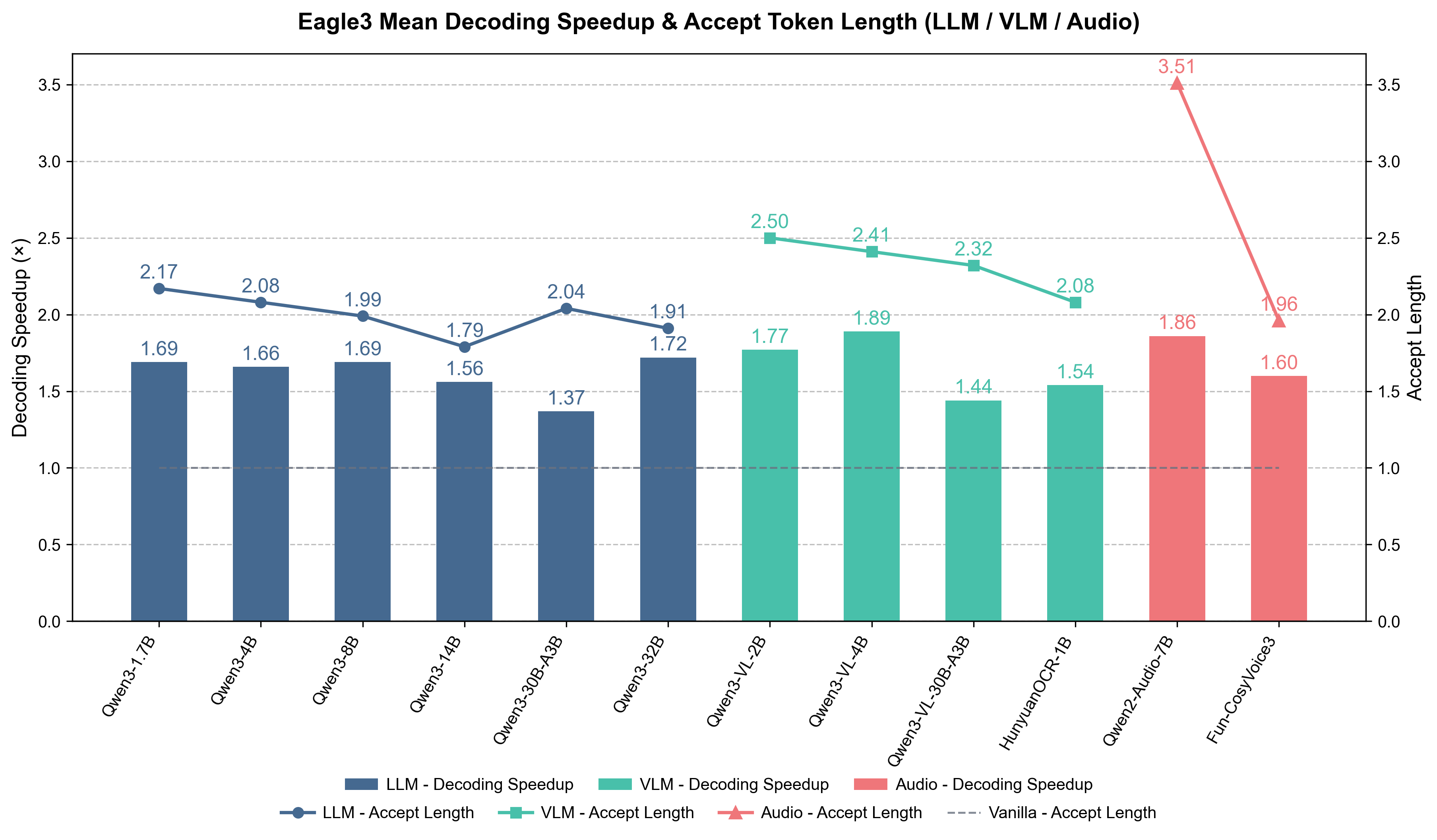
We evaluated the Eagle3 model trained by AngelSlim on tasks including code generation, mathematical reasoning, instruction following, text generation, and multimodal understanding using vLLM. The inference acceleration and context length performance of our trained model under the settings of num_speculative_tokens = 2 or 4 are presented as follows, with an accept length of 1.8–3.5 and a maximum speedup of 1.4–1.9×.
#### 1.1 Qwen3 Series Models
Benchmark results for Qwen3 series models using Eagle3 speculative decoding on vLLM (v0.11.2) across **MT-bench**, **HumanEval**, **GSM8K** and **Alpaca**, using a single GPU (**tp=1, ep=1, num_speculative_tokens=2, batch_size=1, output_len=1024**).
#### 1.2 VLM Models
##### 1.2.1 Qwen3-VL Series Models
Benchmark results for Qwen3-VL series models using Eagle3 speculative decoding on vLLM (v0.12.0) across language and multimodal tasks, using a single GPU (**tp=1, ep=1, num_speculative_tokens=4, batch_size=1, output_len=1024**).
##### 1.2.2 HunyuanOCR Model
Benchmark results for HunyuanOCR using Eagle3 speculative decoding on vLLM (v0.13.0) across **[OmniDocBench](https://huggingface.co/datasets/opendatalab/OmniDocBench)** dataset, using a single GPU (**tp=1, ep=1, num_speculative_tokens=4, batch_size=1, output_len=1024**).
#### 1.3 Audio Models
##### 1.3.1 Qwen2-Audio Model
Benchmark results for Qwen2-Audio using Eagle3 speculative decoding on vLLM (v0.12.0) across **[LibriSpeech](https://www.openslr.org/12)** dataset, using a single GPU (**tp=1, ep=1, num_speculative_tokens=4, batch_size=1, output_len=1024**).
##### 1.3.2 Fun-CosyVoice3 Model
Benchmark results for Fun-CosyVoice3 using Eagle3 speculative decoding across **[LibriTTS](https://www.openslr.org/60/)** dataset, using a single GPU (**tp=1, ep=1, num_speculative_tokens=4, batch_size=1, output_len=1024**).
### 2. Quantization
The performance test results for selected models are shown below. For the complete benchmark, refer to the [Benchmark documentation](https://angelslim.readthedocs.io/zh-cn/latest/performance/quantization/benchmarks.html)
#### 2.1 Hunyuan Series Models
Benchmark results for the `Hunyuan-Instruct` model with `FP8`, `INT4-AWQ` and `INT4-GPTQ` quantization algorithms on datasets including`OlympiadBench`, `AIME 2024` and `DROP`:
Model
Quantization
OlympiadBench
AIME 2024
DROP
GPQA-Diamond
Hunyuan-A13B-Instruct
BF16
82.7
87.30
91.1
71.2
FP8-Static
83.0
86.7
91.1
-
Int4-GPTQ
82.7
86.7
91.1
-
Int4-AWQ
82.6
85.6
91.0
-
Hunyuan-7B-Instruct
BF16
76.5
81.1
85.9
60.1
FP8-Static
76.6
80.9
86.0
60.1
Int4-GPTQ
76.2
81.0
85.7
60.0
Int4-AWQ
76.4
80.9
85.9
60.1
Hunyuan-4B-Instruct
BF16
73.1
78.3
78.2
61.1
FP8-Static
73.1
76.6
78.3
60.2
Int4-GPTQ
72.9
-
78.1
58.1
Int4-AWQ
72.8
-
78.2
-
Hunyuan-1.8B-Instruct
BF16
63.4
56.7
76.7
47.2
FP8-Static
62.5
55.2
75.1
47.7
Int4-GPTQ
60.9
-
73.0
44.4
Int4-AWQ
61.7
-
71.7
43.6
Hunyuan-0.5B-Instruct
BF16
29.6
17.2
52.8
23.3
FP8-Static
29.6
17.2
51.6
22.5
Int4-GPTQ
26.8
-
50.9
23.3
Int4-AWQ
26.3
-
48.9
23.3
#### 2.2 Qwen3 Series Models
Benchmark results for Qwen3 series models with `FP8-Static`, `FP8-Dynamic`, `INT4-GPTQ`, and `INT4-AWQ` quantization algorithms on datasets including `CEVAL`, `MMLU`, `GSM8K`, and `HUMANEVAL`:
Model
Quantization
CEVAL
MMLU
GSM8K
HUMANEVAL
Qwen3-0.6B
BF16
45.84
47.21
42.99
19.51
FP8-Static
45.99
46.87
38.06
18.90
FP8-Dynamic
45.99
46.93
38.29
20.73
INT8-Dynamic
45.17
46.95
41.17
21.34
Qwen3-8B
BF16
79.27
74.78
87.79
63.41
FP8-Static
78.23
74.79
86.96
62.20
FP8-Dynamic
78.45
74.75
87.64
62.80
INT8-Dynamic
78.01
74.84
86.96
67.07
INT4-GPTQ
77.19
73.26
86.43
62.20
INT4-AWQ
76.15
73.59
86.96
63.41
Qwen3-14B
BF16
83.06
78.90
88.40
55.49
FP8-Static
82.62
78.57
89.46
57.32
FP8-Dynamic
82.24
78.92
88.32
52.44
INT8-Dynamic
81.87
78.13
86.28
56.10
INT4-GPTQ
81.05
78.02
87.34
57.93
INT4-AWQ
82.02
77.68
84.23
61.59
Qwen3-32B
BF16
86.55
82.00
74.53
37.80
FP8-Static
86.92
81.78
70.20
39.63
FP8-Dynamic
86.55
81.89
70.43
38.41
INT4-GPTQ
86.18
81.01
-
43.29
INT4-AWQ
86.18
81.54
-
36.59
Qwen3-30B-A3B
BF16
83.66
79.36
89.99
31.71
FP8-Static
83.95
79.47
89.01
31.10
FP8-Dynamic
84.10
79.40
89.16
32.93
INT8-Dynamic
83.36
79.48
89.16
34.15
Qwen3-235B-A22B
BF16
89.60
86.28
85.29
27.44
FP8-Static
89.67
86.19
86.96
27.44
FP8-Dynamic
89.67
86.18
85.22
28.05
INT8-Dynamic
88.93
86.20
86.20
23.78
#### 2.3 DeepSeek Series Models
Benchmark results for DeepSeek-R1-0528 series models with `FP8-Block-Wise` and `W4A8-FP8` quantization algorithms on datasets including `GPQA Diamond`、`AIME 2024`、`SimpleQA` and `LiveCodeBench`:
Model
Quantization
GPQA Diamond
AIME 2024
SimpleQA
LiveCodeBench
DeepSeek-R1-0528
FP8-Block-Wise
78.28
88.67
27.8
77.1
W4A8-FP8
77.37
88.67
26.83
78.86
Note
#### 2.4 Qwen-VL Series Models
**Qwen3-VL Benchmark**
Benchmark results for Qwen3VL series models with `BF16`、`FP8-Static` and `FP8-Dynamic` quantization algorithms on datasets including `MMMU_VAL`、`DocVQA_VAL` and `ChartQA_TEST`:
Model
Quantization
MMMU_VAL
DocVQA_VAL
ChartQA_TEST
Qwen3-VL-32B-Instruct
BF16
60.11
96.08
94.64
FP8-Static
61.22
96.00
94.64
FP8-Dynamic
60.78
96.19
94.72
Qwen3-VL-30B-A3B-Instruct
BF16
50.44
95.28
95.36
FP8-Dynamic
50.67
95.25
95.20
Qwen2.5VL Benchmark
Benchmark results for Qwen2.5VL series models with `BF16`、`FP8-Static`、`FP8-Dynamic`、`INT4-GPTQ`、`INT4-AWQ` quantization algorithms on datasets including `MMMU_VAL`、`DocVQA_VAL` and `ChartQA_TEST`:
Model
Quantization
MMMU_VAL
MMLDocVQA_VALU
ChartQA_TEST
Qwen2.5VL-3B
BF16
47.11
78.57
80.32
FP8-Static
47.33
79.34
79.68
FP8-Dynamic
45.99
46.93
38.29
INT4-GPTQ
46.56
77.20
78.96
INT4-AWQ
45.78
-
79.60
Qwen2.5VL-7B
BF16
45.44
89.71
84.64
FP8-Static
47.00
89.83
85.92
FP8-Dynamic
47.22
89.80
88.64
INT4-GPTQ
46.67
90.45
-
INT4-AWQ
45.67
89.28
-
Qwen2.5VL-32B
BF16
57.00
90.03
-
FP8-Static
57.00
89.88
-
FP8-Dynamic
56.44
89.88
-
INT4-GPTQ
55.22
89.80
-
INT4-AWQ
55.22
90.30
-
Qwen2.5VL-72B
BF16
58.78
94.39
85.60
FP8-Static
57.89
94.41
85.84
FP8-Dynamic
58.67
94.38
85.60
INT4-GPTQ
57.56
94.46
86.48
INT4-AWQ
58.78
94.19
87.28
#### 2.5 Qwen-Omni Series Models
**Qwen3-Omni Text to Text Benchmark**
Benchmark results for Qwen3-Omni series models in BF16, FP8-Static, and FP8-Dynamic on aime25, gpqa_diamond, and mmlu_redux are as follows:
Model
Quantization
aime25
gpqa_diamond
mmlu_redux
Qwen3-Omni-30B-A3B-Instruct
BF16
73.32
56.77
88.09
FP8-Static
71.33
56.57
87.91
FP8-Dynamic
73.33
55.15
88.07
Note
#### 2.6 Other Models
Other models such as GLM-4.6, Qwen2.5, and Seed-OSS have been evaluated on benchmarks like `CEVAL`, `MMLU`, and `GSM8K` using quantization strategies including `FP8-Static`, `FP8-Dynamic`, `INT4-GPTQ`, and `INT4-AWQ`.
Benchmark Experiment Details
Model
Quantization
CEVAL
MMLU
GSM8K
Qwen2.5-1.5B-Instruct
BF16
67.01
60.05
54.28
FP8-Static
66.27
60.23
-
FP8-Dynamic
66.79
60.08
51.71
Qwen2.5-7B-Instruct
BF16
81.20
74.55
79.98
FP8-Static
81.13
74.03
79.30
FP8-Dynamic
80.31
74.07
79.00
INT4-GPTQ
79.05
73.05
74.75
INT4-AWQ
79.35
73.22
79.38
Qwen2.5-32B-Instruct
BF16
87.30
83.21
81.73
FP8-Static
87.59
83.08
81.58
FP8-Dynamic
87.30
83.04
81.58
INT4-GPTQ
86.70
82.45
82.03
INT4-AWQ
87.00
82.64
-
DeepSeek-R1-Distill-Qwen-7B
BF16
53.49
53.80
75.74
FP8-Static
53.57
54.17
76.19
FP8-Dynamic
52.97
54.13
74.15
INT4-GPTQ
51.86
52.44
75.89
INT4-AWQ
53.49
53.70
-
DeepSeek-R1-Distill-Qwen-14B
BF16
77.71
74.28
85.67
FP8-Static
77.56
74.66
86.73
FP8-Dynamic
76.82
74.63
87.11
INT4-GPTQ
74.29
72.37
84.61
INT4-AWQ
74.81
73.00
86.05
DeepSeek-R1-Distill-Qwen-32B
BF16
84.18
80.89
87.41
FP8-Static
83.43
80.90
87.57
FP8-Dynamic
83.73
81.10
86.43
INT4-GPTQ
84.10
79.80
86.73
INT4-AWQ
82.84
80.15
87.19
### 3. Token Compression (VLM)
We evaluated various vision token compression strategies on the **Qwen2.5-VL-3B-Instruct** model across multiple multimodal benchmarks. You can replicate these results using the following command:
python tools/run_pruning_eval.py \
--model_path "Qwen/Qwen2.5-VL-3B-Instruct" \
--configs "configs/qwen2_5_vl/pruning/visionzip_r0.9.yaml" \
--tasks "textvqa" \
--output_dir "./results/visionzip_test"
Detailed Benchmark Results (Qwen2.5-VL-3B-Instruct)
Method
AI2D
ChartQA
DocVQA
MMBCN
MMB
MME
MMStar
OCRBench
POPE
SQA
VQAText
Avg
Baseline
79.11
83.56
92.48
73.28
77.32
1517
56.05
80.10
87.41
80.81
78.79
100.0%
Retain 25% Tokens (75% Compression Ratio)
FastV
72.70
70.04
75.98
63.40
66.92
1437
47.39
36.60
86.42
79.33
73.51
86.02%
VisionZip
74.19
71.32
70.11
67.35
71.22
1452
49.37
42.50
85.51
81.36
68.12
87.34%
HiPrune
73.83
72.76
72.10
67.27
72.34
1449
48.93
41.30
85.86
80.91
69.27
87.67%
VisionSelector
75.19
73.72
90.24
68.81
72.59
1521
49.97
61.80
85.36
80.37
76.86
93.62%
DivPrune
73.06
62.96
78.46
67.10
71.82
1459
48.38
51.40
86.81
80.22
68.91
88.15%
DART
71.08
65.20
79.72
65.38
71.05
1428
48.78
41.80
80.97
80.91
68.25
86.17%
VisPruner
74.29
68.20
72.52
67.35
70.88
1458
49.74
44.80
86.59
81.46
69.62
87.87%
SCOPE
75.84
74.00
82.40
68.81
72.94
1471
50.35
56.00
86.62
80.96
74.04
91.98%
IDPruner
75.94
75.84
90.00
69.42
73.80
1505
49.49
64.90
86.26
80.42
76.90
94.42%
Retain 10% Tokens (90% Compression Ratio)
FastV
65.87
29.72
36.89
48.37
51.98
1257
37.28
13.90
79.50
77.05
57.75
65.30%
VisionZip
67.65
51.60
37.88
59.62
63.06
1338
42.82
21.40
81.14
80.47
51.56
72.75%
HiPrune
67.75
53.20
41.15
59.45
63.14
1326
41.08
20.30
80.90
80.96
53.31
73.00%
VisionSelector
70.50
65.92
79.94
59.97
64.69
1374
42.86
45.20
82.66
80.61
71.57
84.42%
DivPrune
67.71
43.12
58.03
61.25
65.12
1389
40.43
27.90
82.24
79.18
56.87
75.50%
DART
67.49
47.56
60.23
57.99
63.83
1299
42.18
23.40
74.20
78.63
58.02
74.09%
VisPruner
67.75
47.92
48.65
59.28
63.32
1305
41.51
22.50
78.74
79.77
54.95
73.19%
SCOPE
69.75
56.24
55.01
64.26
67.18
1390
44.35
30.80
83.34
80.47
62.58
79.37%
IDPruner
71.79
63.32
79.38
63.57
68.21
1438
44.05
45.50
84.51
80.57
70.02
85.71%
## 📝 License
The code for this project is open-sourced under the [License for AngelSlim](LICENSE).
## 🔗 Citation
@article{angelslim2026,
title={AngelSlim: A more accessible, comprehensive, and efficient toolkit for large model compression},
author={Hunyuan AI Infra Team},
journal={arXiv preprint arXiv:2602.21233},
year={2026}
}
## 💬 Technical Discussion
* AngelSlim is developed by the Tencent Hunyuan AI Infra team, with new features being iteratively updated. If you have any questions or suggestions, please submit them on [GitHub Issues](https://github.com/Tencent/AngelSlim/issues) or join our [WeChat discussion group](./docs/source/assets/angel_slim_wechat.png).
* ⭐ Star this repo to follow our latest progress. And if you are interested in joining us for an internship or full-time position, send your resume to: lucayu@tencent.com.