git-ai-project/git-ai
GitHub: git-ai-project/git-ai
一款 Git 扩展,通过 Agent 主动上报机制精确追踪代码库中 AI 生成内容的归属,支持追溯每行代码背后的模型、会话和原始意图。
Stars: 2077 | Forks: 202
# git-ai


Git AI 是一个开源 git 扩展,用于跟踪您仓库中的 AI 生成代码。
安装后,它会自动将每一行 AI 编写的代码链接到生成它的 agent、model 和 transcript——这样您就永远不会丢失代码背后的意图、需求和架构决策。
**每次提交的 AI 归属:**
`git commit`
```
[hooks-doctor 0afe44b2] wsl compat check
2 files changed, 81 insertions(+), 3 deletions(-)
you ██░░░░░░░░░░░░░░░░░░░░░░░░░░░░░░░░░░░░░░ ai
6% mixed 2% 92%
```
**AI Blame 显示每行代码背后的 model、agent 和 session:**
`git-ai blame /src/log_fmt/authorship_log.rs`
```
cb832b7 (Aidan Cunniffe 2025-12-13 08:16:29 -0500 133) pub fn execute_diff(
cb832b7 (Aidan Cunniffe 2025-12-13 08:16:29 -0500 134) repo: &Repository,
cb832b7 (Aidan Cunniffe 2025-12-13 08:16:29 -0500 135) spec: DiffSpec,
cb832b7 (Aidan Cunniffe 2025-12-13 08:16:29 -0500 136) format: DiffFormat,
cb832b7 (Aidan Cunniffe 2025-12-13 08:16:29 -0500 137) ) -> Result
{
fe2c4c8 (claude [session_id] 2025-12-02 19:25:13 -0500 138) // Resolve commits to get from/to SHAs
fe2c4c8 (claude [session_id] 2025-12-02 19:25:13 -0500 139) let (from_commit, to_commit) = match spec {
fe2c4c8 (claude [session_id] 2025-12-02 19:25:13 -0500 140) DiffSpec::TwoCommit(start, end) => {
fe2c4c8 (claude [session_id] 2025-12-02 19:25:13 -0500 141) // Resolve both commits
fe2c4c8 (claude [session_id] 2025-12-02 19:25:13 -0500 142) let from = resolve_commit(repo, &start)?;...
```
### 支持的 Agent









 ## 安装
Mac, Linux, Windows (WSL)
```
curl -sSL https://usegitai.com/install.sh | bash
```
Windows (非 WSL)
```
powershell -NoProfile -ExecutionPolicy Bypass -Command "irm https://usegitai.com/install.ps1 | iex"
```
就是这样——**无需针对每个仓库进行设置。**像往常一样进行 prompt 和提交。Git AI 会自动跟踪归属信息。
## 我们的选择
- **无工作流变更**——只需 prompt 和提交。Git AI 准确跟踪 AI 代码,不会使您的 git 历史变得杂乱。
- **“检测” AI 代码是一种反模式**——Git AI 不会猜测某个代码块是否由 AI 生成。支持的 agent 会准确报告它们编写了哪些行,从而为您提供尽可能准确的归属信息。
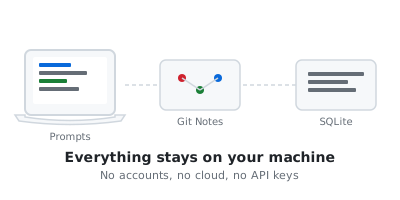
- **本地优先**——100% 离线工作,无需登录。
- **Git 原生和开放标准**——Git AI 使用[开放标准](https://github.com/git-ai-project/git-ai/blob/main/specs/git_ai_standard_v3.0.0.md)通过 Git Notes 跟踪 AI 生成的代码。
- **Transcript 不进入 Git**——Git Notes 链接到存储在本地、Git AI Cloud 或自托管 prompt 存储中的 transcript——保持您的仓库精简、不含敏感信息,并让您掌控自己的数据。
## 安装
Mac, Linux, Windows (WSL)
```
curl -sSL https://usegitai.com/install.sh | bash
```
Windows (非 WSL)
```
powershell -NoProfile -ExecutionPolicy Bypass -Command "irm https://usegitai.com/install.ps1 | iex"
```
就是这样——**无需针对每个仓库进行设置。**像往常一样进行 prompt 和提交。Git AI 会自动跟踪归属信息。
## 我们的选择
- **无工作流变更**——只需 prompt 和提交。Git AI 准确跟踪 AI 代码,不会使您的 git 历史变得杂乱。
- **“检测” AI 代码是一种反模式**——Git AI 不会猜测某个代码块是否由 AI 生成。支持的 agent 会准确报告它们编写了哪些行,从而为您提供尽可能准确的归属信息。
- **本地优先**——100% 离线工作,无需登录。
- **Git 原生和开放标准**——Git AI 使用[开放标准](https://github.com/git-ai-project/git-ai/blob/main/specs/git_ai_standard_v3.0.0.md)通过 Git Notes 跟踪 AI 生成的代码。
- **Transcript 不进入 Git**——Git Notes 链接到存储在本地、Git AI Cloud 或自托管 prompt 存储中的 transcript——保持您的仓库精简、不含敏感信息,并让您掌控自己的数据。
| Solo |
For Teams |
 |
 |
|
- AI Authorship 存储在 Git Notes 中,并带有指向存储在本地 SQLite 中的 transcript 的指针
- Transcript 仅存储在本地计算机上
- 重启任何 transcript
- 使用 `git-ai stats` 衡量跨提交的 AI authorship
|
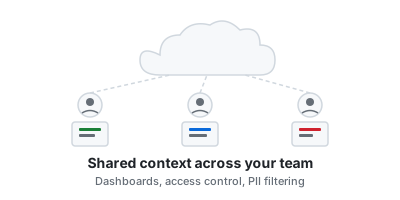
- AI Authorship 存储在 Git Notes 中,指针指向云或自托管 transcript 存储,具备内置访问控制、秘密过滤和 PII 过滤功能
- Agent 和工程师可以读取任何 AI 生成代码块的 transcript 和摘要
- 由任何贡献者重启任何 transcript
- 高级跨 agent 仪表板,用于衡量 AI 采用率、代码持久性,并比较团队中不同 agent 的表现
**[点击此处获取早期访问权限](https://calendly.com/d/cxjh-z79-ktm/meeting-with-git-ai-authors)**
|
# 使用 `/ask` 技能理解“为什么”
看到不明白的地方?`/ask` 技能允许您与编写代码的 agent 就其指令、决策以及分配任务的工程师的意图进行对话。
Git AI 在安装时将 `/ask` 技能添加到 `~/.agents/skills/` 和 `~/.claude/skills/`,因此您只需输入 `/ask` 即可从 Cursor、Claude Code、Copilot、Codex 等工具中调用它:
```
/ask Why didn't we use the SDK here?
```
能够访问原始意图和源代码的 agent 理解“为什么”。只能阅读代码的 agent 可以告诉您代码做什么,但不能告诉您为什么:
| 阅读代码 + Transcript (`/ask`) | 仅阅读代码(未使用 Git AI) |
|---|---|
| 当 Aidan 构建遥测功能时,他指示 agent 不要阻塞我们 CLI 刷新遥测数据的退出路径。我们没有直接使用 Sentry SDK,而是想出了一种模式,即先通过 `append_envelope()` 在本地写入事件,然后通过分离的子进程在后台刷新它们。这保持了热路径的快速,并在事后异步发送遥测数据。 | `src/commands/flush_logs.rs` 是一个 5 行的包装器,委托给 `src/observability/flush.rs`(约 700 行)。`commands/` 层处理 CLI 调度;`observability/` 处理 Sentry、PostHog、指标上传和日志处理。类似 `flush_cas`、`flush_logs`、`flush_metrics_db` 的并行模块遵循相同的轻量级调度模式。 |
# 让您的 Agent 更智能
当 agent 理解其所基于的代码背后的需求和决策时,它们会犯更少的错误并生成更易于维护的代码。提供这种上下文的最佳方式是给 agent 提供您自己使用的相同 `/ask` 工具。告诉您的 agent 在计划模式中使用 `/ask`:
`Claude|AGENTS.md`
```
- In plan mode, always use the /ask skill to read the code and the original transcript that generated it. Understanding intent will help you write a better plan.
```
# AI Blame
Git AI blame 是 `git blame` 的直接替代品,显示每一行的 AI 归属信息。它支持[所有标准的 `git blame` 标志](https://git-scm.com/docs/git-blame)。
```
git-ai blame /src/log_fmt/authorship_log.rs
```
```
cb832b7 (Aidan Cunniffe 2025-12-13 08:16:29 -0500 133) pub fn execute_diff(
cb832b7 (Aidan Cunniffe 2025-12-13 08:16:29 -0500 134) repo: &Repository,
cb832b7 (Aidan Cunniffe 2025-12-13 08:16:29 -0500 135) spec: DiffSpec,
cb832b7 (Aidan Cunniffe 2025-12-13 08:16:29 -0500 136) format: DiffFormat,
cb832b7 (Aidan Cunniffe 2025-12-13 08:16:29 -0500 137) ) -> Result {
fe2c4c8 (claude 2025-12-02 19:25:13 -0500 138) // Resolve commits to get from/to SHAs
fe2c4c8 (claude 2025-12-02 19:25:13 -0500 139) let (from_commit, to_commit) = match spec {
fe2c4c8 (claude 2025-12-02 19:25:13 -0500 140) DiffSpec::TwoCommit(start, end) => {
fe2c4c8 (claude 2025-12-02 19:25:13 -0500 141) // Resolve both commits
fe2c4c8 (claude 2025-12-02 19:25:13 -0500 142) let from = resolve_commit(repo, &start)?;
fe2c4c8 (claude 2025-12-02 19:25:13 -0500 143) let to = resolve_commit(repo, &end)?;
fe2c4c8 (claude 2025-12-02 19:25:13 -0500 144) (from, to)
fe2c4c8 (claude 2025-12-02 19:25:13 -0500 145) }
```
### IDE 插件
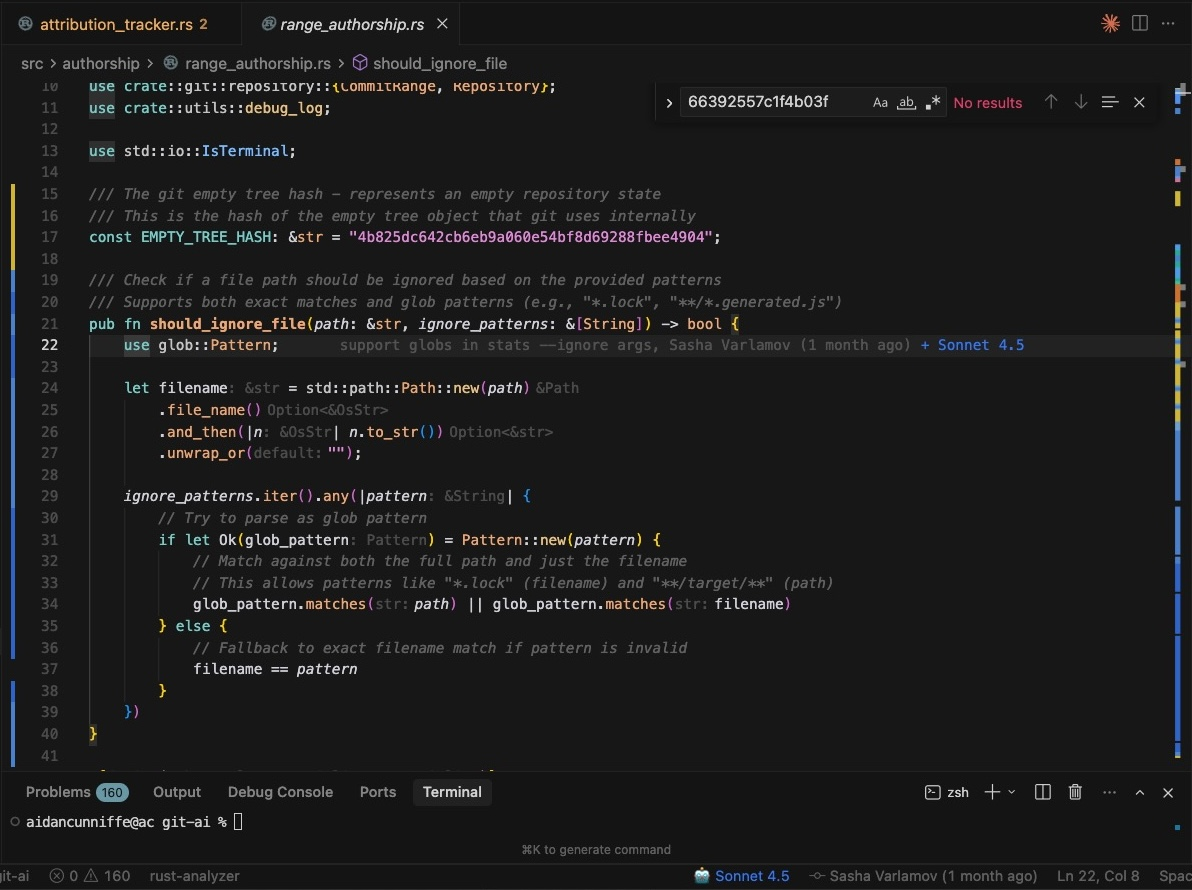
行号区域中的 AI blame 装饰,按 agent session 进行颜色编码。将鼠标悬停在某一行上可查看原始 prompt 或摘要。
| 支持的编辑器 |
|
|
- [VS Code](https://marketplace.visualstudio.com/items?itemName=git-ai.git-ai-vscode)
- [Cursor](https://marketplace.visualstudio.com/items?itemName=git-ai.git-ai-vscode)
- [Windsurf](https://marketplace.visualstudio.com/items?itemName=git-ai.git-ai-vscode)
- [Antigravity](https://marketplace.visualstudio.com/items?itemName=git-ai.git-ai-vscode)
- [Emacs magit](https://github.com/jwiegley/magit-ai)
- *为其他编辑器构建了支持?[提交 PR](https://github.com/git-ai-project/git-ai/pulls)*
|
|
# 跨 Agent 可观测性
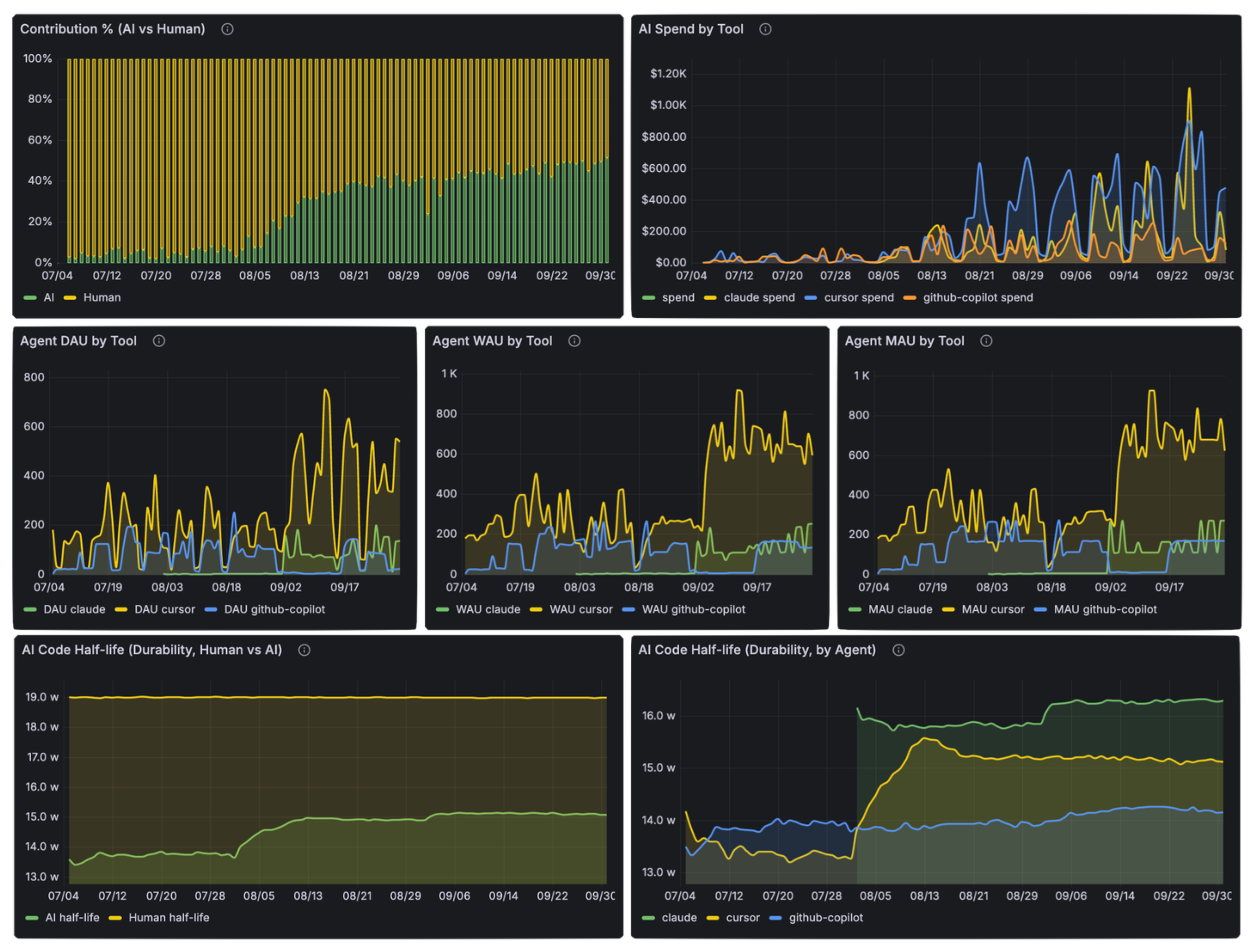
Git AI 收集从 prompt 到生产的跨 agent 遥测数据。跟踪有多少 AI 代码被接受、提交、通过代码审查并进入生产——以便您可以确定哪些工具和实践最适合您的团队。
```
git-ai stats --json
```
了解更多:[Stats 命令参考文档](https://usegitai.com/docs/cli/reference#stats)
```
{
"human_additions": 28,
"mixed_additions": 5,
"ai_additions": 76,
"ai_accepted": 47,
"total_ai_additions": 120,
"total_ai_deletions": 34,
"time_waiting_for_ai": 240,
"tool_model_breakdown": {
"claude_code/claude-sonnet-4-5-20250929": {
"ai_additions": 76,
"mixed_additions": 5,
"ai_accepted": 47,
"total_ai_additions": 120,
"total_ai_deletions": 34,
"time_waiting_for_ai": 240
}
}
}
```
对于团队范围的可见性,[Git AI Enterprise](https://usegitai.com/enterprise) 在 PR、仓库和组织级别聚合数据:
- **AI 代码构成**——跟踪您组织中 AI 生成代码的百分比。
- **全生命周期跟踪**——查看有多少 AI 代码被接受、提交、在代码审查期间重写以及部署到生产环境。衡量该代码一旦发布后的持久性,以及是否引起警报或事故。
- **团队工作流**——识别谁有效地使用后台 agent,谁并行运行 agent,以及从 AI 中获得最大提升的团队有何不同做法。
- **Agent 准备度**——衡量 agent 在您仓库中的有效性。跟踪 skills、rules、MCP 和 `AGENTS.md` 更改跨仓库和任务类型的影响。
- **Agent 和 Model 对比**——按 agent 和 model 比较接受率和输出质量。
**[获取早期访问权限](https://calendly.com/d/cxjh-z79-ktm/meeting-with-git-ai-authors)**
Git AI 如何工作?
- Agent 通过 pre/post edit hooks 报告它们编写了什么代码。
- Git AI 将每次编辑存储为一个 checkpoint——即 `.git/ai/` 中的一个小 diff,记录更改是 AI 生成还是人工编写。Checkpoints 在您工作时累积。
- 提交时,Git AI 将所有 checkpoints 处理为 Authorship Log,将行范围链接到 agent sessions,然后通过 Git Note 将日志附加到提交。
- Git AI 通过在历史更改时透明地重写 Authorship Logs,在 rebase、merge、squash、stash/pop、cherry-pick 和 amend 期间保留归属信息。
Git Note refs/notes/ai #<commitsha> |
`hooks/post_clone_hook.rs` |
|
```
hooks/post_clone_hook.rs
a1b2c3d4e5f6a7b8 6-8
c9d0e1f2a3b4c5d6 16,21,25
---
{
"schema_version": "authorship/3.0.0",
"git_ai_version": "0.1.4",
"base_commit_sha": "f4a8b2c...",
"prompts": {
"a1b2c3d4e5f6a7b8": {
"agent_id": {
"tool": "copilot",
"model": "codex-5.2"
},
"human_author": "Alice Person ",
"messages": [],
"total_additions": 8,
"total_deletions": 0,
"accepted_lines": 3,
"overriden_lines": 0,
"messages_url": "https://your-prompt-store.dev/cas/a1b2c3d4..."
},
"c9d0e1f2a3b4c5d6": {
"agent_id": {
"tool": "cursor",
"model": "sonnet-4.5"
},
"human_author": "Jeff Coder ",
"messages": [],
"total_additions": 5,
"total_deletions": 2,
"accepted_lines": 3,
"overriden_lines": 0,
"messages_url": "https://your-prompt-store.dev/cas/c9d0e1f2..."
}
}
}
```
|
```
1 pub fn post_clone_hook(
2 parsed_args: &ParsedGitInvocation,
3 exit_status: std::process::ExitStatus,
4 ) -> Option<()> {
5
6 if !exit_status.success() {
7 return None;
8 }
9
10 let target_dir =
11 extract_clone_target_directory(&parsed_args.command_args)?;
12
13 let repository =
14 find_repository_in_path(&target_dir).ok()?;
15
16 print!("Fetching authorship notes from origin");
17
18 match fetch_authorship_notes(&repository, "origin") {
19 Ok(()) => {
20 debug_log("successfully fetched");
21 print!(", done.\n");
22 }
23 Err(e) => {
24 debug_log(&format!("fetch failed: {}", e));
25 print!(", failed.\n");
26 }
27 }
28
29 Some(())
30 }
```
|
note 格式在 [Git AI Standard v3.0.0](https://github.com/git-ai-project/git-ai/blob/main/specs/git_ai_standard_v3.0.0.md) 中定义。
# 许可证
Apache 2.0标签:AIGC, AI代码追踪, AI生成内容检测, Claude, Copilot, Cutter, CVE检测, DevOps工具, DLL 劫持, DNS解析, Git工具, Git扩展, 人工智能辅助编程, 代码历史, 代码审查, 代码归因, 代码管理, 可视化界面, 大语言模型, 威胁情报, 开发者工具, 开源项目, 溯源, 网络调试, 自动化, 透明度, 通知系统, 通知系统