phonginreallife/kernelseal
GitHub: phonginreallife/kernelseal
KernelSeal 使用 eBPF 和 BPF-LSM 为 Kubernetes 提供内核级机密保护,在进程启动时注入机密并阻止任何其他进程(包括 root)读取。
Stars: 3 | Forks: 1
# KernelSeal
[](https://github.com/phonginreallife/kernelseal/actions/workflows/ci.yaml)
[](https://github.com/phonginreallife/kernelseal/actions/workflows/security.yaml)
[](https://goreportcard.com/report/github.com/phonginreallife/kernelseal)
[](https://github.com/phonginreallife/kernelseal/releases/latest)
[](LICENSE)
**使用 eBPF 和 BPF-LSM 为 Kubernetes 提供内核级机密保护**
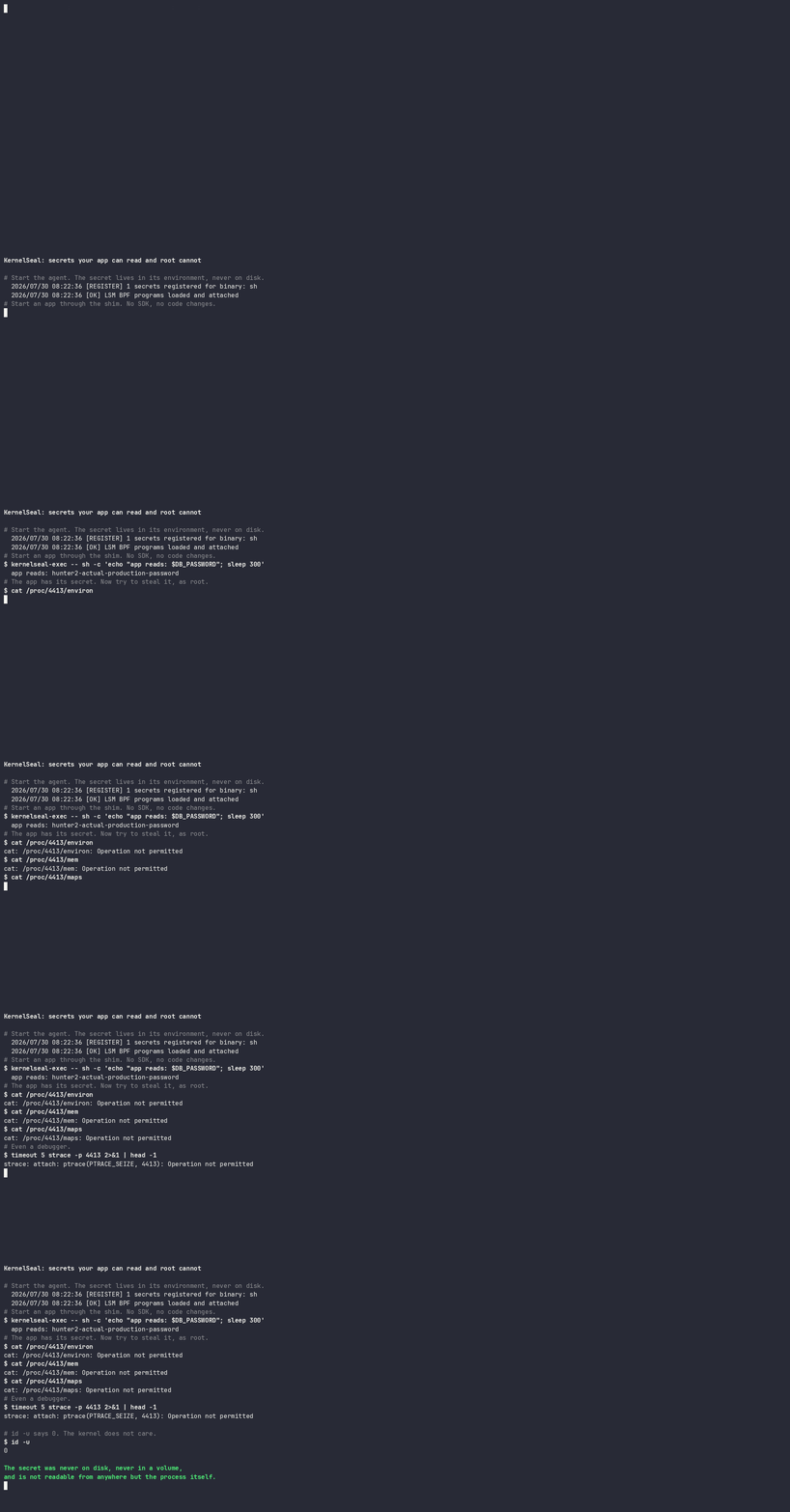
KernelSeal 在 exec 时将应用程序机密直接交付到进程的环境中,并使用 BPF-LSM 阻止主机上的任何其他程序将其读取回来。机密永远不会写入容器文件系统,永远不会作为卷挂载,并且事后也无法从 `/proc//environ` 恢复,即使由容器内的 root 用户也不行。
## 主要功能
- **磁盘上无机密。** 值通过 unix socket 从 agent 传输到目标进程。没有任何内容写入文件或 tmpfs 挂载。
- **普通环境变量。** 应用程序像往常一样读取 `os.Getenv` 或 `$DB_PASSWORD`。无需 SDK,无需更改代码。
- **在进程启动前受保护。** agent 在返回任何机密之前将该 PID 标记为受保护,因此环境永远不会被读取,即使是一瞬间也不行。
- **内核强制执行。** BPF-LSM 拒绝读取 `/proc//environ`、`/proc//mem` 和 `/proc//maps`,并阻止 `ptrace` attach。
- **失败即关闭。** 在 enforce 模式下,如果内核无法保证保护,则完全保留机密不予发放。
- **低开销。** 可选的内核端过滤意味着无关进程永远不会生成事件。
## 工作原理
应用程序的入口点使用 `kernelseal-exec`(一个小型静态 shim)包装。该 shim 向 agent 请求绑定到它即将运行的二进制文件的机密,将它们应用到环境中,然后 `execve` 运行真正的程序。
```
sequenceDiagram
participant Shim as "kernelseal-exec (PID N)"
participant Agent as "KernelSeal agent"
participant Kernel as "BPF-LSM maps"
participant App as "application (PID N)"
Shim->>Agent: "connect, request secrets for /usr/bin/myapp"
Agent->>Agent: "SO_PEERCRED yields verified PID N"
Agent->>Kernel: "mark PID N protected"
Agent-->>Shim: "environment variables"
Shim->>App: "execve, PID preserved"
Note over App,Kernel: "reads of /proc/N/environ now refused"
```
顺序是关键。因为保护机制在机密释放之前就已经安装,并且因为 `execve` 保留了 PID,所以应用程序继承了环境和保护。受保护的进程在运行时不会出现机密可读的时间窗口。
由此设计可以得出以下三点:
agent 使用 `SO_PEERCRED` 识别其调用者,该凭证由内核填充,调用者无法伪造。因此,机密交付与真实的进程绑定,而不是绑定到客户端关于自身的任何断言。
清理工作由 `sched_process_exit` tracepoint 驱动,并由一个定期的 reconciler 提供支持,该 reconciler 会为不再存在的 PID 删除保护。如果没有 reconciler,被驱逐的 LRU 条目可能会使保护附加到随后被无关进程重用的 PID 上。
强制执行是一项策略决策,具有三种模式:`disabled`、`audit`(记录潜在拒绝但允许操作)和 `enforce`(记录并拒绝)。
## 环境要求
- **Kernel:** Linux >= 5.7 并启用 BPF-LSM
- **Kernel 配置:**
CONFIG_BPF=y
CONFIG_BPF_SYSCALL=y
CONFIG_BPF_LSM=y
CONFIG_DEBUG_INFO_BTF=y
- **启动参数:** `lsm=lockdown,capability,yama,bpf`(`bpf` 条目是关键所在)
- **Capabilities:** `SYS_ADMIN`、`BPF`、`PERFMON` 和 `SYS_RESOURCE`(最后一个是提高 BPF maps 的 `RLIMIT_MEMLOCK` 所必需的)
- **Kubernetes:** 1.20+
- **容器运行时:** containerd 或 CRI-O
### 检查支持情况
```
# 输出必须包含 "bpf"
cat /sys/kernel/security/lsm
# CO-RE 必须存在 BTF
ls /sys/kernel/btf/vmlinux
```
如果 `/sys/kernel/security/lsm` 没有列出 `bpf`,KernelSeal 会启动但无法强制执行任何操作。在 enforce 模式下,它将拒绝释放机密,并在其就绪探针上报告 `not ready`,而不是假装保护它们。
## 快速开始
### 从源码构建
```
git clone https://github.com/phonginreallife/kernelseal.git
cd kernelseal
# 需要 clang、llvm、libbpf-dev 和 bpftool
make all
# 在运行前验证一切
make verify
```
这会生成两个二进制文件:
| Binary | 运行位置 | 用途 |
|---|---|---|
| `build/kernelseal` | 特权 sidecar 或 DaemonSet | 加载 BPF,提供机密 |
| `build/kernelseal-exec` | 应用程序容器内部 | 包装入口点 |
### 本地试用
```
# 1. 在其自己的环境中使用 secret 启动 agent。
# 通过 sudo 命令行传递该值,而不是导出它并使用
# sudo -E:许多 sudoers 配置会直接以“不支持保留
# 整个环境”为由拒绝 -E,然后 agent 在启动时
# source 变量将处于未设置状态。它会注册 0 个 secrets,shim 会被告知 binary
# 没有绑定任何内容,因此没有任何内容受到保护。
# -socket-group 将 socket 交给你的 group,以便 shim 能够访问它:
# agent 以 root 身份运行,否则 0660 socket 将仅限 root 访问。
sudo MY_SECRET_VALUE="super-secret-value" ./build/kernelseal \
-config examples/config.yaml \
-exec-monitor bpf/exec_monitor.bpf.o \
-lsm bpf/lsm_file_protect.bpf.o \
-socket-group "$(id -gn)"
# 检查日志是否显示 "[REGISTER] 2 secrets registered for binary: sleep"。
# 如果那里是 0,则表示 secret sources 未能解析,并且第 3 步将会成功,
# 而不是被拒绝。
# 2. 在另一个 shell 中,通过 shim 启动一个进程
./build/kernelseal-exec -- sleep 300 &
SLEEP_PID=$!
# 3. secret 位于其环境中,但无法从这里读取
cat /proc/$SLEEP_PID/environ
# cat: /proc/1234/environ: Operation not permitted
```
### 部署到 Kubernetes
#### 1. 首先检查节点
一切都取决于节点在启动时其 `lsm=` 列表中是否包含 `bpf`,这在大多数发行版中并不是默认设置。探针能在约 20 秒内得出答案。它使用已发布的镜像,因此节点不需要任何工具链,并且它在 `audit` 模式下运行且没有机密绑定,因此不会阻止任何操作,也不会读取任何机密。这使得它可以安全地在生产节点上运行。
```
kubectl apply -f deploy/kernelseal-probe.yaml
kubectl logs -f job/kernelseal-probe
kubectl delete -f deploy/kernelseal-probe.yaml
```
它以 `RESULT: node is ready for KernelSeal` 结束,或者为每个未满足的要求输出一行 `[FAIL]` 并附带各自的修复方法。探针会进行真实的加载和附加,因为在 attach 仍然失败的节点上,每个静态检查都有可能通过。
#### 2. Sidecar,每个 Pod 一个 agent(从这里开始)
Socket 可达性是授权边界:任何能够打开交付 socket 的进程都可以通过命名来请求绑定到任何已配置二进制文件的机密。每个 Pod 一个 agent 可将该 socket 保留在机密所属的 Pod 内,因此这是您应该首选的模式。
[deploy/kernelseal-sidecar.yaml](deploy/kernelseal-sidecar.yaml) 是一个完整且可运行的示例。应用程序 Pod 所需的组件包括:
```
spec:
shareProcessNamespace: true # so the agent can protect the app's processes
securityContext:
fsGroup: 1000 # so both containers can use the socket
initContainers:
# Copies the shim in, so the application image needs no changes
- name: install-shim
image: ghcr.io/phonginreallife/kernelseal:v1.0.0
command: ["/bin/sh", "-c", "cp /usr/local/bin/kernelseal-exec /kernelseal/"]
volumeMounts:
- {name: kernelseal-bin, mountPath: /kernelseal}
containers:
- name: myapp
image: myapp:latest
# The original entrypoint becomes an argument to the shim
command: ["/kernelseal/kernelseal-exec", "--", "/usr/bin/myapp"]
volumeMounts:
- {name: kernelseal-bin, mountPath: /kernelseal, readOnly: true}
- {name: kernelseal-socket, mountPath: /run/kernelseal}
volumes:
- name: kernelseal-bin
emptyDir: {}
- name: kernelseal-socket
emptyDir: {medium: Memory, sizeLimit: 1Mi}
```
#### 3. DaemonSet,每个节点一个 agent
节点范围的 agent 为每个挂载它的 Pod 提供单个 socket,因此节点上的任何 Pod 都可以请求任何已配置二进制文件的机密。仅在节点上的每个工作负载都受到同等信任时(例如单租户集群或专用节点组)才使用它,并首先阅读 [SECURITY.md](SECURITY.md) 中的授权边界部分。
```
kubectl apply -f deploy/manifests/namespace.yaml
kubectl apply -f deploy/manifests/configmap.yaml
kubectl apply -f deploy/manifests/daemonset.yaml
```
## 配置
```
version: v1
policy:
mode: enforce # disabled, audit, enforce
blockEnviron: true # Block /proc/*/environ
blockMem: true # Block /proc/*/mem
blockMaps: false # Block /proc/*/maps
blockPtrace: true # Block ptrace attach
allowSelfRead: true # Let a process read its own /proc files
auditAll: false # Log allowed accesses too
kernelBinaryFilter: true # Only observe configured binaries
secrets:
- name: database-creds
selector:
binary: "postgres" # Matches the binary the shim is about to exec
secretRefs:
- name: PGPASSWORD
source:
envRef: "PG_PASSWORD_SOURCE"
monitoring:
enabled: true
metricsPort: 9090
logLevel: info
```
列在 `secrets` 下的二进制文件只有在通过 shim 启动时才会接收到机密。添加绑定不会影响以任何其他方式启动的进程。
### 机密来源
```
secretRefs:
# Literal value, useful for testing
- name: TOKEN
source:
value: "inline-value"
# From the agent's own environment
- name: DB_PASSWORD
source:
envRef: "SOURCE_DB_PASSWORD"
# From a file, e.g. written by a Vault agent sidecar
- name: API_KEY
source:
fileRef: "/vault/secrets/api-key"
# From a Kubernetes Secret mounted into the agent container
- name: JWT_SECRET
source:
secretKeyRef:
name: my-secret
key: jwt
```
`secretKeyRef` 从挂载的路径读取值,而不是调用 Kubernetes API;将 Secret 挂载到 agent 容器中的 `/var/run/secrets/kernelseal//`。`vaultRef` 被解析器接受但尚未实现,并会返回错误。
### 内核端二进制文件过滤
| 设置 | 行为 | 用例 |
|---|---|---|
| `false` | 观察主机上的每一次执行 | 开发、调试 |
| `true` | 仅观察已配置的二进制文件 | 生产环境 |
## 可观测性
agent 在 `metricsPort` 上提供三个 endpoint:
| Path | 用途 |
|---|---|
| `/metrics` | Prometheus 展示 |
| `/healthz` | Liveness。只要进程在运行就会成功 |
| `/ready` | Readiness。当策略需要 BPF-LSM 但未加载时失败 |
Liveness 刻意不依赖于 readiness,因此降级的 agent 不会在循环中被不断重启。
`monitoring.logLevel` 接受 `debug`、`info`、`warn` 或 `error`,默认为 `info`。单次 exec 追踪位于 `debug` 级别,因为如果主机在循环中运行配置好的二进制文件,否则会产生连续的 `[EXEC]` 行流,从而淹没所有其他日志。机密交付和 LSM 决策在 `info` 及更高级别记录,因此默认级别会显示重要信息。
指标:
- `kernelseal_exec_events_total` - 观察到的进程执行次数
- `kernelseal_secrets_issued_total` - 释放给进程的机密数
- `kernelseal_secrets_denied_total` - 拒绝的机密请求数
- `kernelseal_access_blocked_total` - 被 LSM 阻止的访问数
- `kernelseal_access_audit_total` - 被审计但允许的访问数
- `kernelseal_protected_pids` - 当前受保护的进程
- `kernelseal_lsm_loaded` - 当 LSM 程序已附加时为 1
日志输出示例:
```
[START] Starting KernelSeal - Secret Protection System
Version: v1.0.0
[CONFIG] Loaded KernelSeal configuration from /etc/kernelseal/config.yaml
[REGISTER] 2 secrets registered for binary: myapp
[OK] Exec monitor BPF programs loaded and attached
[FILTER] Kernel-side filtering enabled for 1 binaries: [myapp]
[OK] LSM BPF programs loaded and attached
[CONFIG] Policy configured: mode=enforce, environ=true, mem=true, ptrace=true
[SOCKET] Listening on /run/kernelseal/kernelseal.sock (mode 0660)
[METRICS] Serving /metrics, /healthz and /ready on [::]:9090
[PROTECT] pid=5678 marked protected before release (pid=5678 uid=1000 ...)
[ISSUE] Released 2 secrets to "myapp" [API_KEY DB_PASSWORD] (pid=5678 ...)
[LSM BLOCKED] PID=9999 (cat) uid=0 attempted environ access to PID=5678
```
## 测试
```
make verify # formatting, vet, ABI check, unit and delivery tests
make test # unit tests only
make test-delivery # end-to-end secret delivery, no privileges needed
make test-integration # adds LSM enforcement tests, needs root and BPF-LSM
```
`make test-delivery` 运行真实的 socket 握手和 exec 路径,因此它涵盖了任何机器上的交付机制。`make test-integration` 中的 LSM 强制执行测试会跳过,除非它们发现 root 权限以及内核在启动时其 `lsm=` 列表中包含 `bpf`。
### ABI 检查
`make abi-check` 涵盖了构建时不可见的两种故障模式。
首先,它验证 [internal/types/events.go](internal/types/events.go) 中的 Go 结构体是否逐字段(包括 C 隐式插入的填充)仍然与 [bpf/kernelseal_common.h](bpf/kernelseal_common.h) 中的 C 定义相匹配。这比看起来更重要:policy 结构体两端都是 8 字节,因此不匹配的字段顺序仍然会成功更新 map,并且只是将每个设置写入错误的字节。这样,实施的策略就会在没有任何错误的情况下与配置的策略不同。
其次,它检查加载器按名称解析的每个程序和 map 是否确实存在于已编译的对象中。这些名称来自 `ebpf:"..."` 结构体标签,因此 BPF 源代码中的重命名会在 agent 启动时失败,而不是在编译时。
两者都在 CI 中运行。
## 开发
### 项目结构
```
kernelseal/
├── bpf/
│ ├── exec_monitor.bpf.c # Process lifecycle tracepoints
│ ├── lsm_file_protect.bpf.c # LSM hooks: file_open, ptrace_access_check
│ └── kernelseal_common.h # Shared event and policy layouts
├── cmd/
│ ├── main.go # Agent entrypoint
│ └── kernelseal-exec/ # The exec shim
├── internal/
│ ├── bpf/ # BPF loading and map management
│ ├── metrics/ # Prometheus and health endpoints
│ ├── protocol/ # Shim/agent wire format
│ ├── reconcile/ # Protected-PID reconciliation
│ ├── secrets/ # Secret registry
│ ├── server/ # Unix socket secret delivery
│ ├── types/ # Shared types, ABI-pinned
│ └── policy.go # Configuration and policy
├── deploy/ # Kubernetes manifests
├── demo/ # Docker compose demo
├── examples/ # Example configurations
└── test/integration/ # Delivery and enforcement tests
```
### 构建
```
make vmlinux # generate bpf/vmlinux.h from the running kernel's BTF
make bpf # compile the BPF programs
make build # build both Go binaries
make docker # build the container image
make build GOARCH=arm64 # cross-compile
```
`bpf/vmlinux.h` 是生成并被 gitignore 忽略的。在没有 BTF 的主机上,请使用 `make docker-dev` 在容器中构建 BPF 对象。
## 安全考量
有关完整的威胁模型,请参阅 [SECURITY.md](SECURITY.md)。简要说明:
1. **agent 是特权的。** 它需要 `SYS_ADMIN`、`BPF`、`PERFMON` 和 `SYS_RESOURCE` 来加载 BPF 程序。请将其镜像和配置视为受信任的。
2. **Socket 可达性是授权边界。** 任何可以打开 socket 的进程都可以通过命名来请求绑定到任何已配置二进制文件的机密。请将 socket 卷的范围限定在应该接收这些机密的 Pod 内。
3. **shim 位于信任边界内。** 它在 socket 读取和 `execve` 之间处理明文机密。
4. **sidecar 模式需要 `shareProcessNamespace: true`**,以便 agent 可以保护应用程序进程。
5. **保护是基于 PID 的,并在退出时结束。** 接收机密后 fork 的进程会将其环境传递给子进程,而这些子进程本身并未标记为受保护。
### 已知限制
- `vaultRef` 已被解析但尚未实现。
- 除了 `binary`(`container`、`labels`、`namespace`、`cgroupPath`)之外的选择器已被解析,但尚未用于匹配。
- agent 无法验证 shim 将要执行哪个二进制文件,因为在握手时 `/proc//exe` 仍然指向 shim。二进制名称选择应用哪些机密;它不是身份声明。
- Go 字符串无法被可靠地清零,因此机密值可能会保留在 agent 的 heap 中,直到被垃圾回收。
### 安全扫描
CI 运行 gosec、govulncheck、Trivy、Hadolint 和 Gitleaks。
## 许可证
Apache License 2.0
## 贡献
欢迎贡献。请在提交 pull request 之前运行 `make verify`。
## 参考
- [BPF LSM 文档](https://docs.kernel.org/bpf/prog_lsm.html)
- [Cilium eBPF 库](https://github.com/cilium/ebpf)
- [Linux 安全模块](https://www.kernel.org/doc/html/latest/admin-guide/LSM/index.html)
标签:Docker镜像, EVTX分析, Streamlit, 大语言模型安全, 子域名枚举, 子域名突变, 日志审计, 机密管理, 系统安全, 自定义请求头, 访问控制