moiz-2x/CVE-2025-21420_POC
GitHub: moiz-2x/CVE-2025-21420_POC
Windows 磁盘清理工具本地权限提升漏洞(CVE-2025-21420)的完整概念验证,通过劫持 SilentCleanup 任务中的目录删除操作实现 SYSTEM 权限获取。
Stars: 56 | Forks: 15
## 对比分析 cleanmgr.exe
新版本的 `cleanmgr.exe` 包含了对 [SetProcessMitigationPolicy](https://learn.microsoft.com/en-us/windows/win32/api/processthreadsapi/nf-processthreadsapi-setprocessmitigationpolicy) 函数的调用。
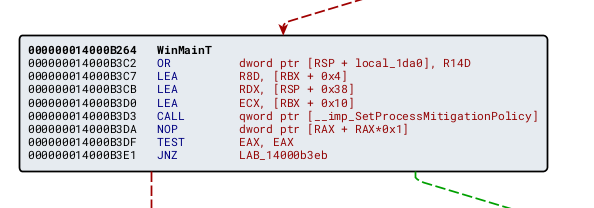
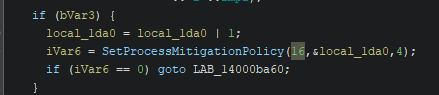
其中 `MitigationPolicy` 设置为 16,对应 **ProcessRedirectionTrustPolicy**。
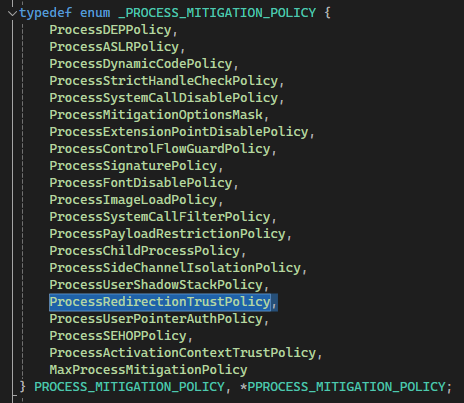
结合 Microsoft 对 [CWE-59: Improper Link Resolution Before File Access ('Link Following')](https://msrc.microsoft.com/update-guide/vulnerability/CVE-2025-21420) 的描述,我们可以推断 `cleanmgr.exe` 已启用 Redirection Guard。
在阅读了 *Simon Zuckerbraun* 和 *enigma0x3* 的两篇博文后:
1. [From Arbitrary Folder Delete/Move/Rename to SYSTEM EoP](https://www.zerodayinitiative.com/blog/2022/3/16/abusing-arbitrary-file-deletes-to-escalate-privilege-and-other-great-tricks)
2. [Bypass UAC](https://enigma0x3.net/2016/07/22/bypassing-uac-on-windows-10-using-disk-cleanup/)
正如 Simon Zuckerbraun 所提到的,`SilentCleanup` 任务可能拥有足够的权限删除 `C:/Config.msi` 文件夹。我们只需要在 `SilentCleanup` 任务(它以 **Run with highest priv** 运行 `cleanmgr.exe`)中找到一个 *Arbitrary Folder Delete/Move/Rename* 漏洞,并将其重定向到 `C:/Config.msi` 文件夹即可。
## 通过 Procmon 观察
运行 `SilentCleanup` 任务并观察 `cleanmgr.exe` 的行为。
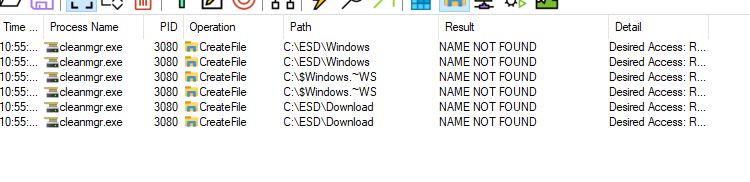
该进程会检查列出的文件夹是否存在(有趣的是,它不验证 `C:\ESD` 是否为 junction,但确实检查了 `Windows` 和 `Download` —— 这一点我们在此不作深入探讨)。
创建文件夹 `C:\$Windows.~WS`、`C:\ESD\Windows`、`C:\ESD\Download`,在其中放入一些随机文件,重新运行 `SilentCleanup` 并再次观察。

我们可以看到 `SilentCleanup` 删除了 `Windows` 和 `Download` 文件夹中的内容。这可以利用 [From Folder Contents Delete to SYSTEM EoP](https://www.zerodayinitiative.com/blog/2022/3/16/abusing-arbitrary-file-deletes-to-escalate-privilege-and-other-great-tricks) 中描述的技术来实现。
## 利用
1. Python 脚本创建 3 个文件夹:`C:\$Windows.~WS`、`C:\ESD\Windows`、`C:\ESD\Download`,插入虚拟 `.txt` 文件并暂停。
2. 运行 [FolderOrFileDeleteToSystem](https://github.com/thezdi/PoC/tree/main/FilesystemEoPs) 设置 `Config.msi`。
3. 运行 [FolderContentsDeleteToFolderDelete](https://github.com/thezdi/PoC/tree/main/FilesystemEoPs) 将内容清理从 `C:\ESD\Windows` 重定向到 `C:/Config.msi`。
**注意:** 请在 Defender 中排除这两个进程,因为 AV 可能会检测到此利用技术。
4. 恢复 Python 脚本运行并运行 `SilentCleanup` 以触发内容清理。
5. 运行 `osk.exe`,然后按 Ctrl-Alt-Delete。
https://github.com/user-attachments/assets/d66b43ea-6706-4bce-94c4-ca3a6e97857f
标签:Cleanmgr, CVE-2025-21420, CWE-59, EoP, PoC, ProcessRedirectionTrustPolicy, Procmon, Redirection Guard, SetProcessMitigationPolicy, SilentCleanup, Web报告查看器, Windows 磁盘清理工具, 二进制差异分析, 云资产清单, 任意文件夹删除, 协议分析, 子域名枚举, 微软漏洞, 暴力破解, 权限提升, 符号链接攻击, 系统安全, 绕过 UAC, 逆向工具, 逆向工程