Rusty Bootkit - 用Rust编写的Windows UEFI Bootkit
作者:Sec-Labs | 发布时间:
项目地址
https://github.com/memN0ps/bootkit-rs
相关技术点
- UEFI runtime driver
- Windows UEFI boot process
- Windows kernel rootkit
- Windows blue-pill hypervisor
- Rust programming language
- Low-level and high-level programming
项目用途
RedLotus是一个Windows UEFI bootkit,通过手动映射Windows内核rootkit或blue-pill hypervisor,使用UEFI runtime driver(EFI_RUNTIME_DRIVER)来加载自己。它可以在操作系统之前运行代码,潜在地向内核注入恶意代码或通过感染引导过程并接管系统的固件或引导加载程序来加载恶意内核驱动程序,有效地禁用或绕过安全保护。它可以用于高级对手模拟或仿真(红队),也可以用于游戏作弊,是一个有趣的、学习的、恶意软件研究和安全意识普及的旁支项目。此项目还展示了Rust可以处理低级和高级任务。它的一个重要功能是在操作系统之前加载内核驱动程序,甚至执行内核中的shellcode以绕过Windows安全保护。
RedLotus项目的主要灵感来源于umap、Bootlicker、BlackLotus、ESPecter、UEFI-Bootkit、EfiGuard、Bootkitting Windows Sandbox和Rootkits and Bootkits等项目。
TODO
- 重构代码
- 更好的错误处理
- 提供稳定性
- 制作关于工作原理的博客或图表
该项目的GitHub主页提供了安装和构建的详细说明。
Rust中的Windows UEFI Bootkit(代号:RedLotus)
使用UEFI运行时驱动程序(EFI_RUNTIME_DRIVER)手动映射[Windows内核rootkit](https://github.com/memN0ps/rootkit-rs)或[Windows蓝色药丸超级监视器](https://github.com/memN0ps/hypervisor-rs)的Windows UEFI bootkit,类似于[umap by @btbd](https://github.com/btbd/umap/)。
引导套件可以在操作系统之前运行代码,并有可能将恶意代码注入内核或通过感染启动过程并接管系统固件或引导加载程序来加载恶意内核驱动程序,从而有效地禁用或绕过安全保护。虽然可以将其用于高级对手模拟或仿真(红队),但在大多数参与中不太可能使用此工具。此工具也可用于游戏作弊,是一个有趣的副业,可供那些有兴趣学习、恶意软件研究和推广安全意识的人使用。它还证明Rust可以处理低级和高级任务。此工具的一个重要功能是其能够在操作系统之前加载内核驱动程序,甚至在内核中执行shellcode以绕过Windows安全保护。重要的是要认识到Rust的潜力,不要低估其威力。
该项目的灵感来自以下内容:
- umap:https://github.com/btbd/umap/(此项目已从C移植到Rust)
- Bootlicker:https://github.com/realoriginal/bootlicker
- BlackLotus:https://www.welivesecurity.com/2023/03/01/blacklotus-uefi-bootkit-myth-confirmed/
- ESPecter:https://www.welivesecurity.com/2021/10/05/uefi-threats-moving-esp-introducing-especter-bootkit/
- UEFI-Bootkit:https://github.com/ajkhoury/UEFI-Bootkit/
- EfiGuard:https://github.com/Mattiwatti/EfiGuard
- Bootkitting Windows Sandbox:https://secret.club/2022/08/29/bootkitting-windows-sandbox.html
- Rootkits and Bootkits:https://nostarch.com/rootkits
待办事项
- 重构代码
- 更好的错误处理
- 提供稳定性
- 制作有关其工作原理的博客或图表
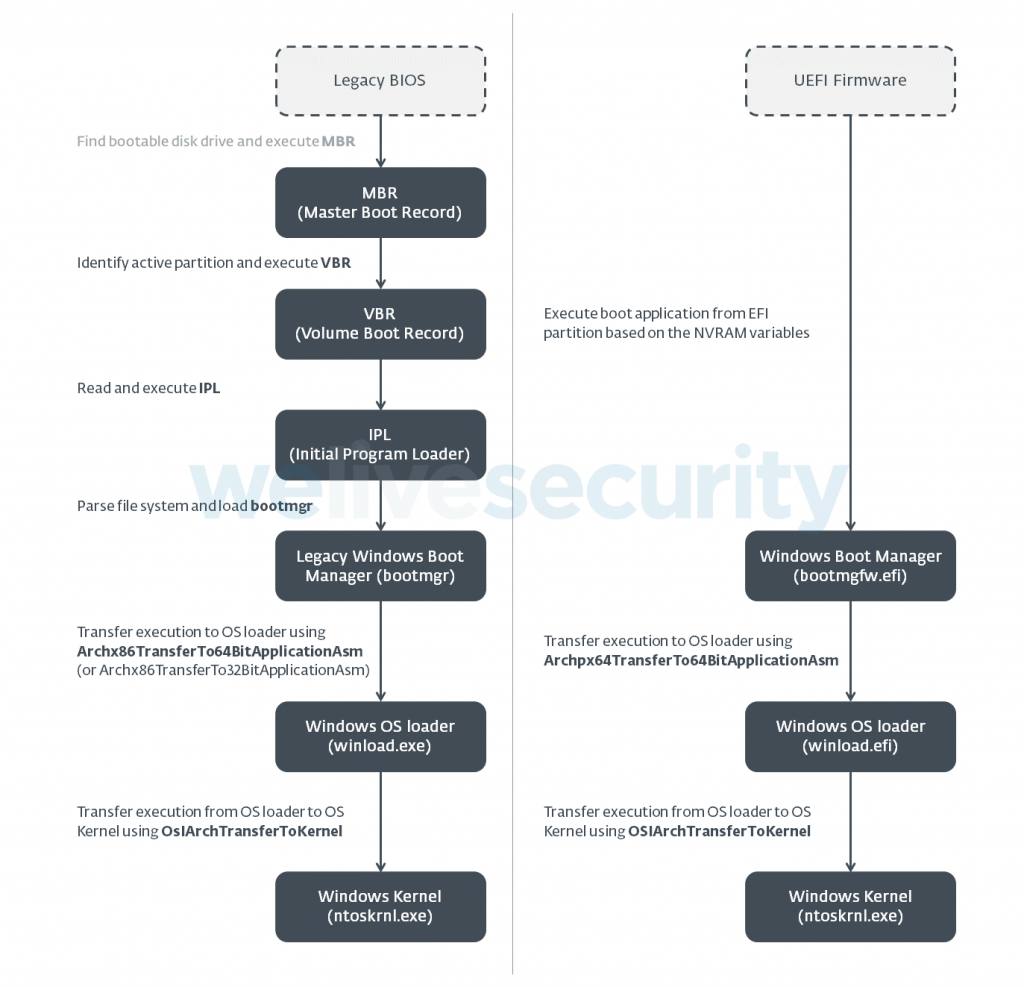
下图显示了遗留和UEFI引导的工作方式。
 图1.比较遗留引导流程(左)和UEFI引导流程(右)在Windows(Vista及更高版本)系统上的完整信用:[WeLiveSecurity](https://www.welivesecurity.com/2021/10/05/uefi-threats-moving-esp-introducing-especter-bootkit/))
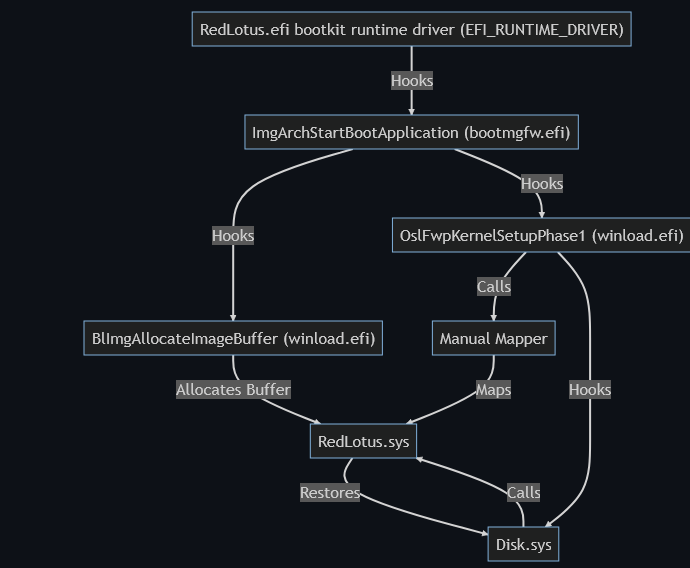
此图解释了RedLotus.efi UEFI bootkit(RedLotus.sys是Windows内核驱动程序)的结构和流程
graph TD;
    R["RedLotus.efi bootkit runtime driver (EFI_RUNTIME_DRIVER)"] -->|Hooks| A["ImgArchStartBootApplication (bootmgfw.efi)"];
    A["ImgArchStartBootApplication (bootmgfw.efi)"] -->|Hooks| B["BlImgAllocateImageBuffer (winload.efi)"];
    B -->|Allocates Buffer| G[RedLotus.sys];
    A -->|Hooks| C["OslFwpKernelSetupPhase1 (winload.efi)"];
    C -->|Calls| D[Manual Mapper];
    D -->|Maps | G[RedLotus.sys]
    C -->|Hooks| E[Disk.sys];
    E -->|Calls| G[RedLotus.sys];
    G -->|Restores| E;
安装
[安装Rust](https://www.rust-lang.org/tools/install)
要开始使用Rust,请[下载安装程序](https://www.rust-lang.org/tools/install),然后运行程序并按照屏幕上的说明进行操作。您可能需要在提示时安装[Visual Studio C ++生成工具](https://visualstudio.microsoft.com/visual-cpp-build-tools/)。
[安装并切换到Rust夜间](https://rust-lang.github.io/rustup/concepts/channels.html)
rustup toolchain install nightly
rustup default nightly
[安装cargo-make](https://github.com/sagiegurari/cargo-make)
cargo install cargo-make
[安装WDK / SDK](https://docs.microsoft.com/en-us/windows-hardware/drivers/download-the-wdk)
*第1步:安装Visual Studio 2022 *第2步:安装Windows 11、版本22H2 SDK *第3步:安装Windows 11、版本22H2 WDK
构建将目录更改为 .\driver\ 并构建驱动程序
cargo make sign
将目录更改为 .\bootkit\ 并构建引导程序
cargo build --target x86_64-unknown-uefi --release
用法
UEFI Bootkit 在以下一个或多个条件下工作:
-
机器上禁用了安全启动,因此无需利用漏洞即可利用它(由此项目支持)。
-
利用 UEFI 固件中已知的缺陷来禁用安全启动,以解决过时固件版本或不再支持的产品的情况,包括使用 Bring Your Own Vulnerable Binary (BYOVB) 技术将易受攻击的二进制文件副本带到机器上,利用漏洞或漏洞,绕过最新的 UEFI 系统上的安全启动 (1-day/one-day)。
-
利用 UEFI 固件中未指定的缺陷来禁用安全启动 (0-day/zero-day 漏洞)。
用法 1:感染磁盘上的 Windows 引导管理器 bootmgfw.efi(不受支持)
通常,UEFI Bootkit 感染位于 EFI 分区 \EFI\Microsoft\Boot\bootmgfw.efi (C:\Windows\Boot\EFI\bootmgfw.efi ) 中的 Windows 引导管理器 bootmgfw.efi。修改引导加载程序包括向 Windows 引导管理器 bootmgfw.efi 中添加一个名为 .efi 的新部分,并更改可执行文件的入口点地址,以便程序流跳转到添加的部分的开头,如下所示:
- 将 bootkit 转换为位置无关代码 (PIC) 或 shellcode
- 查找位于 EFI 分区
\EFI\Microsoft\Boot\bootmgfw.efi中的bootmgfw.efi(Windows 引导管理器) - 将
.efi部分添加到bootmgfw.efi(Windows 引导管理器) - 将 bootkit shellcode 注入或复制到
bootmgfw.efi(Windows 引导管理器) 的.efi部分中 - 更改
bootmgfw.efi(Windows 引导管理器) 的入口点以新添加的.efi部分的 bootkit shellcode - 重新启动
用法 2:通过 UEFI Shell 执行 UEFI Bootkit(已支持)
下载 EDK2 efi shell 或 UEFI-Shell 并按照以下步骤操作:
-
解压已下载的 efi shell 并将文件
Shell.efi(应位于文件夹UefiShell/X64中)重命名为bootx64.efi -
将 USB 驱动器格式化为 FAT32
-
创建以下文件夹结构:
USB:.
 │   redlotus.efi
 │
 └───EFI
      └───Boot
              bootx64.efi
-
从 USB 驱动器引导
4.1. 对于 VMware Workstation,需要以下内容:
-
VMware Workstation:
VM -> 设置 -> 硬件 -> 添加 -> 硬盘 -> 下一步 -> SCSI 或 NVMe (建议) -> 下一步 -> 使用物理磁盘 (适用于高级用户) -> 下一步 -> 设备:PhysicalDrive1 和使用情况:使用整个磁盘 -> 下一步 -> 完成。 -
通过单击
Power On to Firmware启动 VM -
选择 Internal Shell(不受支持的选项)或 EFI Vmware Virtual SCSI Hard Drive (1.0)
-
-
应启动 UEFI shell,将目录更改为与 Windows 引导管理器相同的位置(例如
FS0)。请注意,文件系统可能与您的机器不同
FS0:
- 将 bootkit 复制到与 Windows 引导管理器相同的位置(例如
FS0)。
cp fs2:redlotus.efi fs0:
- 加载 bootkit
load redlotus.efi
- Windows 应自动启动。
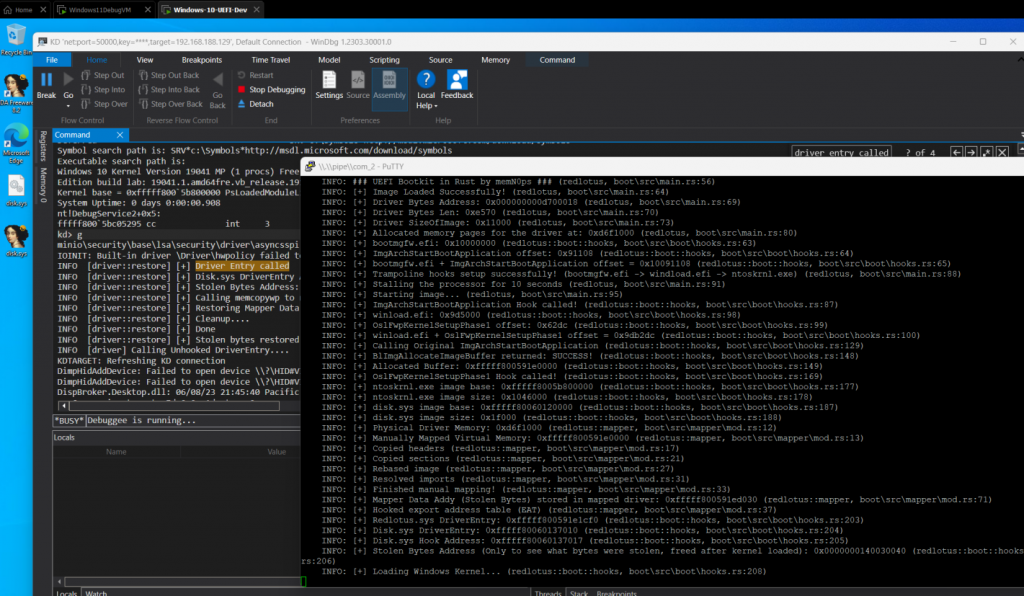
PoC
Credits / References / Thanks / Motivation以下是Github项目列表:
-
Austin Hudson: https://github.com/realoriginal/bootlicker
-
感谢所有帮助:inlineHookz(smoke/snow/never_unsealed):https://twitter.com/never_unsealed
-
Rust社区Discord:https://discord.com/invite/rust-lang(#windows-dev频道PeterRabbit、MaulingMonkey等)
-
Aidan Khoury:https://github.com/ajkhoury/UEFI-Bootkit/
-
Matthijs Lavrijsen:https://github.com/Mattiwatti/EfiGuard
-
Welivesecurity:https://www.welivesecurity.com/2021/10/05/uefi-threats-moving-esp-introducing-especter-bootkit/
-
Welivesecurity:https://www.welivesecurity.com/2023/03/01/blacklotus-uefi-bootkit-myth-confirmed/
-
MrExodia:https://secret.club/2022/08/29/bootkitting-windows-sandbox.html
-
Samuel Tulach:https://github.com/SamuelTulach/rainbow
-
UnknownCheats:https://www.unknowncheats.me/forum/anti-cheat-bypass/452202-rainbow-efi-bootkit-hwid-spoofer-smbios-disk-nic.html
-
Cr4sh:https://github.com/Cr4sh/s6_pcie_microblaze/tree/master/python/payloads/DmaBackdoorBoot
-
Alex Matrosov:Rootkits and Bootkits:https://nostarch.com/rootkits byAlex Matrosov
-
Binarly:https://www.binarly.io/posts/The_Untold_Story_of_the_BlackLotus_UEFI_Bootkit/index.html
-
rust-osdev:https://github.com/rust-osdev/uefi-rs
-
rust-osdev:https://github.com/rust-osdev/bootloader
-
rust-osdev:https://crates.io/crates/uefi
-
rust-osdev:https://docs.rs/uefi/latest/
-
rust-osdev:https://rust-osdev.github.io/uefi-rs/HEAD/
-
https://developer.microsoft.com/en-us/windows/downloads/virtual-machines/
-
https://securelist.com/cosmicstrand-uefi-firmware-rootkit/106973/
-
https://guidedhacking.com/threads/external-internal-pattern-scanning-guide.14112/
-
https://guidedhacking.com/resources/guided-hacking-x64-cheat-engine-sigmaker-plugin-ce-7-2.319/
-
https://github.com/tandasat/MiniVisorPkg/blob/master/Docs/Building_and_Debugging.md
-
https://github.com/tandasat/MiniVisorPkg/blob/master/Docs/Testing_UEFI_on_Hyper-V.md
-
感谢jonaslyk提供了'BlImgAllocateImageBuffer'正确的函数签名 :)