一个用于控制大型语言模型的指导语言。
作者:Sec-Labs | 发布时间:
项目地址
https://github.com/microsoft/guidance
-
Guidance(引导)能够比传统的提示或链接更有效、更高效地控制现代语言模型。引导程序允许您将生成、提示和逻辑控制交错到一个连续的流程中,与语言模型实际处理文本的方式相匹配。简单的输出结构,如及其多个变体(例如、等),已被证明可以改善LLM的性能。更强大的LLM,如,使得更丰富的结构成为可能,而guidance则使得构建这种结构变得更加简单和经济。
特点:
-
简单直观的语法,基于模板语言。
-
具有多个生成、选择、条件、工具使用等功能的丰富输出结构。
-
在Jupyter/VSCode笔记本中实现类似Playground的流式处理。
-
基于智能种子的生成缓存。
-
支持基于角色的聊天模型(例如)。
-
与HuggingFace模型轻松集成,包括,以加快速度;,以优化提示边界;以及,以强制格式。
安装
pythonCopy codepip install guidance实时流式处理()
通过在笔记本中实时流式处理复杂的模板和生成,加快您的提示开发周期。乍一看,Guidance感觉像一个模板语言,就像标准的模板一样,您可以进行变量插值(例如{{proverb}})和逻辑控制。但与标准的模板语言不同,guidance程序具有明确定义的线性执行顺序,直接对应于语言模型处理的令牌顺序。这意味着在执行的任何时候,语言模型都可以用于生成文本(使用{{gen}}命令)或进行逻辑控制流程决策。生成和提示的交错允许精确的输出结构,产生清晰可解析的结果。
import guidance

# set the default language model used to execute guidance programs
guidance.llm = guidance.llms.OpenAI("text-davinci-003")

# define a guidance program that adapts a proverb
program = guidance("""Tweak this proverb to apply to model instructions instead.

{{proverb}}
- {{book}} {{chapter}}:{{verse}}

UPDATED
Where there is no guidance{{gen 'rewrite' stop="\\n-"}}
- GPT {{gen 'chapter'}}:{{gen 'verse'}}""")

# execute the program on a specific proverb
executed_program = program(
    proverb="Where there is no guidance, a people falls,\nbut in an abundance of counselors there is safety.",
    book="Proverbs",
    chapter=11,
    verse=14
)
在程序执行后,所有生成的变量现在都可以轻松访问:
pythonCopy codeexecuted_program["rewrite"]', a model fails,\nbut in an abundance of instructions there is safety.'
聊天对话()
Guidance支持基于API的聊天模型,如GPT-4,以及通过基于角色标签(例如{{#system}}...{{/system}})的统一API支持的开放式聊天模型,例如Vicuna。这允许将丰富的模板和逻辑控制与现代聊天模型相结合进行交互式对话开发。
# connect to a chat model like GPT-4 or Vicuna
gpt4 = guidance.llms.OpenAI("gpt-4")
# vicuna = guidance.llms.transformers.Vicuna("your_path/vicuna_13B", device_map="auto")

experts = guidance('''
{{#system~}}
You are a helpful and terse assistant.
{{~/system}}

{{#user~}}
I want a response to the following question:
{{query}}
Name 3 world-class experts (past or present) who would be great at answering this?
Don't answer the question yet.
{{~/user}}

{{#assistant~}}
{{gen 'expert_names' temperature=0 max_tokens=300}}
{{~/assistant}}

{{#user~}}
Great, now please answer the question as if these experts had collaborated in writing a joint anonymous answer.
{{~/user}}

{{#assistant~}}
{{gen 'answer' temperature=0 max_tokens=500}}
{{~/assistant}}
''', llm=gpt4)

experts(query='How can I be more productive?')
引导加速(笔记本)
当在单个Guidance程序中使用多个生成或LLM导向的控制流语句时,我们可以通过在处理提示时优化地重复使用键/值缓存来显著提高推理性能。这意味着Guidance只要求LLM生成下面的绿色文本,而不是整个程序。与标准的生成方法相比,这将减少该提示的运行时间一半。
# we use LLaMA here, but any GPT-style model will do
llama = guidance.llms.Transformers("your_path/llama-7b", device=0)

# we can pre-define valid option sets
valid_weapons = ["sword", "axe", "mace", "spear", "bow", "crossbow"]

# define the prompt
character_maker = guidance("""The following is a character profile for an RPG game in JSON format.
```json
{
    "id": "{{id}}",
    "description": "{{description}}",
    "name": "{{gen 'name'}}",
    "age": {{gen 'age' pattern='[0-9]+' stop=','}},
    "armor": "{{#select 'armor'}}leather{{or}}chainmail{{or}}plate{{/select}}",
    "weapon": "{{select 'weapon' options=valid_weapons}}",
    "class": "{{gen 'class'}}",
    "mantra": "{{gen 'mantra' temperature=0.7}}",
    "strength": {{gen 'strength' pattern='[0-9]+' stop=','}},
    "items": [{{#geneach 'items' num_iterations=5 join=', '}}"{{gen 'this' temperature=0.7}}"{{/geneach}}]
}```""")

# generate a character
character_maker(
    id="e1f491f7-7ab8-4dac-8c20-c92b5e7d883d",
    description="A quick and nimble fighter.",
    valid_weapons=valid_weapons, llm=llama
)
在使用LLaMA 7B时,上述提示通常需要略超过2.5秒的时间才能完成(在A6000 GPU上)。如果我们将相同的提示调整为单次生成调用(即当前的标准做法),则完成所需时间约为5秒(其中4秒用于令牌生成,1秒用于提示处理)。这意味着Guidance加速对于该提示相比标准方法提供了2倍的加速效果。 实际上,确切的加速因子取决于特定提示的格式和模型的大小(较大的模型获益更多)。目前,加速仅适用于Transformers LLMs。请查看笔记本以获取更多详细信息。
令牌修复(笔记本)
大多数语言模型使用的标准贪婪令牌化引入了一个微妙而强大的偏差,可能对提示产生各种意想不到的后果。使用我们称之为"令牌修复"的过程,guidance会自动去除这些令人惊讶的偏差,使您能够专注于设计您想要的提示,而无需担心令牌化产生的问题。
考虑以下示例,我们尝试生成一个HTTP URL字符串:
# we use StableLM as an open example, but these issues impact all models to varying degrees
guidance.llm = guidance.llms.Transformers("stabilityai/stablelm-base-alpha-3b", device=0)

# we turn token healing off so that guidance acts like a normal prompting library
program = guidance('''The link is <a href="http:{{gen max_tokens=10 token_healing=False}}''')
program()
需要注意的是,LLM生成的输出没有使用明显的下一个字符(两个斜杠)来完整地构成URL。相反,它创建了一个中间带有空格的无效URL字符串。为什么会这样呢?因为字符串 "://" 是一个独立的令牌(1358),所以一旦模型看到一个单独的冒号(令牌 27),它就会假设下一个字符不能是"//",否则分词器不会使用27,而是会使用1358(表示 "://" 的令牌)。
这种偏差不仅仅局限于冒号字符,它在任何地方都会发生。在上面使用的StableLM模型中,超过10,000个最常见令牌中的70%以上是更长可能令牌的前缀,因此当它们是提示中的最后一个令牌时,会导致令牌边界偏差。例如,冒号令牌 27 有34个可能的扩展," the" 令牌 1735 有51个扩展,而空格令牌 209 有28,802个扩展。
guidance通过将模型向后退一个令牌,然后允许模型向前步进,同时限制它只生成前缀与最后一个令牌匹配的令牌,来消除这些偏差。这个"令牌修复"过程消除了令牌边界偏差,并使得任何提示都可以自然地完成:
pythonCopy codeguidance('The link is <a href="http:{{gen max_tokens=10}}')()
丰富的输出结构示例(笔记本)
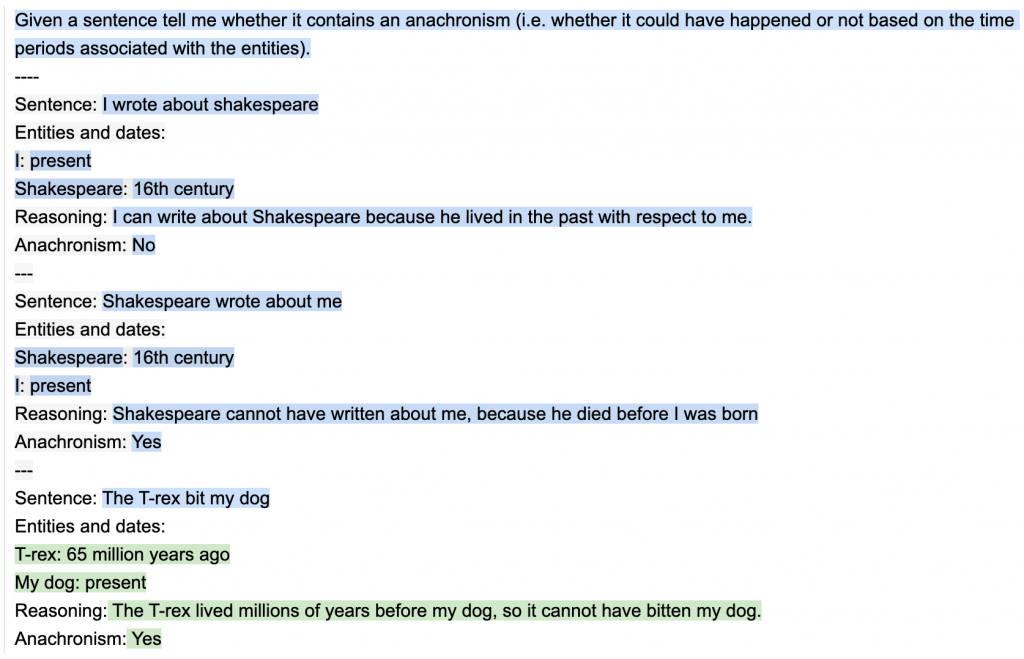
为了展示输出结构的价值,我们从BigBench中选取了一个简单的任务,该任务的目标是确定给定的句子是否包含不合时宜的说法(由于时间段不重叠而不可能发生的陈述)。下面是一个简单的双轮提示,其中包含了人工设计的思维链序列。
Guidance程序,像标准的Handlebars模板一样,既支持变量插值(例如{{input}}),也支持逻辑控制。但与标准的模板语言不同,guidance程序具有独特的线性执行顺序,直接对应于语言模型处理的令牌顺序。这意味着在执行过程中的任何时候,语言模型都可以用于生成文本({{gen}}命令)或进行逻辑控制流程决策({{#select}}...{{or}}...{{/select}}命令)。生成和提示的交错使得可以实现精确的输出结构,提高准确性,并产生清晰可解析的结果。
import guidance

# set the default language model used to execute guidance programs
guidance.llm = guidance.llms.OpenAI("text-davinci-003")

# define the few shot examples
examples = [
    {'input': 'I wrote about shakespeare',
    'entities': [{'entity': 'I', 'time': 'present'}, {'entity': 'Shakespeare', 'time': '16th century'}],
    'reasoning': 'I can write about Shakespeare because he lived in the past with respect to me.',
    'answer': 'No'},
    {'input': 'Shakespeare wrote about me',
    'entities': [{'entity': 'Shakespeare', 'time': '16th century'}, {'entity': 'I', 'time': 'present'}],
    'reasoning': 'Shakespeare cannot have written about me, because he died before I was born',
    'answer': 'Yes'}
]

# define the guidance program
structure_program = guidance(
'''Given a sentence tell me whether it contains an anachronism (i.e. whether it could have happened or not based on the time periods associated with the entities).
----

{{~! display the few-shot examples ~}}
{{~#each examples}}
Sentence: {{this.input}}
Entities and dates:{{#each this.entities}}
{{this.entity}}: {{this.time}}{{/each}}
Reasoning: {{this.reasoning}}
Anachronism: {{this.answer}}
---
{{~/each}}

{{~! place the real question at the end }}
Sentence: {{input}}
Entities and dates:
{{gen "entities"}}
Reasoning:{{gen "reasoning"}}
Anachronism:{{#select "answer"}} Yes{{or}} No{{/select}}''')

# execute the program
out = structure_program(
    examples=examples,
    input='The T-rex bit my dog'
)
所有生成的程序变量现在都可以在执行的程序对象中访问:
pythonCopy codeout["answer"]
' Yes'
我们在验证集上计算准确性,并将其与上述相同的双轮示例(没有输出结构)以及最佳报告结果这里进行比较。下面的结果与现有文献一致,即即使是非常简单的输出结构也会极大地提高性能,甚至与更大的模型进行比较。
| 模型 | 准确性 |
|---|---|
| 具有引导示例的Few-shot学习,没有CoT输出结构 | 63.04% |
| PALM(3轮) | 约69% |
| Guidance | 76.01% |
确保语法有效的JSON示例(笔记本)
大型语言模型在生成有用的输出方面表现出色,但在确保这些输出遵循特定格式方面表现不佳。当我们希望将语言模型的输出用作另一个系统的输入时,这可能会导致问题。例如,如果我们想使用语言模型生成一个JSON对象,我们需要确保输出是有效的JSON。通过使用guidance,我们既可以加速推理速度,又可以确保生成的JSON始终有效。下面是每次生成完美语法的随机游戏角色配置文件的示例:
# load a model locally (we use LLaMA here)
guidance.llm = guidance.llms.Transformers("you_local_path/llama-7b", device=0)

# we can pre-define valid option sets
valid_weapons = ["sword", "axe", "mace", "spear", "bow", "crossbow"]

# define the prompt
program = guidance("""The following is a character profile for an RPG game in JSON format.
```json
{
    "description": "{{description}}",
    "name": "{{gen 'name'}}",
    "age": {{gen 'age' pattern='[0-9]+' stop=','}},
    "armor": "{{#select 'armor'}}leather{{or}}chainmail{{or}}plate{{/select}}",
    "weapon": "{{select 'weapon' options=valid_weapons}}",
    "class": "{{gen 'class'}}",
    "mantra": "{{gen 'mantra'}}",
    "strength": {{gen 'strength' pattern='[0-9]+' stop=','}},
    "items": [{{#geneach 'items' num_iterations=3}}
        "{{gen 'this'}}",{{/geneach}}
    ]
}```""")

# execute the prompt
program(description="A quick and nimble fighter.", valid_weapons=valid_weapons)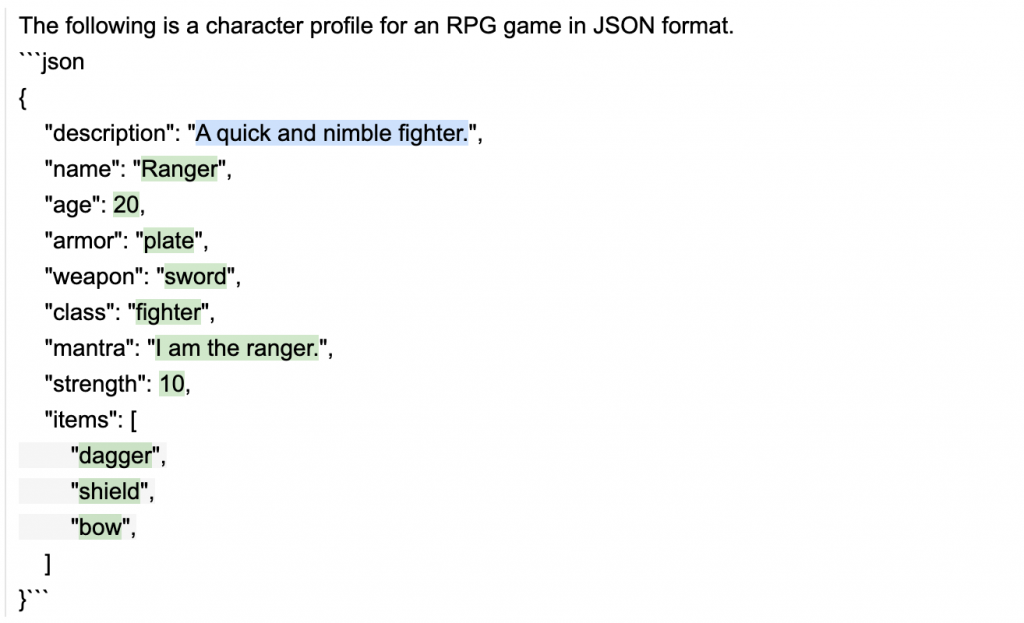
# and we also have a valid python dictionary
out.variables()
基于角色的聊天模型示例(笔记本)
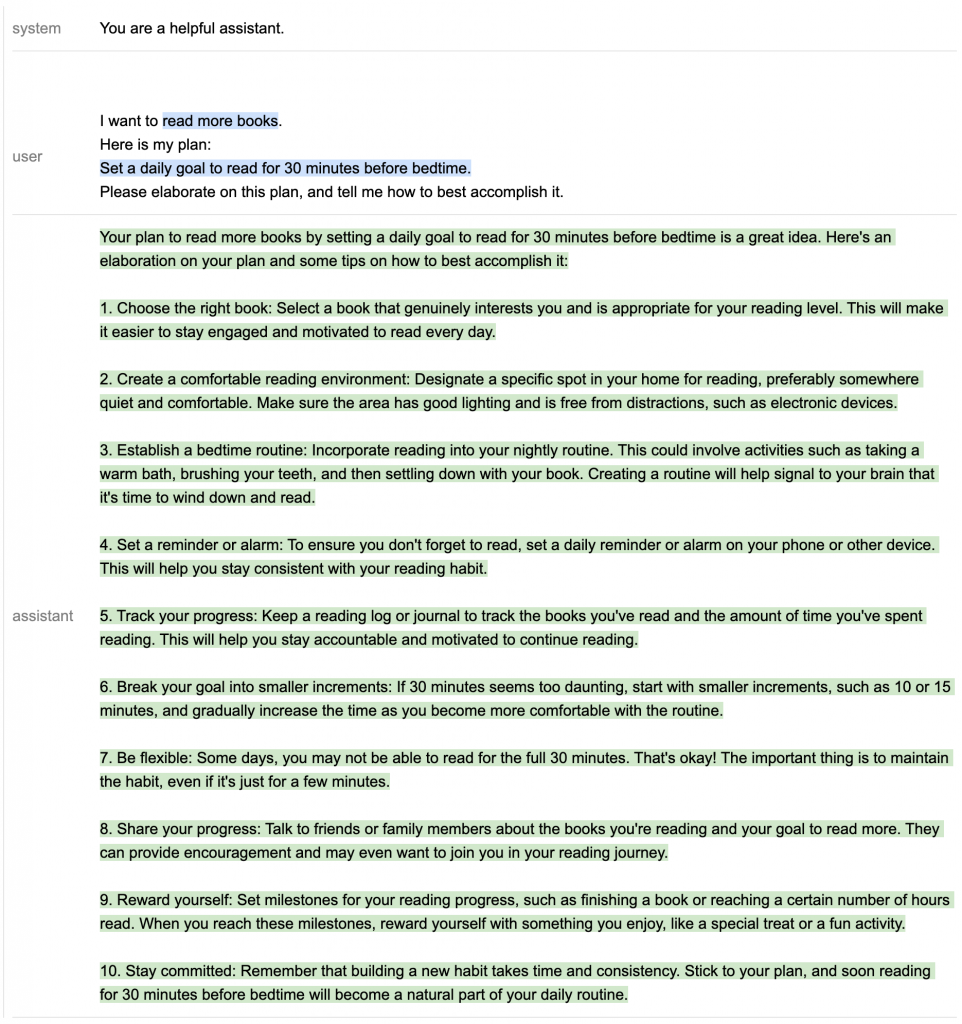
像ChatGPT和Alpaca这样的现代聊天式模型是使用特殊令牌进行训练的,这些令牌用于标记提示的不同区域的"角色"。通过角色标签,Guidance支持这些模型,并自动映射到当前LLM的正确令牌或API调用。下面我们展示了如何使用基于角色的guidance程序实现简单的多步推理和规划。
import guidance
import re

# we use GPT-4 here, but you could use gpt-3.5-turbo as well
guidance.llm = guidance.llms.OpenAI("gpt-4")

# a custom function we will call in the guidance program
def parse_best(prosandcons, options):
    best = int(re.findall(r'Best=(\d+)', prosandcons)[0])
    return options[best]

# define the guidance program using role tags (like `{{#system}}...{{/system}}`)
create_plan = guidance('''
{{#system~}}
You are a helpful assistant.
{{~/system}}

{{! generate five potential ways to accomplish a goal }}
{{#block hidden=True}}
{{#user~}}
I want to {{goal}}.
{{~! generate potential options ~}}
Can you please generate one option for how to accomplish this?
Please make the option very short, at most one line.
{{~/user}}

{{#assistant~}}
{{gen 'options' n=5 temperature=1.0 max_tokens=500}}
{{~/assistant}}
{{/block}}

{{! generate pros and cons for each option and select the best option }}
{{#block hidden=True}}
{{#user~}}
I want to {{goal}}.

Can you please comment on the pros and cons of each of the following options, and then pick the best option?
---{{#each options}}
Option {{@index}}: {{this}}{{/each}}
---
Please discuss each option very briefly (one line for pros, one for cons), and end by saying Best=X, where X is the best option.
{{~/user}}

{{#assistant~}}
{{gen 'prosandcons' temperature=0.0 max_tokens=500}}
{{~/assistant}}
{{/block}}

{{! generate a plan to accomplish the chosen option }}
{{#user~}}
I want to {{goal}}.
{{~! Create a plan }}
Here is my plan:
{{parse_best prosandcons options}}
Please elaborate on this plan, and tell me how to best accomplish it.
{{~/user}}

{{#assistant~}}
{{gen 'plan' max_tokens=500}}
{{~/assistant}}''')

# execute the program for a specific goal
out = create_plan(
    goal='read more books',
    parse_best=parse_best # a custom python function we call in the program
)
-
生成几种实现目标的选项。请注意,我们使用
n=5进行生成,这样每个选项都是单独生成的(不受其他选项的影响)。我们将temperature设置为1以鼓励多样性。 -
为每个选项生成优点和缺点,并选择最佳选项。我们将
temperature设置为0以鼓励模型更加准确。 -
为最佳选项生成一个计划,并要求模型对其进行详细阐述。请注意,步骤1和步骤2是
hidden的,这意味着GPT-4在生成后续内容(在本例中即生成计划时)时不会看到它们。这是让模型专注于当前步骤的简单方法。
由于步骤1和步骤2是隐藏的,它们不会出现在生成的输出中(除非在流式处理期间短暂出现),但我们可以打印这些步骤生成的变量:
print('\n'.join(['Option %d: %s' % (i, x) for i, x in enumerate(out['options'])]))print(out['prosandcons'])Option 0: 优点:建立了一个持续的阅读习惯。 缺点:对于时间安排不规律的人可能不合适。 --- Option 1: 优点:提供社交动力和问责。 缺点:可能与个人的阅读偏好不一致。 --- Option 2: 优点:鼓励每天阅读习惯。 缺点:缺乏具体的时间框架,可能导致拖延。 --- Option 3: 优点:作为每天优先阅读的提醒。 缺点:可能变得重复且容易被忽视。 --- Option 4: 优点:设定了明确的每日阅读目标。 缺点:在忙碌的日子或较长章节中可能难以实现。
Agents(笔记本)
我们可以轻松地构建相互交谈或与用户交谈的代理,通过使用await命令。await命令允许我们暂停执行并返回部分执行的guidance程序。通过将await放在循环中,可以多次调用部分执行的程序,从而形成对话(或您设计的任何其他结构)。例如,下面是我们如何让GPT-4模拟两个代理人互相对话的示例:
import guidance
import re
guidance.llm = guidance.llms.OpenAI("gpt-4")
role_simulator = guidance('''
{{#system~}}
You are a helpful assistant
{{~/system}}

{{#user~}}
You will answer the user as {{role}} in the following conversation. At every step, I will provide you with the user input, as well as a comment reminding you of your instructions. Never talk about the fact that you are an AI, even if the user asks you. Always answer as {{role}}.
{{#if first_question}}You can also start the conversation.{{/if}}
{{~/user}}

{{~! The assistant either starts the conversation or not, depending on if this is the first or second agent }}
{{#assistant~}}
Ok, I will follow these instructions.
{{#if first_question}}Let me start the conversation now:
{{role}}: {{first_question}}{{/if}}
{{~/assistant}}

{{~! Then the conversation unrolls }}
{{~#geneach 'conversation'}}
{{#user~}}
User: {{set 'this.input' (await 'input')}}
Comment: Remember, answer as a {{role}}. Start your utterance with {{role}}:
{{~/user}}

{{#assistant~}}
{{gen 'this.response' temperature=0 max_tokens=300}}
{{~/assistant}}
{{~/geneach}}''')

republican = role_simulator(role='Republican')
democrat = role_simulator(role='Democrat')

first_question = '''What do you think is the best way to stop inflation?'''
republican = republican(input=first_question, first_question=None)
democrat = democrat(input=republican["conversation"][-2]["response"].strip('Republican: '), first_question=first_question)
for i in range(2):
    republican = republican(input=democrat["conversation"][-2]["response"].replace('Democrat: ', ''))
    democrat = democrat(input=republican["conversation"][-2]["response"].replace('Republican: ', ''))
print('Democrat: ' + first_question)
for x in democrat['conversation'][:-1]:
    print('Republican:', x['input'])
    print()
    print(x['response'])
民主党员:你认为阻止通货膨胀的最佳方法是什么?
共和党员:阻止通货膨胀的最佳方法是实施健全的财政政策,例如减少政府支出、降低税收和促进经济增长。此外,美联储应专注于维持稳定的货币政策来控制通货膨胀。
民主党员:我同意健全的财政政策对于控制通货膨胀至关重要。作为一名民主党员,我强调在教育、医疗保健和基础设施方面投资的重要性,以促进长期经济增长。此外,我们应确保美联储在货币政策上保持平衡的态度,既关注控制通货膨胀,又促进充分就业。
共和党员:虽然教育、医疗保健和基础设施投资很重要,但我们也必须优先考虑减少国债并限制政府对经济的干预。通过降低税收和减少监管,我们可以鼓励企业增长和创造就业机会,最终实现长期经济增长。至于美联储,保持稳定的货币政策主要集中在控制通货膨胀方面至关重要,因为这将为企业和消费者创造更可预测的经济环境。
民主党员:减少国债和限制政府干预是有效的考虑因素,但民主党认为战略性地投资于教育、医疗保健和基础设施能够实现长期经济增长和就业机会的增加。我们还支持一种渐进税制,确保每个人都公平缴纳税款,这有助于资助这些投资。至于美联储,我们认为平衡的货币政策,既关注控制通货膨胀,又促进充分就业,对于一个健康的经济是必不可少的。我们必须在财政责任和投资国家未来之间取得平衡。
共和党员:在财政责任和投资国家未来之间找到平衡非常重要。然而,我们认为实现长期经济增长和就业机会的最佳途径是通过自由市场原则,例如降低税收和减少监管。这种方法鼓励企业扩张和创新,从而实现更繁荣的经济。渐进税制有时可能会阻碍增长和投资,因此我们主张建立一个更简单、更公平的税制,以促进经济增长。关于美联储,尽管促进充分就业很重要,但我们不能忽视控制通货膨胀作为主要目标,以维持一个稳定可预测的经济环境。
民主党员:我理解你对自由市场原则的看法,但民主党认为一定程度的政府干预是必要的,以确保一个公平、公正的经济。我们支持渐进税制,减少收入不平等并为有需要的人提供基本服务。此外,我们认为监管对于保护消费者、工人和环境至关重要。至于美联储,我们同意控制通货膨胀至关重要,但我们也认为促进充分就业应是优先考虑的。通过在这些目标之间取得平衡,我们可以为所有美国人创造一个更具包容性和繁荣的经济。
API参考
下面的所有示例都在这个notebook中。模板语法
模板语法基于Handlebars,并进行了一些扩展。
当调用guidance时,它会返回一个程序:
prompt = guidance('''What is {{example}}?''')
prompt
What is {{example}}?
程序可以通过传入参数来执行:
prompt(example='truth')What is truth?
参数可以是可迭代对象:
people = ['John', 'Mary', 'Bob', 'Alice']
ideas = [{'name': 'truth', 'description': 'the state of being the case'},
         {'name': 'love', 'description': 'a strong feeling of affection'},]
prompt = guidance('''List of people:
{{#each people}}- {{this}}
{{~! This is a comment. The ~ removes adjacent whitespace either before or after a tag, depending on where you place it}}
{{/each~}}
List of ideas:
{{#each ideas}}{{this.name}}: {{this.description}}
{{/each}}''')
prompt(people=people, ideas=ideas)
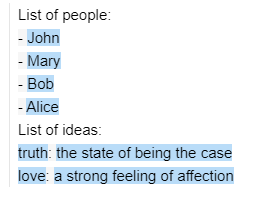
注意在{{/each}}之后的特殊字符~。
这个字符可以添加在任何标签的前面或后面,以删除所有相邻的空白字符。请注意注释语法:{{! This is a comment }}。
您还可以在其他提示/程序中包含提示/程序,例如,您可以重写上面的提示:
prompt1 = guidance('''List of people:
{{#each people}}- {{this}}
{{/each~}}''')
prompt2 = guidance('''{{>prompt1}}
List of ideas:
{{#each ideas}}{{this.name}}: {{this.description}}
{{/each}}''')
prompt2(prompt1=prompt1, people=people, ideas=ideas)
生成
基本生成
gen标签用于生成文本。您可以使用底层模型支持的任何参数。执行提示会调用生成提示:
import guidance
# 设置默认的llm。也可以通过guidance(llm=...)将不同的llm作为参数传递给guidance()
guidance.llm = guidance.llms.OpenAI("text-davinci-003")
prompt = guidance('''The best thing about the beach is {{~gen 'best' temperature=0.7 max_tokens=7}}''')
prompt = prompt()
prompt

guidance会缓存所有使用相同参数的OpenAI生成结果。如果您想清除缓存,可以调用guidance.llms.OpenAI.cache.clear()。
选择
您可以使用select标签从选项列表中进行选择:
prompt = guidance('''Is the following sentence offensive? Please answer with a single word, either "Yes", "No", or "Maybe".
Sentence: {{example}}
Answer:{{#select "answer" logprobs='logprobs'}} Yes{{or}} No{{or}} Maybe{{/select}}''')
prompt = prompt(example='I hate tacos')
prompt
prompt['logprobs']{' Yes': -1.5689583, ' No': -7.332395, ' Maybe': -0.23746304}
生成/选择的序列
一个提示中可以包含多个生成或选择,它们将按顺序执行:
prompt = guidance('''Generate a response to the following email:
{{email}}.
Response:{{gen "response"}}

Is the response above offensive in any way? Please answer with a single word, either "Yes" or "No".
Answer:{{#select "answer" logprobs='logprobs'}} Yes{{or}} No{{/select}}''')
prompt = prompt(email='I hate tacos')
prompt
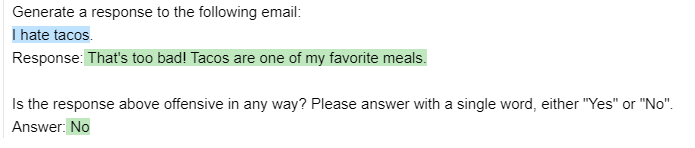
prompt['response'], prompt['answer'](" That's too bad! Tacos are one of my favorite meals.", ' No')
隐藏生成
您可以使用hidden标签在block或gen标签中生成文本,而无需显示或在后续生成中使用它:
prompt = guidance('''{{#block hidden=True}}Generate a response to the following email:
{{email}}.
Response:{{gen "response"}}{{/block}}
I will show you an email and a response, and you will tell me if it's offensive.
Email: {{email}}.
Response: {{response}}
Is the response above offensive in any way? Please answer with a single word, either "Yes" or "No".
Answer:{{#select "answer" logprobs='logprobs'}} Yes{{or}} No{{/select}}''')
prompt = prompt(email='I hate tacos')
prompt
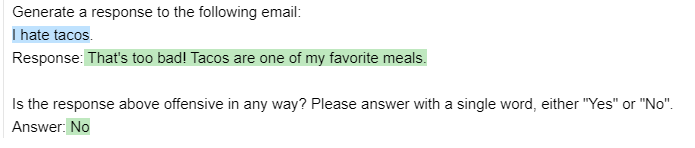
请注意,隐藏块中的内容不会显示在输出中(也不会被select使用),即使我们在后续的生成中使用了生成的response变量。
使用n>1进行生成
如果使用n>1,生成的变量将包含一个列表(还有一个可视化效果,可以浏览列表):
prompt = guidance('''The best thing about the beach is {{~gen 'best' n=3 temperature=0.7 max_tokens=7}}''')
prompt = prompt()
prompt['best']调用函数
您可以使用生成的变量作为参数来调用任何Python函数。当执行提示时,该函数将被调用:
def aggregate(best):
   return '\n'.join(['- ' + x for x in best])
prompt = guidance('''The best thing about the beach is {{~gen 'best' n=3 temperature=0.7 max_tokens=7 hidden=True}}
{{aggregate best}}''')
prompt = prompt(aggregate=aggregate)
prompt
使用await暂停执行
await标签将停止程序的执行,直到提供该变量:
prompt = guidance('''Generate a response to the following email:
{{email}}.
Response:{{gen "response"}}
{{await 'instruction'}}
{{gen 'updated_response'}}''', stream=True)
prompt = prompt(email='Hello there')
prompt
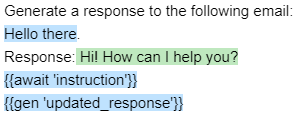
请注意,最后一个gen没有执行,因为它依赖于instruction。现在让我们提供instruction。
pythonCopy codeprompt = prompt(instruction='Please translate the response above to Portuguese.')
prompt
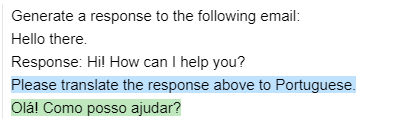
现在程序已经执行到最后。
笔记本函数
Echo、stream。待办事项 @SCOTT
聊天(另请参阅此notebook)
如果您使用的是只允许ChatCompletion(gpt-3.5-turbo或gpt-4)的OpenAI LLM,您可以使用特殊的标签{{#system}}、{{#user}}和{{#assistant}}:
prompt = guidance(
'''{{#system~}}
You are a helpful assistant.
{{~/system}}
{{#user~}}
{{conversation_question}}
{{~/user}}
{{#assistant~}}
{{gen 'response'}}
{{~/assistant}}''')
prompt = prompt(conversation_question='What is the meaning of life?')
prompt由于不允许使用部分完成,您实际上不能在assistant块内部使用输出结构,但您仍然可以在其外部设置结构。这里是一个示例(也在这里):
# Define a template for the chat conversation
template = guidance('''{{#system~}}
You are a helpful assistant.
{{~/system}}
{{#user~}}
{{message}}
{{~/user}}
{{#assistant~}}
{{response}}
{{~/assistant}}''')

# Initialize the chat conversation
conversation = template()

# Start the conversation loop
while True:
    # Get user input
    user_input = input("User: ")

    # Set the user message in the conversation
    conversation['message'] = user_input

    # Generate assistant response
    conversation = conversation()

    # Get the assistant response
    assistant_response = conversation['response']

    # Print assistant response
    print("Assistant:", assistant_response)

    # Check if the conversation is complete
    if 'conversation_complete' in conversation:
        break
通过这种方式,您可以与助手进行交互,并根据用户输入和助手的响应进行持续对话。
experts = guidance(
'''{{#system~}}
You are a helpful assistant.
{{~/system}}
{{#user~}}
I want a response to the following question:
{{query}}
Who are 3 world-class experts (past or present) who would be great at answering this?
Please don't answer the question or comment on it yet.
{{~/user}}
{{#assistant~}}
{{gen 'experts' temperature=0 max_tokens=300}}
{{~/assistant}}
{{#user~}}
Great, now please answer the question as if these experts had collaborated in writing a joint anonymous answer.
In other words, their identity is not revealed, nor is the fact that there is a panel of experts answering the question.
If the experts would disagree, just present their different positions as alternatives in the answer itself (e.g. 'some might argue... others might argue...').
Please start your answer with ANSWER:
{{~/user}}
{{#assistant~}}
{{gen 'answer' temperature=0 max_tokens=500}}
{{~/assistant}}''')
experts(query='What is the meaning of life?')
如果您想隐藏一些对后续生成无关的对话历史记录,仍然可以使用隐藏块。
prompt = guidance(
'''{{#system~}}
You are a helpful assistant.
{{~/system}}
{{#block hidden=True~}}
{{#user~}}
Please tell me a joke
{{~/user}}
{{#assistant~}}
{{gen 'joke'}}
{{~/assistant}}
{{~/block~}}
{{#user~}}
Is the following joke funny? Why or why not?
{{joke}}
{{~/user}}
{{#assistant~}}
{{gen 'funny'}}
{{~/assistant}}''')
prompt()
带有 geneach 的代理
您可以将 await 标签与 geneach(生成列表)结合使用,轻松创建一个代理:
prompt = guidance(
'''{{#system~}}
You are a helpful assistant
{{~/system}}
{{~#geneach 'conversation'}}
{{#user~}}
{{set 'this.user_text' (await 'user_text')}}
{{~/user}}
{{#assistant~}}
{{gen 'this.ai_text' temperature=0 max_tokens=300}}
{{~/assistant}}
{{~/geneach}}''')
prompt= prompt(user_text ='hi there')
prompt
请注意下一轮对话仍然是模板化的,而且对话列表中的最后一个元素是一个占位符:
pythonCopy code
prompt['conversation']
[{'user_text': 'hi there', 'ai_text': 'Hello! How can I help you today? If you have any questions or need assistance, feel free to ask.'}, {}]
然后,我们可以再次执行该提示,它将生成下一轮对话:
pythonCopy codeprompt = prompt(user_text = 'What is the meaning of life?')
prompt
您可以在此处看到一个更详细的示例。
使用工具
在此笔记本中查看“使用搜索API”的示例。