隐藏参数发现工具 | API安全
作者:Sec-Labs | 发布时间:
项目地址
x8
用 Rust 编写的隐藏参数发现套件。

该工具有助于找到可能容易受到攻击或可以揭示其他测试人员错过的有趣功能的隐藏参数。 由于页面的逐行比较、响应代码和反射的比较,实现了很高的准确性。
文档
可以在 https://sh1yo.art/x8docs/ 上找到解释每个功能的文档。
特征
- 快速地。
- 由于模板和注入点的概念,具有灵活的请求配置。
- 可扩展性。 该工具每次运行最多可以检查数千个 url。
- 比同类工具更准确,尤其是在困难的情况下。
- 可以发现具有非随机值的参数,例如 admin=true。
- 高度可配置。
- 由于外部库修改,几乎可以实现原始请求。
例子
检查查询中的参数
x8 -u "https://example.com/" -w <wordlist>使用默认参数:
x8 -u "https://example.com/?something=1" -w <wordlist>/?something=1 等于 /?something=1&%s
通过正文发送参数
x8 -u "https://example.com/" -X POST -w <wordlist>或者使用自定义主体:
x8 -u "https://example.com/" -X POST -b '{"x":{%s}}' -w <wordlist>%s将被替换为不同的参数,例如{"x":{"a":"b3a1a", "b":"ce03a", ...}}
并行检查多个网址
x8 -u "https://example.com/" "https://4rt.one/" -W0自定义模板
x8 -u "https://example.com/" --param-template "user[%k]=%v" -w <wordlist>现在每个请求看起来像/?user[a]=hg2s4&user[b]=a34fa&...
百分比编码
有时参数应该被编码。也可以:
x8 -u "https://example.com/?path=..%2faction.php%3f%s%23" --encode -w <wordlist>GET /?path=..%2faction.php%3fWTDa8%3Da7UOS%26rTIDA%3DexMFp...%23 HTTP/1.1
Host: example.com搜索标题
x8 -u "https://example.com" --headers -w <wordlist>搜索标头值
您还可以定位单个标头:
x8 -u "https://example.com" -H "Cookie: %s" -w <wordlist>测试现场
您可以检查该工具并将其与以下网址上的其他工具进行比较:
https://4rt.one/level1(获取) https://4rt.one/level2(发布 JSON) https://4rt.one/level3(获取)
用法
USAGE:
    x8 [FLAGS] [OPTIONS]

FLAGS:
        --append                       Append to the output file instead of overwriting it.
    -B                                 Equal to -x http://localhost:8080
        --disable-colors
        --disable-custom-parameters    Do not automatically check parameters like admin=true
        --disable-progress-bar
        --disable-trustdns             Can solve some dns related problems
        --encode                       Encodes query or body before making a request, i.e & -> %26, = -> %3D
                                       List of chars to encode: ", `, , <, >, &, #, ;, /, =, %
    -L, --follow-redirects             Follow redirections
        --force                        Force searching for parameters on pages > 25MB. Remove an error in case there's 1
                                       worker with --one-worker-per-host option.
    -h, --help                         Prints help information
        --headers                      Switch to header discovery mode.
                                       NOTE Content-Length and Host headers are automatically removed from the list
        --invert                       By default, parameters are sent within the body only in case PUT or POST methods
                                       are used.
                                       It's possible to overwrite this behavior by specifying the option
        --mimic-browser                Add default headers that browsers usually set.
        --one-worker-per-host          Multiple urls with the same host will be checked one after another,
                                       while urls with different hosts - are in parallel.
                                       Doesn't increase the number of workers
        --reflected-only               Disable page comparison and search for reflected parameters only.
        --remove-empty                 Skip writing to file outputs of url:method pairs without found parameters
        --replay-once                  If a replay proxy is specified, send all found parameters within one request.
        --strict                       Only report parameters that have changed the different parts of a page
        --test                         Prints request and response
    -V, --version                      Prints version information
        --verify                       Verify found parameters.

OPTIONS:
    -b, --body <body>                                       Example: --body '{"x":{%s}}'
                                                            Available variables: {{random}}
    -c <concurrency>                                        The number of concurrent requests per url [default: 1]
        --custom-parameters <custom-parameters>
            Check these parameters with non-random values like true/false yes/no
            (default is "admin bot captcha debug disable encryption env show sso test waf")
        --custom-values <custom-values>
            Values for custom parameters (default is "1 0 false off null true yes no")

    -t, --data-type <data-type>
            Available: urlencode, json
            Can be detected automatically if --body is specified (default is "urlencode")
    -d, --delay <Delay between requests in milliseconds>     [default: 0]
    -H <headers>                                            Example: -H 'one:one' 'two:two'
        --http <http>                                       HTTP version. Supported versions: --http 1.1, --http 2
    -j, --joiner <joiner>
            How to join parameter templates. Example: --joiner '&'
            Default: urlencoded - '&', json - ', ', header values - '; '
        --learn-requests <learn-requests-count>             Set the custom number of learn requests. [default: 9]
    -m, --max <max>
            Change the maximum number of parameters per request.
            (default is <= 256 for query, 64 for headers and 512 for body)
    -X, --method <methods>                                  Multiple values are supported: -X GET POST
    -o, --output <file>
    -O, --output-format <output-format>                     standart, json, url, request [default: standart]
    -P, --param-template <parameter-template>
            %k - key, %v - value. Example: --param-template 'user[%k]=%v'
            Default: urlencoded - <%k=%v>, json - <"%k":%v>, headers - <%k=%v>
    -p, --port <port>                                       Port to use with request file
        --progress-bar-len <progress-bar-len>                [default: 26]
        --proto <proto>                                     Protocol to use with request file (default is "https")
    -x, --proxy <proxy>
        --recursion-depth <recursion-depth>
            Check the same list of parameters with the found parameters until there are no new parameters to be found.
            Conflicts with --verify for now.
        --replay-proxy <replay-proxy>
            Request target with every found parameter via the replay proxy at the end.

    -r, --request <request>                                 The file with the raw http request
        --save-responses <save-responses>
            Save request and response to a directory when a parameter is found

        --split-by <split-by>
            Split the request into lines by the provided sequence. By default splits by \r, \n and \r\n

        --timeout <timeout>                                 HTTP request timeout in seconds. [default: 15]
    -u, --url <url>
            You can add a custom injection point with %s.
            Multiple urls and filenames are supported:
            -u filename.txt
            -u https://url1 http://url2
    -v, --verbose <verbose>                                 Verbose level 0/1/2 [default: 1]
    -w, --wordlist <wordlist>
            The file with parameters (leave empty to read from stdin) [default: ]

    -W, --workers <workers>
            The number of concurrent url checks.
            Use -W0 to run everything in parallel [default: 1]
词汇表
参数:
标头:
Burpsuite集成
burpsuite 集成是通过发送到扩展完成的。
配置
- 打开 Burp Suite 并转到扩展器选项卡。
- 从 BApp Store 查找并安装“自定义发送到”扩展。
- 转到“发送到”选项卡,然后单击“添加”。
为条目命名并将以下行插入命令:
/path/to/x8 --progress-bar-len 20 -c 3 -r %R -w /path/to/wordlist --proto %T --port %P您还可以添加常用参数,例如--output-format, --replay-proxy, --recursion-depth, ..
注意如果进度条不能正常工作---尝试减少的值--progress-bar-len。
从后台运行切换到终端运行。
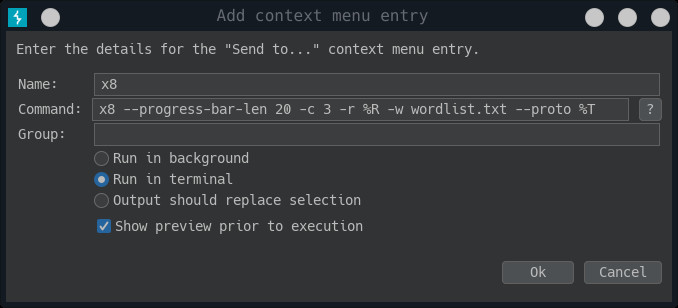
如果您在终端中遇到错误的字体,您可以更改xterm发送到其他选项中的选项。只需将内容替换为xterm -rv -fa 'Monospace' -fs 10 -hold -e %C
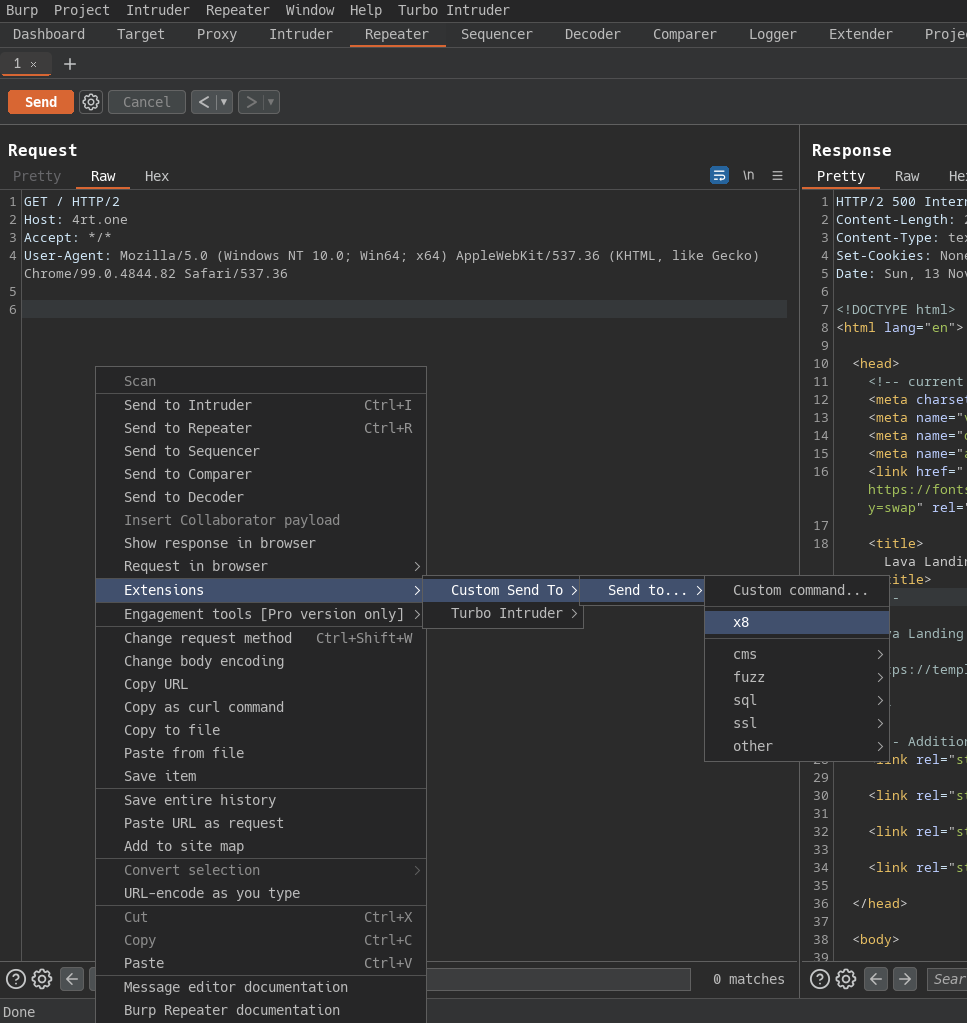
现在您可以转到代理/中继器选项卡并将请求发送到该工具:
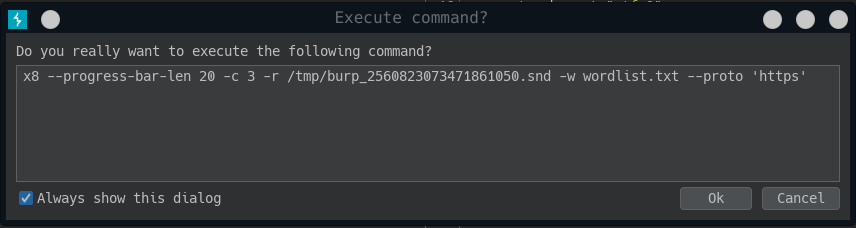
在下一个对话框中,您可以更改命令并在新的终端窗口中运行它。
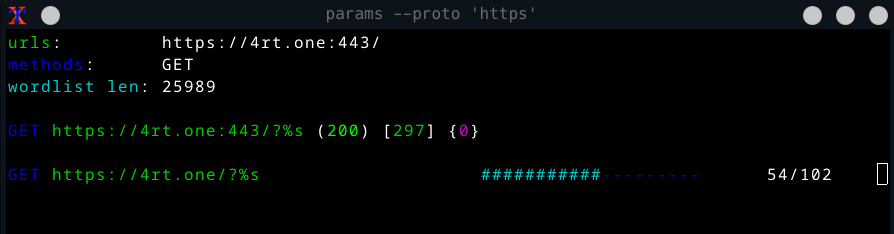
并且应该打开一个带有运行工具的新终端窗口。
安装
注意从 v4.0.0 开始安装cargo install是不可能的,因为我已经更改了一些 http 库。以后我会尝试返回这个安装方法。
- Linux
- 从发布
- 来自 blackarch 存储库(应安装存储库)
# pacman -Sy x8 - 来自源代码(应该安装 rust)
git clone https://github.com/Sh1Yo/x8 cd x8 cargo build --release
- Mac
- 来自源代码(应该安装 rust)
git clone https://github.com/Sh1Yo/x8 cd x8 cargo build --release
- 来自源代码(应该安装 rust)
- Windos
- 从发布
- Docker
- 安装
git clone https://github.com/Sh1Yo/x8 cd x8 docker build -t x8 . - 用法
- 安装