OpenSSH算法协议漏洞修复
作者:用户54752373 | 发布时间:
OpenSSH算法协议漏洞修复
由于低版本的OpenSSH使用了过时不安全的加密算法协议,通常OpenSSH在版本迭代更新时会弃用这些不安全的加密算法。
如果我们仍要继续使用旧版本的OpenSSH,可以根据实际情况,考虑屏蔽掉不安全的加密算法,以降低安全风险。
SSH Weak Key Exchange Algorithms Enabled(启用SSH弱密钥交换算法)
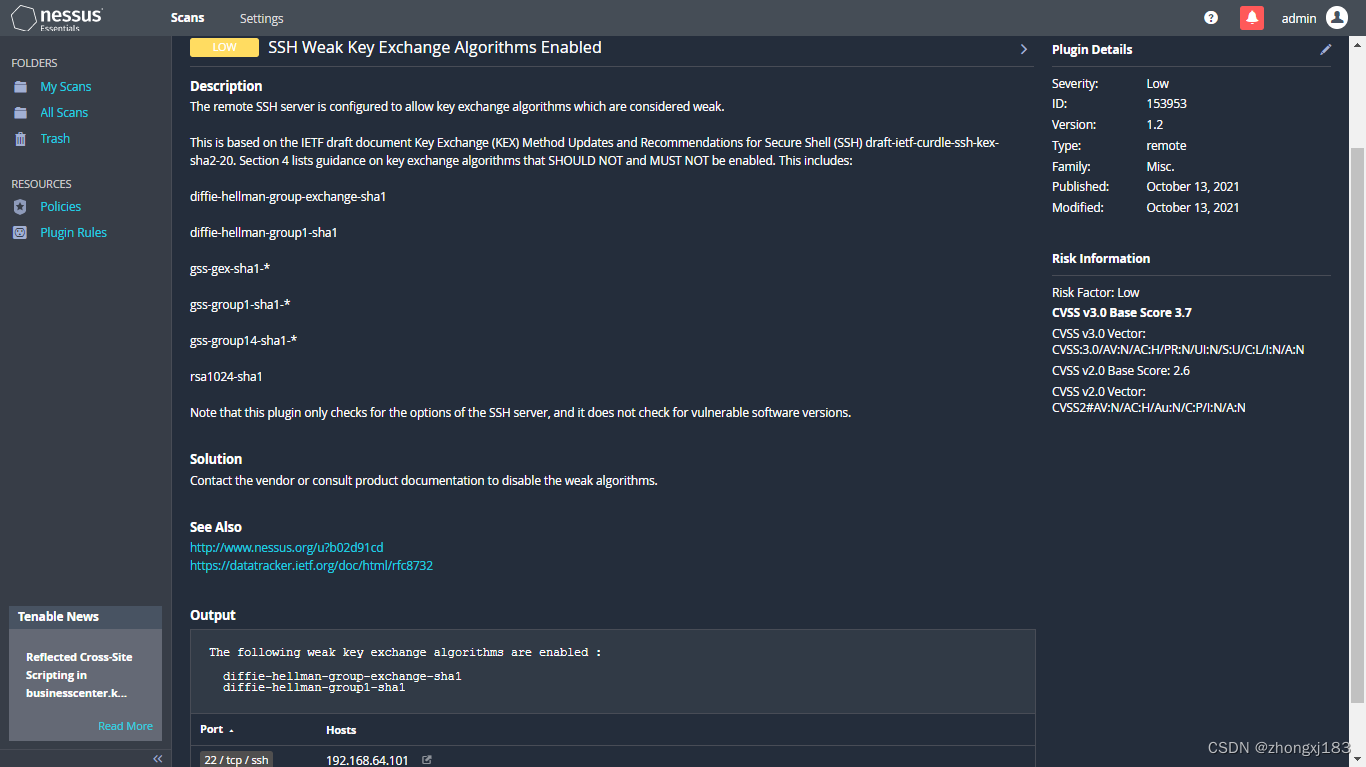
查看kexalgorithms
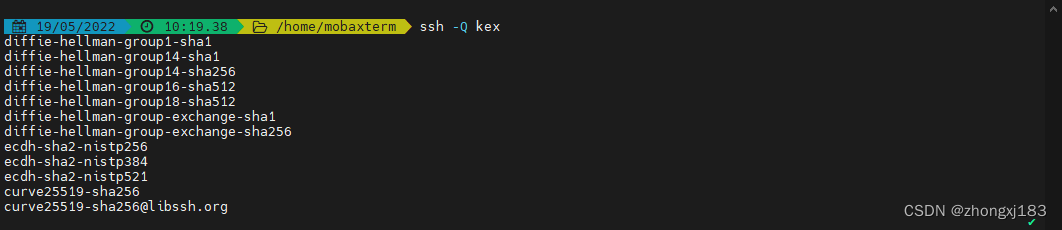
查看客户端支持的kexalgorithms
ssh -Q kex
查看服务端支持的kexalgorithms
sshd -T | grep -w kexalgorithms

修复方法
修改sshd_config配置文件,屏蔽掉不安全的KexAlgorithms。其中sshd_config的配置参数说明如下:
当前openssh版本支持的算法列表和参数用法可以从帮助文档中查找到。
指定可用的KEX (Key Exchange)算法,多个算法之间必须以逗号分隔。
另外,如果指定的列表以’ + '字符开头,则指定的算法将被追加到默认集,而不是替换原有默认的。
如果指定的列表以’ - '字符开头,则指定的算法(包括通配符)将从默认集中删除,而不是替换。(演示环境中的openssh7.4不支持)
如果指定的列表以’ ^ '字符开头,则指定的算法将被放在默认集的开头。(演示环境中的openssh7.4不支持)man sshd_config |grep -A 40 -w KexAlgorithmsecho "KexAlgorithms curve25519-sha256,curve25519-sha256@libssh.org,ecdh-sha2-nistp256,ecdh-sha2-nistp384,ecdh-sha2-nistp521,diffie-hellman-group-exchange-sha256,diffie-hellman-group16-sha512,diffie-hellman-group18-sha512,diffie-hellman-group14-sha256,diffie-hellman-group14-sha1" >> /etc/ssh/sshd_configsystemctl restart sshd
sshd -T | grep -w kexalgorithms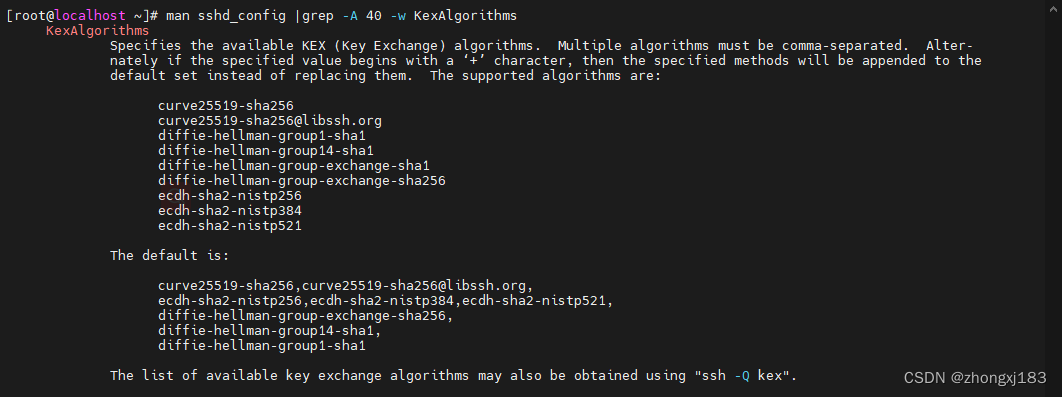

测试验证
客户端指定KexAlgorithms进行连接测试
ssh -v -oKexAlgorithms=diffie-hellman-group1-sha1 root@192.168.64.101
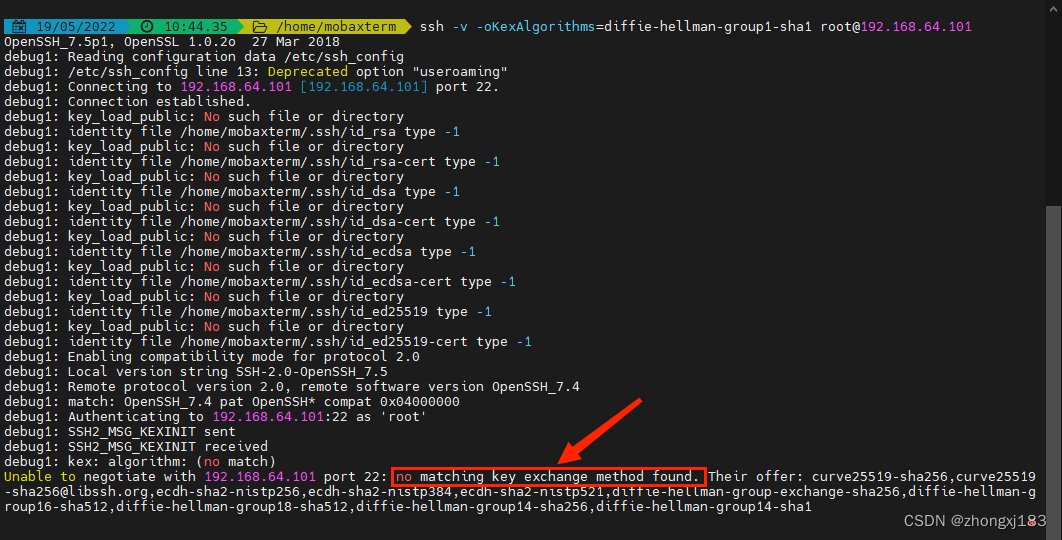
不指定 KexAlgorithms 连接测试
ssh -v root@192.168.64.101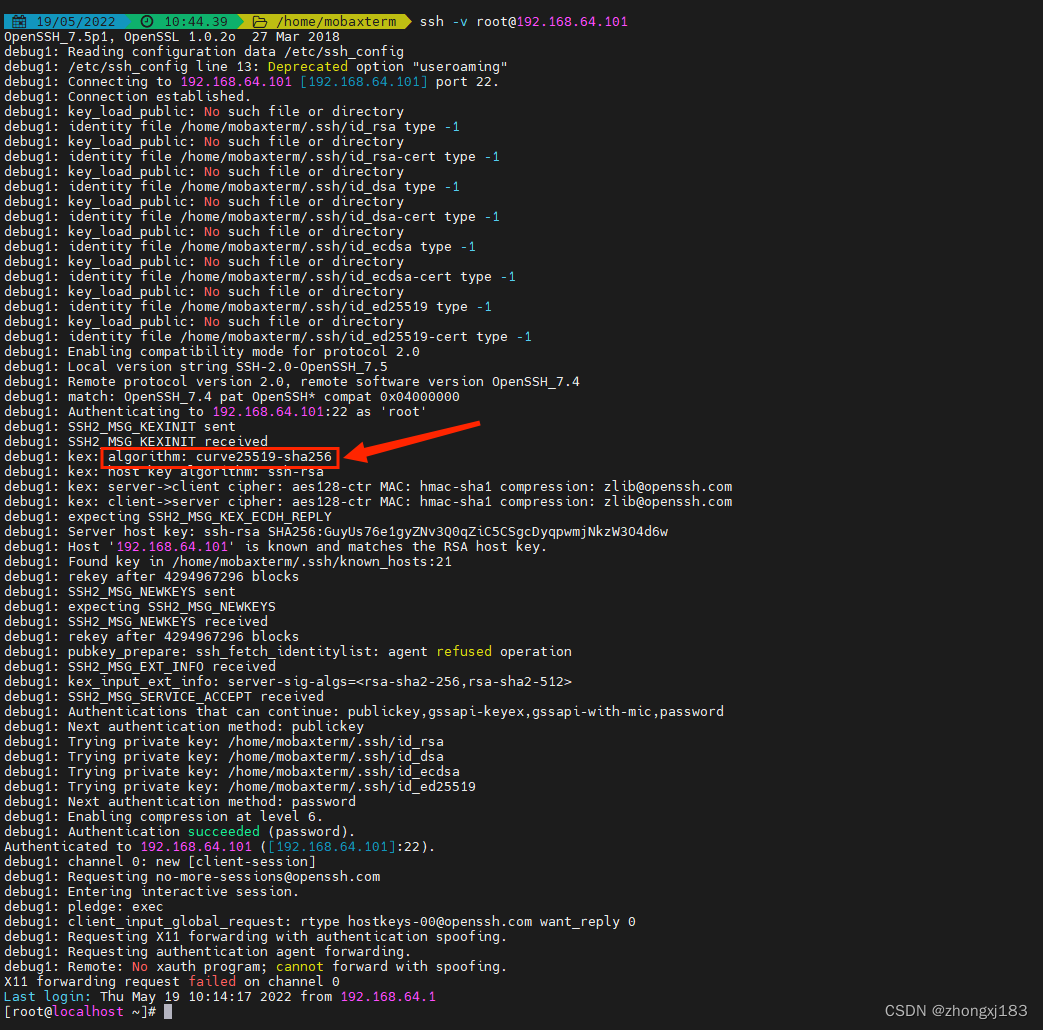
SSH Server CBC Mode Ciphers Enabled(启用SSH服务器CBC模式密码)-CVE-2008-5161
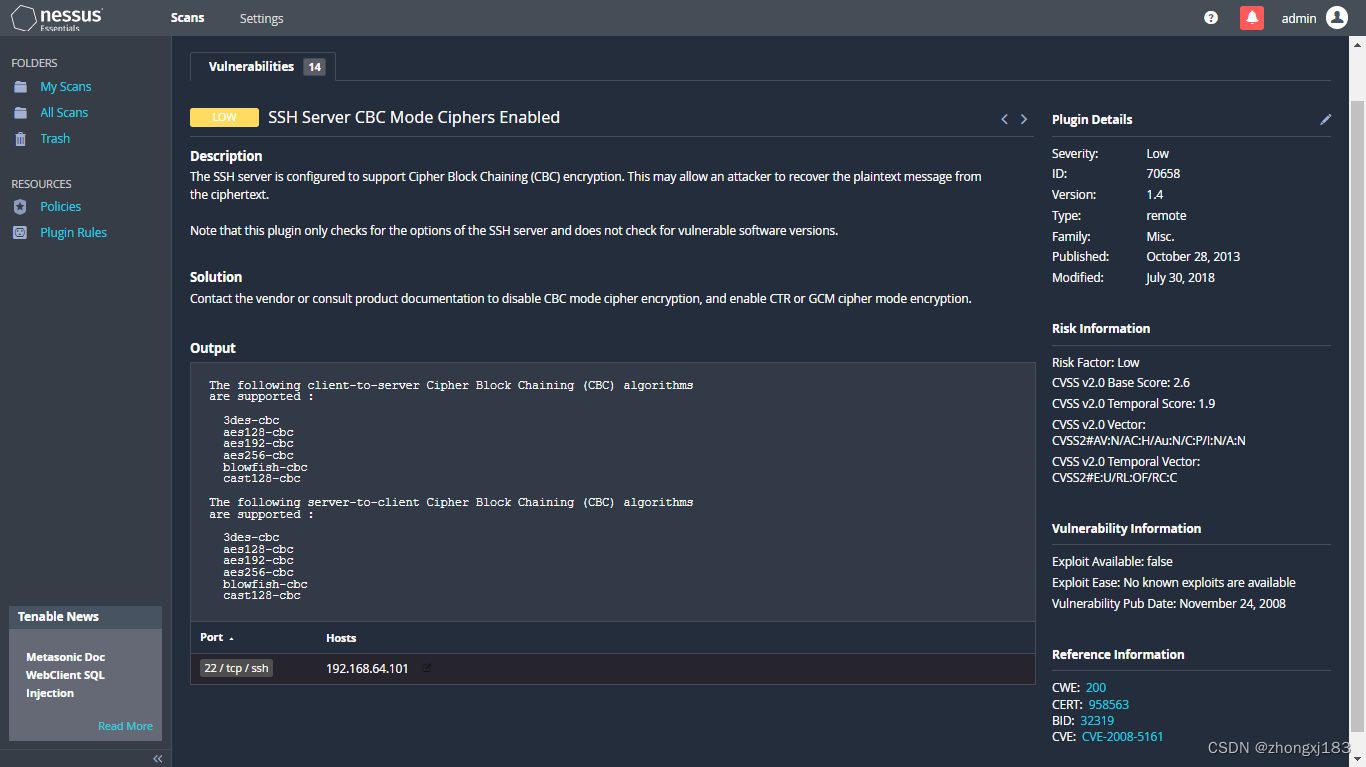
查看ciphers
查看客户端支持的ciphers
ssh -Q cipher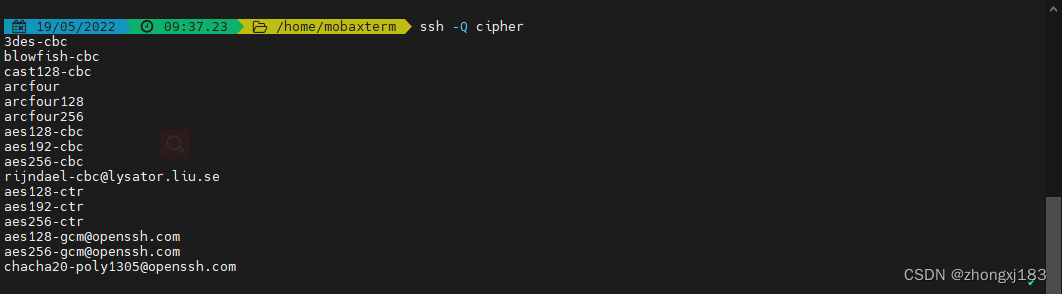
查看服务端支持的ciphers
sshd -T | grep -w ciphers 修复方法
修复方法
修改sshd_config配置文件,屏蔽掉不安全的ciphers,重启sshd服务。其中sshd_config的配置参数说明如下:
当前openssh版本支持的ciphers列表和参数用法可以从帮助文档中查找到。
指定允许使用的ciphers,多个ciphers必须以逗号分隔。
如果指定的列表以’ + '字符开头,则指定的ciphers将被追加到默认ciphers集,而不是替换默认的ciphers。
如果指定的列表以’ - '字符开头,则指定的ciphers(包括通配符)将从默认中删除,而不是替换。(演示环境中的openssh7.4不支持)
如果指定的列表以’ ^ '字符开头,则指定的ciphers将放在默认集的开头。(演示环境中的openssh7.4不支持)man sshd_config |grep -A 40 -w Ciphersecho "Ciphers chacha20-poly1305@openssh.com,aes128-ctr,aes192-ctr,aes256-ctr,aes128-gcm@openssh.com,aes256-gcm@openssh.com" >> /etc/ssh/sshd_configsystemctl restart sshdsshd -T | grep -w ciphers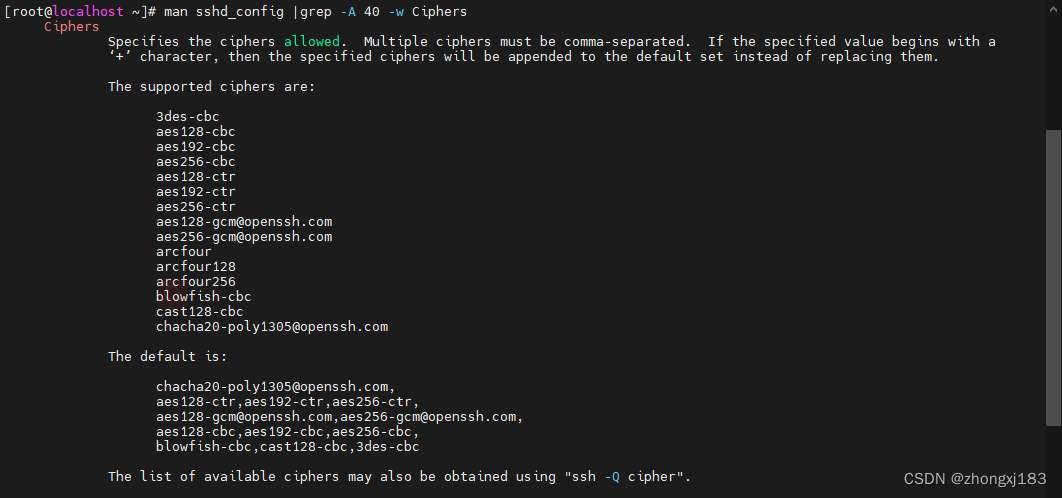

测试验证
客户端指定 CBC Mode Ciphers 进行连接测试
ssh -v -oCiphers=3des-cbc root@192.168.64.101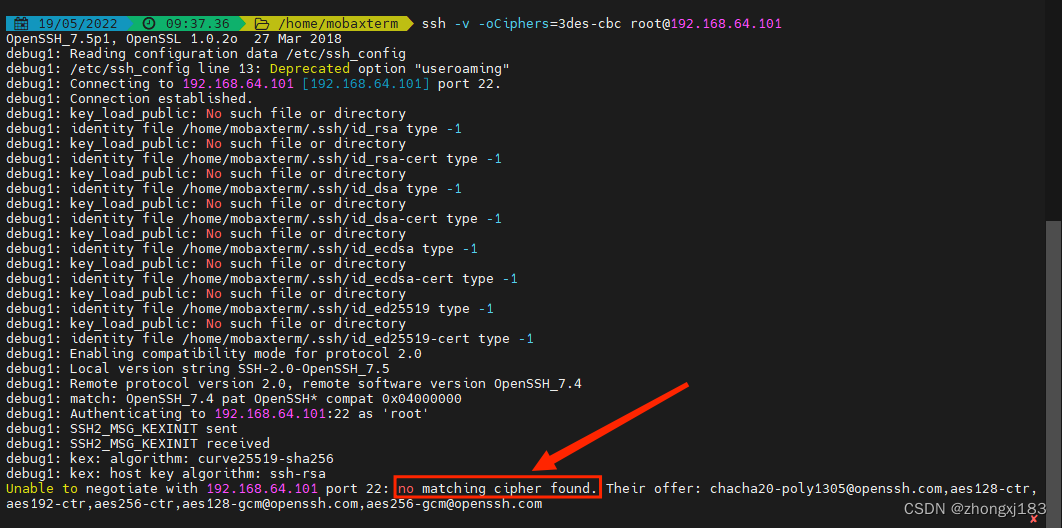 不指定 Ciphers 连接测试
ssh -v root@192.168.64.101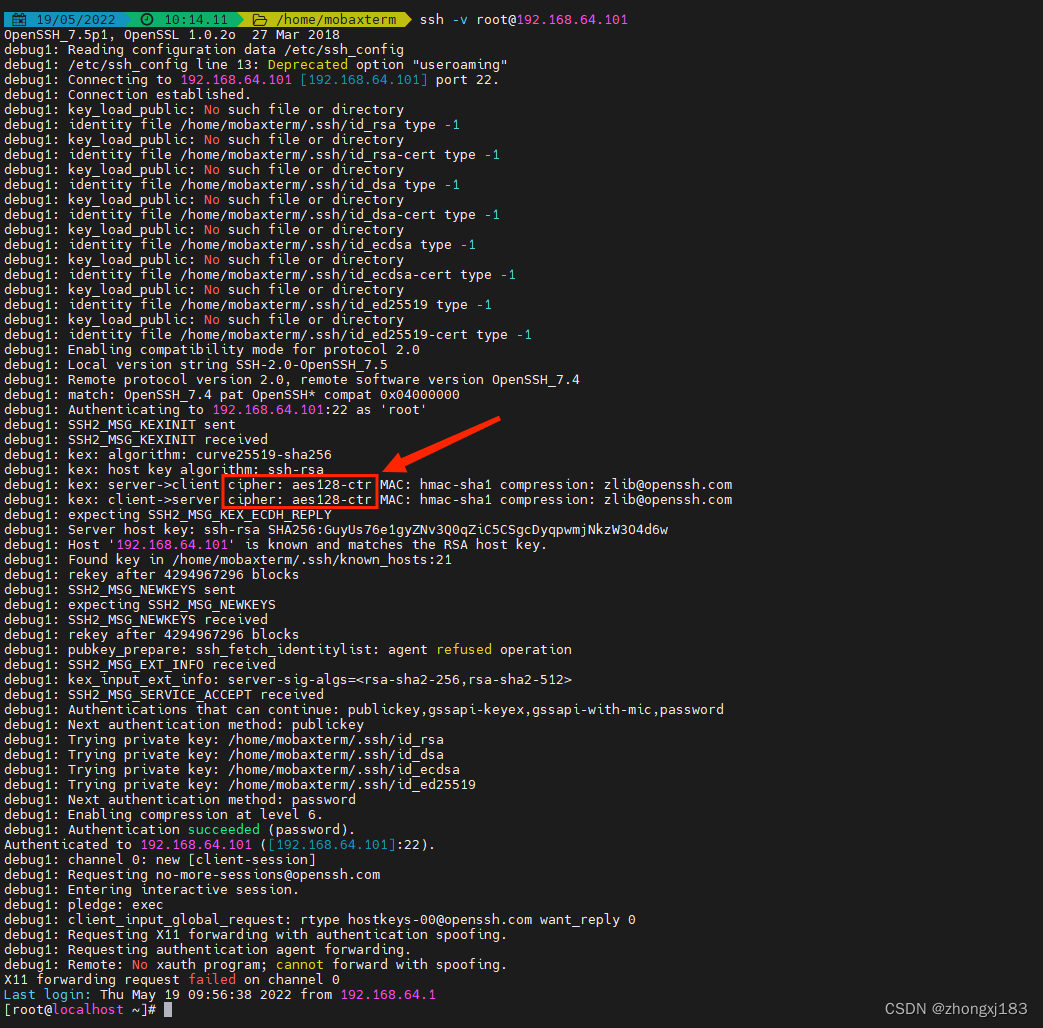
Diffie-Hellman Key Agreement Protocol 资源管理错误漏洞(CVE-2002-20001)

与上述 SSH Weak Key Exchange Algorithms Enabled(启用SSH弱密钥交换算法)中方法类似,屏蔽不安全的KexAlgorithms DH算法
附:ssh客户端与服务器命令ssh -Q kex #查看客户端支持的KexAlgorithms列表ssh -Q cipher #查看客户端支持的Ciphers列表sshd -T | grep -w kexalgorithms #查看服务端支持的KexAlgorithms列表sshd -T | grep -w ciphers #查看服务端支持的Ciphers列表man sshd_config |grep -A 40 -w KexAlgorithms #查看当前openssh版本支持的KexAlgorithms列表man sshd_config |grep -A 40 -w Ciphers #查看当前openssh版本支持的Ciphers列表ssh -v -oKexAlgorithms={KexAlgorithms} {user}@{ipaddr} #客户端指定KexAlgorithms进行连接测试ssh -v -oCiphers={ciphers} {user}@{ipaddr} #客户端指定Ciphers进行连接测试,并显示debug信息
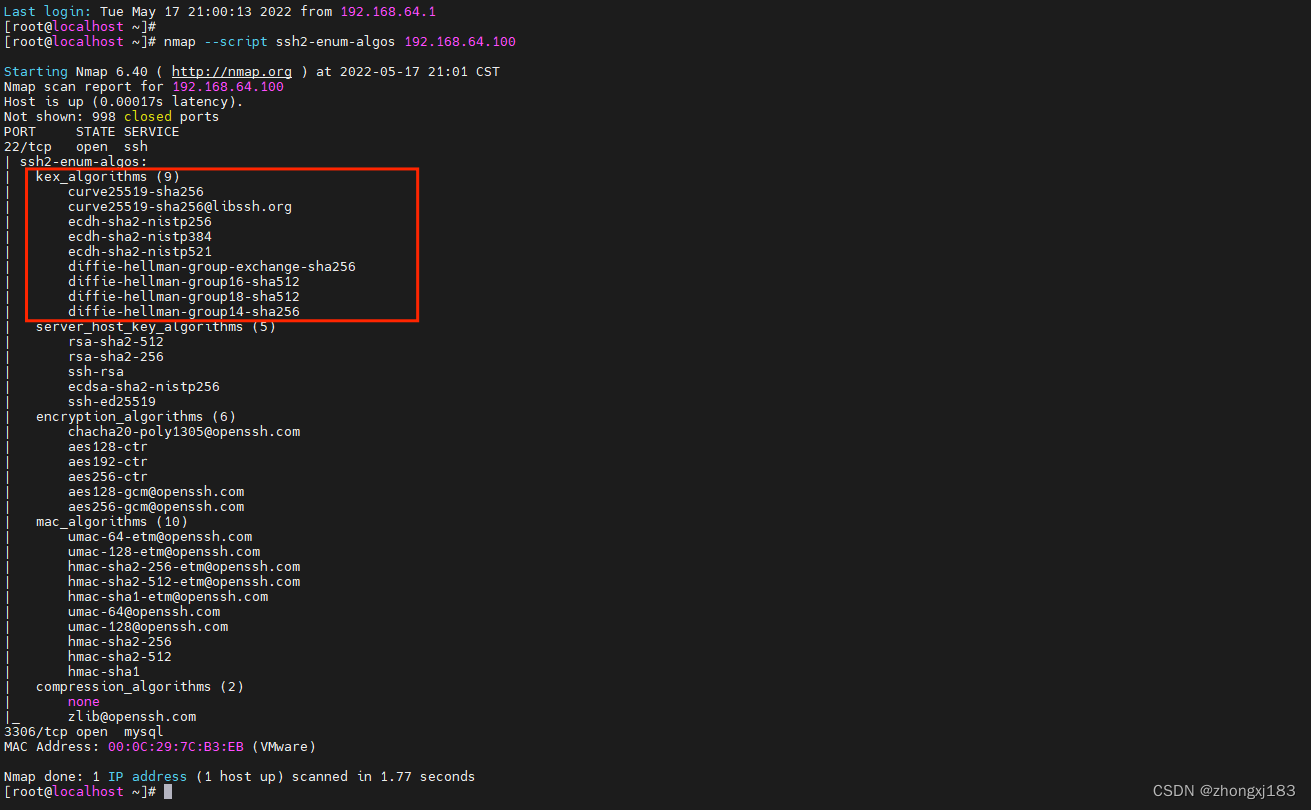
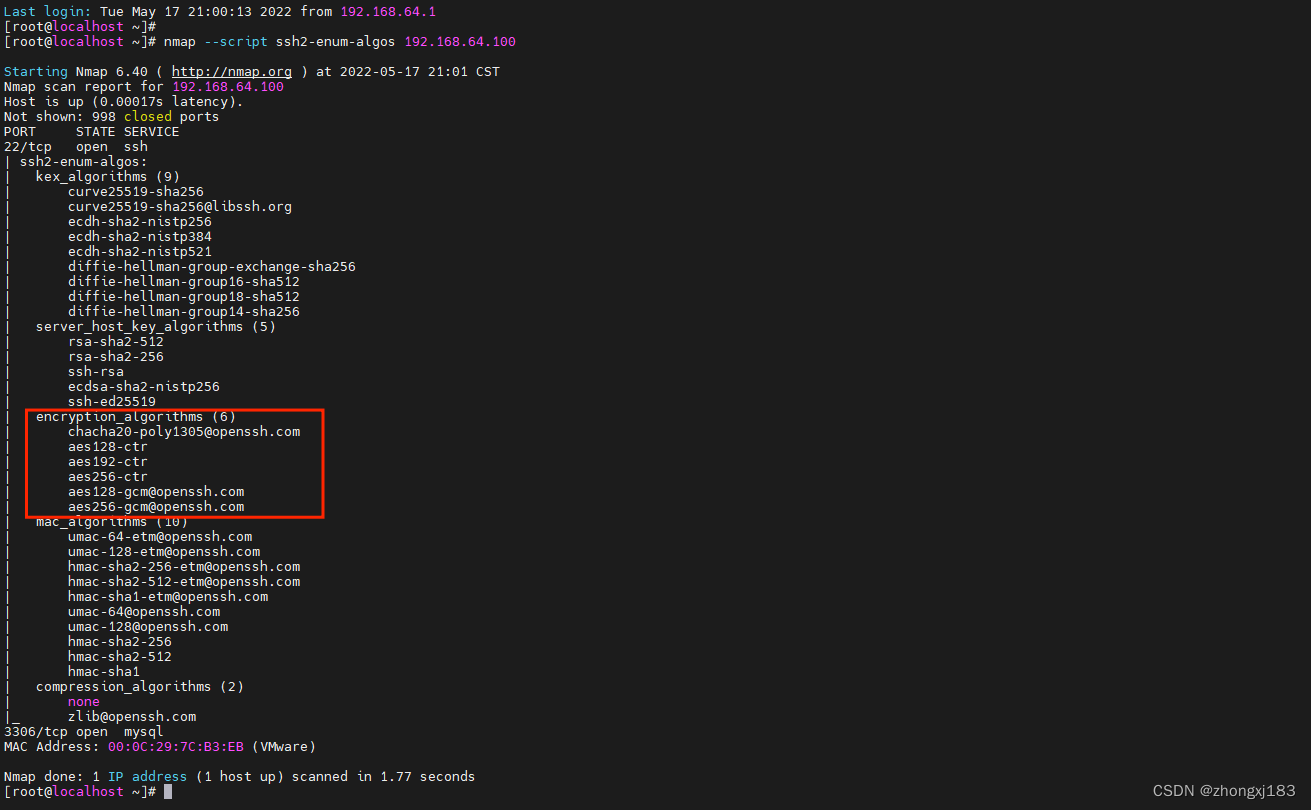
服务端支持的KexAlgorithms和Ciphers列表还可以使用nmap测试查看
nmap --script ssh2-enum-algos 192.168.64.100
支持的KexAlgorithms列表:
支持的Ciphers列表:
补充:CVE-2002-20001漏洞修复参考
不同版本openssh支持的kexalgorithms对比,以7.4和8.7为例
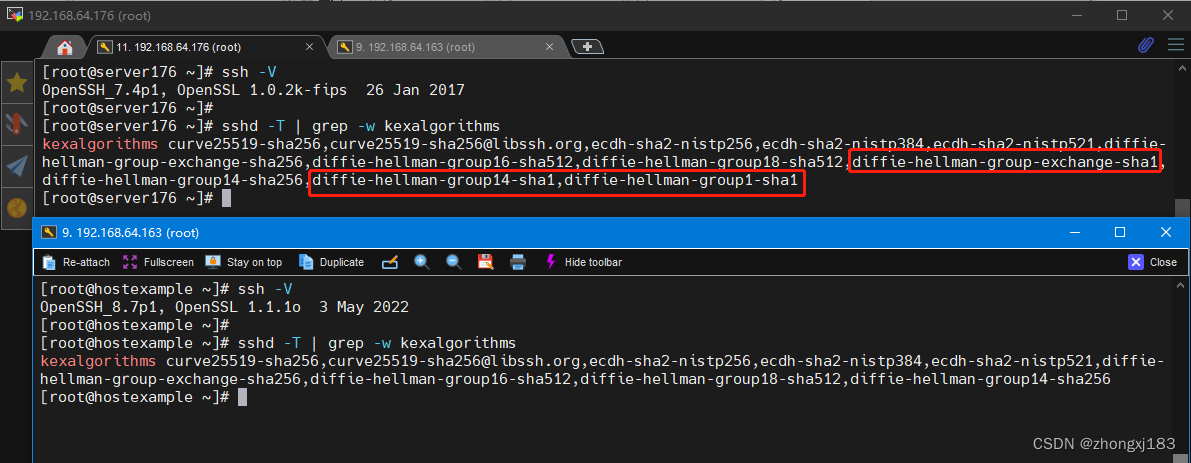
可以看到8.7版本相较于7.4,舍弃了三种kex:
- diffie-hellman-group-exchange-sha1
diffie-hellman-group14-sha1
diffie-hellman-group1-sha1
这三个dh协议算法,在 ietf 官方文档 中也有详细的说明
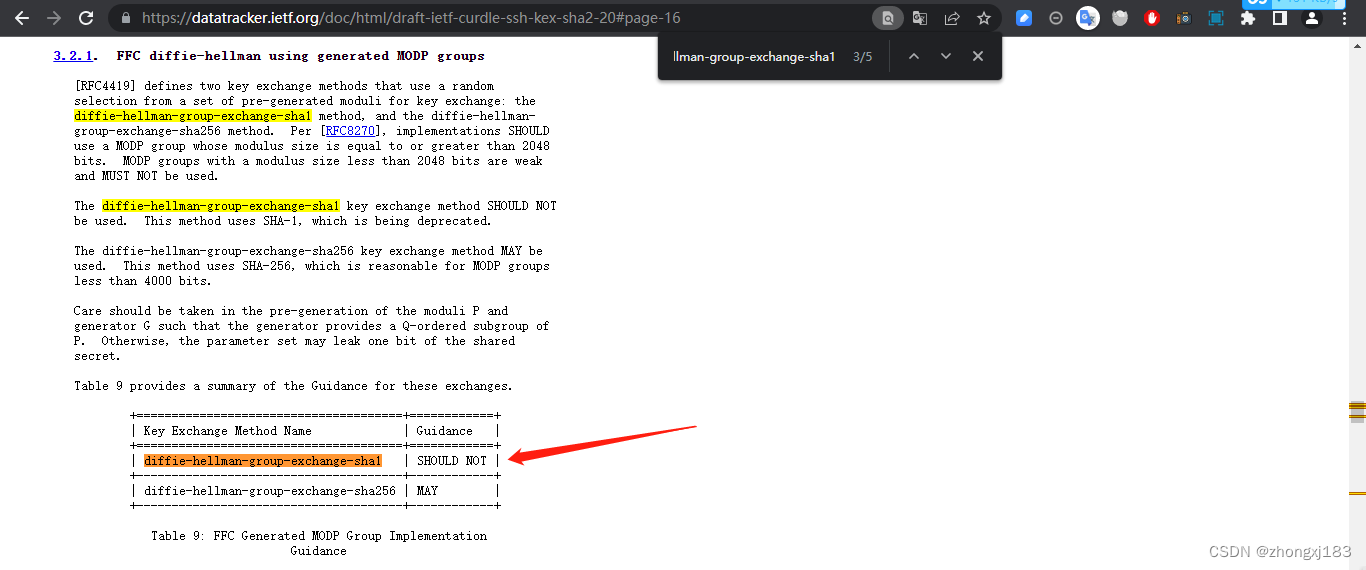
因此,修复该CVE漏洞时,需要将不安全的dh协议算法从ssh服务端支持列表中移除
sshd -T | grep -w kexalgorithmsecho "kexalgorithms curve25519-sha256,curve25519-sha256@libssh.org,ecdh-sha2-nistp256,ecdh-sha2-nistp384,ecdh-sha2-nistp521,diffie-hellman-group-exchange-sha256,diffie-hellman-group16-sha512,diffie-hellman-group18-sha512,diffie-hellman-group14-sha256" >> /etc/ssh/sshd_configsystemctl restart sshdsshd -T | grep -w kexalgorithms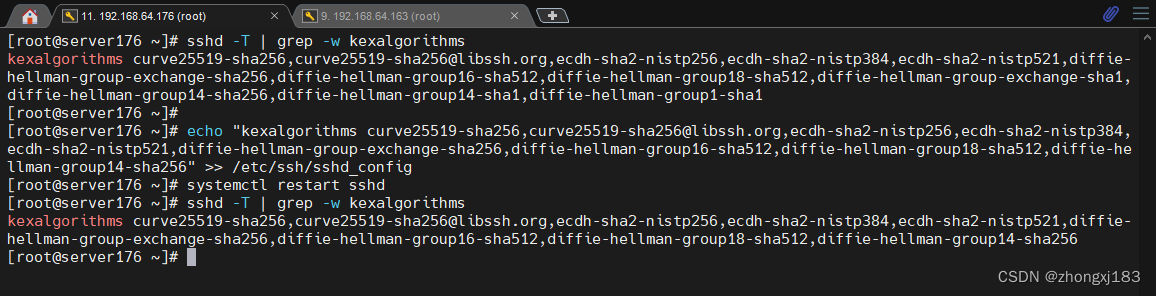
访问测试

如果还是扫描到该漏洞,则参考 https://github.com/Balasys/dheater 中的方法,直接将全部dh算法移除。不影响ssh连接访问即可。
- ssh7.4
sshd -T | grep -w kexalgorithmsecho "kexalgorithms curve25519-sha256,curve25519-sha256@libssh.org,ecdh-sha2-nistp256,ecdh-sha2-nistp384,ecdh-sha2-nistp521" >> /etc/ssh/sshd_configsystemctl restart sshdsshd -T | grep -w kexalgorithms 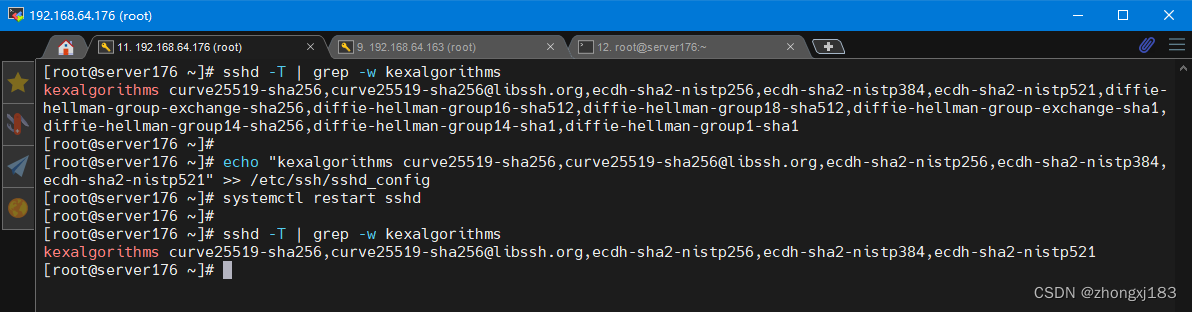
ssh8.7sshd -T | grep -w kexalgorithmsecho "kexalgorithms -diffie-hellman-group-exchange-sha256,diffie-hellman-group16-sha512,diffie-hellman-group18-sha512,diffie-hellman-group14-sha256" >> /etc/ssh/sshd_configsystemctl restart sshdsshd -T | grep -w kexalgorithms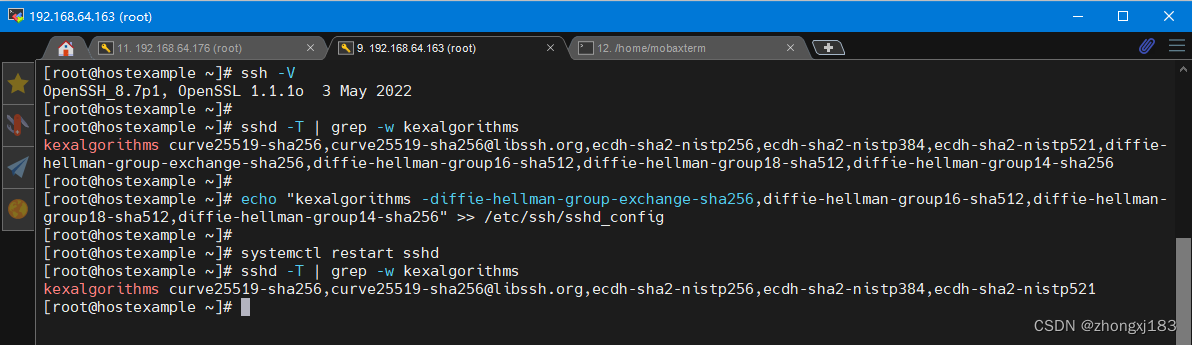
参考文章
互联网工程任务组官方文档1:https://datatracker.ietf.org/doc/html/draft-ietf-curdle-ssh-kex-sha2-20#page-16
互联网工程任务组官方文档2:https://datatracker.ietf.org/doc/html/rfc8732
openbsd官方帮助文档:https://man.openbsd.org/sshd_config
nmapdoc:https://nmap.org/nsedoc/scripts/ssh2-enum-algos.html
https://github.com/Balasys/dheater
原文:(8条消息) OpenSSH算法协议漏洞修复_zhongxj183的博客-CSDN博客_openssh 资源管理错误漏洞