使用多个搜索引擎快速发现互联网上暴露的主机——uncover
作者:Sec-Labs | 发布时间:
工具介绍
uncover是一个Go包,使用众所周知的搜索引擎的API来快速发现互联网上暴露的主机。它是以自动化的方式建立的,所以你可以查询它,并利用你目前的管道命令行工具获得结果。
项目地址
https://github.com/projectdiscovery/uncover
效果展示
- 一次性查询多个搜索引擎
- 可用的搜索引擎支持
- 支持多个API密钥输入
- 自动API密钥随机化
- 支持输入的stdin / stdout
安装说明
uncover需要go1.17才能成功安装。运行下面的命令来获取项目
go install -v github.com/projectdiscovery/uncover/cmd/uncover@latest使用方法
uncover -h这将显示该工具的帮助。下面是它支持的所有参数
Usage:
  ./uncover [flags]

Flags:
INPUT:
   -q, -query string[]   search query, supports: stdin,file,config input (example: -q 'example query', -q 'query.txt')
   -e, -engine string[]  search engine to query (shodan,shodan-idb,fofa,censys,quake,hunter,zoomeye) (default shodan)

SEARCH-ENGINE:
   -s, -shodan string[]       search query for shodan (example: -shodan 'query.txt')
   -sd, -shodan-idb string[]  search query for shodan-idb (example: -shodan-idb 'query.txt')
   -ff, -fofa string[]        search query for fofa (example: -fofa 'query.txt')
   -cs, -censys string[]      search query for censys (example: -censys 'query.txt')
   -qk, -quake string[]       search query for quake (example: -quake 'query.txt')
   -ht, -hunter string[]      search query for hunter (example: -hunter 'query.txt')
   -ze, -zoomeye string[]     search query for zoomeye (example: -zoomeye 'query.txt')

CONFIG:
   -pc, -provider string  provider configuration file (default "$HOME/.config/uncover/provider-config.yaml")
   -config string         flag configuration file (default "$HOME/.config/uncover/config.yaml")
   -timeout int           timeout in seconds (default 30)
   -delay int             delay between requests in seconds (0 to disable) (default 1)
   -retry int             number of times to retry a failed request (default 2)

OUTPUT:
   -o, -output string  output file to write found results
   -f, -field string   field to display in output (ip,port,host) (default "ip:port")
   -j, -json           write output in JSONL(ines) format
   -r, -raw            write raw output as received by the remote api
   -l, -limit int      limit the number of results to return (default 100)
   -nc, -no-color      disable colors in output

DEBUG:
   -silent   show only results in output
   -version  show version of the project
   -v        show verbose output
配置文件
默认提供程序配置文件应位于 $HOME/.config/uncover/provider-config.yaml并以以下内容为例。
注意 :需要在运行之前配置 API 密钥。
shodan:
  - SHODAN_API_KEY_1
  - SHODAN_API_KEY_2
censys:
  - CENSYS_API_ID_1:CENSYS_API_SECRET_1
  - CENSYS_API_ID_2:CENSYS_API_SECRET_2
fofa:
  - FOFA_EMAIL_1:FOFA_KEY_2
  - FOFA_EMAIL_2:FOFA_KEY_2
quake:
  - QUAKE_TOKEN_1
  - QUAKE_TOKEN_2
hunter:
  - HUNTER_API_KEY_1
  - HUNTER_API_KEY_2
zoomeye:
  - ZOOMEYE_API_KEY_1
  - ZOOMEYE_API_KEY_2
当在配置文件中为同一个提供者指定多个密钥/凭证时,每次执行都将使用随机密钥。
或者,您也可以在 bash 配置文件中将 API 密钥设置为环境变量。
export SHODAN_API_KEY=xxx
export CENSYS_API_ID=xxx
export CENSYS_API_SECRET=xxx
export FOFA_EMAIL=xxx
export FOFA_KEY=xxx
export QUAKE_TOKEN=xxx
export HUNTER_API_KEY=xxx
export ZOOMEYE_API_KEY=xxx
所需的 API 密钥可以通过在以下平台 Shodan 、 Censys 、 Fofa 、 Quake 、 Hunter 和 ZoomEye 上注册获得。
运行Uncover
默认运行:
Uncover 支持多种查询方式,包括 stdin 或 q标志,默认 shodan如果未指定引擎,则使用引擎进行搜索。
echo 'ssl:"Uber Technologies, Inc."' | uncover

  __  ______  _________ _   _____  _____
 / / / / __ \/ ___/ __ \ | / / _ \/ ___/
/ /_/ / / / / /__/ /_/ / |/ /  __/ /
\__,_/_/ /_/\___/\____/|___/\___/_/ v0.0.1


		projectdiscovery.io

[WRN] Use with caution. You are responsible for your actions
[WRN] Developers assume no liability and are not responsible for any misuse or damage.
[WRN] By using uncover, you also agree to the terms of the APIs used.

107.180.12.116:993
107.180.26.155:443
104.244.99.31:443
161.28.20.79:443
104.21.8.108:443
198.71.233.203:443
104.17.237.13:443
162.255.165.171:443
12.237.119.61:443
192.169.250.211:443
104.16.251.50:443
用每行包含多个搜索查询的文件输入运行uncover
cat dorks.txt

ssl:"Uber Technologies, Inc."
title:"Grafana"
uncover -q dorks.txt
__ ______ _________ _ _____ _____
/ / / / __ \/ ___/ __ \ | / / _ \/ ___/
/ /_/ / / / / /__/ /_/ / |/ / __/ /
\__,_/_/ /_/\___/\____/|___/\___/_/ v0.0.1
projectdiscovery.io
[WRN] Use with caution. You are responsible for your actions
[WRN] Developers assume no liability and are not responsible for any misuse or damage.
[WRN] By using uncover, you also agree to the terms of the APIs used.
107.180.12.116:993
107.180.26.155:443
104.244.99.31:443
161.28.20.79:443
104.21.8.108:443
198.71.233.203:443
2607:7c80:54:3::74:3001
104.198.55.35:80
46.101.82.244:3000
34.147.126.112:80
138.197.147.213:8086针对多个搜索引擎的单个查询
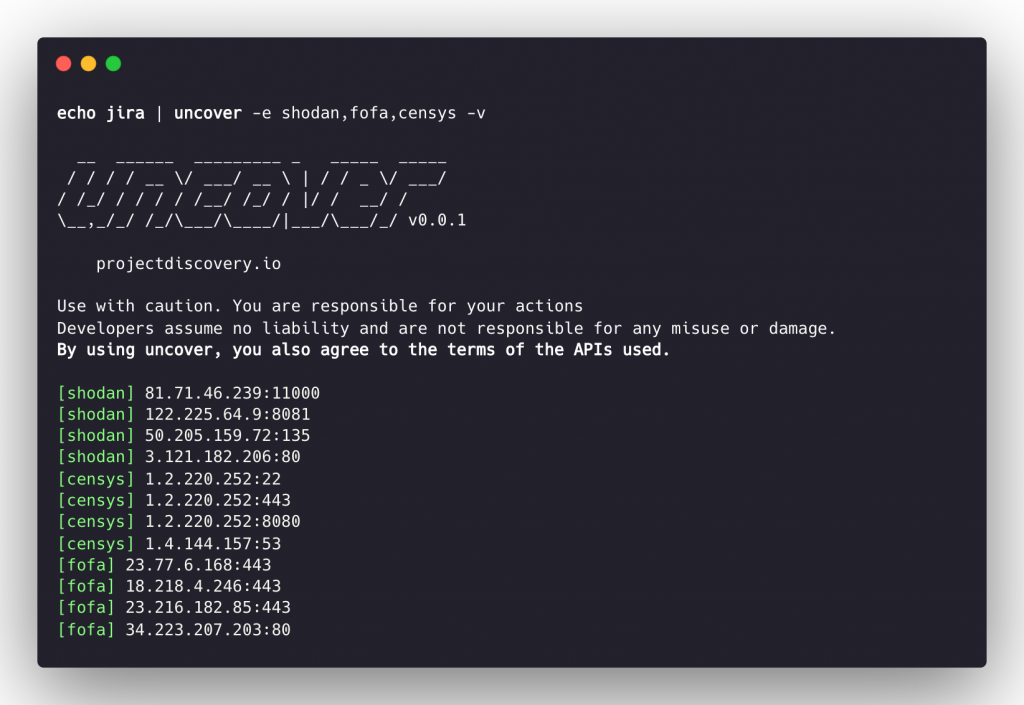
发现 支持多个搜索引擎,使用默认 shodan , -e标志可用于对任何或所有搜索引擎运行相同的查询。
echo jira | uncover -e shodan,censys,fofa,quake,hunter,zoomeye

  __  ______  _________ _   _____  _____
 / / / / __ \/ ___/ __ \ | / / _ \/ ___/
/ /_/ / / / / /__/ /_/ / |/ /  __/ /
\__,_/_/ /_/\___/\____/|___/\___/_/ v0.0.3


    projectdiscovery.io

[WRN] Use with caution. You are responsible for your actions
[WRN] Developers assume no liability and are not responsible for any misuse or damage.
[WRN] By using uncover, you also agree to the terms of the APIs used.

176.31.249.189:5001
13.211.116.80:443
43.130.1.221:631
192.195.70.29:443
52.27.22.181:443
117.48.120.226:8889
106.52.115.145:49153
13.69.135.128:443
193.35.99.158:443
18.202.109.218:8089
101.36.105.97:21379
42.194.226.30:2626
针对多个搜索引擎的多个查询
uncover -shodan 'http.component:"Atlassian Jira"' -censys 'services.software.product=`Jira`' -fofa 'app="ATLASSIAN-JIRA"' -quake 'Jira' -hunter 'Jira' -zoomeye 'app:"Atlassian JIRA"'

  __  ______  _________ _   _____  _____
 / / / / __ \/ ___/ __ \ | / / _ \/ ___/
/ /_/ / / / / /__/ /_/ / |/ /  __/ /
\__,_/_/ /_/\___/\____/|___/\___/_/ v0.0.7


    projectdiscovery.io

[WRN] Use with caution. You are responsible for your actions
[WRN] Developers assume no liability and are not responsible for any misuse or damage.
[WRN] By using uncover, you also agree to the terms of the APIs used.

104.68.37.129:443
162.222.160.42:443
34.255.84.133:443
52.204.121.166:443
23.198.29.120:443
136.156.180.95:443
54.194.233.15:443
104.117.55.155:443
149.81.4.6:443
54.255.218.95:443
3.223.137.57:443
83.228.124.171:443
23.202.195.82:443
52.16.59.25:443
18.159.145.227:443
104.105.53.236:443
Shodan-InternetDB API
Uncover支持 shodan -internetdb API 为给定的 IP/CIDR 输入拉取可用端口。
shodan-idb时,用作 默认 引擎,否则 当提供IP/CIDR 作为输入 shodan使用搜索引擎。
echo 51.83.59.99/24 | uncover

  __  ______  _________ _   _____  _____
 / / / / __ \/ ___/ __ \ | / / _ \/ ___/
/ /_/ / / / / /__/ /_/ / |/ /  __/ /
\__,_/_/ /_/\___/\____/|___/\___/_/ v0.0.3


    projectdiscovery.io

[WRN] Use with caution. You are responsible for your actions
[WRN] Developers assume no liability and are not responsible for any misuse or damage.
[WRN] By using uncover, you also agree to the terms of the APIs used.

51.83.59.1:53
51.83.59.1:10000
51.83.59.2:53
51.83.59.3:25
51.83.59.3:80
51.83.59.3:389
51.83.59.3:443
51.83.59.3:465
51.83.59.3:587
51.83.59.3:993
字段格式
-f, -fieldflag 可用于指示当前要返回哪些字段, ip, port, 和 host受支持并可用于返回所需的字段。
uncover -q jira -f host -silent

ec2-44-198-22-253.compute-1.amazonaws.com
ec2-18-246-31-139.us-west-2.compute.amazonaws.com
tasks.devrtb.com
leased-line-91-149-128-229.telecom.by
74.242.203.213.static.inetbone.net
ec2-52-211-7-108.eu-west-1.compute.amazonaws.com
ec2-54-187-161-180.us-west-2.compute.amazonaws.com
185-2-52-226.static.nucleus.be
ec2-34-241-80-255.eu-west-1.compute.amazonaws.com
字段格式
发现 有一个 -f, -field可用于自定义输出格式的标志。 例如,在 uncover -f https://ip:port/version, ip:port 将被替换为输出中的结果,同时保持格式定义,它也可用于指定已知的方案/路径/文件以准备输出,以便可以立即将其作为输入传递给其他工具在管线中。
echo kubernetes | uncover -f https://ip:port/version -silent

https://35.222.229.38:443/version
https://52.11.181.228:443/version
https://35.239.255.1:443/version
https://34.71.48.11:443/version
https://130.211.54.173:443/version
https://54.184.250.232:443/version
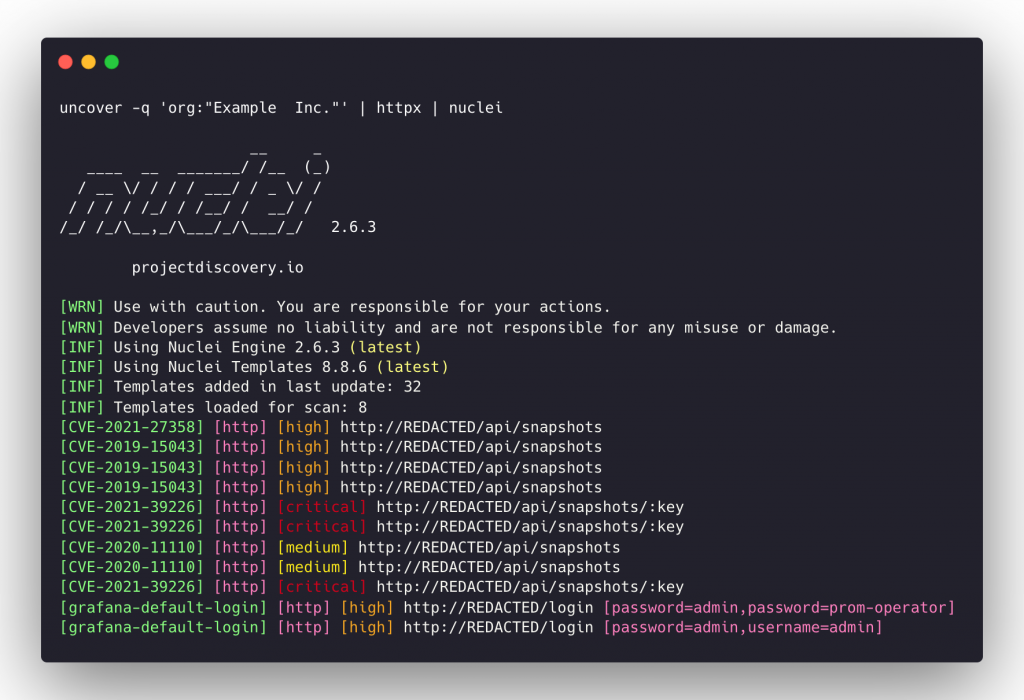
Uncover 可以进一步通过管道传输到工作流中接受 stdin 作为输入的其他项目,例如:
uncover -q example -f ip | naabu- 在找到的主机上运行 naabu 进行端口扫描。uncover -q title:GitLab | httpx- 运行httpx以探测找到的结果。 为 Web 服务器uncover -q 51.83.59.99/24 | httpx- 运行httpx 。 在从 shodan-internetdb 获得的主机/端口上
uncover -q http.title:GitLab -silent | httpx -silent

https://15.185.150.109
https://139.162.137.16
https://164.68.115.243
https://135.125.215.186
https://163.172.59.119
http://15.236.10.197
https://129.206.117.248