JSON文件的结构差异识别小工具
作者:Sec-Labs | 发布时间:
效果展示
JSON结构差异
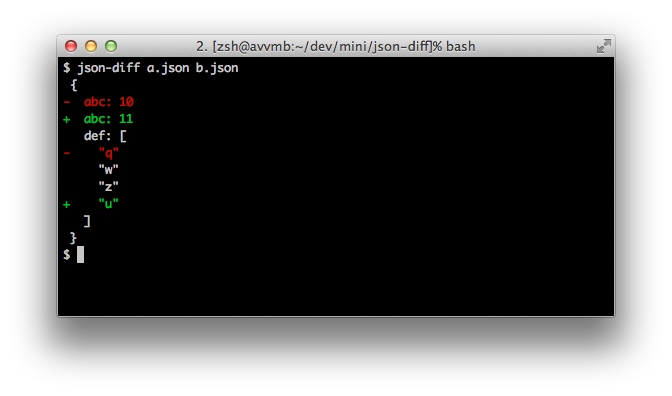
可以通过上图很清晰的看出,两个json文件a.json和b.json中新增了哪些参数,同一参数不同值的情况
项目地址
https://github.com/andreyvit/json-diff
安装
npm install -g json-diff使用方法
简单方式
json-diff a.json b.json详细版本
% json-diff --help

Usage: json-diff [-vCjfonskKp] first.json second.json

Arguments:
<first.json>          Old file
<second.json>         New file

General options:
-v, --verbose         Output progress info
-C, --[no-]color      Colored output
-j, --raw-json        Display raw JSON encoding of the diff
-f, --full            Include the equal sections of the document, not just the deltas
    --max-elisions COUNT  Max number of ...'s to show in a row in "deltas" mode (before
                            collapsing them)

-o, --output-keys KEYS  Always print this comma separated keys, with their value, if they are
                        part of an object with any diff

-n, --output-new-only   Output only the updated and new key/value pairs (without marking them as
                        such). If you need only the diffs from the old file, just exchange the
                        first and second json.

-s, --sort            Sort primitive values in arrays before comparing
-k, --keys-only       Compare only the keys, ignore the differences in values
-K, --keep-unchanged-values   Instead of omitting values that are equal, output them as they are
-p, --precision DECIMALS  Round all floating point numbers to this number of decimal places prior
                            to comparison

-h, --help            Display this usage information
在javascript(ES5)中
var jsonDiff = require('json-diff')

console.log(jsonDiff.diffString({ foo: 'bar' }, { foo: 'baz' }));
// Output:
//  {
// -  foo: "bar"
// +  foo: "baz"
//  }

// As above, but without console colors
console.log(jsonDiff.diffString({ foo: 'bar' }, { foo: 'baz' }, {color:false}));

// Raw output:
console.log(jsonDiff.diff({ foo: 'bar', b:3}, { foo: 'baz', b:3}));
// Output:
// { foo: { __old: 'bar', __new: 'baz' } }

// Passing in the "full" option:
console.log(jsonDiff.diff({ foo: 'bar', b:3}, { foo: 'baz', b:3}, {full:true}));
// Output:
// { foo: { __old: 'bar', __new: 'baz' }, b: 3 }
在javascript(ES6+)中
import { diffString, diff } from 'json-diff';

console.log(diffString({ foo: 'bar' }, { foo: 'baz' }));
console.log(diff({ foo: 'bar' }, { foo: 'baz' }));
特点
- 彩色的、类似于差异的输出
- 对修改后的数组元素进行模糊匹配(当数组元素是对象层次结构时)
- "keysOnly "选项,只比较json结构(keys),忽略数值
- "full "选项,输出整个json树,而不仅仅是deltas。
- "outputKeys "选项,对于有差异的对象总是输出给定的键值
合理的测试覆盖率(虽然远非100%)。
标签:工具分享, 对比工具