SecretFinder——用于查找敏感数据
作者:Sec-Labs | 发布时间:
项目地址
https://github.com/m4ll0k/SecretFinder
关于 SecretFinder
SecretFinder 是一个基于LinkFinder的 python 脚本,用于发现 JavaScript 文件中的敏感数据,如 apikeys、accesstoken、authorizations、jwt、..etc。它是通过将 jsbeautifier for python 与相当大的正则表达式结合使用来实现的。正则表达式由四个小的正则表达式组成。这些负责查找和搜索 js 文件上的任何内容。
输出以 HTML 或纯文本形式给出。
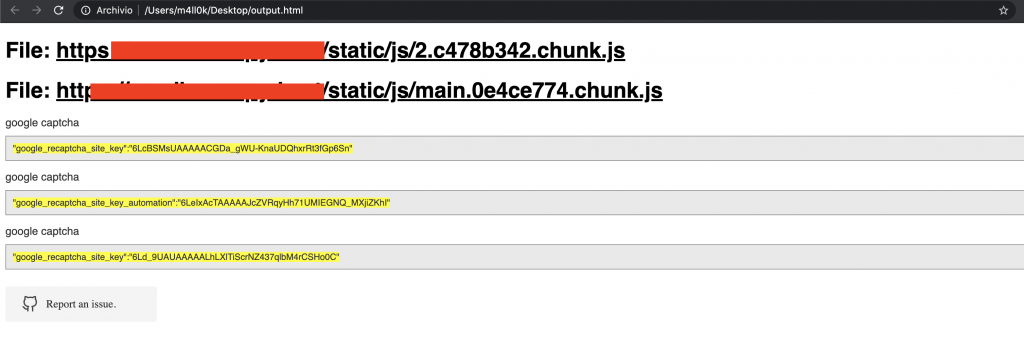
帮助
usage: SecretFinder.py [-h] [-e] -i INPUT [-o OUTPUT] [-r REGEX] [-b]
                       [-c COOKIE] [-g IGNORE] [-n ONLY] [-H HEADERS]
                       [-p PROXY]

optional arguments:
  -h, --help            show this help message and exit
  -e, --extract         Extract all javascript links located in a page and
                        process it
  -i INPUT, --input INPUT
                        Input a: URL, file or folder
  -o OUTPUT, --output OUTPUT
                        Where to save the file, including file name. Default:
                        output.html
  -r REGEX, --regex REGEX
                        RegEx for filtering purposes against found endpoint
                        (e.g: ^/api/)
  -b, --burp            Support burp exported file
  -c COOKIE, --cookie COOKIE
                        Add cookies for authenticated JS files
  -g IGNORE, --ignore IGNORE
                        Ignore js url, if it contain the provided string
                        (string;string2..)
  -n ONLY, --only ONLY  Process js url, if it contain the provided string
                        (string;string2..)
  -H HEADERS, --headers HEADERS
                        Set headers ("Name:Value\nName:Value")
  -p PROXY, --proxy PROXY
                        Set proxy (host:port)
安装
SecretFinder 支持 Python 3。
$ git clone https://github.com/m4ll0k/SecretFinder.git secretfinder
$ cd secretfinder
$ python -m pip install -r requirements.txt or pip install -r requirements.txt
$ python3 SecretFinder.py
用法
- 在在线 JavaScript 文件中使用默认正则表达式查找敏感数据并将 HTML 结果输出到 results.html 的最基本用法:
python3 SecretFinder.py -i https://example.com/1.js -o results.html
- CLI/STDOUT 输出(不使用 jsbeautifier,这使得它非常快):
python3 SecretFinder.py -i https://example.com/1.js -o cli
- 分析整个域及其 JS 文件:
python3 SecretFinder.py -i https://example.com/ -e
- 忽略由提供的某些 js 文件(如外部库)
-g --ignore
python3 SecretFinder.py -i https://example.com/ -e -g 'jquery;bootstrap;api.google.com'
- 仅处理由以下提供的某些 js 文件
-n --only:
python3 SecretFinder.py -i https://example.com/ -e -n 'd3i4yxtzktqr9n.cloudfront.net;www.myexternaljs.com'
- 使用你的正则表达式:
python3 SecretFinder.py -i https://example.com/1.js -o cli -r 'apikey=my.api.key[a-zA-Z]+'
- 其他选项:添加标头、代理和 cookie:
python3 SecretFinder.py -i https://example.com/ -e -o cli -c 'mysessionid=111234' -H 'x-header:value1\nx-header2:value2' -p 127.0.0.1:8080 -r 'apikey=my.api.key[a-zA-Z]+'
-
输入接受所有这些条目:
-
网址:例如https://www.google.com/ [-e] 是必填项
-
Js 网址:例如https://www.google.com/1.js
-
文件夹:例如 myjsfiles/*
-
本地文件:例如 /js/myjs/file.js
添加正则表达式
- 打开
SecretFinder.py并添加您的正则表达式:
_regex = {
    'google_api'     : r'AIza[0-9A-Za-z-_]{35}',
    'google_captcha' : r'6L[0-9A-Za-z-_]{38}|^6[0-9a-zA-Z_-]{39}$',
    'google_oauth'   : r'ya29\.[0-9A-Za-z\-_]+',
    'amazon_aws_access_key_id' : r'A[SK]IA[0-9A-Z]{16}',
    'amazon_mws_auth_toke' : r'amzn\\.mws\\.[0-9a-f]{8}-[0-9a-f]{4}-[0-9a-f]{4}-[0-9a-f]{4}-[0-9a-f]{12}',
    'amazon_aws_url' : r's3\.amazonaws.com[/]+|[a-zA-Z0-9_-]*\.s3\.amazonaws.com',
    'facebook_access_token' : r'EAACEdEose0cBA[0-9A-Za-z]+',
    'authorization_basic' : r'basic\s*[a-zA-Z0-9=:_\+\/-]+',
    'authorization_bearer' : r'bearer\s*[a-zA-Z0-9_\-\.=:_\+\/]+',
    'authorization_api' : r'api[key|\s*]+[a-zA-Z0-9_\-]+',
    'mailgun_api_key' : r'key-[0-9a-zA-Z]{32}',
    'twilio_api_key' : r'SK[0-9a-fA-F]{32}',
    'twilio_account_sid' : r'AC[a-zA-Z0-9_\-]{32}',
    'twilio_app_sid' : r'AP[a-zA-Z0-9_\-]{32}',
    'paypal_braintree_access_token' : r'access_token\$production\$[0-9a-z]{16}\$[0-9a-f]{32}',
    'square_oauth_secret' : r'sq0csp-[ 0-9A-Za-z\-_]{43}|sq0[a-z]{3}-[0-9A-Za-z\-_]{22,43}',
    'square_access_token' : r'sqOatp-[0-9A-Za-z\-_]{22}|EAAA[a-zA-Z0-9]{60}',
    'stripe_standard_api' : r'sk_live_[0-9a-zA-Z]{24}',
    'stripe_restricted_api' : r'rk_live_[0-9a-zA-Z]{24}',
    'github_access_token' : r'[a-zA-Z0-9_-]*:[a-zA-Z0-9_\-]+@github\.com*',
    'rsa_private_key' : r'-----BEGIN RSA PRIVATE KEY-----',
    'ssh_dsa_private_key' : r'-----BEGIN DSA PRIVATE KEY-----',
    'ssh_dc_private_key' : r'-----BEGIN EC PRIVATE KEY-----',
    'pgp_private_block' : r'-----BEGIN PGP PRIVATE KEY BLOCK-----',
    'json_web_token' : r'ey[A-Za-z0-9-_=]+\.[A-Za-z0-9-_=]+\.?[A-Za-z0-9-_.+/=]*$',

    'name_for_my_regex' : r'my_regex',
    # for example
    'example_api_key'    : r'^example\w+{10,50}'
}