ChatGPT本地化 | 如何在你的电脑上部署开源GPT-3语言模型 | ChatGLM
作者:FancyPig | 发布时间: | 更新时间:
相关阅读
杂谈
之前的一期分享里,我们分享了dalai,但是dalai支持的LLaMA与Alpaca对中文并不友好,因此,我最近又研究了一下清华大学的开源项目ChatGLM
准备工作
安装CUDA
首先,你肯定是要有一个显卡的,我这里使用的Nvidia 3070的显卡,显存为8GB。
官网给的说明是最低6GB显存就可以跑,但是个人认为最佳显存应该是13GB以上,可以接收更多的输入。
我们首先需要装好CUDA相关驱动,我使用的是Windows操作相同,这里是安装了以下软件
最终上面的驱动会用于Pytorch中。
检查CUDA是否成功安装
你可以通过终端的命令,查看自己是否安装完成
nvidia-smi这里可以看到CUDA的版本号以及你的显存,我这里可以看到8192MiB就是8GB显存

nvcc --version同样的这里也可以看到CUDA编译器版本号,也是11.8

安装Pytorch
安装Pytorch的时候,请一定要使用下面的命令
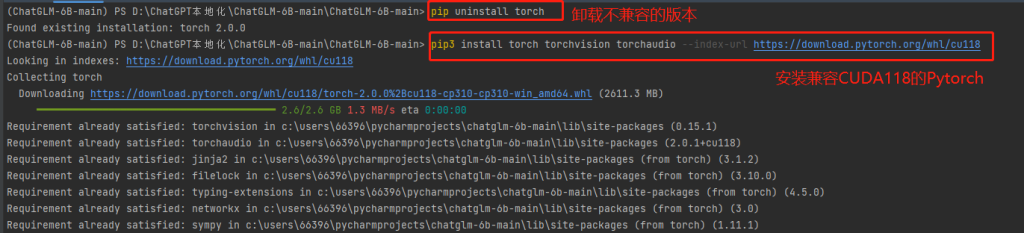
pip3 install torch torchvision torchaudio --index-url https://download.pytorch.org/whl/cu118上面的命令中会指定我们下载CUDA11.8对应的pytorch,实际上目前最新的已经有了CUDA12.0,但Pytorch似乎目前并未支持,只支持了CUDA11.7和11.8。如果你需要自定义安装,可以在下面的链接中,选择对应的配置,使用相应的命令进行安装
https://pytorch.org/get-started/locally/
如果版本pytorch与CUDA不一致,可能会导致运行程序的时候出现类似下面的报错
raise AssertionError("Torch not compiled with CUDA enabled")
AssertionError: Torch not compiled with CUDA enabled
当然,这里也有一个小技巧。
你如果不确定自己CUDA是否安装、配置正确,你可以新建一个Python文件,譬如
pytorch.py
import torch

print(torch.__version__)
print(torch.version.cuda)
运行一下,就可以看到自己的相关版本号了,如果有None的情况,则代表没有配置正确

这里值得补充的是有的人可能很早之前使用pip3就安装过了pytorch,在使用新的命令安装的时候会提示Requirement already satisfied
Requirement already satisfied: torch in c:\users\66396\pycharmprojects\chatglm-6b-main\lib\site-packages (2.0.0)
Requirement already satisfied: torchvision in c:\users\66396\pycharmprojects\chatglm-6b-main\lib\site-packages (0.15.1)
Requirement already satisfied: torchaudio in c:\users\66396\pycharmprojects\chatglm-6b-main\lib\site-packages (2.0.1+cu118)
Requirement already satisfied: sympy in c:\users\66396\pycharmprojects\chatglm-6b-main\lib\site-packages (from torch) (1.11.1)
Requirement already satisfied: filelock in c:\users\66396\pycharmprojects\chatglm-6b-main\lib\site-packages (from torch) (3.10.0)
Requirement already satisfied: networkx in c:\users\66396\pycharmprojects\chatglm-6b-main\lib\site-packages (from torch) (3.0)
Requirement already satisfied: jinja2 in c:\users\66396\pycharmprojects\chatglm-6b-main\lib\site-packages (from torch) (3.1.2)
Requirement already satisfied: typing-extensions in c:\users\66396\pycharmprojects\chatglm-6b-main\lib\site-packages (from torch) (4.5.0)
Requirement already satisfied: pillow!=8.3.*,>=5.3.0 in c:\users\66396\pycharmprojects\chatglm-6b-main\lib\site-packages (from torchvision) (9.4.0)
Requirement already satisfied: requests in c:\users\66396\pycharmprojects\chatglm-6b-main\lib\site-packages (from torchvision) (2.28.2)
Requirement already satisfied: numpy in c:\users\66396\pycharmprojects\chatglm-6b-main\lib\site-packages (from torchvision) (1.24.2)
Requirement already satisfied: MarkupSafe>=2.0 in c:\users\66396\pycharmprojects\chatglm-6b-main\lib\site-packages (from jinja2->torch) (2.1.2)
Requirement already satisfied: certifi>=2017.4.17 in c:\users\66396\pycharmprojects\chatglm-6b-main\lib\site-packages (from requests->torchvision) (2022.12.7)
Requirement already satisfied: idna<4,>=2.5 in c:\users\66396\pycharmprojects\chatglm-6b-main\lib\site-packages (from requests->torchvision) (3.4)
Requirement already satisfied: urllib3<1.27,>=1.21.1 in c:\users\66396\pycharmprojects\chatglm-6b-main\lib\site-packages (from requests->torchvision) (1.26.15)
Requirement already satisfied: charset-normalizer<4,>=2 in c:\users\66396\pycharmprojects\chatglm-6b-main\lib\site-packages (from requests->torchvision) (3.1.0)
Requirement already satisfied: mpmath>=0.19 in c:\users\66396\pycharmprojects\chatglm-6b-main\lib\site-packages (from sympy->torch) (1.3.0)
因此,遇到之前已经安装了的情况,你可以使用下面命令,先卸载pytorch
pip uninstall torch卸载之后,在运行最上面的命令安装兼容CUDA11.8的pytorch
使用ChatGLM
我们可以下载ChatGLM
安装依赖
pip3 install -r requirements.txt启动Web界面
python3 web_demo.py或者直接在Pycharm里右键Run 'web_demo'都可以

这里会下载模型,大约12GB

你如果中途断了,没有启动成功,则可能在下次启动时,会出现多个模型文件夹,如果占用了空间,请按需删除即可

注意事项
你很可能会遇到下面的情况,那就是显存不够,会出现下面的报错
torch.cuda.OutOfMemoryError: CUDA out of memory. Tried to allocate 128.00 MiB (GPU 0; 8.00 GiB total capacity; 7.28 GiB already allocated; 0 bytes free; 7.28 GiB reserved in total by PyTorch) If reserved memory is >> allocated memory try setting max_split_size_mb to avoid fragmentation.  See documentation for Memory Management and PYTORCH_CUDA_ALLOC_CONF

Process finished with exit code 1
出现这种情况,你可以在web_demo.py中修改一行代码,将
model = AutoModel.from_pretrained("THUDM/chatglm-6b", trust_remote_code=True).half().cuda()改为
model = AutoModel.from_pretrained("THUDM/chatglm-6b", trust_remote_code=True).half().quantize(4).cuda()则可以运行
效果展示
运行并且启动成功之后,你可以访问127.0.0.1:7860
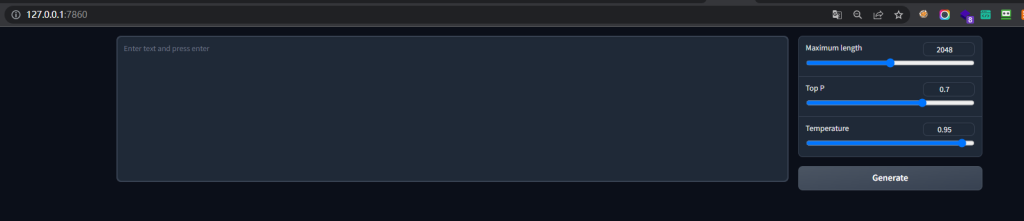
之后就可以开始提问了
可以看到效果还是非常不错的,譬如提问一个网络安全相关的问题

再比方说,让他编一个英雄救美的故事

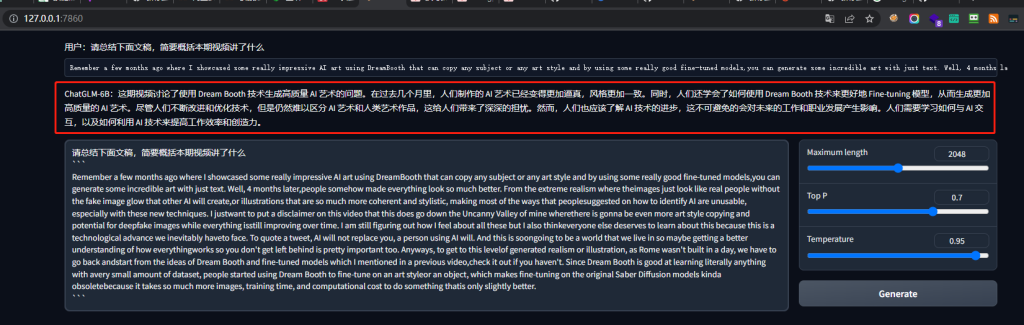
我尝试拿今天的一个视频稿,进行了一个摘要提取,发现效果是真的不错,它不但能读懂英文,还可以将其转换成非常地道的中文
除了这些之外,它还有诸多能力,这里我们就摘抄了官网给的
- 自我认识
- 提纲写作
- 邮件写作助手
- 信息抽取
- 角色扮演
- 评价比较
- 旅游向导
总结
总的来说,60亿参数能有这样的类似GPT-3的效果,已经非常不错了,并且他对中文的理解、认知是非常强悍的。当然,我们肯定不能拿它去跟ChatGPT去比较了,但是它也有比较不错的优势,譬如,可以私有化、本地部署,针对一些中小型企业,或者一些需要在内网、不出网的情况下,一些产品如果想要使用GPT赋能,或者说打造ChatOPS(用聊天的方式进行运维),这就是一个相当不错的选择。它不仅可以实现智能问答,还可以在有一定理解的基础上智能处置,联动一些企业的现有业务流程,给企业提供更加强大的生产力。