Fofa语法、使用技巧、工具推荐汇总
作者:黎明 | 发布时间: | 更新时间:
相关阅读
相关技巧
data-postsbox="{"id":3185,"title":"使用Fofa确定网站真实IP地址的小技巧","author":"热心网友","author_id":9547,"cover_image":"","cover_video":"","views":4864,"comment_count":5,"category":"cybersecurity","is_forum_post":false}">{"id":3185,"title":"使用Fofa确定网站真实IP地址的小技巧","author":"热心网友","author_id":9547,"cover_image":"","cover_video":"","views":4864,"comment_count":5,"category":"cybersecurity","is_forum_post":false}
相关工具
data-postsbox="{"id":25038,"title":"聚合版空间资产测绘","author":"Sec-Labs","author_id":10015,"cover_image":"","cover_video":"","views":475,"comment_count":6,"category":"","is_forum_post":true}">{"id":25038,"title":"聚合版空间资产测绘","author":"Sec-Labs","author_id":10015,"cover_image":"","cover_video":"","views":475,"comment_count":6,"category":"","is_forum_post":true}
data-postsbox="{"id":24220,"title":"非付费会员,fofa数据无限抓取版的梅开二度","author":"Sec-Labs","author_id":10015,"cover_image":"","cover_video":"","views":744,"comment_count":0,"category":"","is_forum_post":true}">{"id":24220,"title":"非付费会员,fofa数据无限抓取版的梅开二度","author":"Sec-Labs","author_id":10015,"cover_image":"","cover_video":"","views":744,"comment_count":0,"category":"","is_forum_post":true}
data-postsbox="{"id":21887,"title":"FOFA联动XRAY小工具——XRAY-F","author":"Sec-Labs","author_id":10015,"cover_image":"","cover_video":"","views":236,"comment_count":1,"category":"","is_forum_post":true}">{"id":21887,"title":"FOFA联动XRAY小工具——XRAY-F","author":"Sec-Labs","author_id":10015,"cover_image":"","cover_video":"","views":236,"comment_count":1,"category":"","is_forum_post":true}
data-postsbox="{"id":20532,"title":"FOFA 图形化采集工具——FOFA_GUI","author":"Sec-Labs","author_id":10015,"cover_image":"","cover_video":"","views":498,"comment_count":2,"category":"","is_forum_post":true}">{"id":20532,"title":"FOFA 图形化采集工具——FOFA_GUI","author":"Sec-Labs","author_id":10015,"cover_image":"","cover_video":"","views":498,"comment_count":2,"category":"","is_forum_post":true}
data-postsbox="{"id":19203,"title":"FOFA—IP采集工具——FofaCollection","author":"Sec-Labs","author_id":10015,"cover_image":"","cover_video":"","views":323,"comment_count":1,"category":"","is_forum_post":true}">{"id":19203,"title":"FOFA—IP采集工具——FofaCollection","author":"Sec-Labs","author_id":10015,"cover_image":"","cover_video":"","views":323,"comment_count":1,"category":"","is_forum_post":true}
data-postsbox="{"id":18076,"title":"记fofa爬虫工具开发篇","author":"wjlin0","author_id":19058,"cover_image":"","cover_video":"","views":534,"comment_count":2,"category":"","is_forum_post":true}">{"id":18076,"title":"记fofa爬虫工具开发篇","author":"wjlin0","author_id":19058,"cover_image":"","cover_video":"","views":534,"comment_count":2,"category":"","is_forum_post":true}
什么是Fofa?

FOFA 是白帽汇推出的一款网络空间资产搜索引擎。它能够帮助用户迅速进行网络资产匹配、加快后续工作进程。例如进行漏洞影响范围分析、应用分布统计、应用流行度排名统计等。
简单理解就是:
一个本土加强版 shodan,知道某产品在互联网的部署情况、获取一个根域名所有子域名网站、根据 IP 确认企业、根据一个子域名网站找到跟他在一个 IP 的其他网站、全网漏洞扫描、一个新的漏洞全网的影响范围。
Fofa作用
监管机构提供国家级解决方案
为企业单位提供公网资产攻击面梳理方案
为安全研究者提供目标资产梳理
为安全研究机构提供数据支撑
为白帽子提供攻防实战能力
Fofa网站
Fofa网站https://fofa.info/
Fofa语法
fofa逻辑连接符
| 逻辑连接符 | 具体含义 |
|---|---|
| = | 匹配,=""时,可查询不存在字段或者值为空的情况 |
| == | 完全匹配,==""时,可查询存在且值为空的情况 |
| && | 与 |
| || | 或者 |
| != | 不匹配,!=""时,可查询值为空的情况 |
| ~= | 正则语法匹配专用(高级会员独有,不支持body) |
| () | 确认查询优先级,括号内容优先级最高 |
fofa语法
| 例句 | 用途说明 | 注 |
|---|---|---|
| title="beijing" | 从标题中搜索“北京” | - |
| header="elastic" | 从http头中搜索“elastic” | - |
| body="网络空间测绘" | 从html正文中搜索“网络空间测绘” | - |
| fid="sSXXGNUO2FefBTcCLIT/2Q==" | 查找相同的网站指纹 | 搜索网站类型资产 |
| domain="qq.com" | 搜索根域名带有qq.com的网站。 | - |
| icp="京ICP证030173号" | 查找备案号为“京ICP证030173号”的网站 | 搜索网站类型资产 |
| js_name="js/jquery.js" | 查找网站正文中包含js/jquery.js的资产 | 搜索网站类型资产 |
| js_md5="82ac3f14327a8b7ba49baa208d4eaa15" | 查找js源码与之匹配的资产 | - |
| cname="ap21.inst.siteforce.com" | 查找cname为"ap21.inst.siteforce.com"的网站 | - |
| cname_domain="siteforce.com" | 查找cname包含“siteforce.com”的网站 | - |
| cloud_name="Aliyundun" | 通过云服务名称搜索资产 | - |
| icon_hash="-247388890" | 搜索使用此 icon 的资产 | 仅限FOFA高级会员使用 |
| host=".gov.cn" | 从url中搜索”.gov.cn” | 搜索要用host作为名称 |
| port="6379" | 查找对应“6379”端口的资产 | - |
| ip="1.1.1.1" | 从ip中搜索包含“1.1.1.1”的网站 | 搜索要用ip作为名称 |
| ip="220.181.111.1/24" | 查询IP为“220.181.111.1”的C网段资产 | - |
| status_code="402" | 查询服务器状态为“402”的资产 | 查询网站类型数据 |
| protocol="quic" | 查询quic协议资产 | 搜索指定协议类型(在开启端口扫描的情况下有效) |
| country="CN" | 搜索指定国家(编码)的资产。 | - |
| region="Xinjiang" | 搜索指定行政区的资产。 | - |
| city="Ürümqi" | 搜索指定城市的资产。 | - |
| cert="baidu" | 搜索证书(https或者imaps等)中带有baidu的资产。 | - |
| cert.subject="Oracle Corporation" | 搜索证书持有者是Oracle Corporation的资产 | - |
| cert.issuer="DigiCert" | 搜索证书颁发者为DigiCert Inc的资产 | - |
| cert.is_valid=true | 验证证书是否有效,true有效,false无效 | 仅限FOFA高级会员使用 |
| jarm="2ad...83e81" | 搜索JARM指纹 | - |
| banner="users" && protocol="ftp" | 搜索FTP协议中带有users文本的资产。 | - |
| type="service" | 搜索所有协议资产,支持subdomain和service两种 | 搜索所有协议资产 |
| os="centos" | 搜索CentOS资产。 | - |
| server=="Microsoft-IIS/10" | 搜索IIS 10服务器。 | - |
| app="Microsoft-Exchange" | 搜索Microsoft-Exchange设备 | - |
| after="2017" && before="2017-10-01" | 时间范围段搜索 | - |
| asn="19551" | 搜索指定asn的资产。 | - |
| org="LLC Baxet" | 搜索指定org(组织)的资产。 | - |
| base_protocol="udp" | 搜索指定udp协议的资产。 | - |
| is_fraud=false | 排除仿冒/欺诈数据 | - |
| is_honeypot=false | 排除蜜罐数据 | 仅限FOFA高级会员使用 |
| is_ipv6=true | 搜索ipv6的资产 | 搜索ipv6的资产,只接受true和false。 |
| is_domain=true | 搜索域名的资产 | 搜索域名的资产,只接受true和false。 |
| is_cloud=true | 筛选使用了云服务的资产 | - |
| port_size="6" | 查询开放端口数量等于"6"的资产 | 仅限FOFA会员使用 |
| port_size_gt="6" | 查询开放端口数量大于"6"的资产 | 仅限FOFA会员使用 |
| port_size_lt="12" | 查询开放端口数量小于"12"的资产 | 仅限FOFA会员使用 |
| ip_ports="80,161" | 搜索同时开放80和161端口的ip | 搜索同时开放80和161端口的ip资产(以ip为单位的资产数据) |
| ip_country="CN" | 搜索中国的ip资产(以ip为单位的资产数据)。 | 搜索中国的ip资产 |
| ip_region="Zhejiang" | 搜索指定行政区的ip资产(以ip为单位的资产数据)。 | 搜索指定行政区的资产 |
| ip_city="Hangzhou" | 搜索指定城市的ip资产(以ip为单位的资产数据)。 | 搜索指定城市的资产 |
| ip_after="2021-03-18" | 搜索2021-03-18以后的ip资产(以ip为单位的资产数据)。 | 搜索2021-03-18以后的ip资产 |
| ip_before="2019-09-09" | 搜索2019-09-09以前的ip资产(以ip为单位的资产数据)。 | 搜索2019-09-09以前的ip资产 |
常用fofa语法
1、搜索页面标题中含有“后台管理”关键词的网站和IP地址
title="后台管理"
2、搜索HTTP响应头中含有“flask”关键词的网站和IP地址
header="flask"
3、搜索根域名中带有“baidu.com”的网站
domain="baidu.com"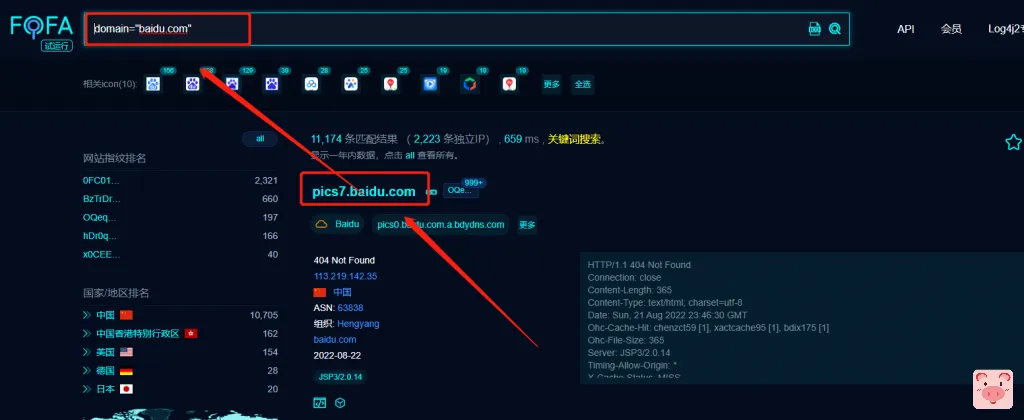
4、搜索域名中带有"login"关键词的网站
host="login"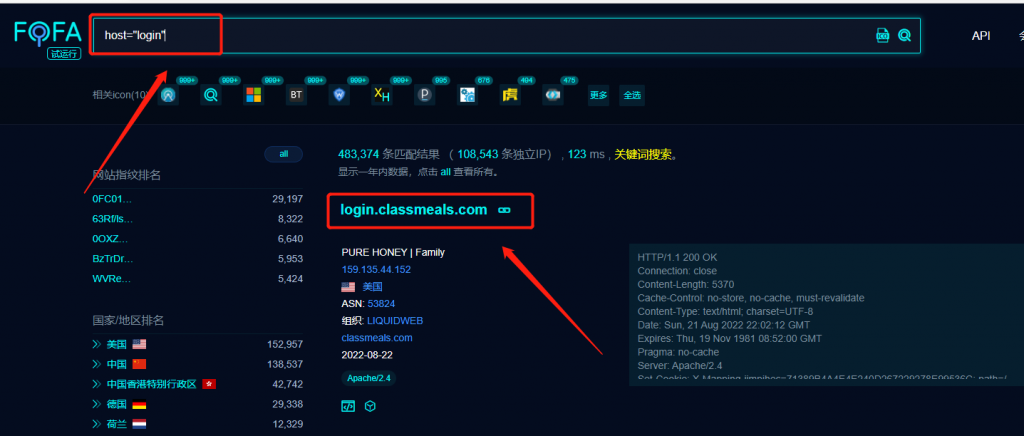
5、搜索开放3389端口的ip
port="3389"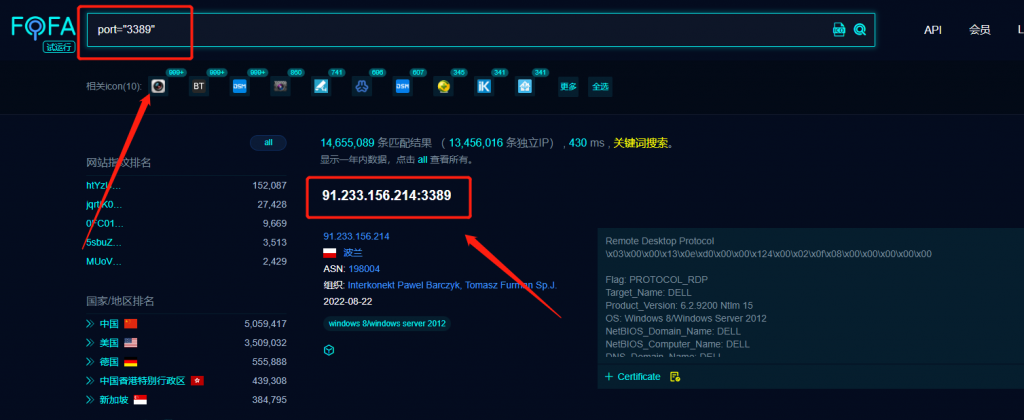
6、搜索城市教育网站
"edu." && region="Beijing"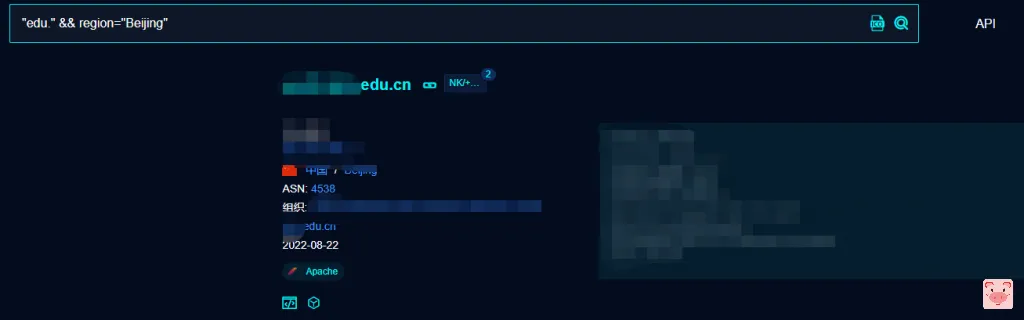
知识点
输入is_domain=true这个条件,搜出来的就都是有域名的了
标签:域名