羊了个羊 整活版 支持自定义图标、音效、背景音乐 附源码
作者:FancyPig | 发布时间: | 更新时间:
杂谈
很多热心网友还在纠结《羊了个羊》该如何通关?
很多热心网友都已经开始整活了,自定义图标、自定义bgm,甚至还可以通过深度学习自动通关。
可谓是八仙过海,各显神通啊!
相关阅读
data-postsbox="{"id":23290,"title":"全网首发 羊了个羊在线版 附前后端代码/通关思路/通关脚本 持续更新","author":"FancyPig","author_id":1,"cover_image":"https://static.pigsec.cn/wp-content/uploads/2022/09/20220915025258637.png","cover_video":"","views":22873,"comment_count":1297,"category":"srccode","is_forum_post":false}">{"id":23290,"title":"全网首发 羊了个羊在线版 附前后端代码/通关思路/通关脚本 持续更新","author":"FancyPig","author_id":1,"cover_image":"https://static.pigsec.cn/wp-content/uploads/2022/09/20220915025258637.png","cover_video":"","views":22873,"comment_count":1297,"category":"srccode","is_forum_post":false}
data-postsbox="{"id":24038,"title":"羊了个羊关于HTTP Debugger Pro的故事——快速通关!","author":"发现BUG的QA","author_id":53049,"cover_image":"","cover_video":"","views":3413,"comment_count":18,"category":"knowledge","is_forum_post":false}">{"id":24038,"title":"羊了个羊关于HTTP Debugger Pro的故事——快速通关!","author":"发现BUG的QA","author_id":53049,"cover_image":"","cover_video":"","views":3413,"comment_count":18,"category":"knowledge","is_forum_post":false}
data-postsbox="{"id":23804,"title":"【视频教程】羊了个羊PC过关小工具 自动获取Token 附C#源码","author":"FancyPig","author_id":1,"cover_image":"https://static.pigsec.cn/wp-content/uploads/2022/09/20220922012349187.png","cover_video":"","views":5041,"comment_count":19,"category":"knowledge","is_forum_post":false}">{"id":23804,"title":"【视频教程】羊了个羊PC过关小工具 自动获取Token 附C#源码","author":"FancyPig","author_id":1,"cover_image":"https://static.pigsec.cn/wp-content/uploads/2022/09/20220922012349187.png","cover_video":"","views":5041,"comment_count":19,"category":"knowledge","is_forum_post":false}
data-postsbox="{"id":23374,"title":"《羊了个羊》 通关小工具及使用教程","author":"Echo","author_id":11501,"cover_image":"","cover_video":"","views":6211,"comment_count":266,"category":"knowledge","is_forum_post":false}">{"id":23374,"title":"《羊了个羊》 通关小工具及使用教程","author":"Echo","author_id":11501,"cover_image":"","cover_video":"","views":6211,"comment_count":266,"category":"knowledge","is_forum_post":false}
data-postsbox="{"id":23577,"title":"羊了个羊 免抓包通关在线工具 附源码","author":"FancyPig","author_id":1,"cover_image":"","cover_video":"","views":5365,"comment_count":53,"category":"knowledge","is_forum_post":false}">{"id":23577,"title":"羊了个羊 免抓包通关在线工具 附源码","author":"FancyPig","author_id":1,"cover_image":"","cover_video":"","views":5365,"comment_count":53,"category":"knowledge","is_forum_post":false}
data-postsbox="{"id":23730,"title":"【视频教程】羊了个羊 IOS快速通关教程","author":"FancyPig","author_id":1,"cover_image":"https://static.pigsec.cn/wp-content/uploads/2022/09/20220921010236180.png","cover_video":"","views":5805,"comment_count":29,"category":"knowledge","is_forum_post":false}">{"id":23730,"title":"【视频教程】羊了个羊 IOS快速通关教程","author":"FancyPig","author_id":1,"cover_image":"https://static.pigsec.cn/wp-content/uploads/2022/09/20220921010236180.png","cover_video":"","views":5805,"comment_count":29,"category":"knowledge","is_forum_post":false}
在线体验
界面截图

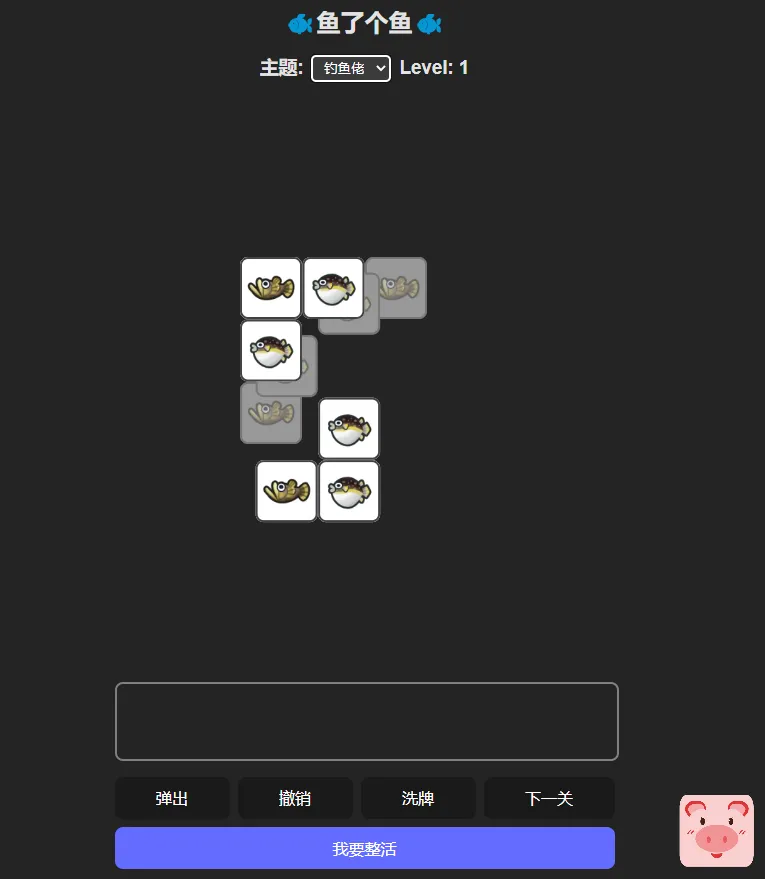


高级玩法介绍
您还可以自定义自己的主题,点击我要整活

您可以自行添加标题、描述、背景音乐、音效素材、图片素材
设计自己的羊了个羊

源码下载
源码使用
使用vscode,文件>打开文件夹

选择我们下载好的项目solvable-sheep-game-master

终端>新建终端

运行下面的命令安装依赖
yarn install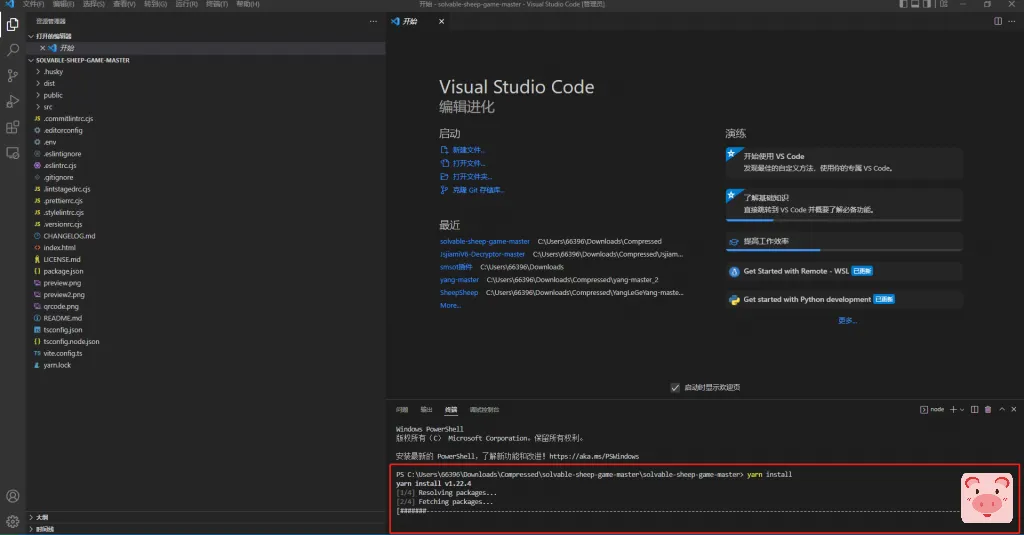
使用下面的命令测试项目
yarn dev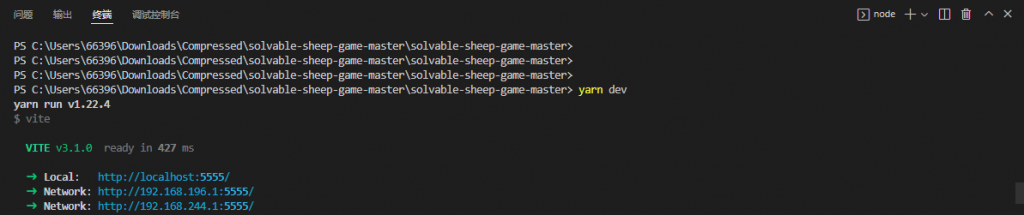
核心代码修改
然后我们就可以边修改代码,边查看界面的变化了
底部版权信息
/src/components/Info.tsx
import React, { FC } from 'react';

export const Info: FC = () => {
    return (
        <>
            <p>
                <span id="busuanzi_container_site_pv">
                    累计访问:<span id="busuanzi_value_site_pv"></span>次
                </span>
            </p>
            {/* <p>
                bgm素材:
                <a
                    href="https://www.bilibili.com/video/BV1zs411S7sz/"
                    target="_blank"
                    rel="noreferrer"
                >
                    洛天依,言和原创《普通DISCO》
                </a>
                、
                <a
                    href="https://music.163.com/#/song?id=135022"
                    target="_blank"
                    rel="noreferrer"
                >
                    贫民百万歌星
                </a>
                、
                <a
                    href="https://y.qq.com/n/ryqq/songDetail/0020Nusb3QJGn9"
                    target="_blank"
                    rel="noreferrer"
                >
                    只因你太美
                </a>
            </p> */}
            <p>
                更多精彩关注
                <a
                    href="https://www.pigsec.cn/"
                    target="_blank"
                    rel="noreferrer"
                >
                    FancyPig's blog
                </a>
            </p>
        </>
    );
};
底部备案号修改
src/components/BeiAn.tsx文件
import React, { FC } from 'react';

export const BeiAn: FC = () => {
    return (
        <p style={{ textAlign: 'center' }}>
            <a
                href="https://beian.miit.gov.cn/"
                target="_blank"
                rel="noopener noreferrer nofollow"
            >
                京ICP备17068217号-1
            </a>
        </p>
    );
};
自建主题
您可以仿照上面的方式自建主题并配上有趣的BGM
- /src/themes/您的主题名称/index.tsx
- /src/themes/您的主题名称/images
- /src/themes/您的主题名称/sounds/bgm.mp3
// XX主题
import React from 'react';
import { Theme } from '../interface';
import { defaultSounds } from '../default';
import bgm from './sounds/bgm.mp3';

const soundUrls = import.meta.glob('./sounds/*.mp3', {
    import: 'default',
    eager: true,
});

const sounds = Object.entries(soundUrls).map(([key, value]) => ({
    name: key.slice(9, -4),
    src: value,
})) as Theme<string>['sounds'];

const imagesUrls = import.meta.glob('./images/*.png', {
    import: 'default',
    eager: true,
});

const images = Object.entries(imagesUrls).map(([key, value]) => ({
    name: key.slice(9, -4),
    // eslint-disable-next-line @typescript-eslint/ban-ts-comment
    // @ts-ignore
    content: <img src={value} alt="" />,
}));

export const pddTheme: Theme<string> = {
    title: 'XX主题',
    name: 'XX',
    bgm: bgm,
    icons: images.map(({ name, content }) => ({
        name,
        content,
        clickSound: 'button-click',
        tripleSound: name,
    })),
    sounds: [defaultSounds[0], ...sounds],
};
打包上线
最后我们进行打包上线
yarn build我们上线仅需要拷贝dist目录下生成的代码即可

常见问题
我的vscode终端里好像没有yarn命令?
解决方案一:
使用下面的命令安装yarn命令
npm i yarn -g解决方案二:
实在装不上,有yarn命令的地方你就用npm替换,譬如教程中
yarn install你就使用
npm install不一定很有效,但是可以解决部分问题